Web Accessibility a11y WCAG 2.2 Complete Guide 2026
Introduction
Web accessibility (often written as a11y) refers to designing and developing websites so that everyone can use them—regardless of disability, device limitations, or situational challenges. The WCAG 2.2 (Web Content Accessibility Guidelines) is the latest standard that defines how to make web content more accessible.
In this web accessibility tutorial (WCAG 2.2 complete guide 2026), you will learn how to build inclusive websites that work for users with visual, auditory, motor, and cognitive impairments.
In Pakistan, accessibility is still an emerging skill in web development. Learning it gives students a competitive advantage in freelancing, software houses in Lahore, Karachi, and Islamabad, and international remote jobs. Platforms like Fiverr and Upwork increasingly demand developers who understand accessibility standards.
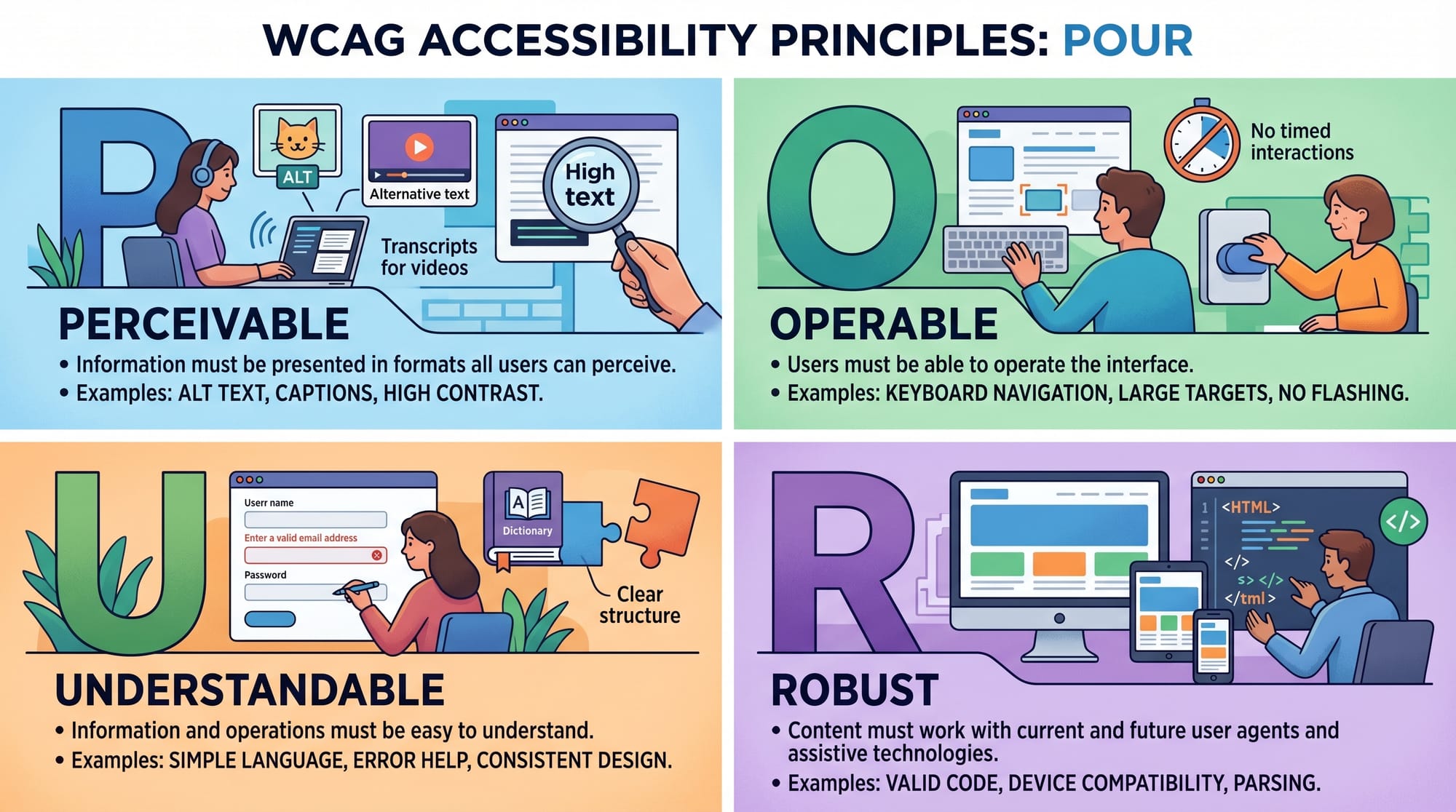
WCAG is based on four core principles called POUR:
- Perceivable
- Operable
- Understandable
- Robust
By the end of this guide, you will understand how to implement these principles in real-world projects.
Prerequisites
Before starting this a11y guide 2026, you should have:
- Basic HTML knowledge (forms, headings, links)
- Basic CSS understanding (focus styles, layout)
- Beginner JavaScript (optional but helpful)
- Familiarity with browser developer tools
You do NOT need prior accessibility experience. This tutorial is beginner-friendly for intermediate learners.
Core Concepts & Explanation
1. WCAG 2.2 Principles (POUR Model)
WCAG 2.2 is structured around four principles:
- Perceivable: Users must be able to see/hear content
- Operable: Users must be able to interact with UI
- Understandable: Content must be readable and predictable
- Robust: Works across browsers and assistive technologies
Example:
If Ahmad from Lahore uses a screen reader, your website must still be navigable.
2. Accessibility Features in HTML (Semantic + ARIA)
HTML provides built-in accessibility when used correctly.
Key tools:
- Semantic tags (
<header>,<nav>,<main>) - ARIA attributes (
aria-label,role) - Keyboard navigation support
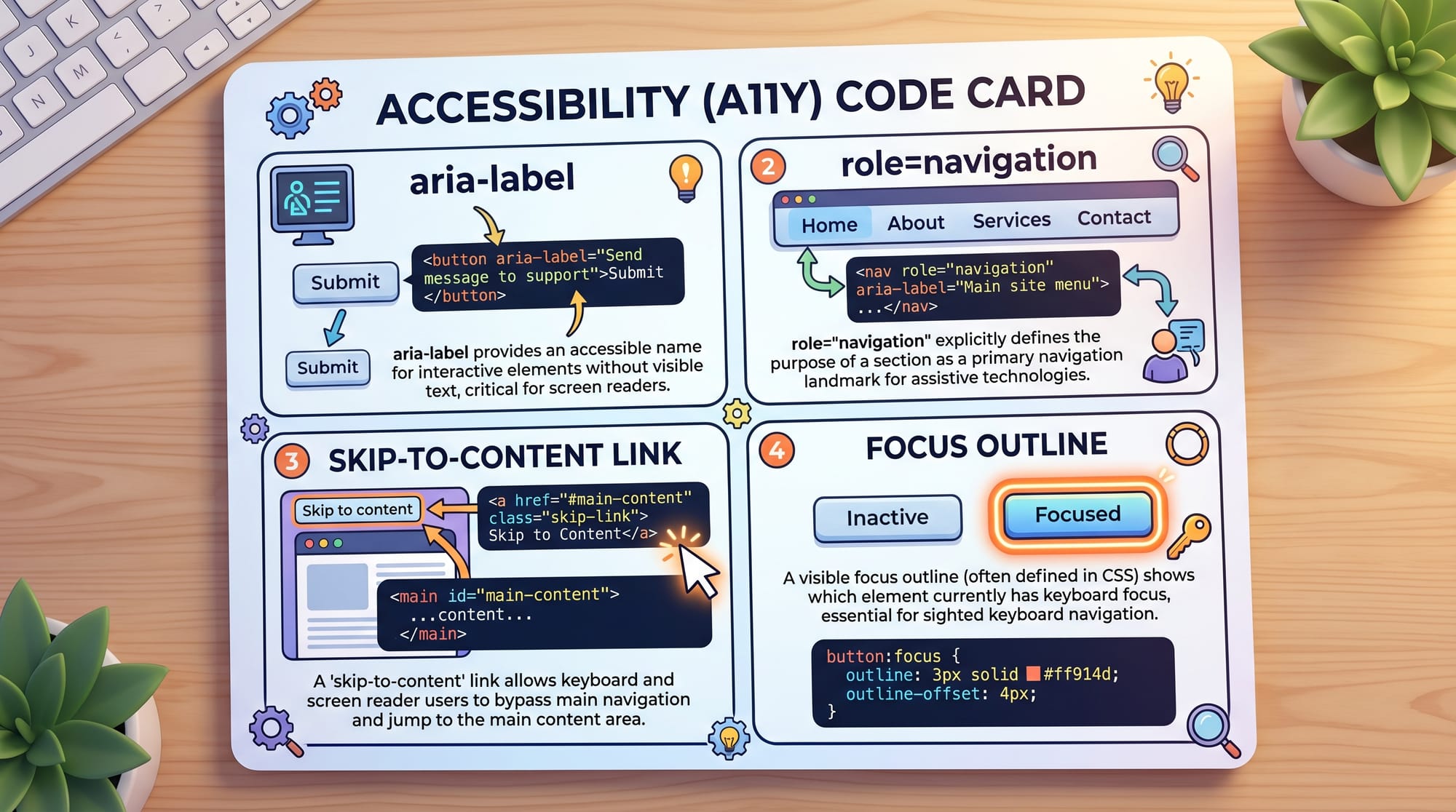
These help assistive technologies interpret your UI correctly.
Practical Code Examples
Example 1: Accessible Navigation Bar
<!-- Navigation bar -->
<nav aria-label="Main Navigation">
  <a href="#home">Home</a>
  <a href="#courses">Courses</a>
  <a href="#contact">Contact</a>
</nav>

<!-- Skip link -->
<a href="#main-content" class="skip-link">Skip to content</a>
Line-by-line explanation:
nav aria-label="Main Navigation"→ Helps screen readers identify this section<a href="#home">→ Standard navigation linksskip-link→ Allows keyboard users to jump directly to content
This is essential for WCAG 2.2 compliance under Operable principle.
Example 2: Accessible Login Form (Real-World Use Case)
<form>
  <label for="email">Email Address</label>
  <input type="email" id="email" aria-required="true">

  <label for="password">Password</label>
  <input type="password" id="password">

  <button type="submit">Login</button>
</form>
Line-by-line explanation:
<label for="email">→ Connects label with input fieldtype="email"→ Enables validation and mobile keyboard optimizationaria-required="true"→ Announces required field to screen readers<button type="submit">→ Clearly defines form submission action
This ensures users like Fatima in Karachi can use your form without confusion.
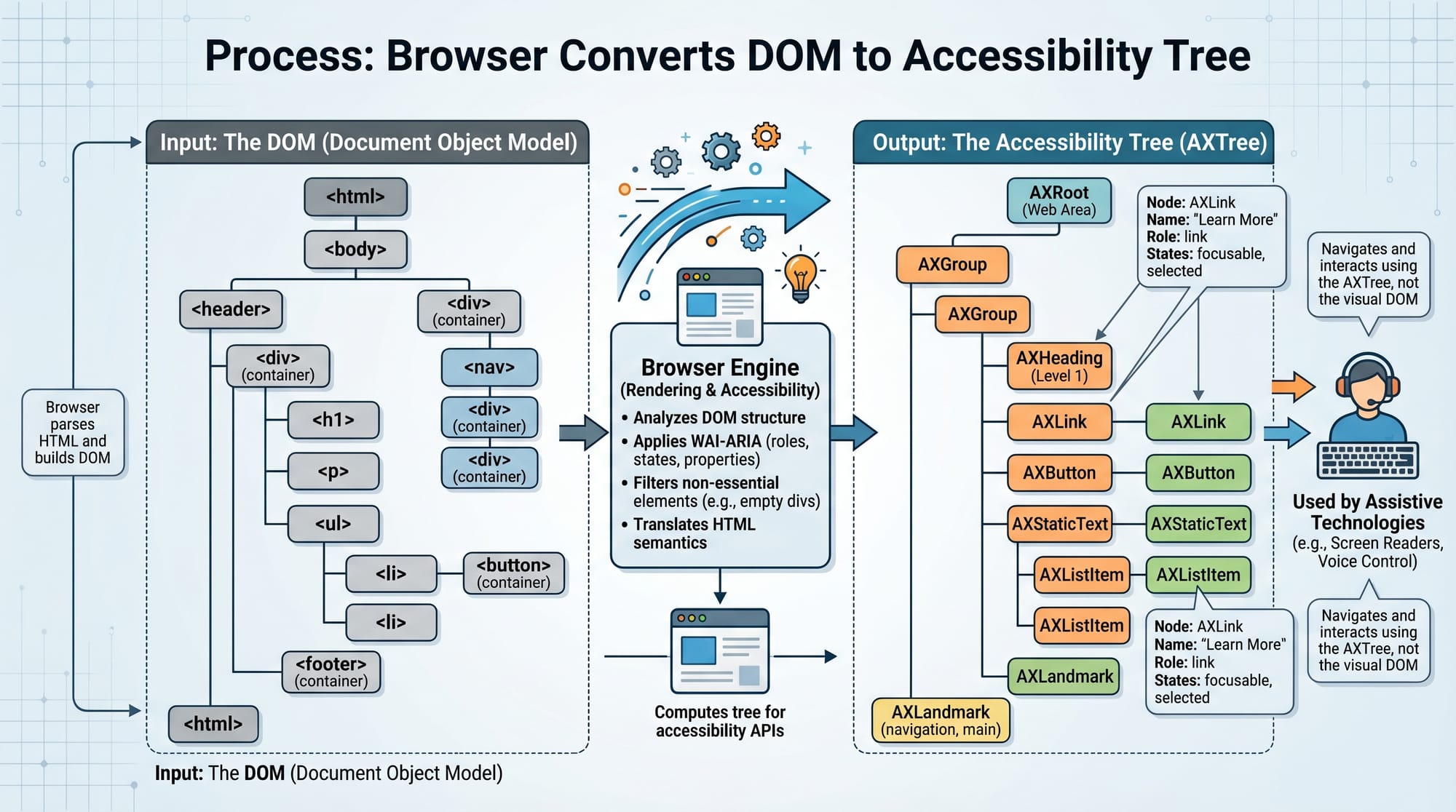
The browser converts your HTML DOM into an accessibility tree, which assistive tools like screen readers use.
Common Mistakes & How to Avoid Them
Mistake 1: Missing Alt Text for Images
❌ Wrong:
<img src="chart.png">
✔ Fix:
<img src="chart.png" alt="Sales growth chart for 2025">
Explanation:
Without alt, screen readers cannot describe images to users with visual impairments.
Mistake 2: Poor Keyboard Navigation Support
Many Pakistani developers only test with mouse input.
❌ Problem:
Buttons and links are not focusable.
✔ Fix:
button:focus {
  outline: 3px solid #005fcc;
}
Explanation:
:focusensures visibility when tabbing- Outline improves keyboard navigation experience
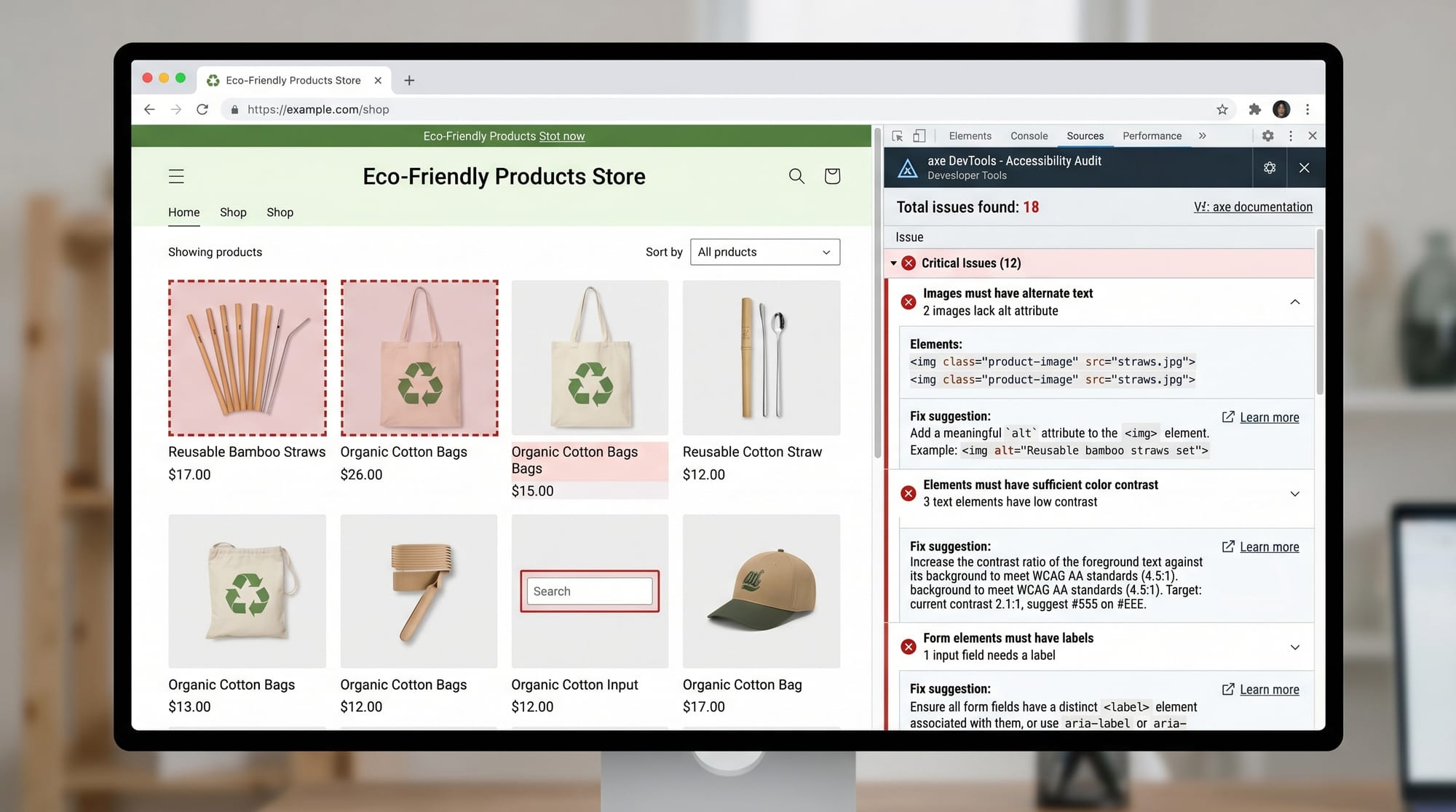
Tools like axe DevTools highlight accessibility problems automatically.
Practice Exercises
Exercise 1: Fix the Form
Problem:
Improve this form for accessibility:
<form>
  <input type="text" placeholder="Enter name">
  <input type="submit" value="Send">
</form>
Solution:
<form>
  <label for="name">Name</label>
  <input type="text" id="name" aria-label="Name input">

  <button type="submit">Send</button>
</form>
Explanation:
- Added label for screen readers
- Replaced input submit with button
- Added ARIA label for clarity
Exercise 2: Improve Button Accessibility
Problem:
A button is not descriptive:
<button>Click here</button>
Solution:
<button aria-label="Download syllabus PDF">
  Download
</button>
Explanation:
aria-labelgives meaningful context- Helps screen reader users understand purpose
Frequently Asked Questions
What is web accessibility in simple terms?
Web accessibility means designing websites so all users, including disabled users, can access and use them effectively. It ensures equal access to information.
What is WCAG 2.2 and why is it important?
WCAG 2.2 is the latest global standard for web accessibility. It improves usability for people with disabilities and helps websites meet legal and industry standards.
How do I make my website accessible?
You can start by using semantic HTML, adding alt text to images, ensuring keyboard navigation, and following WCAG guidelines.
What is ARIA in accessibility?
ARIA (Accessible Rich Internet Applications) provides extra attributes like aria-label to improve accessibility when HTML alone is not enough.
Why should Pakistani students learn accessibility?
Because freelancing platforms and international companies now require accessible websites. It increases job opportunities in Pakistan’s growing tech industry.
Summary & Key Takeaways
- WCAG 2.2 is based on the POUR principles
- Semantic HTML improves accessibility automatically
- ARIA attributes enhance screen reader support
- Keyboard navigation is essential for usability
- Accessible forms increase user engagement
- Accessibility improves SEO and user experience
Next Steps & Related Tutorials
To continue your learning journey, explore these tutorials on theiqra.edu.pk:
- Learn HTML structure in HTML Semantic Elements
- Improve styling with CSS Basics for Beginners
- Build interactive websites using JavaScript DOM Manipulation
- Understand layouts in Responsive Web Design with CSS Grid & Flexbox
These topics will help you build fully accessible, professional-grade websites suitable for global clients.
If you want, I can also convert this into:
✅ Blog-ready HTML for WordPress
✅ SEO schema markup (FAQ + Article schema)
✅ Or a downloadable PDF for students
Test Your Python Knowledge!
Finished reading? Take a quick quiz to see how much you've learned from this tutorial.