ARIA Roles & Attributes Accessible Rich Internet Applications
Introduction
ARIA Roles & Attributes: Accessible Rich Internet Applications is a set of special HTML attributes that help make websites more accessible for users who rely on screen readers and assistive technologies. In modern web development, especially when building dynamic applications like dropdowns, modals, tabs, and live notifications, normal HTML is not always enough to describe what is happening on the screen. This is where ARIA becomes essential.
For Pakistani students learning web development—whether you are in Lahore, Karachi, Islamabad, or studying online—understanding ARIA roles tutorial concepts is a powerful skill. It helps you build professional, industry-level websites that are inclusive for all users, including people with visual impairments.
For example, imagine Ahmad builds a shopping website where a “Add to Cart” confirmation appears dynamically. Without ARIA, a screen reader user may never know that the item was added. With ARIA attributes like aria-live, the update can be announced automatically.
ARIA improves:
- Accessibility for screen reader users
- Keyboard navigation support
- Communication of dynamic UI changes
- Semantic meaning in custom components
Prerequisites
Before learning ARIA attributes, you should already understand:
- Basic HTML (div, button, form, input)
- CSS fundamentals (layout and styling)
- JavaScript basics (DOM manipulation)
- Understanding of semantic HTML (
header,nav,main,footer) - Basic knowledge of accessibility concepts
If you are new, first complete:
- Web Accessibility Basics tutorial on theiqra.edu.pk
- HTML Semantic Elements guide
Core Concepts & Explanation
ARIA Roles: What They Are and Why They Matter
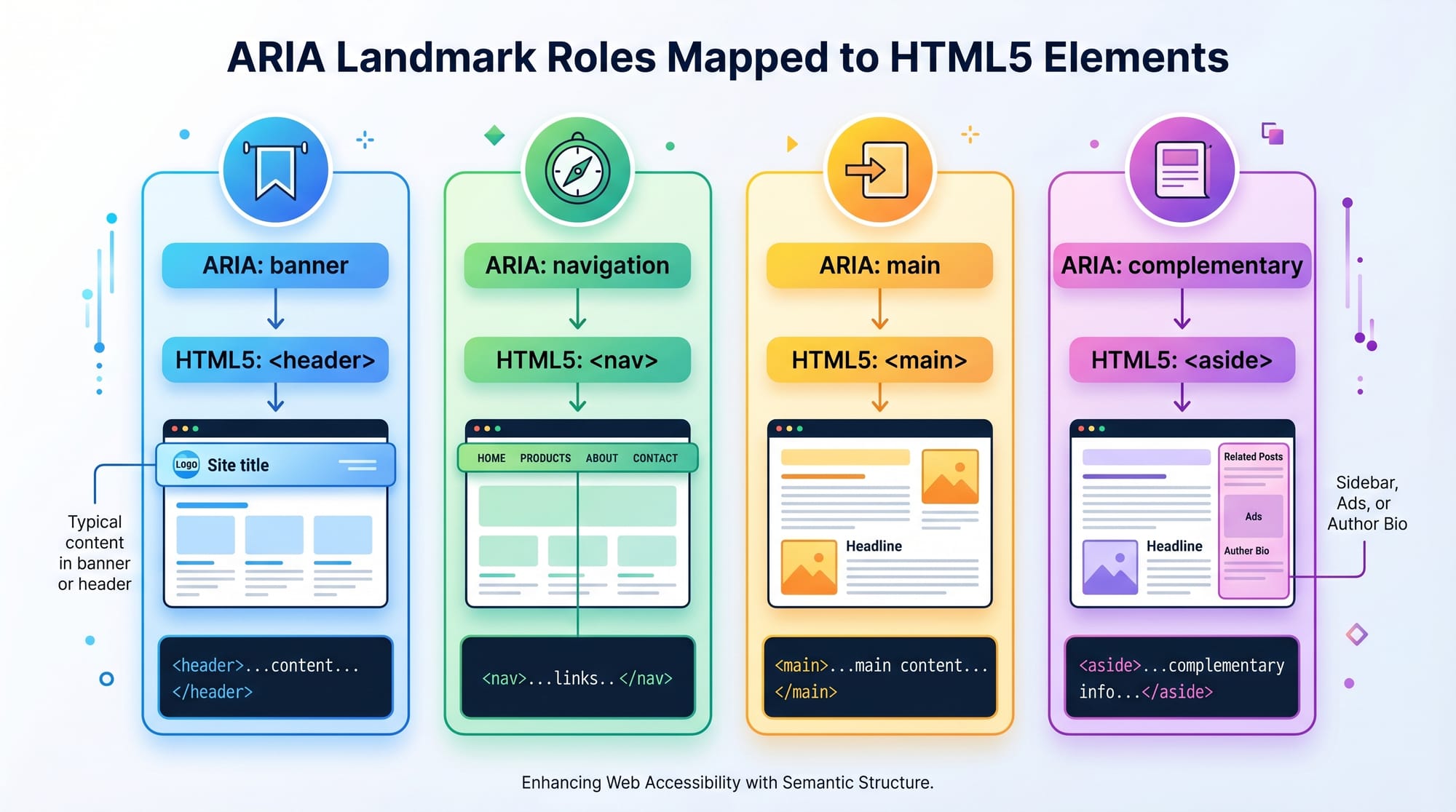
ARIA roles define what an element is supposed to be when HTML alone is not enough. They tell assistive technologies the purpose of a component.
Common ARIA roles include:
role="navigation"→ defines navigation menusrole="button"→ defines clickable elementsrole="dialog"→ defines modal popupsrole="alert"→ important messages
Example:
<div role="button" tabindex="0">Click Me</div>
Line-by-line explanation:
<div>→ A generic container elementrole="button"→ Tells screen readers this behaves like a buttontabindex="0"→ Makes it keyboard focusableClick Me→ Visible text for users
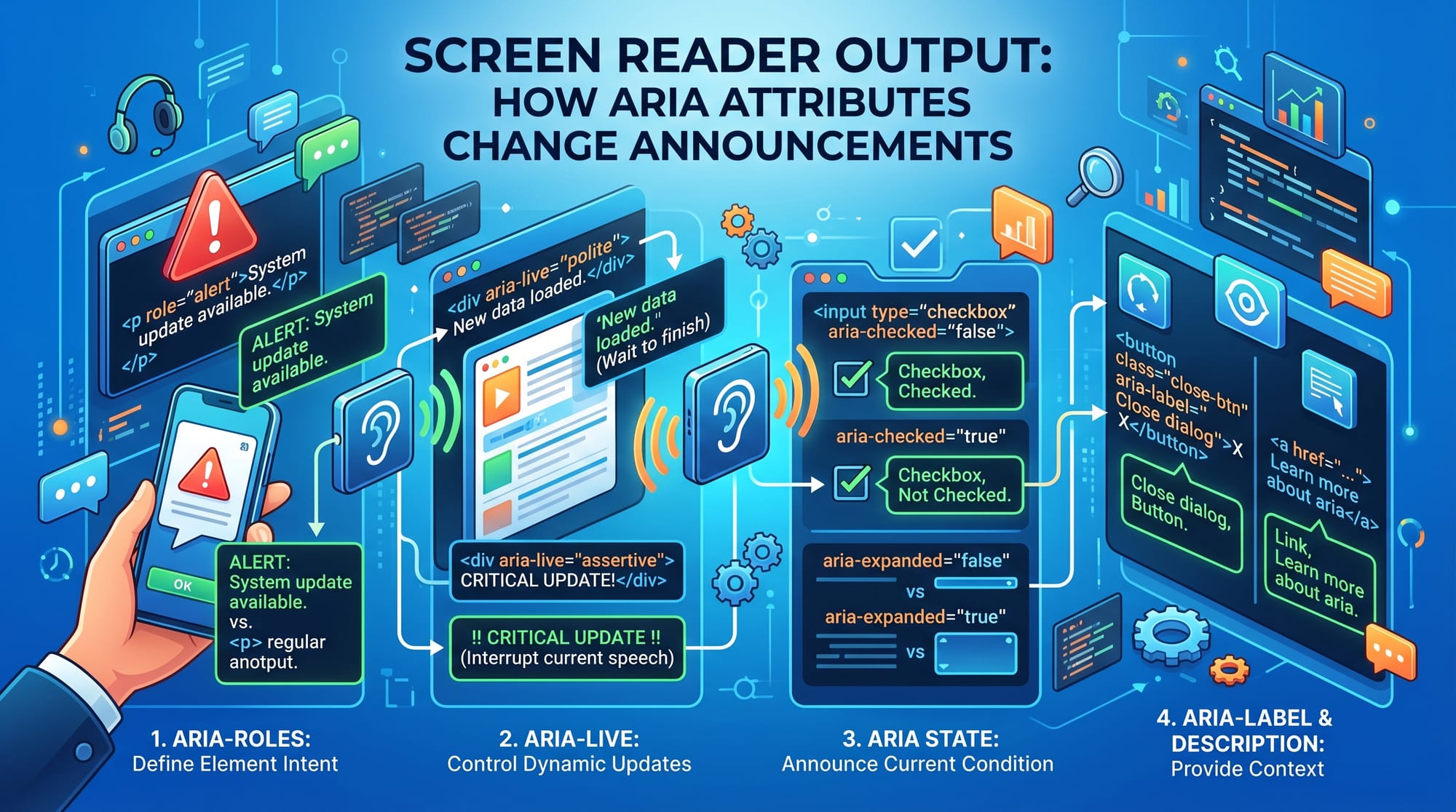
Without ARIA, a screen reader will treat this as just a “div,” but with ARIA, it becomes a usable button.
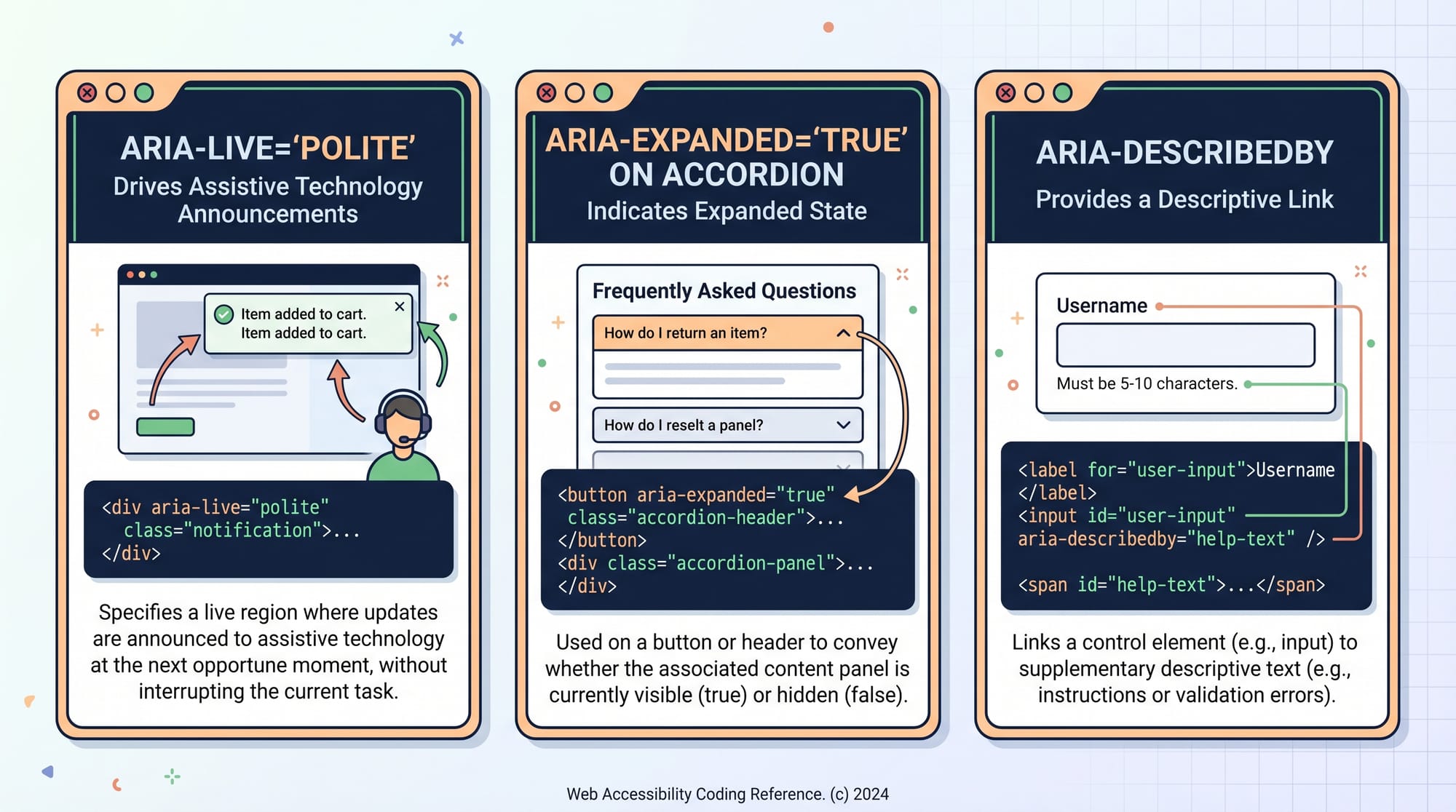
ARIA Attributes: aria-label, aria-live, aria-expanded, aria-describedby
ARIA attributes provide extra information about elements.
1. aria-label
Used when visible text is not enough.
<button aria-label="Search Website">
  🔍
</button>
Explanation:
- Button shows only icon
aria-labelgives meaning to screen readers- Screen reader reads: “Search Website button”
2. aria-live
Used for dynamic content updates.
<div aria-live="polite">
  Your order has been placed successfully.
</div>
Explanation:
aria-live="polite"→ announces updates when screen reader is idle- Useful in notifications, chat apps, alerts
3. aria-expanded
Used for dropdowns or collapsible menus.
<button aria-expanded="false">
  Menu
</button>
Explanation:
falsemeans menu is closed- Changes to
truewhen opened - Helps users understand state of UI
4. aria-describedby
Links elements with descriptive text.
<input aria-describedby="emailHelp">
<p id="emailHelp">We will never share your email.</p>
Explanation:
- Input references paragraph
- Screen reader reads both together
- Improves clarity
Practical Code Examples
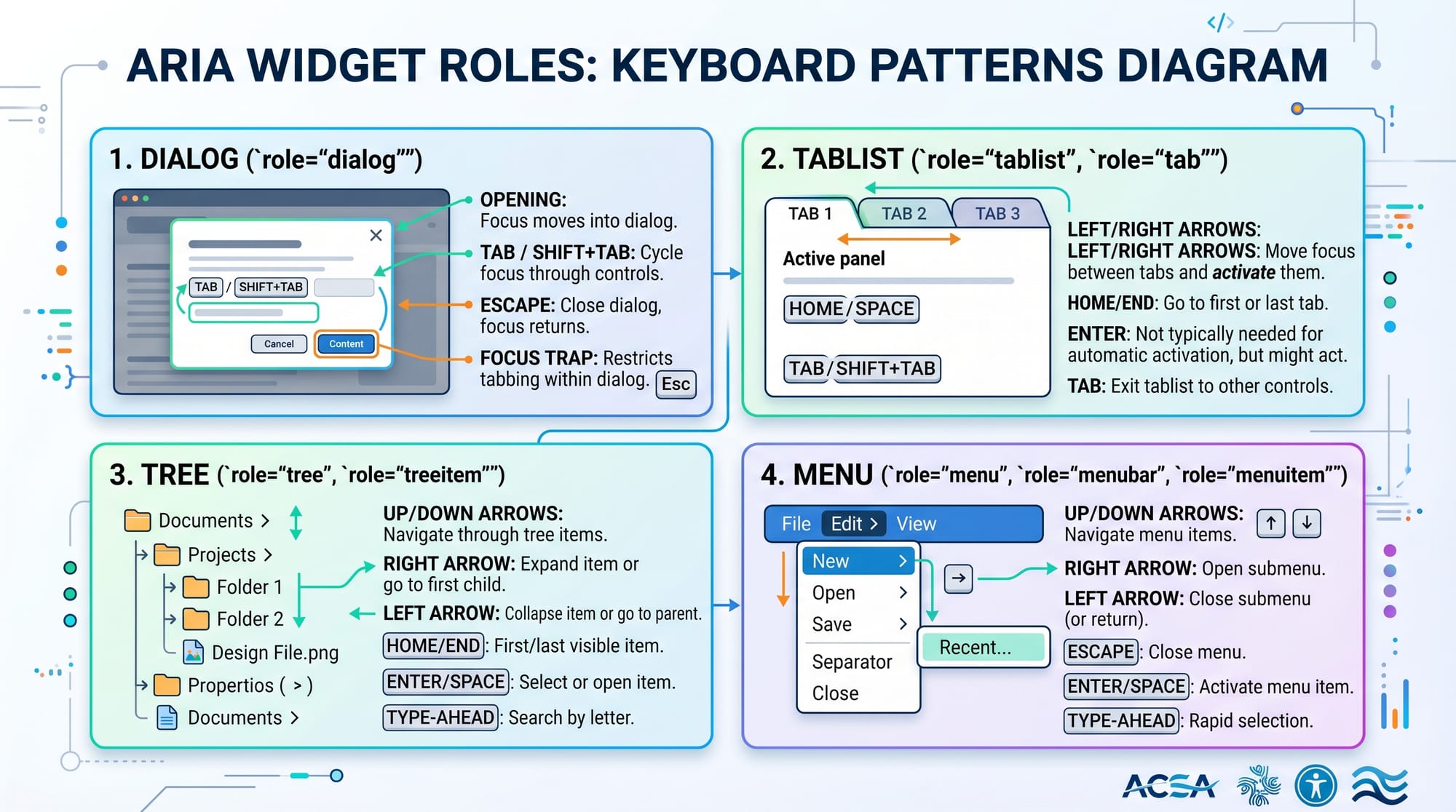
Example 1: Accessible Accordion Menu
<div>
  <button aria-expanded="false" onclick="toggleFAQ()">
    What is ARIA?
  </button>

  <div hidden id="faq">
    ARIA helps improve web accessibility for screen readers.
  </div>
</div>
Line-by-line explanation:
<div>→ Container for accordion<button>→ Clickable heading for questionaria-expanded="false"→ Initially collapsed stateonclick="toggleFAQ()"→ JavaScript function triggers toggle<div hidden>→ Content hidden by defaultid="faq"→ Used for toggling visibility
When clicked, JavaScript changes:
aria-expanded="true"- removes
hiddenattribute
This ensures screen readers understand state changes.
Example 2: Real-World Notification System
<div aria-live="assertive" id="notification">
  Payment received from Ali: PKR 5,000
</div>
Line-by-line explanation:
<div>→ Notification containeraria-live="assertive"→ Immediately announces messageid="notification"→ Allows JS updates- Text → Dynamic transaction message
Real-world use case:
Fatima builds a freelance marketplace app in Karachi. When a client sends payment, this message is instantly announced to visually impaired users.
Common Mistakes & How to Avoid Them
Mistake 1: Using ARIA Instead of Semantic HTML
❌ Wrong:
<div role="button">Submit</div>
✔ Correct:
<button>Submit</button>
Explanation:
- Native HTML elements already include accessibility features
- ARIA should enhance, not replace semantic HTML
Mistake 2: Incorrect aria-live Usage
❌ Wrong:
<div aria-live="off">New message received</div>
✔ Correct:
<div aria-live="polite">New message received</div>
Explanation:
offdisables announcementspoliteorassertiveshould be used based on urgency
Practice Exercises
Exercise 1: Build Accessible Button
Problem:
Create a custom button using a <div> that is accessible to screen readers.
Solution:
<div role="button" tabindex="0" aria-label="Submit Form">
  Submit
</div>
Explanation:
role="button"makes it act like a buttontabindex="0"enables keyboard focusaria-labelprovides accessible name
Exercise 2: Live Score Update
Problem:
Create a live cricket score update system for a Pakistani sports website.
Solution:
<div aria-live="polite">
  Pakistan vs India: 120/2 (15 overs)
</div>
Explanation:
aria-live="polite"ensures updates are announced- Content updates dynamically via JavaScript
Frequently Asked Questions
What is ARIA in web development?
ARIA (Accessible Rich Internet Applications) is a set of attributes that improve accessibility for users using screen readers. It helps describe dynamic UI components that HTML alone cannot explain.
When should I use aria-label?
You should use aria-label when an element does not have visible text, such as icon buttons or custom controls. It provides a readable description for assistive tools.
What is the difference between aria-live polite and assertive?
polite waits until the screen reader is idle before announcing updates, while assertive interrupts immediately. Use assertive only for urgent messages.
Can ARIA replace semantic HTML?
No, ARIA should never replace semantic HTML. Native elements like <button> and <nav> already include built-in accessibility support.
How do aria-expanded and aria-controls work together?
aria-expanded shows whether a component is open or closed, while aria-controls links it to the content it controls, improving navigation clarity for screen readers.
Summary & Key Takeaways
- ARIA improves accessibility for dynamic web applications
- Use semantic HTML first, ARIA second
aria-labelprovides hidden descriptive textaria-liveannounces dynamic updatesaria-expandedtracks UI state changes- Proper ARIA usage improves UX for all users
Next Steps & Related Tutorials
To strengthen your frontend skills, explore:
- Learn Web Accessibility fundamentals on theiqra.edu.pk
- Master HTML Semantic Elements for better structure
- Explore JavaScript DOM Manipulation techniques
- Build Accessible UI Components with real-world projects
If you want, I can also create:
✅ MCQs quiz from this tutorial
✅ Practice project (accessible dashboard UI)
✅ Urdu explanation version for beginners
Test Your Python Knowledge!
Finished reading? Take a quick quiz to see how much you've learned from this tutorial.