AWS for Beginners Core Services Guide 2026
Introduction
AWS for Beginners: Core Services Guide 2026 is a complete, beginner-friendly tutorial designed to help Pakistani students understand and start using Amazon Web Services (AWS). AWS is the world’s leading cloud computing platform, used by startups, universities, and large companies across the globe.
If you’re a student in Lahore, Karachi, Islamabad, or anywhere in Pakistan, learning AWS in 2026 can open doors to high-paying remote jobs, freelancing opportunities, and careers in DevOps, cloud engineering, and software development.
Cloud computing is no longer optional—it’s a core skill. Instead of buying expensive servers, companies now rent computing power from AWS and pay only for what they use. This is especially useful in Pakistan where startups need cost-effective solutions.
In this guide, you will learn:
- What AWS is and how it works
- Core AWS services like EC2, S3, IAM, and RDS
- How to deploy your first application
- Common mistakes beginners make
- Practical exercises to build real skills
Prerequisites
Before starting this AWS tutorial, you should have:
- Basic understanding of computers and the internet
- Familiarity with programming (optional but helpful)
- Basic Linux/command-line knowledge
- Understanding of web concepts (like websites, servers, databases)
- A free AWS account (using Free Tier)
💡 Tip: Even if you are a beginner student from a non-CS background in Pakistan, don’t worry—this guide is designed step-by-step.
Core Concepts & Explanation
Cloud Computing Basics (IaaS, PaaS, SaaS)
Cloud computing means using remote servers instead of your own computer.
There are three main types:
- IaaS (Infrastructure as a Service)
Example: AWS EC2
You control everything (OS, software) - PaaS (Platform as a Service)
Example: AWS Elastic Beanstalk
AWS manages infrastructure, you focus on code - SaaS (Software as a Service)
Example: Gmail, Zoom
You just use the software
📌 Example (Pakistan):
Ali wants to host a website for his university project. Instead of buying a server in Lahore, he uses AWS EC2.
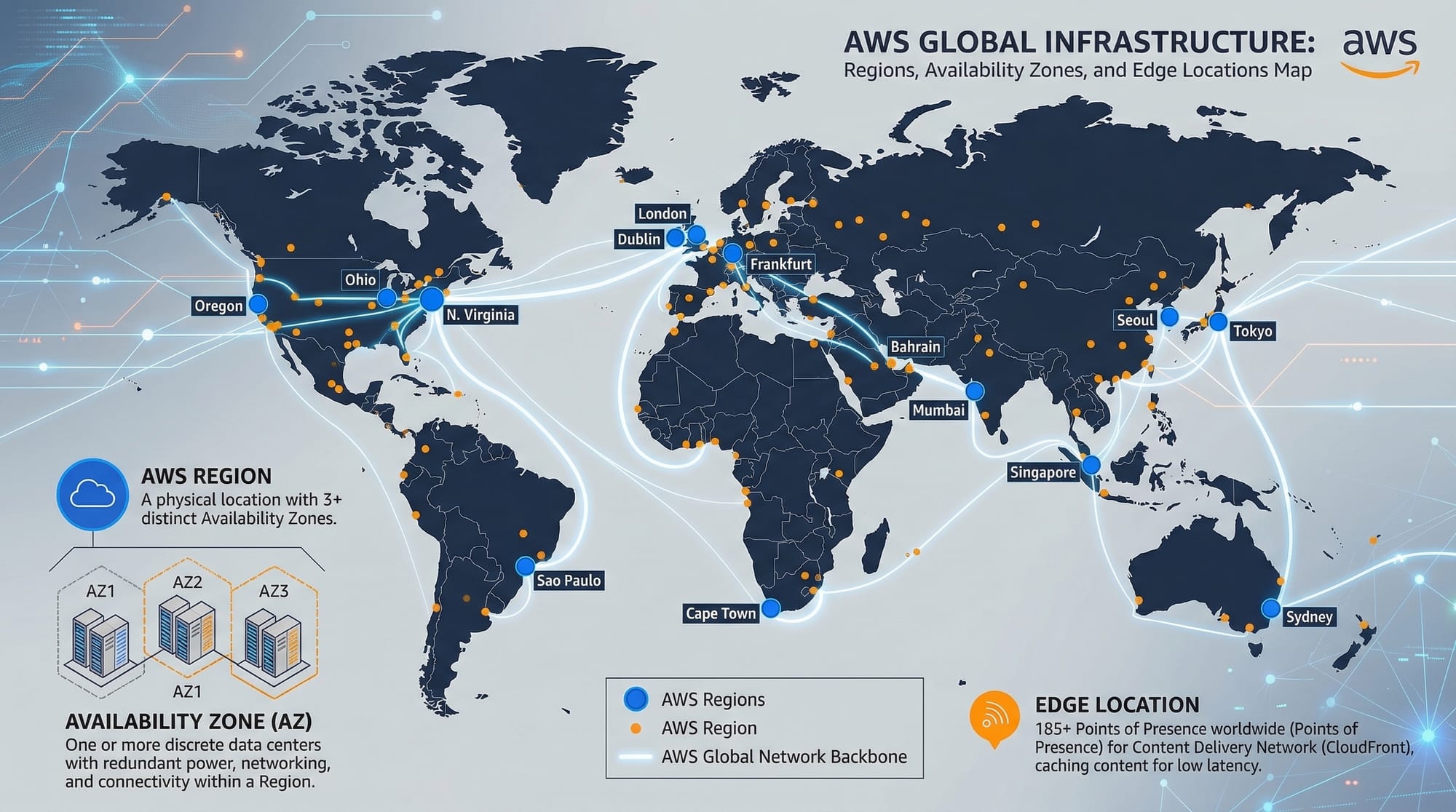
AWS Global Infrastructure (Regions & Availability Zones)
AWS is divided into:
- Regions (e.g., Middle East, Asia Pacific)
- Availability Zones (AZs) (multiple data centers in a region)
Why this matters:
- High availability
- Fault tolerance
- Faster access
📌 Example:
A Karachi-based e-commerce site can use a nearby region to reduce latency.
Identity and Access Management (IAM)
IAM controls who can access AWS and what they can do.
Key components:
- Users (Ahmad, Fatima)
- Roles (permissions for services)
- Policies (rules in JSON format)
📌 Example:
Fatima creates an IAM user for her internship team so they don’t use her main account.
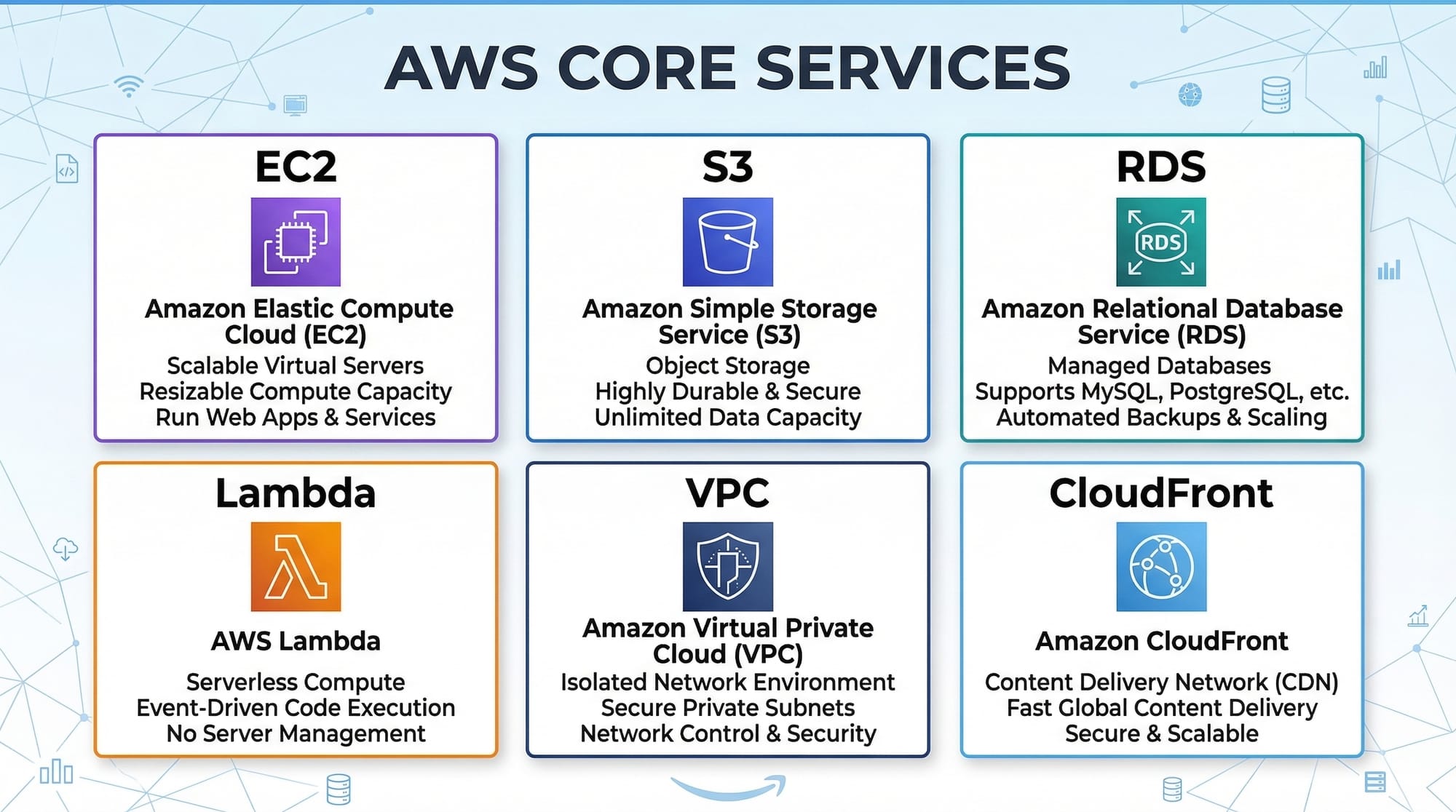
Amazon EC2 (Elastic Compute Cloud)
EC2 lets you run virtual servers.
Key features:
- Choose OS (Linux/Windows)
- Pay-as-you-go pricing
- Scalable
📌 Example:
A student in Islamabad runs a Node.js app on EC2 for a freelancing client.
Amazon S3 (Simple Storage Service)
S3 is used to store files like:
- Images
- Videos
- Backups
Features:
- Highly durable
- Cheap storage
- Accessible from anywhere
📌 Example:
A photography student stores wedding photos for clients in S3.
Amazon RDS (Relational Database Service)
RDS is a managed database service.
Supports:
- MySQL
- PostgreSQL
- MariaDB
📌 Example:
A university project stores student data in RDS instead of local MySQL.
AWS Lambda (Serverless Computing)
Lambda runs code without managing servers.
Use cases:
- APIs
- Automation
- Event-driven tasks
📌 Example:
Send email notifications when a file is uploaded.
Practical Code Examples
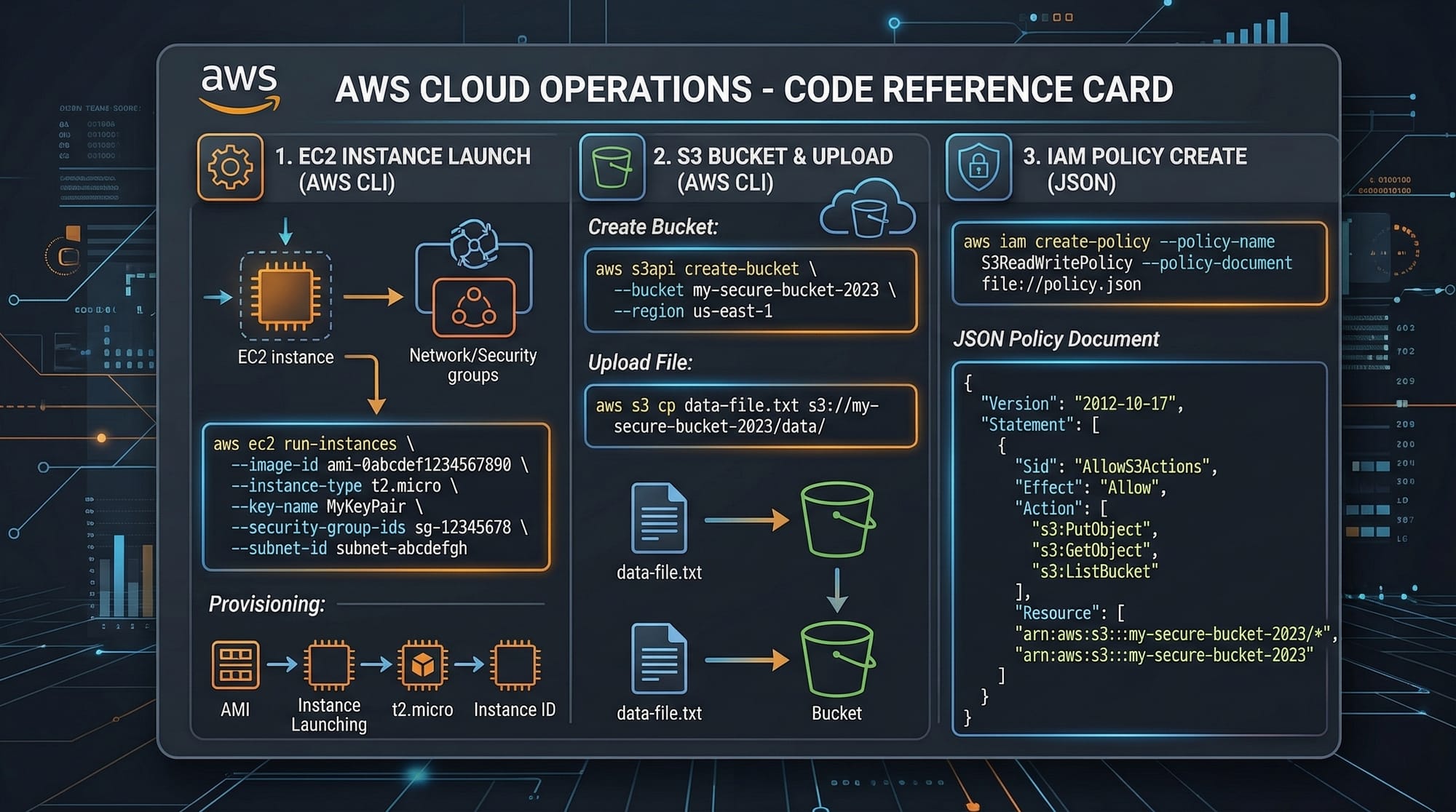
Example 1: Launch an EC2 Instance Using AWS CLI
aws ec2 run-instances \
  --image-id ami-12345678 \
  --count 1 \
  --instance-type t2.micro \
  --key-name MyKeyPair \
  --security-group-ids sg-12345678 \
  --subnet-id subnet-12345678
Explanation Line-by-Line
aws ec2 run-instances
→ Command to launch a new EC2 instance--image-id ami-12345678
→ Specifies the OS image (AMI)--count 1
→ Number of instances to launch--instance-type t2.micro
→ Free tier eligible instance--key-name MyKeyPair
→ SSH key for login--security-group-ids sg-12345678
→ Firewall rules--subnet-id subnet-12345678
→ Network location
Example 2: Upload File to S3 (Real-World Application)
aws s3 cp project.zip s3://my-student-bucket/
Explanation Line-by-Line
aws s3 cp
→ Copy commandproject.zip
→ Local files3://my-student-bucket/
→ Destination bucket
📌 Real-World Use Case:
Ahmad uploads his final-year project backup to S3 for safety.
Common Mistakes & How to Avoid Them
Mistake 1: Using Root Account for Everything
❌ Problem:
Beginners use the root account for daily tasks
✅ Solution:
- Create IAM users
- Use least privilege access
Mistake 2: Ignoring AWS Billing
❌ Problem:
Unexpected charges in PKR
✅ Solution:
- Enable billing alerts
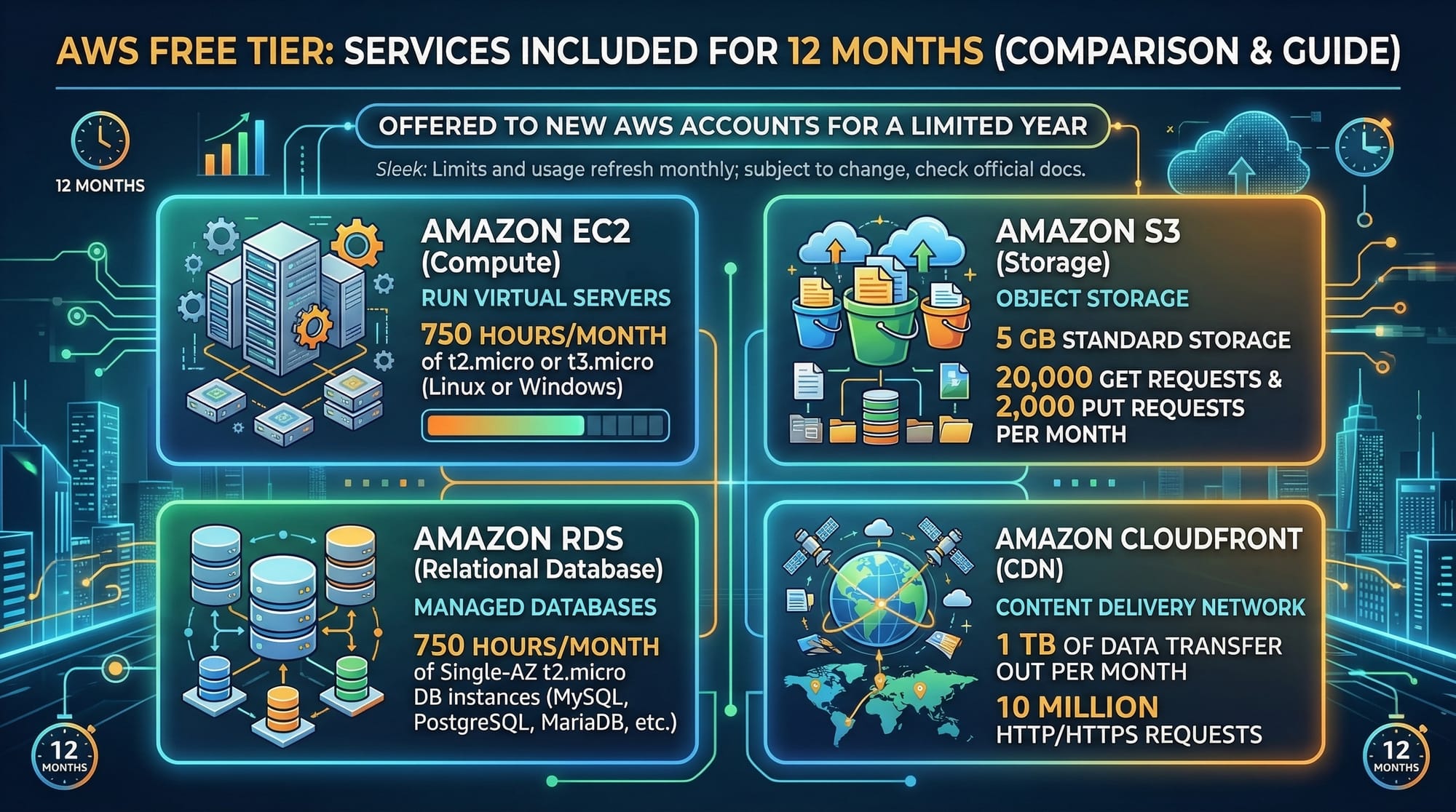
- Use Free Tier only
- Stop unused EC2 instances
Mistake 3: Not Securing S3 Buckets
❌ Problem:
Public data exposure
✅ Solution:
- Use private buckets
- Configure IAM policies
Practice Exercises
Exercise 1: Create an EC2 Instance
Problem:
Launch a Linux EC2 instance and connect via SSH
Solution:
- Go to AWS Console
- Choose EC2 → Launch Instance
- Select Ubuntu
- Download key pair
- Connect via terminal
Exercise 2: Upload Static Website to S3
Problem:
Host a static HTML website
Solution:
- Create S3 bucket
- Enable static hosting
- Upload HTML files
- Access via public URL
Frequently Asked Questions
What is AWS and why should I learn it?
AWS is a cloud platform that provides computing, storage, and networking services. Learning AWS helps Pakistani students access global job opportunities and build scalable applications.
How do I create a free AWS account?
You can sign up on AWS using your email and debit/credit card. AWS offers a 12-month Free Tier for beginners.
What is the easiest AWS service to start with?
Amazon S3 is the easiest because you can quickly upload and access files without complex setup.
How do I avoid AWS charges?
Use Free Tier services, monitor billing, and always stop unused resources like EC2 instances.
Can I get a job in Pakistan with AWS skills?
Yes, many companies in Pakistan and remote international clients hire AWS-skilled developers and DevOps engineers.
Summary & Key Takeaways
- AWS is the leading cloud platform used worldwide
- Core services include EC2, S3, IAM, RDS, and Lambda
- Pakistani students can build real-world projects using AWS
- Always monitor billing to avoid unexpected costs
- Hands-on practice is key to mastering AWS
- Cloud skills are highly in demand in 2026
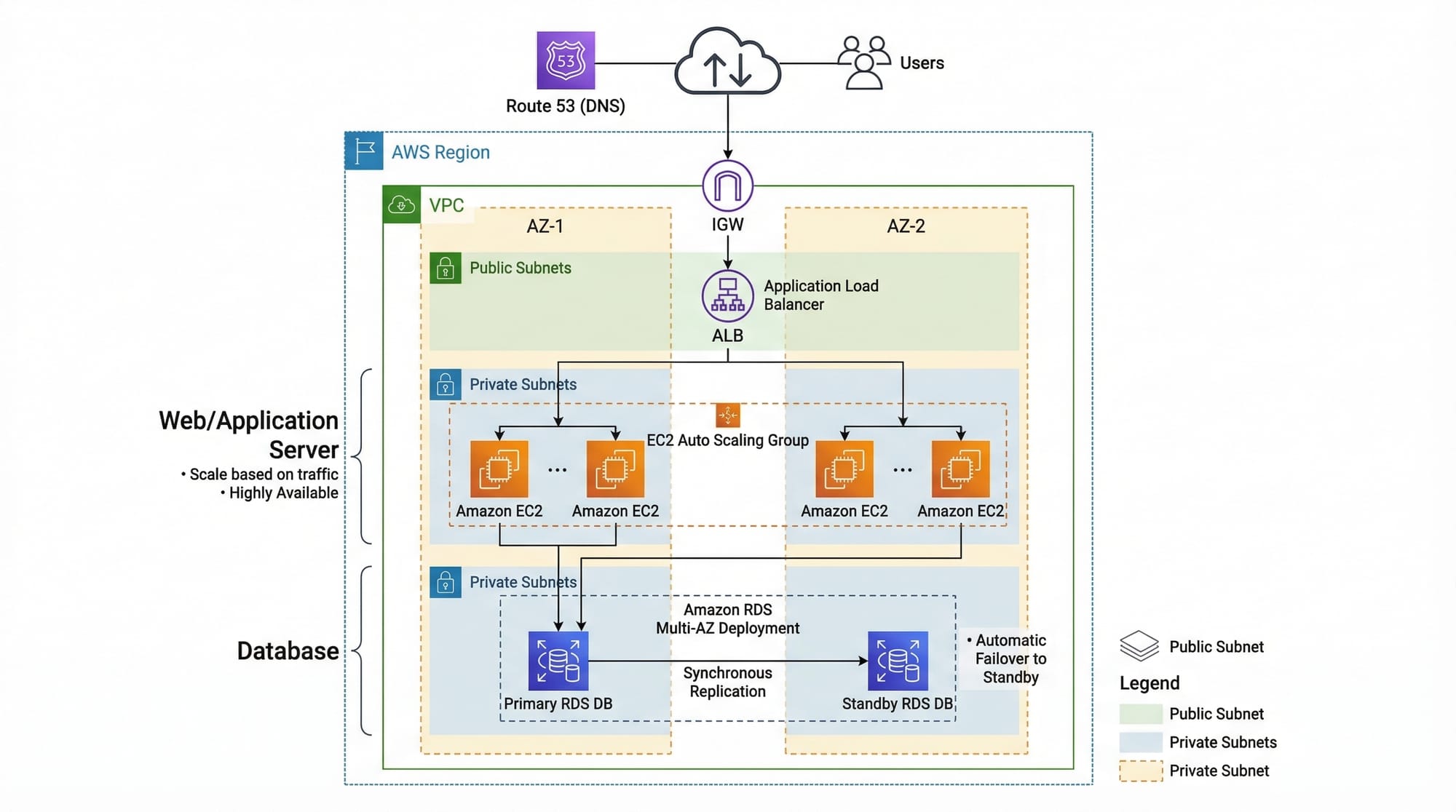
Next Steps & Related Tutorials
To continue your learning journey on theiqra.edu.pk, explore:
- Learn how to deploy apps in our Docker to Kubernetes guide
- Understand CI/CD pipelines with GitHub Actions tutorial
- Master backend APIs with our GraphQL tutorial for beginners
- Explore cloud alternatives in Google Cloud Basics and Azure Tutorial
💡 Tip: Start building small projects like a portfolio website or student management system using AWS.
If you stay consistent and practice regularly, you can become a cloud engineer—even starting from Pakistan 🇵🇰.
Test Your Python Knowledge!
Finished reading? Take a quick quiz to see how much you've learned from this tutorial.