Docker to Kubernetes Container Orchestration Guide
Introduction
The journey from Docker to Kubernetes is one of the most important steps in becoming a modern DevOps engineer. This Docker to Kubernetes: Container Orchestration Guide is designed to help Pakistani students understand how to move from running containers locally using Docker to managing them at scale using Kubernetes (K8s).
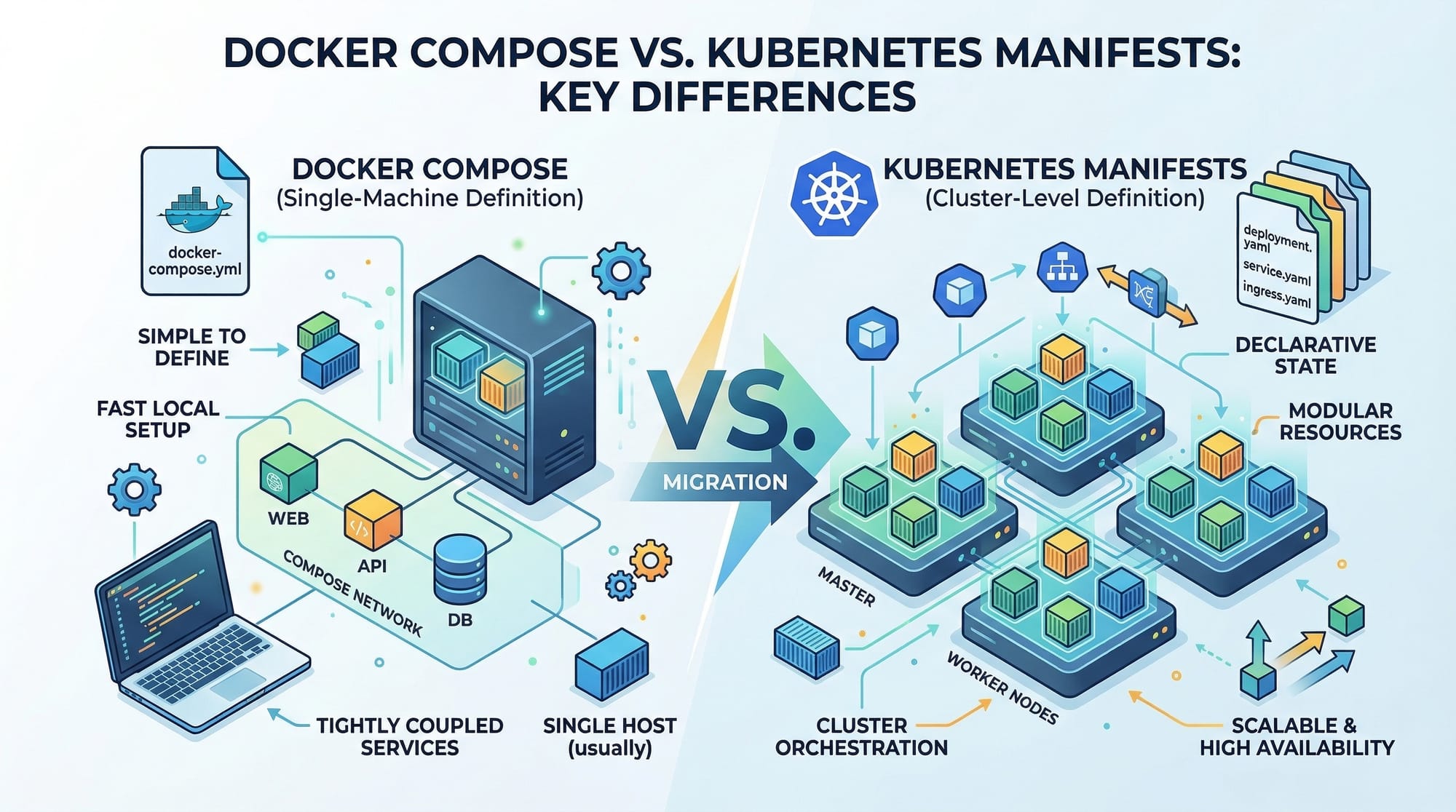
Docker allows you to package applications into containers, but when your application grows—like a startup in Lahore scaling from 10 users to 10,000—you need a system to manage multiple containers across servers. This is where container orchestration comes in, and Kubernetes is the industry standard.
For students in Pakistan, mastering Kubernetes opens doors to global remote jobs, freelancing opportunities, and high-paying roles in companies based in Karachi, Islamabad, and beyond.
Prerequisites
Before starting this guide, you should have:
- Basic understanding of Docker (images, containers, Dockerfile)
- Experience with Docker Compose
- Familiarity with Linux commands
- Basic networking knowledge (ports, HTTP)
- Understanding of YAML syntax
- Optional but helpful: cloud basics (AWS, Azure, GCP)
Core Concepts & Explanation
Docker vs Kubernetes: From Single Host to Cluster
Docker is great for running containers on a single machine. For example, Ahmad in Karachi can run:
docker run -p 3000:3000 my-app
But what if Ahmad’s app needs:
- High availability
- Load balancing
- Auto-scaling
Kubernetes solves this by managing containers across multiple machines (nodes).
Key Idea:
- Docker = Container runtime
- Kubernetes = Container orchestrator
Kubernetes Architecture (Master & Worker Nodes)
Kubernetes operates using a cluster:
- Master Node (Control Plane)
- API Server
- Scheduler
- Controller Manager
- Worker Nodes
- Kubelet
- Container runtime (Docker/containerd)
- Pods
Example:
Fatima in Islamabad deploys her e-commerce app. Kubernetes ensures:
- Pods are always running
- Failed containers restart automatically
- Traffic is balanced across instances
Pods, Deployments, and Services Explained
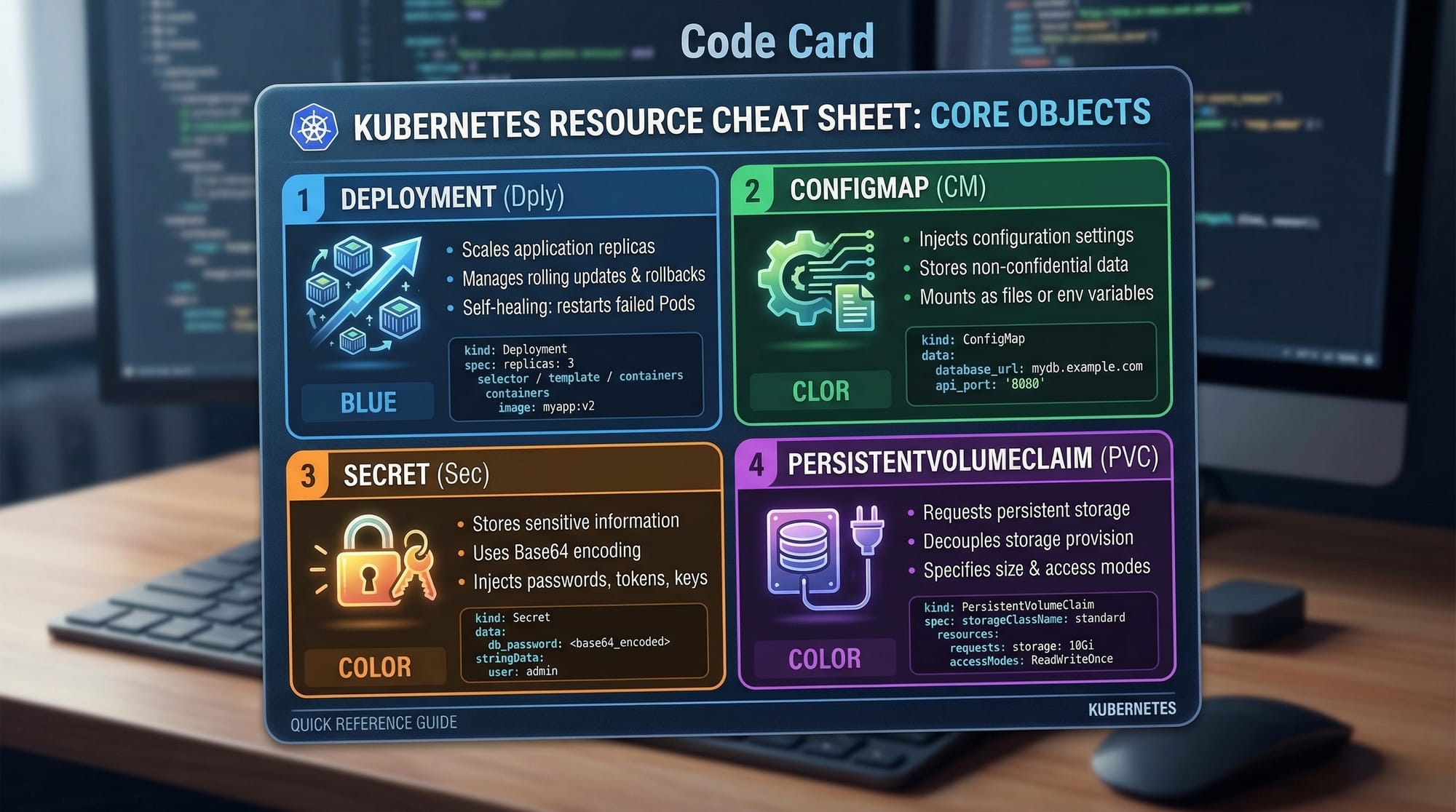
These are the core building blocks of Kubernetes:
- Pod → Smallest unit (1 or more containers)
- Deployment → Manages replicas and updates
- Service → Exposes pods to network
Example YAML:
apiVersion: v1
kind: Pod
metadata:
  name: my-app
spec:
  containers:
    - name: app-container
      image: nginx
Explanation:
apiVersion: Kubernetes API versionkind: Type of resource (Pod)metadata: Name of the podspec: Container configuration
Configuration Management with ConfigMaps & Secrets
Applications often need configuration like database URLs.
- ConfigMap → Non-sensitive data
- Secret → Sensitive data (passwords, API keys)
Example:
apiVersion: v1
kind: ConfigMap
metadata:
  name: app-config
data:
  APP_ENV: production
Explanation:
data: Stores key-value configuration- Used inside containers as environment variables
Practical Code Examples
Example 1: Simple Kubernetes Deployment
apiVersion: apps/v1
kind: Deployment
metadata:
  name: my-app-deployment
spec:
  replicas: 3
  selector:
    matchLabels:
      app: my-app
  template:
    metadata:
      labels:
        app: my-app
    spec:
      containers:
        - name: my-container
          image: nginx
          ports:
            - containerPort: 80
Line-by-line explanation:
apiVersion: apps/v1→ Defines deployment APIkind: Deployment→ Resource typemetadata.name→ Deployment namereplicas: 3→ Run 3 instancesselector.matchLabels→ Match pods with labeltemplate.metadata.labels→ Label applied to podscontainers→ Defines container settingsimage: nginx→ Container imagecontainerPort: 80→ Port exposed inside container
Example 2: Real-World Application (Pakistani Startup Scenario)
Ali runs a food delivery app in Lahore. He needs:
- Backend API
- Redis cache
- Database
apiVersion: apps/v1
kind: Deployment
metadata:
  name: food-app
spec:
  replicas: 2
  selector:
    matchLabels:
      app: food
  template:
    metadata:
      labels:
        app: food
    spec:
      containers:
        - name: backend
          image: my-backend:v1
          ports:
            - containerPort: 5000
        - name: redis
          image: redis
Explanation:
replicas: 2→ Ensures availabilitybackend container→ Runs APIredis container→ Caching service- Multiple containers in one pod share resources
Helm for Managing Kubernetes Apps
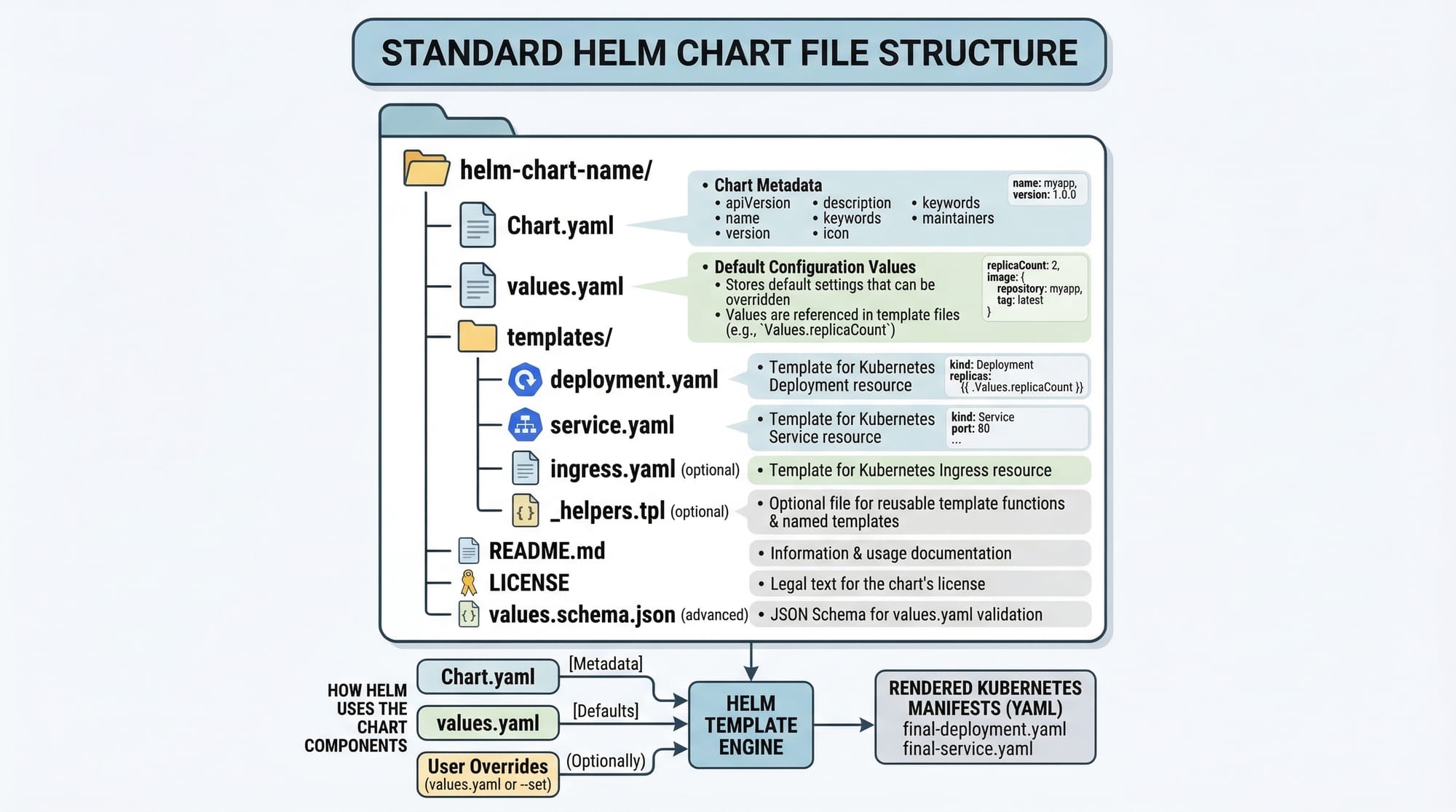
Helm is like a package manager for Kubernetes.
Structure:
my-chart/
  Chart.yaml
  values.yaml
  templates/
Chart.yaml→ Metadatavalues.yaml→ Configuration valuestemplates/→ Kubernetes manifests
Common Mistakes & How to Avoid Them
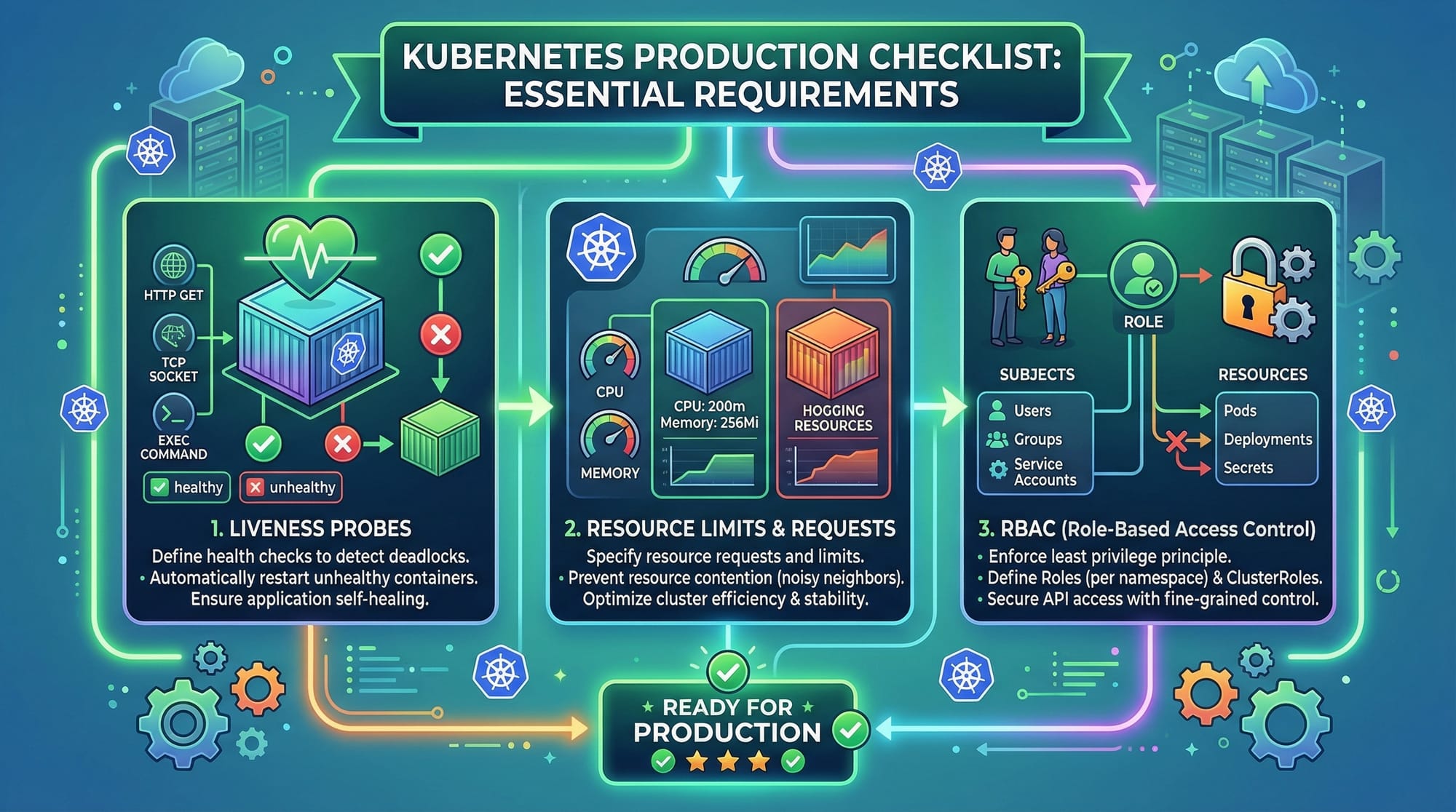
Mistake 1: Not Setting Resource Limits
Without limits, your app can crash the cluster.
❌ Wrong:
resources: {}
✅ Correct:
resources:
  limits:
    memory: "512Mi"
    cpu: "500m"
Fix Explanation:
- Prevents one container from using all resources
- Ensures stable production systems
Mistake 2: Ignoring Liveness & Readiness Probes
Kubernetes doesn’t know if your app is healthy.
❌ Wrong:
# No health checks
✅ Correct:
livenessProbe:
  httpGet:
    path: /
    port: 80
  initialDelaySeconds: 5
Fix Explanation:
livenessProbe→ Restarts unhealthy containerreadinessProbe→ Controls traffic routing
Practice Exercises
Exercise 1: Deploy a Simple Web App
Problem:
Create a Kubernetes Deployment with 2 replicas running nginx.
Solution:
apiVersion: apps/v1
kind: Deployment
metadata:
  name: nginx-deploy
spec:
  replicas: 2
  selector:
    matchLabels:
      app: nginx
  template:
    metadata:
      labels:
        app: nginx
    spec:
      containers:
        - name: nginx
          image: nginx
Explanation:
- Runs 2 nginx instances
- Labels ensure proper pod selection
Exercise 2: Add Environment Variables
Problem:
Add environment variable APP_ENV=production.
Solution:
env:
  - name: APP_ENV
    value: "production"
Explanation:
env→ Defines environment variables- Used inside container runtime
Frequently Asked Questions
What is container orchestration?
Container orchestration is the automated management of containerized applications, including deployment, scaling, and networking. Kubernetes is the most popular tool used for this purpose.
How do I deploy an app in Kubernetes?
You create YAML configuration files (Deployment, Service) and apply them using kubectl apply -f file.yaml. Kubernetes then manages the lifecycle automatically.
What is the difference between Docker Compose and Kubernetes?
Docker Compose is used for local multi-container setups, while Kubernetes is designed for production environments with scaling and high availability.
How do I scale applications in Kubernetes?
You can increase replicas in a Deployment or use kubectl scale --replicas=5 deployment/my-app. Kubernetes will automatically create more pods.
Is Kubernetes difficult for beginners?
Yes, it has a learning curve, but with practice and real-world examples, Pakistani students can master it and access global opportunities.
Summary & Key Takeaways
- Docker is used to create containers, Kubernetes manages them at scale
- Kubernetes uses Pods, Deployments, and Services as core components
- ConfigMaps and Secrets handle configuration securely
- Helm simplifies Kubernetes application management
- Always use resource limits and health checks in production
- Learning Kubernetes opens global DevOps career opportunities
Next Steps & Related Tutorials
To continue your learning journey, explore these tutorials on theiqra.edu.pk:
- Learn how to manage multi-container apps with Docker Compose basics
- Deep dive into Kubernetes tutorial for beginners to advanced
- Automate deployments with CI/CD using GitHub Actions and Kubernetes
- Explore Helm charts for Kubernetes package management
Related: Docker Compose, Kubernetes Tutorial
If you stay consistent and practice regularly, you can go from running your first Docker container to deploying production-grade Kubernetes clusters—just like engineers working in top companies in Lahore, Karachi, and Islamabad 🚀
Test Your Python Knowledge!
Finished reading? Take a quick quiz to see how much you've learned from this tutorial.