Kubernetes Tutorial for Beginners 2026
Introduction
Kubernetes has become the backbone of modern cloud-native applications. If you’re searching for a kubernetes tutorial, planning to learn kubernetes, or looking for k8s for beginners 2026, you’re in the right place.
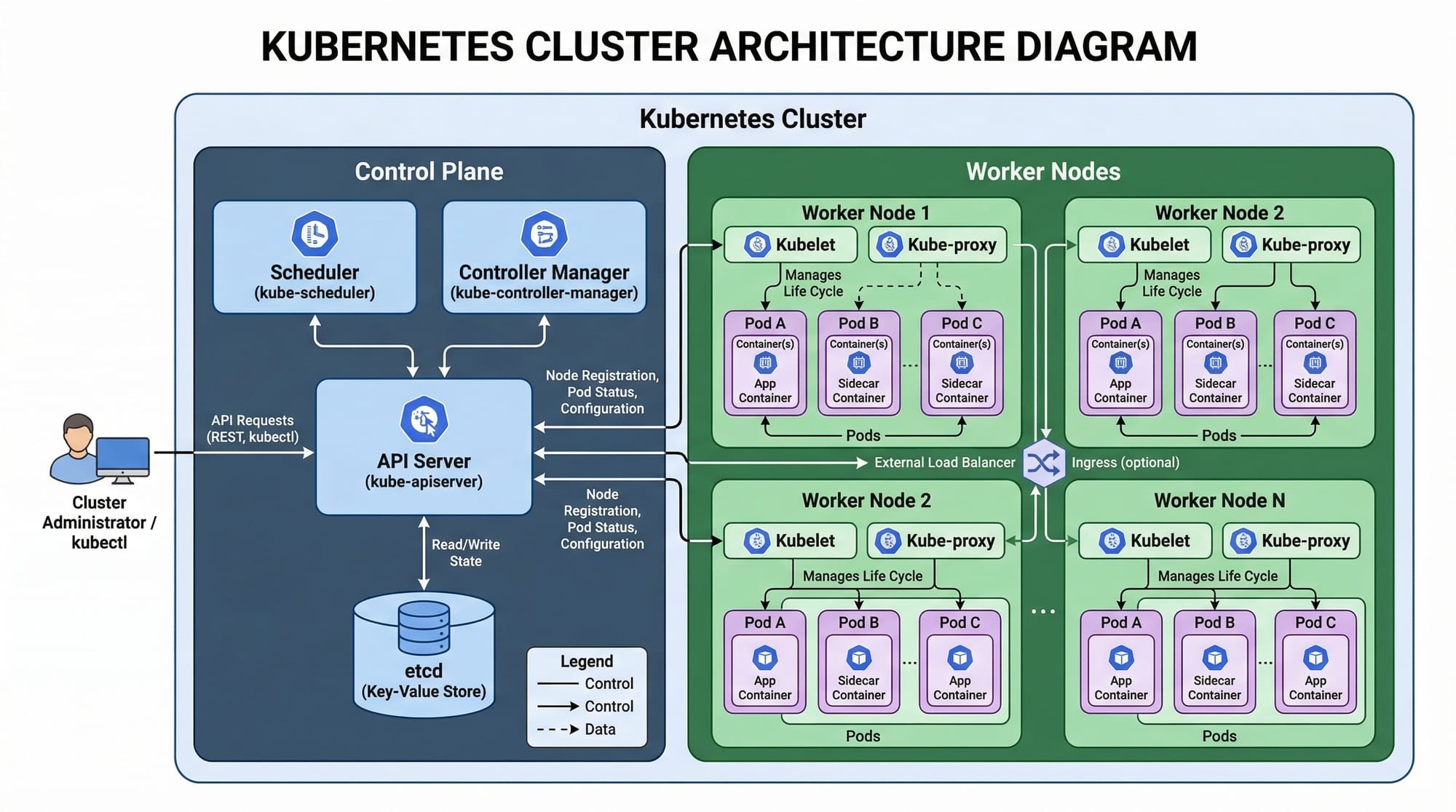
Kubernetes (often abbreviated as K8s) is an open-source platform used to automate the deployment, scaling, and management of containerized applications. In simple words, it helps you run applications reliably across multiple servers.
For Pakistani students—whether you're studying in Lahore, Karachi, Islamabad, or learning online—Kubernetes is a high-demand skill in DevOps, Cloud Computing, and Software Engineering. Companies hiring locally and internationally expect developers to understand container orchestration.
Why should you learn Kubernetes in 2026?
- Growing demand in freelancing and remote jobs (Upwork, Fiverr)
- Used by companies like startups in Karachi and enterprise firms in Islamabad
- Essential for DevOps engineers earning in USD or high PKR salaries
- Works with Docker, which is already widely used
Think of Kubernetes as a manager that ensures your app keeps running—even if servers fail.
Prerequisites
Before starting this Kubernetes tutorial for beginners 2026, you should have:
- Basic understanding of Linux commands
- Familiarity with Docker (containers)
- Basic networking concepts (IP, ports)
- YAML basics (configuration files)
- Optional: Cloud basics (AWS, Azure, or GCP)
If you’re completely new, start with:
- Docker Basics
- Linux Command Line
Core Concepts & Explanation
Pods — The Smallest Deployable Unit
A Pod is the smallest unit in Kubernetes. It contains one or more containers.
Example:
- Ahmad runs a Node.js app inside a container
- Kubernetes wraps it inside a Pod
Key points:
- One Pod = One logical app unit
- Pods are ephemeral (can be recreated anytime)
Example YAML:
apiVersion: v1
kind: Pod
metadata:
  name: my-app
spec:
  containers:
    - name: app-container
      image: nginx
Explanation:
apiVersion: Kubernetes API versionkind: Resource type (Pod)metadata: Name of the Podspec: Configuration detailscontainers: List of containers inside Podimage: Docker image used
Deployments — Managing Pods at Scale
A Deployment ensures your app is always running.
Example:
Fatima runs an e-commerce app in Karachi. She wants:
- 3 copies (replicas) of her app
- Auto-restart if one fails
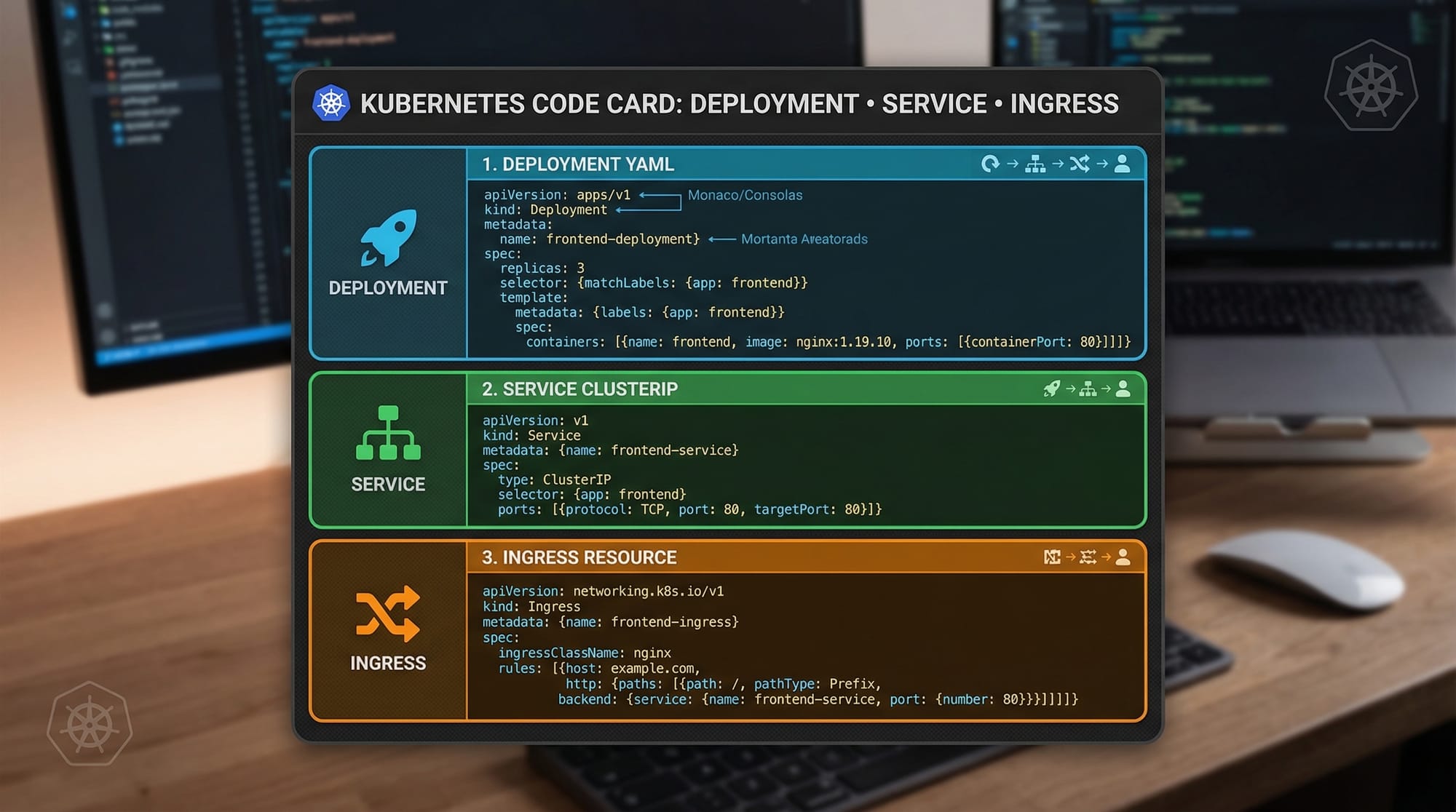
apiVersion: apps/v1
kind: Deployment
metadata:
  name: ecommerce-app
spec:
  replicas: 3
  selector:
    matchLabels:
      app: ecommerce
  template:
    metadata:
      labels:
        app: ecommerce
    spec:
      containers:
        - name: app
          image: nginx
Explanation:
replicas: Number of app instancesselector: Matches Podstemplate: Blueprint for Podslabels: Tags to identify Pods
Services — Exposing Your Application
Pods are temporary, so we use Services to expose them.
Types:
- ClusterIP (internal)
- NodePort (external)
- LoadBalancer (cloud)
Example:
apiVersion: v1
kind: Service
metadata:
  name: my-service
spec:
  selector:
    app: ecommerce
  ports:
    - protocol: TCP
      port: 80
      targetPort: 80
  type: NodePort
Explanation:
selector: Connects to Podsport: Service porttargetPort: Pod porttype: Exposure type
kubectl — Command Line Tool
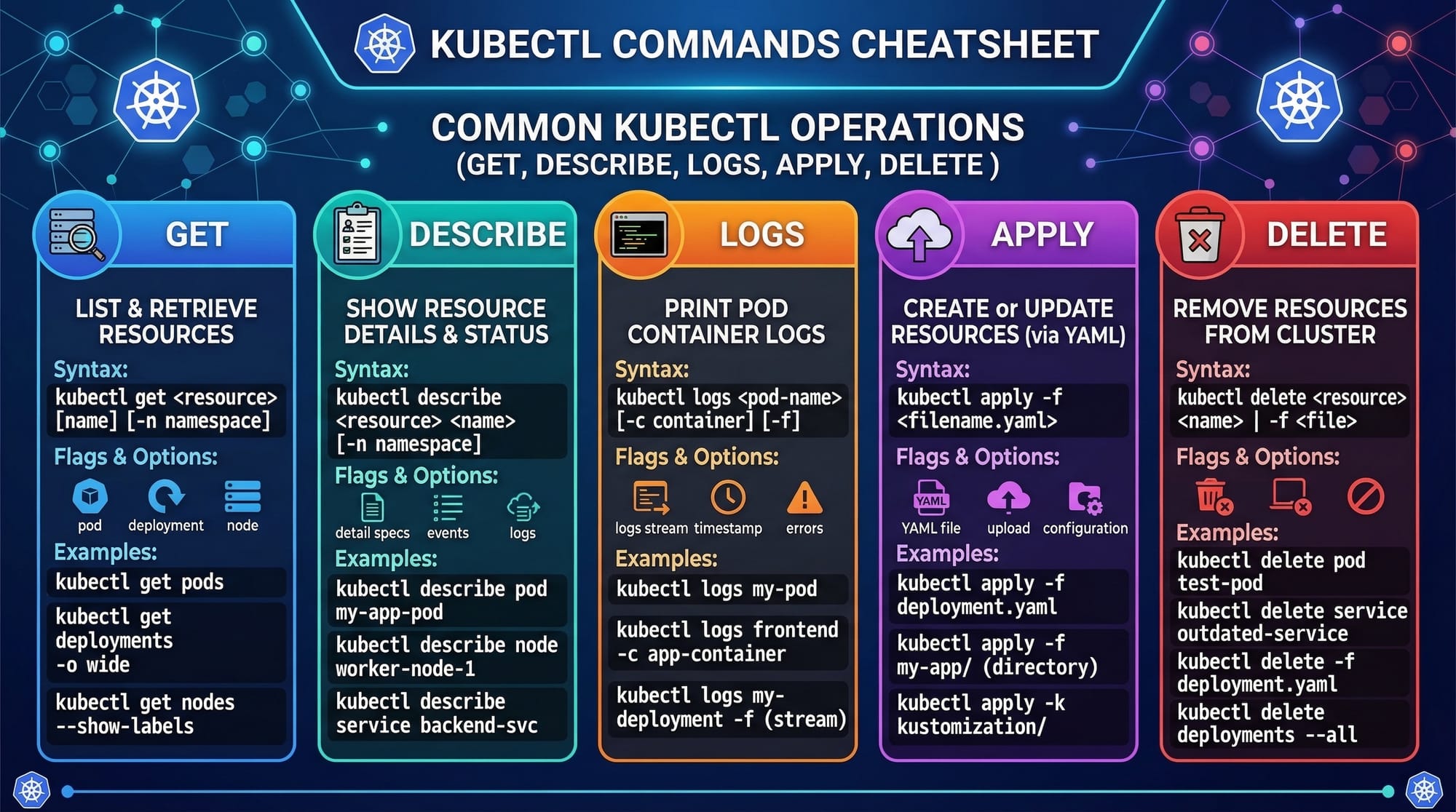
kubectl is used to interact with Kubernetes.
Common commands:
kubectl get podskubectl describe pod <name>kubectl logs <pod>kubectl apply -f file.yamlkubectl delete pod <name>
Practical Code Examples
Example 1: Deploying a Simple App
Let’s deploy an Nginx app.
apiVersion: apps/v1
kind: Deployment
metadata:
  name: nginx-deployment
spec:
  replicas: 2
  selector:
    matchLabels:
      app: nginx
  template:
    metadata:
      labels:
        app: nginx
    spec:
      containers:
        - name: nginx
          image: nginx
          ports:
            - containerPort: 80
Explanation:
replicas: 2→ Runs 2 copiesmatchLabels→ Links Deployment with Podstemplate→ Defines Pod structureimage: nginx→ Uses Nginx imagecontainerPort: 80→ App runs on port 80
Apply it:
kubectl apply -f deployment.yaml
apply→ Creates resource-f→ File input
Example 2: Real-World Application
Ali in Lahore builds a blogging platform and wants public access.
apiVersion: v1
kind: Service
metadata:
  name: blog-service
spec:
  selector:
    app: blog
  ports:
    - port: 80
      targetPort: 3000
  type: NodePort
Explanation:
selector→ Connects to blog Podsport: 80→ Public porttargetPort: 3000→ App portNodePort→ Exposes app externally
Now users can access it via server IP.
Common Mistakes & How to Avoid Them
Mistake 1: Wrong Labels
Problem:
Pods don’t connect to Services.
Example issue:
- Deployment label:
app: myapp - Service selector:
app: my-app
Fix:
Ensure labels match exactly.
labels:
  app: myapp
Mistake 2: Not Setting Resource Limits
Problem:
App crashes due to high memory usage.
Fix:
resources:
  limits:
    memory: "512Mi"
    cpu: "1"
Explanation:
memory: Max memory usagecpu: Max CPU usage
Mistake 3: Forgetting Namespace
Problem:
Resources not found.
Fix:
Always specify namespace:
kubectl get pods -n default
Practice Exercises
Exercise 1: Create a Pod
Problem:
Create a Pod running Redis.
Solution:
apiVersion: v1
kind: Pod
metadata:
  name: redis-pod
spec:
  containers:
    - name: redis
      image: redis
Explanation:
- Uses Redis image
- Simple single-container Pod
Exercise 2: Deploy a Scalable App
Problem:
Create a Deployment with 4 replicas.
Solution:
apiVersion: apps/v1
kind: Deployment
metadata:
  name: scalable-app
spec:
  replicas: 4
  selector:
    matchLabels:
      app: scalable
  template:
    metadata:
      labels:
        app: scalable
    spec:
      containers:
        - name: app
          image: nginx
Explanation:
replicas: 4→ 4 instances- Ensures high availability
Frequently Asked Questions
What is Kubernetes used for?
Kubernetes is used to automate deployment, scaling, and management of containerized applications. It ensures apps run reliably even if servers fail.
How do I start learning Kubernetes in Pakistan?
Start with Docker basics, then practice using Minikube or Kind locally. Follow tutorials like this and deploy small projects.
Is Kubernetes hard to learn?
Kubernetes has a learning curve, but with consistent practice and real-world examples, beginners can understand it within weeks.
Do I need Kubernetes for freelancing?
Yes, many international clients require Kubernetes knowledge, especially for DevOps and cloud-based projects.
What is the difference between Docker and Kubernetes?
Docker creates containers, while Kubernetes manages and orchestrates those containers at scale.
Summary & Key Takeaways
- Kubernetes automates deployment and scaling of apps
- Pods are the smallest units in Kubernetes
- Deployments manage multiple Pods efficiently
- Services expose applications to users
- kubectl is essential for managing clusters
- Real-world skills can help you earn in PKR and USD
Next Steps & Related Tutorials
To continue your journey, check out these tutorials on theiqra.edu.pk:
- Learn Docker Basics to understand containers before Kubernetes
- Explore Docker Compose for multi-container apps
- Read a complete DevOps Tutorial 2026 to understand CI/CD pipelines
- Study GitHub Actions CI/CD Tutorial for automation workflows
By mastering Kubernetes, you’re preparing yourself for high-paying DevOps and cloud roles—both in Pakistan and globally. Keep practicing, build projects, and stay consistent.
Test Your Python Knowledge!
Finished reading? Take a quick quiz to see how much you've learned from this tutorial.