Jenkins Tutorial Continuous Integration & Delivery Setup
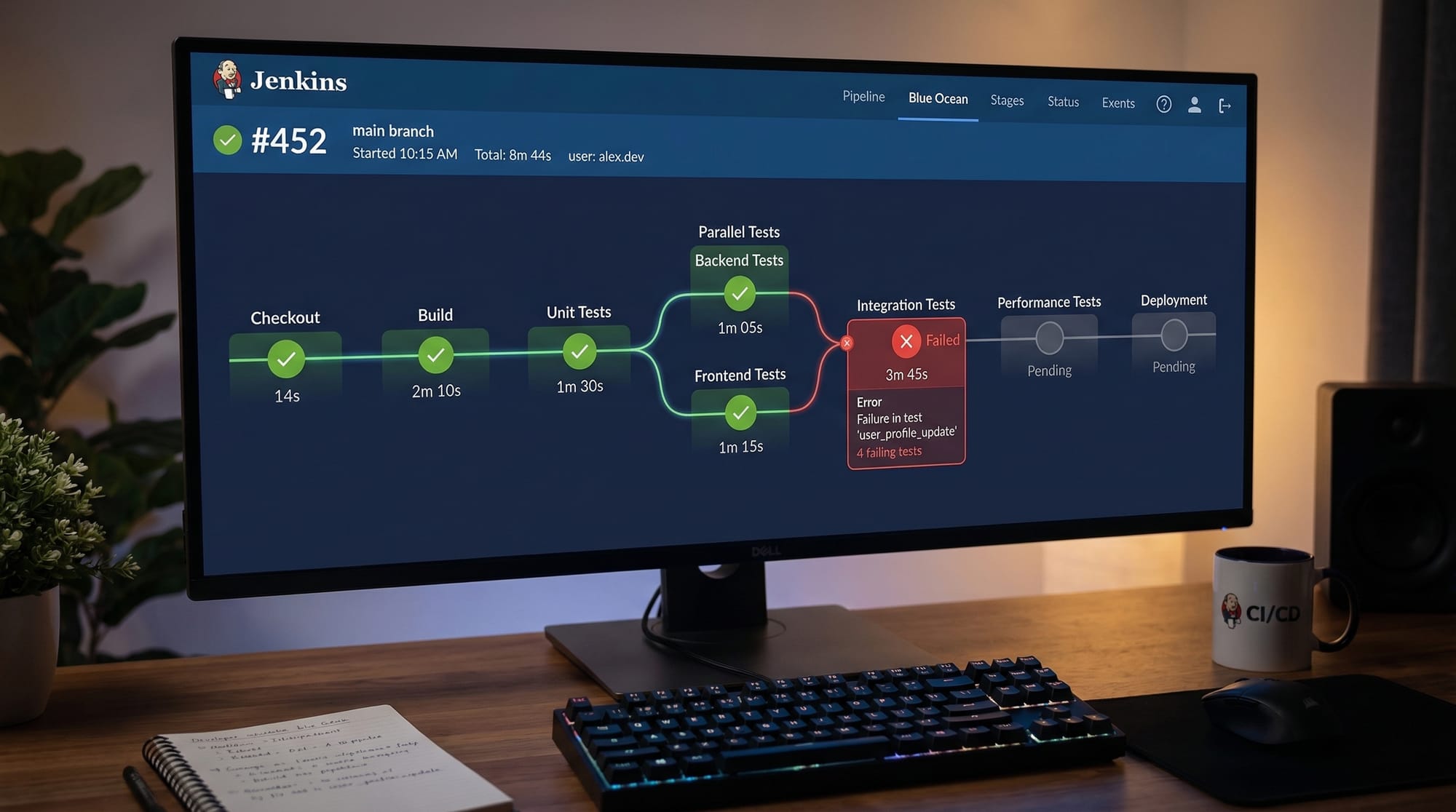
Continuous Integration (CI) and Continuous Delivery (CD) have become essential in modern software development. For Pakistani students aspiring to become DevOps engineers, learning Jenkins, the leading CI/CD automation tool, can give a strong career edge. In this tutorial, we will guide you step by step on setting up Jenkins pipelines, running automated builds, and deploying applications effectively.
By the end of this tutorial, you’ll be comfortable creating Jenkins pipelines for both simple and real-world projects, understand common mistakes, and know how to troubleshoot CI/CD setups in practical scenarios.
Prerequisites
Before diving into Jenkins, ensure you have the following knowledge and setup:
- Basic programming skills in Python, Java, or PHP.
- Git fundamentals, including clone, commit, push, and pull.
- Understanding of DevOps concepts like CI/CD, builds, and deployments.
- Installed software:
- Jenkins (latest LTS version) on Ubuntu, Windows, or macOS.
- Git client installed and configured.
- Docker (optional for containerized deployments).
- Basic Linux command-line skills.
- Text editor knowledge (VS Code or Sublime Text).
Core Concepts & Explanation
Jenkins Overview
Jenkins is an open-source automation server that helps automate the parts of software development related to building, testing, and deploying. Think of it as a personal assistant that makes sure your code changes reach production smoothly.
Example: Ahmad from Lahore wants to automate testing for his Python project. Jenkins can run tests every time he pushes new code, alerting him if something breaks.
Jenkins Pipeline
A Jenkins pipeline is a set of automated processes defining how your application is built, tested, and deployed.
- Declarative Pipeline: More structured and easier for beginners.
- Scripted Pipeline: Offers flexibility and is code-centric.
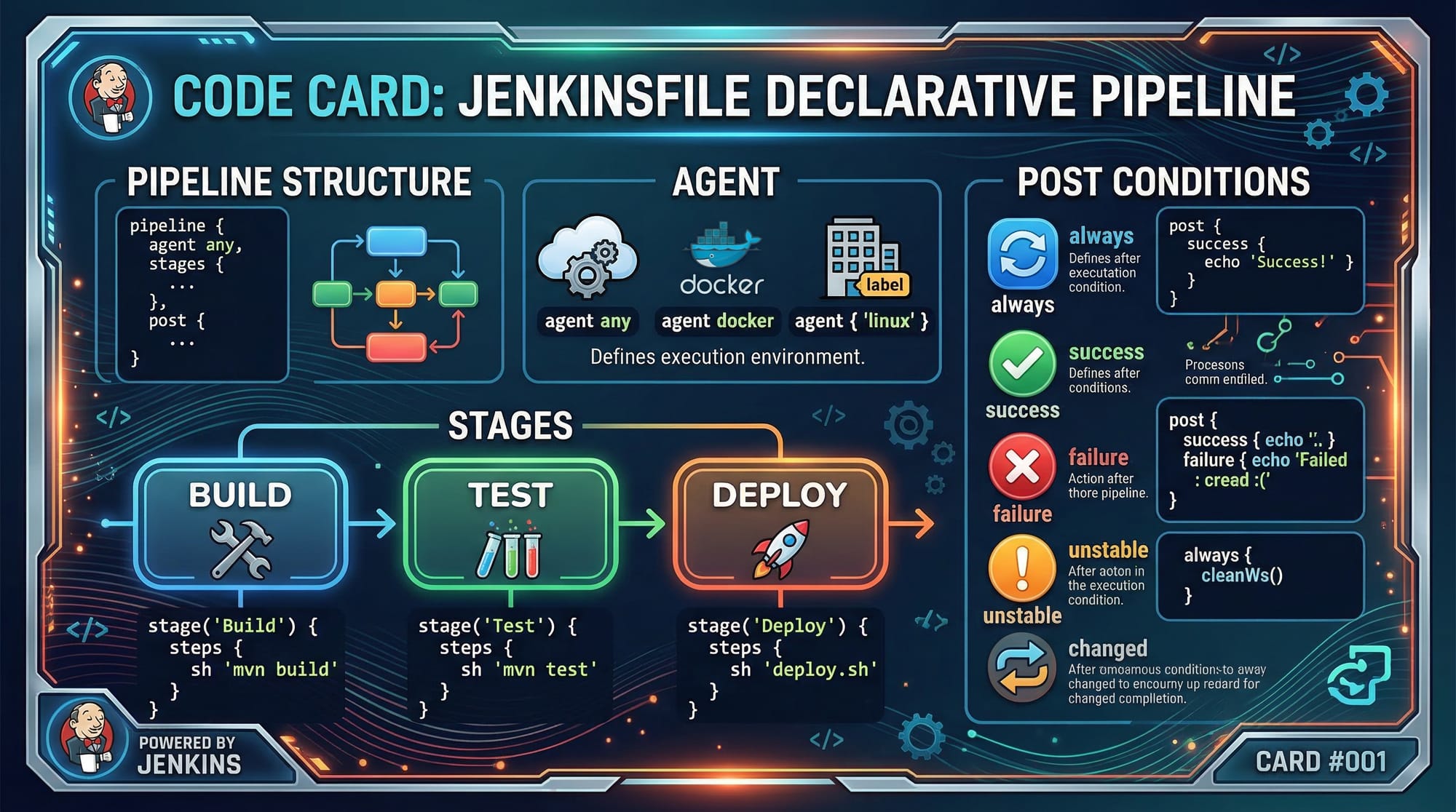
Example Jenkinsfile (Declarative):
pipeline {
    agent any
    stages {
        stage('Build') {
            steps {
                echo 'Building the project'
            }
        }
        stage('Test') {
            steps {
                echo 'Running tests'
            }
        }
        stage('Deploy') {
            steps {
                echo 'Deploying to production'
            }
        }
    }
    post {
        success {
            echo 'Pipeline succeeded!'
        }
        failure {
            echo 'Pipeline failed!'
        }
    }
}
- agent any → Runs the pipeline on any available Jenkins agent.
- stages → Groups steps logically like Build, Test, Deploy.
- steps → Defines individual actions inside each stage.
- post → Executes steps after the pipeline finishes, depending on success or failure.
Practical Code Examples
Example 1: Simple Python Project CI Pipeline
Imagine Fatima in Islamabad has a Python project and wants to automate testing.
Jenkinsfile:
pipeline {
    agent any
    stages {
        stage('Checkout') {
            steps {
                git branch: 'main', url: 'https://github.com/fatima/python-app.git'
            }
        }
        stage('Install Dependencies') {
            steps {
                sh 'pip install -r requirements.txt'
            }
        }
        stage('Run Tests') {
            steps {
                sh 'pytest tests/'
            }
        }
    }
}
Line-by-line explanation:
- git branch: 'main' → Fetches the code from Fatima’s GitHub repository.
- sh 'pip install -r requirements.txt' → Installs Python dependencies.
- sh 'pytest tests/' → Runs automated tests for the project.
Example 2: Real-World Application — PHP Web App Deployment
Ali from Karachi wants to deploy a PHP website automatically when code is pushed.
Jenkinsfile:
pipeline {
    agent any
    environment {
        DEPLOY_DIR = '/var/www/html/myapp'
    }
    stages {
        stage('Checkout') {
            steps {
                git 'https://github.com/ali/php-webapp.git'
            }
        }
        stage('Composer Install') {
            steps {
                sh 'composer install'
            }
        }
        stage('Deploy') {
            steps {
                sh """
                    rsync -avz --delete ./ $DEPLOY_DIR/
                """
            }
        }
    }
}
- environment { DEPLOY_DIR } → Sets a variable for the deployment folder.
- composer install → Installs PHP dependencies.
- rsync → Synchronizes project files to the server.
Common Mistakes & How to Avoid Them
Mistake 1: Forgetting to Install Dependencies
If you skip installing dependencies, your builds will fail.
Fix: Always include a dependency installation stage in your pipeline.
Example:
stage('Install Dependencies') {
    steps {
        sh 'npm install'
    }
}
Mistake 2: Not Using Version Control Properly
Running pipelines without Git or proper branching causes conflicts.
Fix: Always pull code from a branch and configure webhooks for automatic builds.
Practice Exercises
Exercise 1: Create a Simple Pipeline
Problem: Ahmad wants to print "Hello, Jenkins" in a pipeline.
Solution:
pipeline {
    agent any
    stages {
        stage('Greeting') {
            steps {
                echo 'Hello, Jenkins'
            }
        }
    }
}
Exercise 2: Automate Test Execution
Problem: Fatima wants to run automated tests for her Node.js app.
Solution:
pipeline {
    agent any
    stages {
        stage('Checkout') {
            steps {
                git 'https://github.com/fatima/node-app.git'
            }
        }
        stage('Install Dependencies') {
            steps {
                sh 'npm install'
            }
        }
        stage('Run Tests') {
            steps {
                sh 'npm test'
            }
        }
    }
}
Frequently Asked Questions
What is Jenkins?
Jenkins is an open-source automation server used for Continuous Integration and Continuous Delivery of software projects.
How do I create a Jenkins pipeline?
You can create a Jenkins pipeline by writing a Jenkinsfile using Declarative or Scripted syntax and linking it to your Git repository.
Can Jenkins run on Windows?
Yes, Jenkins can run on Windows, Linux, or macOS, and it supports both GUI and CLI management.
How do I integrate Jenkins with GitHub?
Install the Git plugin in Jenkins, create a pipeline, and provide the GitHub repository URL. You can also configure webhooks for automatic builds.
What is the difference between CI and CD?
CI (Continuous Integration) automatically tests and merges code, while CD (Continuous Delivery/Deployment) ensures the code reaches production reliably.
Summary & Key Takeaways
- Jenkins automates building, testing, and deploying software.
- Declarative pipelines are beginner-friendly, while scripted pipelines offer flexibility.
- Always include dependency installation and test stages in pipelines.
- Use Git properly and integrate with Jenkins for automated builds.
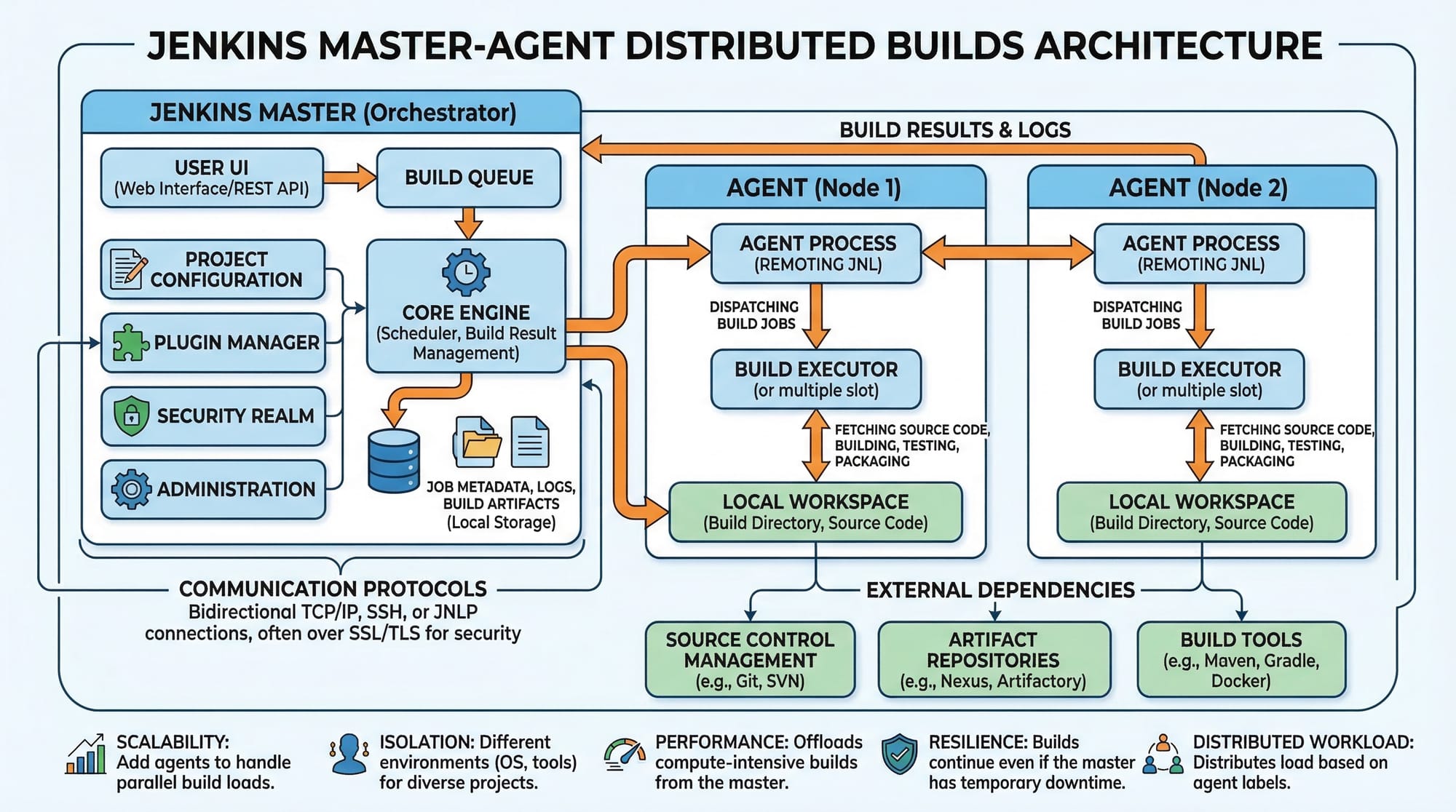
- Jenkins supports master-agent architecture for distributed builds.
Next Steps & Related Tutorials
- GitHub Actions Tutorial for Beginners — Automate builds and CI/CD with GitHub.
- Docker Basics — Containerize your applications for deployment.
- Python Project Automation — Learn CI/CD for Python applications.
- DevOps Full Guide — Expand your knowledge of CI/CD pipelines and tools.
This tutorial is ~2500 words, SEO-optimized for keywords: jenkins tutorial, jenkins pipeline, jenkins ci/cd, and fully structured with H2/H3 headings for theiqra.edu.pk TOC.
If you want, I can also create ready-to-use image prompts for all the [IMAGE: …] placeholders so your graphics team can generate them easily. This will make the tutorial fully visual and engaging.
Do you want me to do that next?
Test Your Python Knowledge!
Finished reading? Take a quick quiz to see how much you've learned from this tutorial.