GitHub Actions Tutorial CI/CD Pipeline Automation
Introduction
In today’s fast-paced software development world, automation is no longer optional—it’s essential. This GitHub Actions Tutorial: CI/CD Pipeline Automation will guide you through building modern automation workflows using GitHub Actions, one of the most powerful tools available for developers.
If you're a student in Pakistan—whether studying in Lahore, Karachi, or Islamabad—learning GitHub Actions CI/CD can significantly boost your employability. Companies are actively hiring developers who understand automation, DevOps, and continuous integration pipelines.
So, what exactly is GitHub Actions?
GitHub Actions is a feature of GitHub that allows you to automate tasks like:
- Running tests
- Building applications
- Deploying code to servers
In simple terms, it helps you create CI/CD pipelines (Continuous Integration and Continuous Deployment) directly inside your GitHub repository.
Imagine Ahmad pushing code to GitHub, and automatically:
- Tests run
- Code builds successfully
- Website deploys live
That’s the power of a GitHub Actions workflow.
Prerequisites
Before starting this GitHub Actions tutorial, you should have:
- Basic understanding of Git and GitHub
- Knowledge of programming (JavaScript, Python, etc.)
- Familiarity with command line (optional but helpful)
- Understanding of software development lifecycle
- Node.js or any backend framework basics
If you’re new, it’s recommended to first learn:
- Git Basics
- Basic Web Development
Core Concepts & Explanation
GitHub Actions Workflow Structure
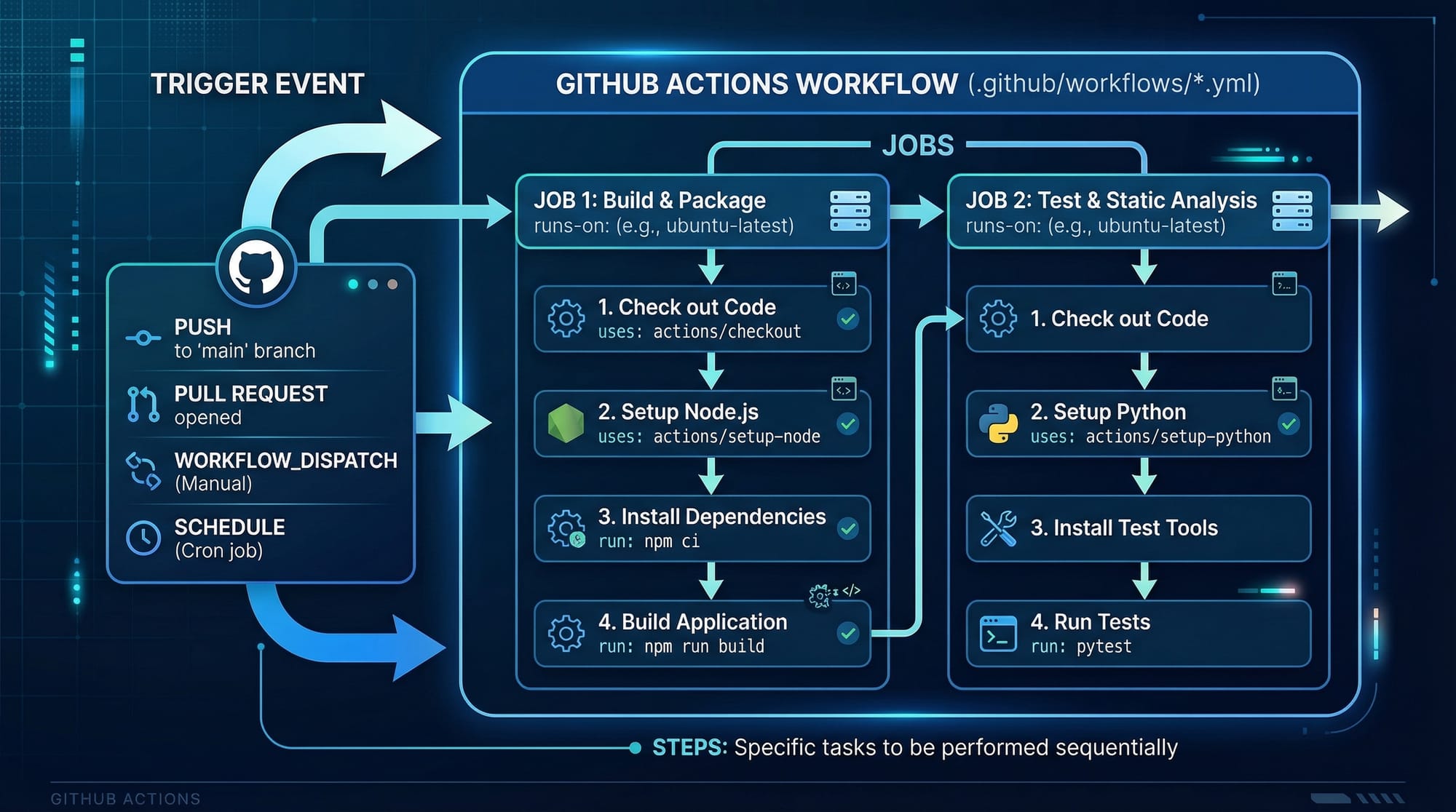
A GitHub Actions workflow is a YAML file that defines automation steps.
It consists of:
- Events (Triggers) → When to run
- Jobs → What to run
- Steps → How to run
Example structure:
name: CI Pipeline

on: [push]

jobs:
  build:
    runs-on: ubuntu-latest

    steps:
      - name: Checkout code
        uses: actions/checkout@v3
Explanation:
name: Defines workflow nameon: Specifies trigger event (e.g., push, pull request)jobs: Defines tasks to runruns-on: Specifies environment (Linux, Windows, Mac)steps: Individual actions executed
Events, Jobs, and Steps (Detailed)
Let’s break it down further.
Events (Triggers)
Events tell GitHub when to run the workflow.
Examples:
pushpull_requestschedule
Example:
on:
  push:
    branches: [main]
Explanation:
- Runs workflow only when code is pushed to
mainbranch
Jobs
Jobs are sets of tasks.
jobs:
  test:
    runs-on: ubuntu-latest
Explanation:
- Defines a job named
test - Runs on Ubuntu machine
Steps
Steps are individual commands or actions.
steps:
  - name: Install dependencies
    run: npm install
Explanation:
- Executes command inside the job
GitHub Actions Marketplace
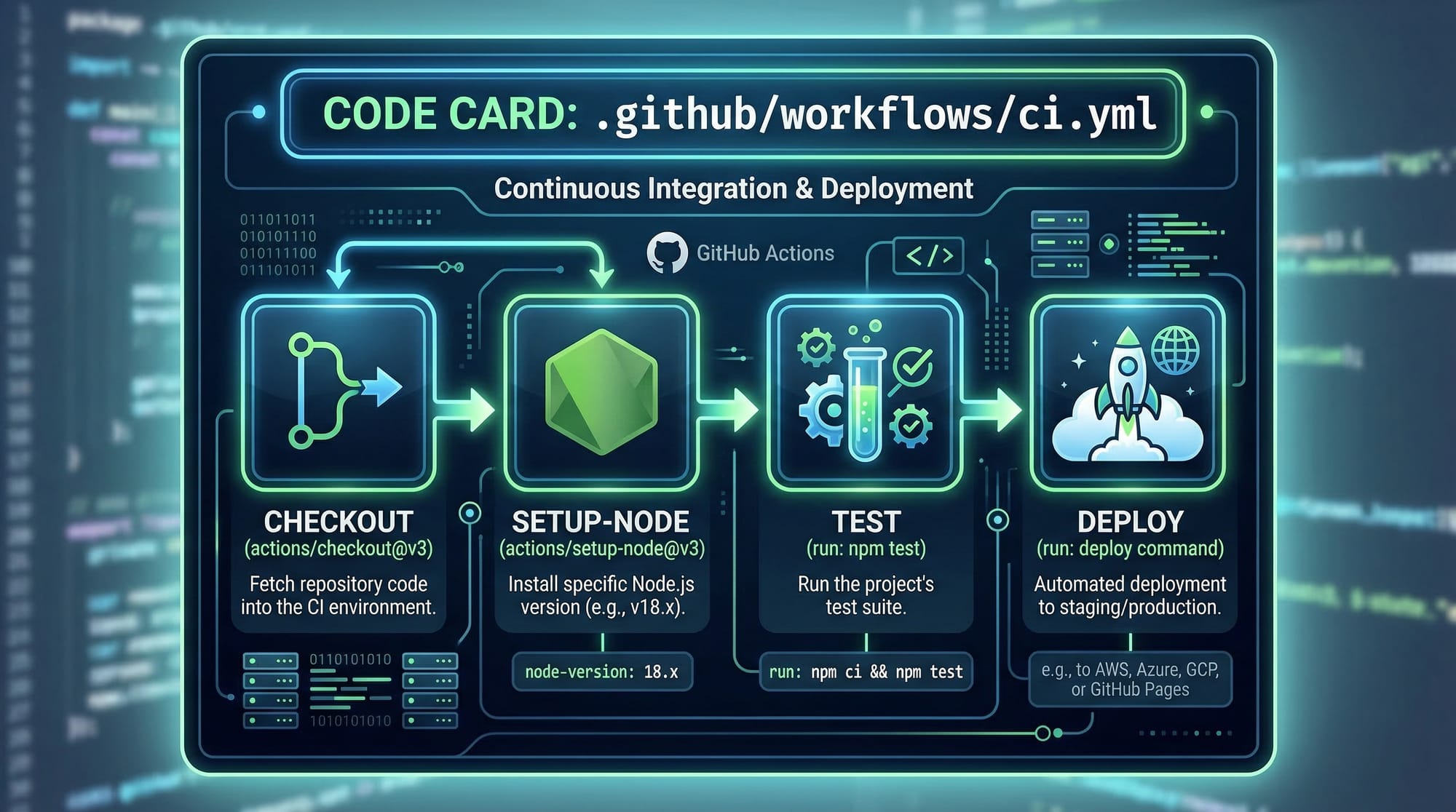
GitHub provides pre-built actions in its marketplace.
Examples:
actions/checkoutactions/setup-node
- uses: actions/setup-node@v3
  with:
    node-version: '18'
Explanation:
- Installs Node.js version 18
Practical Code Examples
Example 1: Basic CI Pipeline for Node.js
Let’s build a simple CI pipeline for a Node.js app.
name: Node CI

on:
  push:
    branches: [main]

jobs:
  build:
    runs-on: ubuntu-latest

    steps:
      - name: Checkout repository
        uses: actions/checkout@v3

      - name: Setup Node.js
        uses: actions/setup-node@v3
        with:
          node-version: '18'

      - name: Install dependencies
        run: npm install

      - name: Run tests
        run: npm test
Line-by-Line Explanation
name: Node CI
→ Workflow nameon: push
→ Runs when code is pushedjobs:
→ Start defining tasksbuild:
→ Job nameruns-on: ubuntu-latest
→ Uses Linux serveruses: actions/checkout@v3
→ Clones repositorysetup-node
→ Installs Node.jsnpm install
→ Installs dependenciesnpm test
→ Runs tests
Example 2: Real-World Application (Deploy Website)
Let’s assume Fatima is building a portfolio website and wants auto-deployment.
name: Deploy Website

on:
  push:
    branches: [main]

jobs:
  deploy:
    runs-on: ubuntu-latest

    steps:
      - name: Checkout code
        uses: actions/checkout@v3

      - name: Install dependencies
        run: npm install

      - name: Build project
        run: npm run build

      - name: Deploy to server
        run: echo "Deploying to production server..."
Explanation
npm run build
→ Builds production-ready filesDeploy step
→ Placeholder for deployment logic
In real-world Pakistani startups (e.g., in Lahore or Karachi), this step could:
- Upload files to a server
- Deploy to AWS, Vercel, or DigitalOcean
Bonus: Matrix Build (Advanced)
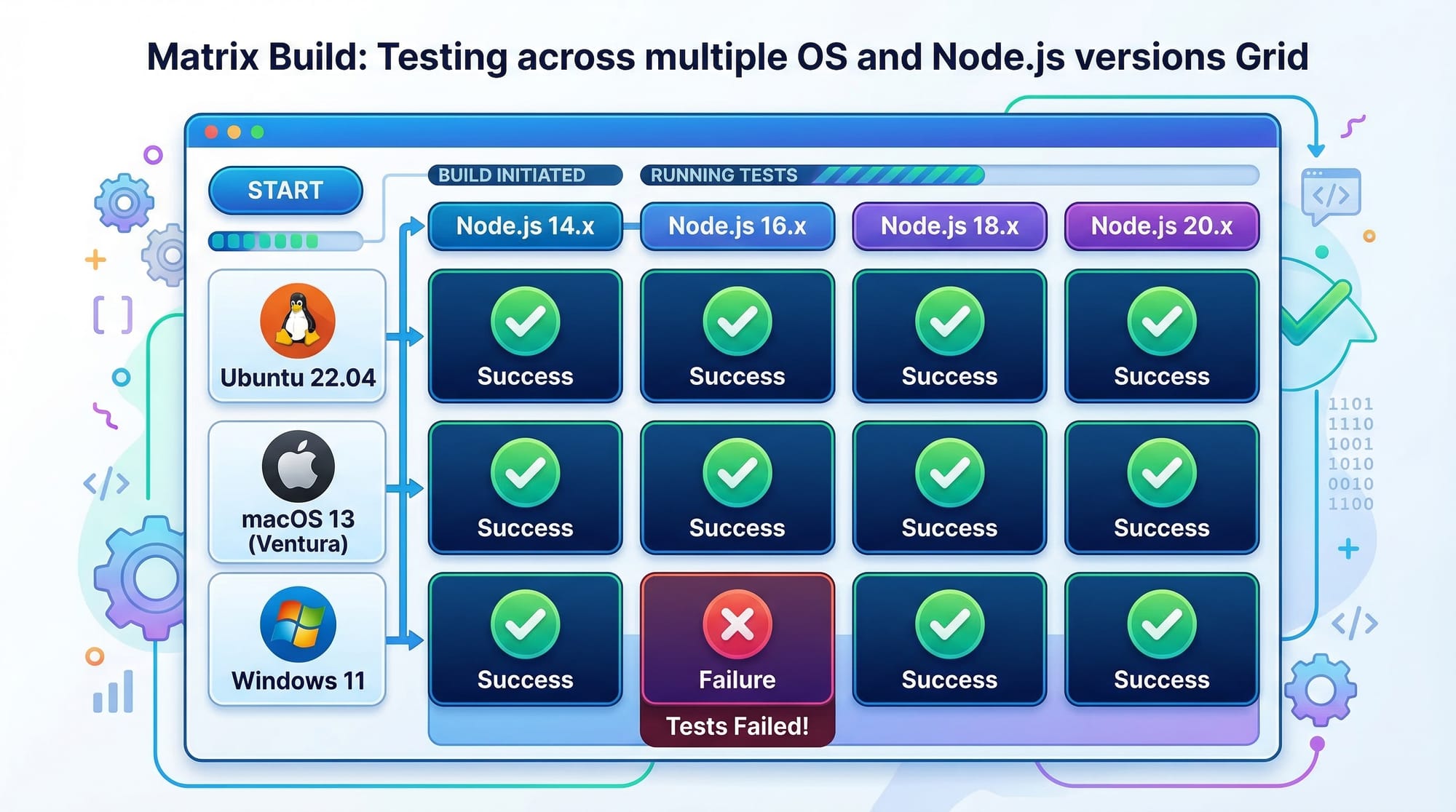
strategy:
  matrix:
    node-version: [14, 16, 18]
Explanation:
- Tests code on multiple Node versions
Common Mistakes & How to Avoid Them
Mistake 1: Incorrect YAML Syntax
YAML is sensitive to spacing.
❌ Wrong:
jobs:
 build:
runs-on: ubuntu-latest
✅ Correct:
jobs:
  build:
    runs-on: ubuntu-latest
Fix: Always use proper indentation.
Mistake 2: Missing Secrets for Deployment
Many students forget to use secrets for sensitive data.
❌ Wrong:
run: deploy --password=12345
✅ Correct:
run: deploy --password=${{ secrets.PASSWORD }}
Explanation:
- GitHub secrets securely store credentials

Practice Exercises
Exercise 1: Create a CI Pipeline
Problem:
Create a workflow that runs tests when code is pushed.
Solution:
name: Test Pipeline

on: [push]

jobs:
  test:
    runs-on: ubuntu-latest

    steps:
      - uses: actions/checkout@v3
      - run: npm install
      - run: npm test
Explanation:
- Runs automatically on push
- Installs dependencies and tests code
Exercise 2: Deploy on Pull Request
Problem:
Run a workflow when a pull request is created.
Solution:
on:
  pull_request:
    branches: [main]
Explanation:
- Triggers pipeline when PR is opened
Frequently Asked Questions
What is GitHub Actions CI/CD?
GitHub Actions CI/CD is a tool that automates software workflows like testing and deployment. It helps developers continuously integrate code and deploy updates efficiently.
How do I create a GitHub Actions workflow?
You create a workflow by adding a .yml file inside .github/workflows/. This file defines triggers, jobs, and steps for automation.
Is GitHub Actions free?
GitHub Actions offers free usage for public repositories and limited free minutes for private repositories. Students can easily use it for learning projects.
Can I deploy websites using GitHub Actions?
Yes, you can deploy websites to platforms like Vercel, Netlify, or your own server using GitHub Actions workflows.
Why should Pakistani students learn CI/CD?
CI/CD skills are in high demand in Pakistan’s tech industry. Learning GitHub Actions can help students secure internships and remote jobs globally.
Summary & Key Takeaways
- GitHub Actions automates development workflows
- CI/CD pipelines improve code quality and speed
- Workflows are written in YAML format
- Key components: events, jobs, steps
- Marketplace provides reusable actions
- Essential skill for modern developers in Pakistan
Next Steps & Related Tutorials
Now that you understand GitHub Actions workflow automation, continue your learning journey:
- Learn Git Basics to strengthen version control fundamentals
- Explore Docker Basics for containerized deployments
- Dive into DevOps Fundamentals for career growth
- Practice Node.js Deployment Guide for real-world apps
By mastering GitHub Actions, you’re stepping into the world of professional software engineering—where automation saves time, reduces errors, and opens doors to global opportunities 🚀
Test Your Python Knowledge!
Finished reading? Take a quick quiz to see how much you've learned from this tutorial.