DevOps Tutorial for Beginners Concepts Tools & Roadmap 2026
Introduction
DevOps is one of the most in-demand skills in the modern tech industry, and in this DevOps tutorial for beginners: concepts, tools & roadmap 2026, you will learn everything you need to get started from scratch. If you are a student in Pakistan aiming to build a career in software development, cloud computing, or IT operations, learning DevOps can significantly boost your opportunities.
So, what exactly is DevOps?
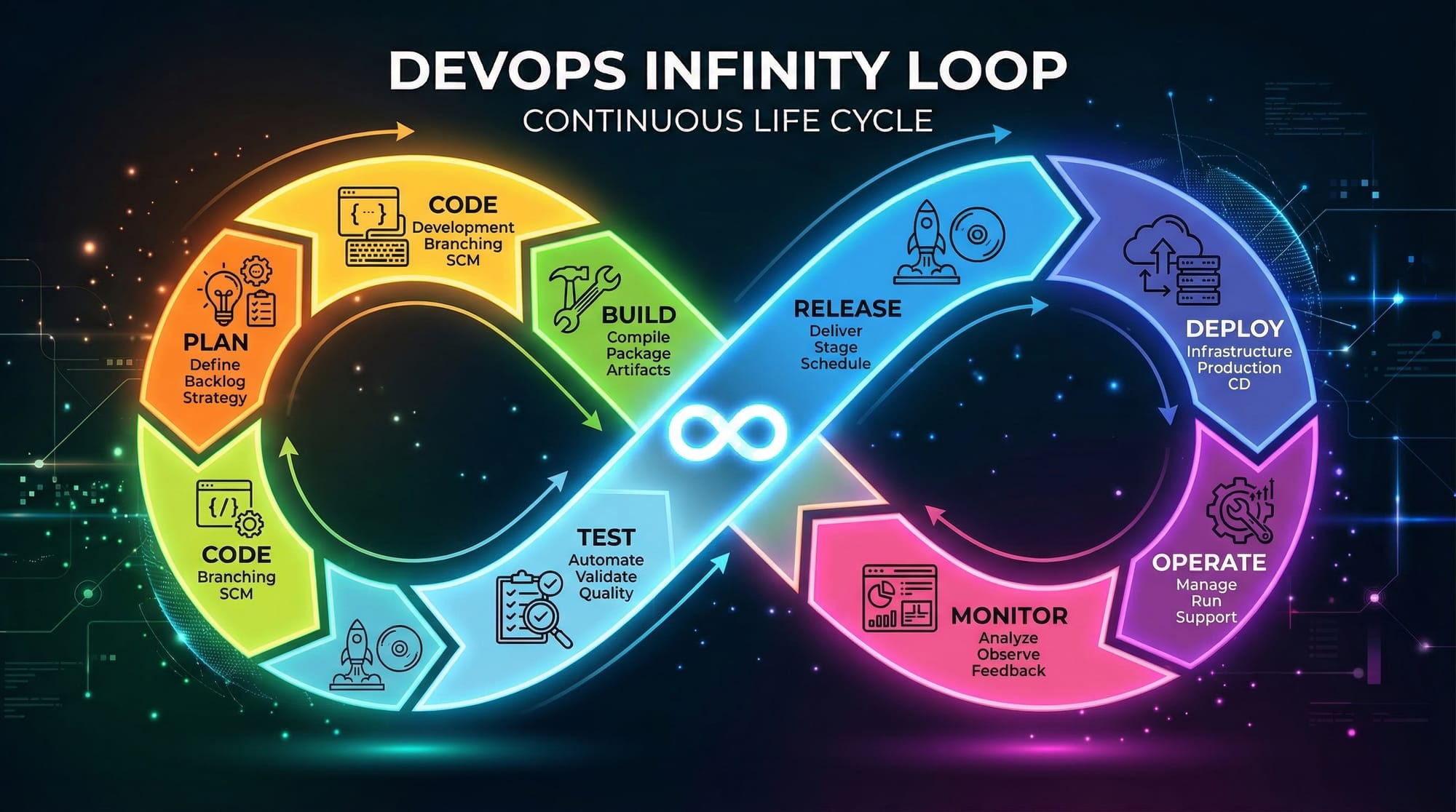
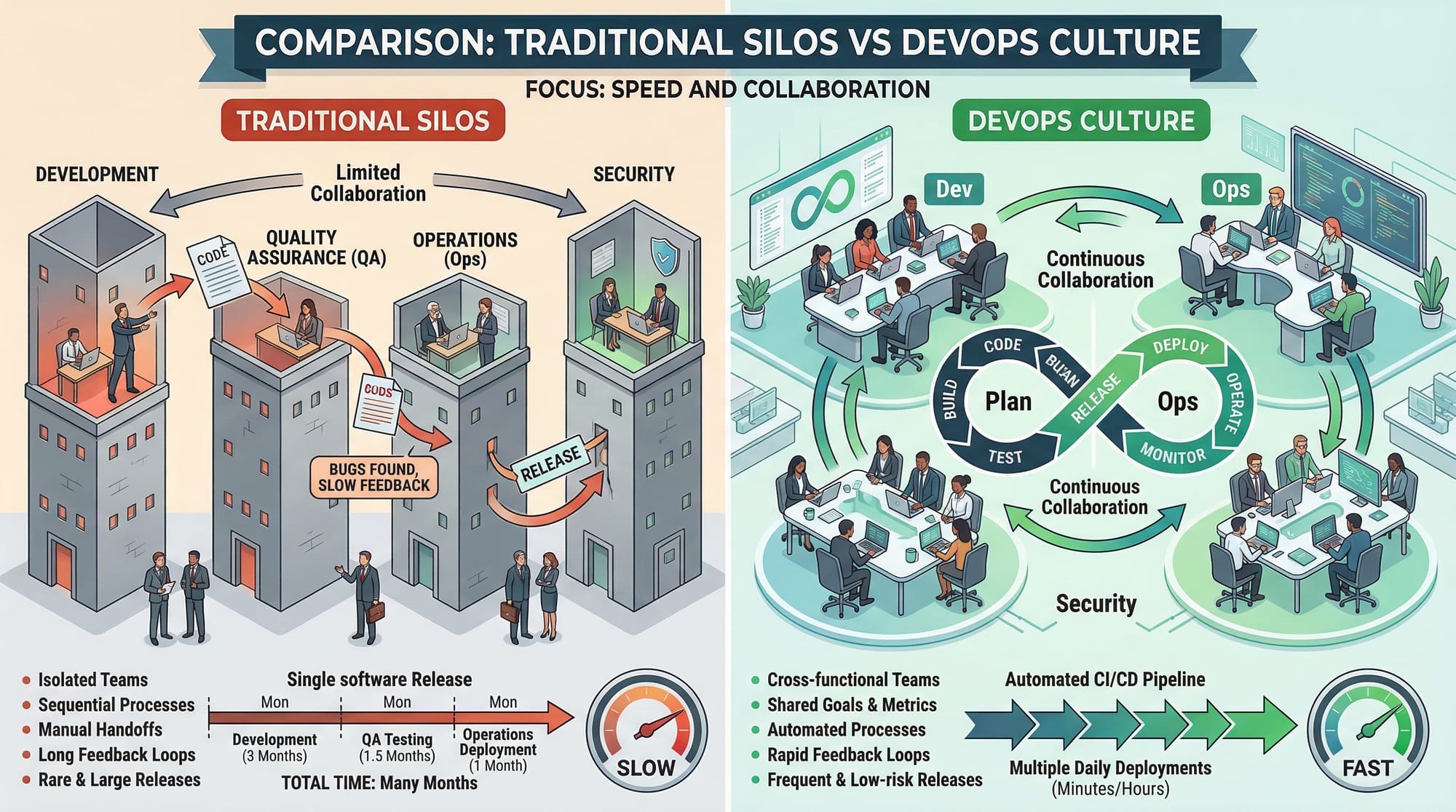
DevOps is a combination of two words: Development (Dev) and Operations (Ops). It is a culture, set of practices, and tools that help teams deliver software faster and more reliably by improving collaboration between developers and IT operations teams.
Traditionally, developers wrote code and handed it over to operations teams for deployment. This often caused delays, bugs, and misunderstandings. DevOps removes these barriers by encouraging collaboration, automation, and continuous improvement.
In Pakistan, companies in cities like Lahore, Karachi, and Islamabad are rapidly adopting DevOps practices. Whether you are Ahmad building a startup or Fatima preparing for a job interview, learning DevOps in 2026 is a smart move.
Prerequisites
Before starting your journey to learn DevOps in 2026, you should have some basic knowledge. Don’t worry—you don’t need to be an expert.
Here are the recommended prerequisites:
- Basic understanding of programming (Python, JavaScript, or Java)
- Familiarity with command line (CLI) usage
- Basic knowledge of Git and version control
- Understanding of how web applications work
- Some exposure to Linux operating system
- Basic idea of cloud computing (optional but helpful)
If you are completely new, you can first learn:
- Git Basics
- Linux commands
- Basic programming
Core Concepts & Explanation
Continuous Integration (CI)
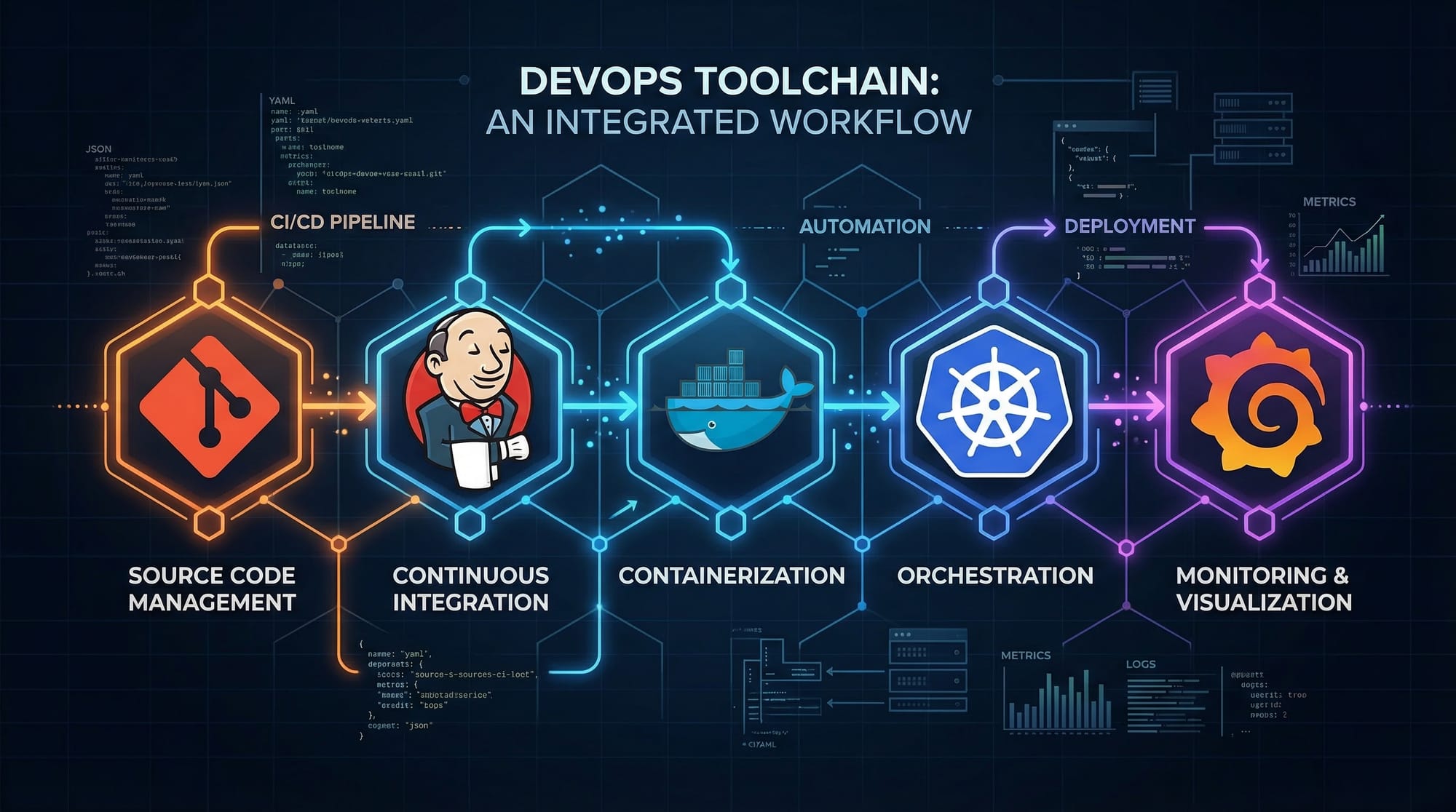
Continuous Integration (CI) is the practice of automatically integrating code changes into a shared repository.
For example:
Ali is working on a project in Karachi. Every time he pushes code to GitHub, a tool like Jenkins automatically:
- Builds the project
- Runs tests
- Checks for errors
This ensures that the code is always in a working state.
Benefits:
- Early bug detection
- Faster development
- Better code quality
Continuous Delivery (CD)
Continuous Delivery means that your code is always ready to be deployed to production.
Example:
Fatima builds an e-commerce app in Lahore. After passing tests, the code is automatically prepared for deployment. With one click, it can go live.
Key idea: Automation + readiness
Continuous Deployment
Continuous Deployment goes one step further—code is automatically deployed without manual approval.
Example:
If Ahmad updates a website in Islamabad, it automatically goes live after passing tests.
Infrastructure as Code (IaC)
Instead of manually setting up servers, you define infrastructure using code.
Example:
Using tools like Terraform, you can write:
- Server configuration
- Network settings
- Storage
This makes infrastructure:
- Repeatable
- Scalable
- Easy to manage
Containerization (Docker)
Containerization allows you to package applications with all dependencies.
Example:
A Docker container ensures your app runs the same on:
- Your laptop
- A server in Karachi
- A cloud platform
Orchestration (Kubernetes)
Kubernetes helps manage multiple containers.
It handles:
- Scaling
- Load balancing
- Self-healing
Monitoring & Logging
Monitoring tools track system performance.
Example:
Grafana dashboards can show:
- CPU usage
- Memory usage
- Errors
Practical Code Examples
Example 1: Automating a Build with GitHub Actions
name: CI Pipeline

on:
  push:
    branches:
      - main

jobs:
  build:
    runs-on: ubuntu-latest

    steps:
      - name: Checkout code
        uses: actions/checkout@v3

      - name: Install Node.js
        uses: actions/setup-node@v3
        with:
          node-version: '18'

      - name: Install dependencies
        run: npm install

      - name: Run tests
        run: npm test
Explanation:
name: CI Pipeline→ Defines the workflow nameon: push→ Runs when code is pushedbranches: main→ Only triggers on main branchruns-on: ubuntu-latest→ Uses Linux environmentactions/checkout@v3→ Pulls your codesetup-node@v3→ Installs Node.jsnpm install→ Installs dependenciesnpm test→ Runs automated tests
This is a real DevOps pipeline used in companies.
Example 2: Dockerizing a Node.js App
# Use official Node image
FROM node:18

# Set working directory
WORKDIR /app

# Copy package files
COPY package*.json ./

# Install dependencies
RUN npm install

# Copy app code
COPY . .

# Expose port
EXPOSE 3000

# Start application
CMD ["npm", "start"]
Explanation:
FROM node:18→ Base imageWORKDIR /app→ Working directoryCOPY package*.json→ Copy dependency filesRUN npm install→ Install packagesCOPY . .→ Copy all codeEXPOSE 3000→ Open portCMD ["npm", "start"]→ Start app
This ensures your app runs consistently everywhere.
Common Mistakes & How to Avoid Them
Mistake 1: Ignoring Automation
Many beginners manually deploy apps.
Problem:
- Time-consuming
- Error-prone
Fix:
Use CI/CD tools like:
- GitHub Actions
- Jenkins
Automate everything from testing to deployment.
Mistake 2: Not Learning Linux
DevOps heavily relies on Linux systems.
Problem:
- Difficulty managing servers
- Limited troubleshooting skills
Fix:
Practice commands like:
ls
cd
mkdir
chmod
Mistake 3: Skipping Version Control
Some beginners don’t use Git properly.
Fix:
- Learn branching
- Use pull requests
- Commit frequently
Mistake 4: Overcomplicating Tools
Trying to learn too many tools at once.
Fix:
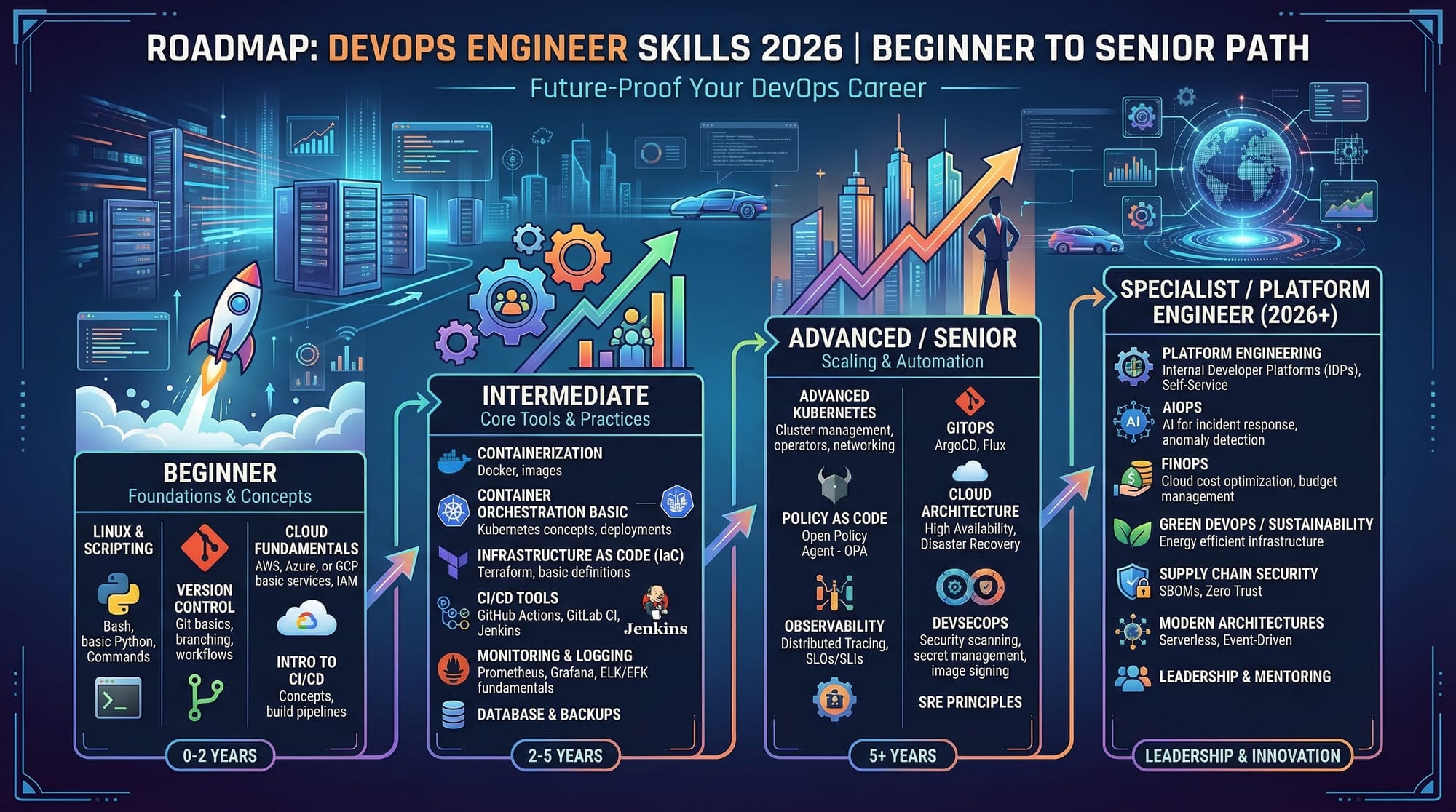
Start simple:
- Git
- Docker
- CI/CD
- Kubernetes
Practice Exercises
Exercise 1: Create a CI Pipeline
Problem:
Set up a GitHub Action that runs tests on every push.
Solution:
name: Test Pipeline

on: [push]

jobs:
  test:
    runs-on: ubuntu-latest
    steps:
      - uses: actions/checkout@v3
      - run: echo "Running tests..."
Explanation:
- Triggers on push
- Runs on Linux
- Executes a simple command
Exercise 2: Build a Docker Container
Problem:
Create a Docker container for a simple app.
Solution:
FROM nginx:latest
COPY . /usr/share/nginx/html
Explanation:
- Uses Nginx server
- Copies website files
- Serves static content
Frequently Asked Questions
What is DevOps in simple terms?
DevOps is a way of working where developers and operations teams collaborate to build, test, and deploy software faster using automation and modern tools.
How do I start learning DevOps in Pakistan?
Start with Git and Linux, then move to Docker, CI/CD tools, and cloud platforms. Practice using real projects and online resources.
Is DevOps a good career in 2026?
Yes, DevOps is one of the highest-paying and fastest-growing fields globally and in Pakistan, especially in tech hubs like Lahore and Islamabad.
Do I need coding for DevOps?
Yes, basic coding is helpful. You should know scripting (Python or Bash) to automate tasks.
How long does it take to learn DevOps?
For beginners, it can take 3–6 months with consistent practice to build a strong foundation.
Summary & Key Takeaways
- DevOps combines development and operations for faster delivery
- Automation is the core principle of DevOps
- Tools like Git, Docker, and Jenkins are essential
- CI/CD pipelines improve software quality and speed
- Linux and scripting are important skills
- DevOps careers are growing rapidly in Pakistan
Next Steps & Related Tutorials
To continue your DevOps roadmap, explore these tutorials on theiqra.edu.pk:
- Learn Docker Basics to understand containerization
- Master Git Basics for version control
- Explore Kubernetes for Beginners to manage containers
- Study CI/CD Pipelines with Jenkins for automation
By following this DevOps roadmap, you will be well on your way to becoming a DevOps engineer in 2026. Keep practicing, build real projects, and stay consistent—success will follow.
Test Your Python Knowledge!
Finished reading? Take a quick quiz to see how much you've learned from this tutorial.