Google Cloud Platform (GCP) Tutorial for Beginners 2026
Introduction
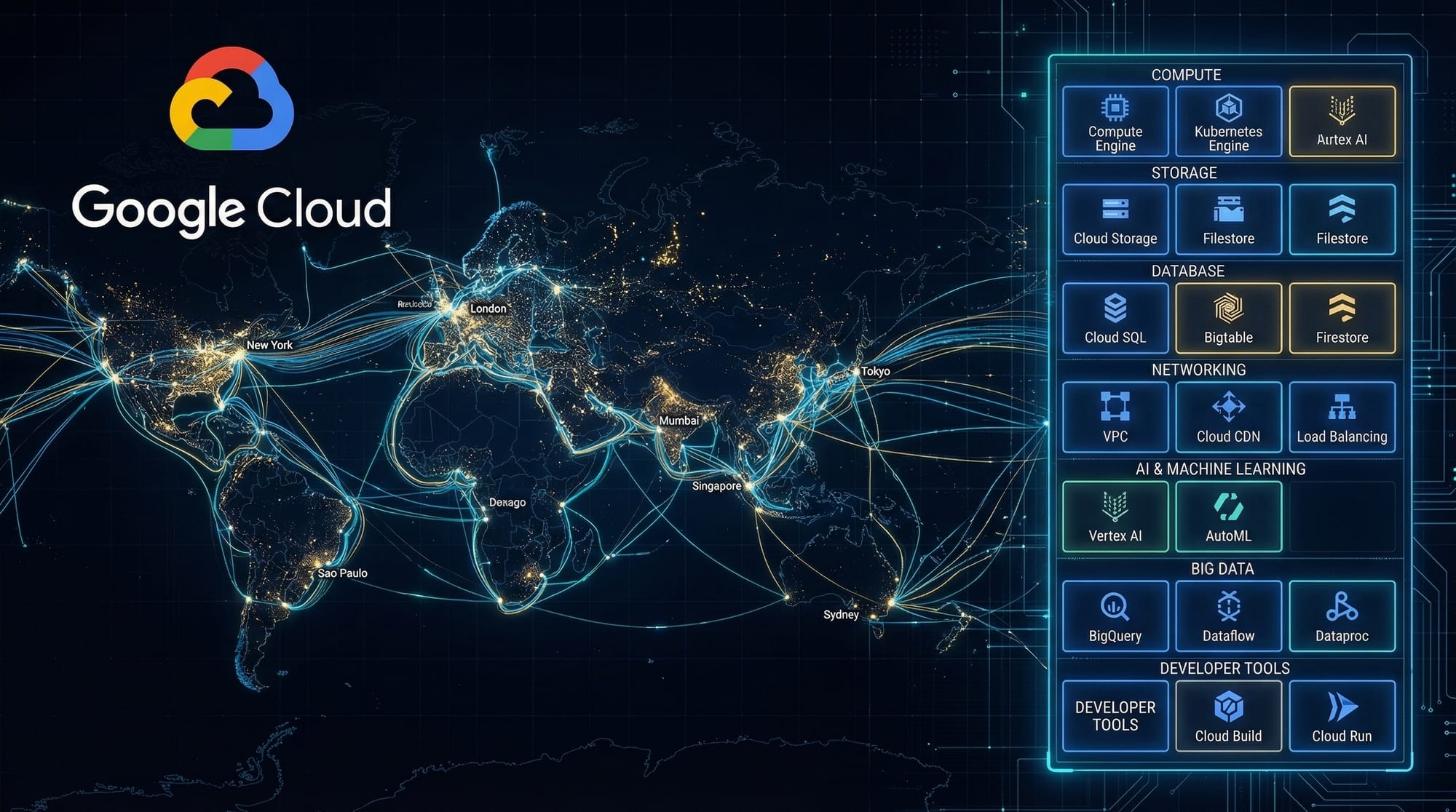
The Google Cloud Platform (GCP) Tutorial for Beginners 2026 is your complete guide to understanding and using one of the world’s most powerful cloud computing platforms. If you're searching for a gcp tutorial, google cloud tutorial, or want to learn gcp 2026, you're in the right place.
Google Cloud Platform (GCP) is a suite of cloud services offered by Google that allows you to build, deploy, and scale applications on the same infrastructure that powers Google services like YouTube, Gmail, and Google Search.
For Pakistani students in cities like Lahore, Karachi, and Islamabad, learning GCP can open doors to:
- Freelancing opportunities on platforms like Fiverr and Upwork
- Remote jobs with international companies
- Building startups with low infrastructure cost
- Deploying scalable apps for local businesses
With the rise of cloud computing in Pakistan’s tech ecosystem, understanding GCP is no longer optional—it's a competitive advantage.
Prerequisites
Before starting this google cloud tutorial, you should have:
- Basic understanding of computers and the internet
- Familiarity with programming (Python, JavaScript, or Java is helpful but not required)
- Basic knowledge of Linux commands (optional but recommended)
- A Google account (Gmail)
- Willingness to learn and experiment
Core Concepts & Explanation
Cloud Computing Fundamentals
Cloud computing means using remote servers (on the internet) instead of your local computer to store data and run applications.
There are three main types:
- IaaS (Infrastructure as a Service) – Virtual machines, storage (e.g., Compute Engine)
- PaaS (Platform as a Service) – Platforms to deploy apps (e.g., App Engine)
- SaaS (Software as a Service) – Ready-to-use apps (e.g., Google Docs)
Example:
Ahmad runs a small e-commerce store in Karachi. Instead of buying expensive servers, he uses GCP to host his website and database.
GCP Resource Hierarchy
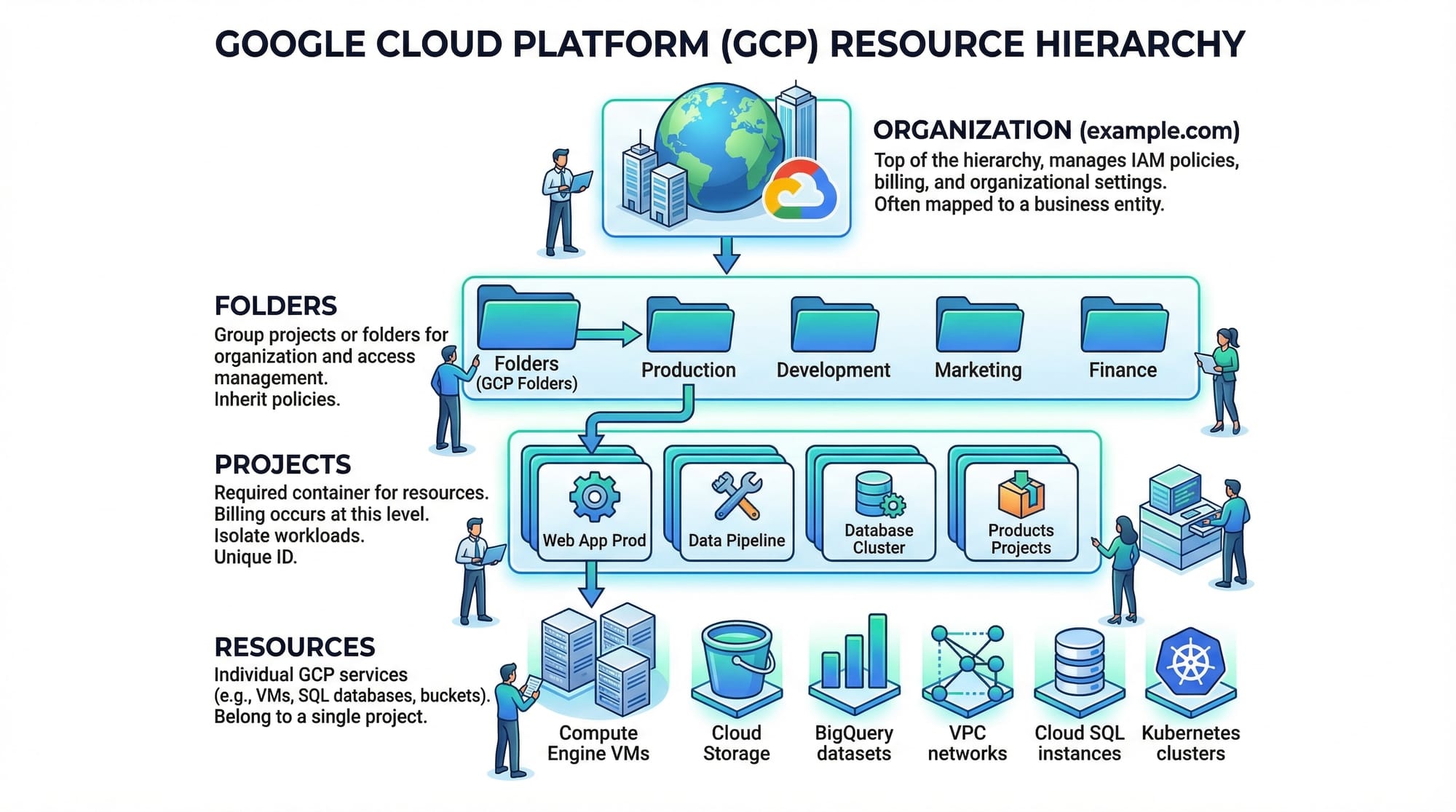
GCP organizes resources in a structured hierarchy:
- Organization – Your company or institution
- Folder – Departments (optional)
- Project – Core working unit
- Resources – VMs, storage, databases
Example:
Fatima creates a project called online-shop-pk and deploys her website, database, and APIs inside it.
Compute Services in GCP
Compute services allow you to run applications:
- Compute Engine – Virtual machines (like AWS EC2)
- App Engine – Fully managed platform
- Cloud Run – Run containers serverlessly
- Cloud Functions – Event-driven serverless functions
Example:
Ali deploys a Node.js app using Cloud Run without managing servers.
Storage and Databases
GCP provides multiple storage options:
- Cloud Storage – Object storage (like Google Drive for developers)
- Cloud SQL – Managed MySQL/PostgreSQL
- Firestore – NoSQL database
- BigQuery – Data analytics
Example:
A startup in Islamabad stores user images in Cloud Storage and user data in Firestore.
Identity and Access Management (IAM)
IAM controls who can access what:
- Roles: Viewer, Editor, Owner
- Permissions: Specific actions
- Members: Users, groups, service accounts
Example:
A teacher gives students "Viewer" access to a project for learning purposes.
Practical Code Examples
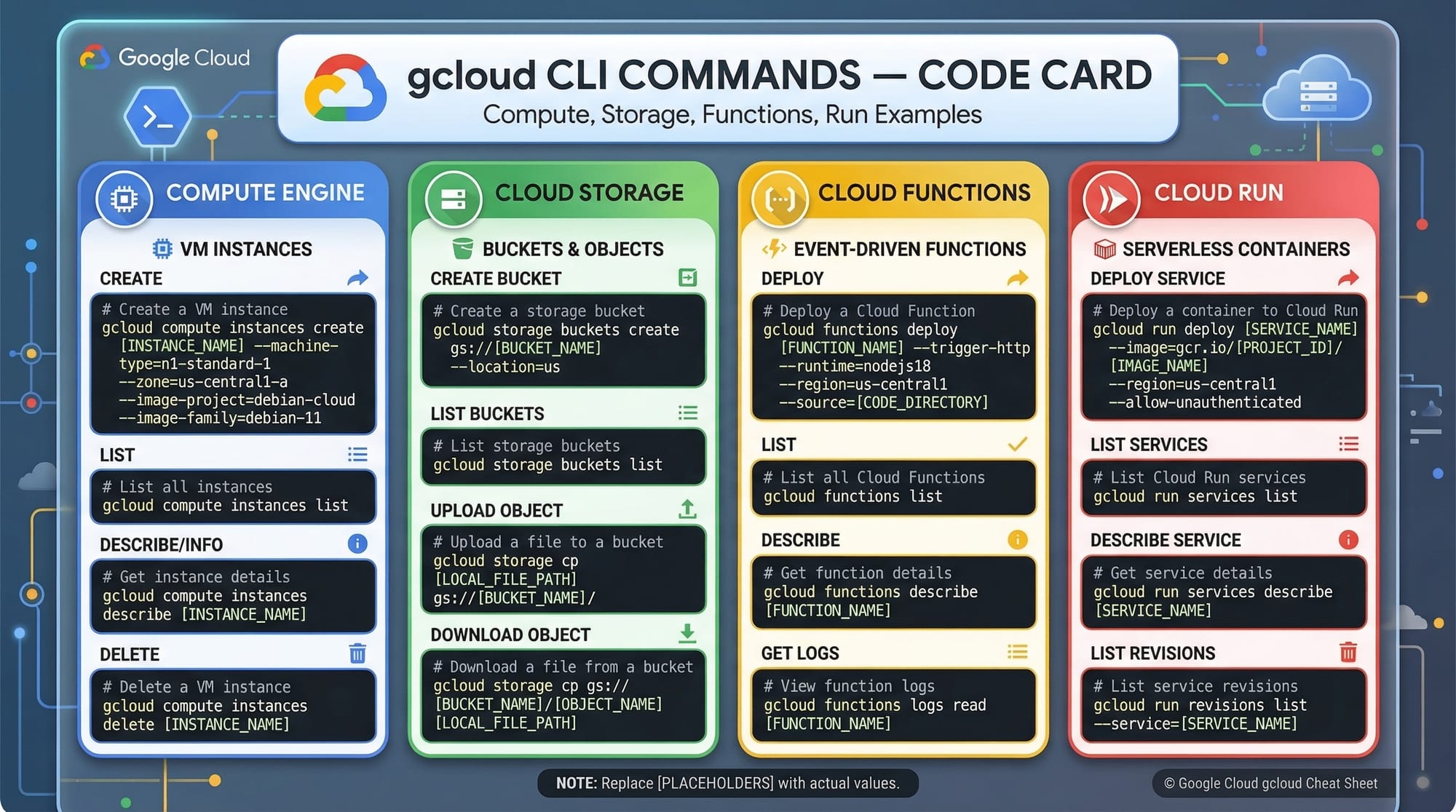
Example 1: Create a Virtual Machine using gcloud CLI
# Step 1: Set your project
gcloud config set project my-first-project

# Step 2: Create a VM instance
gcloud compute instances create my-vm-instance \
    --zone=asia-south1-a \
    --machine-type=e2-medium \
    --image-family=debian-11 \
    --image-project=debian-cloud
Explanation:
gcloud config set project my-first-project
→ Sets the active project where resources will be createdgcloud compute instances create my-vm-instance
→ Creates a virtual machine named "my-vm-instance"--zone=asia-south1-a
→ Specifies region (close to Pakistan for better latency)--machine-type=e2-medium
→ Defines CPU and RAM configuration--image-family=debian-11
→ Uses Debian Linux OS--image-project=debian-cloud
→ Official Debian image source
Example 2: Real-World Application – Deploy a Simple Web App
# Step 1: Create a Cloud Run service
gcloud run deploy my-web-app \
  --image=gcr.io/my-project/my-app-image \
  --platform=managed \
  --region=asia-south1 \
  --allow-unauthenticated
Explanation:
gcloud run deploy my-web-app
→ Deploys a containerized web app--image=gcr.io/my-project/my-app-image
→ Docker image stored in Google Container Registry--platform=managed
→ Fully managed serverless environment--region=asia-south1
→ Deploys near Pakistan--allow-unauthenticated
→ Makes app publicly accessible
Real-world use case:
A freelancer from Lahore deploys a portfolio website using Cloud Run and shares it with clients globally.
Common Mistakes & How to Avoid Them
Mistake 1: Not Setting Budget Alerts
Many beginners forget billing controls and get unexpected charges.
Fix:
- Go to Billing → Budgets & Alerts
- Set limit (e.g., PKR 2000/month)
Mistake 2: Using Wrong Region
Choosing distant regions increases latency.
Fix:
- Use
asia-south1(Mumbai) or nearby regions
Mistake 3: Leaving Resources Running
VMs and services continue billing even if unused.
Fix:
gcloud compute instances stop my-vm-instance
Mistake 4: Overusing Owner Permissions
Giving full access can be risky.
Fix:
- Use least privilege principle
- Assign Viewer/Editor roles instead
Practice Exercises
Exercise 1: Create and Stop a VM
Problem:
Create a VM instance and then stop it after 5 minutes.
Solution:
gcloud compute instances create test-vm --zone=asia-south1-a

# Stop after usage
gcloud compute instances stop test-vm
Explanation:
- First command creates VM
- Second command stops it to avoid billing
Exercise 2: Upload File to Cloud Storage
Problem:
Upload a file to a bucket.
Solution:
# Create bucket
gsutil mb gs://my-bucket-pk

# Upload file
gsutil cp file.txt gs://my-bucket-pk
Explanation:
gsutil mb→ Creates bucketgsutil cp→ Uploads file
Frequently Asked Questions
What is Google Cloud Platform (GCP)?
GCP is a cloud computing platform by Google that provides services like computing, storage, and databases over the internet. It allows developers to build scalable applications without managing physical servers.
How do I start learning GCP in Pakistan?
You can start by creating a free Google Cloud account, exploring the free tier, and following beginner tutorials like this one. Practice using real projects to build confidence.
Is GCP free for students?
Yes, GCP offers free credits (usually $300) for new users, which Pakistani students can use for learning and experimentation.
Which programming language is best for GCP?
GCP supports many languages like Python, JavaScript, Java, and Go. Python is highly recommended for beginners due to its simplicity.
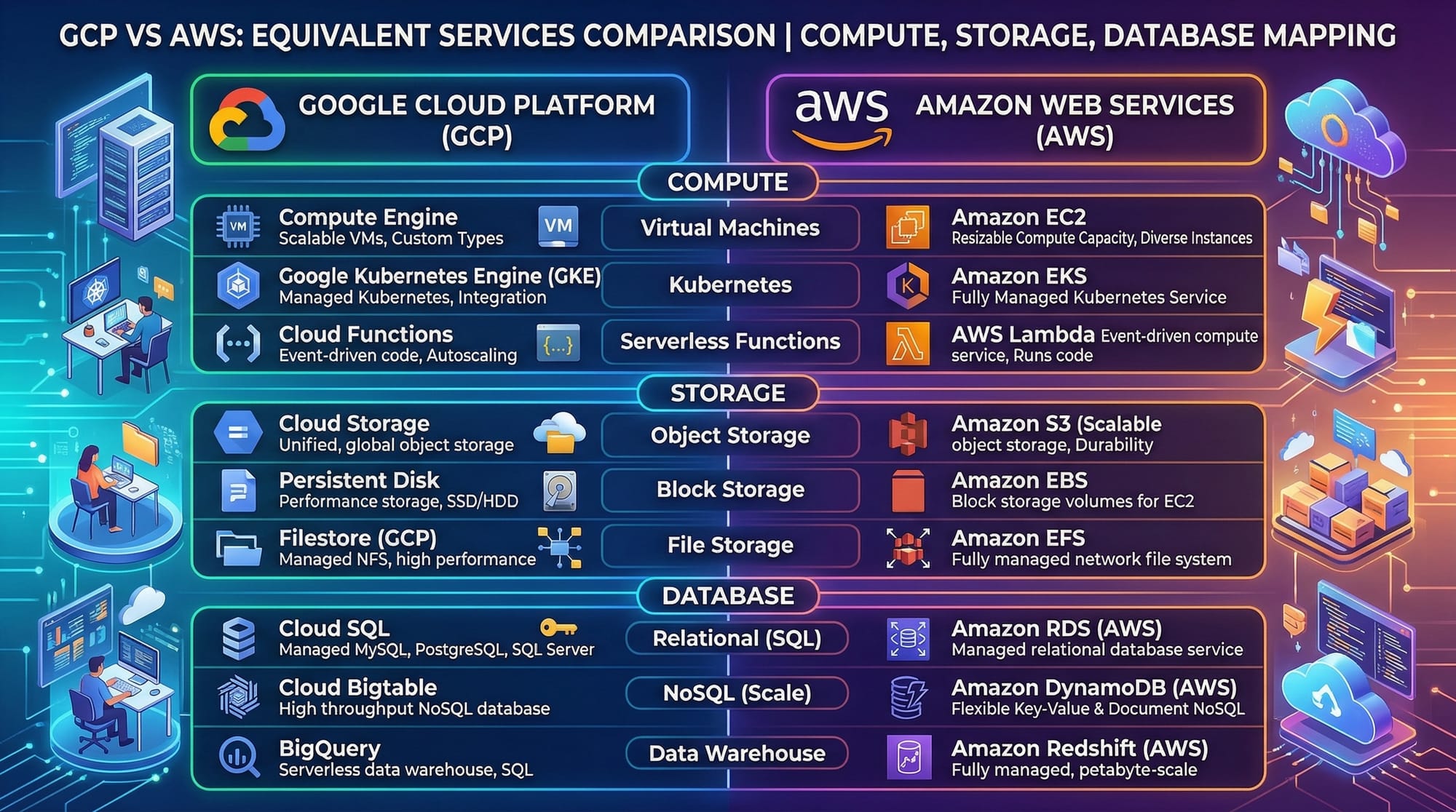
What is the difference between GCP and AWS?
Both are cloud platforms, but GCP is known for data analytics and AI tools, while AWS has a larger service ecosystem. Beginners can start with either based on preference.
Summary & Key Takeaways
- GCP is a powerful cloud platform used globally
- Pakistani students can benefit from freelancing and remote jobs
- Core concepts include compute, storage, IAM, and networking
- Always monitor billing and choose correct regions
- Hands-on practice is essential to mastering GCP
Next Steps & Related Tutorials
Now that you’ve completed this gcp tutorial, continue your cloud journey with:
- Learn how cloud compares across providers in our AWS for Beginners 2026 guide
- Explore Microsoft cloud in our Azure Tutorial for Beginners
- Understand deployment pipelines in our CI/CD Tutorial with GitHub Actions
- Master containers with our Docker and Kubernetes Complete Guide
These tutorials will help you become a complete cloud engineer and boost your career in Pakistan’s growing tech industry 🚀
Test Your Python Knowledge!
Finished reading? Take a quick quiz to see how much you've learned from this tutorial.