Bash Scripting Advanced Functions Arrays & Error Handling
Introduction
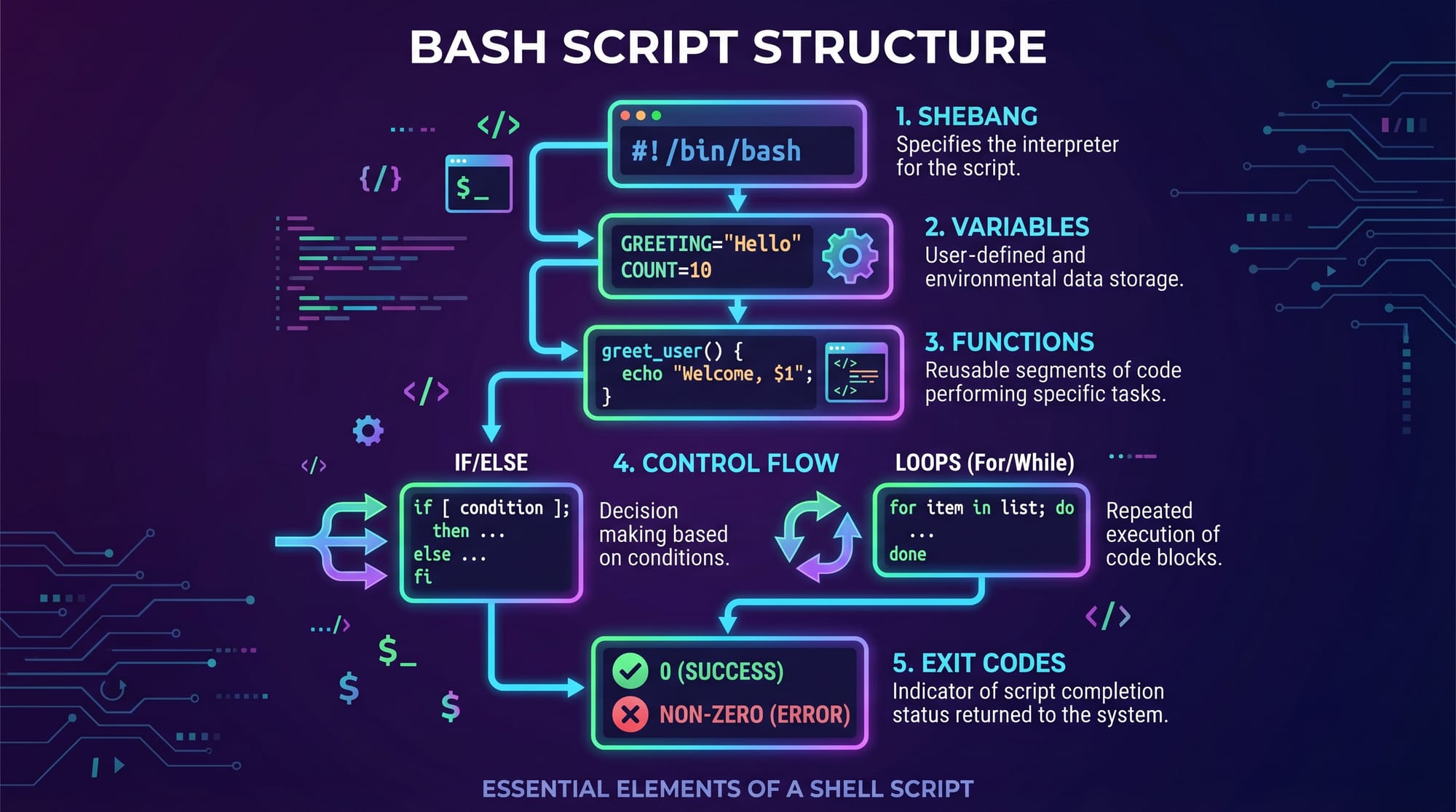
Advanced Bash scripting is a powerful skill for anyone working with Linux systems, DevOps tools, or server automation. In this tutorial titled “Bash Scripting Advanced: Functions, Arrays & Error Handling”, you will learn how to write professional-level scripts using advanced bash scripting techniques, including bash functions, bash arrays, and robust error handling strategies.
For Pakistani students studying computer science in universities in Lahore, Karachi, Islamabad, or online platforms, Bash scripting is especially important because:
- It is widely used in Linux servers and cloud systems
- It helps automate repetitive tasks in internships and jobs
- It builds strong fundamentals for DevOps, cybersecurity, and backend engineering careers
Whether you are managing a small project at home or working on a real server in a university lab, Bash scripting gives you control and efficiency.
Prerequisites
Before learning advanced bash scripting, you should already understand:
- Basic Linux commands (ls, cd, cp, mv, rm)
- File permissions in Linux
- Simple shell scripting (variables, loops, if statements)
- Basic terminal usage
- Text editors like nano or vim
If you are not comfortable with these topics, first review Linux Basics tutorial on theiqra.edu.pk.
Core Concepts & Explanation
Bash Functions: Reusable Code Blocks
Bash functions allow you to write reusable code instead of repeating the same logic again and again.
Example Syntax:
function greet() {
    echo "Hello, Ahmad!"
}
Explanation:
function greet()→ defines a function named greet{→ starts function blockecho "Hello, Ahmad!"→ prints message}→ ends function
Why Functions Matter:
- Improve code readability
- Reduce duplication
- Make debugging easier
For example, in Karachi-based IT companies, developers often reuse functions for logging and deployment scripts.
Bash Arrays: Handling Multiple Values
Arrays allow you to store multiple values in a single variable.
Indexed Array Example:
students=("Ali" "Fatima" "Usman")
Explanation:
students→ array name( )→ defines array"Ali" "Fatima" "Usman"→ elements stored in order
Accessing Values:
echo ${students[1]}
Explanation:
${students[1]}→ accesses second element (Fatima)- Bash indexing starts at 0
Associative Arrays (Key-Value Pairs):
declare -A marks
marks[Ali]=85
marks[Fatima]=92
Explanation:
declare -A→ creates associative arraymarks[Ali]=85→ assigns value to key "Ali"

Error Handling in Bash Scripts
Error handling ensures your script does not fail silently.
Common Techniques:
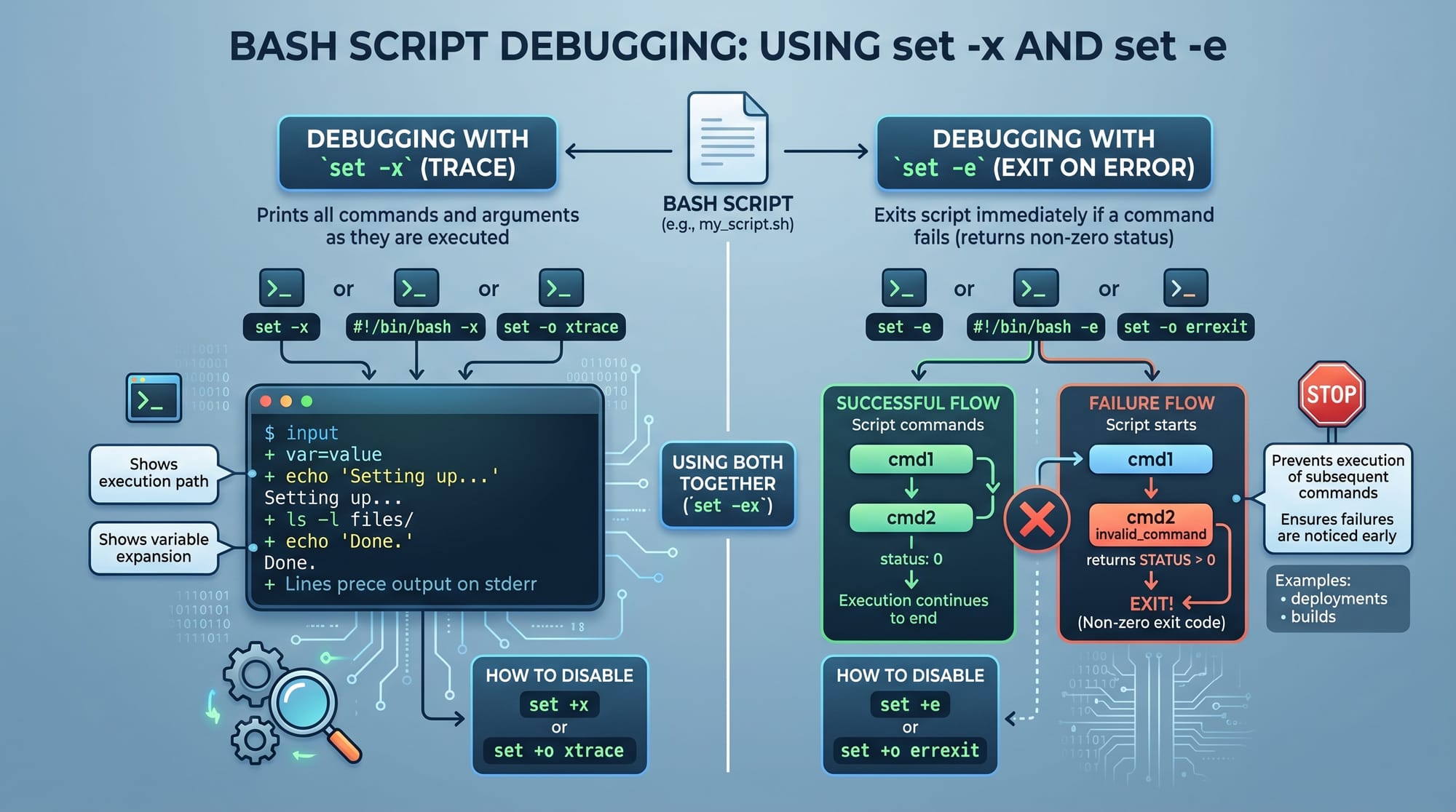
1. Exit on Error
set -e
Explanation:
- Script stops immediately if any command fails
2. Debug Mode
set -x
Explanation:
- Prints each command before execution
- Useful for debugging scripts
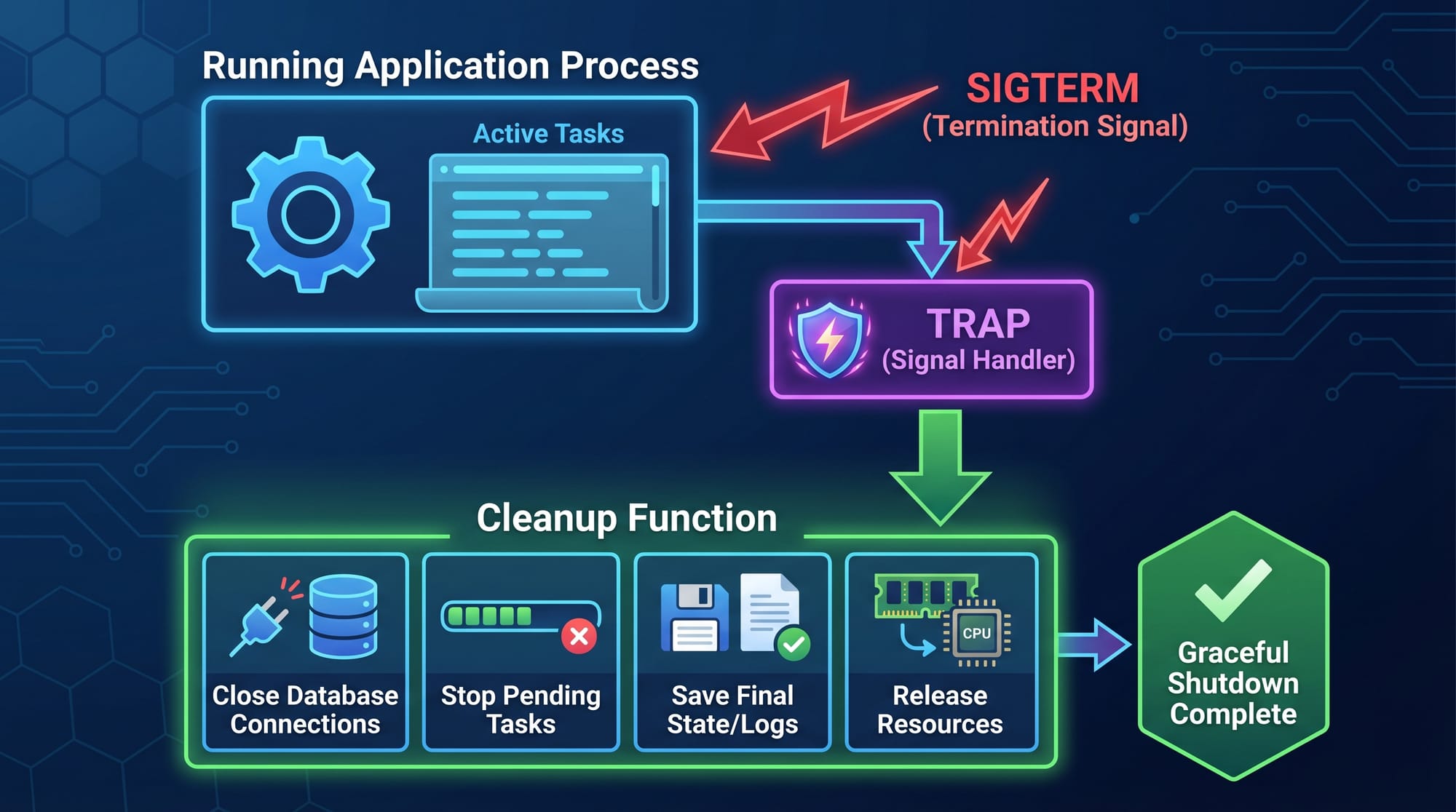
3. Trap for Cleanup
trap 'echo "Script interrupted"; exit' INT
Explanation:
trapcatches signals like CTRL+C- Executes cleanup command before exit
Practical Code Examples
Example 1: Student Marks Processing System
#!/bin/bash

declare -A marks

marks[Ali]=78
marks[Fatima]=91
marks[Ahmed]=85

print_marks() {
    for student in "${!marks[@]}"
    do
        echo "$student scored ${marks[$student]}"
    done
}

print_marks
Line-by-Line Explanation:
#!/bin/bash→ tells system to use Bash interpreterdeclare -A marks→ creates associative arraymarks[Ali]=78→ assigns marks to Aliprint_marks()→ defines functionfor student in "${!marks[@]}"→ loops through all keysecho→ prints student name and marksprint_marks→ calls function
This type of script is useful for teachers in Lahore managing student records.
Example 2: Backup Script with Error Handling
#!/bin/bash

set -e

SOURCE_DIR="/home/ahmad/documents"
BACKUP_DIR="/home/ahmad/backup"

create_backup() {
    mkdir -p "$BACKUP_DIR"
    cp -r "$SOURCE_DIR"/* "$BACKUP_DIR"
    echo "Backup completed successfully"
}

trap 'echo "Backup failed or interrupted"; exit 1' INT TERM

create_backup
Line-by-Line Explanation:
set -e→ stops script if any command failsSOURCE_DIR→ folder to backupBACKUP_DIR→ destination foldercreate_backup()→ function definitionmkdir -p→ creates backup directory if not existscp -r→ copies files recursivelyecho→ success messagetrap→ handles interruption signalscreate_backup→ runs function
Common Mistakes & How to Avoid Them
Mistake 1: Not Quoting Variables
Many beginners forget to use quotes around variables.
Wrong Example:
cp $SOURCE_DIR/* $BACKUP_DIR
Problem:
- Fails if paths contain spaces
Correct Fix:
cp "$SOURCE_DIR"/* "$BACKUP_DIR"
Explanation:
- Quotes protect file paths from word splitting
Mistake 2: Ignoring Exit Codes
Some students in Islamabad ignore command success/failure.
Wrong Example:
cp file.txt /backup/
echo "Done"
Problem:
- Even if copy fails, script says "Done"
Correct Fix:
cp file.txt /backup/ || echo "Copy failed"
Explanation:
||runs second command if first fails
Mistake 3: Not Using Trap for Cleanup
Without cleanup, temporary files may remain.
trap 'rm -f /tmp/tempfile; echo "Cleaned up"' EXIT
Explanation:
- Ensures cleanup always runs
Practice Exercises
Exercise 1: Create a Simple Calculator Function
Problem:
Write a Bash function that adds two numbers.
Solution:
add() {
    sum=$(( $1 + $2 ))
    echo "Sum is $sum"
}

add 10 20
Explanation:
$1and$2are function arguments$(( ))performs arithmeticechoprints result
Exercise 2: Student List Using Arrays
Problem:
Store 3 student names and print them.
Solution:
students=("Ali" "Fatima" "Usman")

for s in "${students[@]}"
do
    echo "Student: $s"
done
Explanation:
- Array stores names
- Loop prints each student
"${students[@]}"expands all elements
Frequently Asked Questions
## What are bash functions used for?
Bash functions are used to organize code into reusable blocks. They help reduce repetition and make scripts easier to maintain. In advanced bash scripting, functions are essential for structuring complex automation tasks.
## How do bash arrays work?
Bash arrays store multiple values in one variable. You can access elements using indexes or keys (associative arrays). They are useful for handling lists like students, files, or configuration values.
## What is the purpose of error handling in bash?
Error handling ensures scripts stop or respond correctly when something goes wrong. It prevents data loss, incorrect outputs, and silent failures in automation scripts.
## How do I debug a bash script?
You can debug using set -x to trace commands and set -e to stop on errors. These tools help identify where the script is failing during execution.
## Why is advanced bash scripting important for students in Pakistan?
Advanced bash scripting helps Pakistani students build real-world skills for freelancing, DevOps jobs, and internships. It is widely used in companies in Lahore, Karachi, and Islamabad for automation and server management.
Summary & Key Takeaways
- Bash functions help reuse and organize code efficiently
- Bash arrays store multiple values in indexed or key-value format
- Error handling prevents script failures and improves reliability
- Tools like
set -e,set -x, andtrapare essential for debugging - Real-world scripts are widely used in Linux server environments
- Mastering these skills is important for DevOps and backend careers
Next Steps & Related Tutorials
To strengthen your Linux scripting skills, continue learning:
- Learn system automation in Linux Basics tutorial on theiqra.edu.pk
- Explore advanced command usage in Zsh Tutorial
- Understand server control in Linux Networking Guide
- Build real-world projects using Shell Scripting for Beginners
Keep practicing daily, and try writing your own automation scripts for tasks like backups, log monitoring, and file management.
Test Your Python Knowledge!
Finished reading? Take a quick quiz to see how much you've learned from this tutorial.