Contentful Tutorial Enterprise Headless CMS Guide
Introduction
The Contentful Tutorial: Enterprise Headless CMS Guide is a complete beginner-to-intermediate learning resource designed to help students understand how modern content management systems work using Contentful, one of the world’s most popular headless CMS platforms.
Unlike traditional CMS platforms (like WordPress), Contentful separates the backend content system from the frontend presentation layer. This means developers can build websites using React, Next.js, Vue, or any other framework while Contentful acts as the central content hub.
For Pakistani students in cities like Lahore, Karachi, and Islamabad, learning Contentful is extremely valuable because many freelancing and remote jobs now require headless CMS skills. Companies pay in USD or PKR equivalents (50,000–300,000 PKR/month for juniors in Pakistan’s market) for developers who can integrate APIs and manage scalable content systems.
In this tutorial, you will learn how to use Contentful API, structure content models, and fetch data using contentful javascript SDK.
By the end, you will be able to build real-world content-driven applications like blogs, e-commerce pages, and educational websites such as theiqra.edu.pk.
Prerequisites
Before starting this Contentful tutorial, students should have a basic understanding of:
- HTML, CSS, and JavaScript fundamentals
- Basic knowledge of REST APIs
- Familiarity with React or Next.js (recommended but not required)
- Node.js installed on your system
- Basic understanding of JSON data structures
You should also have:
- A free Contentful account
- A code editor like VS Code
- Internet connection for API requests
Even if you are a beginner from Pakistan’s intermediate CS background (ICS, FSc Pre-Engineering, or BSCS 1st year), you can follow along easily.
Core Concepts & Explanation
Content Models (Content Types, Fields, and Entries)
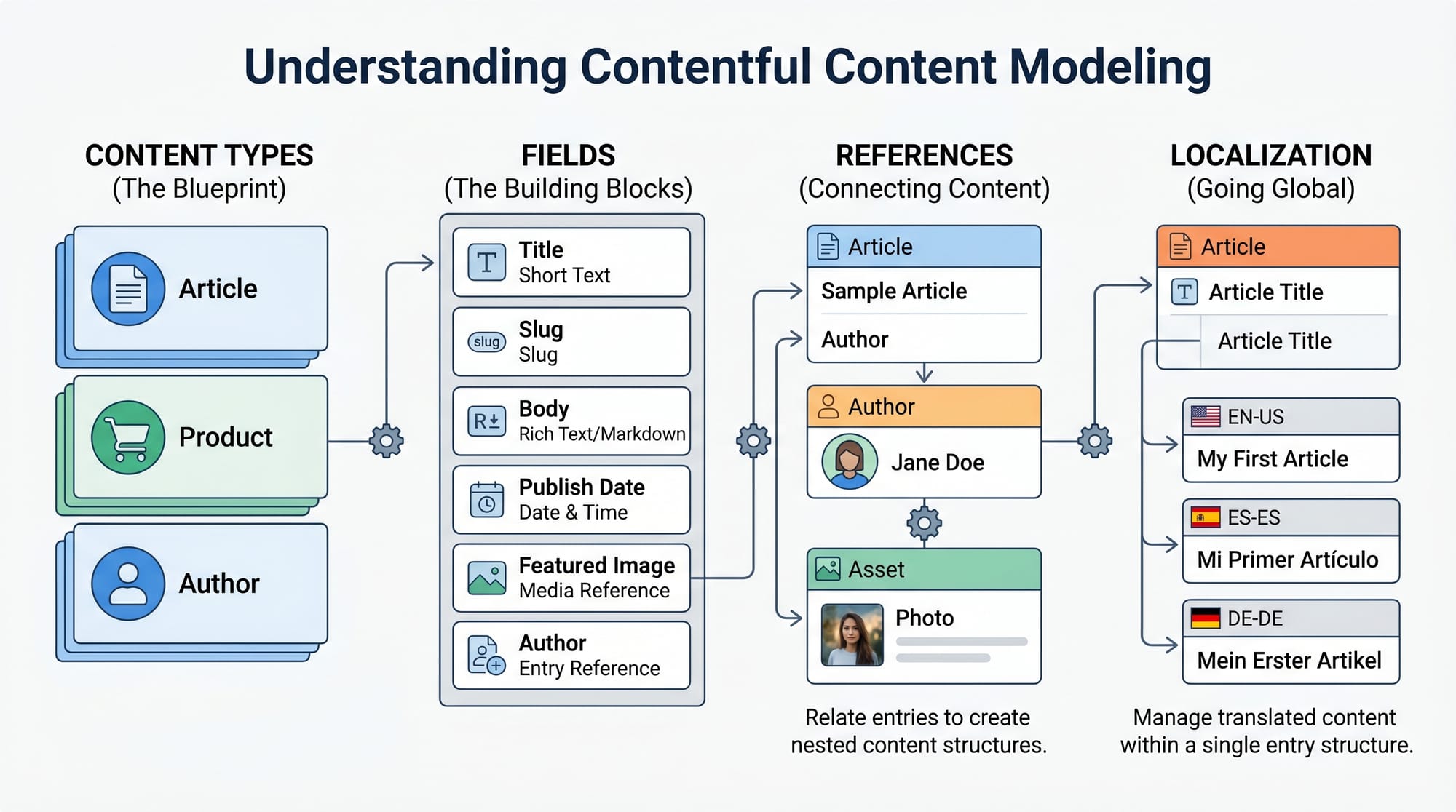
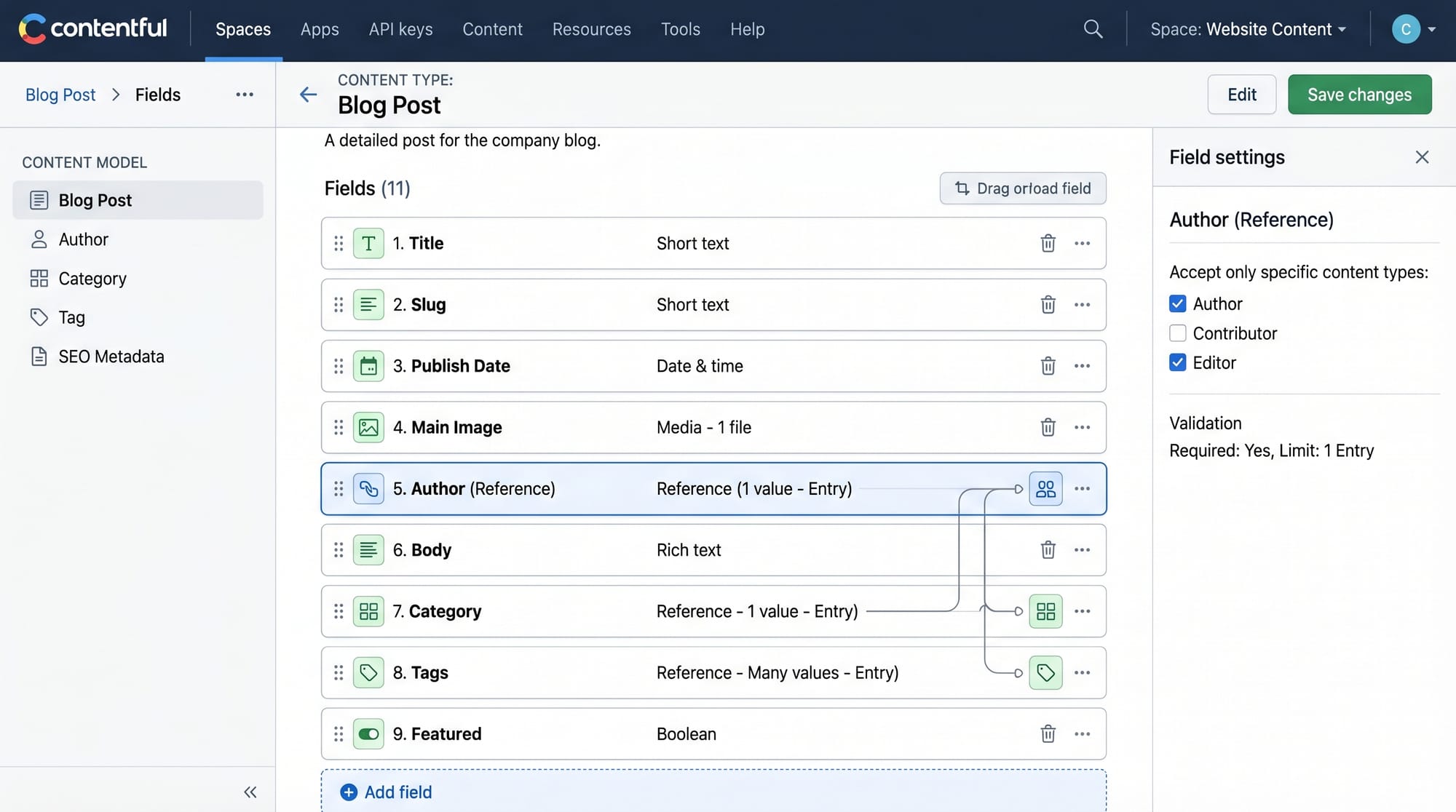
In Contentful, everything starts with a Content Model. A content model defines the structure of your data.
For example, a blog website in Pakistan might have:
- Blog Post
- Author (e.g., Ahmad from Lahore)
- Category (Tech, Education, News)
Each Content Type contains fields like:
- Title (Text)
- Body (Rich Text)
- Image (Asset)
- Published Date
Once you create a content type, you add actual data called Entries.
Content Delivery API vs Management API
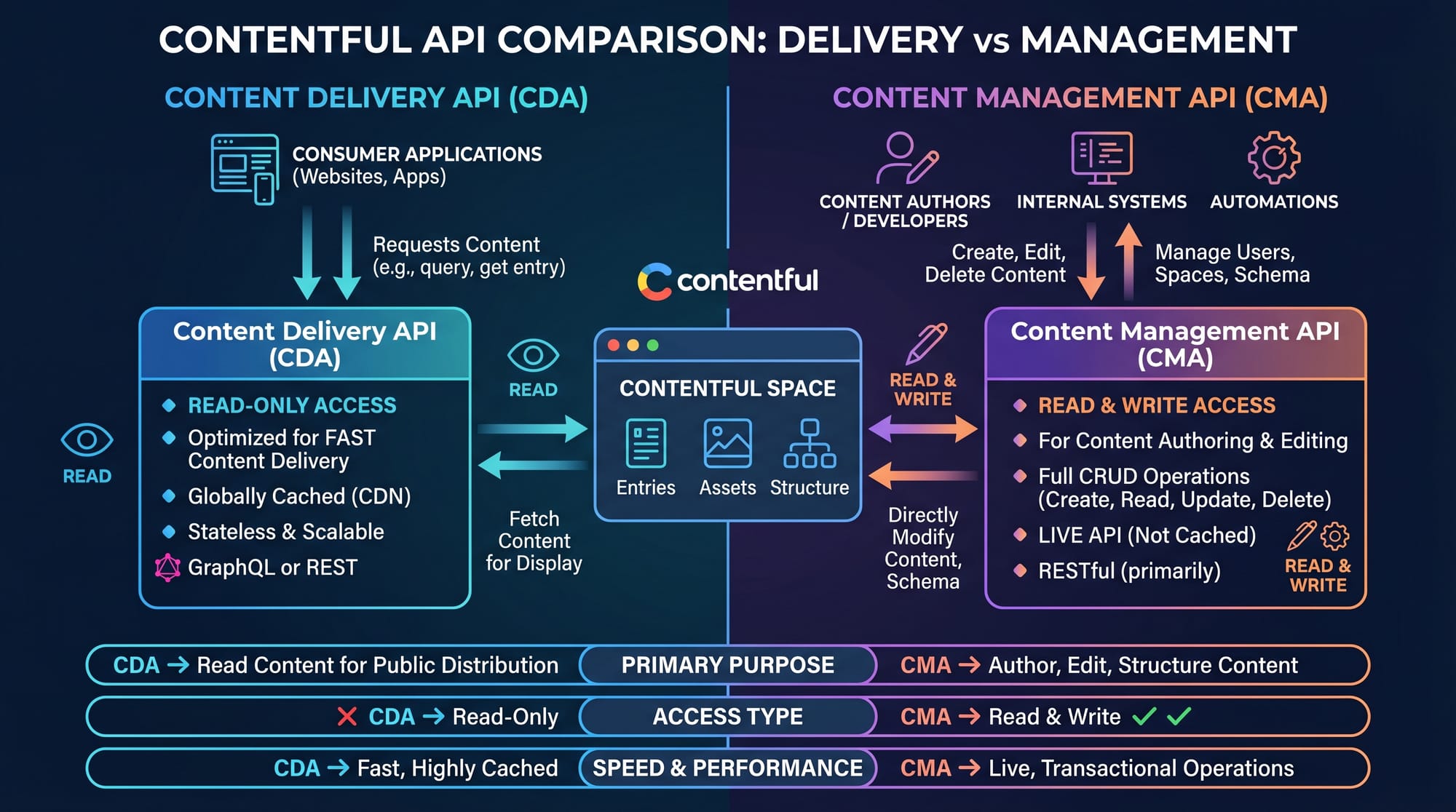
Contentful provides two major APIs:
- Content Delivery API (CDA)
- Used to fetch published content
- Read-only access
- Used in frontend applications
- Content Management API (CMA)
- Used to create, update, delete content
- Requires authentication
- Used in admin dashboards
For example:
- CDA → Showing blog posts on a website
- CMA → Adding a new blog post from admin panel
Practical Code Examples
Example 1: Setting Up Contentful Client (JavaScript)
First, install the Contentful SDK:
npm install contentful
Now create a client:
import { createClient } from "contentful";

// Step 1: Create client connection
const client = createClient({
  space: "your_space_id",
  accessToken: "your_access_token"
});

// Step 2: Fetch entries
client.getEntries()
  .then((response) => console.log(response.items));
Explanation Line by Line:
import { createClient } from "contentful";
Imports the Contentful SDK function.const client = createClient({...})
Creates a connection to your Contentful space using credentials.space
This is your project ID from Contentful dashboard.accessToken
Public API key to access published content.getEntries()
Fetches all content entries from Contentful..then(...)
Handles the API response and prints data.
Example 2: Real-World Blog Application (React)
import { useEffect, useState } from "react";
import { createClient } from "contentful";

const client = createClient({
  space: "abc123space",
  accessToken: "xyz789token"
});

export default function Blog() {
  const [posts, setPosts] = useState([]);

  useEffect(() => {
    client.getEntries({ content_type: "blogPost" })
      .then((res) => setPosts(res.items));
  }, []);

  return (
    <div>
      <h1>Pakistan Tech Blog</h1>
      {posts.map((post) => (
        <div key={post.sys.id}>
          <h2>{post.fields.title}</h2>
          <p>{post.fields.description}</p>
        </div>
      ))}
    </div>
  );
}
Explanation Line by Line:
useState([])
Stores blog posts in state.useEffect()
Runs API call when page loads.getEntries({ content_type })
Fetches only blog posts from Contentful.setPosts(res.items)
Saves API data into state.posts.map()
Loops through posts and displays them.
This is how modern Pakistani startups build scalable blogs and news portals.
Common Mistakes & How to Avoid Them
Mistake 1: Using Wrong API Token
Many students mistakenly use the Management API token in frontend apps.
Problem:
- App fails to load data
- Security risk
Fix:
Always use Content Delivery API token for frontend:
accessToken: "CDA_public_token"
Mistake 2: Not Defining Content Types Properly
If your content model is not structured correctly, your API returns messy data.
Problem:
- Undefined fields
- Broken UI
Fix:
Always define structured content types like:
- title (Text)
- slug (Text)
- image (Asset)
Practice Exercises
Exercise 1: Create a Blog API
Problem:
Create a Contentful setup that fetches “Articles” content type and displays titles.
Solution:
client.getEntries({ content_type: "articles" })
  .then(res => console.log(res.items));
This will output all articles stored in Contentful.
Exercise 2: Display Author Name
Problem:
Show author name from linked content type.
Solution:
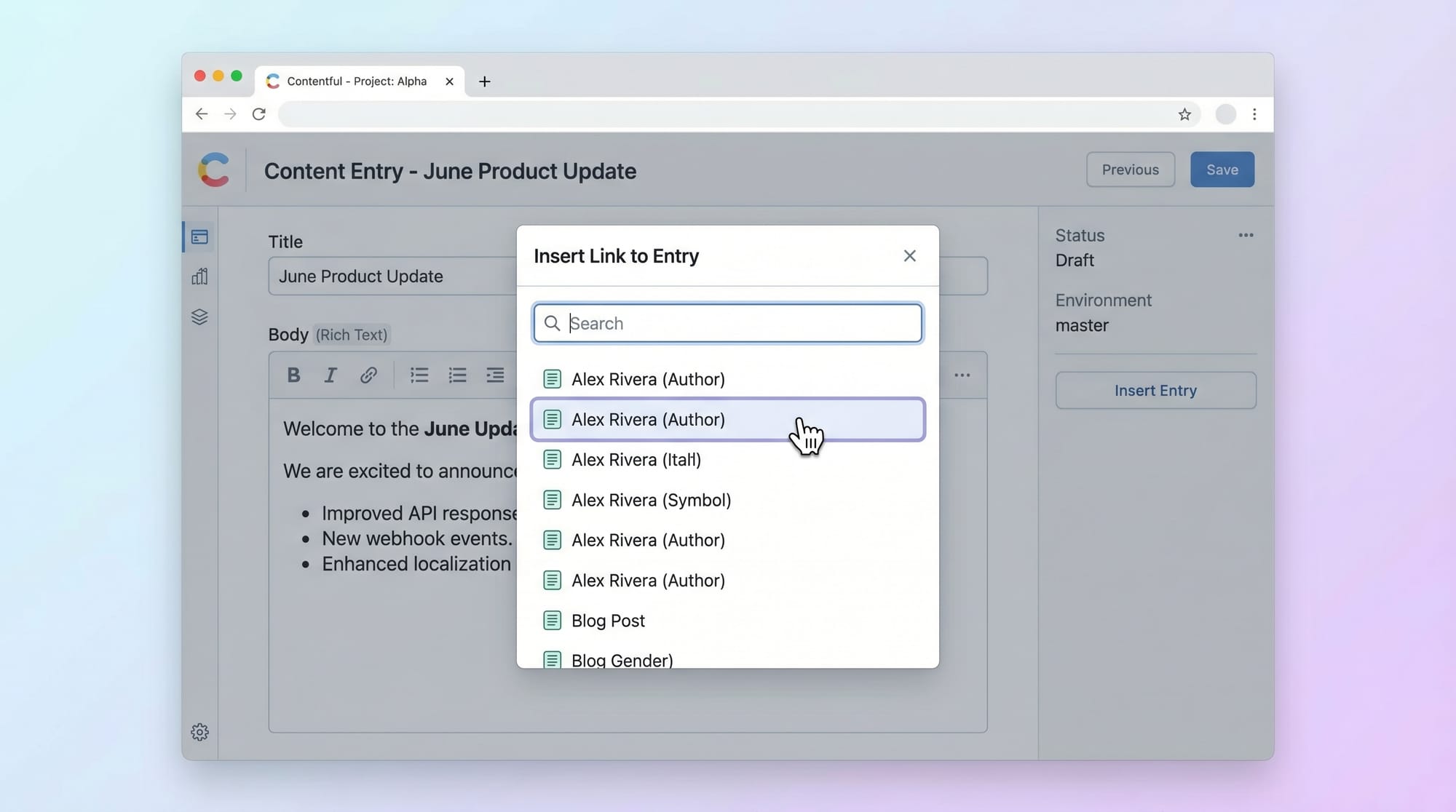
post.fields.author.fields.name
This accesses nested referenced data in Contentful.
Frequently Asked Questions
What is Contentful in simple words?
Contentful is a headless CMS that stores content separately from your website design. Developers use APIs to fetch this content and display it anywhere.
How do I use Contentful API in JavaScript?
You install the Contentful SDK, create a client using space ID and access token, and then use methods like getEntries() to fetch data.
Is Contentful good for beginners in Pakistan?
Yes, it is excellent for beginners because it teaches API integration, content modeling, and real-world development skills used in freelancing.
What is the difference between Contentful and WordPress?
WordPress is a traditional CMS with built-in frontend, while Contentful is headless and provides only backend content via APIs.
Can I use Contentful with React or Next.js?
Yes, Contentful works perfectly with React, Next.js, Vue, and other frontend frameworks using its JavaScript SDK or REST API.
Summary & Key Takeaways
- Contentful is a powerful headless CMS used in modern web development
- It separates content management from frontend design
- Contentful API is used to fetch and manage content
- JavaScript SDK makes integration simple for React/Next.js apps
- Proper content modeling is essential for scalable applications
- Pakistani developers can earn freelance income using Contentful skills
Next Steps & Related Tutorials
Now that you understand Contentful basics, you should continue learning advanced topics:
- Learn how to build dynamic apps with Next.js Tutorial on theiqra.edu.pk
- Explore API data structures in GraphQL Tutorial
- Improve frontend skills with React.js Tutorial for Beginners
- Understand backend integration using Node.js REST API Guide
These tutorials will help you become a full-stack developer capable of building enterprise-level applications for global clients.
Test Your Python Knowledge!
Finished reading? Take a quick quiz to see how much you've learned from this tutorial.