Sanity io Tutorial Structured Content Platform Guide

Introduction
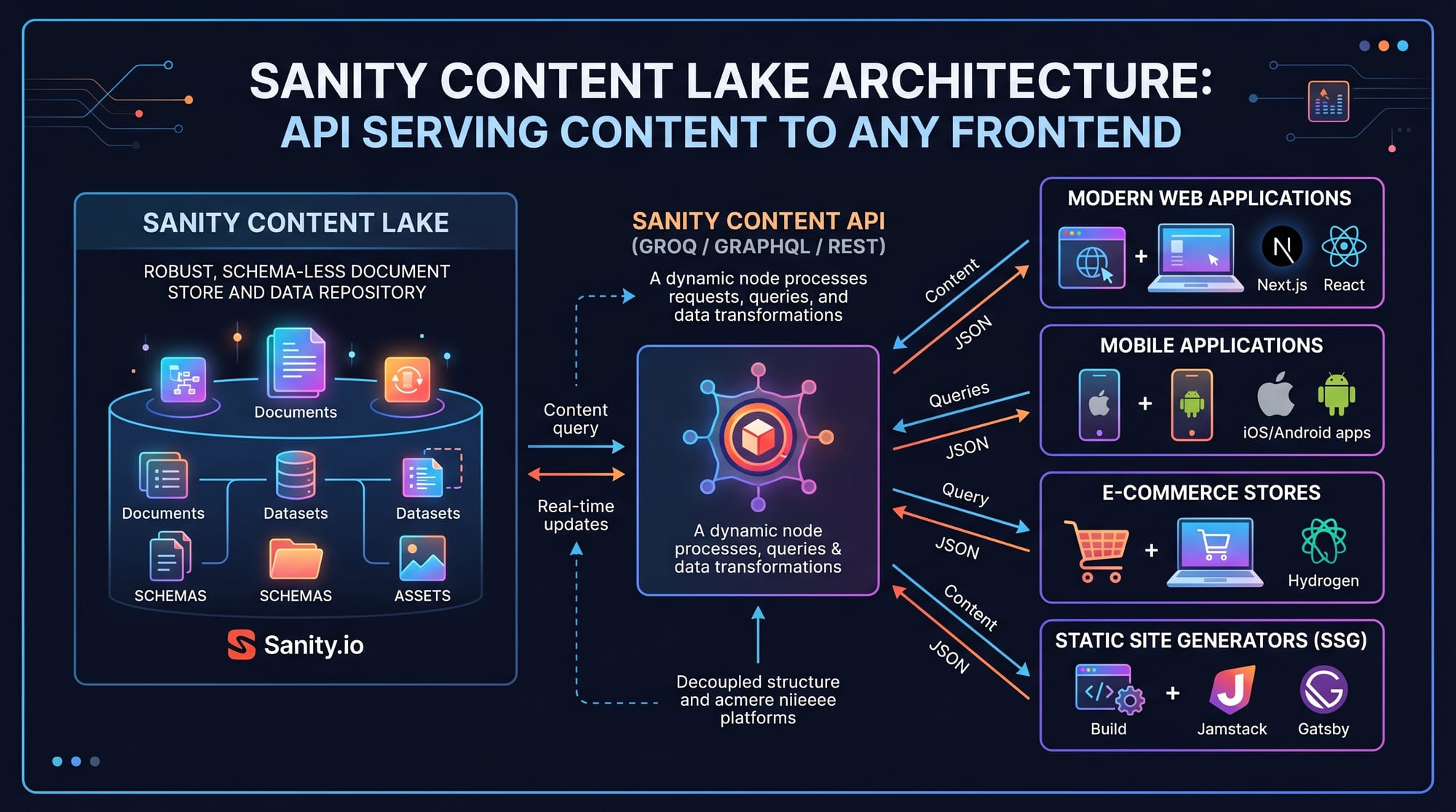
Sanity.io is a modern structured content platform that helps developers and content creators manage data in a flexible, API-driven way. Unlike traditional CMS platforms where content is locked into fixed templates, Sanity allows you to define your own content structure using schemas and then query it using powerful tools like the GROQ query language.
This sanity io tutorial: structured content platform guide is designed for Pakistani students who want to learn modern backend content systems used in real-world web development jobs. Whether you're from Lahore, Karachi, or Islamabad, learning Sanity can help you build professional websites, blogs, and e-commerce platforms.
For example, a student like Ahmad in Islamabad can build a tech blog where content is dynamically fetched and displayed using React or Next.js, while Fatima in Karachi can create an online recipe platform with structured ingredients, categories, and images.
Sanity is widely used in global tech companies, and learning it early gives Pakistani students a strong freelance and job advantage in PKR-based and international markets.
Prerequisites
Before starting this tutorial, you should have:
- Basic understanding of JavaScript
- Familiarity with JSON objects
- Basic knowledge of React or Next.js (recommended)
- Understanding of REST APIs (helpful but not required)
- Node.js installed on your system
If you are a beginner from Pakistan, don’t worry. Even if you are learning web development from scratch, you can still follow along step by step.
Core Concepts & Explanation
Content as Structured Data (Schemas)
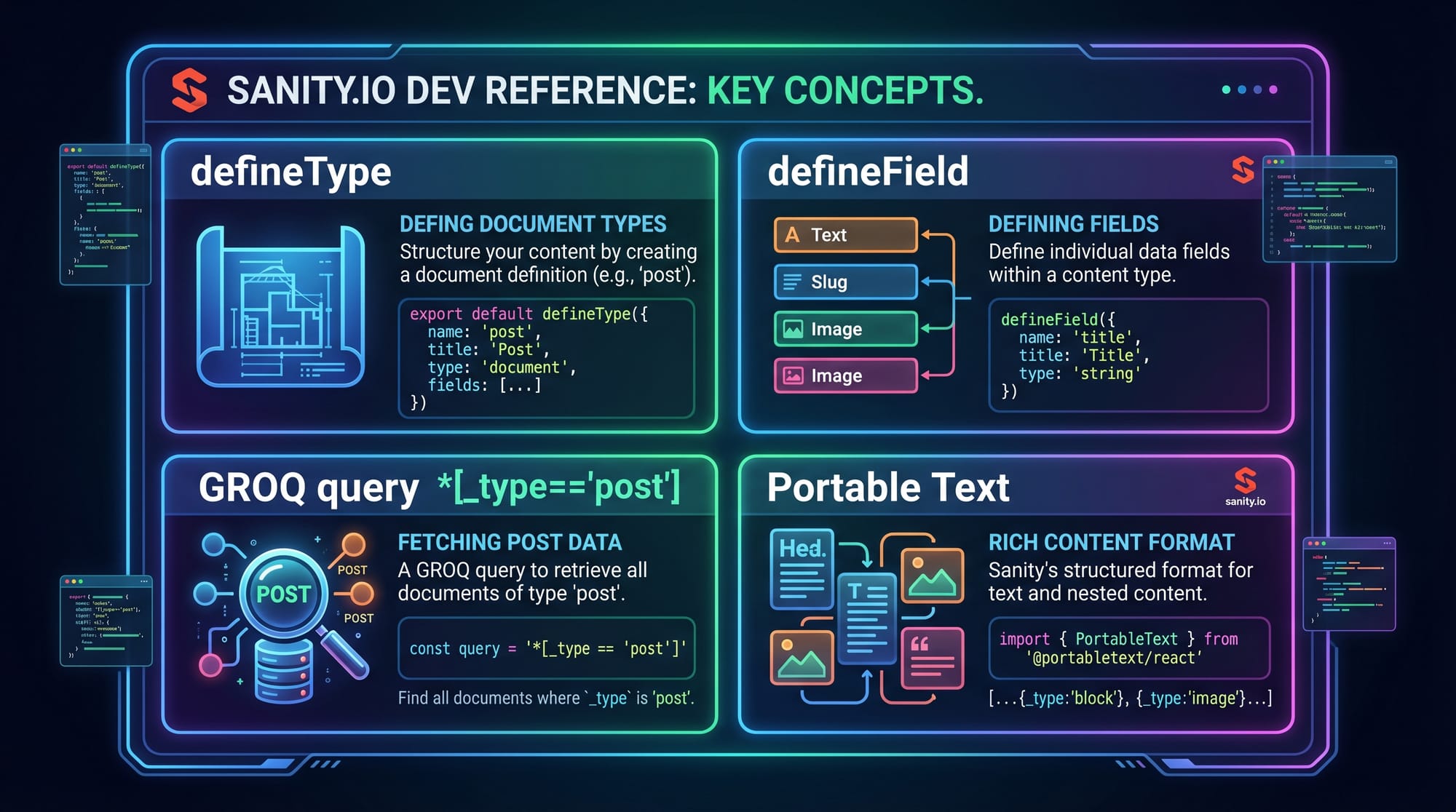
In Sanity, content is not just text—it is structured data defined using schemas. A schema defines what fields a content type has.
Example: A blog post schema may include:
- Title
- Slug
- Author
- Body
- Published date
Instead of writing plain HTML, you define structure using JavaScript objects.
GROQ Query Language Basics
GROQ Query Language is Sanity’s query language used to fetch structured content.
Example query:
*[_type == "post"]{
  title,
  slug,
  publishedAt
}
This means:
*→ select all documents[_type == "post"]→ filter posts only{}→ return selected fields
Portable Text (Rich Content Format)
Portable Text is Sanity’s way of storing rich text (like blog content) in JSON format. It allows you to store:
- Headings
- Paragraphs
- Links
- Images
Instead of storing HTML, everything is structured.
Practical Code Examples
Example 1: Creating a Blog Schema in Sanity
export default {
  name: "post",
  title: "Post",
  type: "document",
  fields: [
    {
      name: "title",
      title: "Title",
      type: "string"
    },
    {
      name: "slug",
      title: "Slug",
      type: "slug",
      options: { source: "title", maxLength: 96 }
    },
    {
      name: "body",
      title: "Body",
      type: "array",
      of: [{ type: "block" }]
    }
  ]
}
Explanation:
- Line 1: Exporting schema object so Sanity can use it
- Line 2-4: Defining content type as "post"
- Line 5-12: Creating fields array
- Line 6-9: Title field (simple text)
- Line 10-14: Slug field for URLs (auto-generated from title)
- Line 15-22: Body field for rich text content
This schema allows students like Ali in Lahore to create blog posts without touching database code.
Example 2: Fetching Data Using GROQ in Real Project
import { createClient } from "@sanity/client";

const client = createClient({
  projectId: "your_project_id",
  dataset: "production",
  useCdn: true
});

export async function getPosts() {
  const posts = await client.fetch(`
    *[_type == "post"] | order(publishedAt desc){
      title,
      slug,
      publishedAt
    }
  `);

  return posts;
}
Explanation:
- Line 1: Import Sanity client
- Line 3: Initialize client connection
- Line 4-8: Configuration settings
- Line 10: Function to fetch posts
- Line 11-14: GROQ query fetching posts sorted by newest first
- Line 16: Returning data to frontend
This is commonly used in Next.js blogs, news websites, and dashboards.
Common Mistakes & How to Avoid Them
Mistake 1: Not Structuring Content Properly
Many beginners treat Sanity like a normal text editor.
Wrong approach:
- Storing everything in a single text field
Correct approach:
- Break content into structured fields like title, category, author
Fix: Always design schema first before writing content.
Mistake 2: Writing Incorrect GROQ Queries
Beginners often forget brackets or filtering logic.
Wrong:
*post.title
Correct:
*[_type == "post"]{ title }
Fix: Always start with *[] and define filters inside brackets.
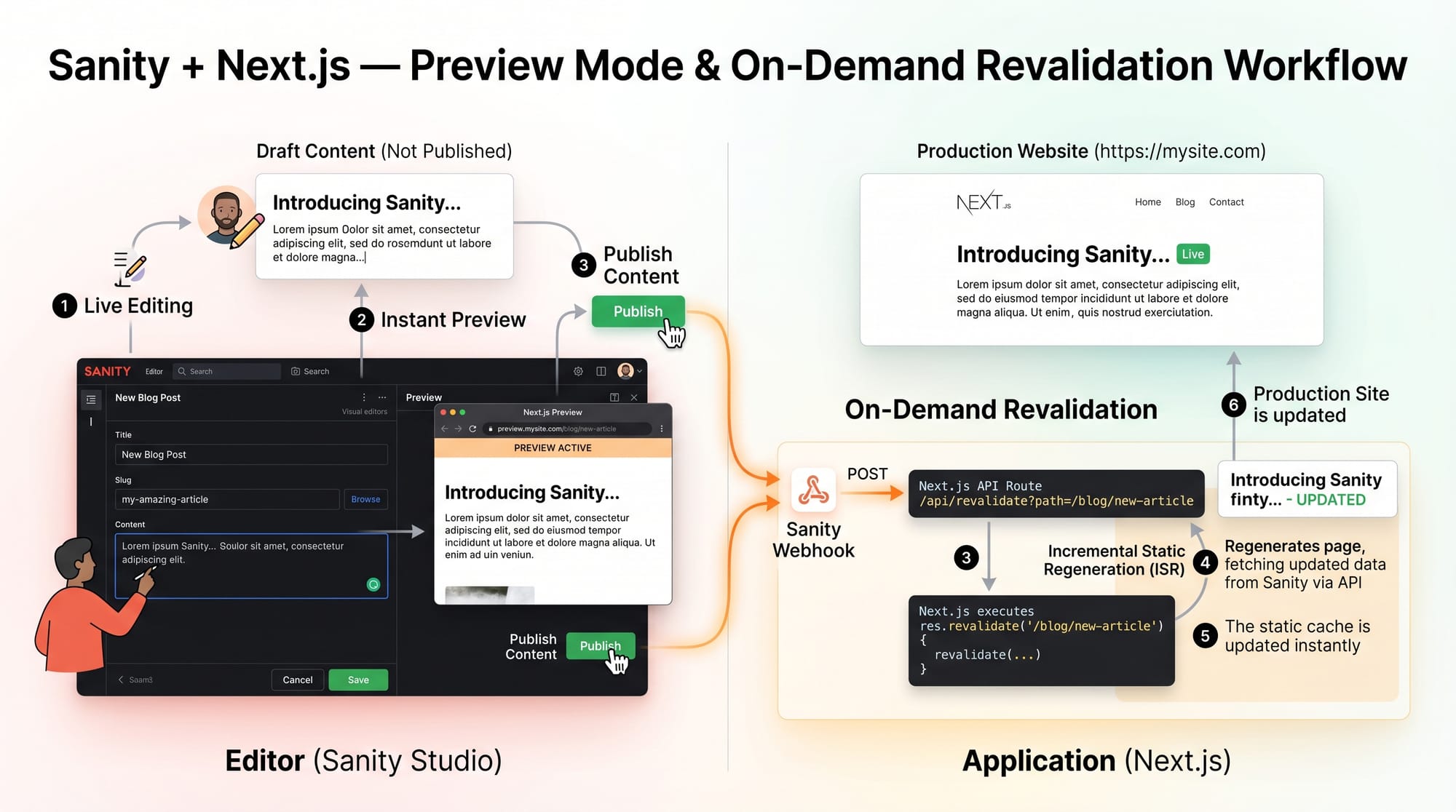
Mistake 3: Ignoring Preview Mode in Frontend
Many students from Pakistan deploy apps but don’t enable preview mode in Next.js.
Fix:
- Use preview API
- Enable draft content viewing
- Use on-demand revalidation
Practice Exercises
Exercise 1: Create a Product Schema
Problem:
Create a schema for a product in an e-commerce store (like Daraz-style items in Pakistan).
Solution:
export default {
  name: "product",
  title: "Product",
  type: "document",
  fields: [
    { name: "title", type: "string" },
    { name: "price", type: "number" },
    { name: "description", type: "text" }
  ]
}
Explanation:
- Defines product structure
- Includes title, price (in PKR), and description
Exercise 2: Fetch Products Sorted by Price
Problem:
Retrieve all products sorted by lowest price first.
Solution:
*[_type == "product"] | order(price asc){
  title,
  price
}
Explanation:
- Filters product documents
- Orders them in ascending price order
- Returns only title and price fields
Frequently Asked Questions
What is Sanity CMS used for?
Sanity CMS is used for managing structured content in websites and applications. It allows developers to separate content from design, making it easier to update websites dynamically without rewriting code.
How does GROQ query language work?
GROQ is a query language used in Sanity to fetch specific data from the content lake. It filters documents using conditions and returns only the required fields, making it fast and efficient.
Is Sanity CMS free to use?
Yes, Sanity offers a free tier that is perfect for students and small projects. Pakistani learners can start building blogs and portfolios without any initial cost.
Can I use Sanity with React or Next.js?
Yes, Sanity integrates perfectly with React and Next.js. Most modern developers use it with Next.js to build fast, SEO-friendly websites with dynamic content.
Why should Pakistani students learn Sanity CMS?
Learning Sanity CMS helps Pakistani students gain international freelance skills, build modern web applications, and earn in PKR or USD by working on global projects.
Summary & Key Takeaways
- Sanity is a powerful structured content platform for modern web apps
- GROQ is used to query content efficiently
- Schemas define how content is structured
- Portable Text handles rich content formatting
- Sanity works perfectly with React and Next.js
- Learning it gives Pakistani students freelance and job opportunities
Next Steps & Related Tutorials
Now that you understand the basics of this sanity io tutorial, you can continue learning advanced topics.
Recommended tutorials on theiqra.edu.pk:
- Build modern websites with the Next.js Tutorial
- Learn component-based UI with React.js Introduction
- Explore backend systems in Node.js API Development
- Master full-stack workflows with Headless CMS Integration Guide
Keep practicing by building real projects like blogs, portfolios, and small e-commerce websites.
Test Your Python Knowledge!
Finished reading? Take a quick quiz to see how much you've learned from this tutorial.