Design a Chat Application System Design Interview Guide
Introduction
Designing a chat application is one of the most popular topics in system design interviews. Companies often ask candidates to design WhatsApp, Messenger, or a real-time messaging system to test their understanding of scalability, databases, networking, and distributed systems.
In this tutorial — “Design a Chat Application: System Design Interview Guide” — you’ll learn how to approach chat application system design, including how to design systems like WhatsApp from scratch.
For Pakistani students preparing for software engineering interviews (whether in Lahore, Karachi, or Islamabad), this topic is extremely valuable. Many companies — including startups and international firms — expect you to understand real-time systems and messaging architecture.
We’ll break everything down step-by-step using simple examples like Ahmad messaging Fatima or Ali chatting with a group.
Prerequisites
Before starting this tutorial, you should have a basic understanding of:
- Programming fundamentals (JavaScript, Python, or Java)
- Networking basics (HTTP, TCP/IP)
- Databases (SQL and NoSQL)
- Basic system design concepts (client-server architecture)
- APIs and JSON format
- Optional but helpful: knowledge of WebSockets
If you’re not confident in these areas, consider reviewing:
- System Design Interview basics
- WebSocket tutorial
- REST API fundamentals
Core Concepts & Explanation
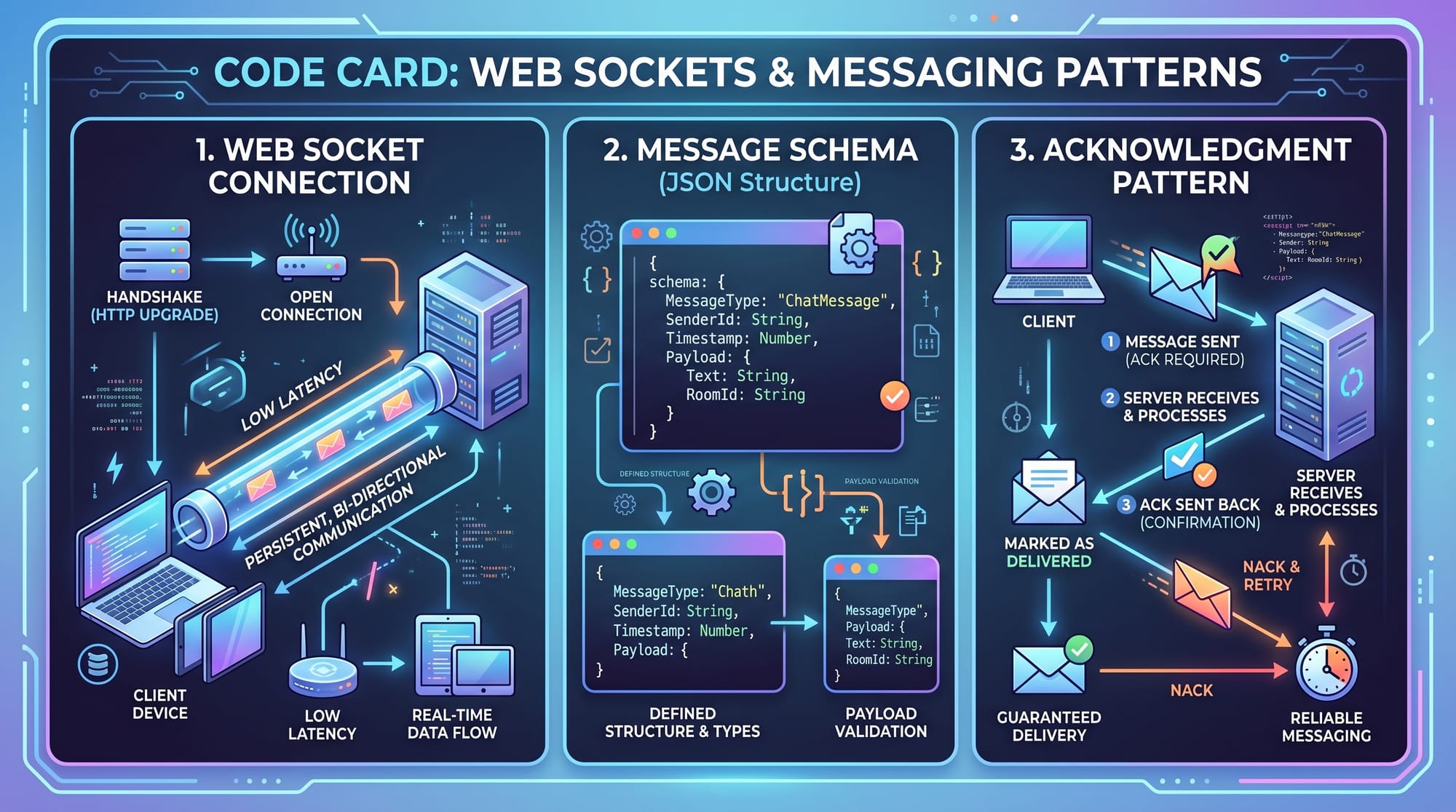
Real-Time Communication (WebSockets vs HTTP)
In a chat system, messages must be delivered instantly. Traditional HTTP works on a request-response model, which is not efficient for real-time messaging.
Instead, we use WebSockets, which maintain a persistent connection between client and server.
Example:
- Ahmad sends a message to Fatima
- With HTTP → client sends request repeatedly (inefficient)
- With WebSocket → connection stays open → instant delivery
Key Benefit:
- Low latency
- Efficient for real-time apps
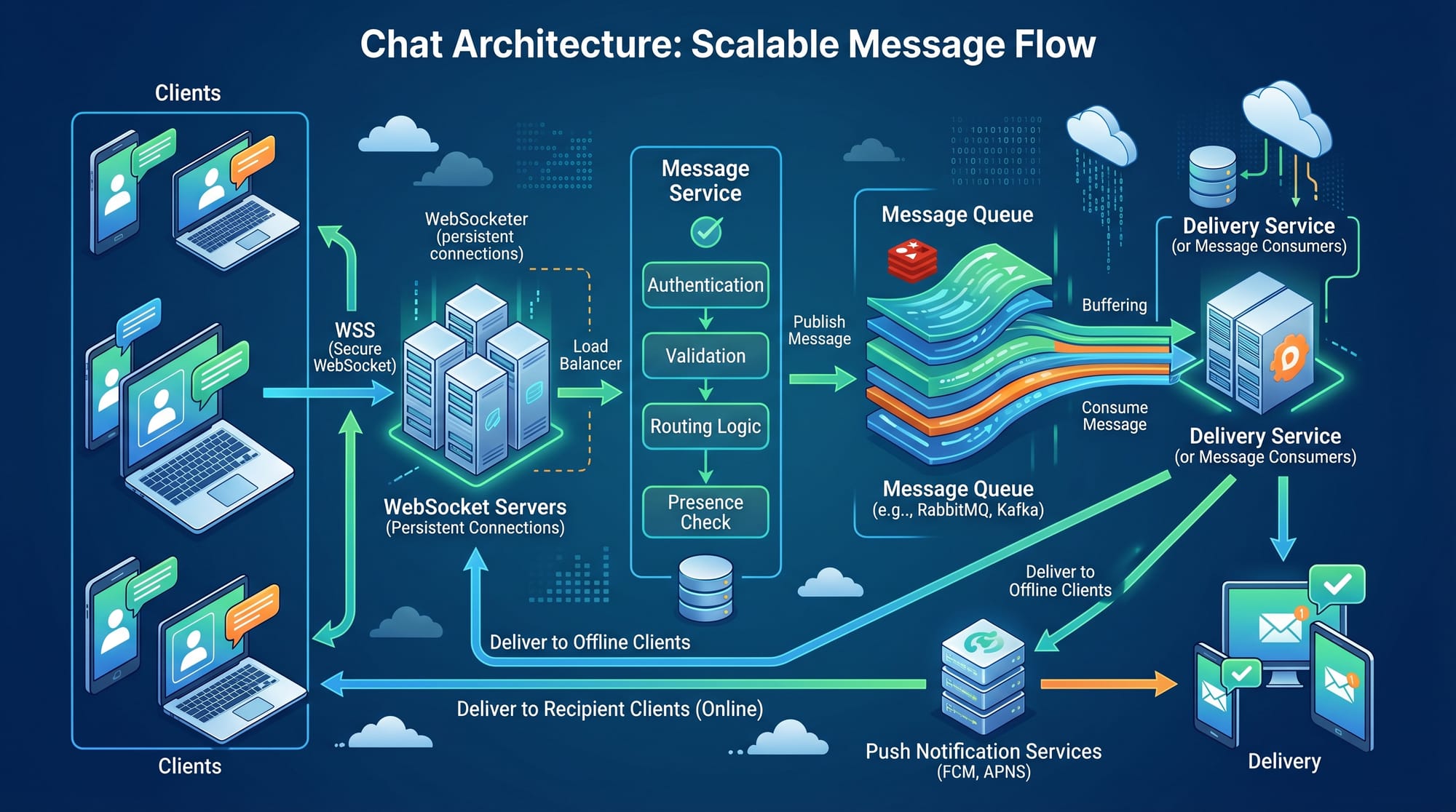
Message Storage & Delivery Architecture
A chat system must store and deliver messages reliably.
Basic Flow:
- User sends message
- Message goes to server
- Server stores it in database
- Server delivers to recipient
Example:
- Ali sends “Hello” to Fatima
- Message is stored with timestamp
- Delivered instantly if Fatima is online
- Stored for later if offline
Key Components:
- Message Service
- Database (NoSQL preferred for scalability)
- Queue (Kafka / RabbitMQ)
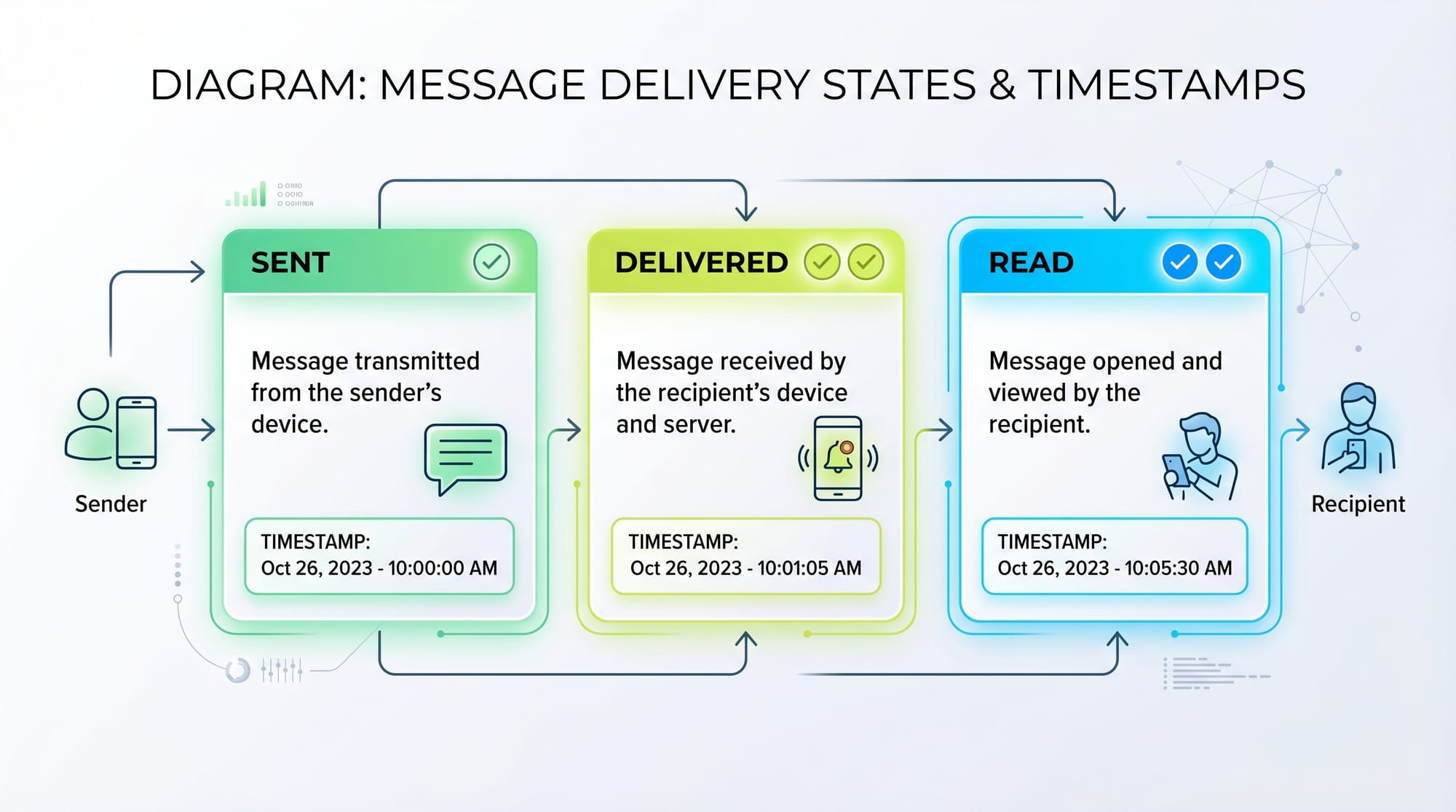
Message States (Sent, Delivered, Read)
A modern messaging system tracks message states.
- Sent → message reached server
- Delivered → message reached recipient device
- Read → recipient opened the message
Example:
- Ahmad sends message → ✔ Sent
- Fatima receives → ✔✔ Delivered
- Fatima reads → ✔✔ Blue (Read)
Scaling the System (Millions of Users)
In Pakistan, apps like WhatsApp handle millions of users simultaneously.
To scale:
- Use load balancers
- Use distributed servers
- Store data in sharded databases
Example:
- Users in Lahore connect to Lahore server
- Users in Karachi connect to Karachi server
- Reduces latency and load
One-to-One vs Group Chat Design
There are two main types of chats:
1. One-to-One Chat
- Simple message delivery
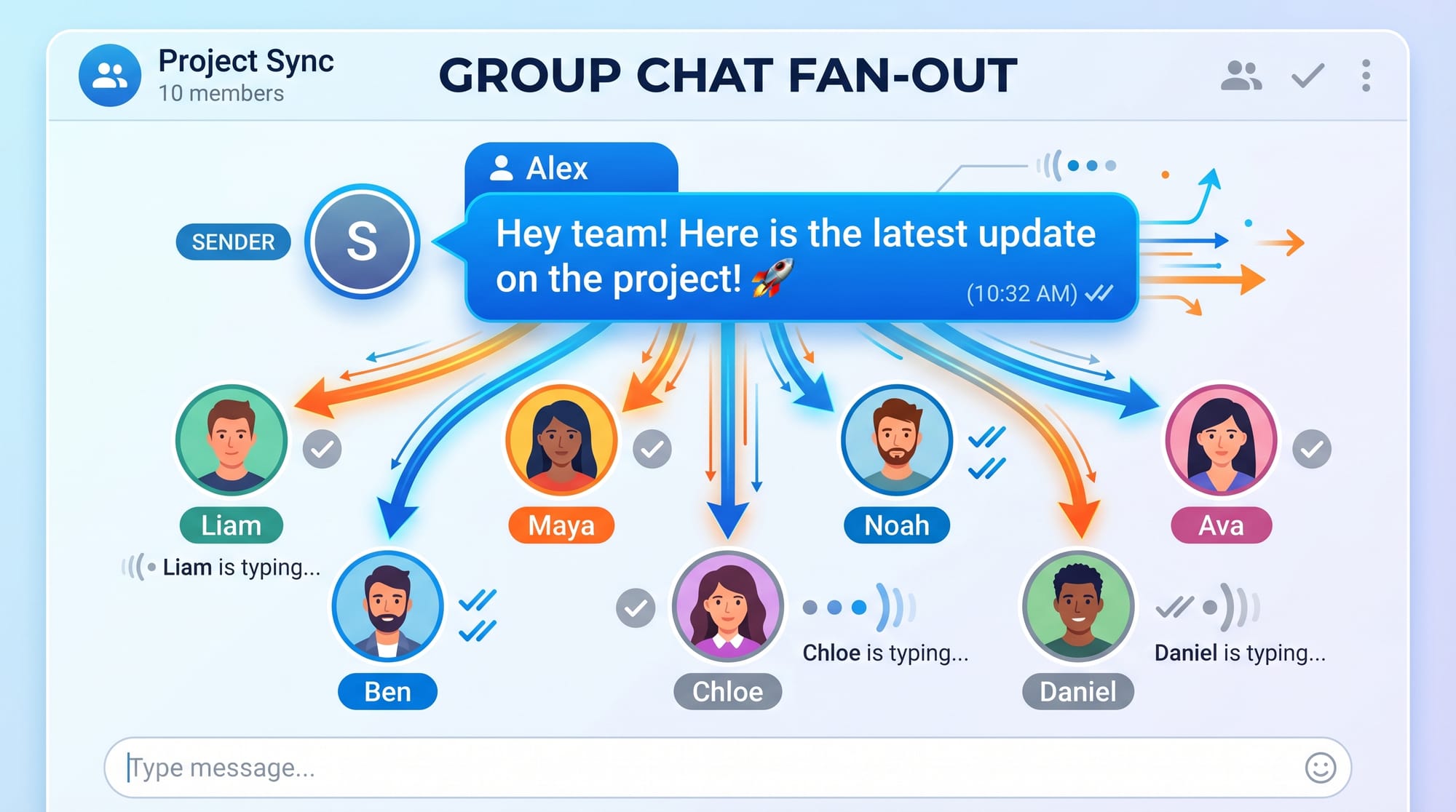
2. Group Chat
- Requires fan-out strategy
Fan-out Approach:
- One message → sent to multiple users
Example:
Ali sends message in group of 5 → system sends to all 5 members
Practical Code Examples
Example 1: Basic WebSocket Chat Server
// Import WebSocket library
const WebSocket = require('ws');

// Create a WebSocket server on port 8080
const wss = new WebSocket.Server({ port: 8080 });

// Listen for new connections
wss.on('connection', function connection(ws) {
    console.log('New user connected');

    // Listen for incoming messages
    ws.on('message', function incoming(message) {
        console.log('Received:', message);

        // Broadcast message to all users
        wss.clients.forEach(function each(client) {
            if (client.readyState === WebSocket.OPEN) {
                client.send(message);
            }
        });
    });

    // Handle user disconnect
    ws.on('close', () => {
        console.log('User disconnected');
    });
});
Line-by-line Explanation:
require('ws')→ imports WebSocket librarynew WebSocket.Server→ creates serveron('connection')→ triggered when user connectson('message')→ listens for messageswss.clients.forEach→ sends message to all connected usersclient.send()→ delivers messageon('close')→ handles disconnect
Example 2: Real-World Messaging System (With Message Schema)
// Message schema example
const message = {
    id: "msg_123",
    sender: "Ahmad",
    receiver: "Fatima",
    content: "Hello!",
    timestamp: Date.now(),
    status: "sent"
};

// Function to send message
function sendMessage(ws, message) {
    // Convert message to JSON
    const data = JSON.stringify(message);

    // Send message via WebSocket
    ws.send(data);
}

// Acknowledge message delivery
function acknowledgeMessage(messageId) {
    return {
        messageId: messageId,
        status: "delivered"
    };
}
Line-by-line Explanation:
message object→ defines structure of chat messageid→ unique message identifiersender/receiver→ users involvedtimestamp→ helps orderingstatus→ tracks delivery stateJSON.stringify→ converts object to stringws.send()→ sends dataacknowledgeMessage()→ confirms delivery
Common Mistakes & How to Avoid Them
Mistake 1: Using Only HTTP for Real-Time Chat
Problem:
- High latency
- Inefficient polling
Solution:
- Use WebSockets or long polling
Fix Example:
Instead of repeated HTTP calls, establish a persistent WebSocket connection.
Mistake 2: Not Handling Offline Users
Problem:
- Messages get lost if user is offline
Solution:
- Store messages in database
- Deliver when user reconnects
Example:
Fatima turns off internet → Ahmad sends message → system stores → delivers later
Mistake 3: Poor Group Chat Scaling
Problem:
- Sending messages inefficiently
Solution:
- Use fan-out strategy
- Use message queues
Mistake 4: No Message Ordering
Problem:
- Messages appear in wrong order
Solution:
- Use timestamps or sequence numbers
Practice Exercises
Exercise 1: Design a One-to-One Chat System
Problem:
Design a system where Ahmad sends messages to Fatima with real-time delivery.
Solution:
- Use WebSocket connection
- Store messages in database
- Deliver instantly if online
- Store if offline
Exercise 2: Design a Group Chat System
Problem:
Ali creates a group with 10 users and sends messages.
Solution:
- Use fan-out approach
- Store group members
- Send message to each user
- Use queue for scalability
Frequently Asked Questions
What is chat application system design?
It is the process of designing scalable and efficient messaging systems that allow users to send and receive messages in real time.
How do I design WhatsApp-like systems?
Start by designing core features like messaging, user presence, and delivery states. Then scale using distributed systems, queues, and databases.
Why are WebSockets important in messaging systems?
WebSockets allow persistent connections, enabling real-time communication without repeated requests.
How do chat apps handle offline users?
Messages are stored in a database and delivered when the user reconnects to the system.
What database is best for messaging systems?
NoSQL databases (like MongoDB or Cassandra) are preferred because they handle large-scale data and high write loads efficiently.
Summary & Key Takeaways
- Chat applications rely heavily on real-time communication (WebSockets)
- Message states (sent, delivered, read) improve user experience
- Scalability requires queues, load balancers, and distributed systems
- Group chats use fan-out strategies
- Handling offline users is critical for reliability
- Message ordering ensures consistent conversation flow
Next Steps & Related Tutorials
To deepen your understanding, explore these tutorials on theiqra.edu.pk:
- Learn System Design Interview preparation with real-world examples
- Master WebSocket Tutorial for real-time applications
- Understand Database Sharding and Scaling techniques
- Explore REST API Design for scalable applications
These topics will help you become confident in tackling system design interviews and building real-world applications used across Pakistan and globally 🚀
Test Your Python Knowledge!
Finished reading? Take a quick quiz to see how much you've learned from this tutorial.