Design a URL Shortener System Design Interview Guide
Introduction
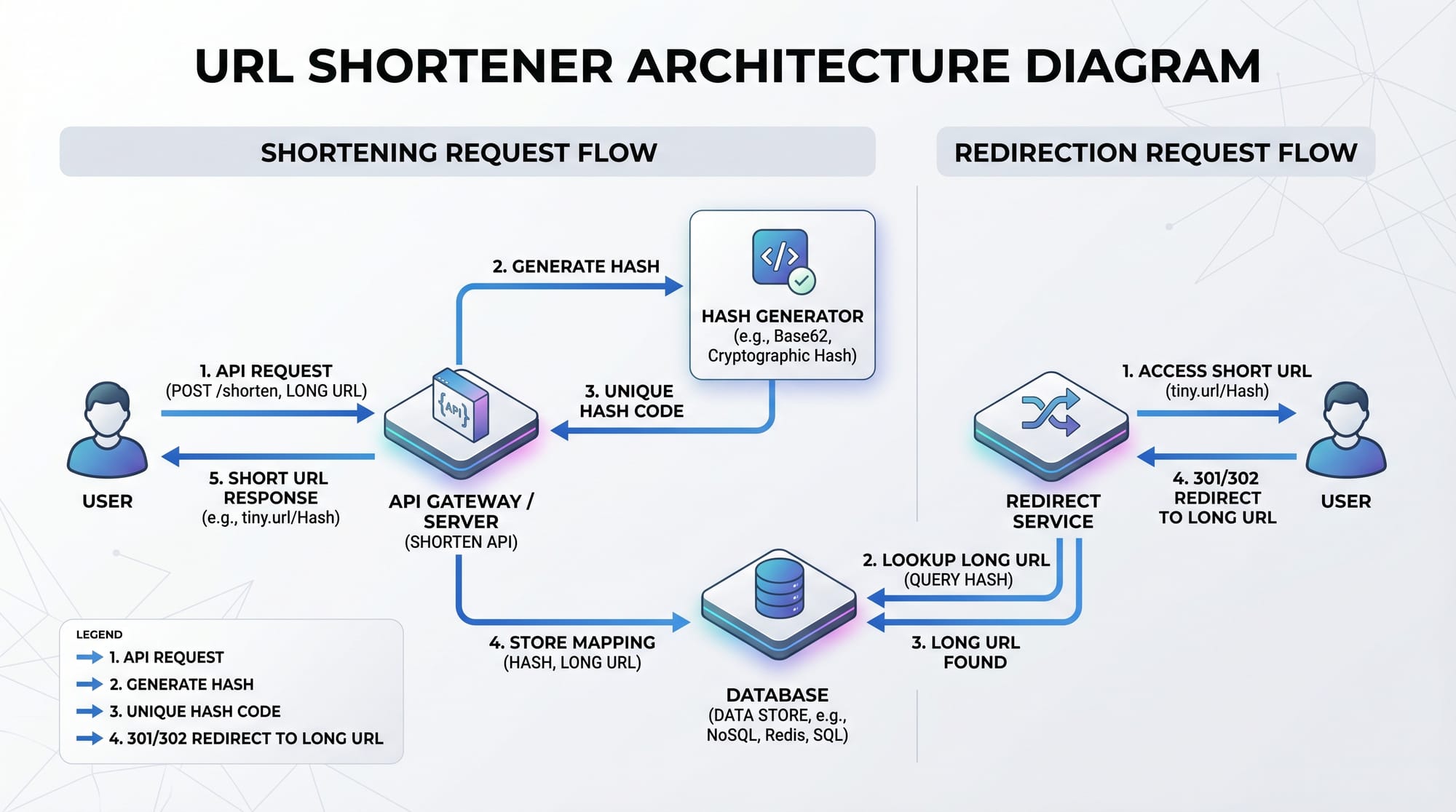
Designing a URL shortener is a classic system design interview problem and a must-know concept for aspiring software engineers. Platforms like TinyURL or Bitly take long, complex links and convert them into short, shareable URLs. This process involves multiple system design concepts such as scalability, hashing, databases, caching, and API design.
For Pakistani students preparing for technical interviews at companies in Lahore, Karachi, or even international remote roles, mastering url shortener system design helps build strong problem-solving and architectural thinking skills. Whether you're Ahmad preparing for your first internship or Fatima aiming for FAANG-level interviews, this guide will walk you through everything step by step.
Prerequisites
Before diving into this tutorial, you should have:
- Basic understanding of data structures (arrays, hash maps)
- Knowledge of databases (SQL or NoSQL)
- Familiarity with HTTP/HTTPS protocols
- Basic programming knowledge (Python, Java, or JavaScript)
- Understanding of REST APIs
- Introductory knowledge of scalability concepts
Core Concepts & Explanation
URL Shortening Basics
At its core, a URL shortener converts a long URL into a shorter version.
Example:
- Original:
https://theiqra.edu.pk/blog/system-design-interview-guide-for-beginners - Short:
https://tiqra.pk/abc123
When a user clicks the short URL, they are redirected to the original long URL.
How it works:
- User submits a long URL
- System generates a unique short code
- Store mapping in database
- Redirect users when short URL is accessed
Hashing and Unique ID Generation
To create short URLs, we need a unique identifier.
There are two common approaches:
- Hashing the URL
- Auto-increment ID + Encoding
Example (Auto-increment):
- ID: 125 → Encoded →
cb
This ensures uniqueness and avoids collisions.
Base62 Encoding for Short URLs
Instead of using numbers, we use Base62 encoding to generate short, readable URLs.
Base62 Characters:
a-z(26)A-Z(26)0-9(10)
Total = 62 characters
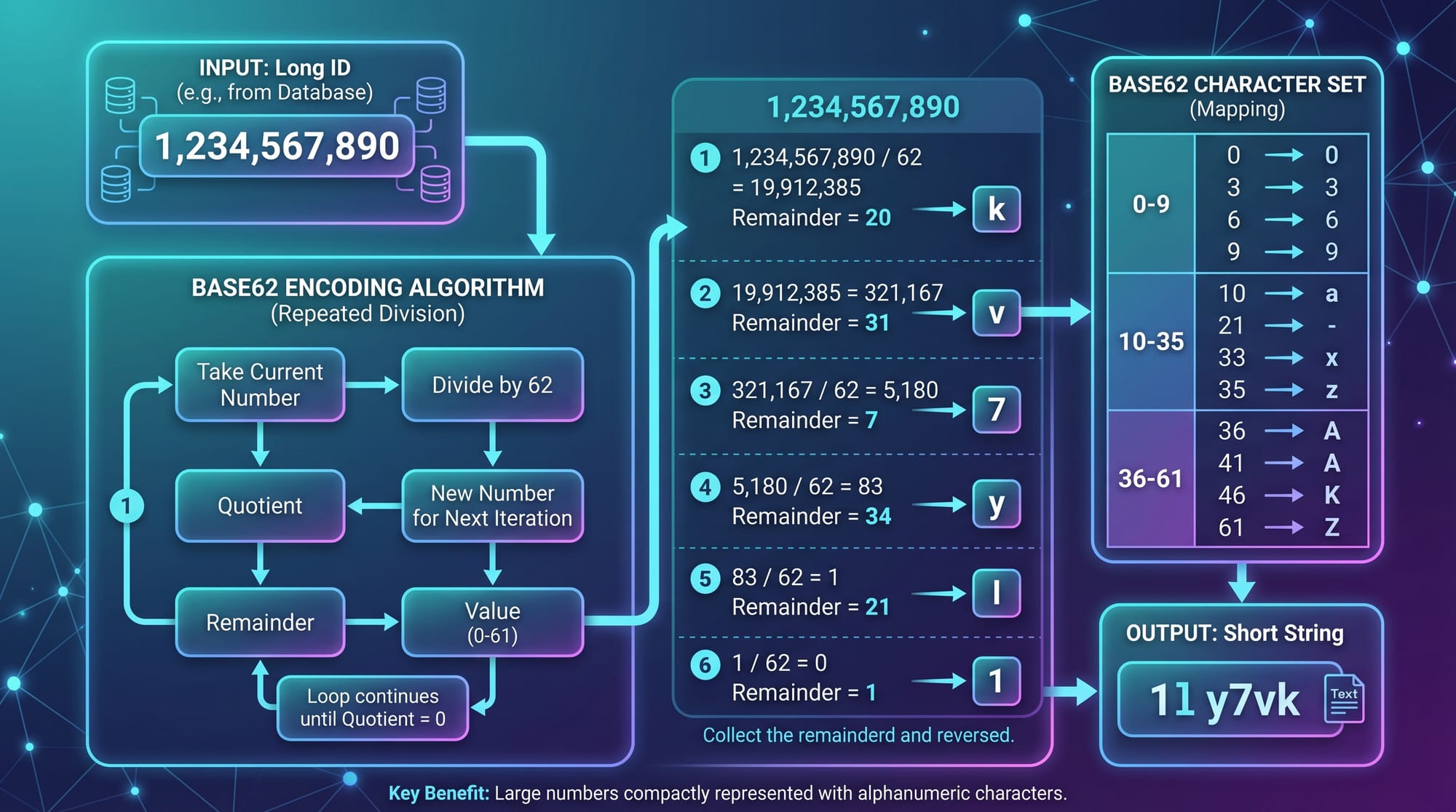
Example:
- Decimal: 999
- Base62:
g7
This significantly reduces URL length.
Database Design
We need a database to store mappings:
| short_code | long_url | created_at |
|---|---|---|
| abc123 | google.com | 2026-01-01 |
Key considerations:
- Index on
short_code - Fast read operations
- Scalable storage (millions of URLs)
Redirect Mechanism
When a user visits:
https://tiqra.pk/abc123
The system:
- Extracts
abc123 - Looks up database
- Returns HTTP 302 redirect
Scalability Considerations
In Pakistan, if your service grows (e.g., used by students in Islamabad universities), you need:
- Load balancers
- Caching (Redis)
- Database sharding
- CDN for global performance
Practical Code Examples
Example 1: Generate Short URL Using Base62
import string

BASE62 = string.ascii_letters + string.digits

def encode(num):
    short_url = ""
    base = len(BASE62)

    while num > 0:
        short_url += BASE62[num % base]
        num //= base

    return short_url[::-1]
Line-by-line explanation:
import string: Imports character utilitiesBASE62 = ...: Defines all 62 charactersdef encode(num):: Function to convert number → short stringshort_url = "": Initialize empty stringbase = len(BASE62): Base = 62while num > 0:: Loop until number becomes 0num % base: Get remainder → index in BASE62num //= base: Reduce number[::-1]: Reverse string (important!)
Example 2: Real-World URL Shortener API
from flask import Flask, request, redirect
import sqlite3

app = Flask(__name__)

def get_db():
    return sqlite3.connect('urls.db')

@app.route('/shorten', methods=['POST'])
def shorten():
    long_url = request.form['url']

    db = get_db()
    cursor = db.cursor()

    cursor.execute("INSERT INTO urls (long_url) VALUES (?)", (long_url,))
    db.commit()

    url_id = cursor.lastrowid

    short_code = encode(url_id)

    cursor.execute("UPDATE urls SET short_code=? WHERE id=?", (short_code, url_id))
    db.commit()

    return {"short_url": f"http://localhost:5000/{short_code}"}

@app.route('/<short_code>')
def redirect_url(short_code):
    db = get_db()
    cursor = db.cursor()

    cursor.execute("SELECT long_url FROM urls WHERE short_code=?", (short_code,))
    result = cursor.fetchone()

    if result:
        return redirect(result[0])
    return "URL not found"
Line-by-line explanation:
Flask: Lightweight web framework/shorten: API endpoint to create short URLrequest.form['url']: Get user inputINSERT INTO urls: Store long URLlastrowid: Get auto-increment IDencode(url_id): Convert ID → short codeUPDATE urls: Save short code/short_code: Dynamic routeSELECT long_url: Retrieve original URLredirect(): Send user to original link

Common Mistakes & How to Avoid Them
Mistake 1: Not Handling Collisions
If you use hashing, two URLs may generate the same short code.
Fix:
- Use auto-increment IDs
- Or add randomness + retry logic
Mistake 2: Ignoring Scalability
Beginners often design systems only for small scale.
Fix:
- Use caching (Redis)
- Implement database sharding
- Add load balancer
Mistake 3: No Expiry Mechanism
URLs stored forever increase database size.
Fix:
- Add
expiry_datecolumn - Run cleanup jobs
Mistake 4: No Analytics Tracking
Real systems track clicks and user data.
Fix:
- Store:
- Click count
- Location (e.g., Lahore, Karachi)
- Device type

Practice Exercises
Exercise 1: Build Base62 Decoder
Problem:
Write a function to convert short URL back to number.
Solution:
def decode(short_url):
    base = len(BASE62)
    num = 0

    for char in short_url:
        num = num * base + BASE62.index(char)

    return num
Explanation:
- Loop through characters
- Multiply current value by base
- Add index of character
Exercise 2: Add Expiry Feature
Problem:
Modify system to expire URLs after 7 days.
Solution:
ALTER TABLE urls ADD COLUMN expiry_date DATETIME;
from datetime import datetime, timedelta

expiry = datetime.now() + timedelta(days=7)
Explanation:
- Add new column
- Set expiry during insertion
- Check before redirect
Frequently Asked Questions
What is a URL shortener in system design?
A URL shortener is a service that converts long URLs into shorter ones and redirects users to the original link. It is commonly used in interviews to test scalability and design thinking.
How do I design TinyURL in interviews?
Start with requirements, then design APIs, database schema, and scaling strategy. Explain trade-offs clearly to impress interviewers.
What database is best for URL shorteners?
Both SQL and NoSQL work. SQL is simpler for beginners, while NoSQL scales better for massive traffic.
How do I avoid collisions in short URLs?
Use auto-increment IDs with Base62 encoding or implement collision detection and retries.
Is URL shortener asked in Pakistani interviews?
Yes, especially in companies in Islamabad, Lahore, and remote roles. It’s a very common system design interview question.
Summary & Key Takeaways
- URL shorteners map long URLs to short codes using encoding
- Base62 encoding helps create compact, readable URLs
- Database design is critical for performance and scalability
- Redirect systems must be fast and reliable
- Scalability techniques include caching, sharding, and load balancing
- This is a high-value topic for system design interview preparation
Next Steps & Related Tutorials
To continue your learning journey on theiqra.edu.pk, explore:
- Learn System Design Interview Basics for beginners
- Master Database Design for Scalable Applications
- Build REST APIs with Flask and Node.js
- Understand Caching with Redis in Real Systems
Related: System Design Interview, Database Design
This guide equips you with everything needed to confidently explain and implement a design tinyurl system. Keep practicing, build projects, and soon you'll be ready for real-world system design interviews 🚀
Test Your Python Knowledge!
Finished reading? Take a quick quiz to see how much you've learned from this tutorial.