Design a File Storage System S3 like Object Storage
Introduction
Designing a file storage system like S3-like object storage is one of the most important topics in modern system design interviews and cloud engineering. In simple terms, a file storage system such as Amazon S3 (part of Amazon Web Services) allows users to store, retrieve, and manage large amounts of unstructured data like images, videos, backups, and documents over the internet.
In Pakistan, companies in cities like Lahore, Karachi, and Islamabad are rapidly moving toward cloud-native architectures. Learning file storage system design, especially design S3, helps Pakistani students prepare for software engineering jobs, freelancing opportunities, and international tech interviews.
Object storage architecture is different from traditional file systems. Instead of hierarchical folders, it stores data as objects in a flat namespace, along with metadata and unique identifiers.
By the end of this tutorial, you will understand how to design a scalable, fault-tolerant, and highly available object storage system.
Prerequisites
Before learning object storage architecture, you should be familiar with:
- Basic programming (Python, Java, or Node.js)
- HTTP/REST APIs
- Basic database concepts (SQL and NoSQL)
- Networking fundamentals (latency, bandwidth)
- Basic system design concepts (load balancing, caching)
- Understanding of distributed systems (helpful but not mandatory)
If you are a student in Pakistan studying computer science at universities like UET Lahore or FAST Karachi, this topic is typically introduced in advanced system design courses.
Core Concepts & Explanation
Object Storage vs File Storage vs Block Storage
To understand design S3, we must compare storage types:
File Storage
Traditional hierarchical system (folders and subfolders). Example: Windows file system.
Block Storage
Data is stored in fixed-size blocks, used by databases and virtual machines.
Object Storage (S3 Model)
Data is stored as objects:
- Data
- Metadata
- Unique ID (key)
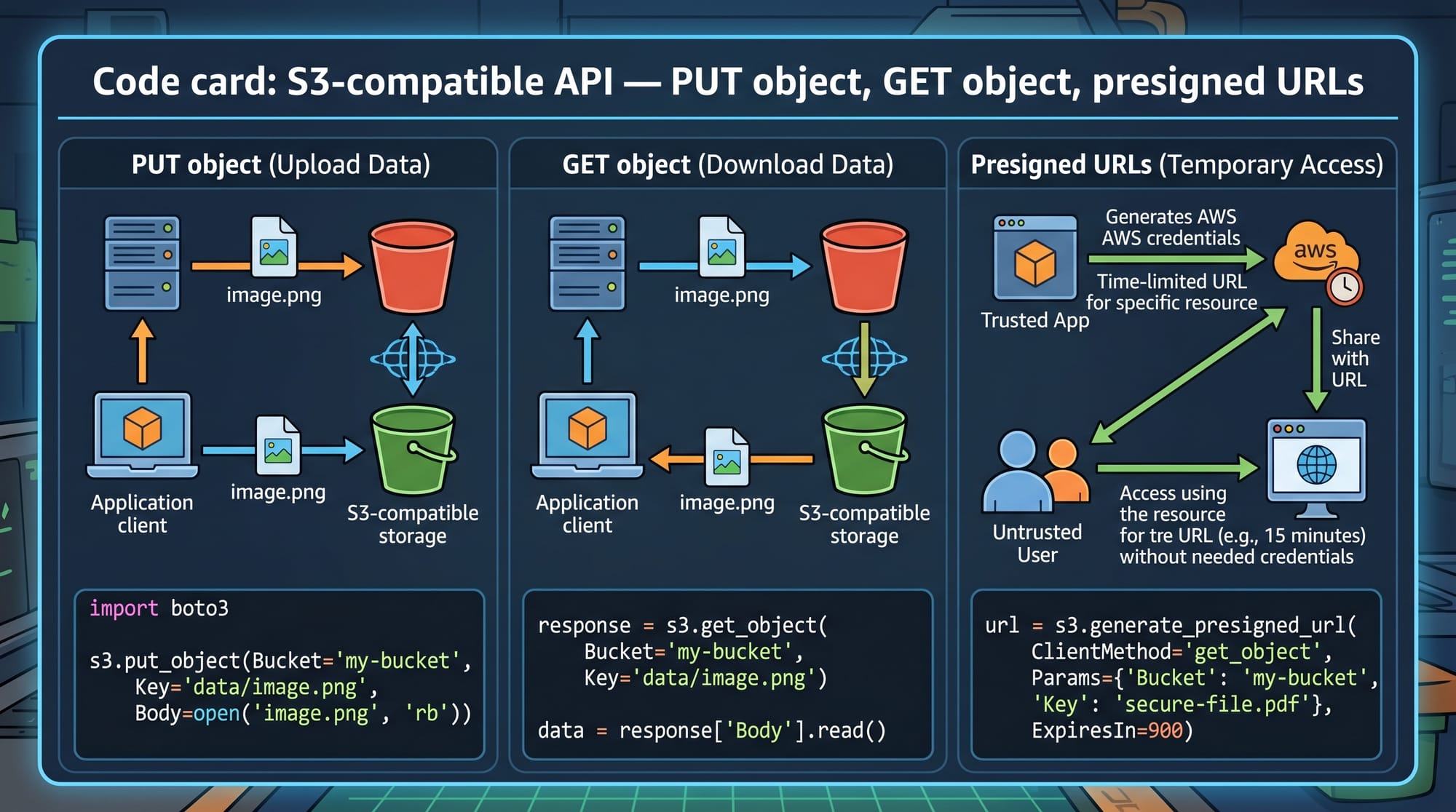
Each object is accessed via API instead of file paths.
Example:
GET /bucket-name/object-key
This makes object storage ideal for scaling to billions of files.
Buckets, Objects, and Keys
In an S3-like system:
- Bucket → container for objects
- Object → actual file + metadata
- Key → unique identifier
Example:
Bucket: student-projects
Object Key: ahmad/project1/report.pdf
Metadata example:
{
  "owner": "Ahmad",
  "size": "2MB",
  "created_at": "2026-04-15"
}
Distributed Storage Architecture
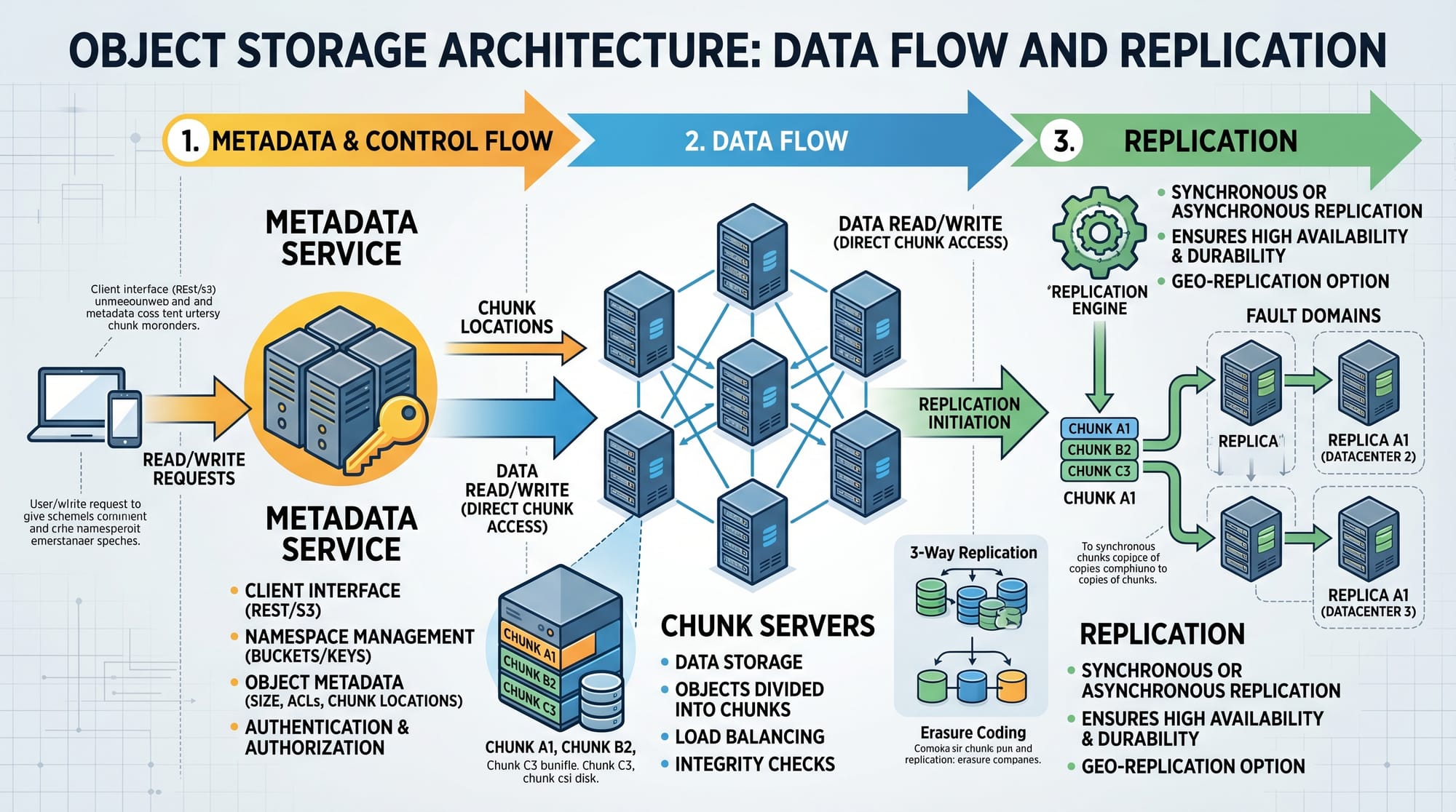
A real-world file storage system design uses multiple layers:
- API Gateway (request handling)
- Metadata Service (tracks object location)
- Storage Nodes (store actual data)
- Replication System (ensures durability)
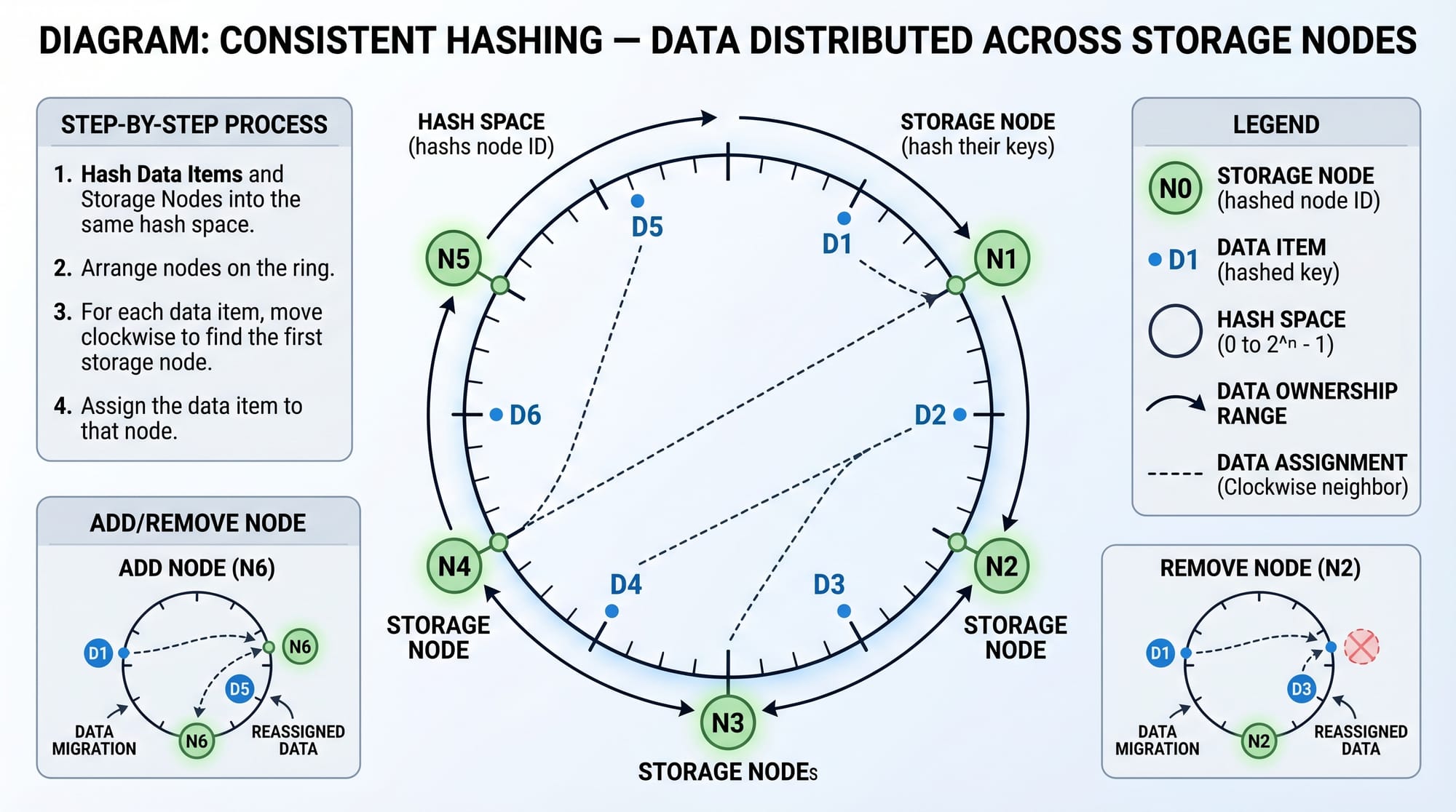
To distribute data evenly, systems use consistent hashing. This ensures that when a node is added or removed, minimal data is reshuffled.
Data Durability Through Replication
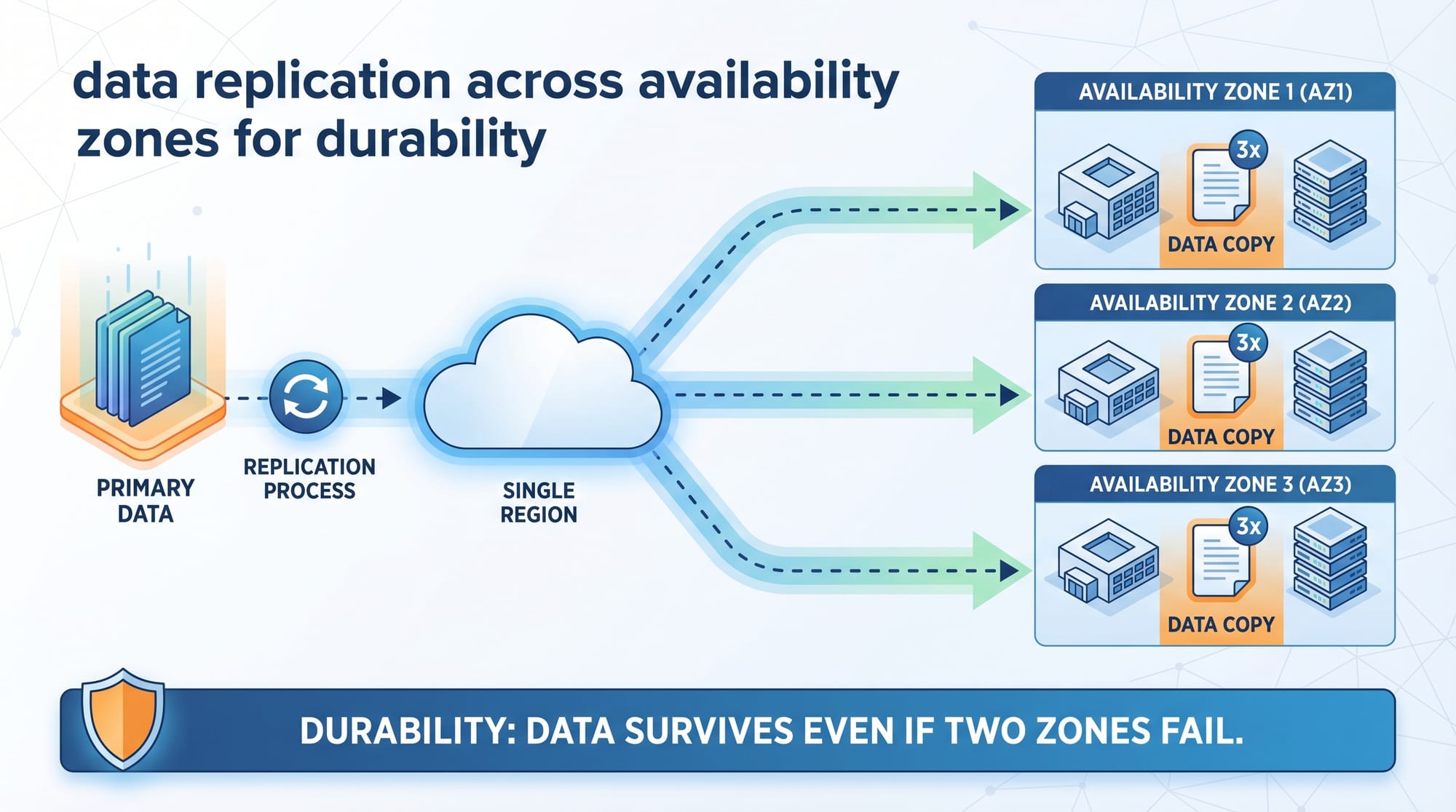
Object storage systems ensure durability by storing multiple copies:
Example:
- 3 replicas of each object
- Stored across different availability zones
If one server in Karachi data center fails, data is still available from Lahore or Islamabad nodes.
Practical Code Examples
Example 1: Simple S3-like Object Storage API
Below is a simplified Python implementation:
# Simple in-memory object storage system

storage = {}  # dictionary to store objects

def put_object(bucket, key, data):
    if bucket not in storage:
        storage[bucket] = {}
    storage[bucket][key] = data
    return "Object stored successfully"

def get_object(bucket, key):
    return storage[bucket][key]
Line-by-line explanation:
storage = {}→ main in-memory dictionary acting as databaseput_object()→ stores data in a bucket with a keyif bucket not in storage→ creates bucket if not existsstorage[bucket][key] = data→ stores objectget_object()→ retrieves object using bucket and key
This is a very simplified version of design S3, missing replication and persistence.
Example 2: Real-World S3 Upload Simulation
import uuid

class ObjectStorage:
    def __init__(self):
        self.db = {}

    def upload(self, bucket, file_data):
        object_id = str(uuid.uuid4())
        if bucket not in self.db:
            self.db[bucket] = {}

        self.db[bucket][object_id] = {
            "data": file_data,
            "size": len(file_data)
        }

        return object_id
Line-by-line explanation:
uuid.uuid4()→ generates unique object IDself.db = {}→ simulates storage backendupload()→ stores file into bucketlen(file_data)→ calculates file size- Returns object ID for later retrieval
This mimics how real object storage systems assign unique identifiers.
Common Mistakes & How to Avoid Them
Mistake 1: Using Traditional File System Structure
Many beginners design S3-like systems using folders and paths.
Problem:
- Hard to scale
- Not distributed-friendly
Fix:
Use flat namespace with object keys instead of hierarchical folders.
Example:
Bad: /users/ahmad/photos/img1.jpg
Good: bucket: users, key: ahmad_photos_img1
Mistake 2: Ignoring Data Replication
A single server approach leads to data loss.
Problem:
If a server in Karachi fails, all data is lost.
Fix:
Use replication:
- Store 3 copies
- Use different physical machines
- Use different regions
Mistake 3: No Metadata Separation
Storing metadata inside files makes search slow.
Fix:
Separate:
- Metadata service (fast lookup)
- Data storage (large binary objects)
Practice Exercises
Exercise 1: Design a Mini Object Storage
Problem:
Design a simple object storage system for a university project in Islamabad where students upload assignments.
Solution:
- Use bucket per course (CS101, CS201)
- Object key = student ID + assignment ID
- Store metadata in a dictionary or database
Exercise 2: Add Replication Layer
Problem:
Extend your storage system to support fault tolerance.
Solution:
- Store 3 copies of each object
- Save in different nodes:
- Node A (Lahore)
- Node B (Karachi)
- Node C (Islamabad)
This ensures high availability.
Frequently Asked Questions
What is file storage system design in simple terms?
File storage system design is the process of building systems that store and retrieve files efficiently at scale. It includes handling metadata, replication, and distributed storage nodes.
How does S3-like object storage work?
S3-like systems store data as objects in buckets. Each object has a unique key and metadata. Requests are made via HTTP APIs instead of traditional file paths.
Why is object storage better than file storage?
Object storage is more scalable and fault-tolerant. It can handle billions of files and is ideal for cloud applications like backups, media storage, and analytics.
What are buckets and objects in S3 design?
Buckets are logical containers for grouping data. Objects are the actual files stored inside buckets along with metadata and unique identifiers.
How do you ensure data durability in object storage systems?
Data durability is ensured using replication (multiple copies), erasure coding, and distributed storage across multiple servers or data centers.
Summary & Key Takeaways
- Object storage is the foundation of modern cloud systems like Amazon S3
- Data is stored as objects with metadata and unique keys
- Systems use distributed architecture with replication
- Consistent hashing helps distribute data evenly
- Metadata service is separate from storage nodes
- Fault tolerance is achieved using multiple replicas
Next Steps & Related Tutorials
If you want to go deeper into file storage system design, explore these tutorials on theiqra.edu.pk:
- Learn System Design Interview Basics for distributed systems fundamentals
- Read Designing URL Shortener Systems for understanding scalability patterns
- Explore Database Sharding & Replication Techniques for backend scaling
- Study AWS for Beginners to understand real cloud infrastructure
You can also compare this topic with real-world implementations in companies like Amazon Web Services to strengthen your understanding.
If you want, I can also:
✔ Draw a full S3 architecture diagram
✔ Give a senior-level interview answer for this question
✔ Or convert this into a quiz for revision
Test Your Python Knowledge!
Finished reading? Take a quick quiz to see how much you've learned from this tutorial.