Linux Networking iptables firewalld & Network Configuration
Introduction
Linux networking is one of the most important skills for system administrators, DevOps engineers, and backend developers. In this linux networking tutorial, we will explore three core components: iptables, firewalld, and general network configuration in Linux systems.
Understanding these tools helps you secure servers, manage traffic, and troubleshoot network issues effectively. For Pakistani students learning IT skills for freelancing or jobs in companies in Lahore, Karachi, or Islamabad, mastering Linux firewall tools can open opportunities in DevOps, cloud computing, and cybersecurity.
For example, a developer like Ahmad in Lahore hosting a web application must ensure only ports 80 (HTTP) and 443 (HTTPS) are open, while blocking unauthorized access using a linux firewall.
Prerequisites
Before starting this tutorial, you should have:
- Basic understanding of Linux commands (ls, cd, mkdir, etc.)
- Familiarity with terminal or shell usage
- Basic knowledge of IP addresses and ports
- A Linux distribution installed (Ubuntu, CentOS, or Debian)
- Root or sudo access to execute firewall commands
If you are new, consider reading Linux Basics on theiqra.edu.pk before continuing.
Core Concepts & Explanation
Linux Network Stack Overview
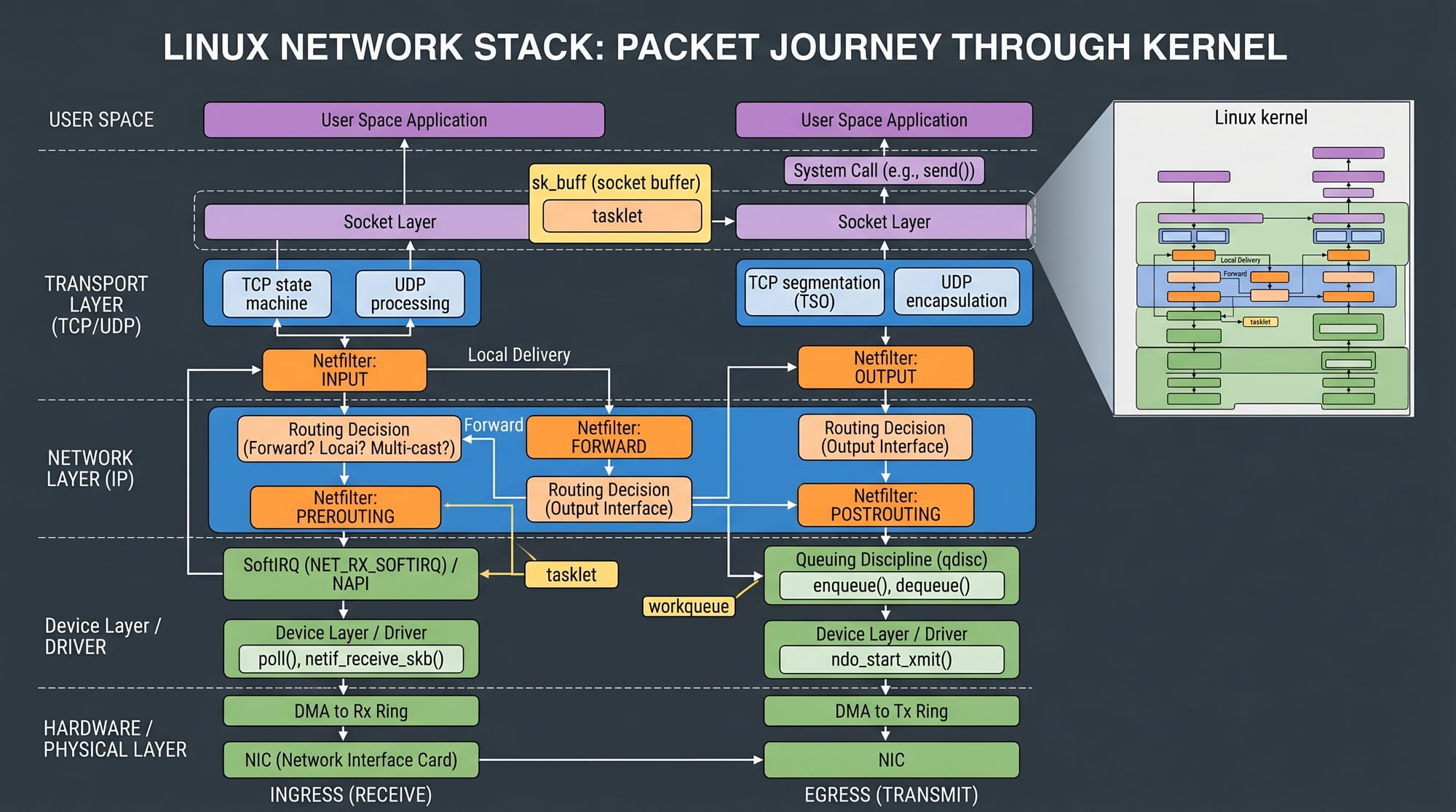
Linux networking works by processing packets through different layers of the kernel. Every incoming and outgoing packet passes through rules defined by firewall tools like iptables or firewalld.
Key components include:
- Network interfaces (eth0, wlan0)
- IP addresses and routing tables
- Ports and protocols (TCP/UDP)
- Kernel-level packet filtering
This is essential for understanding how a linux firewall controls traffic.
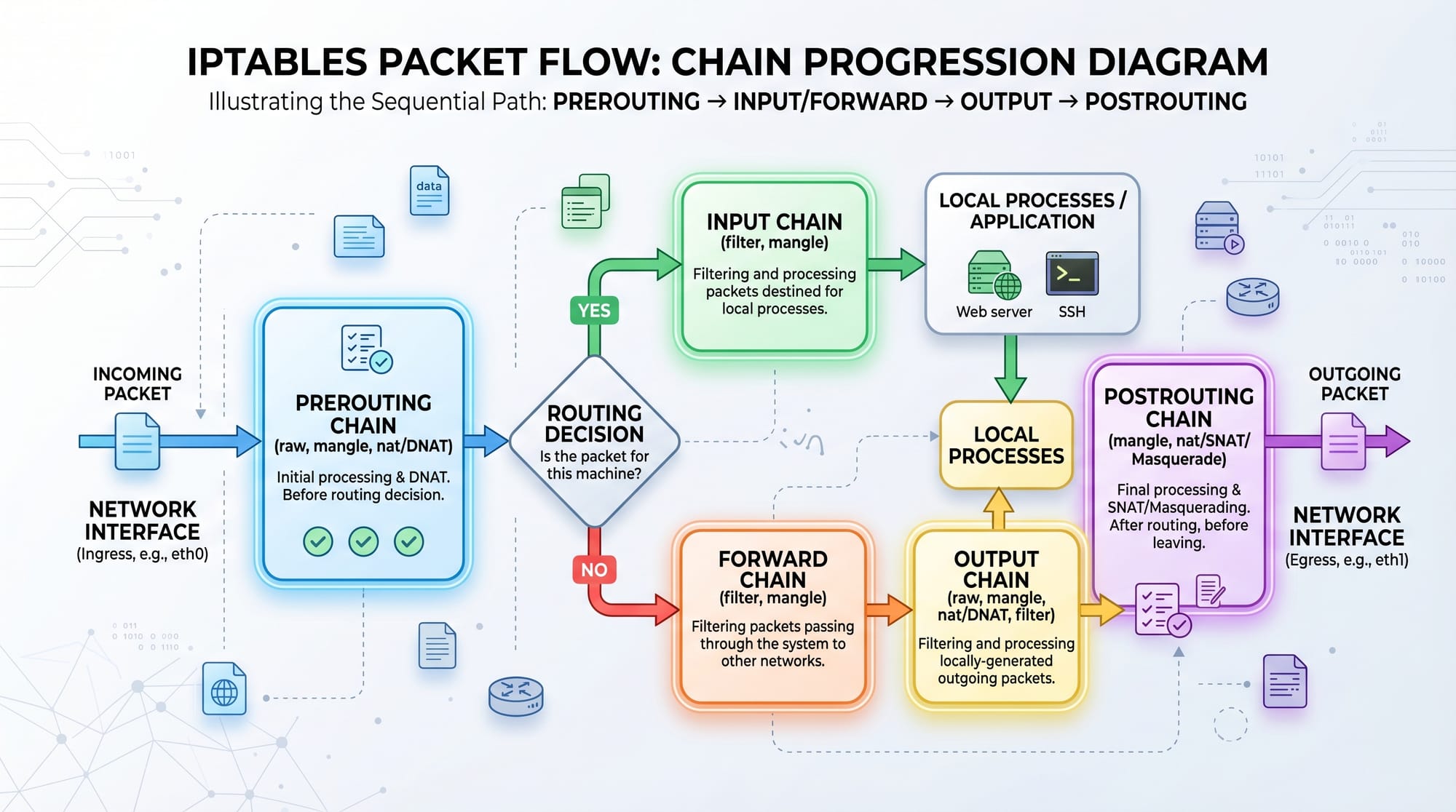
iptables Architecture & Chains
iptables is a powerful command-line firewall utility used to configure Linux kernel firewall rules.
It operates using tables and chains:
- Filter Table (most commonly used)
- NAT Table
- Mangle Table
Chains:
- INPUT → Incoming traffic
- OUTPUT → Outgoing traffic
- FORWARD → Routed traffic
- PREROUTING → Before routing decision
- POSTROUTING → After routing decision
Example:
- Allow SSH traffic (port 22)
- Block unwanted IP addresses
- Control web server access
firewalld Zones & Services
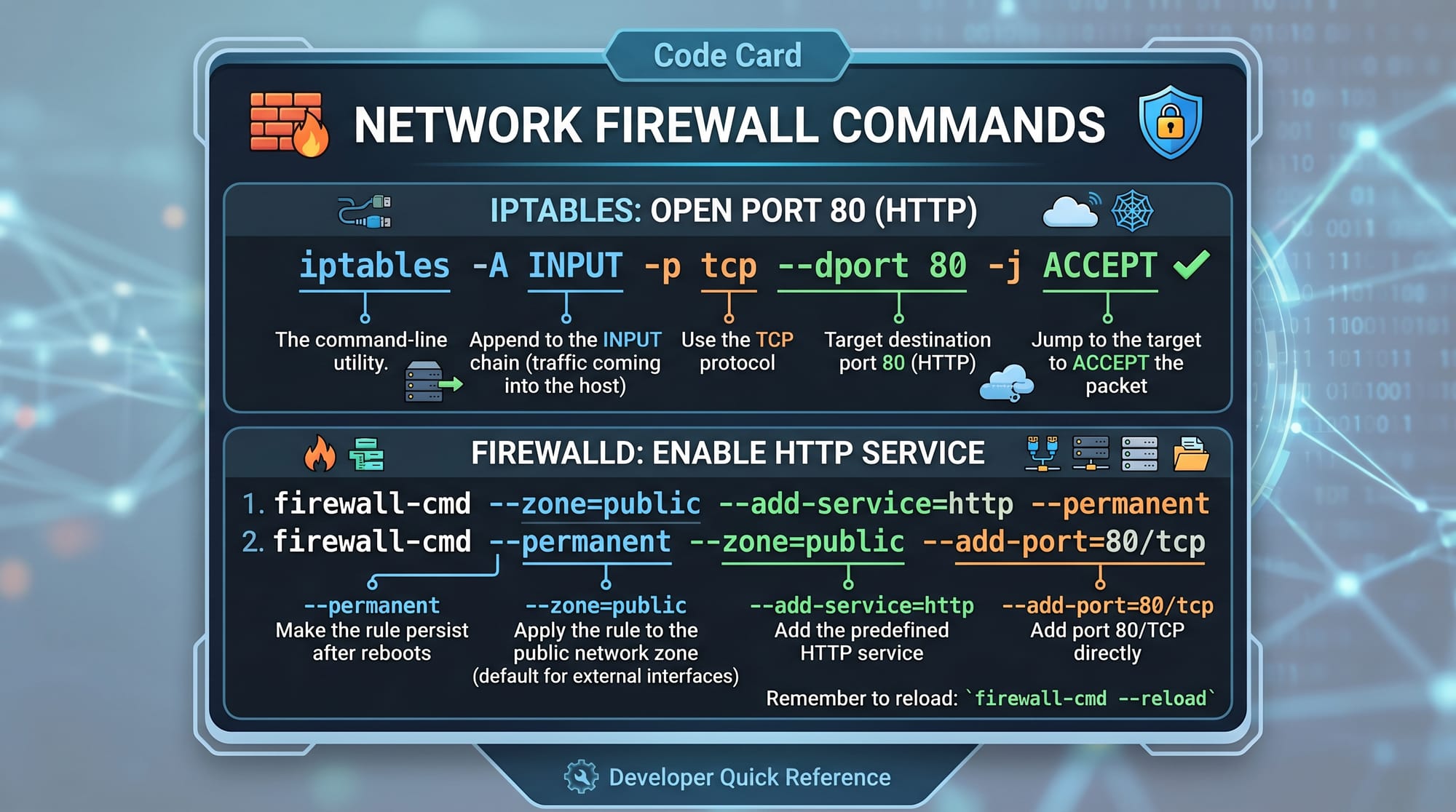
firewalld is a modern firewall management tool used in RedHat-based systems. It simplifies iptables rules using zones.
Common zones:
- public (untrusted networks)
- home (trusted home network)
- work (office network)
- dmz (public servers)
Instead of writing complex rules, you assign services:
Example services:
- ssh
- http
- https
Practical Code Examples
Example 1: Basic iptables Rules for Web Server
Let’s configure a simple firewall for a web server.
# Allow incoming HTTP traffic
iptables -A INPUT -p tcp --dport 80 -j ACCEPT

# Allow HTTPS traffic
iptables -A INPUT -p tcp --dport 443 -j ACCEPT

# Allow SSH access
iptables -A INPUT -p tcp --dport 22 -j ACCEPT

# Drop all other incoming traffic
iptables -A INPUT -j DROP
Explanation:
- Line 1: Adds rule to accept HTTP (port 80)
- Line 2: Allows secure HTTPS traffic (port 443)
- Line 3: Permits SSH access for remote login
- Line 4: Blocks all remaining incoming connections
This is a basic but powerful linux firewall setup used on production servers.
Example 2: Real-World Server Security Setup (Pakistan ISP Example)
Imagine Ali in Karachi hosting a startup website on a VPS.
# Reset existing rules
iptables -F

# Allow loopback traffic
iptables -A INPUT -i lo -j ACCEPT

# Allow established connections
iptables -A INPUT -m conntrack --ctstate ESTABLISHED,RELATED -j ACCEPT

# Allow SSH only from specific IP
iptables -A INPUT -p tcp -s 203.0.113.10 --dport 22 -j ACCEPT

# Allow web traffic
iptables -A INPUT -p tcp --dport 80 -j ACCEPT

# Allow HTTPS
iptables -A INPUT -p tcp --dport 443 -j ACCEPT

# Drop everything else
iptables -A INPUT -j DROP
Explanation:
- Flush removes old rules
- Loopback ensures internal system communication works
- Established connections prevent breaking active sessions
- SSH restricted to a trusted IP increases security
- Web traffic allowed for users
- Default deny policy improves safety
Common Mistakes & How to Avoid Them
Mistake 1: Locking Yourself Out of SSH
Many beginners accidentally block port 22 and lose remote access.
Fix:
- Always allow SSH before applying DROP rules
- Use a second session to test rules before saving
Mistake 2: Not Saving iptables Rules
iptables rules reset after reboot if not saved.
Fix:
iptables-save > /etc/iptables/rules.v4
Or use:
service iptables save
Practice Exercises
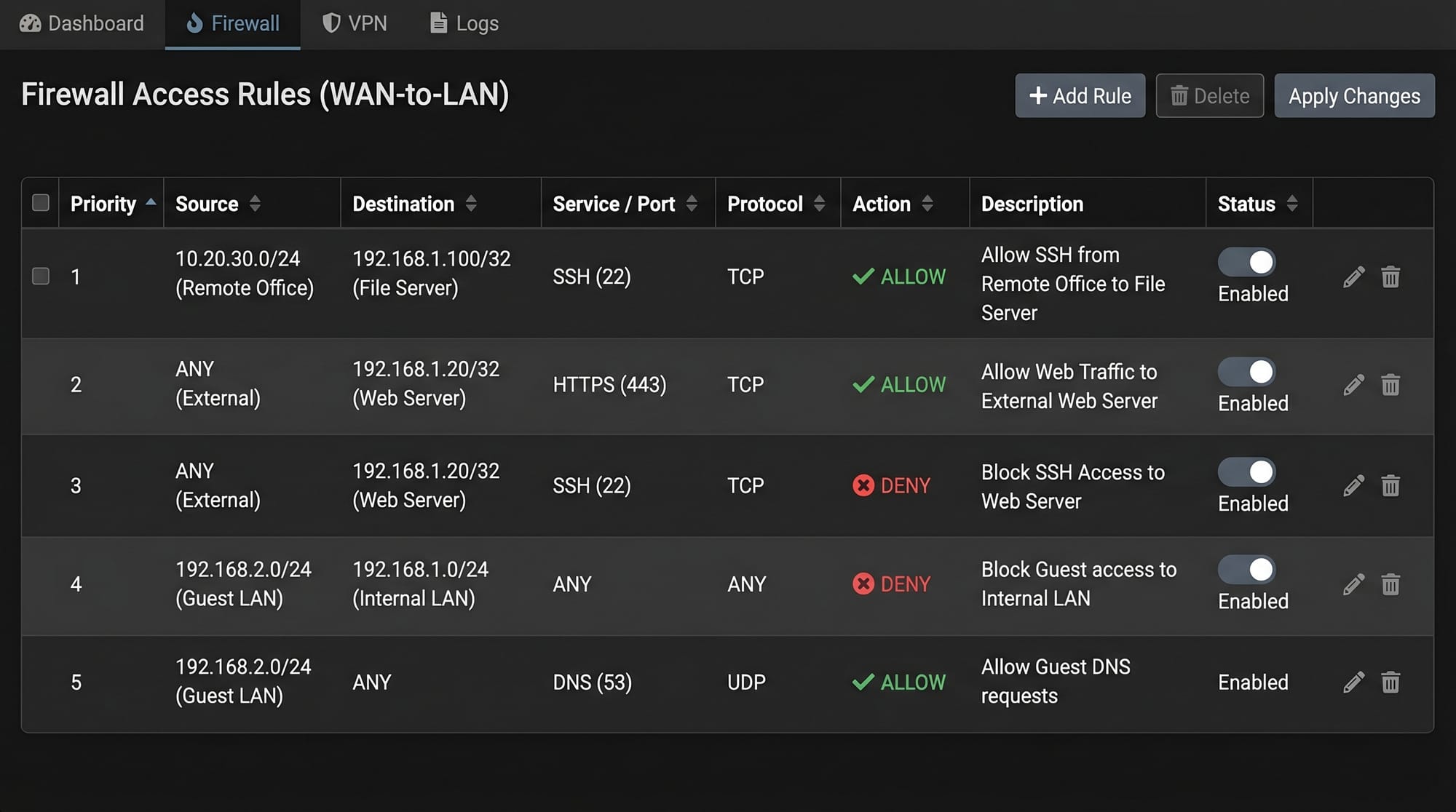
Exercise 1: Basic Firewall Setup
Task: Allow only SSH and HTTP traffic on a Linux server.
Solution:
iptables -A INPUT -p tcp --dport 22 -j ACCEPT
iptables -A INPUT -p tcp --dport 80 -j ACCEPT
iptables -A INPUT -j DROP
Explanation:
- SSH and HTTP are allowed
- Everything else is blocked
Exercise 2: Secure a Development Server
Task: Allow SSH only from your IP (e.g., 192.168.1.100) and allow HTTPS traffic.
Solution:
iptables -A INPUT -p tcp -s 192.168.1.100 --dport 22 -j ACCEPT
iptables -A INPUT -p tcp --dport 443 -j ACCEPT
iptables -A INPUT -j DROP
Explanation:
- Restricts SSH access to one trusted machine
- Allows secure web traffic
- Blocks all other traffic for safety
Frequently Asked Questions
What is iptables in Linux?
iptables is a command-line firewall tool used to configure rules that control incoming and outgoing network traffic. It operates at the kernel level and provides powerful packet filtering capabilities.
What is the difference between iptables and firewalld?
iptables is a low-level tool requiring manual rule management, while firewalld is a high-level firewall manager that uses zones and simplifies configuration.
How do I check active firewall rules in Linux?
You can view active rules using:
iptables -L -n -v
This displays all current rules, ports, and traffic statistics.
Is firewalld better than iptables?
Firewalld is easier for beginners and dynamic environments, while iptables offers more granular control. Both are widely used depending on system requirements.
How can I reset firewall rules in Linux?
You can flush all iptables rules using:
iptables -F
This removes all active rules and resets the firewall configuration.
Summary & Key Takeaways
- Linux networking relies on kernel-level packet filtering
- iptables provides powerful but manual firewall control
- firewalld simplifies firewall management using zones
- Always secure SSH access to prevent lockouts
- Default deny rules improve system security
- Practice is essential for mastering Linux firewall skills
Next Steps & Related Tutorials
To strengthen your skills, continue learning:
- Learn Linux Basics on theiqra.edu.pk to master terminal commands
- Explore Linux Security Fundamentals for advanced protection techniques
- Study DevOps Networking Essentials for cloud deployment skills
- Read Server Administration with Linux for real-world hosting setups
This linux networking tutorial, along with hands-on practice in iptables tutorial examples, will help you confidently manage any linux firewall system in real-world environments like VPS servers, cloud platforms, and enterprise systems.
Test Your Python Knowledge!
Finished reading? Take a quick quiz to see how much you've learned from this tutorial.