Design a Notification System Push Email & In App
Introduction
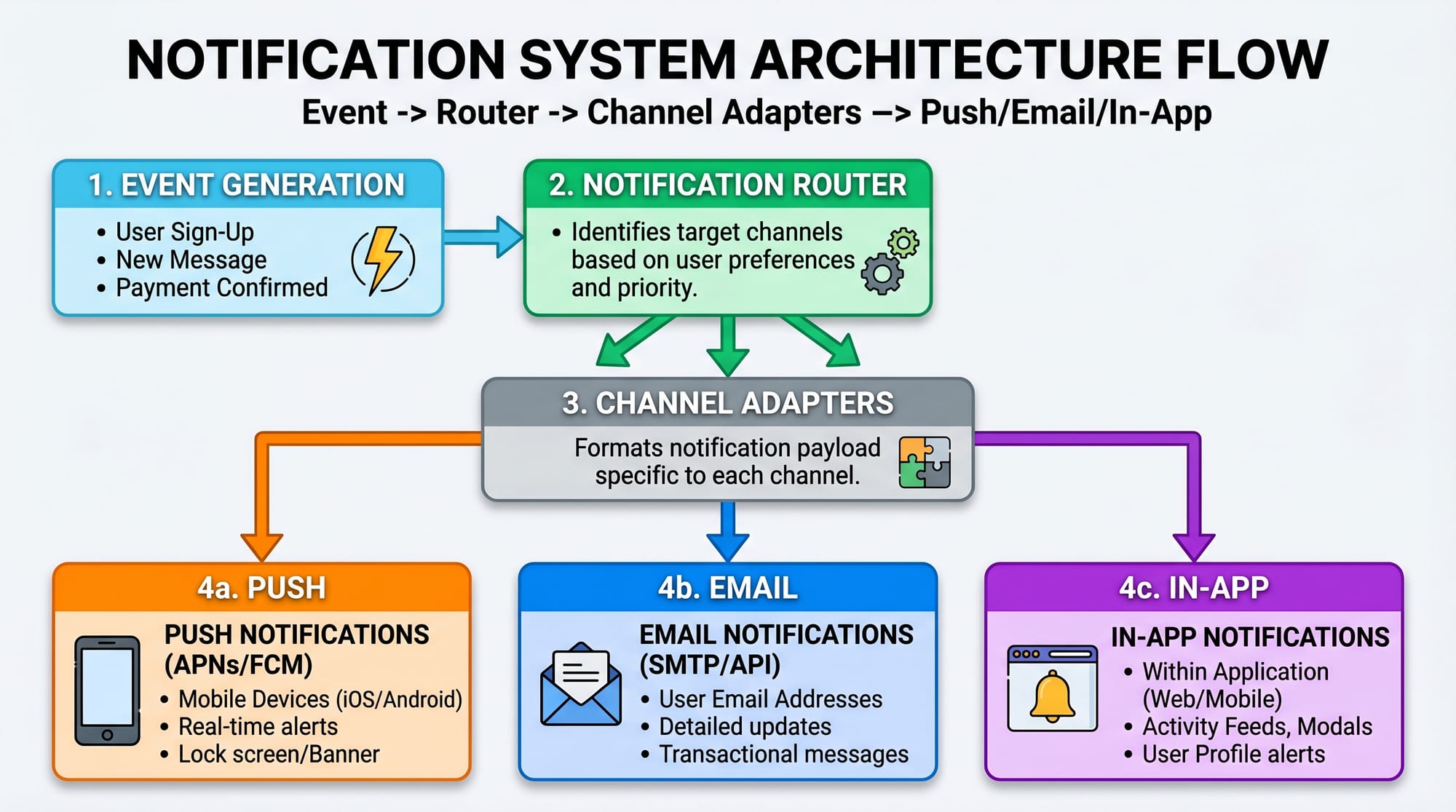
A notification system: push, email & in-app is a critical backend system used in almost every modern application like Facebook, WhatsApp, Daraz, and Foodpanda. It is responsible for sending timely messages to users across multiple channels such as mobile push notifications, email alerts, and in-app messages.
In simple terms, a notification system ensures that when something important happens in your application (like a new message, order update, or security alert), the user gets informed instantly through their preferred channel.
For Pakistani students learning system design, understanding notification systems is extremely important because:
- It is a frequently asked interview topic in companies like Careem, Bykea, and global FAANG firms.
- It teaches real-world distributed system concepts like queues, retries, and scalability.
- It is widely used in local apps such as JazzCash, Easypaisa, and online learning platforms.
Imagine Ahmad from Lahore orders food on Foodpanda. He gets:
- A push notification: “Order confirmed”
- An email receipt
- An in-app live tracking update
All of this is handled by a notification service working behind the scenes.
Prerequisites
Before learning notification system design, you should understand:
- Basic programming (Python, Java, or JavaScript)
- REST APIs and HTTP concepts
- Databases (SQL or NoSQL basics)
- Basic knowledge of queues (optional but helpful)
- Understanding of microservices architecture
If you are already familiar with system design basics like load balancers or caching, this tutorial will be easier to follow.
Core Concepts & Explanation
Event-Driven Architecture
A notification system is usually event-driven, meaning it reacts to events happening in the system.
Example events:
- User places an order
- Payment is successful
- New message received
Instead of directly sending notifications, the system emits an event like:
"ORDER_PLACED"
This event is processed asynchronously by a notification service.
Example:
- Ali from Karachi places an order → event is generated → notification service sends updates.
Notification Channels (Push, Email, In-App)
A modern system supports multiple channels:
Push Notifications
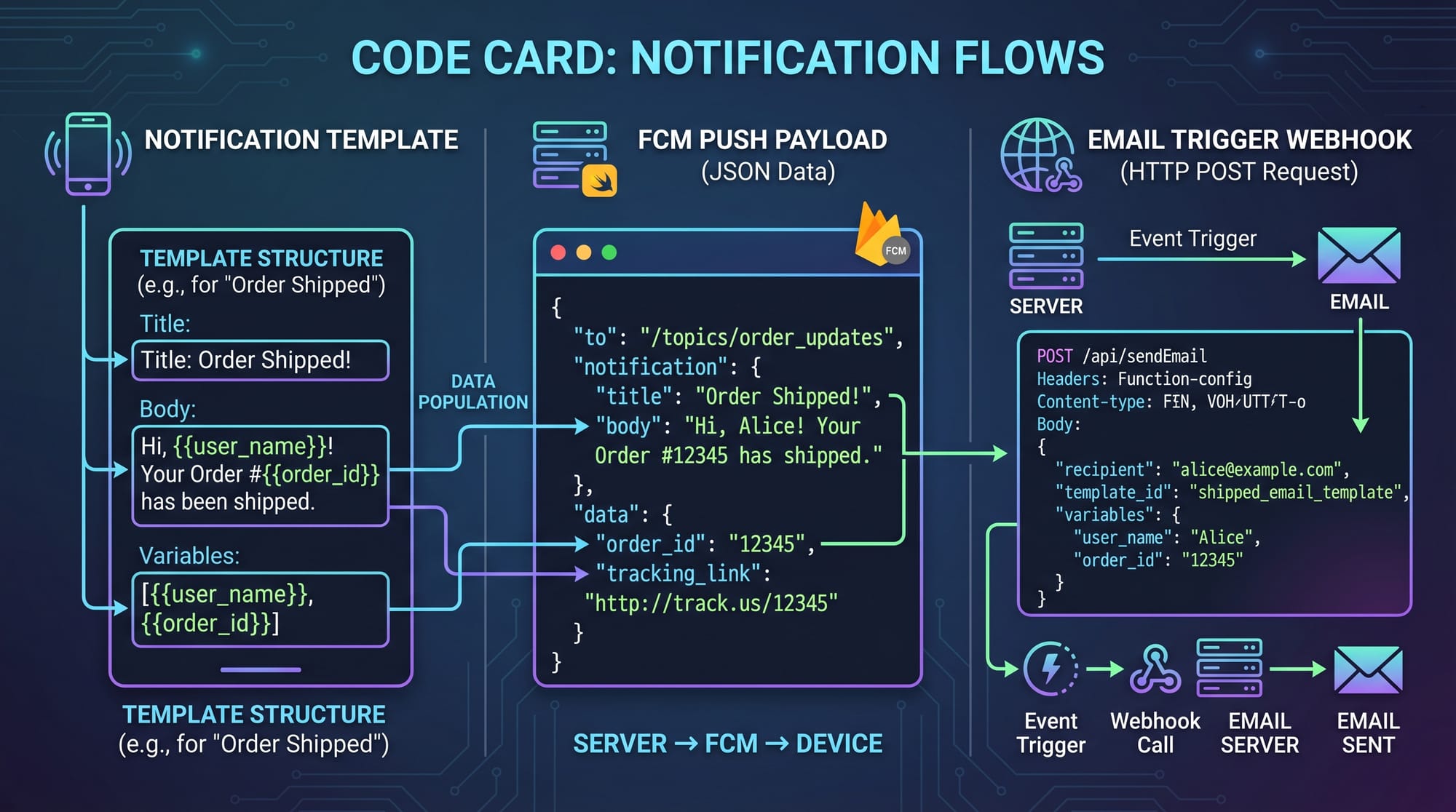
Sent to mobile devices using services like FCM (Firebase Cloud Messaging).
Email Notifications
Used for receipts, reports, and account verification.
In-App Notifications
Displayed inside the application UI (bell icon updates, banners, etc.)
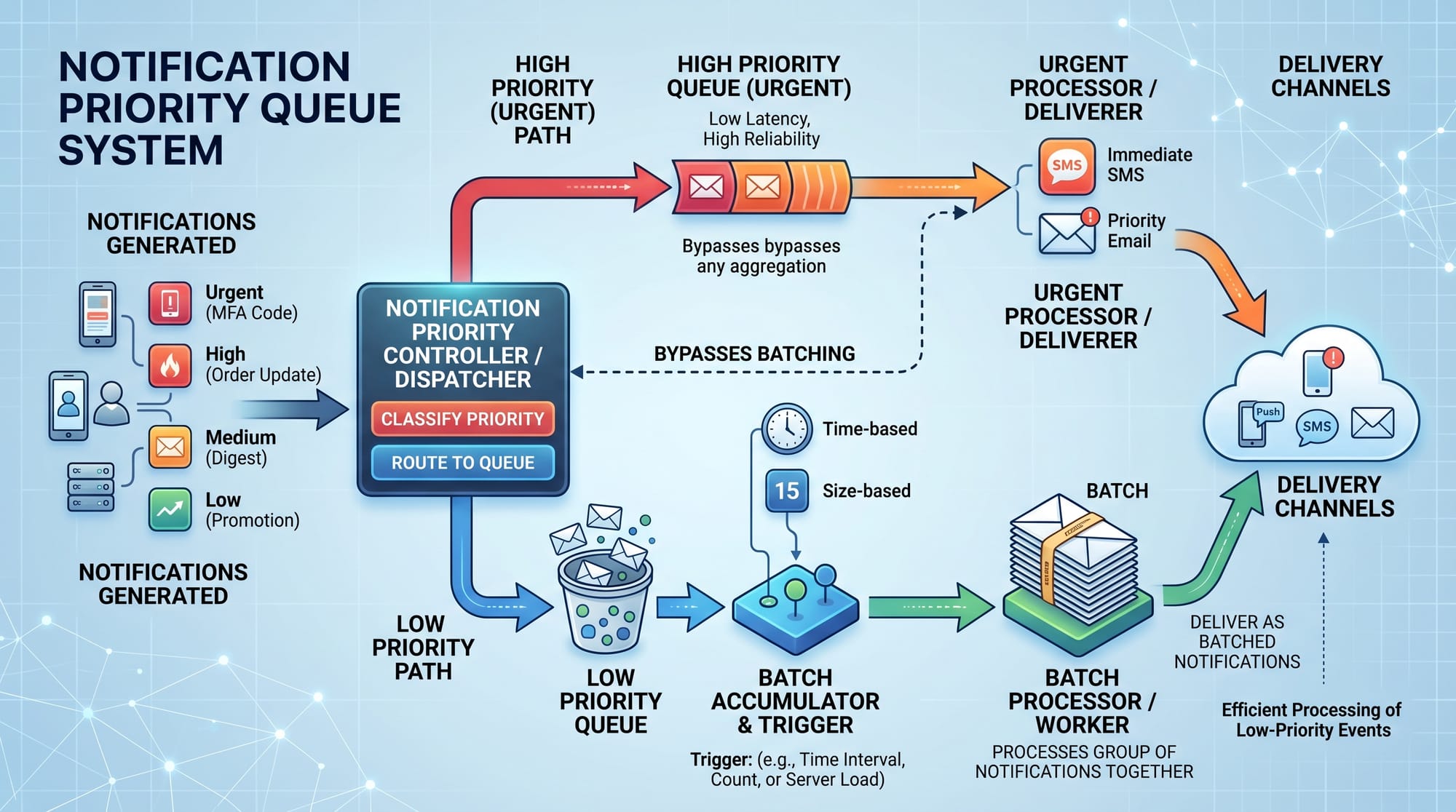
Each channel has its own adapter inside the system.
Example:
- Fatima in Islamabad receives:
- Push: “Your ride is arriving”
- Email: trip invoice
- In-app: driver tracking updates
Message Queue & Asynchronous Processing
A notification system must not block the main application.
Instead, it uses a message queue like Kafka or RabbitMQ.
Why?
- Prevents API slowdown
- Handles high traffic spikes
- Enables retry mechanisms
Flow:
- Event generated
- Sent to queue
- Notification workers consume messages
- Send via appropriate channel
Practical Code Examples
Example 1: Basic Notification Service (Python)
# Step 1: Event received from application
def handle_event(event):
    # Step 2: Route event to notification handler
    notification = create_notification(event)

    # Step 3: Send notification via multiple channels
    send_push(notification)
    send_email(notification)
    send_in_app(notification)


# Step 4: Create notification payload
def create_notification(event):
    return {
        "user_id": event["user_id"],
        "title": event["title"],
        "message": event["message"]
    }


# Step 5: Push notification sender
def send_push(notification):
    print("Sending push:", notification)


# Step 6: Email sender
def send_email(notification):
    print("Sending email:", notification)


# Step 7: In-app notification
def send_in_app(notification):
    print("Storing in-app notification:", notification)
Line-by-line Explanation
handle_event(event)→ Main entry point when an event occurscreate_notification(event)→ Converts raw event into a structured formatsend_push()→ Sends mobile push notificationsend_email()→ Sends email alertsend_in_app()→ Stores notification in database for UI display
This is a simple synchronous version, but real systems are asynchronous.
Example 2: Real-World Scalable Notification System
# Step 1: Push event into message queue
def publish_event(queue, event):
    queue.append(event)


# Step 2: Worker processes queue
def notification_worker(queue):
    while queue:
        event = queue.pop(0)

        if event["type"] == "ORDER_PLACED":
            send_push(event)
            send_email(event)

        elif event["type"] == "MESSAGE_RECEIVED":
            send_in_app(event)


# Step 3: Channel handlers
def send_push(event):
    print("FCM push sent:", event)


def send_email(event):
    print("Email sent:", event)


def send_in_app(event):
    print("In-app stored:", event)
Line-by-line Explanation
publish_event()→ Adds event to queue instead of processing immediatelynotification_worker()→ Continuously processes eventsqueue.pop(0)→ Fetches oldest event (FIFO behavior)if event["type"]→ Routes event based on type- Channel functions → Simulate delivery systems
This model is similar to what apps like Careem or Daraz use internally.
Common Mistakes & How to Avoid Them
Mistake 1: Sending Notifications Synchronously
Many beginners directly send notifications inside API requests.
Problem:
- Slows down user experience
- Causes timeout issues during high traffic
Fix:
- Use message queues like Kafka or RabbitMQ
- Process notifications asynchronously
Example:
Instead of sending email during checkout, push event to queue.
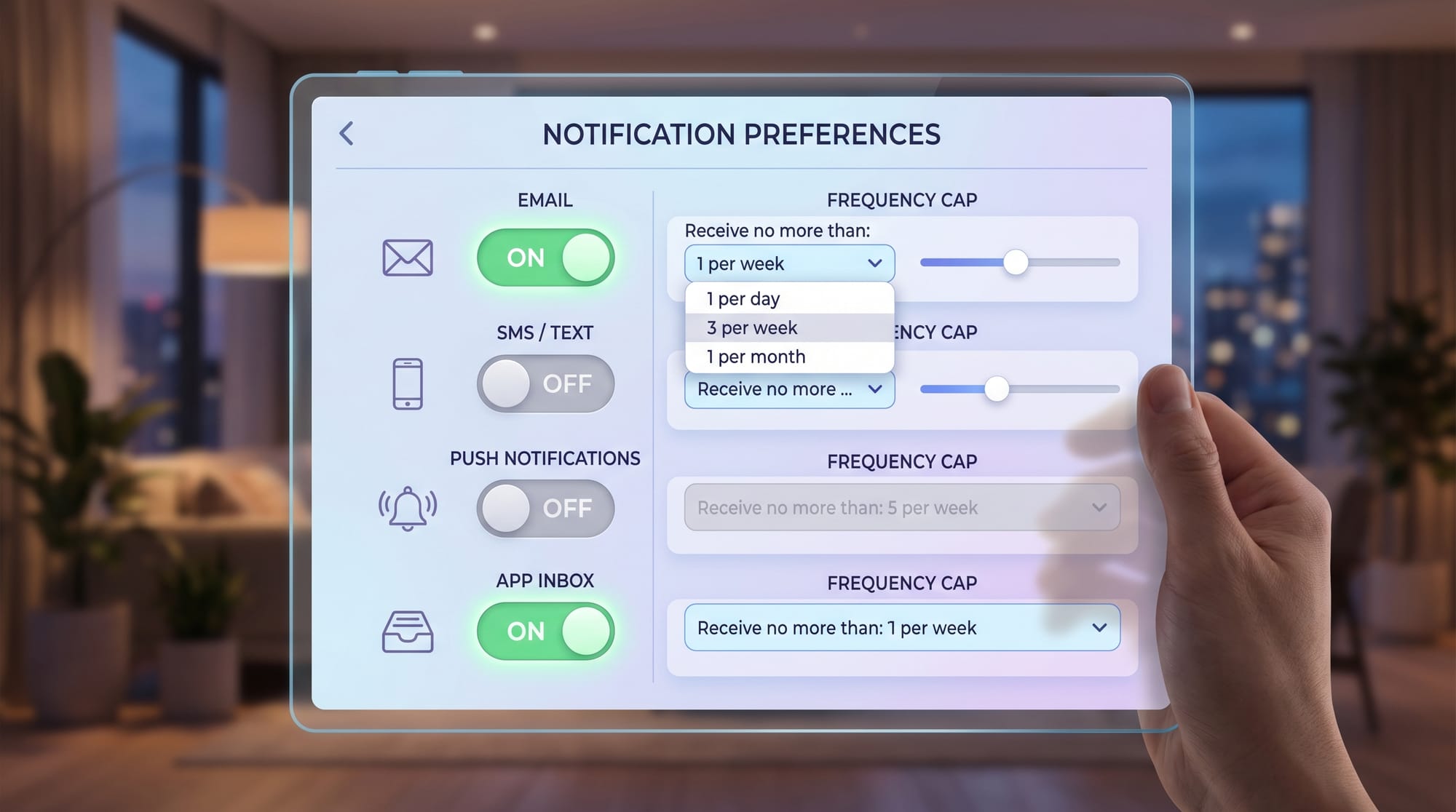
Mistake 2: Not Handling User Preferences
Not all users want every notification.
Problem:
- Users get annoyed
- High unsubscribe rates
Fix:
Maintain preference settings:
- Push: ON/OFF
- Email: ON/OFF
- In-app: ALWAYS ON
Example:
Ahmad from Lahore disables email notifications but keeps push enabled.
Mistake 3: No Retry Mechanism
Network failures can cause notification loss.
Fix:
- Retry failed messages 3–5 times
- Use exponential backoff strategy
Mistake 4: Overloading Single Channel
Sending everything via email or push causes overload.
Fix:
- Use intelligent routing
- Prioritize channels based on urgency
Practice Exercises
Exercise 1: Design a Simple Notification System
Problem:
Design a system that sends notifications when a user registers.
Solution:
- Event: USER_REGISTERED
- Queue stores event
- Worker sends:
- Email: Welcome message
- Push: “Account created successfully”
- In-app: Greeting notification
Exercise 2: Add Priority-Based Notifications
Problem:
Urgent alerts (like password reset) must be delivered instantly.
Solution:
- Create priority queue:
- HIGH → immediate push + email
- LOW → batch email digest
Example:
Fatima requests password reset → HIGH priority → instant email + push
Frequently Asked Questions
What is a notification system in system design?
A notification system is a backend service that sends messages to users through push, email, or in-app channels. It ensures users are informed about important events in real time.
How does push notification architecture work?
Push notification architecture uses a service like FCM to send messages from backend servers to mobile devices. The system includes event generation, queue processing, and delivery through platform APIs.
What is a notification service?
A notification service is a microservice responsible for handling, routing, and delivering notifications across different channels such as email, SMS, push, and in-app messages.
Why do we use message queues in notification systems?
Message queues allow asynchronous processing, which prevents system overload and improves scalability. They ensure notifications are delivered even during high traffic spikes.
How do large apps like Daraz or Foodpanda send notifications?
They use distributed notification systems with event-driven architecture, message queues, and multiple channel adapters to send push, email, and in-app notifications efficiently.
Summary & Key Takeaways
- Notification systems are event-driven distributed systems
- They support multiple channels: push, email, and in-app
- Message queues ensure scalability and reliability
- Asynchronous processing prevents API delays
- User preferences and retry mechanisms are essential
- Priority-based routing improves user experience
Next Steps & Related Tutorials
To strengthen your system design skills, explore:
- Internal guide: System Design Interview Preparation
- Learn more: Message Queues Explained Simply
- Advanced topic: Designing Scalable Chat Applications
- Beginner series: Distributed Systems Basics for Students
If you want, I can also:
✔ Convert this into a downloadable PDF for students
✔ Add system design interview questions on notifications
✔ Or create a diagram-heavy version for visual learners
Test Your Python Knowledge!
Finished reading? Take a quick quiz to see how much you've learned from this tutorial.