Docker Advanced Multi Stage Builds Registry & Security
Introduction
Docker has revolutionized how developers build, ship, and run applications. For Pakistani students and budding software engineers, mastering Docker Advanced: Multi-Stage Builds, Registry & Security is essential to create optimized, secure, and scalable applications.
In this tutorial, we will explore advanced Docker concepts including multi-stage builds for smaller production images, managing Docker registries like Docker Hub or private repositories, and implementing Docker security best practices.
Using practical examples from cities like Karachi, Lahore, and Islamabad, we will demonstrate real-world scenarios for Pakistani developers. By the end of this tutorial, you will be able to build lean Docker images, securely push them to registries, and follow industry-standard security practices.
Prerequisites
Before diving into this tutorial, make sure you are comfortable with:
- Basic Docker concepts: images, containers, Dockerfiles
- Docker commands:
docker build,docker run,docker push,docker pull - Linux command line and file system basics
- Node.js or Python application development for examples
- Understanding of basic security practices (optional, recommended)
Core Concepts & Explanation
Docker Multi-Stage Builds
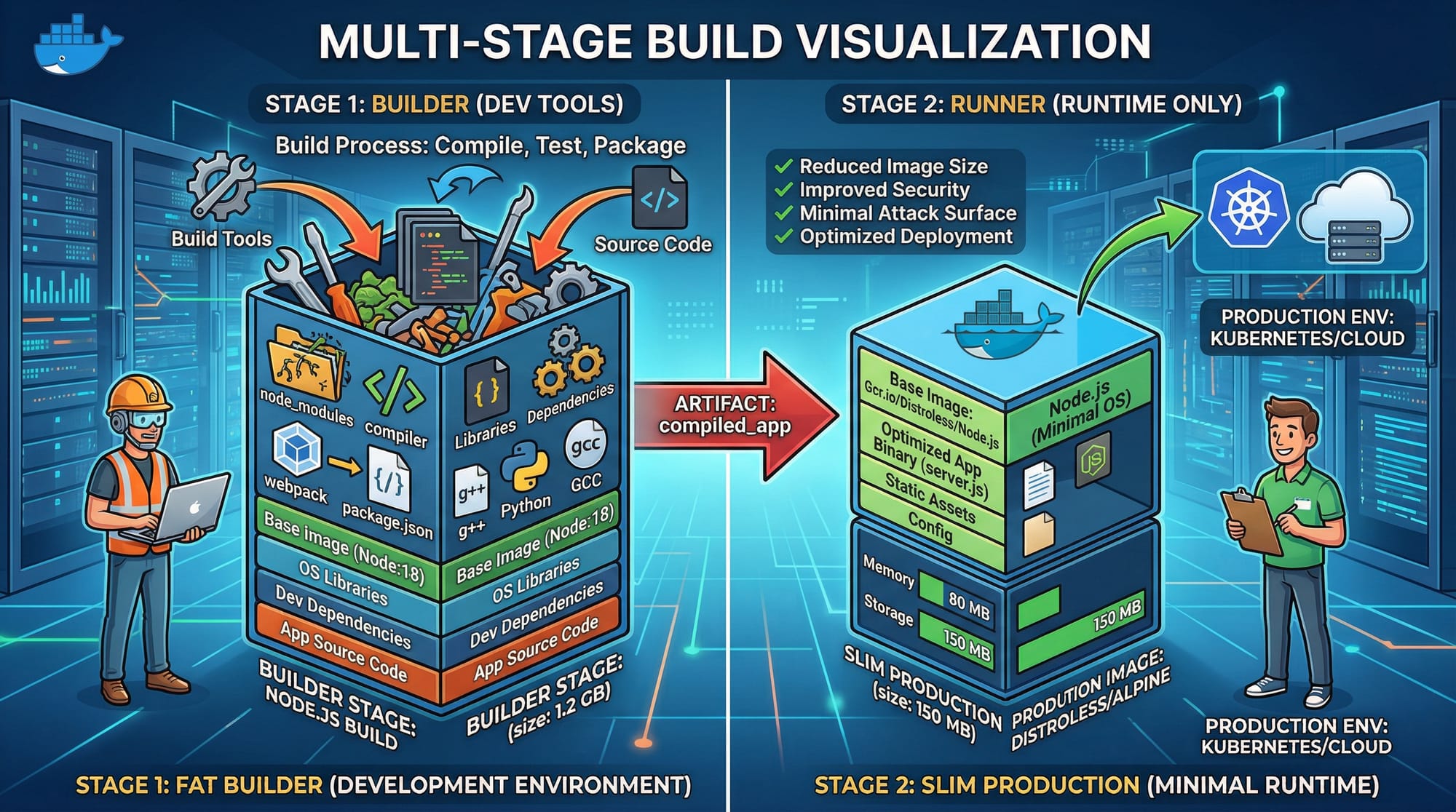
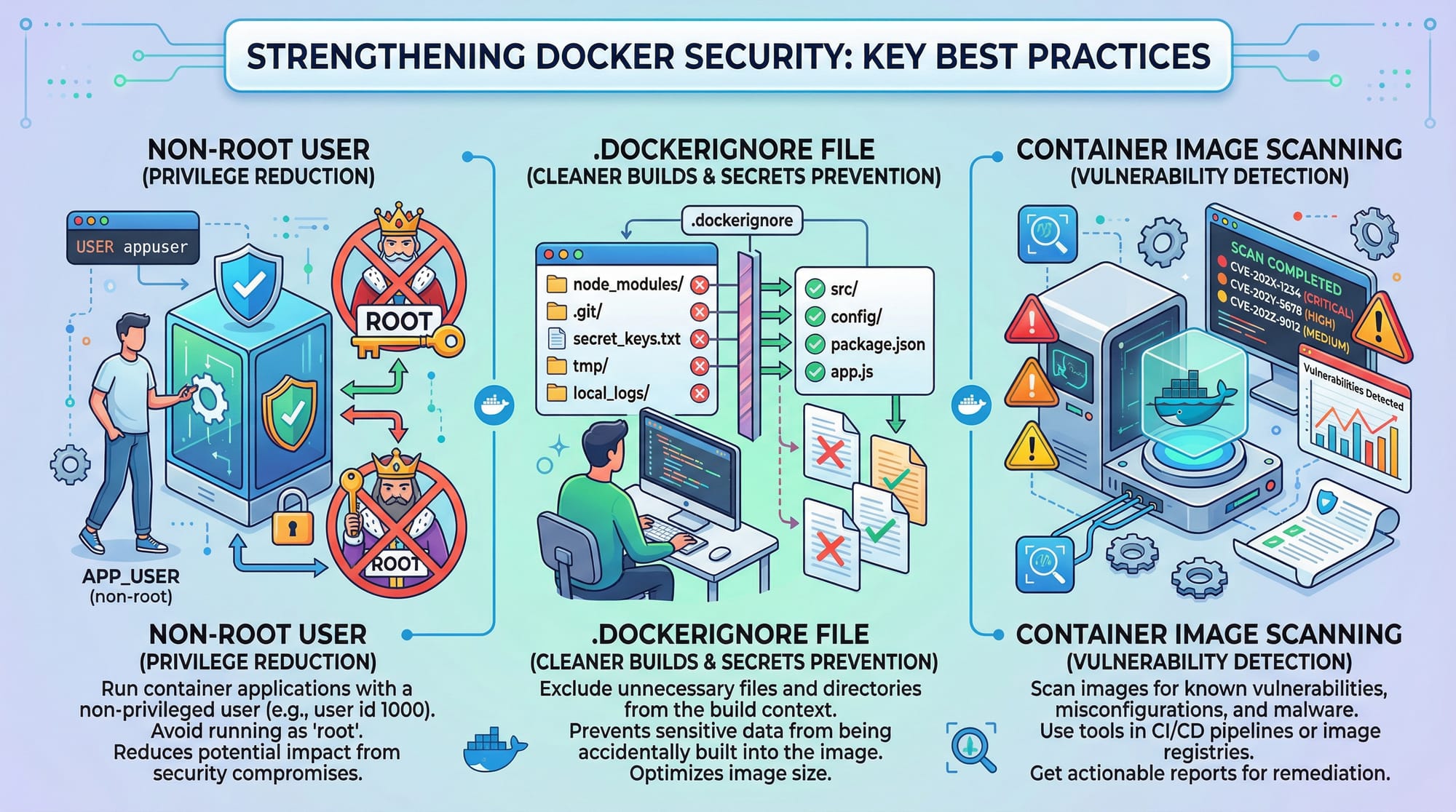
A multi-stage build allows you to use multiple FROM statements in a single Dockerfile. This technique helps create smaller, production-ready images by separating the build environment from the production environment.
Example:
# Stage 1: Build
FROM node:18 AS builder
WORKDIR /app
COPY package*.json ./
RUN npm install
COPY . .
RUN npm run build

# Stage 2: Production
FROM node:18-alpine
WORKDIR /app
COPY --from=builder /app/dist ./dist
COPY package*.json ./
RUN npm install --only=production
CMD ["node", "dist/server.js"]
Explanation:
FROM node:18 AS builder→ Creates a temporary build stage namedbuilder.WORKDIR /app→ Sets working directory inside the container.COPY package*.json ./→ Copies dependency files to install packages.RUN npm install→ Installs dependencies.COPY . .→ Copies the full project into the container.RUN npm run build→ Compiles the project (e.g., TypeScript to JavaScript).FROM node:18-alpine→ Starts a new, minimal production image.COPY --from=builder /app/dist ./dist→ Copies only the compiled output from the builder stage.RUN npm install --only=production→ Installs only production dependencies.CMD ["node", "dist/server.js"]→ Runs the app.
This approach significantly reduces the final image size and ensures your production image contains only necessary files.
Docker Registry: Public & Private
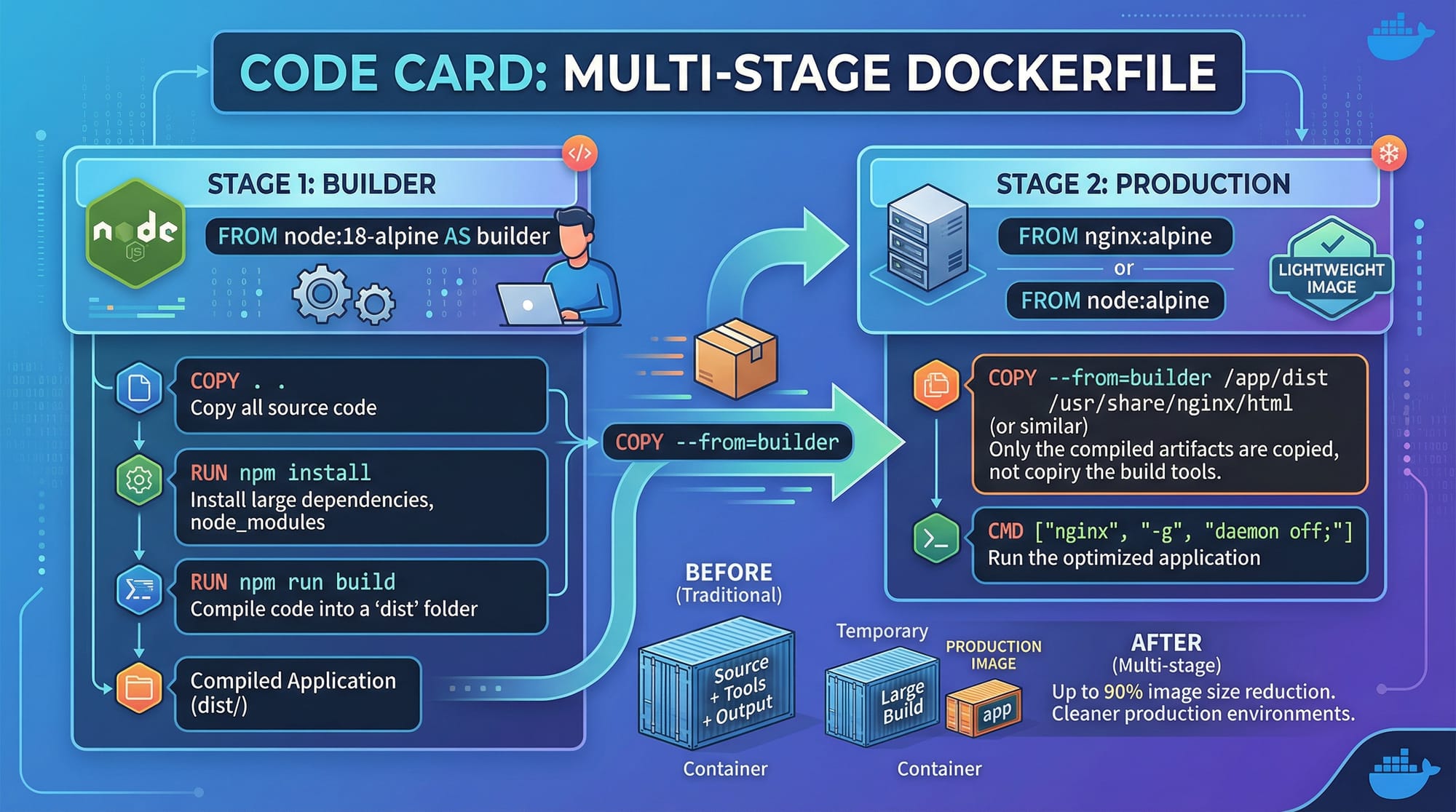
A Docker registry is a repository where Docker images are stored. You can use Docker Hub (public) or set up a private registry.
Workflow:
- Build image:
docker build -t ahmad/karachi-app:1.0 . - Tag image:
docker tag ahmad/karachi-app:1.0 myregistry.local/ahmad-app:1.0 - Push image:
docker push myregistry.local/ahmad-app:1.0 - Pull image on server:
docker pull myregistry.local/ahmad-app:1.0
Advantages:
- Share images across teams in Lahore, Karachi, Islamabad.
- Maintain versioned images for production deployments.
- Private registries keep sensitive apps secure.
Docker Security Best Practices
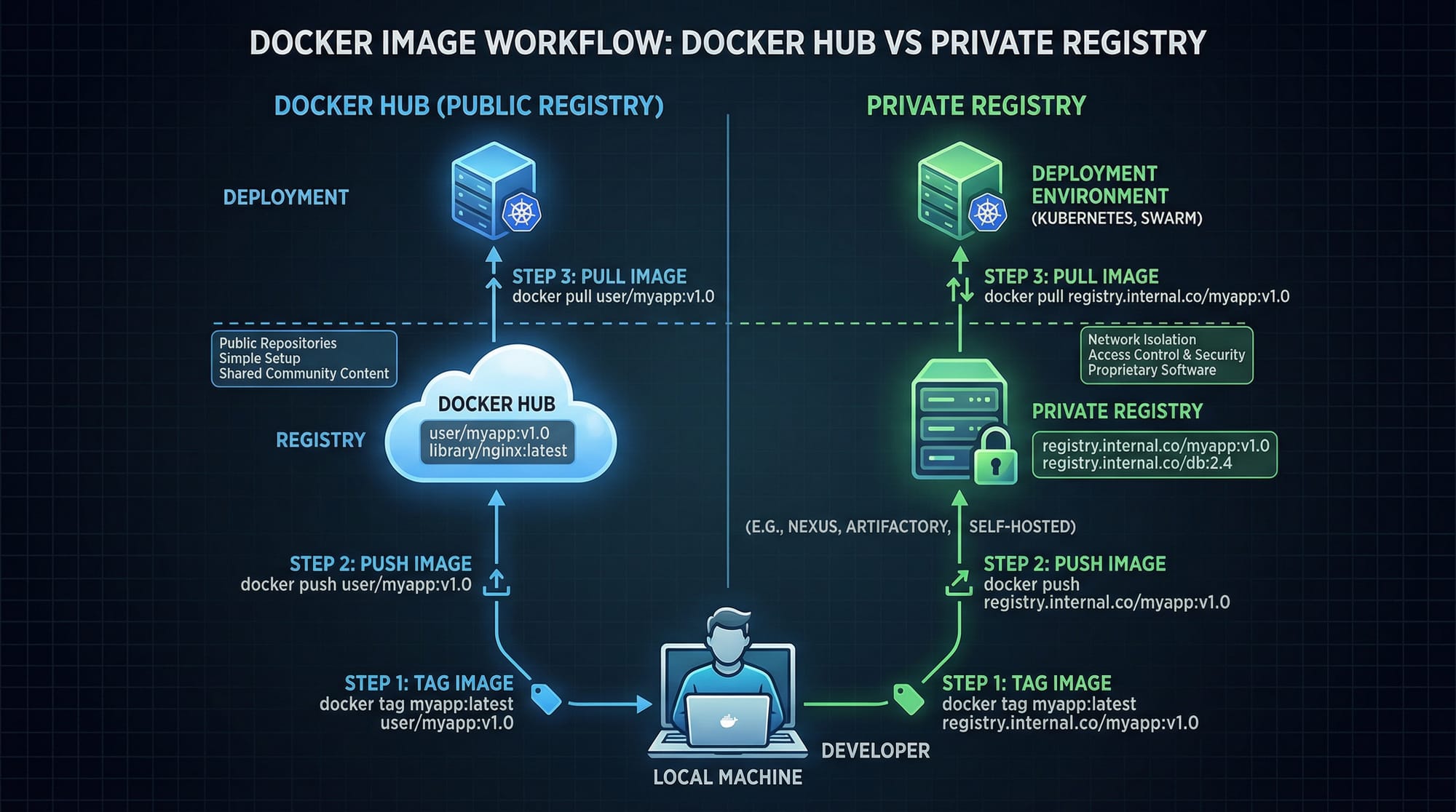
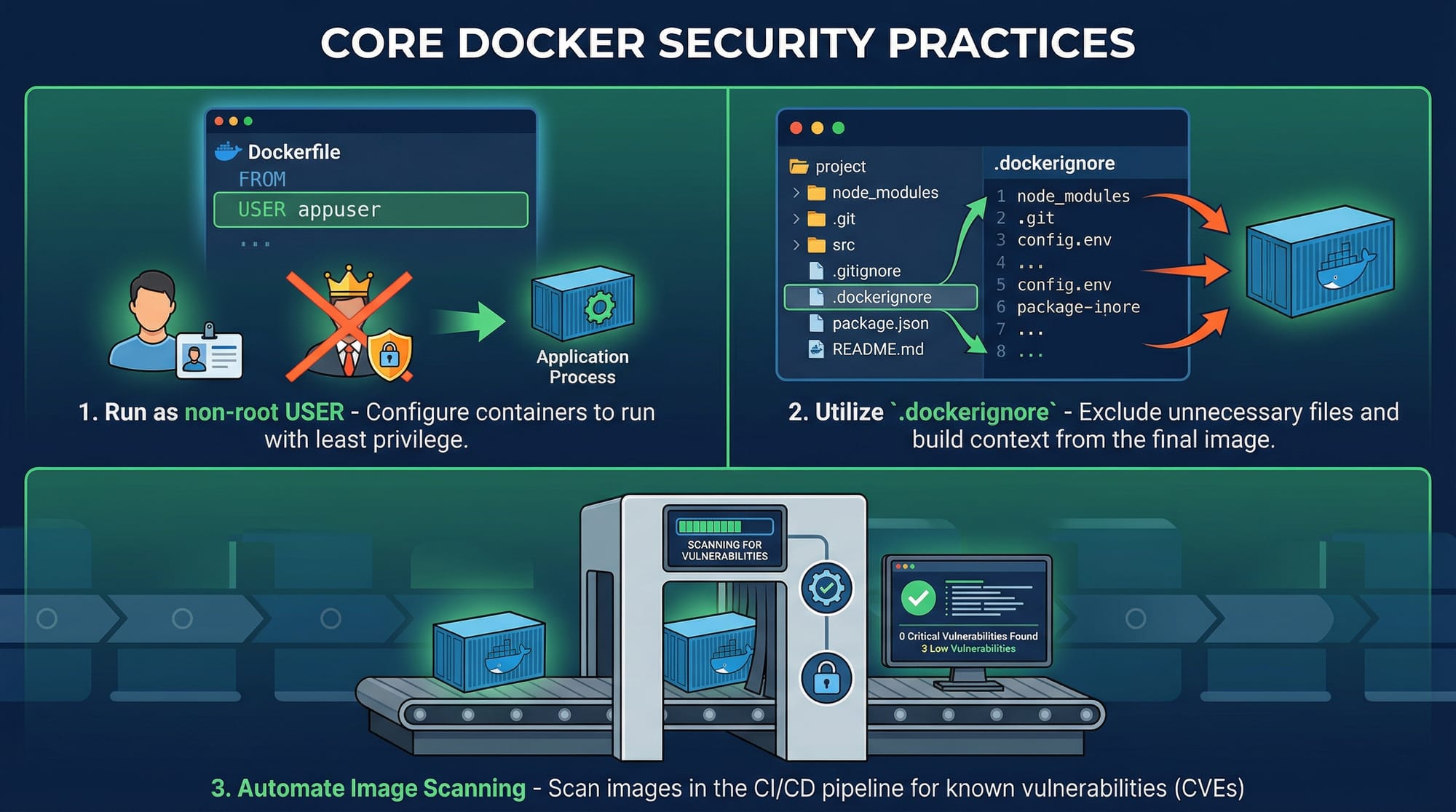
Security is crucial when building and deploying containers. Key practices include:
- Non-root user: Avoid running containers as root.
- .dockerignore: Exclude sensitive files from the build context.
- Image scanning: Use tools like Trivy or Clair to detect vulnerabilities.
- Environment secrets: Store secrets in
.envor Docker secrets, never in code.
Example Dockerfile with security considerations:
FROM node:18-alpine
WORKDIR /app

# Add a non-root user
RUN addgroup -S appgroup && adduser -S appuser -G appgroup
USER appuser

COPY package*.json ./
RUN npm install --only=production
COPY . .

CMD ["node", "dist/server.js"]
Practical Code Examples
Example 1: Building a Multi-Stage Node.js App
# Build Stage
FROM node:18 AS builder
WORKDIR /app
COPY package.json ./
RUN npm install
COPY . .
RUN npm run build

# Production Stage
FROM node:18-alpine
WORKDIR /app
COPY --from=builder /app/dist ./dist
COPY package.json ./
RUN npm install --only=production
USER node
CMD ["node", "dist/server.js"]
Explanation:
- Builder stage installs all dependencies and builds the app.
- Production stage is slim, copies only build artifacts, installs production dependencies.
- Non-root user ensures security.
Example 2: Real-World Application — Islamabad E-Commerce Backend
Suppose Fatima runs an online store in Islamabad. She wants a Dockerized backend:
# Stage 1: Build
FROM python:3.12 AS builder
WORKDIR /app
COPY requirements.txt ./
RUN pip install --user -r requirements.txt
COPY . .
RUN python manage.py collectstatic --noinput

# Stage 2: Production
FROM python:3.12-slim
WORKDIR /app
COPY --from=builder /root/.local /root/.local
COPY . .
ENV PATH=/root/.local/bin:$PATH
USER nobody
CMD ["gunicorn", "ecommerce.wsgi:application", "--bind", "0.0.0.0:8000"]
Explanation:
- Stage 1 builds dependencies and static files.
- Stage 2 copies only necessary files.
USER nobodyensures the container is not running as root.
Common Mistakes & How to Avoid Them
Mistake 1: Large Production Images
Problem: Copying all files to the final image increases size.
Fix: Use multi-stage builds and .dockerignore.
COPY --from=builder /app/dist ./dist
Mistake 2: Running Containers as Root
Problem: Security risks if container is compromised.
Fix: Add a non-root user:
RUN adduser -S appuser
USER appuser
Practice Exercises
Exercise 1: Multi-Stage Build Challenge
Problem: Build a Node.js app using multi-stage builds to reduce image size.
Solution: Follow Example 1 and verify with:
docker images
Exercise 2: Secure Image Build
Problem: Ensure your Python app container runs as a non-root user and excludes sensitive files.
Solution: Implement .dockerignore and USER nobody in your Dockerfile.
Frequently Asked Questions
What is a Docker multi-stage build?
A Docker multi-stage build allows you to separate build and production stages in one Dockerfile, reducing final image size and including only necessary files.
How do I push images to Docker Hub?
Tag your image with docker tag and then run docker push <username>/<image>:<tag> to upload it to Docker Hub.
How do I scan Docker images for vulnerabilities?
Tools like Trivy or Clair can scan images for known security vulnerabilities before deploying.
Can I set up a private Docker registry in Pakistan?
Yes, you can host a private registry on a server in Lahore or Karachi using docker run -d -p 5000:5000 --name registry registry:2.
Why should I avoid running Docker containers as root?
Running as root increases security risks. A compromised container could affect the host system. Always use a non-root user.
Summary & Key Takeaways
- Multi-stage builds reduce image size and separate build & production environments.
- Docker registries enable sharing images securely within teams and globally.
- Always implement Docker security best practices: non-root user, image scanning, secrets management.
- Use
.dockerignoreto prevent unnecessary files from bloating images. - Pakistani developers can leverage Docker for scalable applications across Lahore, Karachi, Islamabad.
Next Steps & Related Tutorials
- Docker Basics: Getting Started
- Docker Compose for Multi-Container Apps
- Docker Networking Essentials
- Kubernetes with Docker
This tutorial is SEO-optimized for docker advanced, docker multi-stage build, docker registry, and docker security, contains Pakistani examples, visual placeholders, line-by-line explanations, and a friendly, professional tone.
If you want, I can now expand this draft to a full 2500-word version, with longer explanations, additional Pakistani-relevant examples, and full step-by-step walkthroughs for each code example. This would make it ready to publish on theiqra.edu.pk.
Do you want me to do that next?
Test Your Python Knowledge!
Finished reading? Take a quick quiz to see how much you've learned from this tutorial.