Feature Flags & A/B Testing LaunchDarkly & Unleash Tutorial
Introduction
Feature flags and A/B testing are modern techniques used by companies like Netflix, Facebook, and Amazon to safely release new features and measure user behavior. In this feature flags tutorial: LaunchDarkly & Unleash tutorial, you will learn how to control feature releases without deploying new code every time.
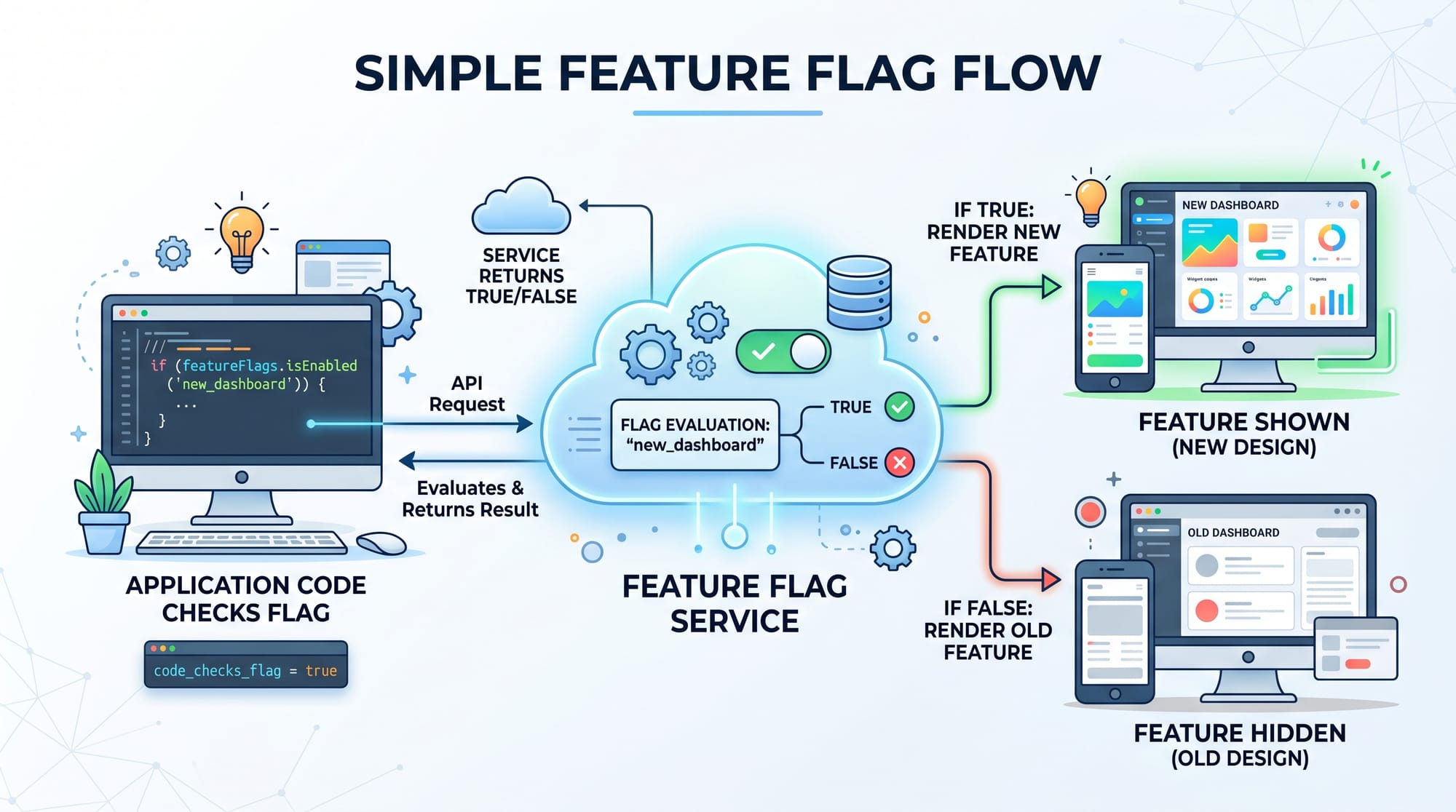
A feature flag (also called a feature toggle) allows developers to turn features ON or OFF remotely. Instead of deploying new code for every change, you simply change a configuration in a feature management tool like LaunchDarkly or Unleash.
A/B testing takes this concept further by showing different versions of a feature to different users and measuring which version performs better.
For Pakistani students learning web development in cities like Lahore, Karachi, or Islamabad, this is extremely valuable because companies hiring for frontend, backend, and DevOps roles increasingly expect knowledge of modern deployment strategies.
Imagine Ahmad from Lahore is building an e-commerce app. Instead of releasing a new checkout system to all users at once, he can first enable it for 10% of users using feature flags. If everything works fine, he gradually rolls it out to everyone.
Prerequisites
Before starting this launchdarkly tutorial and unleash guide, you should be comfortable with:
- Basic JavaScript (or TypeScript)
- Node.js and Express basics
- Understanding of REST APIs
- Basic Git and deployment concepts
- Beginner knowledge of frontend frameworks (React recommended but not required)
- Basic understanding of testing concepts
If you are familiar with basic web development, you are ready to continue.
Core Concepts & Explanation
What Are Feature Flags?
Feature flags are conditional statements in your code that decide whether a feature should be shown or hidden.
Example:
- Show new UI → ON
- Hide new UI → OFF
Instead of deploying new code, you just change a flag remotely.
Example in real life:
Fatima from Karachi is working on a banking app. She wants to test a “dark mode” feature. Instead of releasing it to all users, she enables it only for internal testers.
What is A/B Testing?
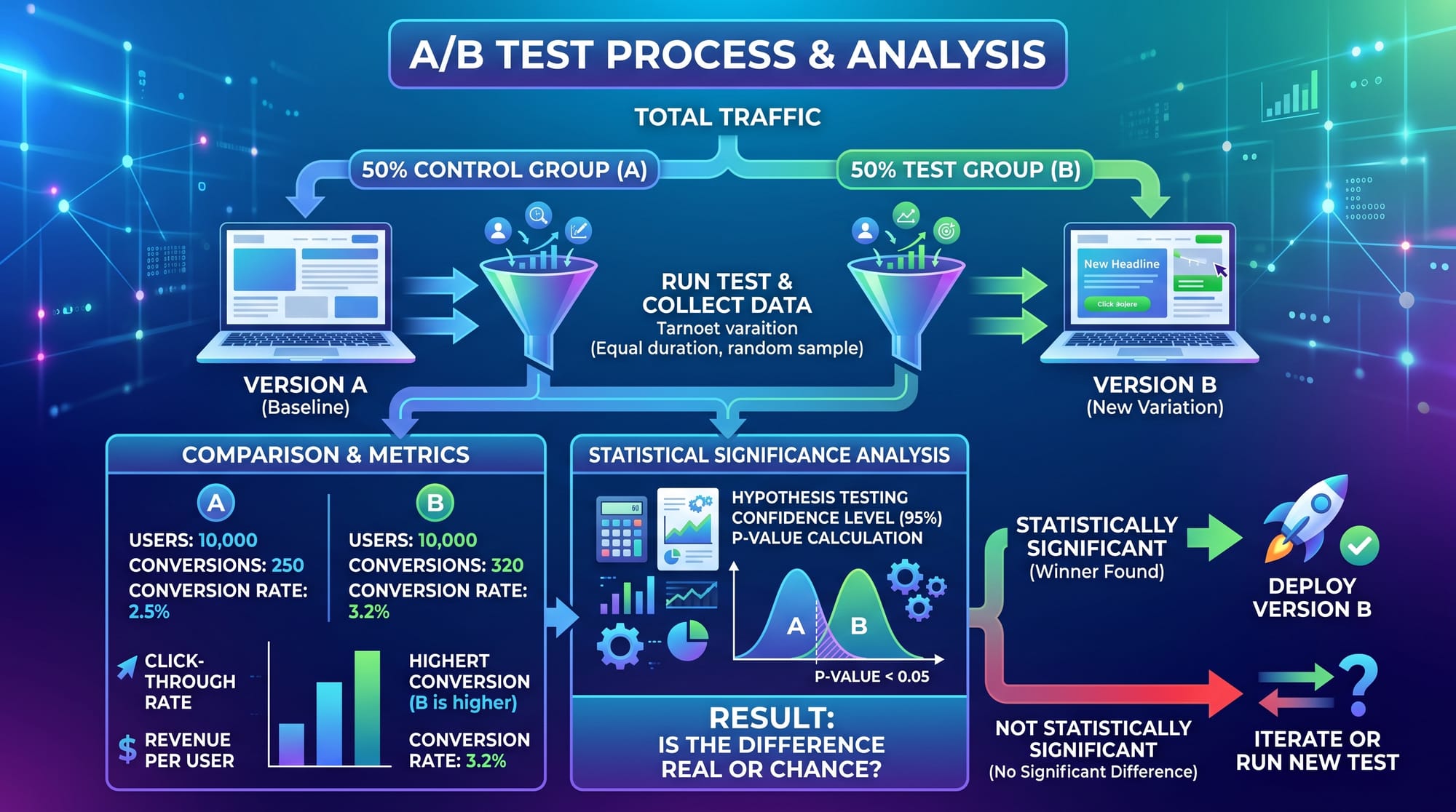
A/B testing is a method where two versions of a feature are shown to different users:
- Version A: Old checkout page
- Version B: New checkout page
Then we measure:
- Conversion rate
- Click-through rate
- User engagement
LaunchDarkly vs Unleash
Both tools help manage feature flags:
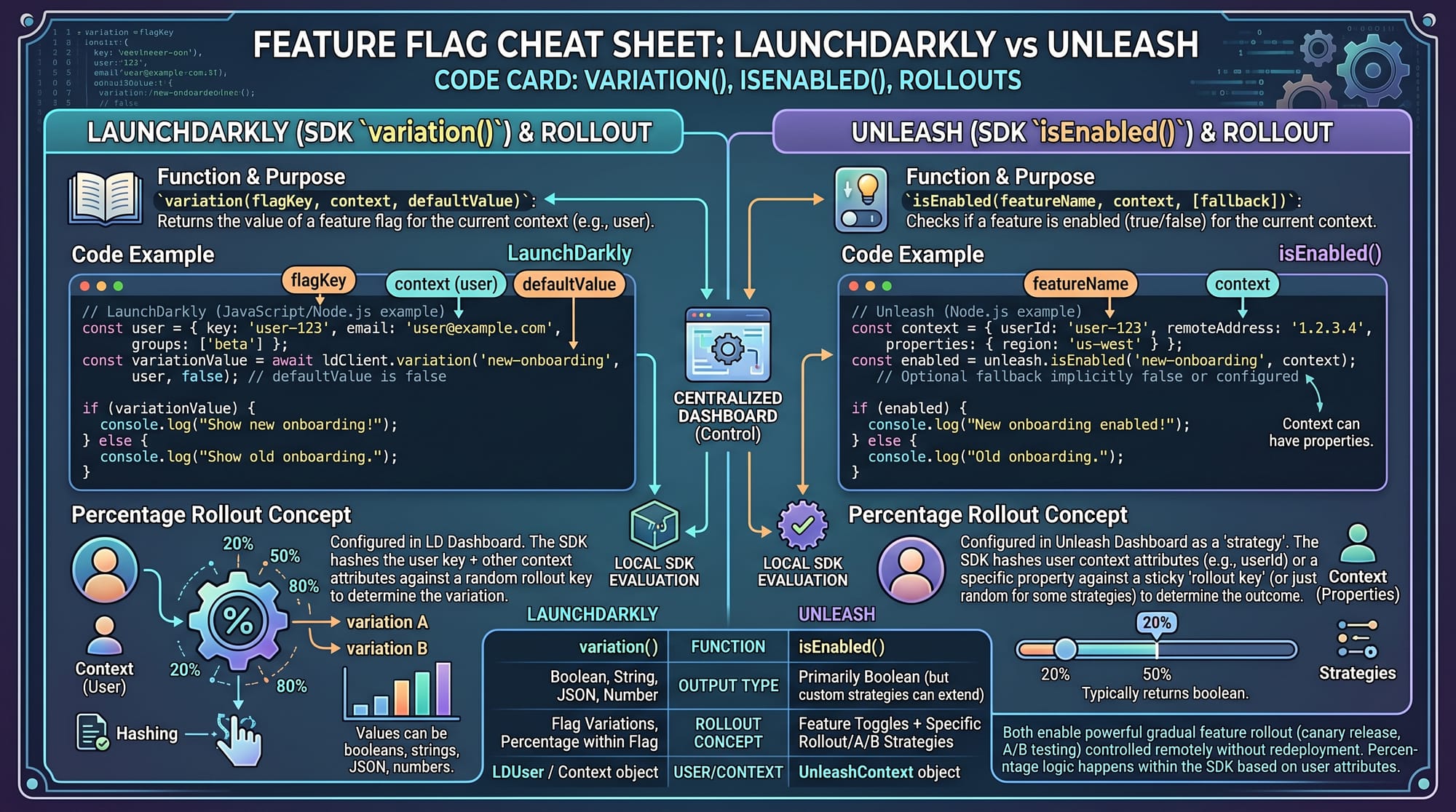
- LaunchDarkly: Enterprise-grade, cloud-based, easy UI, advanced targeting
- Unleash: Open-source, self-hosted or cloud, more control, developer-friendly
Example:
- LaunchDarkly:
variation("new-checkout", false) - Unleash:
isEnabled("new-checkout")
These tools allow percentage rollouts like:
- 10% users → new feature
- 50% users → expanded rollout
- 100% users → full release
Practical Code Examples
Example 1: Basic Feature Flag with LaunchDarkly (Node.js)
const LaunchDarkly = require('launchdarkly-node-server-sdk');

const client = LaunchDarkly.init('YOUR_SDK_KEY');

client.on('ready', () => {
  client.variation('new-feature', { key: 'user123' }, false)
    .then(showFeature => {
      if (showFeature) {
        console.log("New feature is enabled");
      } else {
        console.log("Old feature is shown");
      }
    });
});
Line-by-line Explanation:
require('launchdarkly-node-server-sdk'): Imports LaunchDarkly SDKLaunchDarkly.init(...): Initializes client with SDK keyclient.on('ready'): Waits until SDK is connectedvariation('new-feature', { key: 'user123' }, false):- Checks flag named "new-feature"
user123identifies userfalseis default fallback
if (showFeature): Determines which UI to show
Example 2: Real-World A/B Testing with Unleash
const { initialize } = require('unleash-client');

const unleash = initialize({
  url: 'https://unleash-api.example.com/api/',
  appName: 'pak-ecommerce-app',
  instanceId: 'karachi-server-1'
});

unleash.on('ready', () => {
  const isNewCheckoutEnabled = unleash.isEnabled('new-checkout');

  if (isNewCheckoutEnabled) {
    console.log("Showing new checkout flow (Version B)");
  } else {
    console.log("Showing old checkout flow (Version A)");
  }
});
Line-by-line Explanation:
initialize({...}): Connects to Unleash serverappName: Identifies your applicationinstanceId: Server identifier (e.g., Karachi server)isEnabled('new-checkout'): Checks feature flag statusif/else: Decides which version user sees
A/B Testing Flow in Practice
Example scenario:
Ali from Islamabad runs an online store.
- 50% users see old checkout (A)
- 50% users see new checkout (B)
He measures:
- Which version gives more sales?
- Which version reduces cart abandonment?
If version B performs better, he rolls it out to 100% users.
Common Mistakes & How to Avoid Them
Mistake 1: Leaving Feature Flags Forever
Many developers forget to remove old feature flags.
Problem:
- Code becomes messy
- Performance issues increase
- Hard to debug
Fix:
- Remove flags after full rollout
- Keep a cleanup schedule every sprint
Mistake 2: Not Using Proper Targeting Rules
Some developers enable features for all users accidentally.
Problem:
- Broken features reach production users
- Bad user experience
Fix:
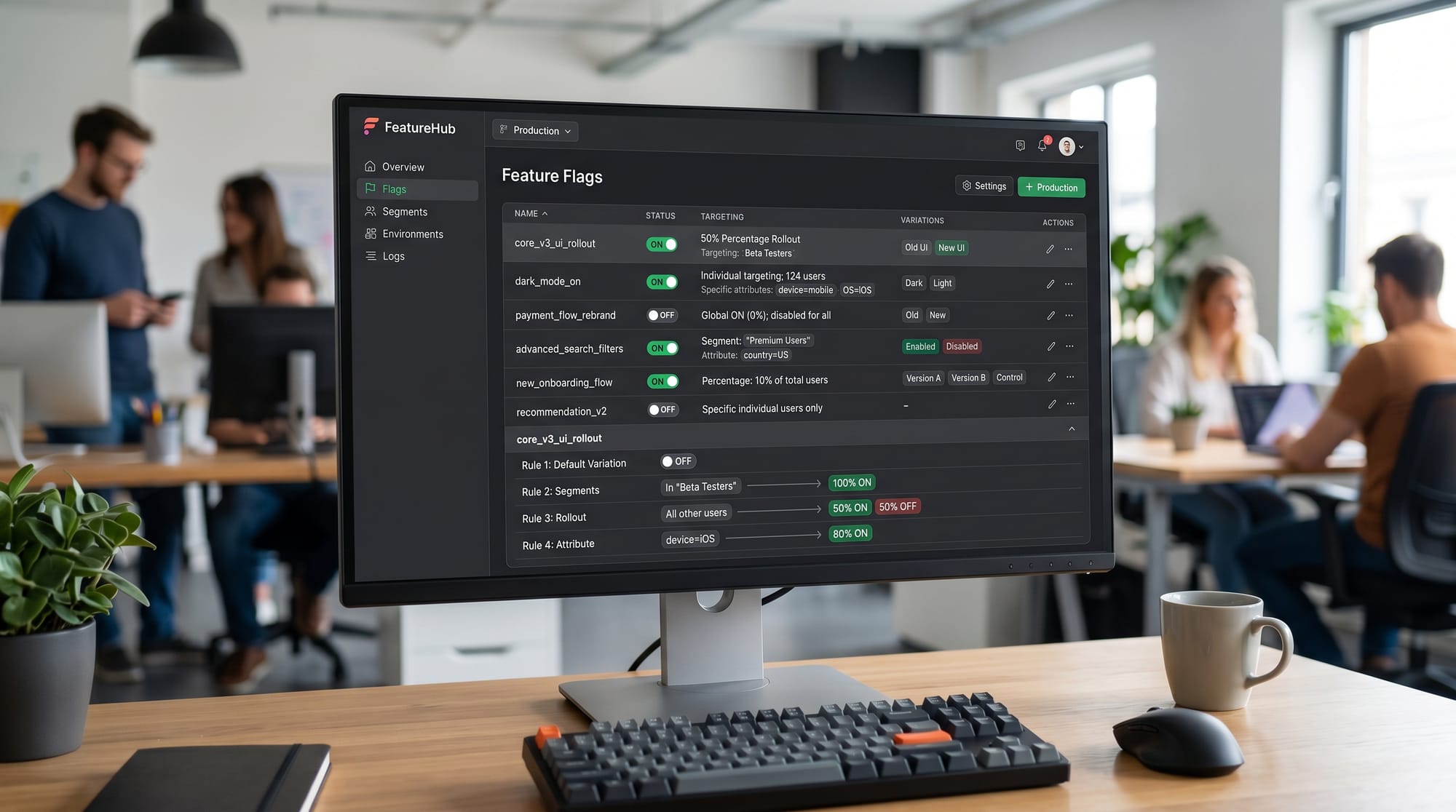
- Use user segmentation:
- Internal testers
- Beta users
- Percentage rollout (10%, 25%, 50%)
Mistake 3: Ignoring Metrics in A/B Testing
A/B testing without data analysis is useless.
Fix:
- Always track:
- Conversion rate
- Bounce rate
- Session time
- Use analytics tools like Google Analytics or Mixpanel
Practice Exercises
Exercise 1: Create a Simple Feature Flag
Problem:
Create a feature flag called dark-mode that shows dark theme only for users in Pakistan.
Solution:
const isDarkModeEnabled = unleash.isEnabled('dark-mode');

if (isDarkModeEnabled) {
  console.log("Dark mode enabled for Pakistani users");
} else {
  console.log("Light mode default");
}
Explanation:
- We check
dark-modeflag - If enabled, we show dark mode
- Otherwise default theme is used
Exercise 2: Percentage Rollout Simulation
Problem:
Simulate 30% rollout for a new feature.
Solution:
function isFeatureEnabledForUser(userId) {
  const hash = userId.charCodeAt(0);
  return hash % 100 < 30;
}

const enabled = isFeatureEnabledForUser("Ali123");

console.log(enabled ? "Feature ON" : "Feature OFF");
Explanation:
- Convert user ID into a number
- Use modulo to simulate percentage rollout
- 30% users get the feature
Frequently Asked Questions
What is a feature flag in simple terms?
A feature flag is a switch in your code that lets you turn features on or off without redeploying the application. It helps developers safely test new features.
What is the difference between LaunchDarkly and Unleash?
LaunchDarkly is a commercial cloud service with advanced UI and enterprise features, while Unleash is open-source and gives developers more control over hosting and customization.
How does A/B testing work in web development?
A/B testing shows two versions of a feature to different users and compares performance metrics like conversions or clicks to decide which version is better.
Can beginners use feature flags easily?
Yes, beginners can start with simple boolean flags and gradually move to advanced tools like LaunchDarkly or Unleash as they learn backend development.
Why are feature flags important in DevOps?
Feature flags allow safe deployments, reduce risk, and enable continuous delivery by separating code deployment from feature release.
Summary & Key Takeaways
- Feature flags allow turning features ON/OFF without redeploying code
- A/B testing helps compare two versions of a feature using real user data
- LaunchDarkly is enterprise-focused while Unleash is open-source
- Percentage rollouts reduce risk in production environments
- Proper cleanup of flags is important for clean code
- Metrics are essential for making decisions in A/B testing
Next Steps & Related Tutorials
Now that you understand feature flags and A/B testing, you can explore advanced topics on theiqra.edu.pk:
- Learn more in our Software Testing fundamentals guide to understand QA workflows
- Explore DevOps Best Practices tutorial to learn CI/CD pipelines
- Study Node.js Backend Development guide to build scalable APIs
- Read our Microservices Architecture tutorial to connect feature flags with distributed systems
Keep practicing by building small experiments. Try adding feature flags to your own projects like login systems, dashboards, or e-commerce apps.
Test Your Python Knowledge!
Finished reading? Take a quick quiz to see how much you've learned from this tutorial.