GraphQL Code Generator TypeScript Types from Schema
Introduction
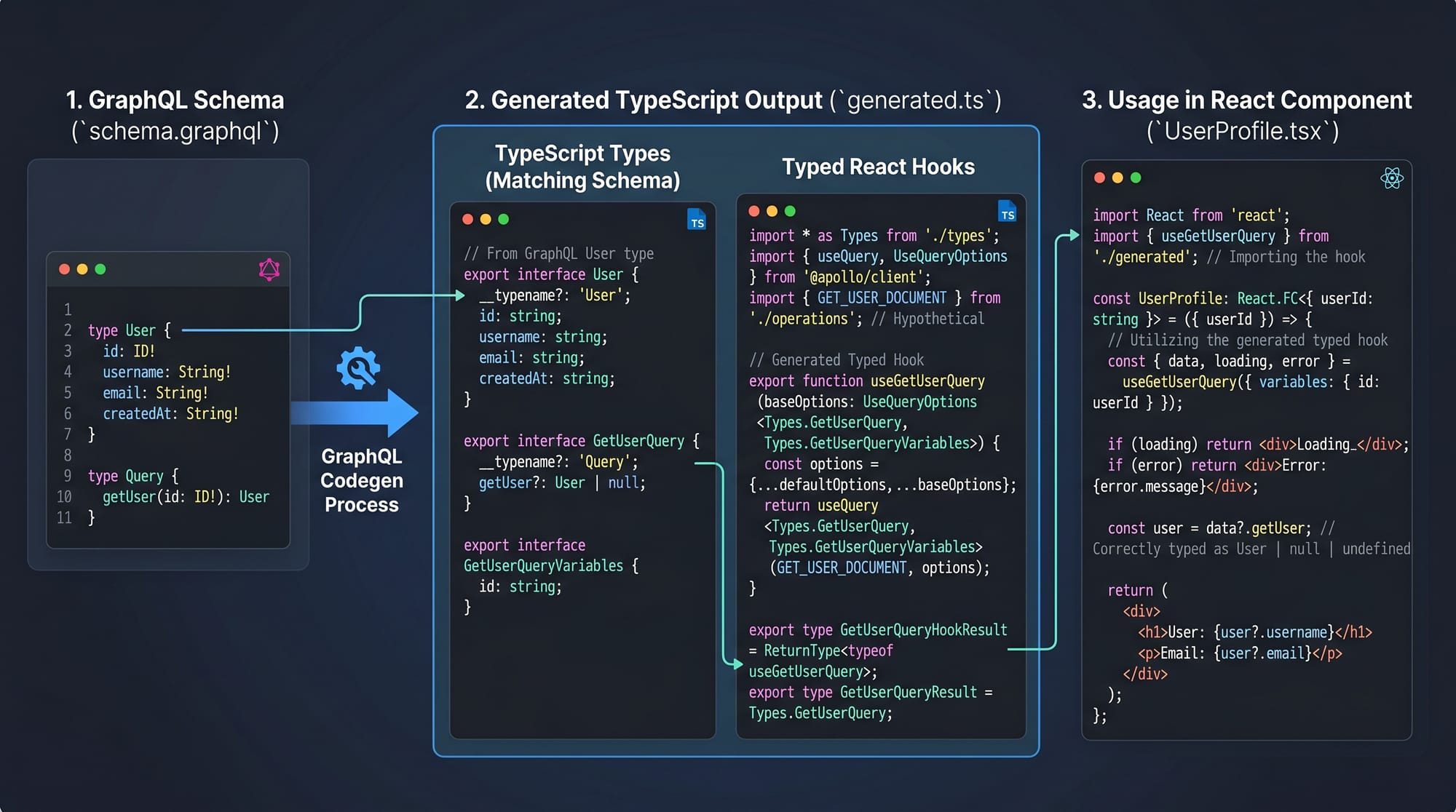
GraphQL development becomes significantly more powerful when you combine it with automatic type generation. This is where GraphQL Code Generator comes in—a tool that converts your GraphQL schema and queries into strongly-typed TypeScript code.
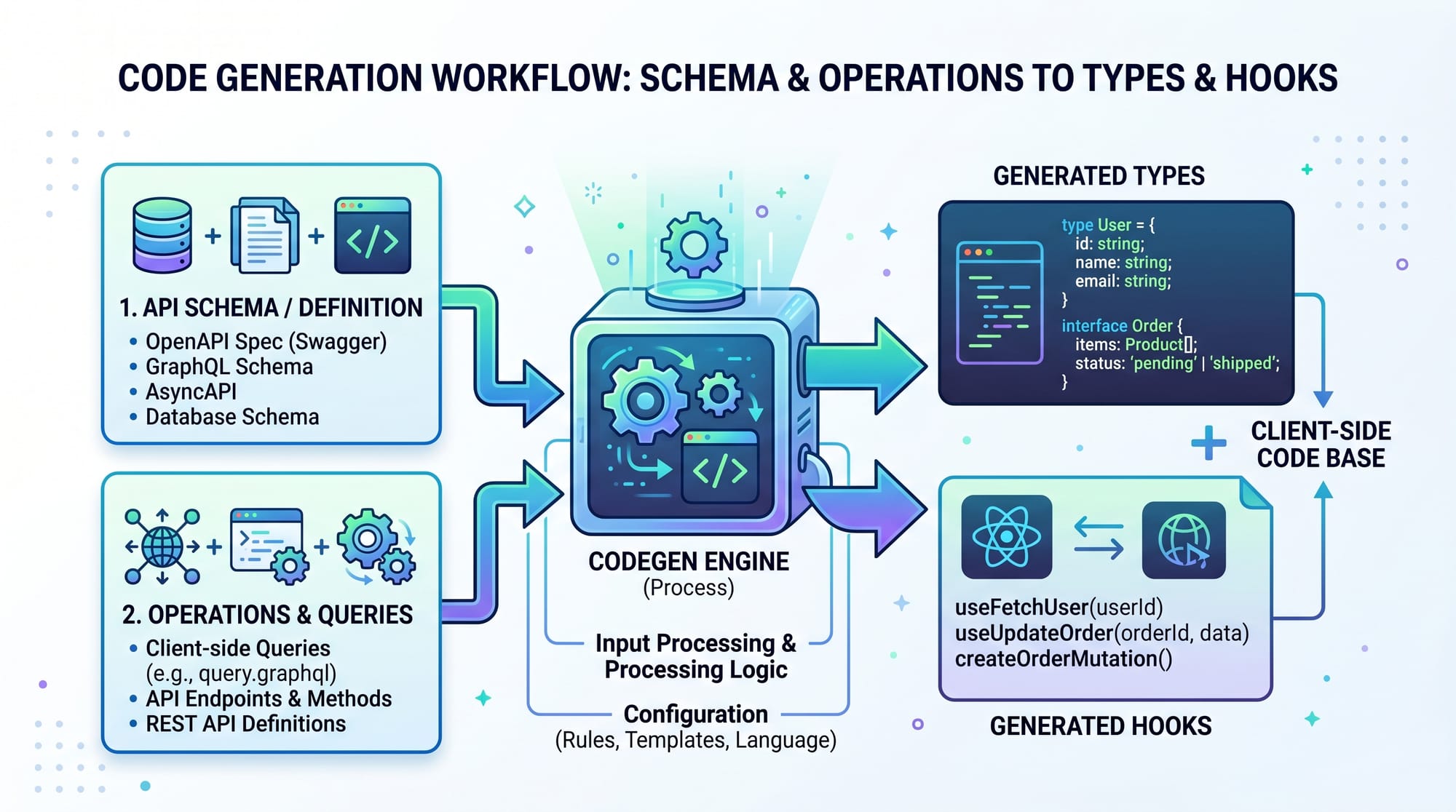
In simple terms, GraphQL Code Generator (graphql codegen) reads your GraphQL schema and operations, then generates TypeScript GraphQL types and even ready-to-use hooks for frameworks like React. This eliminates guesswork, reduces bugs, and improves developer productivity.
For Pakistani students—whether you're building a startup project in Lahore, freelancing from Karachi, or studying in Islamabad—learning this tool gives you a real advantage. Many modern companies expect developers to write type-safe APIs, and mastering this workflow puts you ahead in the job market.
Prerequisites
Before diving into GraphQL Code Generator, make sure you’re comfortable with:
- Basic GraphQL concepts (queries, mutations, schema)
- Basic TypeScript (interfaces, types, generics)
- JavaScript fundamentals (ES6+)
- Node.js and npm/yarn
- Optional but helpful:
- React (for using generated hooks)
- Familiarity with APIs
If you’re new, consider first reading a GraphQL Tutorial and TypeScript Basics on theiqra.edu.pk.
Core Concepts & Explanation
Understanding GraphQL Schema and Operations
GraphQL Code Generator works with two key inputs:
- Schema – Defines your API structure
- Operations – Your queries and mutations
Example schema:
type User {
  id: ID!
  name: String!
  city: String!
}
Example query:
query GetUsers {
  users {
    id
    name
    city
  }
}
Now, instead of manually writing TypeScript types, codegen will generate them automatically.
Generated TypeScript:
export type User = {
  id: string;
  name: string;
  city: string;
};

export type GetUsersQuery = {
  users: User[];
};
Why this matters:
- No mismatch between frontend and backend
- Autocomplete in IDE
- Fewer runtime errors
Configuring GraphQL Code Generator
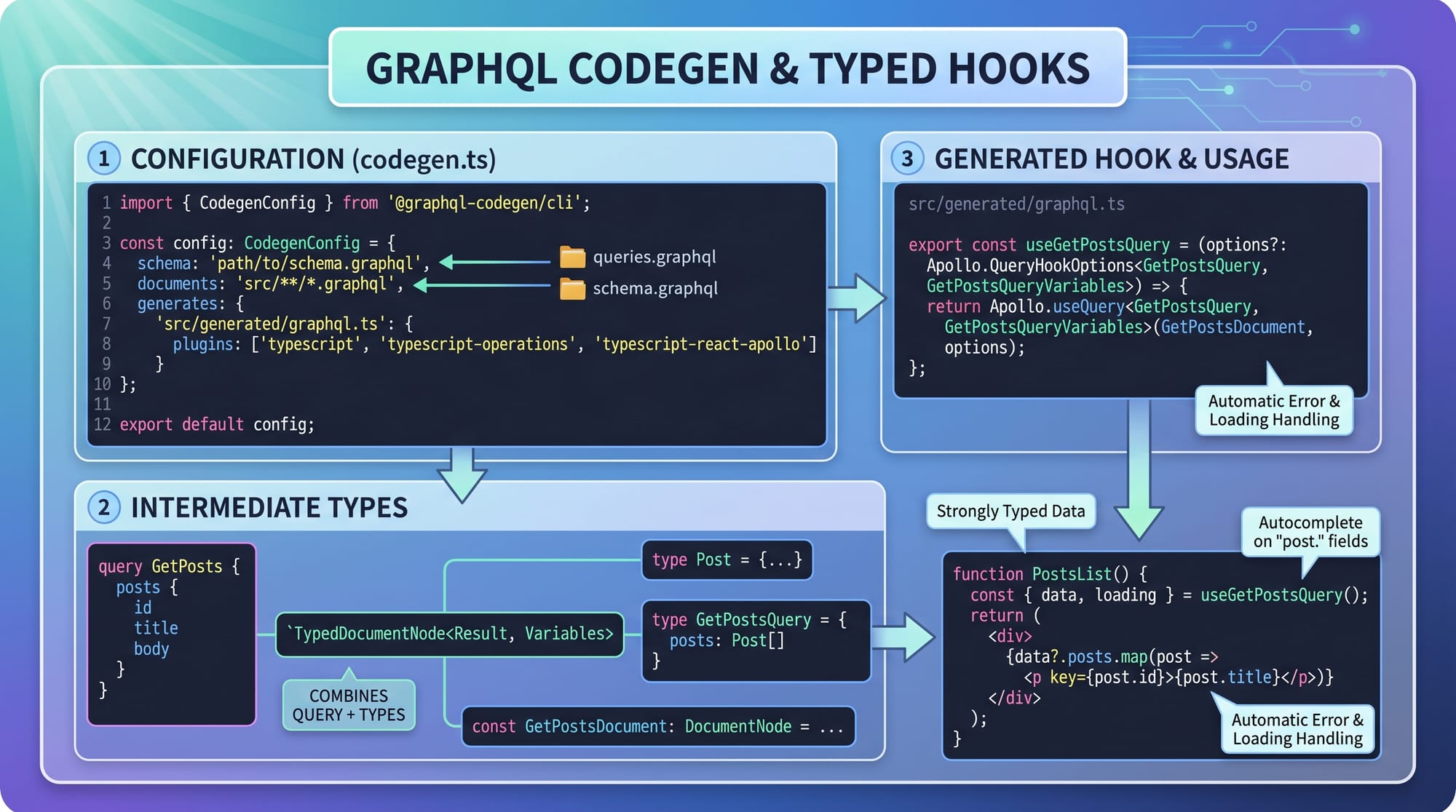
To use graphql code generator, you define a configuration file.
Install dependencies:
npm install @graphql-codegen/cli
Initialize:
npx graphql-codegen init
Example codegen.ts:
import type { CodegenConfig } from '@graphql-codegen/cli';

const config: CodegenConfig = {
  schema: 'http://localhost:4000/graphql',
  documents: './src/**/*.graphql',
  generates: {
    './src/generated/': {
      preset: 'client',
      plugins: [],
    },
  },
};

export default config;
Line-by-line explanation:
schema:→ URL or file path of your GraphQL schemadocuments:→ Location of your queries/mutationsgenerates:→ Where generated files will be savedpreset: 'client'→ Generates ready-to-use client code (hooks, types)
Run the generator:
npx graphql-codegen
Now your project has fully typed GraphQL code.
Practical Code Examples
Example 1: Generating TypeScript Types for Queries
Let’s say Ahmad is building a student portal in Islamabad.
GraphQL query:
query GetStudents {
  students {
    id
    name
    course
  }
}
After running graphql codegen, you get:
export type GetStudentsQuery = {
  students: {
    id: string;
    name: string;
    course: string;
  }[];
};
Explanation:
GetStudentsQuery→ auto-generated type based on query namestudents→ matches schema field- Each field (
id,name,course) is typed correctly - Array type (
[]) reflects multiple students
Now in your code:
const data: GetStudentsQuery = await fetchStudents();
Benefit: TypeScript ensures you only access valid fields.
Example 2: Real-World Application (React + Hooks)
Fatima is building a job portal for freelancers in Karachi.
GraphQL query:
query GetJobs {
  jobs {
    id
    title
    salary
  }
}
Generated React hook:
import { useGetJobsQuery } from './generated';

function JobsList() {
  const { data, loading, error } = useGetJobsQuery();

  if (loading) return <p>Loading...</p>;
  if (error) return <p>Error</p>;

  return (
    <ul>
      {data?.jobs.map((job) => (
        <li key={job.id}>
          {job.title} - {job.salary} PKR
        </li>
      ))}
    </ul>
  );
}
Line-by-line explanation:
useGetJobsQuery()→ auto-generated hookdata→ typed responsedata?.jobs→ safe access (optional chaining)job.salary→ TypeScript ensures it exists and is correct
This is extremely useful when working with real-world applications like job portals or e-commerce stores in Pakistan.
Common Mistakes & How to Avoid Them
Mistake 1: Not Including Documents Path
Problem:
documents: './src/graphql'
If your queries are in .ts or .tsx, they won’t be detected.
Fix:
documents: './src/**/*.{ts,tsx,graphql}'
Explanation:
- Ensures all queries are picked up
- Prevents missing type generation
Mistake 2: Schema Not Accessible
Problem:
schema: 'http://localhost:4000/graphql'
If server is not running, codegen fails.
Fix:
- Start your server before running codegen
- OR use local schema file:
schema: './schema.graphql'
Explanation:
- Codegen needs schema to generate types
- Offline development works better with local schema

Practice Exercises
Exercise 1: Generate Types for Products
Problem:
Create a GraphQL query for products with:
- id
- name
- price
Then generate TypeScript types.
Solution:
query GetProducts {
  products {
    id
    name
    price
  }
}
Generated:
export type GetProductsQuery = {
  products: {
    id: string;
    name: string;
    price: number;
  }[];
};
Exercise 2: Create Typed React Hook
Problem:
Use codegen to create a React hook for fetching users.
Solution:
query GetUsers {
  users {
    id
    name
  }
}
Usage:
const { data } = useGetUsersQuery();
Explanation:
- Hook is auto-generated
- No manual typing needed
- Safer and faster development
Frequently Asked Questions
What is GraphQL Code Generator?
GraphQL Code Generator is a tool that automatically generates TypeScript types, hooks, and utilities from your GraphQL schema and queries. It helps developers write safer and cleaner code.
How do I generate TypeScript GraphQL types?
Install @graphql-codegen/cli, configure your schema and documents, then run npx graphql-codegen. It will create TypeScript types based on your queries.
Can I use graphql codegen without React?
Yes, absolutely. You can generate plain TypeScript types or use it with other frameworks like Vue or Angular. React hooks are optional.
Is graphql codegen useful for beginners?
It’s best suited for intermediate learners. However, beginners can start using it once they understand basic GraphQL and TypeScript concepts.
What problems does GraphQL Code Generator solve?
It eliminates manual type writing, prevents mismatches between frontend and backend, improves autocomplete, and reduces runtime errors.
Summary & Key Takeaways
- GraphQL Code Generator automatically creates TypeScript GraphQL types
- It improves type safety and developer productivity
- Works with schema + operations to generate accurate types
- Supports React hooks and multiple frameworks
- Reduces bugs and improves maintainability
- Essential tool for modern full-stack development in Pakistan
Next Steps & Related Tutorials
To continue your learning journey, explore these tutorials on theiqra.edu.pk:
- Learn the fundamentals with a GraphQL Tutorial
- Strengthen your typing skills with TypeScript Basics
- Build APIs using GraphQL Subscriptions Tutorial
- Improve backend knowledge with Node.js API Development Guide
By combining these skills with graphql code generator, you’ll be ready to build professional, scalable applications—whether for freelancing, startups, or enterprise jobs in Pakistan 🚀
Test Your Python Knowledge!
Finished reading? Take a quick quiz to see how much you've learned from this tutorial.