Internationalization i18n Build Multilingual Web Apps
Introduction
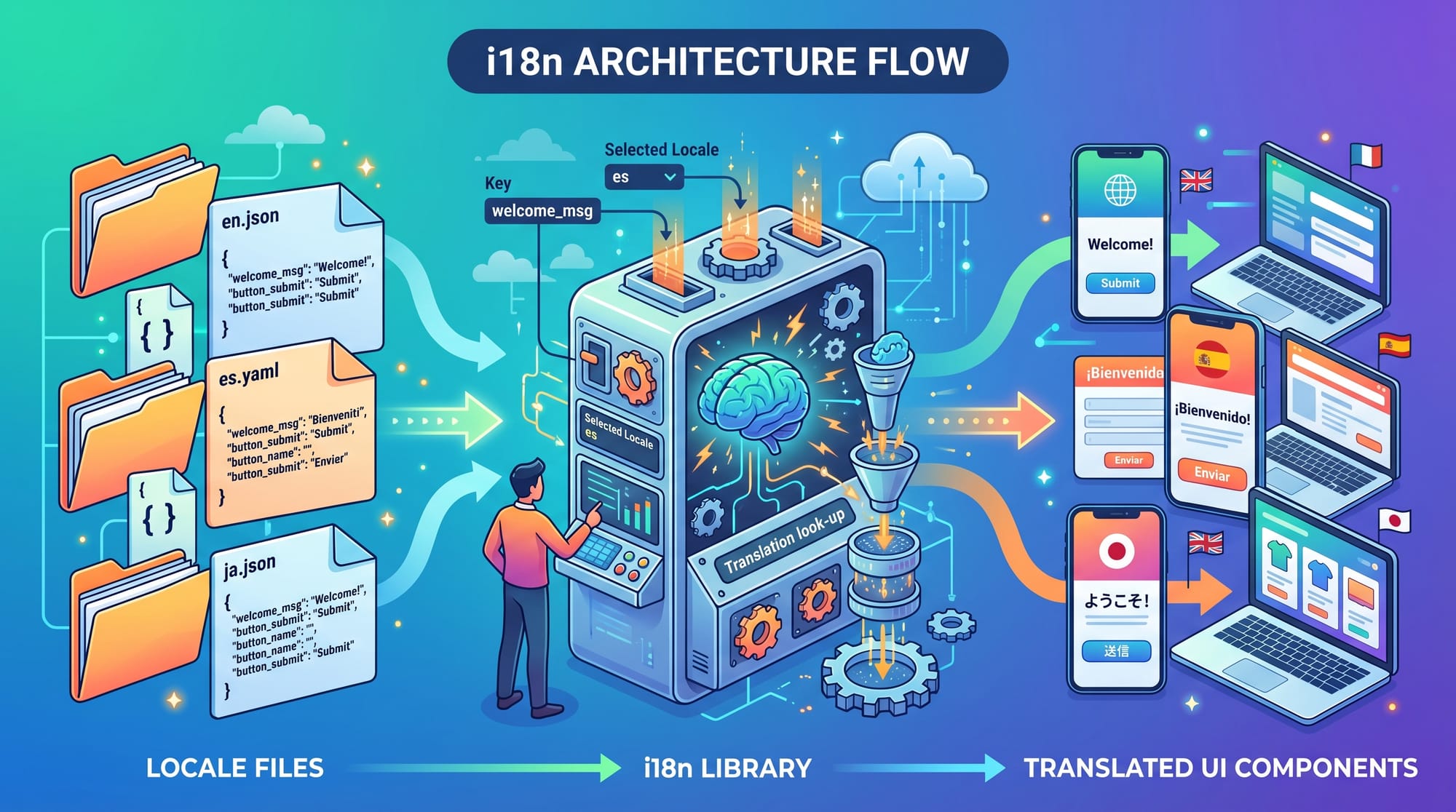
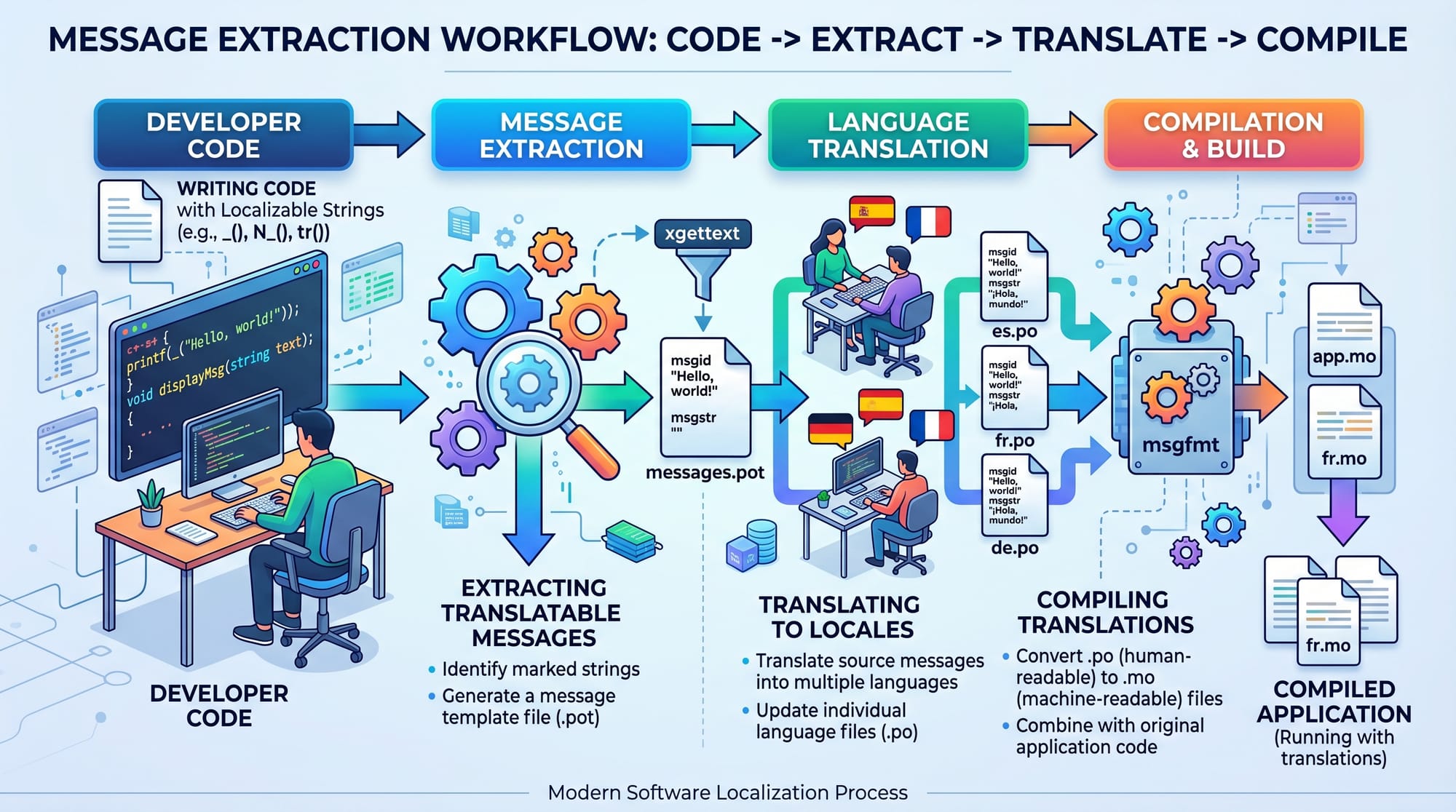
Internationalization (i18n): build multilingual web apps refers to the process of designing and developing applications that can support multiple languages and cultural formats without changing the core codebase. Instead of hardcoding text like “Welcome” in English, developers prepare their apps to dynamically switch between languages such as English, Urdu, or Arabic.
For Pakistani students learning modern web development, i18n is an essential skill. Pakistan has a diverse audience that uses both English and Urdu, and many users prefer localized content. Whether you are building a job portal for Karachi, an e-commerce site for Lahore, or an educational platform for Islamabad, multilingual support increases user engagement and accessibility.
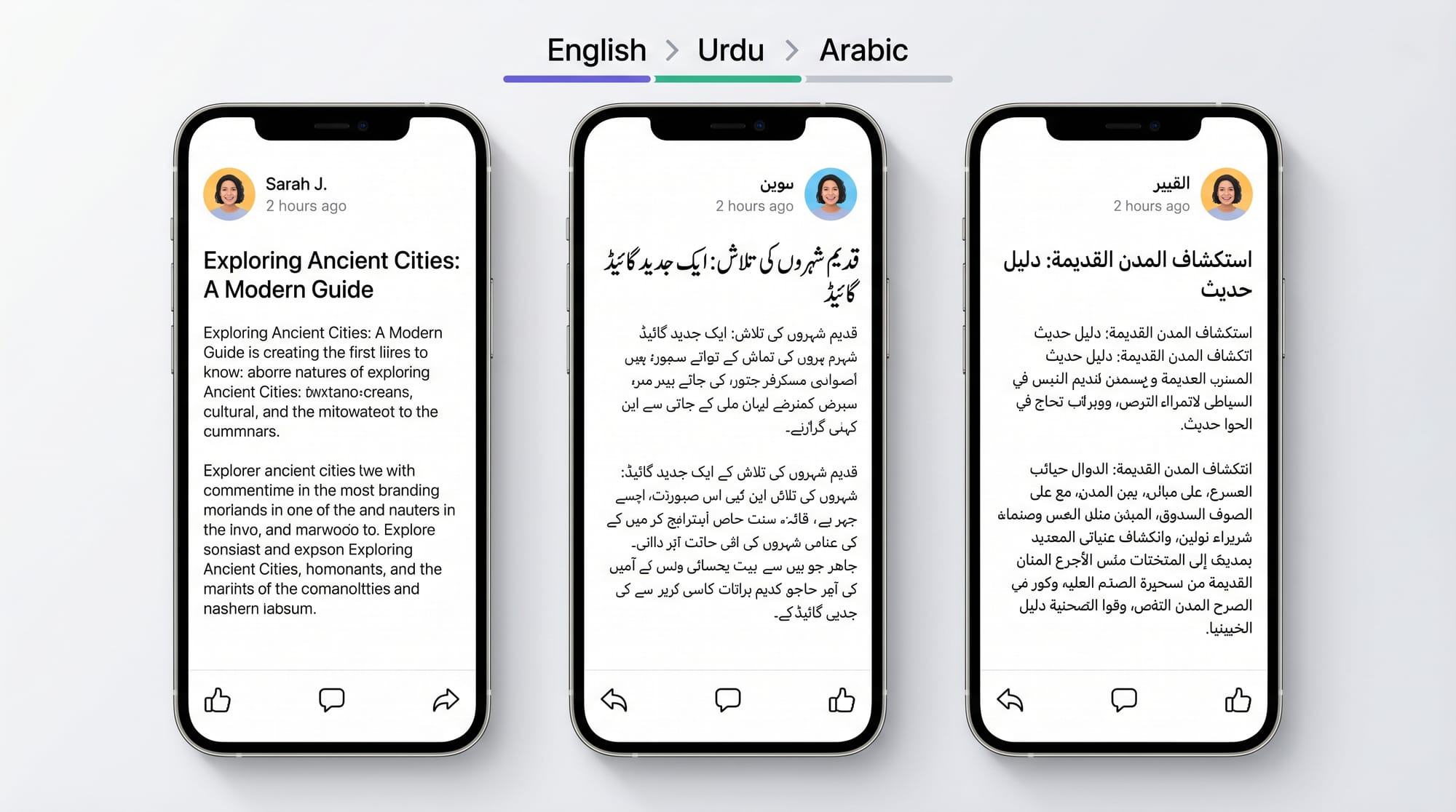
Modern companies expect developers to understand internationalization because global applications must adapt to different languages, number formats (PKR vs USD), and text directions (LTR vs RTL). For example, Urdu is written right-to-left (RTL), while English is left-to-right (LTR).
In this tutorial, you will learn how to implement i18n in React applications, understand key concepts, and build real-world multilingual web apps using tools like react-i18next and next-intl.
Prerequisites
Before starting this tutorial, you should have a basic understanding of:
- HTML, CSS, and JavaScript fundamentals
- React.js basics (components, props, state)
- Node.js and npm installation
- Basic understanding of JSON files
- Familiarity with React hooks (useState, useEffect)
Optional but helpful:
- Understanding of Next.js framework
- Basic knowledge of REST APIs
- Awareness of frontend routing
If you already built small projects like a todo app or portfolio website, you are ready to learn internationalization.
Core Concepts & Explanation
1. What is Localization (l10n) vs Internationalization (i18n)
Internationalization (i18n) is the process of preparing your app to support multiple languages. Localization (l10n) is the actual translation of content into a specific language.
For example:
- i18n: Designing a button as
"welcome_message" - l10n: Translating it into:
- English: "Welcome"
- Urdu: "خوش آمدید"
This separation makes your application scalable and easier to maintain.
2. Translation Files and Keys System
Instead of writing text directly in components, we store translations in JSON files.
Example:
{
  "welcome": "Welcome",
  "login": "Login"
}
Urdu version:
{
  "welcome": "خوش آمدید",
  "login": "لاگ ان کریں"
}
Your React app then uses keys like "welcome" to fetch the correct translation dynamically.
3. Language Detection & Switching
Modern i18n libraries detect user language using:
- Browser settings
- User preference (saved in localStorage)
- Geo-location (optional)
Users can also manually switch languages using a dropdown menu.
4. RTL (Right-to-Left) Support
Languages like Urdu and Arabic require layout direction changes.
Example:
- English →
direction: ltr - Urdu →
direction: rtl
This affects:
- Text alignment
- Navigation menus
- Icons and layout structure
Practical Code Examples
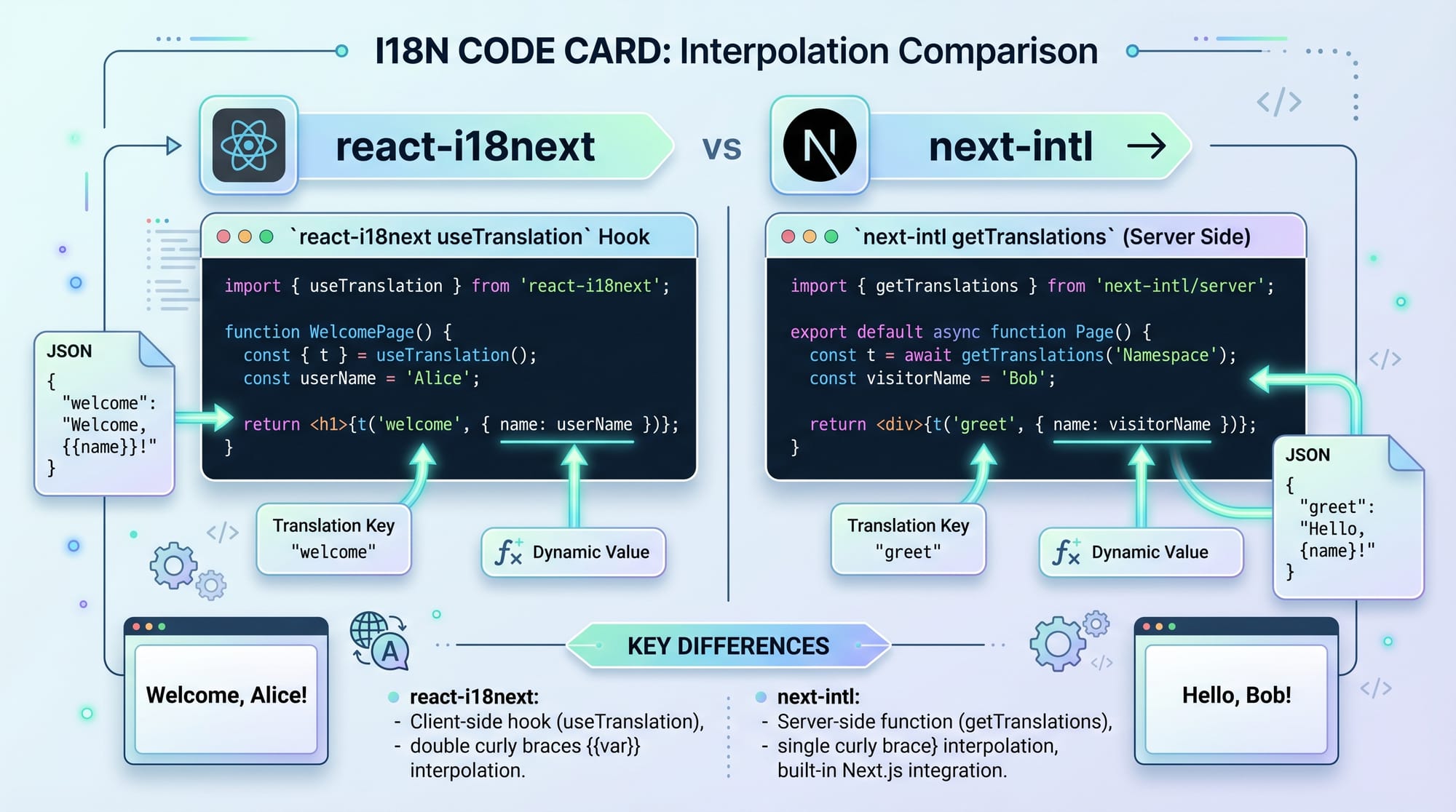
Example 1: Setting Up React i18n (Basic Setup)
Install dependencies:
npm install i18next react-i18next
Create i18n.js:
import i18n from "i18next";
import { initReactI18next } from "react-i18next";

import en from "./locales/en.json";
import ur from "./locales/ur.json";

i18n
  .use(initReactI18next)
  .init({
    resources: {
      en: { translation: en },
      ur: { translation: ur },
    },
    lng: "en",
    fallbackLng: "en",
    interpolation: {
      escapeValue: false,
    },
  });

export default i18n;
Line-by-line explanation:
- Line 1–2: Import i18n core library and React binding
- Line 4–5: Import translation JSON files
- Line 7: Initialize i18n configuration
- Line 8–13: Define language resources (English + Urdu)
- Line 14: Set default language to English
- Line 15: Fallback language if translation missing
- Line 16–18: Disable HTML escaping (React already handles it)
- Line 20: Export configuration for use in app
Using Translations in React Component
import { useTranslation } from "react-i18next";

function Home() {
  const { t, i18n } = useTranslation();

  return (
    <div>
      <h1>{t("welcome")}</h1>
      <button onClick={() => i18n.changeLanguage("ur")}>
        Urdu
      </button>
    </div>
  );
}

export default Home;
Line-by-line explanation:
- Import translation hook
t: function to get translated texti18n.changeLanguage: switches language dynamically- Button changes UI language to Urdu instantly
Example 2: Real-World Application (Student Portal)
Imagine a student portal for universities in Islamabad.
function StudentDashboard() {
  const { t } = useTranslation();

  const studentName = "Ahmad";

  return (
    <div>
      <h2>{t("dashboard_title")}</h2>
      <p>{t("welcome_student", { name: studentName })}</p>
      <p>{t("fee_status")}: 25,000 PKR</p>
    </div>
  );
}
Line-by-line explanation:
studentName: dynamic variable for personalizationt("dashboard_title"): loads localized headingt("welcome_student", { name }): demonstrates interpolation- Fee is displayed in PKR (local currency)
This approach is widely used in real systems like LMS platforms and university dashboards.
Common Mistakes & How to Avoid Them
Mistake 1: Hardcoding Text in Components
❌ Wrong approach:
<h1>Welcome</h1>
This breaks multilingual support.
✔ Correct approach:
<h1>{t("welcome")}</h1>
Always use translation keys instead of static text.
Mistake 2: Ignoring RTL Layout for Urdu
Many developers forget that Urdu requires right-to-left layout.
❌ Problem:
UI breaks when switching to Urdu.
✔ Solution:
body[dir="rtl"] {
  text-align: right;
  direction: rtl;
}
You can dynamically apply this when language changes.
Mistake 3: Not Organizing Translation Files Properly
Bad structure:
- Everything in one file
Good structure:
auth.jsondashboard.jsoncommon.json
This improves scalability for large apps.
Mistake 4: Missing Pluralization Support
Example problem:
- "1 message" vs "5 messages"
Use i18n plural rules instead of manual logic.
Practice Exercises
Exercise 1: Build a Language Switcher
Task: Create a React component with buttons for English and Urdu.
✔ Solution:
function LanguageSwitcher() {
  const { i18n } = useTranslation();

  return (
    <div>
      <button onClick={() => i18n.changeLanguage("en")}>
        English
      </button>
      <button onClick={() => i18n.changeLanguage("ur")}>
        Urdu
      </button>
    </div>
  );
}
Exercise 2: Add Dynamic Greeting
Task: Show greeting based on time and language.
✔ Solution:
function Greeting() {
  const { t } = useTranslation();
  const hour = new Date().getHours();

  const greetingKey =
    hour < 12 ? "morning" : "evening";

  return <h1>{t(greetingKey)}</h1>;
}
Frequently Asked Questions
What is internationalization in web development?
Internationalization (i18n) is the process of designing software so it can support multiple languages and regions without rewriting code. It prepares applications for translation.
How do I implement i18n in React?
You can use libraries like react-i18next. Install it, create translation JSON files, configure i18n, and use the useTranslation hook inside components.
What is the difference between i18n and localization?
i18n is the preparation for multiple languages, while localization (l10n) is the actual translation into a specific language like Urdu or Arabic.
Why is RTL support important?
RTL (Right-to-Left) support is necessary for languages like Urdu and Arabic. Without it, UI elements appear misaligned or broken.
Can I use i18n in Next.js projects?
Yes, Next.js supports i18n natively and also works well with libraries like next-intl for advanced multilingual routing and translations.
Summary & Key Takeaways
- i18n helps build multilingual web applications efficiently
- Translation keys replace hardcoded text in UI
- React uses libraries like
react-i18nextfor implementation - RTL support is essential for Urdu and Arabic languages
- Proper file structure improves scalability
- Pakistani apps benefit greatly from localization for cities like Lahore, Karachi, and Islamabad
Next Steps & Related Tutorials
Now that you understand internationalization, you can explore:
- Learn React fundamentals in our tutorial: React.js Introduction
- Build full-stack apps with Next.js Tutorial
- Improve UI skills with Modern Frontend Development Guide
- Learn API integration in REST API Basics for Beginners
Continue practicing by building a multilingual portfolio or student dashboard for real-world experience.
Test Your Python Knowledge!
Finished reading? Take a quick quiz to see how much you've learned from this tutorial.