RTL Right to Left Support Arabic & Urdu Web Design
Introduction
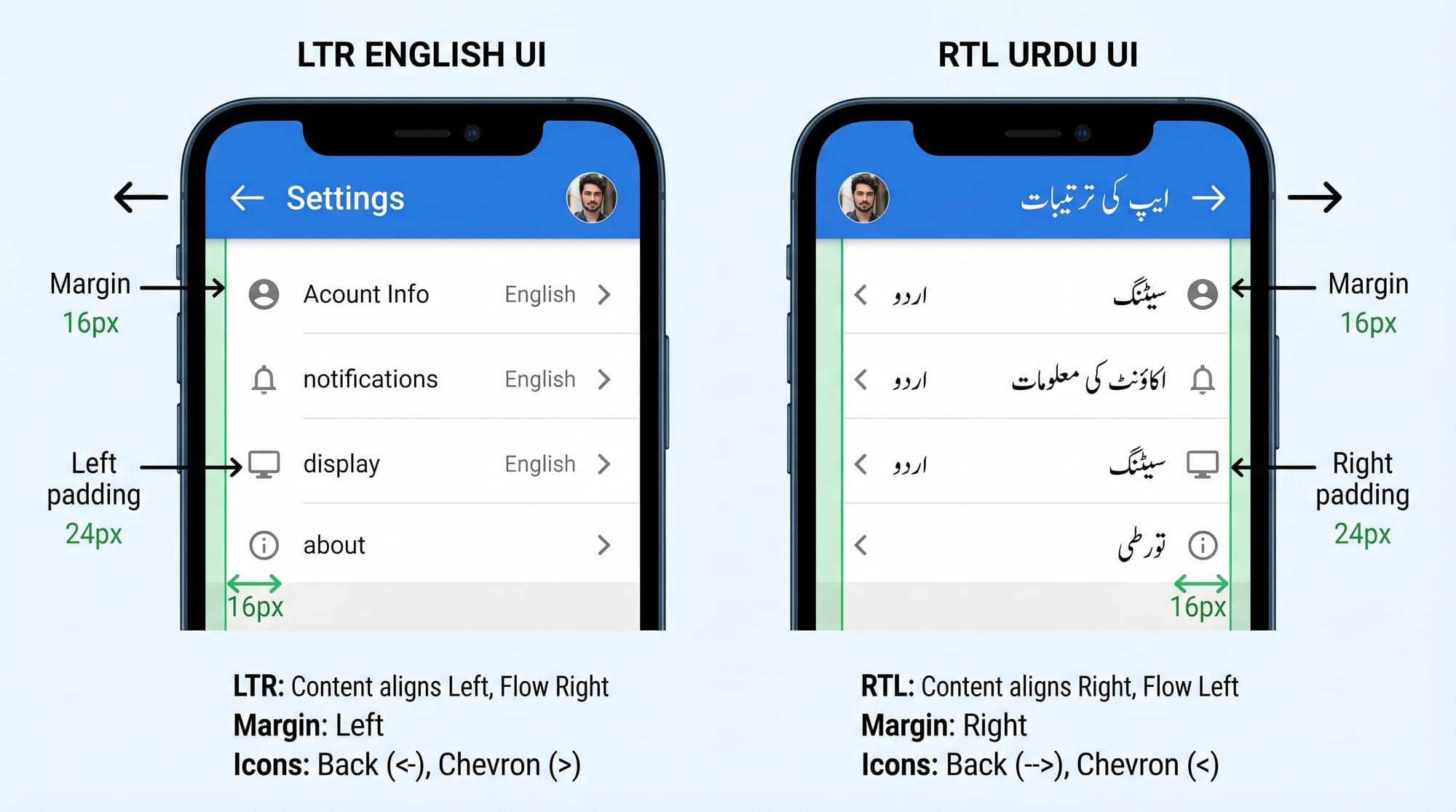
RTL (Right-to-Left) support refers to designing websites that display content flowing from right to left instead of the default left-to-right (LTR) direction used in English. This is essential for languages like Urdu and Arabic, which are widely used across Pakistan and the Muslim world.
For Pakistani developers building educational platforms, e-commerce stores, or news websites in Urdu, understanding RTL design is a must-have skill. Whether you're creating a blog for Ahmad in Lahore or a learning portal for Fatima in Karachi, proper RTL support ensures your content is readable, professional, and user-friendly.
Without RTL support, Urdu text may appear misaligned, navigation can feel confusing, and the overall experience suffers. This tutorial will guide you step-by-step to master RTL CSS and build fully functional right-to-left web layouts.
Prerequisites
Before starting this tutorial, you should have:
- Basic understanding of HTML structure
- Familiarity with CSS styling
- Knowledge of flexbox or basic layout systems
- Understanding of text direction concepts (LTR vs RTL)
- A code editor like VS Code
Core Concepts & Explanation
Direction Attribute (dir) in HTML
The dir attribute is the foundation of RTL design. It tells the browser the direction of the content.
<html dir="rtl">
  <body>
    <p>یہ اردو متن ہے</p>
  </body>
</html>
Explanation:
<html dir="rtl">→ Sets the entire document direction to right-to-left<p>→ Contains Urdu text which will now render properly aligned- The browser automatically flips text alignment and flow
You can also apply it to specific sections:
<div dir="rtl">اردو سیکشن</div>
This is useful when mixing English and Urdu content.
CSS Logical Properties vs Physical Properties
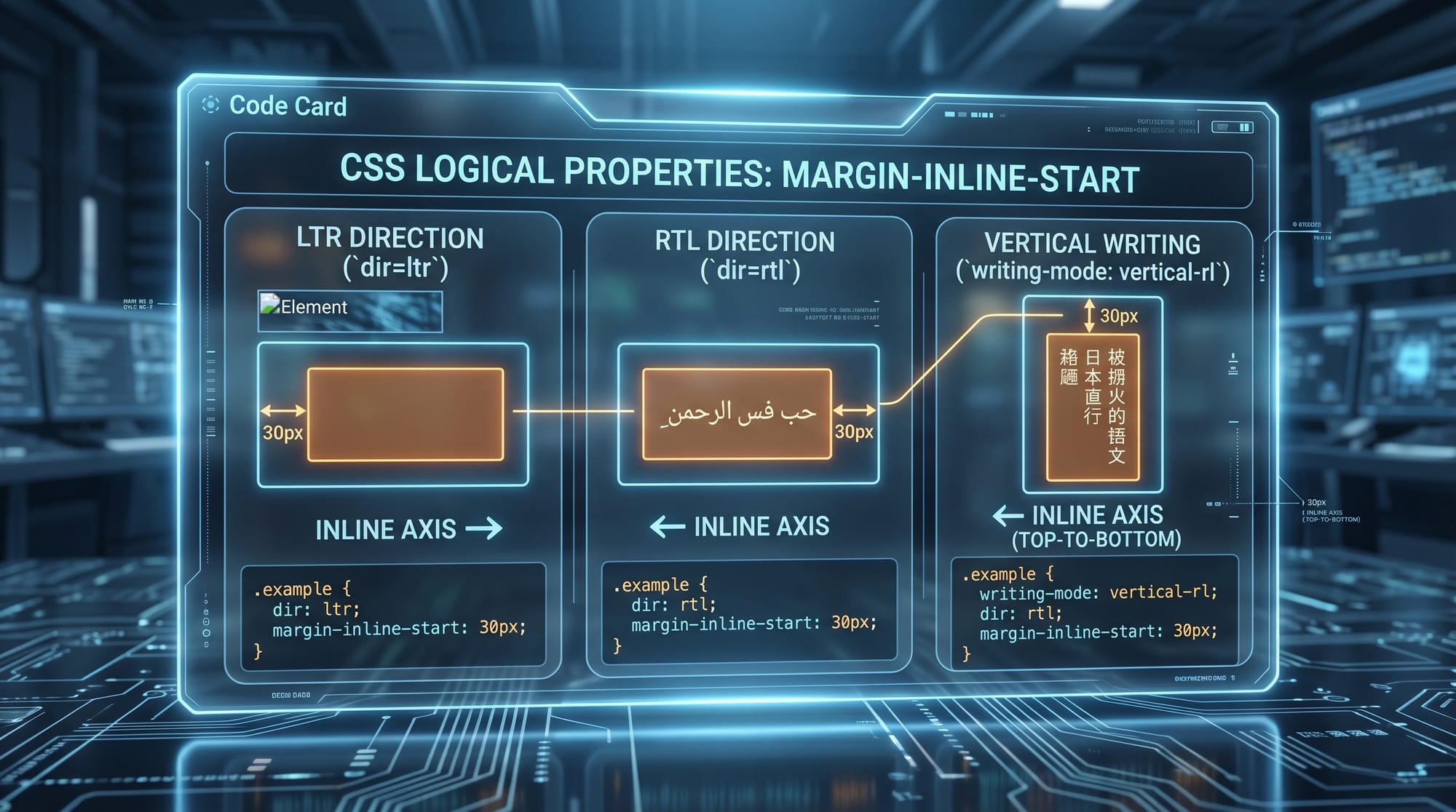
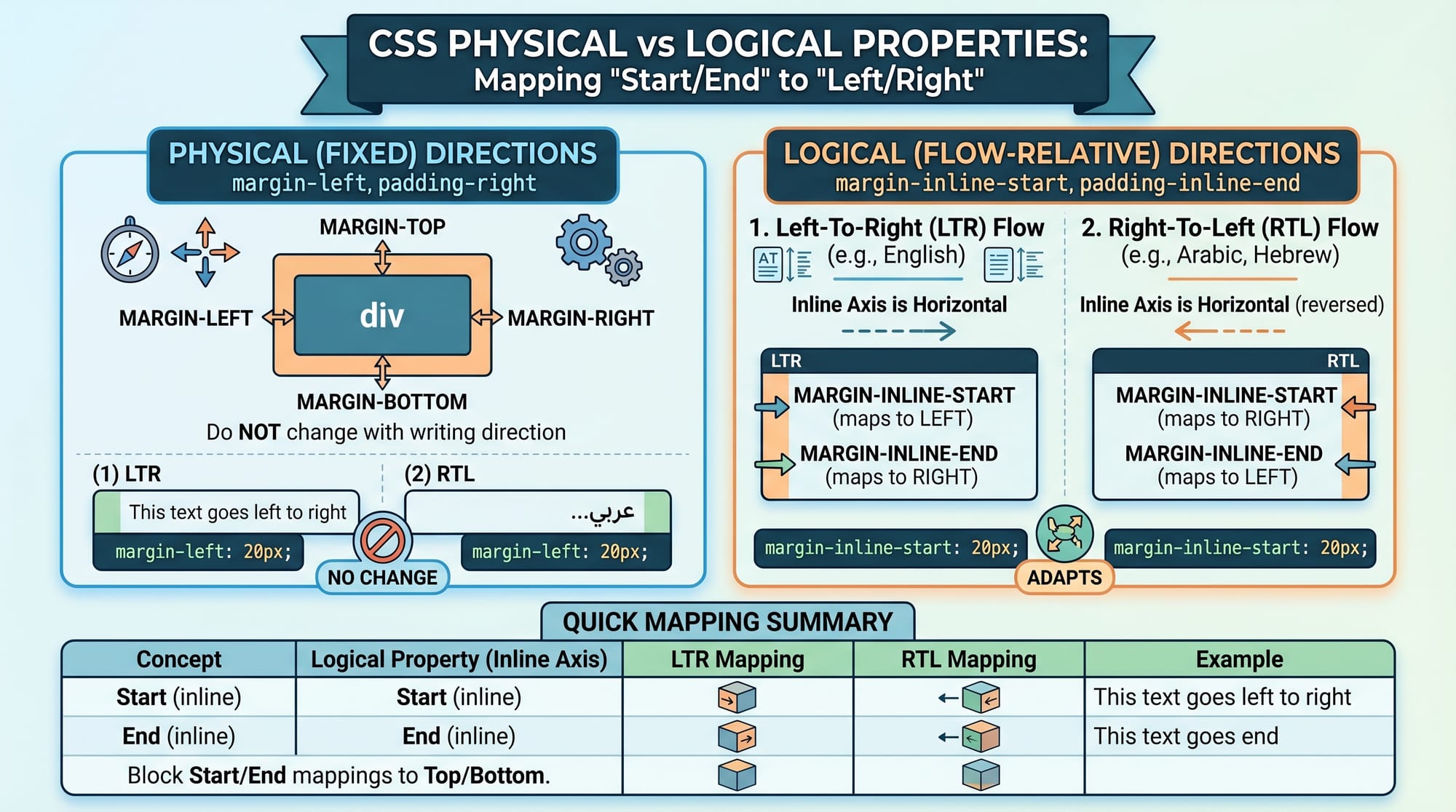
Traditional CSS uses physical directions like left and right. However, RTL design works better with logical properties.
.container {
  margin-inline-start: 20px;
  padding-inline-end: 10px;
}
Explanation:
margin-inline-start→ Automatically adjusts to left (LTR) or right (RTL)padding-inline-end→ Opposite side of start- These properties make your layout adaptable for both directions
Avoid using:
margin-left: 20px; /* Not RTL-friendly */
Text Alignment and Writing Modes
In RTL layouts, alignment shifts automatically, but you can control it:
.text {
  text-align: start;
}
Explanation:
start→ Left in LTR, Right in RTLend→ Opposite side
This ensures consistency across languages.
Flexbox and RTL Behavior
Flexbox respects direction:
.nav {
  display: flex;
  flex-direction: row;
}
Explanation:
- In RTL, items flow from right to left automatically
- No need to manually reverse items
Practical Code Examples
Example 1: Basic RTL Web Page
<!DOCTYPE html>
<html dir="rtl">
<head>
  <style>
    body {
      font-family: 'Noto Nastaliq Urdu', serif;
      text-align: start;
    }

    .container {
      margin-inline-start: 20px;
      padding-inline-end: 15px;
    }
  </style>
</head>
<body>
  <div class="container">
    <h1>خوش آمدید</h1>
    <p>یہ ایک اردو ویب پیج ہے۔</p>
  </div>
</body>
</html>
Line-by-line Explanation:
<!DOCTYPE html>→ Defines HTML5 document<html dir="rtl">→ Enables RTL layoutfont-family→ Uses Urdu-friendly fonttext-align: start→ Aligns text correctly for RTL.container→ Uses logical spacing properties<h1>→ Displays heading in Urdu<p>→ Paragraph text
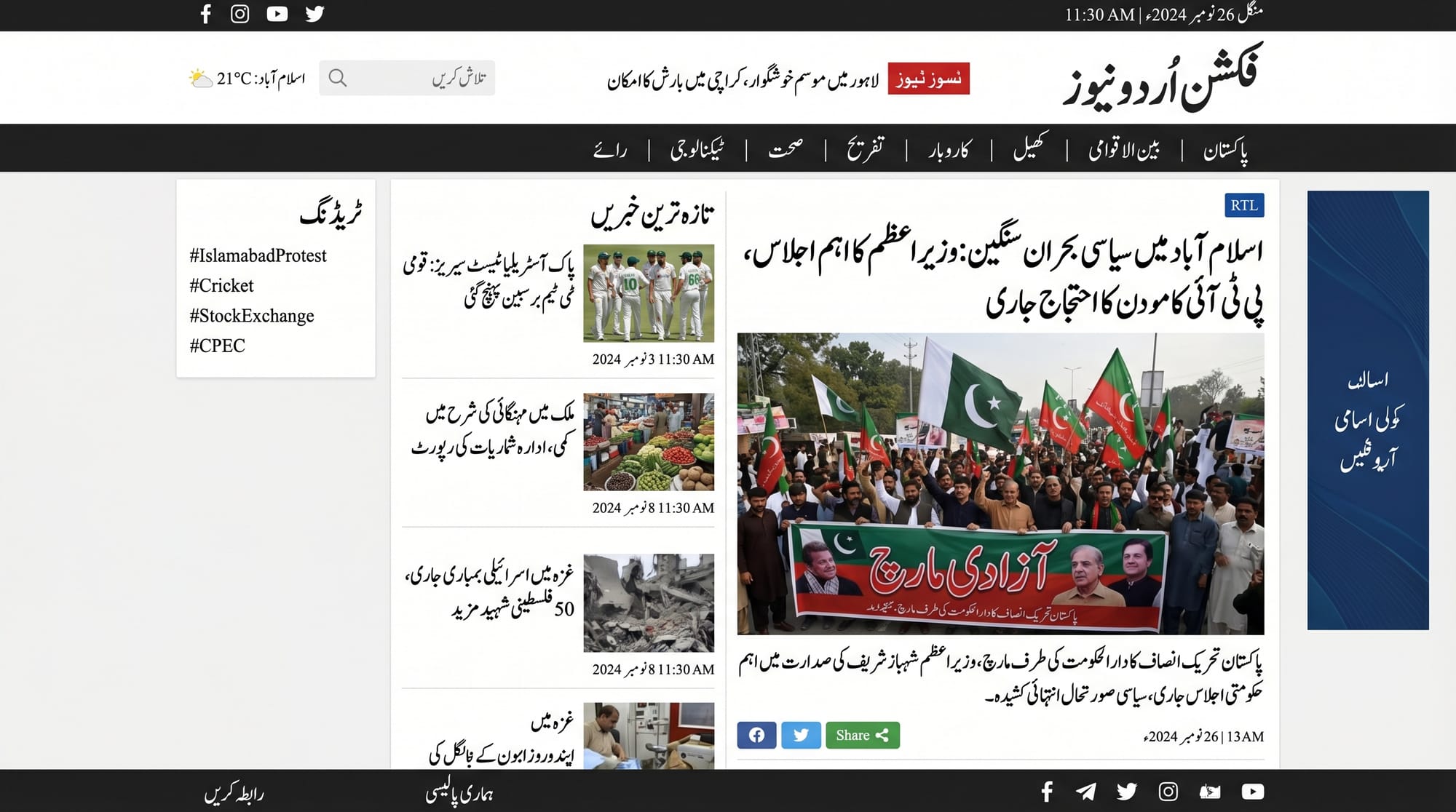
Example 2: Real-World Application (Pakistani News Layout)
<!DOCTYPE html>
<html dir="rtl">
<head>
  <style>
    body {
      font-family: Arial;
    }

    .navbar {
      display: flex;
      justify-content: space-between;
      background: #006400;
      color: white;
      padding: 10px;
    }

    .article {
      margin-inline-start: 30px;
    }
  </style>
</head>
<body>

<div class="navbar">
  <div>خبریں</div>
  <div>رابطہ</div>
</div>

<div class="article">
  <h2>کراچی میں بارش</h2>
  <p>آج کراچی میں شدید بارش ہوئی۔</p>
</div>

</body>
</html>
Line-by-line Explanation:
.navbar→ Flexbox used for navigationjustify-content: space-between→ Spreads items correctly in RTL- Background color → Mimics Pakistani news sites
.article→ Uses logical margin- Urdu headings → Real-world readability
Common Mistakes & How to Avoid Them
Mistake 1: Using Left/Right Instead of Start/End
Wrong:
margin-left: 20px;
Problem: Breaks in RTL layout
Correct:
margin-inline-start: 20px;
Fix Explanation:
- Logical properties adapt automatically
- Saves time when supporting multiple languages
Mistake 2: Forgetting to Flip Icons and Images
Icons like arrows must flip direction.
Wrong:
➡️ Next
Correct:
.icon {
  transform: scaleX(-1);
}
Explanation:
scaleX(-1)flips horizontally- Important for navigation arrows and UI elements
Practice Exercises
Exercise 1: Convert LTR Page to RTL
Problem:
Convert a simple English page into Urdu RTL layout.
Solution:
<html dir="rtl">
  <body>
    <p>یہ ایک مثال ہے</p>
  </body>
</html>
Explanation:
- Add
dir="rtl" - Replace content with Urdu text
Exercise 2: Fix Layout Spacing
Problem:
Spacing breaks in RTL due to margin-left.
Solution:
.box {
  margin-inline-start: 15px;
}
Explanation:
- Replace physical property with logical
- Works for both LTR and RTL
Frequently Asked Questions
What is RTL web design?
RTL web design is the process of creating websites that display content from right to left, suitable for languages like Urdu and Arabic. It involves layout adjustments, text alignment, and proper CSS usage.
How do I enable RTL in HTML?
You can enable RTL by adding dir="rtl" to the <html> tag or specific elements. This automatically changes text direction and layout flow.
Can I support both English and Urdu on one website?
Yes, you can use mixed direction layouts by applying dir="ltr" and dir="rtl" to different sections. CSS logical properties help manage both seamlessly.
Why should I use logical properties in CSS?
Logical properties like margin-inline-start adapt automatically to RTL and LTR layouts, making your code flexible and future-proof.
Do I need special fonts for Urdu websites?
Yes, using fonts like Noto Nastaliq Urdu improves readability and gives a professional look, especially for Pakistani audiences.
Summary & Key Takeaways
- RTL design is essential for Urdu and Arabic websites
- Use
dir="rtl"to enable right-to-left layout - Prefer CSS logical properties over left/right
- Flexbox works naturally with RTL layouts
- Always test icons, alignment, and spacing
- Urdu-friendly fonts improve user experience
Next Steps & Related Tutorials
To continue your learning journey on theiqra.edu.pk, explore these tutorials:
- Learn how to build multilingual apps with Internationalization (i18n) in Web Development
- Strengthen your foundation with CSS Basics for Beginners
- Understand layout systems in Flexbox and Grid Complete Guide
- Improve UI with Responsive Web Design for Pakistani Developers
By mastering RTL support, you're not just improving your coding skills—you’re making the web more inclusive for millions of Urdu-speaking users across Pakistan 🇵🇰.
Test Your Python Knowledge!
Finished reading? Take a quick quiz to see how much you've learned from this tutorial.