Shopify Development Tutorial Themes Liquid & Apps 2026
Introduction
Shopify has become one of the most powerful e-commerce platforms in the world, enabling businesses to create online stores quickly and efficiently. This Shopify Development Tutorial: Themes, Liquid & Apps 2026 is designed to help Pakistani students understand how to build, customize, and extend Shopify stores using modern tools and techniques.
For students in cities like Lahore, Karachi, and Islamabad, learning shopify development, shopify liquid tutorial, and shopify theme development opens doors to freelancing, remote jobs, and even launching your own online business. Whether you want to help Ahmad sell clothing online or assist Fatima in building a cosmetics store, Shopify skills are highly in demand.
Prerequisites
Before starting this tutorial, you should have:
- Basic knowledge of HTML, CSS, and JavaScript
- Understanding of web development fundamentals
- Familiarity with Git and command line tools
- A Shopify Partner account (free)
- Basic understanding of e-commerce concepts (products, carts, checkout)
Core Concepts & Explanation
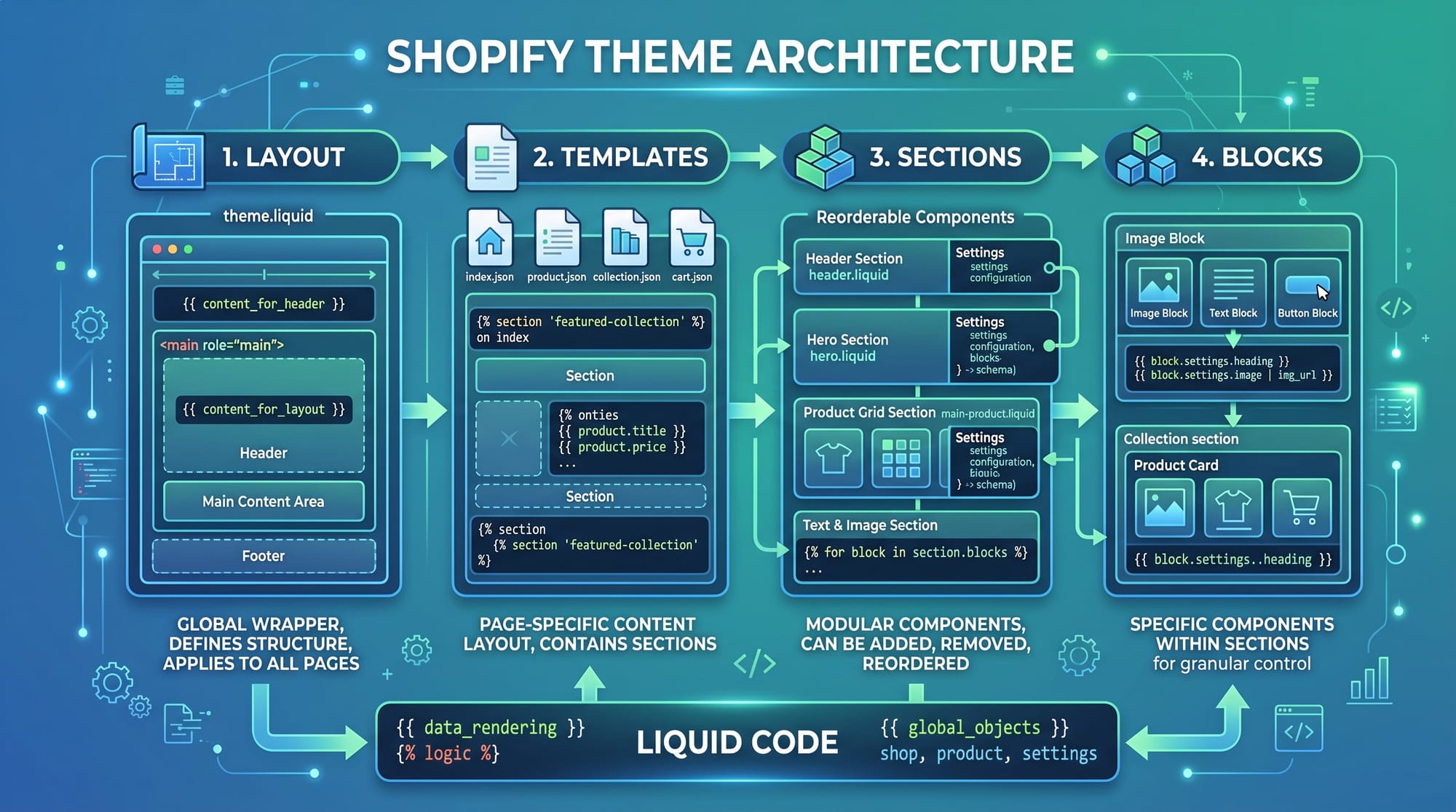
Shopify Theme Architecture (Layouts, Templates, Sections, Blocks)
Shopify themes follow a structured architecture:
- Layout: Main wrapper (e.g.,
theme.liquid) - Templates: Define page structure (product, collection)
- Sections: Reusable components
- Blocks: Customizable elements inside sections
Example:
<!DOCTYPE html>
<html>
  <head>
    <title>{{ shop.name }}</title>
  </head>
  <body>
    {{ content_for_layout }}
  </body>
</html>
Explanation:
{{ shop.name }}→ Outputs store name dynamically{{ content_for_layout }}→ Loads page-specific content- This is the base layout for all pages
Shopify Liquid Templating Language
Liquid is Shopify’s templating language used to display dynamic data.
Key Components:
- Output:
{{ }} - Logic:
{% %} - Filters:
|
Example:
<h1>{{ product.title }}</h1>

{% if product.available %}
  <p>In Stock</p>
{% else %}
  <p>Out of Stock</p>
{% endif %}
Explanation:
{{ product.title }}→ Displays product name{% if %}→ Conditional logic- Helps show dynamic store data
Shopify CLI & Development Workflow
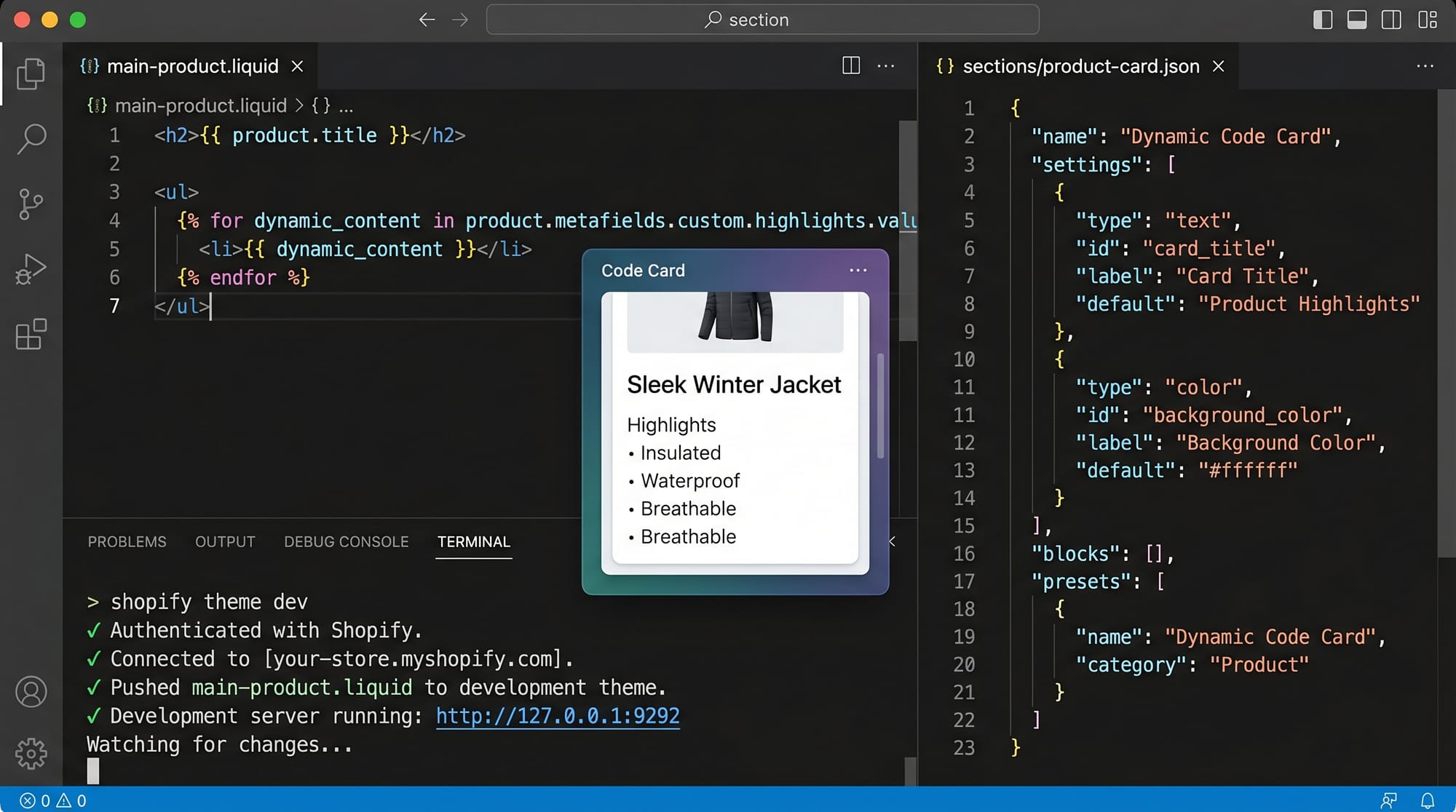
Shopify CLI is used to create, preview, and deploy themes.
Basic Commands:
shopify theme init
shopify theme dev
shopify theme push
Explanation:
init→ Create a new themedev→ Run local development serverpush→ Upload theme to Shopify store
Practical Code Examples
Example 1: Display Products Using Liquid Loop
{% for product in collections.frontpage.products %}
  <div class="product-card">
    <h2>{{ product.title }}</h2>
    <p>{{ product.price | money }}</p>
  </div>
{% endfor %}
Line-by-line Explanation:
{% for product in collections.frontpage.products %}
Loops through all products in the "frontpage" collection<div class="product-card">
Creates a container for each product{{ product.title }}
Displays product name{{ product.price | money }}
Formats price in currency (PKR if configured){% endfor %}
Ends loop
Example 2: Real-World Application (Pakistani Clothing Store)
Imagine Ali runs a clothing store in Lahore.
{% for product in collections.clothing.products %}
  <div class="product">
    <img src="{{ product.featured_image | img_url: 'medium' }}">
    <h3>{{ product.title }}</h3>
    <p>Price: {{ product.price | money }}</p>

    {% if product.available %}
      <button>Add to Cart</button>
    {% else %}
      <span>Sold Out</span>
    {% endif %}
  </div>
{% endfor %}
Explanation:
collections.clothing.products→ Clothing categoryimg_url→ Resizes image- Condition shows Add to Cart or Sold Out
- Useful for real Pakistani stores selling kurtas, jeans, etc.
Common Mistakes & How to Avoid Them
Mistake 1: Hardcoding Data Instead of Using Liquid
❌ Wrong:
<h1>Blue Shirt</h1>
✅ Correct:
<h1>{{ product.title }}</h1>
Explanation:
- Hardcoding limits scalability
- Liquid makes your store dynamic
Mistake 2: Not Using Sections Properly
❌ Wrong:
Putting all code in one file
✅ Correct:
{% section 'header' %}
{% section 'footer' %}
Explanation:
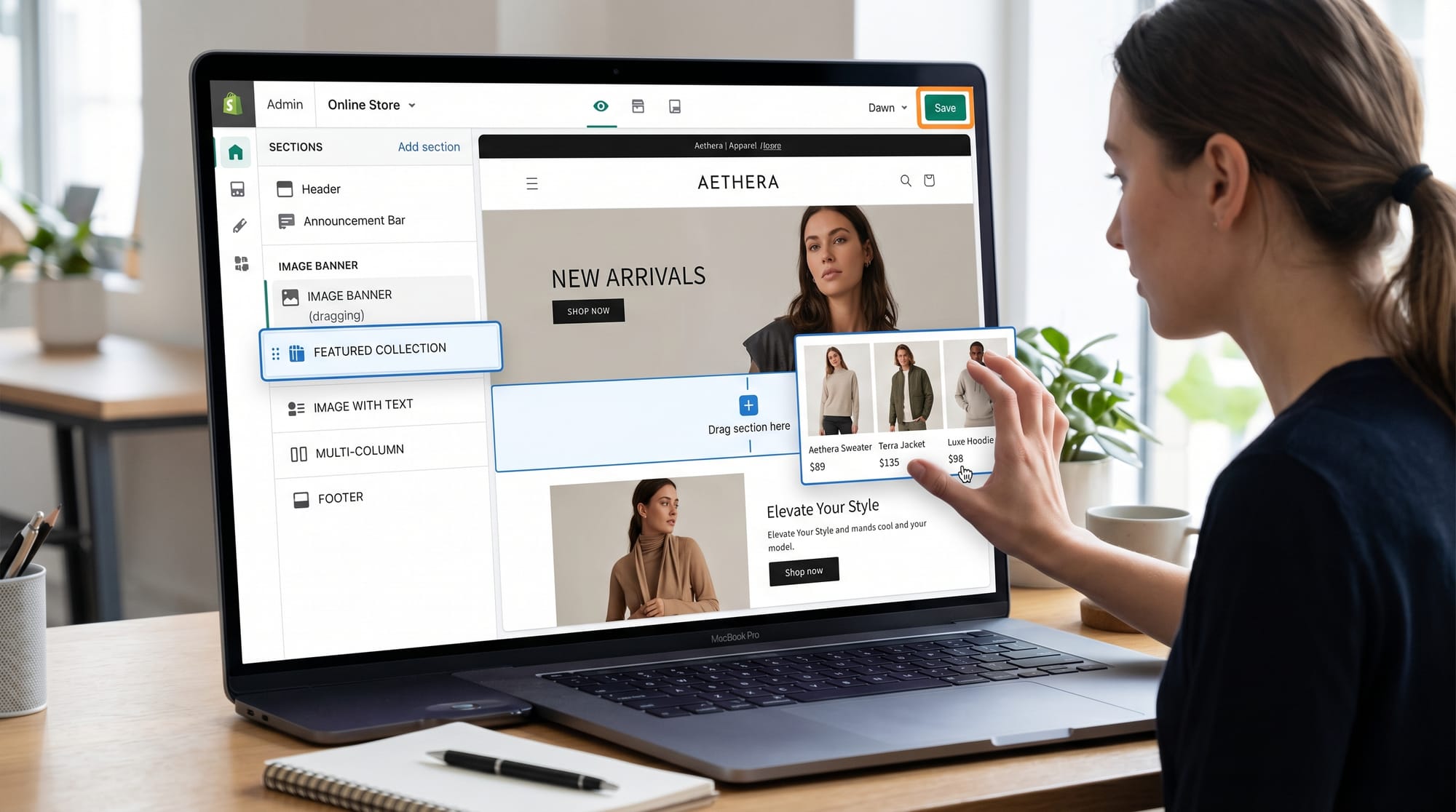
- Sections make themes reusable
- Helps in Shopify Theme Editor customization
Practice Exercises
Exercise 1: Show Product Prices in PKR
Problem: Display product price with currency formatting.
Solution:
<p>{{ product.price | money }}</p>
Explanation:
moneyfilter formats currency- Automatically shows PKR if store currency is set
Exercise 2: Display Only Available Products
Problem: Show only in-stock items.
Solution:
{% for product in collections.all.products %}
  {% if product.available %}
    <p>{{ product.title }}</p>
  {% endif %}
{% endfor %}
Explanation:
- Loops all products
- Filters using
if product.available
Frequently Asked Questions
What is Shopify development?
Shopify development involves creating and customizing online stores using themes, Liquid templates, and apps. It allows developers to build professional e-commerce websites quickly.
How do I learn Shopify Liquid?
Start with basic syntax like {{ }} and {% %}, then practice loops, conditions, and filters. Build small projects like product pages to improve your skills.
Is Shopify development in demand in Pakistan?
Yes, Shopify developers are highly in demand in Pakistan for freelancing and remote jobs, especially on platforms like Fiverr and Upwork.
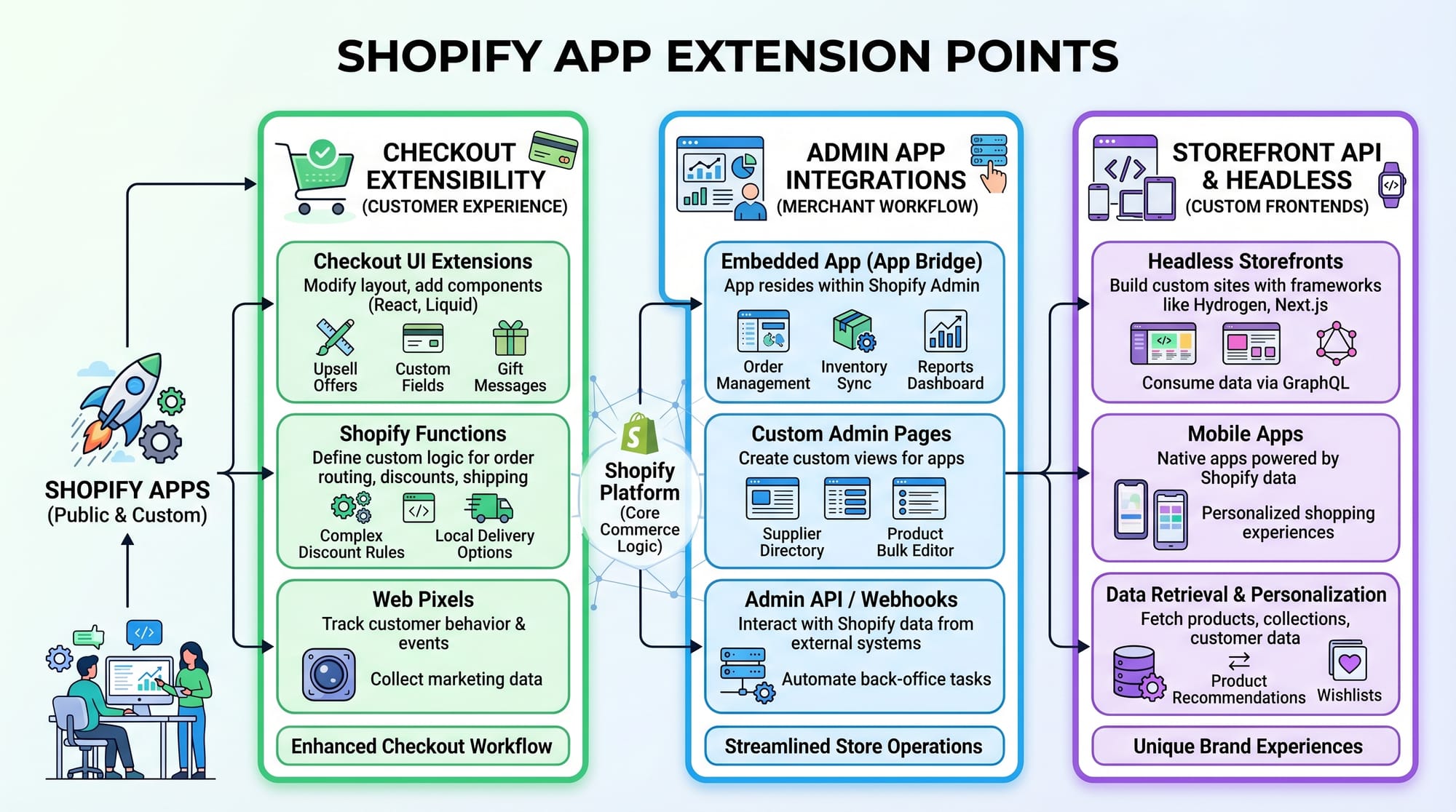
Can I build apps for Shopify?
Yes, Shopify apps are built using technologies like Node.js and APIs. Apps extend store functionality such as payments, analytics, and automation.
Do I need coding for Shopify theme development?
Yes, basic coding (HTML, CSS, JavaScript) and Liquid are required for custom theme development, but beginners can start with drag-and-drop tools.
Summary & Key Takeaways
- Shopify development is a valuable skill for Pakistani students
- Liquid is the core templating language for dynamic content
- Theme architecture includes layouts, templates, sections, and blocks
- Shopify CLI simplifies development workflow
- Real-world projects improve learning and freelancing opportunities
Next Steps & Related Tutorials
To continue your learning journey on theiqra.edu.pk, explore these tutorials:
- Learn how to build full online stores in our E-commerce Tutorial
- Strengthen your fundamentals with our JavaScript Tutorial
- Dive deeper into backend integration with a Node.js API Development Guide
- Explore frontend skills with a Responsive Web Design Tutorial
By mastering Shopify development, you can start freelancing, build your own brand, or even launch a successful online store in Pakistan. Keep practicing, stay consistent, and build real-world projects 🚀
Test Your Python Knowledge!
Finished reading? Take a quick quiz to see how much you've learned from this tutorial.