Medusa js Tutorial Open Source E commerce Backend 2026
Introduction
The world of e-commerce is evolving rapidly, and developers are increasingly moving toward flexible, scalable, and customizable solutions. This medusa js tutorial introduces you to Medusa.js, a modern open source ecommerce backend designed for developers who want full control over their online store.
Medusa.js is a headless e-commerce platform, meaning the backend (logic, database, APIs) is separated from the frontend (website or mobile app). This gives you the freedom to build custom storefronts using technologies like React, Next.js, or even mobile apps.
For Pakistani students—whether you’re in Lahore, Karachi, or Islamabad—learning Medusa.js can open doors to freelance opportunities, startups, and advanced backend development roles. Instead of relying on rigid platforms, you can build tailored e-commerce solutions for local businesses, such as clothing brands, electronics shops, or grocery delivery services.
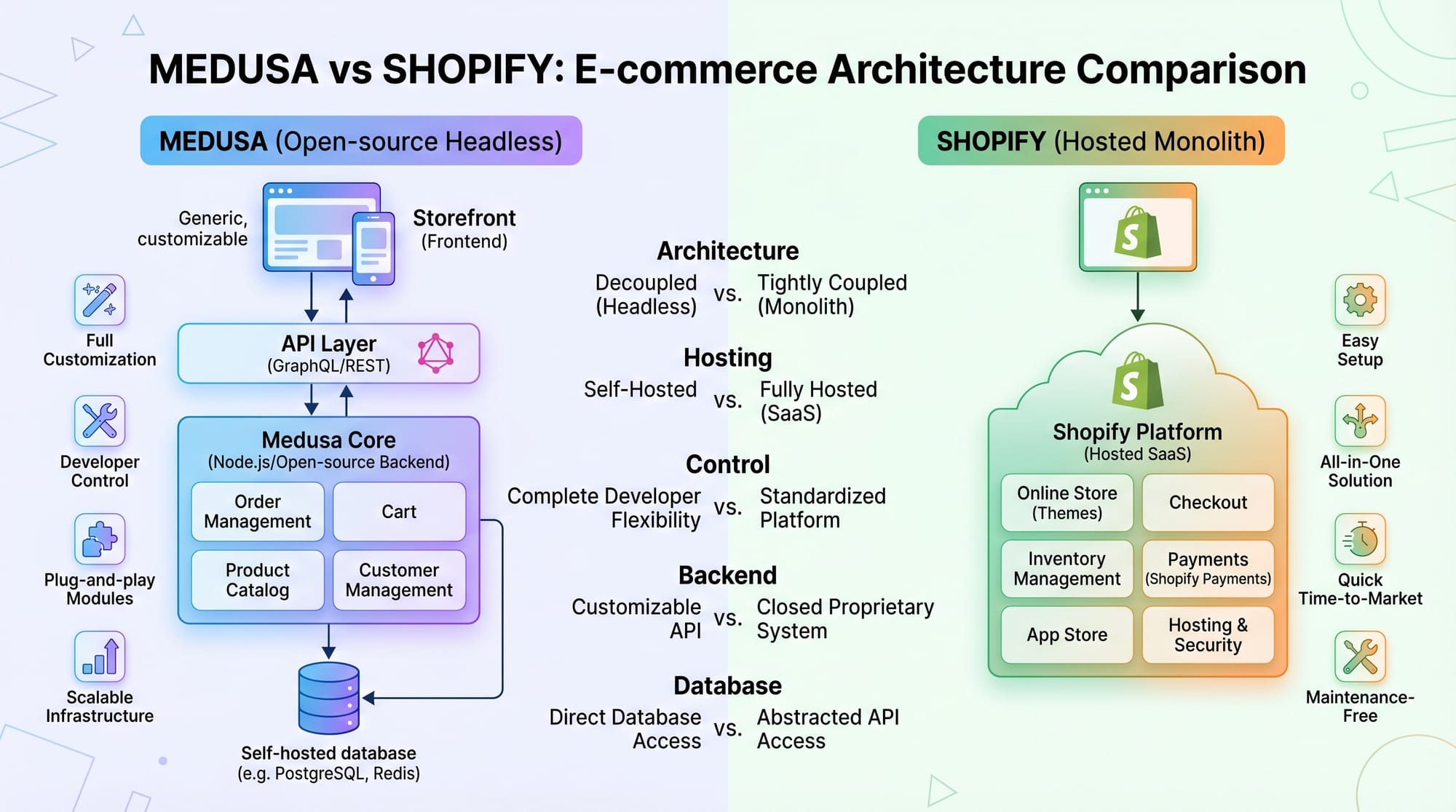
In this tutorial, you’ll learn everything from core concepts to real-world implementations, along with a comparison of medusa vs shopify.
Prerequisites
Before starting this Medusa.js tutorial, you should have:
- Basic knowledge of JavaScript (ES6+)
- Understanding of Node.js and npm
- Familiarity with REST APIs
- Basic knowledge of databases (PostgreSQL recommended)
- Experience with Git and command line
- Optional: Basic React or Next.js knowledge for frontend
If you're new to Node.js, check out our Node.js Basics tutorial on theiqra.edu.pk.
Core Concepts & Explanation
Headless Commerce Architecture
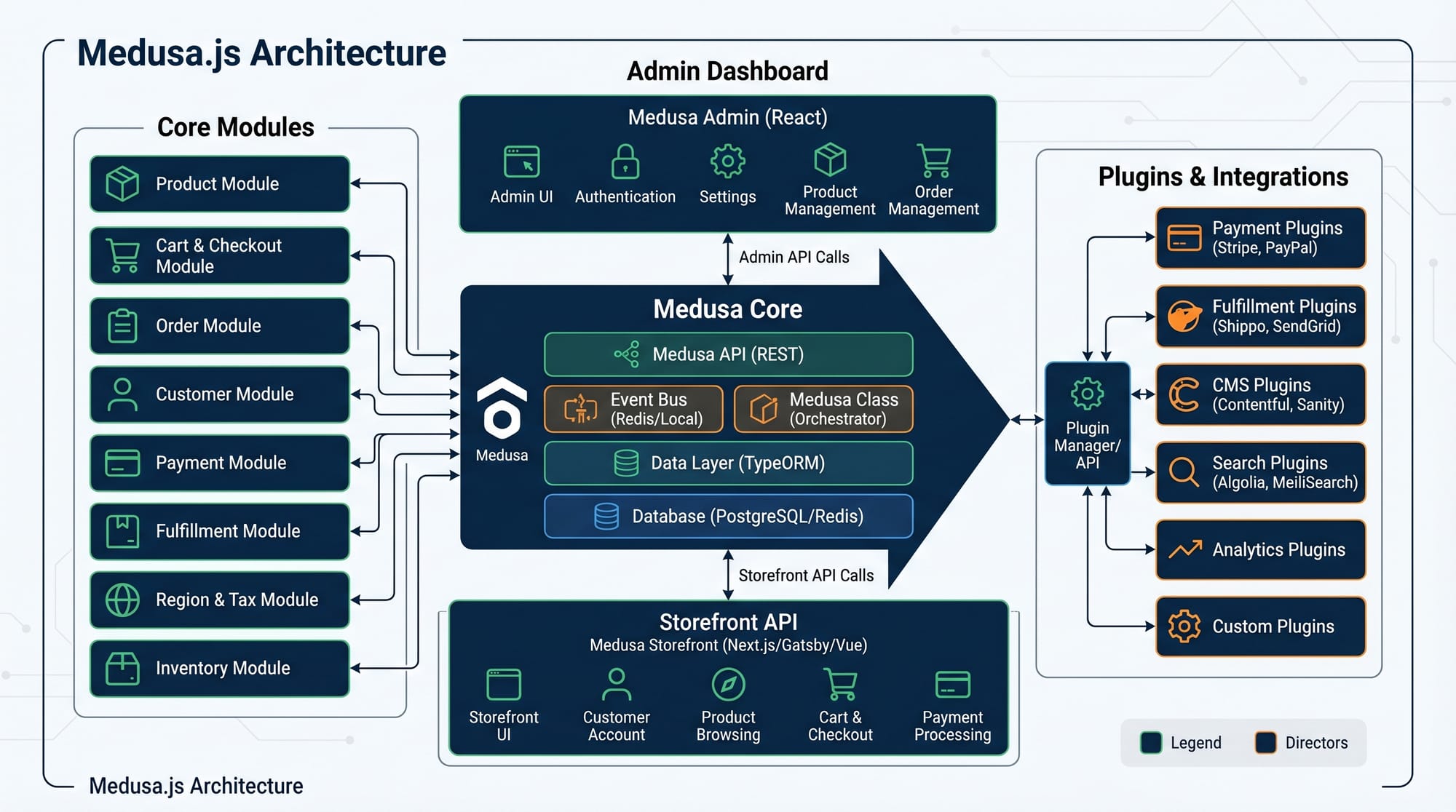
Medusa.js follows a headless architecture, which separates backend logic from frontend presentation.
Example:
Ahmad is building an online clothing store in Lahore. Using Medusa:
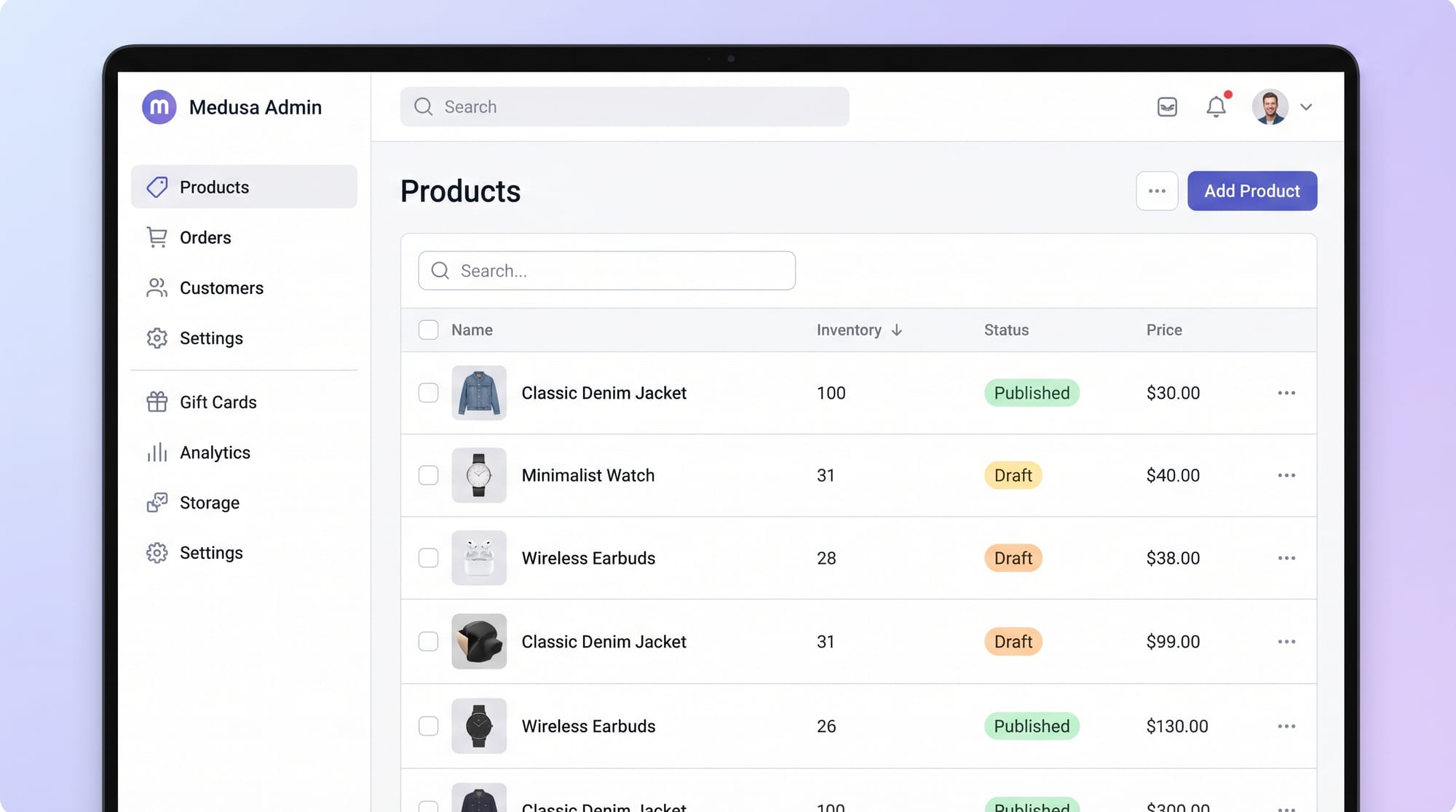
- Backend handles products, orders, payments
- Frontend (React app) displays products to customers
This separation allows Ahmad to:
- Create a mobile app later without changing backend
- Use different frontends for web and admin
Services, Plugins, and APIs
Medusa.js is built around modular components:
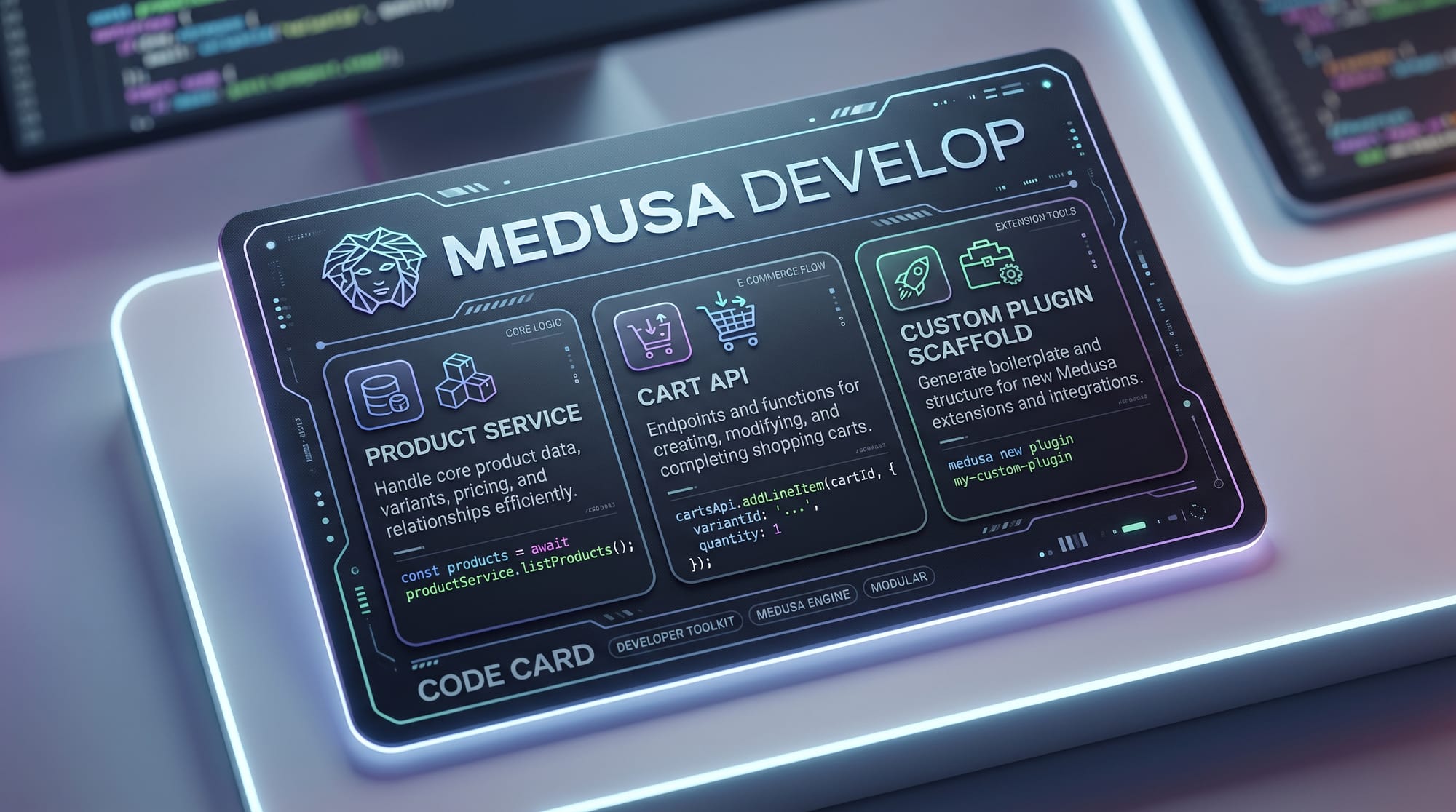
- Services → Business logic (e.g., ProductService)
- Plugins → Extend functionality (e.g., payment gateways)
- APIs → Communicate with frontend
Example:
Fatima wants to integrate JazzCash:
- She creates a plugin
- Connects it to Medusa’s payment service
- Now customers can pay in PKR
Practical Code Examples
Example 1: Setting Up a Medusa Project
npx create-medusa-app my-store
cd my-store
npm install
npm run start
Line-by-line explanation:
npx create-medusa-app my-store
Creates a new Medusa project named "my-store"cd my-store
Navigates into the project directorynpm install
Installs all dependenciesnpm run start
Starts the Medusa backend server
After running this, your backend will be live at:http://localhost:9000
Example 2: Real-World Application — Product API
const express = require("express");
const app = express();

app.get("/products", async (req, res) => {
  const products = await productService.list();
  res.json(products);
});

app.listen(3000, () => {
  console.log("Server running on port 3000");
});
Line-by-line explanation:
const express = require("express");
Imports Express frameworkconst app = express();
Initializes the appapp.get("/products", async (req, res) => {
Creates an API endpoint/productsconst products = await productService.list();
Fetches product data from Medusa serviceres.json(products);
Sends products as JSON responseapp.listen(3000, () => {
Starts server on port 3000console.log("Server running on port 3000");
Logs confirmation message
Common Mistakes & How to Avoid Them
Mistake 1: Not Understanding Headless Architecture
Many beginners think Medusa includes a frontend like Shopify.
Problem:
Ali tried to open the store but saw only APIs.
Solution:
- Build a frontend using Next.js
- Or use Medusa starter storefront
Mistake 2: Incorrect Database Configuration
Medusa requires PostgreSQL, but students often misconfigure it.
Problem Code:
DATABASE_URL=wrong_url
Fix:
DATABASE_URL=postgres://user:password@localhost:5432/medusa
Explanation:
- Ensure PostgreSQL is installed
- Use correct credentials
- Match port and database name
Practice Exercises
Exercise 1: Create a Product API
Problem:
Create an endpoint to return all products.
Solution:
app.get("/items", async (req, res) => {
  const items = await productService.list();
  res.json(items);
});
Explanation:
- Defines route
/items - Fetches products
- Returns JSON response
Exercise 2: Add a New Product
Problem:
Add a product programmatically.
Solution:
await productService.create({
  title: "T-Shirt",
  price: 1500,
});
Explanation:
create()method adds product- Title is product name
- Price in PKR (1500)
Frequently Asked Questions
What is Medusa.js?
Medusa.js is an open-source, headless e-commerce backend built with Node.js. It allows developers to build custom online stores with full control over backend logic and APIs.
How do I install Medusa.js?
You can install Medusa.js using npx create-medusa-app. It automatically sets up a project with all dependencies and configurations needed to start development.
What is the difference between Medusa and Shopify?
Medusa is open-source and customizable, while Shopify is a hosted platform with limited backend control. Medusa is better for developers, whereas Shopify is easier for non-technical users.
Can I use Medusa.js in Pakistan?
Yes, Medusa.js works perfectly in Pakistan. You can integrate local payment methods like JazzCash or EasyPaisa using custom plugins.
Is Medusa.js good for freelancing?
Absolutely. Many international clients prefer open-source solutions, and Medusa.js skills can help you earn through freelancing platforms like Upwork and Fiverr.
Summary & Key Takeaways
- Medusa.js is a powerful open source ecommerce backend
- It follows a headless architecture for flexibility
- You can build custom stores for Pakistani businesses
- Plugins allow integration of local payment systems
- Compared to Shopify, Medusa offers more control
- Ideal for intermediate developers and freelancers
Next Steps & Related Tutorials
To continue your learning journey, explore these tutorials on theiqra.edu.pk:
- Learn backend fundamentals with Node.js Basics
- Build modern frontends with Next.js Tutorial
- Understand APIs with a complete REST API guide
- Explore full-stack development with MERN stack tutorials
These resources will help you become a complete e-commerce developer capable of building production-ready applications in Pakistan and beyond.
Test Your Python Knowledge!
Finished reading? Take a quick quiz to see how much you've learned from this tutorial.