Stripe Integration Tutorial Payments Subscriptions & Checkout
Introduction
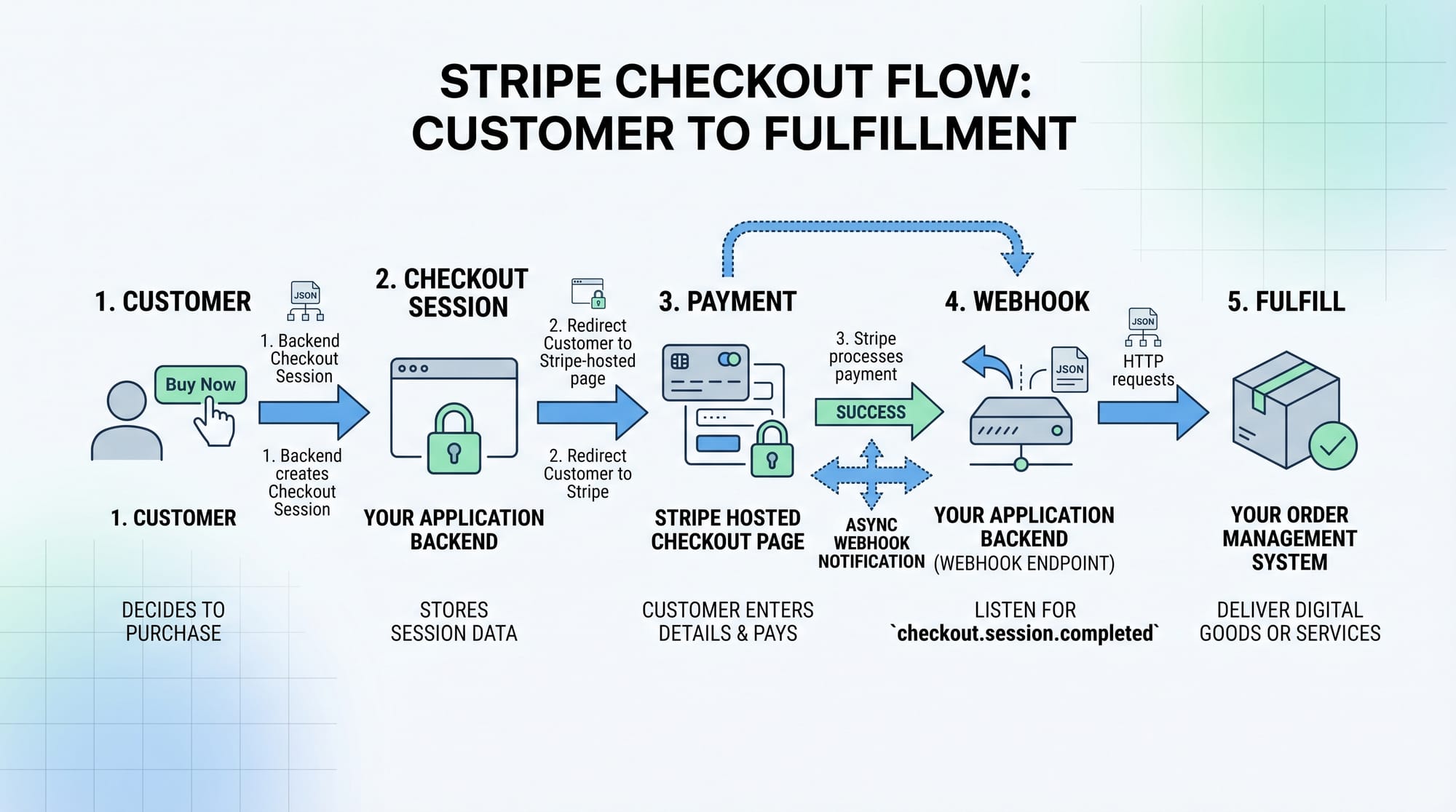
Stripe is one of the most powerful and developer-friendly payment gateways used worldwide for handling online payments, subscriptions, and checkout flows. In this Stripe Integration Tutorial: Payments, Subscriptions & Checkout, you will learn how to integrate Stripe into your web applications step-by-step.
For Pakistani students and developers, learning Stripe is extremely valuable. Whether you're building an e-commerce store in Lahore, a SaaS startup in Karachi, or a freelance project for international clients, Stripe allows you to accept payments globally in a secure and scalable way.
This tutorial will guide you through:
- One-time payments using Stripe Checkout
- Subscription-based billing (monthly/yearly plans)
- Secure payment handling using webhooks
By the end, you’ll be able to build real-world payment systems similar to platforms like Netflix or Shopify.
Prerequisites
Before starting this tutorial, make sure you have:
- Basic knowledge of JavaScript (Node.js)
- Understanding of APIs and HTTP requests
- Familiarity with Express.js
- A Stripe account (you can create one for free)
- Basic understanding of frontend (HTML/React is helpful)
Core Concepts & Explanation
Stripe API Keys & Authentication
Stripe uses API keys to authenticate your requests. There are two types:
- Publishable Key → Used on frontend
- Secret Key → Used on backend (must remain secure)
Example:
const stripe = require('stripe')('sk_test_12345');
Explanation:
require('stripe')→ Imports Stripe library'sk_test_12345'→ Your secret API key- This allows your server to communicate securely with Stripe
Stripe Checkout Sessions
Stripe Checkout is a pre-built payment page hosted by Stripe.
Example:
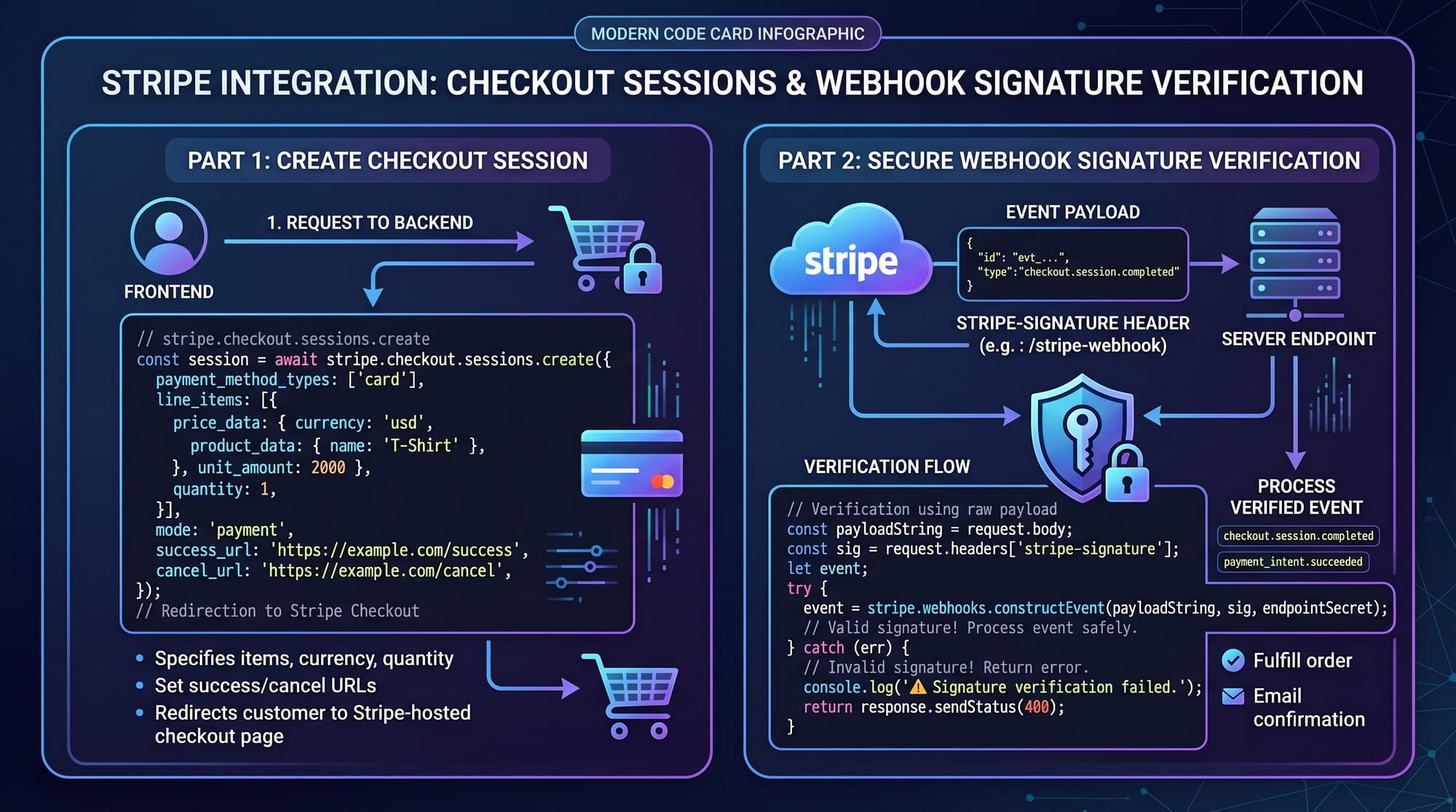
const session = await stripe.checkout.sessions.create({
  payment_method_types: ['card'],
  line_items: [{
    price_data: {
      currency: 'pkr',
      product_data: {
        name: 'Web Development Course',
      },
      unit_amount: 500000,
    },
    quantity: 1,
  }],
  mode: 'payment',
  success_url: 'http://localhost:3000/success',
  cancel_url: 'http://localhost:3000/cancel',
});
Explanation:
payment_method_types→ Accepts card paymentsline_items→ Product detailscurrency: 'pkr'→ Pakistani Rupeesunit_amount: 500000→ PKR 5000 (Stripe uses smallest unit)mode: 'payment'→ One-time paymentsuccess_url→ Redirect after payment successcancel_url→ Redirect if canceled
Webhooks for Payment Confirmation
Webhooks allow Stripe to notify your server when a payment is completed.
Example:
app.post('/webhook', express.raw({ type: 'application/json' }), (req, res) => {
  const sig = req.headers['stripe-signature'];

  let event;

  try {
    event = stripe.webhooks.constructEvent(req.body, sig, endpointSecret);
  } catch (err) {
    return res.status(400).send(`Webhook Error: ${err.message}`);
  }

  if (event.type === 'checkout.session.completed') {
    console.log('Payment successful!');
  }

  res.json({ received: true });
});
Explanation:
stripe-signature→ Ensures request is from StripeconstructEvent()→ Verifies webhook authenticityevent.type→ Detects payment success- Used to trigger order fulfillment (e.g., send course access to Ahmad)
Practical Code Examples
Example 1: Basic Stripe Checkout Integration
const express = require('express');
const app = express();
const stripe = require('stripe')('sk_test_key');

app.post('/create-checkout-session', async (req, res) => {
  const session = await stripe.checkout.sessions.create({
    payment_method_types: ['card'],
    line_items: [{
      price_data: {
        currency: 'pkr',
        product_data: {
          name: 'Online Course',
        },
        unit_amount: 300000,
      },
      quantity: 1,
    }],
    mode: 'payment',
    success_url: 'http://localhost:3000/success',
    cancel_url: 'http://localhost:3000/cancel',
  });

  res.json({ id: session.id });
});

app.listen(4242, () => console.log('Server running'));
Explanation (line-by-line):
express()→ Initializes serverstripe('sk_test_key')→ Connects to Stripe/create-checkout-session→ API endpointcheckout.sessions.create()→ Creates payment sessionline_items→ Defines product and priceres.json({ id: session.id })→ Sends session ID to frontendapp.listen()→ Starts server
Example 2: Real-World Subscription System
app.post('/create-subscription', async (req, res) => {
  const customer = await stripe.customers.create({
    email: '[email protected]',
  });

  const subscription = await stripe.subscriptions.create({
    customer: customer.id,
    items: [{
      price: 'price_monthly_123',
    }],
    payment_behavior: 'default_incomplete',
    expand: ['latest_invoice.payment_intent'],
  });

  res.send(subscription);
});
Explanation:
customers.create()→ Creates a Stripe customeremail→ User email (Fatima from Karachi)subscriptions.create()→ Creates recurring billingprice→ Predefined Stripe price IDpayment_behavior→ Handles incomplete paymentsexpand→ Fetches payment details
Common Mistakes & How to Avoid Them
Mistake 1: Exposing Secret API Keys
Problem: Beginners often put secret keys in frontend code.
❌ Wrong:
const stripe = Stripe('sk_test_secret');
✅ Correct:
const stripe = Stripe('pk_test_publishable');
Fix:
- Always keep secret keys on backend
- Use environment variables (
.env)
Mistake 2: Not Verifying Webhooks
Problem: Accepting webhook data without validation.
❌ Wrong:
app.post('/webhook', (req, res) => {
  console.log(req.body);
});
✅ Correct:
stripe.webhooks.constructEvent(req.body, sig, endpointSecret);
Fix:
- Always verify signature
- Prevent fake payment confirmations
Practice Exercises
Exercise 1: Create a One-Time Payment
Problem: Build a checkout for a PKR 2000 course.
Solution:
unit_amount: 200000
Explanation:
- Stripe uses paisa (smallest unit)
- 2000 PKR = 200000 paisa
Exercise 2: Monthly Subscription Plan
Problem: Create a monthly plan for a coding academy in Islamabad.
Solution:
items: [{
  price: 'price_monthly_plan_id',
}]
Explanation:
- Use Stripe Dashboard to create pricing
- Link price ID in backend
Frequently Asked Questions
What is Stripe Checkout?
Stripe Checkout is a pre-built, secure payment page hosted by Stripe that allows users to pay using cards and other methods without building your own UI.
How do I integrate Stripe in Node.js?
You install the Stripe package via npm, initialize it with your secret key, and use APIs like checkout.sessions.create() to handle payments.
Can Pakistani developers use Stripe?
Yes, Pakistani developers can integrate Stripe for international clients, though direct payouts may require supported countries or workarounds like Stripe Atlas.
How do I handle subscription payments?
You create a customer and attach a subscription plan using Stripe’s subscription API, which automatically handles recurring billing.
What are webhooks in Stripe?
Webhooks are automated messages sent by Stripe to your server when events occur, such as successful payments or failed transactions.
Summary & Key Takeaways
- Stripe enables secure global payment processing
- Stripe Checkout simplifies payment UI development
- Subscriptions allow recurring billing models
- Webhooks are essential for verifying payments
- Never expose secret API keys
- Stripe is widely used in real-world SaaS and e-commerce
Next Steps & Related Tutorials
To deepen your understanding, explore these tutorials on theiqra.edu.pk:
- Learn backend fundamentals with Node.js Basics
- Build interactive UIs using React.js Introduction
- Understand REST APIs for payment systems
- Explore full-stack e-commerce project tutorials
These topics will help you build complete production-ready applications using Stripe.
This tutorial gives you a strong foundation in stripe tutorial, stripe checkout, and stripe subscription integration. Keep practicing, build projects, and soon you’ll be ready to implement real-world payment systems for clients in Pakistan and beyond 🚀
Test Your Python Knowledge!
Finished reading? Take a quick quiz to see how much you've learned from this tutorial.