JazzCash & Easypaisa Integration Pakistani Payment Gateways
Introduction
In Pakistan’s rapidly growing e-commerce ecosystem, digital payments have become essential. Services like JazzCash and Easypaisa dominate the local market, enabling millions of users to send, receive, and pay money using their mobile wallets.
JazzCash & Easypaisa integration refers to connecting your website or application with these payment gateways so customers can pay directly using their mobile wallets, debit cards, or bank accounts.
For Pakistani students learning web development or building startups in cities like Lahore, Karachi, or Islamabad, understanding jazzcash api integration, easypaisa api, and pakistan payment gateway systems is a highly valuable skill.
Learning this helps you:
- Build real-world e-commerce applications
- Accept payments in PKR locally
- Work with APIs, security, and backend logic
- Prepare for freelance and startup opportunities
Prerequisites
Before starting this tutorial, you should have:
- Basic knowledge of HTML, CSS, and JavaScript
- Understanding of Node.js or PHP backend
- Familiarity with REST APIs
- Basic knowledge of HTTP requests (GET/POST)
- Understanding of JSON data format
- A JazzCash or Easypaisa sandbox account (for testing)
Core Concepts & Explanation
Payment Gateway Workflow in Pakistan
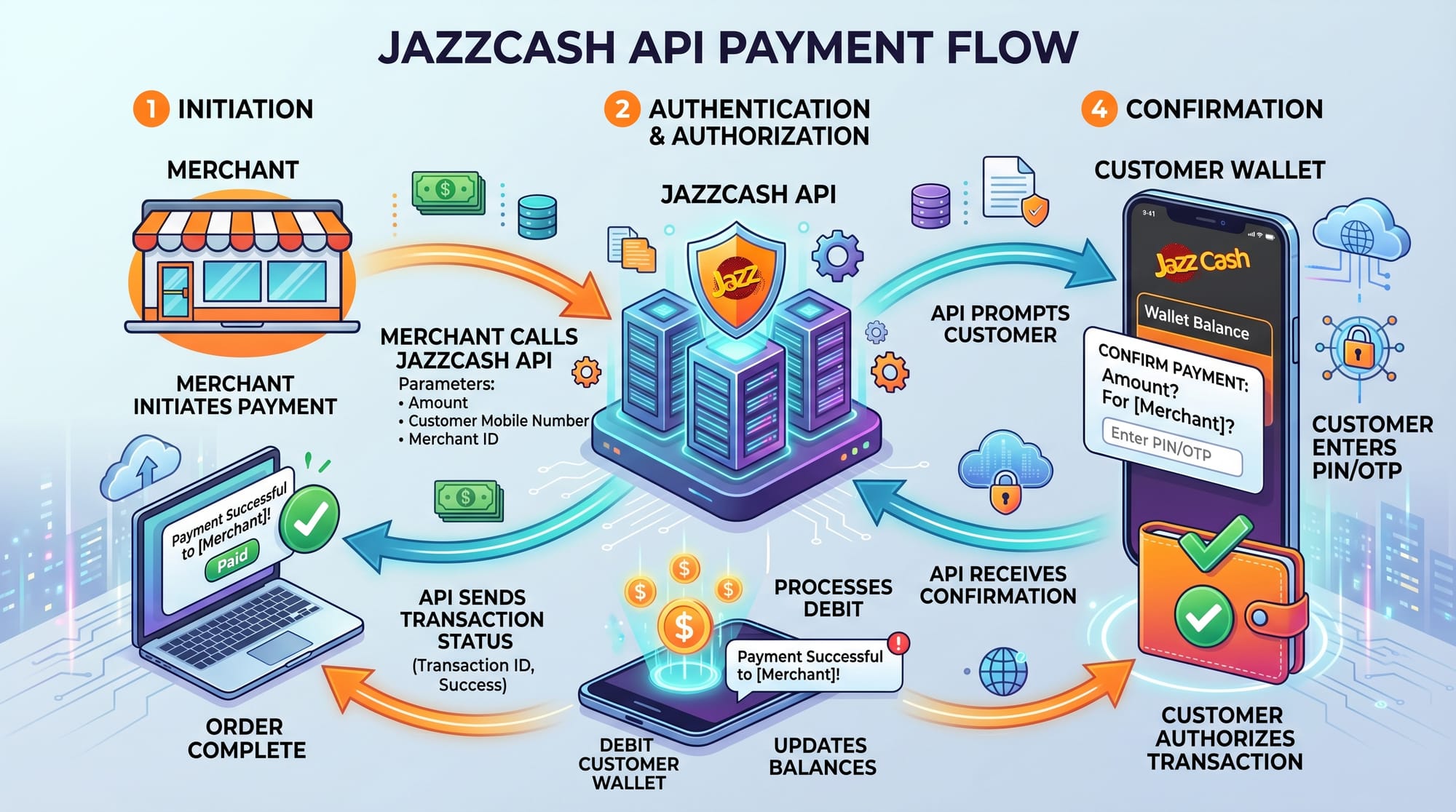
A payment gateway like JazzCash or Easypaisa acts as a bridge between your application and the customer’s wallet.
Basic flow:
- Customer clicks "Pay Now"
- Your server sends request to JazzCash/Easypaisa API
- User authenticates (OTP or PIN)
- Payment is processed
- Gateway sends response/callback to your server
Example:
Ali runs an online store in Karachi. A customer selects a product worth PKR 1500 and chooses JazzCash. The system:
- Sends transaction request
- Redirects to JazzCash interface
- Customer confirms payment
- Server receives confirmation
Secure Transactions with HMAC & Credentials
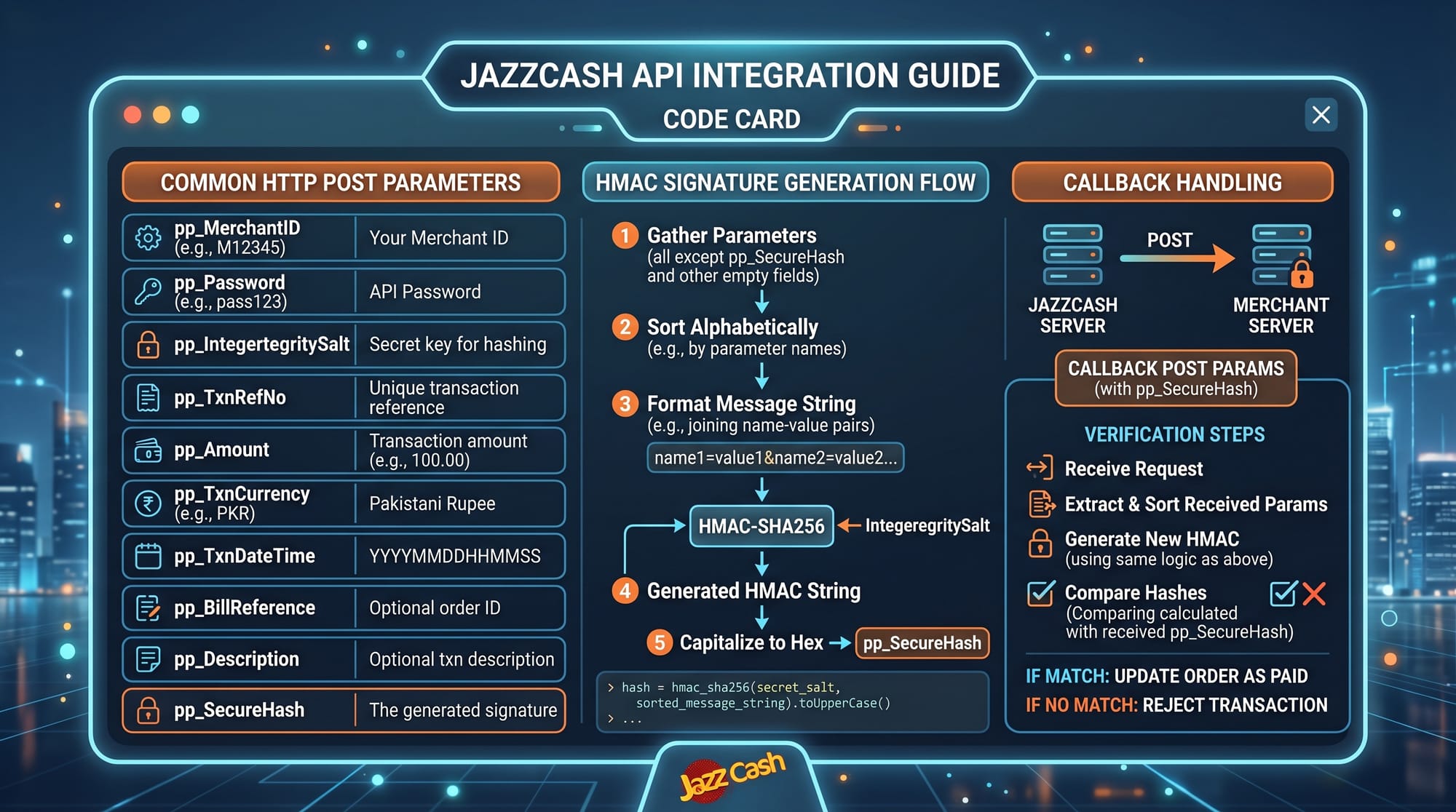
Security is critical in payment systems. Both JazzCash and Easypaisa require:
- Merchant ID
- Password
- Integrity Salt / API Key
- HMAC SHA256 Signature
HMAC (Hash-based Message Authentication Code) ensures data is not tampered with.
Example concept:
You generate a hash using:
hash = HMAC_SHA256(data + salt)
This hash is sent with your request to verify authenticity.
Practical Code Examples
Example 1: JazzCash API Integration (Node.js)
const crypto = require('crypto');
const axios = require('axios');

// Step 1: Define parameters
const data = {
  pp_Version: "1.1",
  pp_TxnType: "MWALLET",
  pp_Language: "EN",
  pp_MerchantID: "MC12345",
  pp_Password: "yourpassword",
  pp_TxnRefNo: "T" + Date.now(),
  pp_Amount: "150000", // PKR 1500 (in paisa)
  pp_TxnCurrency: "PKR",
  pp_ReturnURL: "https://yourwebsite.com/callback"
};

// Step 2: Create string for hashing
const integritySalt = "your_integrity_salt";
const stringToHash = Object.values(data).join('&');

// Step 3: Generate HMAC SHA256 hash
const hash = crypto
  .createHmac('sha256', integritySalt)
  .update(stringToHash)
  .digest('hex');

// Step 4: Attach hash to request
data.pp_SecureHash = hash;

// Step 5: Send POST request
axios.post("https://sandbox.jazzcash.com.pk/CustomerPortal/transactionmanagement/merchantform", data)
  .then(response => {
    console.log(response.data);
  })
  .catch(error => {
    console.error(error);
  });
Line-by-line explanation:
crypto→ Used to generate secure hashaxios→ Sends HTTP POST requestdata→ Contains required JazzCash parameterspp_Amount→ Always in paisa (150000 = PKR 1500)stringToHash→ Combines all values for hashingcreateHmac()→ Generates secure signaturepp_SecureHash→ Ensures request authenticityaxios.post()→ Sends request to JazzCash API
Example 2: Easypaisa Payment Integration (Real-World)
const axios = require('axios');

// Step 1: Payment request data
const paymentData = {
  storeId: "12345",
  transactionAmount: "2000",
  transactionType: "MA",
  mobileAccountNo: "03451234567",
  emailAddress: "[email protected]"
};

// Step 2: Send request
axios.post("https://easypaisa.com.pk/api/payment", paymentData)
  .then(response => {
    console.log("Payment Success:", response.data);
  })
  .catch(error => {
    console.error("Payment Failed:", error);
  });
Real-world scenario:
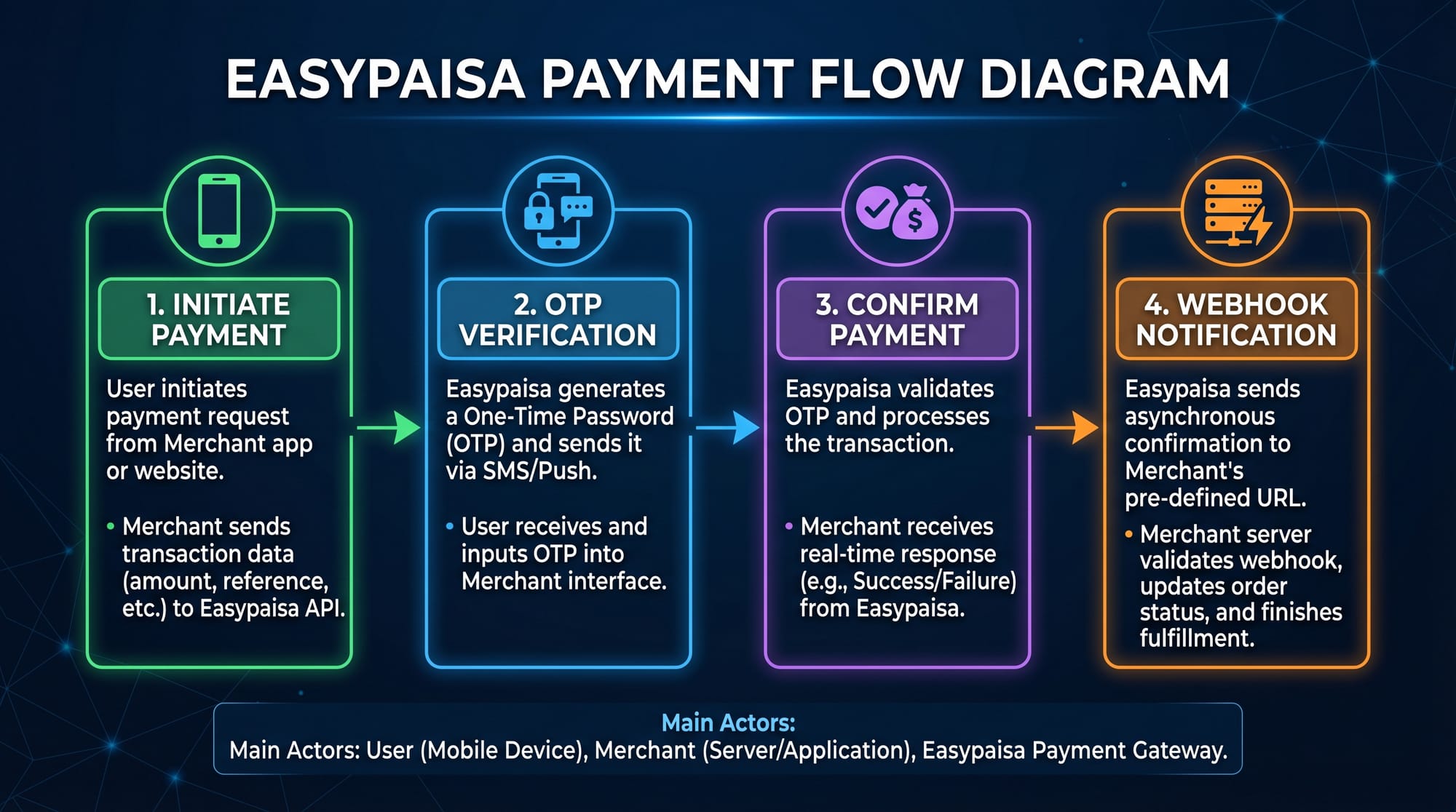
Fatima in Islamabad buys a course worth PKR 2000:
- She enters her Easypaisa number
- Receives OTP
- Confirms payment
- Backend receives success response
Line-by-line explanation:
paymentData→ Contains transaction detailsmobileAccountNo→ Customer wallet numberaxios.post()→ Sends payment requestthen()→ Handles successcatch()→ Handles errors
Common Mistakes & How to Avoid Them
Mistake 1: Incorrect Amount Format
Problem: Sending PKR instead of paisa
Example:
pp_Amount: "1500" // WRONG
Fix:
pp_Amount: "150000" // Correct (PKR 1500)
Explanation: JazzCash requires amount in paisa (1 PKR = 100 paisa).
Mistake 2: Invalid Hash Generation
Problem: Hash mismatch error due to wrong order
Fix:
- Always follow parameter order
- Use correct salt
- Avoid extra spaces
const stringToHash = Object.values(data).join('&');
Tip: Even a small mismatch causes payment failure.
Practice Exercises
Exercise 1: Create a Payment Request
Problem:
Create a JazzCash request for PKR 500.
Solution:
pp_Amount: "50000" // 500 PKR in paisa
Explanation: Multiply by 100 to convert into paisa.
Exercise 2: Handle Payment Callback
Problem:
Write a simple callback handler.
Solution:
app.post('/callback', (req, res) => {
  const status = req.body.pp_ResponseCode;

  if (status === "000") {
    console.log("Payment Successful");
  } else {
    console.log("Payment Failed");
  }

  res.send("OK");
});
Explanation:
pp_ResponseCode→ Payment status"000"→ Success- Endpoint receives confirmation from JazzCash
Frequently Asked Questions
What is JazzCash API integration?
It allows developers to connect their apps with JazzCash to accept payments digitally. It uses secure HTTP requests and authentication methods like HMAC.
How do I integrate Easypaisa API?
You need merchant credentials, create API requests, and handle responses or callbacks after payment confirmation.
Is sandbox testing available?
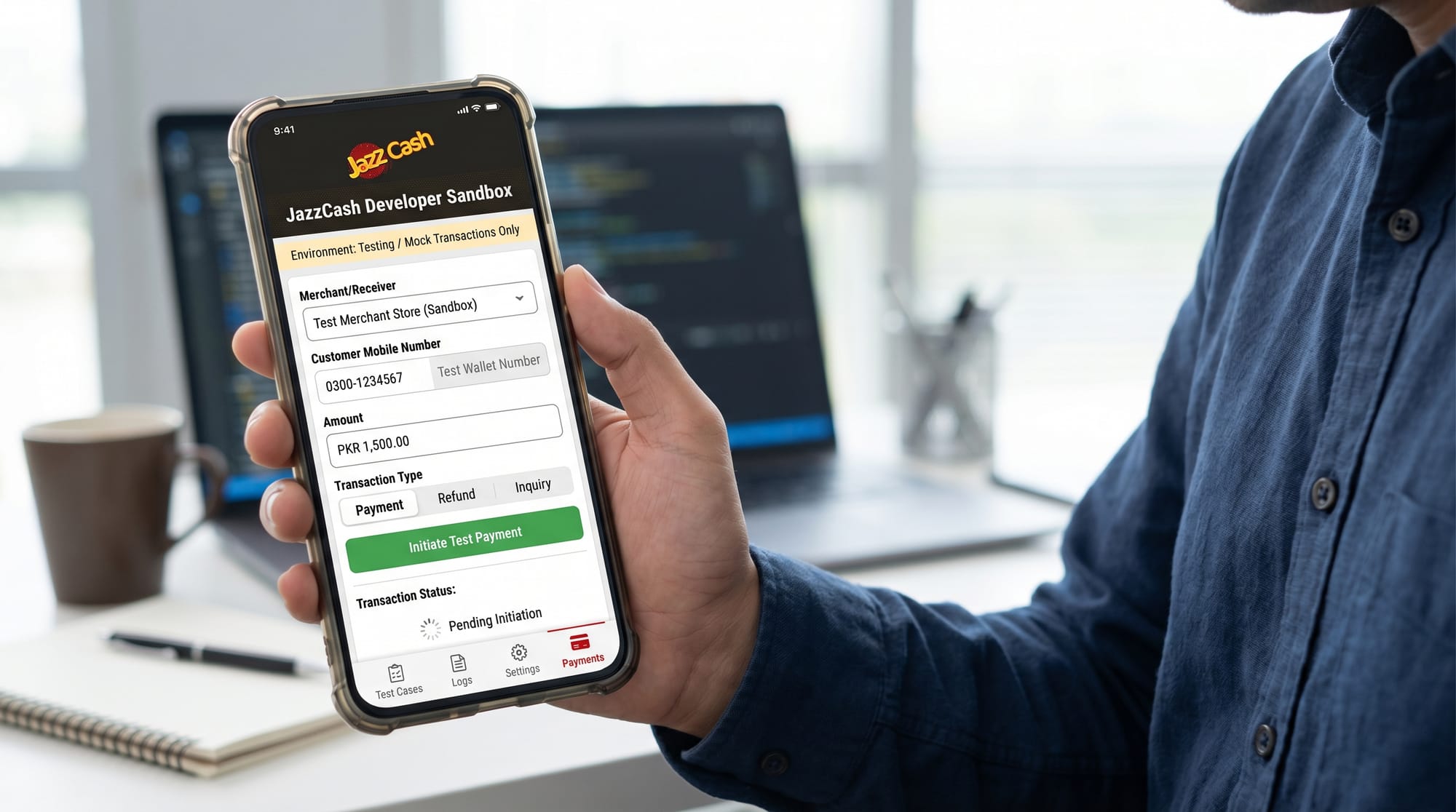
Yes, both JazzCash and Easypaisa provide sandbox environments so you can test without real money.
Why is my payment failing?
Common reasons include incorrect hash, wrong credentials, or invalid amount format.
Can I use both JazzCash and Easypaisa together?
Yes, many Pakistani e-commerce platforms offer both options to give users flexibility.
Summary & Key Takeaways
- JazzCash and Easypaisa are leading Pakistan payment gateways
- Always use paisa format for transaction amounts
- HMAC hashing ensures secure communication
- Backend handling (callbacks/webhooks) is essential
- Sandbox testing helps avoid real-world errors
- Integration skills are valuable for freelancing and startups
Next Steps & Related Tutorials
To deepen your skills, explore these tutorials on theiqra.edu.pk:
- Learn backend fundamentals with Node.js Basics
- Accept international payments with Stripe Integration
- Build full stores using Shopify Development Guide
- Understand APIs better with REST API Fundamentals
By mastering these, you’ll be ready to build complete, production-level Pakistani e-commerce systems 🚀
Test Your Python Knowledge!
Finished reading? Take a quick quiz to see how much you've learned from this tutorial.