WooCommerce Development Custom Themes & Plugins Guide
Introduction
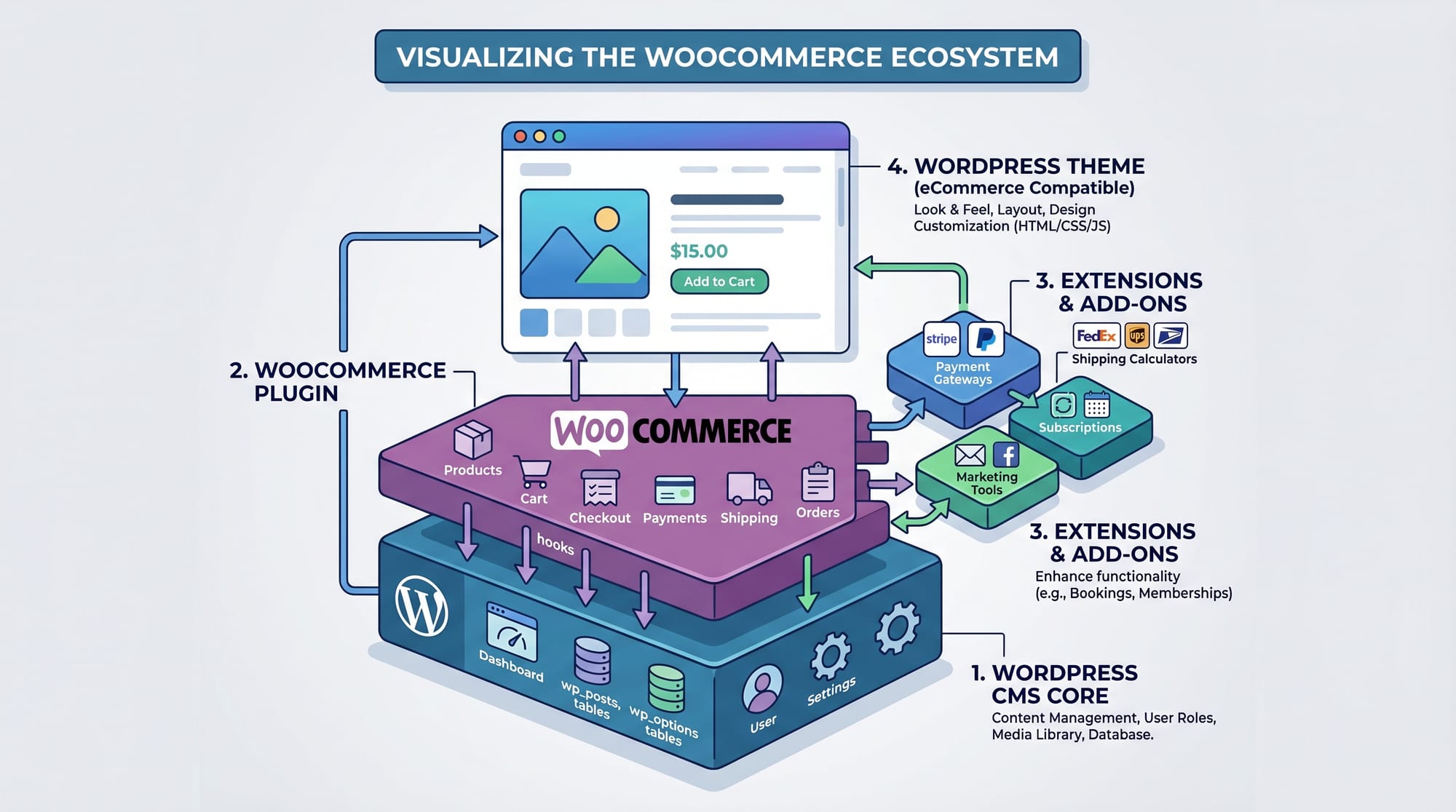
WooCommerce Development: Custom Themes & Plugins Guide is an intermediate-level tutorial designed to help you understand how to extend and customize WooCommerce for real-world e-commerce stores. WooCommerce is the most popular e-commerce plugin for WordPress, and it powers thousands of online stores, including small businesses in Pakistan selling products in cities like Lahore, Karachi, and Islamabad.
In this woocommerce tutorial, you will learn how to build custom themes and plugins that modify WooCommerce behavior, design product pages, and create advanced functionality like custom checkout fields or product types.
For Pakistani students learning web development, WooCommerce skills are highly valuable because:
- Freelance platforms like Fiverr and Upwork have high demand for WooCommerce developers
- Local businesses in Pakistan are shifting to online stores due to e-commerce growth
- You can build full online stores for clients and earn in USD or PKR
- It combines PHP, WordPress, and real-world business logic
Prerequisites
Before starting this woocommerce custom theme and plugin development guide, you should be familiar with:
- Basic HTML, CSS, and JavaScript
- Intermediate PHP (functions, classes, arrays)
- WordPress basics (themes, plugins, admin panel)
- Understanding of MySQL databases (basic level)
- Local development tools like XAMPP or LocalWP
Optional but helpful:
- Basic knowledge of REST APIs
- Familiarity with Git version control
Core Concepts & Explanation
WooCommerce Hooks (Actions & Filters)
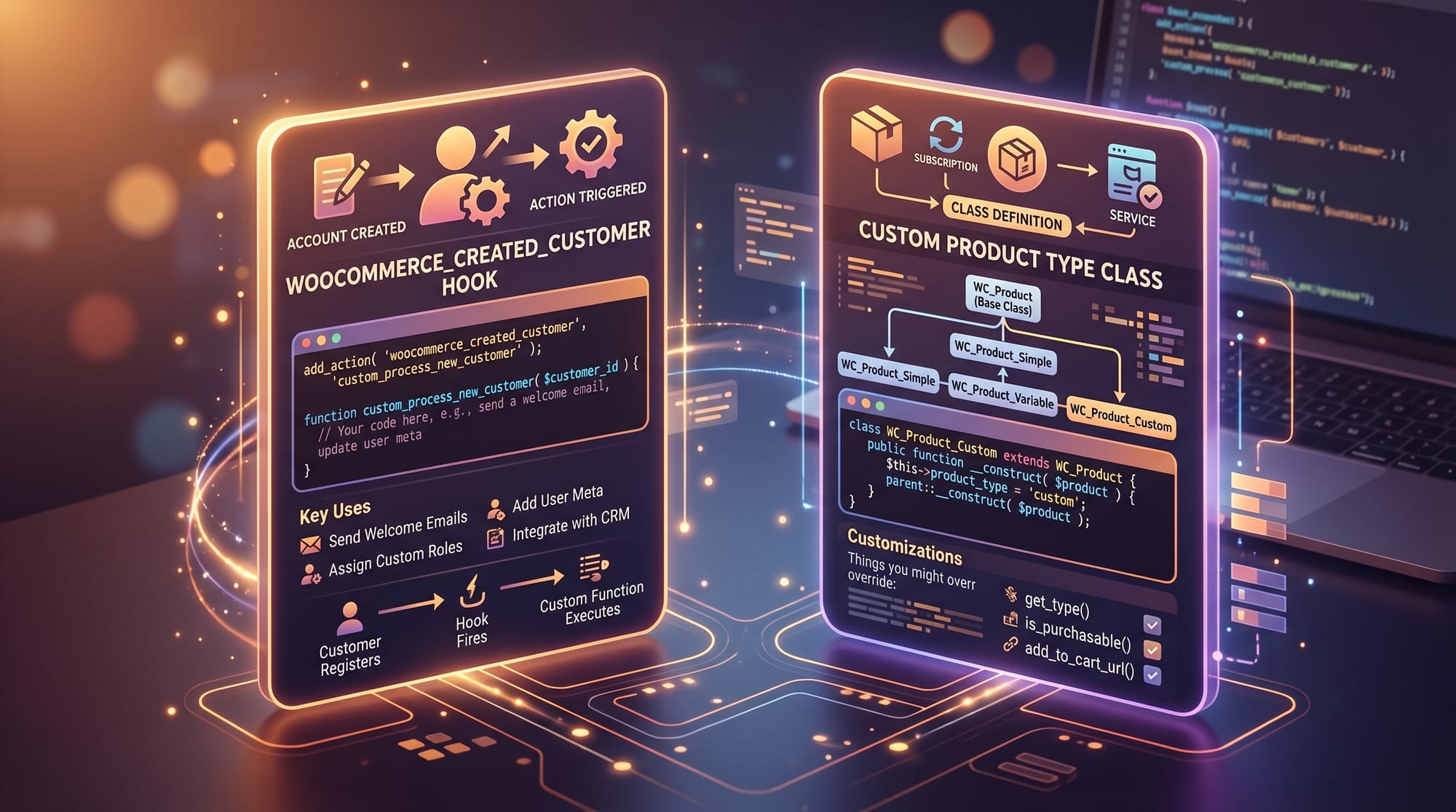
WooCommerce heavily relies on hooks. Hooks allow you to modify or extend functionality without editing core files.
There are two types:
- Action Hooks → Perform an action (e.g., send email, save data)
- Filter Hooks → Modify existing data (e.g., product price, title)
Example:
add_action('woocommerce_before_single_product', 'custom_message');

function custom_message() {
    echo "<p>Welcome to Ahmad's Store in Lahore!</p>";
}
Explanation:
add_action()registers a function to a WooCommerce event'woocommerce_before_single_product'is the hook locationcustom_message()is the custom function we createdechoprints a message on product pages
WooCommerce Template Hierarchy
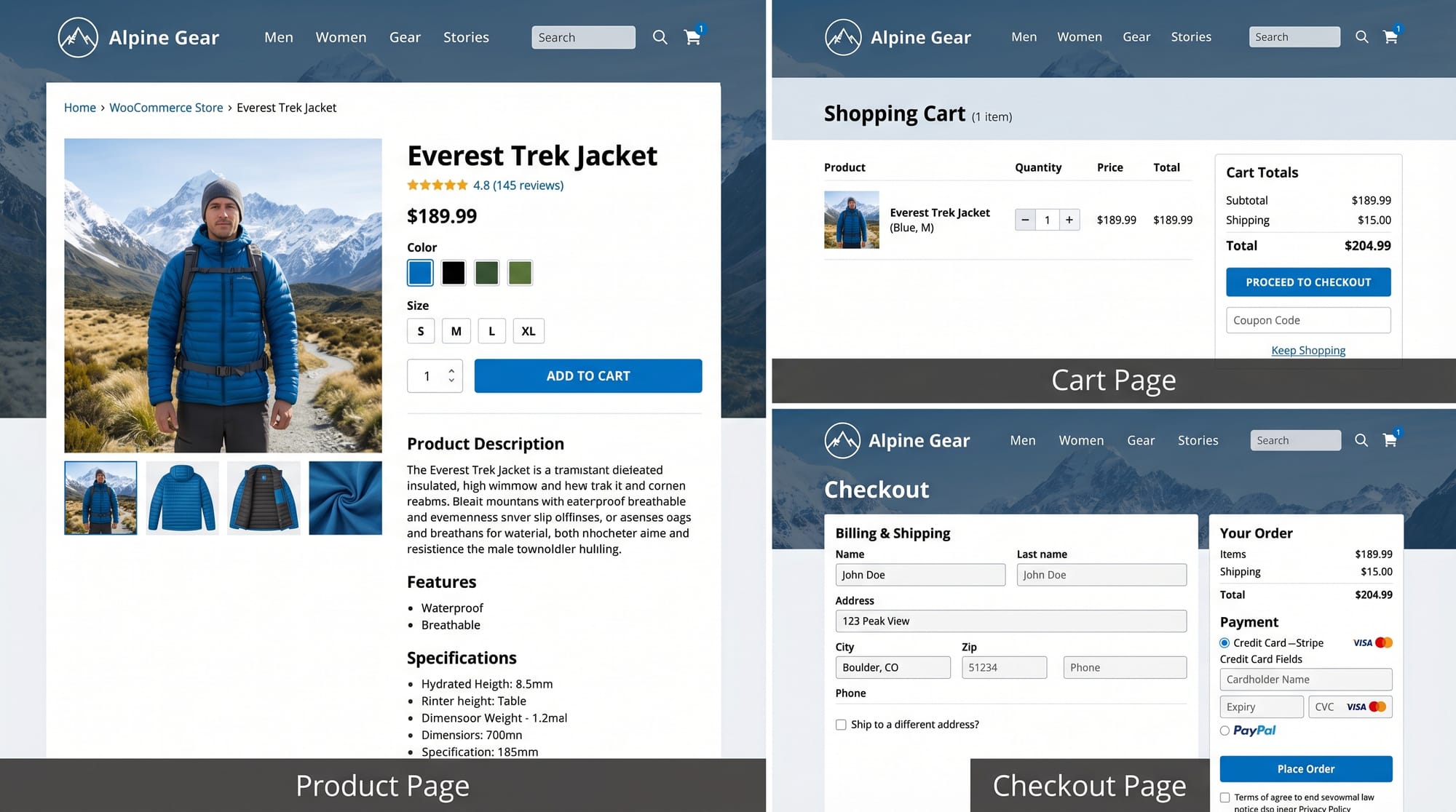
WooCommerce uses templates to display pages like:
- Product page
- Cart page
- Checkout page
You can override these templates inside your theme:
your-theme/woocommerce/single-product.php
Example customization:
- Change layout of product page
- Add custom banners for Pakistani seasonal sales (Eid, Ramadan discounts)
Custom Product Types
WooCommerce allows custom product types like:
- Subscription products
- Rental products
- Event tickets
Example concept:
A store in Karachi selling car rentals can create a “Rental Product Type” instead of simple products.
Practical Code Examples
Example 1: Adding Custom Checkout Field
This example adds a “WhatsApp Number” field to checkout.
add_action('woocommerce_after_order_notes', 'add_whatsapp_field');

function add_whatsapp_field($checkout) {
    echo '<div id="whatsapp_field"><h3>WhatsApp Contact</h3>';

    woocommerce_form_field('whatsapp_number', array(
        'type' => 'text',
        'class' => array('form-row-wide'),
        'label' => __('WhatsApp Number'),
        'placeholder' => __('03XX-XXXXXXX'),
    ), $checkout->get_value('whatsapp_number'));

    echo '</div>';
}
Line-by-line explanation:
add_action(...)attaches function to checkout pageadd_whatsapp_fieldis our custom function$checkoutholds checkout form datawoocommerce_form_field()creates input field'whatsapp_number'is database keyget_value()retrieves previously entered value
Example 2: Auto Apply Discount for Pakistani Customers
add_action('woocommerce_cart_calculate_fees', 'apply_discount');

function apply_discount() {
    global $woocommerce;

    $discount = $woocommerce->cart->subtotal * 0.10;

    $woocommerce->cart->add_fee('Student Discount Pakistan', -$discount);
}
Explanation:
- Runs when cart totals are calculated
- Gets cart subtotal
- Calculates 10% discount
- Applies negative fee (discount)
- Displays “Student Discount Pakistan” in cart
This is useful for stores targeting students in Islamabad universities.
Common Mistakes & How to Avoid Them
Mistake 1: Editing Core WooCommerce Files
Many beginners directly modify WooCommerce plugin files.
Why it's bad:
- Updates will overwrite changes
- Breaks site stability
- Not scalable
Fix:
Always use:
- Child themes
- Custom plugins
- Hooks and filters
Example safe approach:
add_filter('woocommerce_product_price', 'custom_price_display');
Mistake 2: Not Enqueuing Scripts Properly
Beginners often add CSS/JS directly in templates.
Problem:
- Causes performance issues
- Conflicts with themes
Fix:
add_action('wp_enqueue_scripts', 'load_custom_scripts');

function load_custom_scripts() {
    wp_enqueue_style('custom-style', get_stylesheet_uri());
}
Explanation:
wp_enqueue_scriptsis correct hookwp_enqueue_style()safely loads CSS- Prevents duplicate loading issues
Practice Exercises
Exercise 1: Add Custom Store Greeting
Problem:
Display “Welcome to Ali’s Online Store in Karachi” on all shop pages.
Solution:
add_action('woocommerce_before_shop_loop', 'store_greeting');

function store_greeting() {
    echo "<h2>Welcome to Ali's Online Store in Karachi</h2>";
}
Explanation:
- Hook triggers before product loop
- Displays greeting message
- Useful for branding
Exercise 2: Create Custom Shipping Message
Problem:
Show “Free delivery in Lahore for orders above PKR 5000”.
Solution:
add_action('woocommerce_cart_totals_after_shipping', 'shipping_notice');

function shipping_notice() {
    echo "<p>Free delivery in Lahore for orders above PKR 5000</p>";
}
Explanation:
- Hook adds message after shipping section
- Helps improve conversions
- Targets Lahore customers specifically
Frequently Asked Questions
What is WooCommerce development?
WooCommerce development is the process of customizing WooCommerce stores using PHP, hooks, themes, and plugins. It allows developers to build advanced e-commerce features beyond default functionality.
How do I create a WooCommerce custom theme?
You create a WooCommerce custom theme by overriding WooCommerce template files inside your WordPress theme and using hooks to modify layout and behavior.
Can I develop WooCommerce plugins as a beginner?
Yes, if you understand basic PHP and WordPress structure. Start with simple plugins like adding checkout fields or modifying product display.
What skills are needed for WooCommerce plugin development?
You need PHP, WordPress knowledge, understanding of hooks (actions/filters), and basic database understanding.
Is WooCommerce development good for freelancing in Pakistan?
Yes, it is highly in demand. Many businesses in Lahore, Karachi, and Islamabad hire freelancers to build and maintain WooCommerce stores.
Summary & Key Takeaways
- WooCommerce is a powerful WordPress e-commerce plugin
- Hooks (actions & filters) are essential for customization
- Never modify core plugin files directly
- Custom themes control design, plugins control functionality
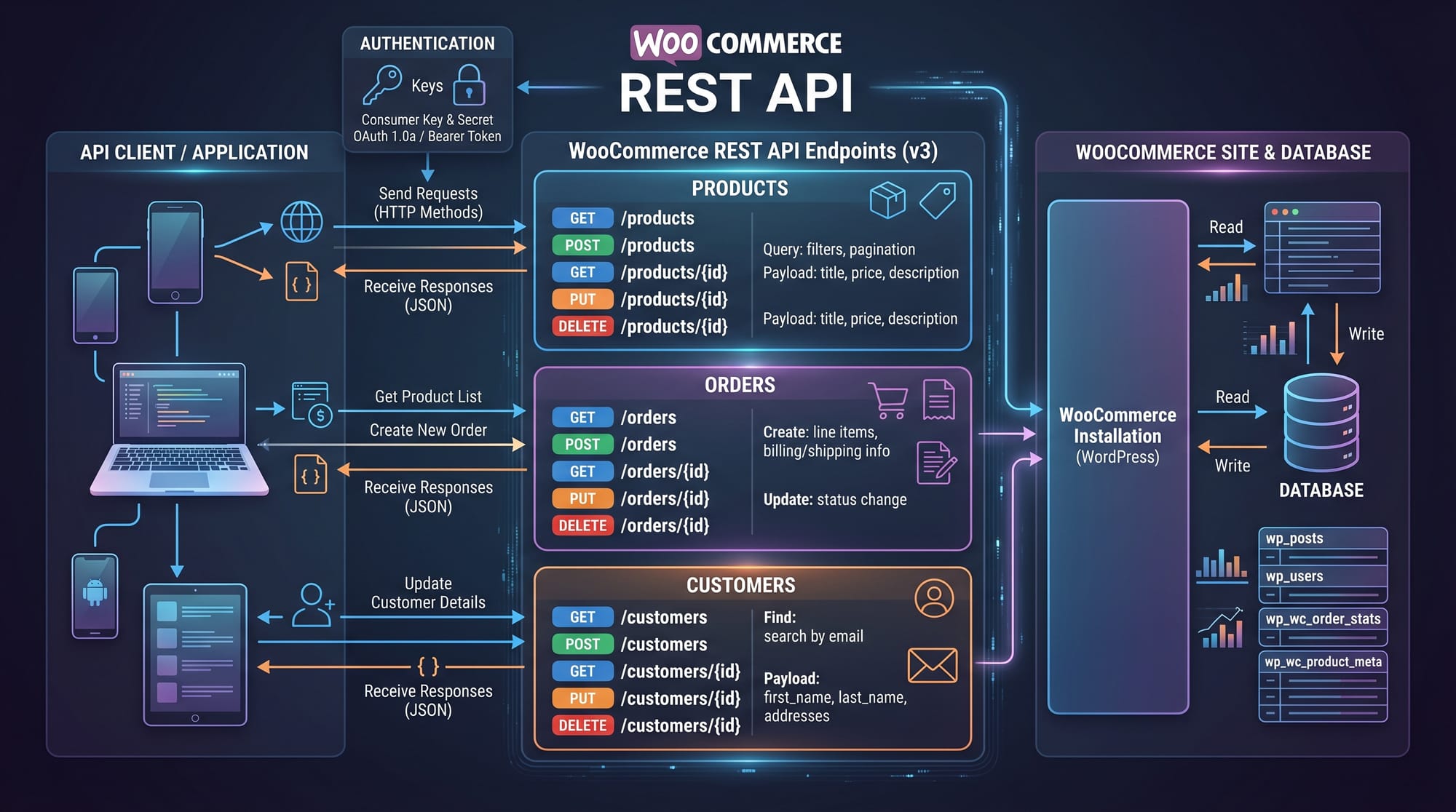
- WooCommerce REST API enables advanced integrations
- Pakistani developers can earn freelancing income using WooCommerce skills
Next Steps & Related Tutorials
To continue your learning journey, explore these tutorials on theiqra.edu.pk:
- Learn WordPress fundamentals in our WordPress Development Guide
- Master backend logic with PHP Tutorial for Beginners
- Explore advanced APIs in REST API Integration Guide
- Build full websites using E-commerce Website Development in Pakistan
These tutorials will help you become a professional WooCommerce developer ready for freelancing and job opportunities in the global market.
Test Your Python Knowledge!
Finished reading? Take a quick quiz to see how much you've learned from this tutorial.