Strapi Tutorial Headless CMS with Node js 2026
Introduction
Strapi is one of the most powerful open-source headless CMS platforms used for building modern APIs quickly and efficiently. In this strapi tutorial: headless cms with node.js 2026, you will learn how Strapi works, how it connects with Node.js, and why it is becoming a top choice for developers worldwide—including in Pakistan.
A headless CMS means the backend (content management) is separated from the frontend (website or app). Strapi gives you an admin panel to manage content and automatically generates APIs (REST or GraphQL) that you can use in any frontend like React, Next.js, or mobile apps.
For Pakistani students learning web development in 2026, Strapi is extremely valuable because:
- It helps you build real-world SaaS and eCommerce backends
- It reduces backend development time significantly
- It is widely used in freelancing projects (earning in PKR or USD)
- It integrates easily with Node.js ecosystem
For example, a student like Ali from Lahore can build a blog API for clients without writing complex backend code from scratch.
Prerequisites
Before starting this strapi headless cms tutorial, make sure you have the following knowledge:
- Basic understanding of JavaScript (ES6+)
- Node.js and npm installed on your system
- Basic knowledge of REST APIs
- Familiarity with JSON structure
- A code editor like VS Code
Optional but helpful:
- Understanding of Express.js
- Basic database concepts (MongoDB or PostgreSQL)
- Git & GitHub basics
If you are completely new, you should first complete:
- Node.js Basics tutorial on theiqra.edu.pk
- JavaScript Fundamentals course
Core Concepts & Explanation
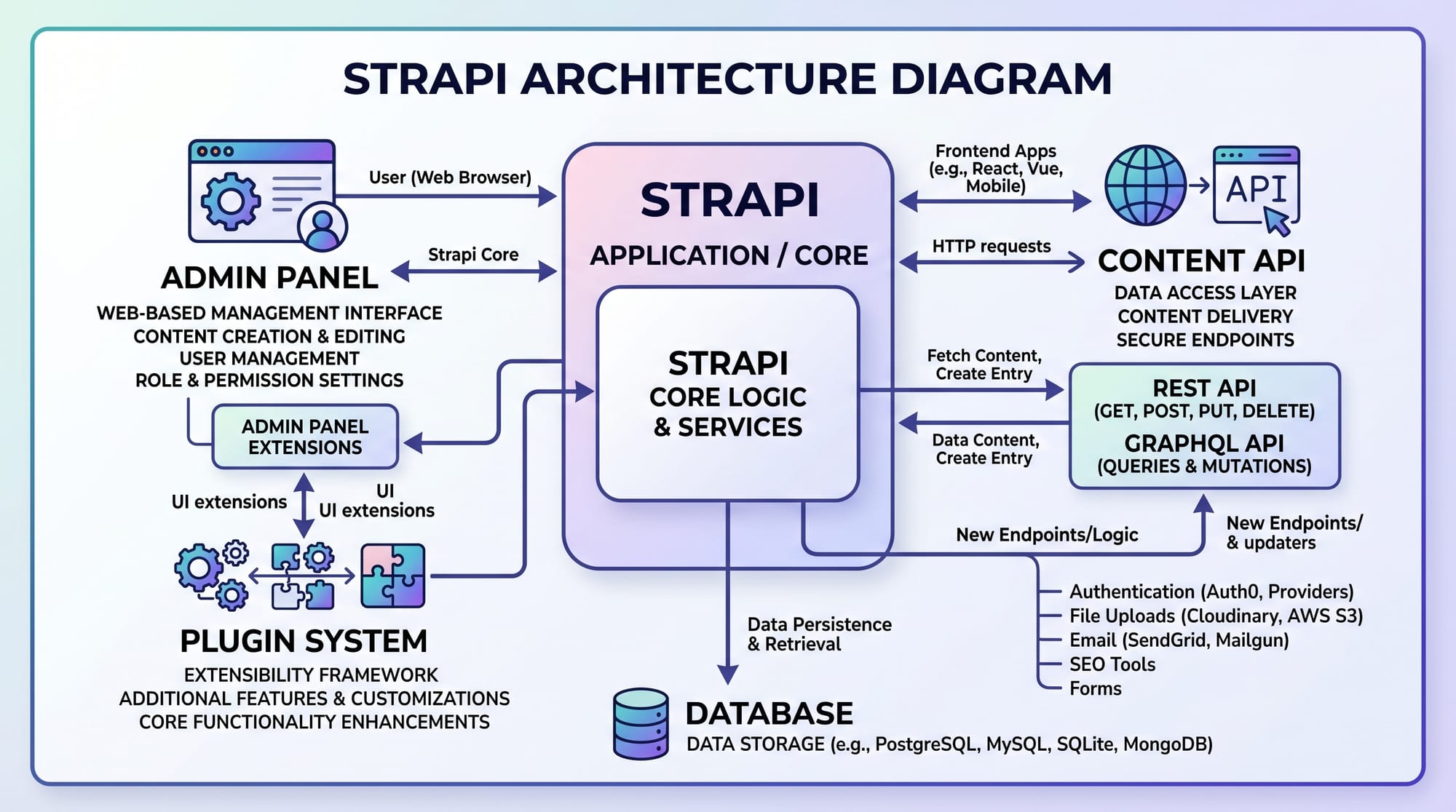
Headless CMS Architecture in Strapi
A headless CMS like Strapi separates content management from presentation.
In traditional CMS (like WordPress):
- Backend + frontend are tightly coupled
In Strapi:
- Backend (Strapi) → manages content
- API → delivers data
- Frontend → React/Next.js/mobile apps consume data
Example:
- Fatima from Karachi builds a food blog API in Strapi
- React frontend displays recipes using API calls
This makes Strapi highly flexible and scalable.
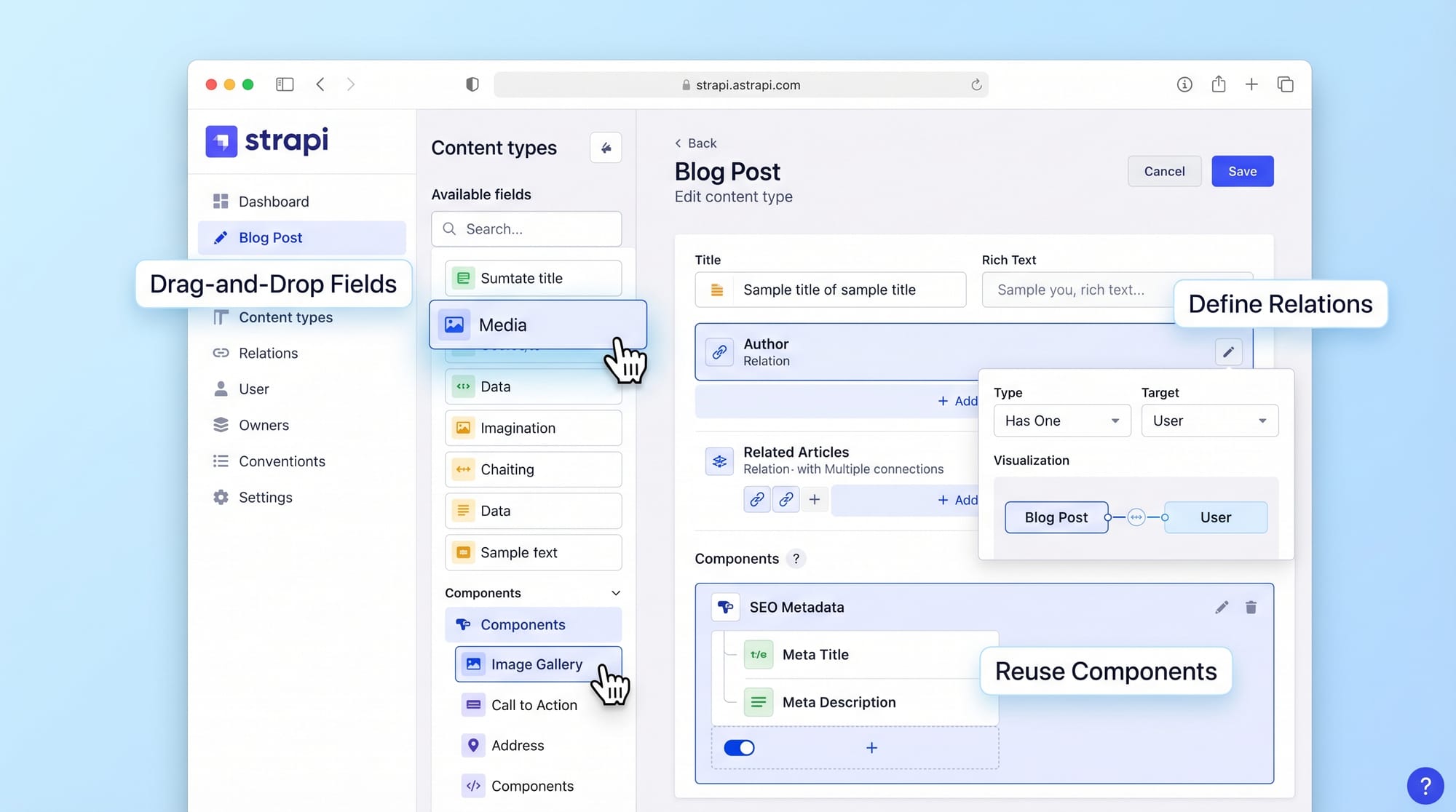
Content Types, API & Components
Strapi revolves around three core building blocks:
1. Content Types
These define your database structure.
Example:
- Blog Post
- Product
- Student Profile
2. APIs
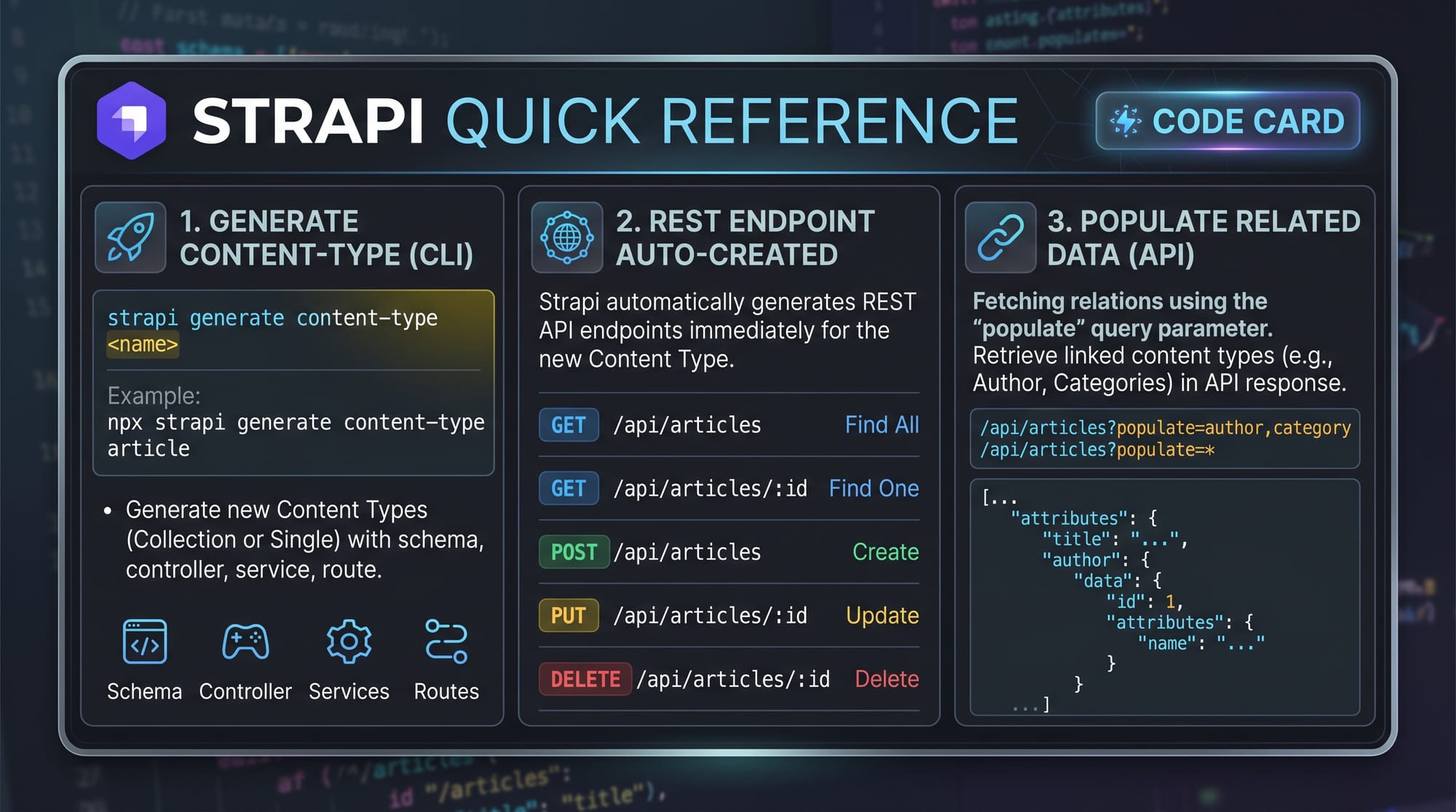
Strapi automatically generates REST APIs.
Example:
GET /api/articles
POST /api/articles
3. Components
Reusable fields like:
- SEO metadata
- Author details
- Image blocks
Practical Code Examples
Example 1: Creating a Blog Content Type in Strapi
First, install Strapi:
npx create-strapi-app@latest my-project
Explanation:
npx→ runs package without installing globallycreate-strapi-app@latest→ installs latest Strapi versionmy-project→ folder name for project
Now navigate:
cd my-project
Explanation:
- Moves into project directory where Strapi is installed
Start development server:
npm run develop
Explanation:
- Starts Strapi admin panel
- Opens at
http://localhost:1337/admin
Now create content type:
- Go to Content-Type Builder
- Create “Article”
- Add fields:
- title (Text)
- description (Rich Text)
- publishedAt (Date)
Strapi automatically creates APIs for you.
Example 2: Fetching Data from Strapi API (Real World)
Now let’s fetch data using Node.js:
// Import fetch (Node 18+ supports native fetch)
const fetch = require("node-fetch");

// API URL from Strapi backend
const API_URL = "http://localhost:1337/api/articles";

async function getArticles() {
  const response = await fetch(API_URL);
  const data = await response.json();
  console.log(data);
}

getArticles();
Line-by-line Explanation:
require("node-fetch")→ imports fetch for API requestsAPI_URL→ Strapi endpoint for articlesasync function getArticles()→ asynchronous function for API callawait fetch(API_URL)→ sends request to Strapi backendresponse.json()→ converts response into readable JSONconsole.log(data)→ prints articles in terminal
Example use case:
- Ali from Islamabad builds a news website showing articles fetched from Strapi.
Common Mistakes & How to Avoid Them
Mistake 1: Not Setting Public Permissions
Many beginners install Strapi but forget to allow API access.
Problem:
API returns:
403 Forbidden
Fix:
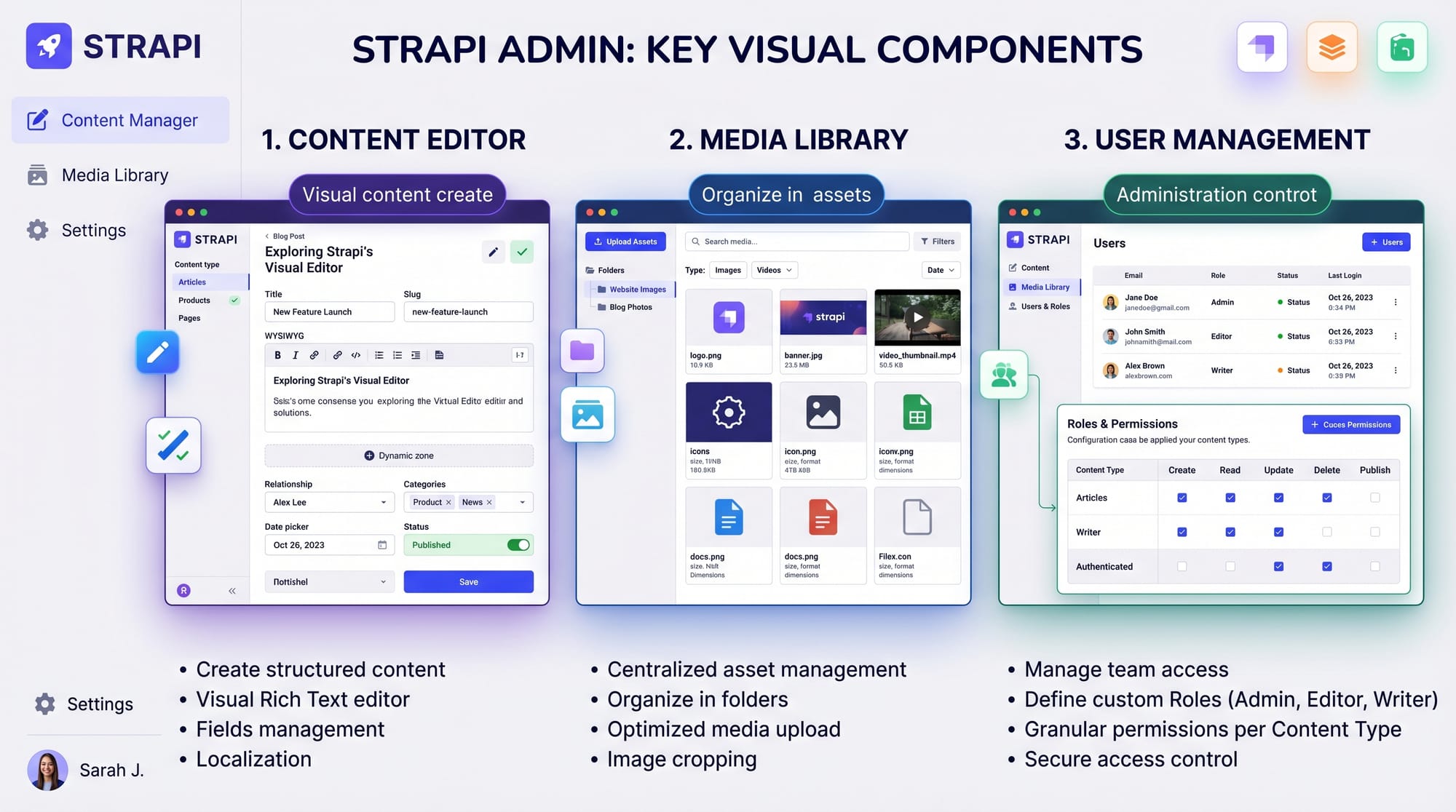
- Go to Settings → Roles → Public
- Enable “find” and “findOne” permissions
Now API works correctly.
Mistake 2: Using Wrong API URL Structure
Beginners often use incorrect endpoints like:
❌ /articles
✔ /api/articles
Fix:
Always use /api/ prefix in Strapi v5 (2026 standard)
Example:
http://localhost:1337/api/articles
Practice Exercises
Exercise 1: Create a Product API
Task:
Create a “Product” content type with:
- name
- price (PKR)
- description
Solution:
- Open Content-Type Builder
- Add fields
- Start server
- Access API at
/api/products
Example product:
- Name: Laptop
- Price: 150,000 PKR
- Description: Gaming laptop for developers
Exercise 2: Fetch and Display Data
Task:
Fetch products from Strapi API and display them in Node.js console.
Solution:
const fetch = require("node-fetch");

async function getProducts() {
  const res = await fetch("http://localhost:1337/api/products");
  const data = await res.json();
  console.log(data);
}

getProducts();
Explanation:
Same API flow as articles, but using products endpoint.
Frequently Asked Questions
What is Strapi used for?
Strapi is used to build backend APIs quickly without writing full server code. It helps developers create content-driven applications like blogs, eCommerce stores, and mobile apps.
Is Strapi good for beginners in Pakistan?
Yes, Strapi is beginner-friendly and widely used in freelancing. Pakistani students can learn it to build client projects and earn income in PKR or USD.
Can I use Strapi with React or Next.js?
Yes, Strapi works perfectly with React, Next.js, Vue, and mobile apps. It provides REST and GraphQL APIs for easy integration.
Is Strapi free to use?
Yes, Strapi is open-source and free. However, paid hosting and enterprise features are optional.
What database does Strapi use?
Strapi supports PostgreSQL, MySQL, SQLite, and MongoDB (via community adapters). PostgreSQL is recommended for production apps.
Summary & Key Takeaways
- Strapi is a powerful headless CMS with Node.js integration
- It automatically generates APIs from content types
- Ideal for Pakistani students learning modern web development
- No need to write backend APIs manually
- Works perfectly with React, Next.js, and mobile apps
- Widely used in freelancing and SaaS development
Next Steps & Related Tutorials
Now that you understand Strapi, you should continue learning full-stack development:
- Learn Node.js Basics on theiqra.edu.pk to strengthen backend fundamentals
- Explore Next.js Tutorial to build frontend apps using Strapi APIs
- Study REST API Development for deeper backend understanding
- Try building a complete blog system using Strapi + React
If you want, I can also create:
- Strapi + Next.js full project tutorial
- Strapi authentication system guide (JWT, roles)
- Or a Fiverr freelancing project setup using Strapi 🚀
Test Your Python Knowledge!
Finished reading? Take a quick quiz to see how much you've learned from this tutorial.