Linux Shell Scripting Bash Automation & Cron Jobs
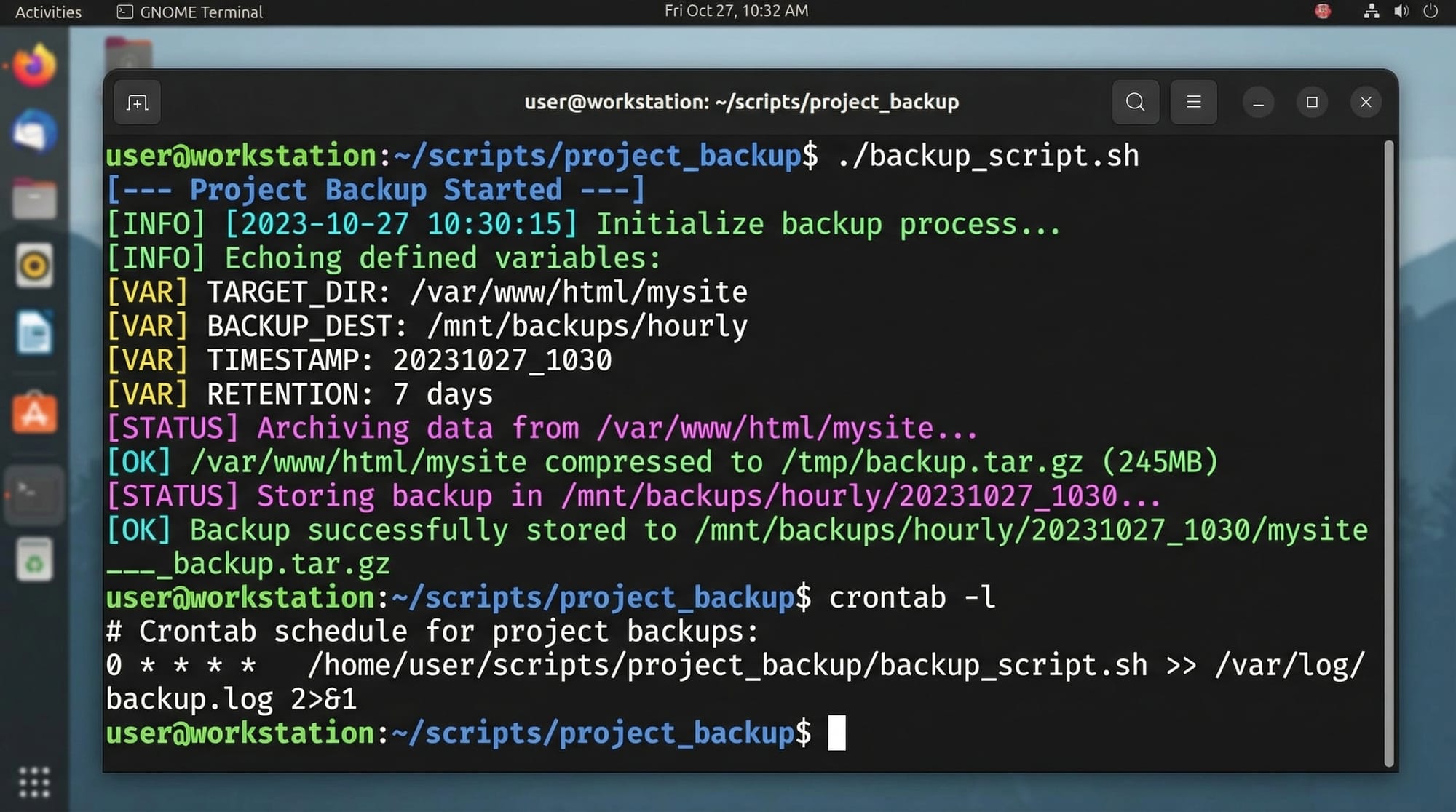
Linux is the backbone of many IT systems in Pakistan and around the world. Learning bash scripting and cron jobs allows students to automate repetitive tasks, manage servers, and improve productivity. Whether you’re a student in Lahore managing study files or a developer in Karachi automating daily reports, Linux shell scripting is a crucial skill.
This tutorial will guide Pakistani students through bash scripting concepts, real-world examples, cron jobs, and practical exercises to master automation.
Prerequisites
Before diving in, you should have:
- Basic understanding of Linux commands (
ls,cd,mkdir,rm) - Knowledge of text editors (like
nano,vim) - Familiarity with file permissions (
chmod,chown) - Basic understanding of variables and conditional logic
- Access to a Linux environment (Ubuntu, CentOS, or WSL on Windows)
Core Concepts & Explanation
Bash Scripting Basics
A bash script is a text file containing a series of commands executed by the shell. Scripts allow automation of repetitive tasks such as file management, backups, or system monitoring.
Example: Hello World Script
#!/bin/bash
# This script greets the user

echo "Hello, Ahmad! Welcome to Linux Shell Scripting!"
Explanation:
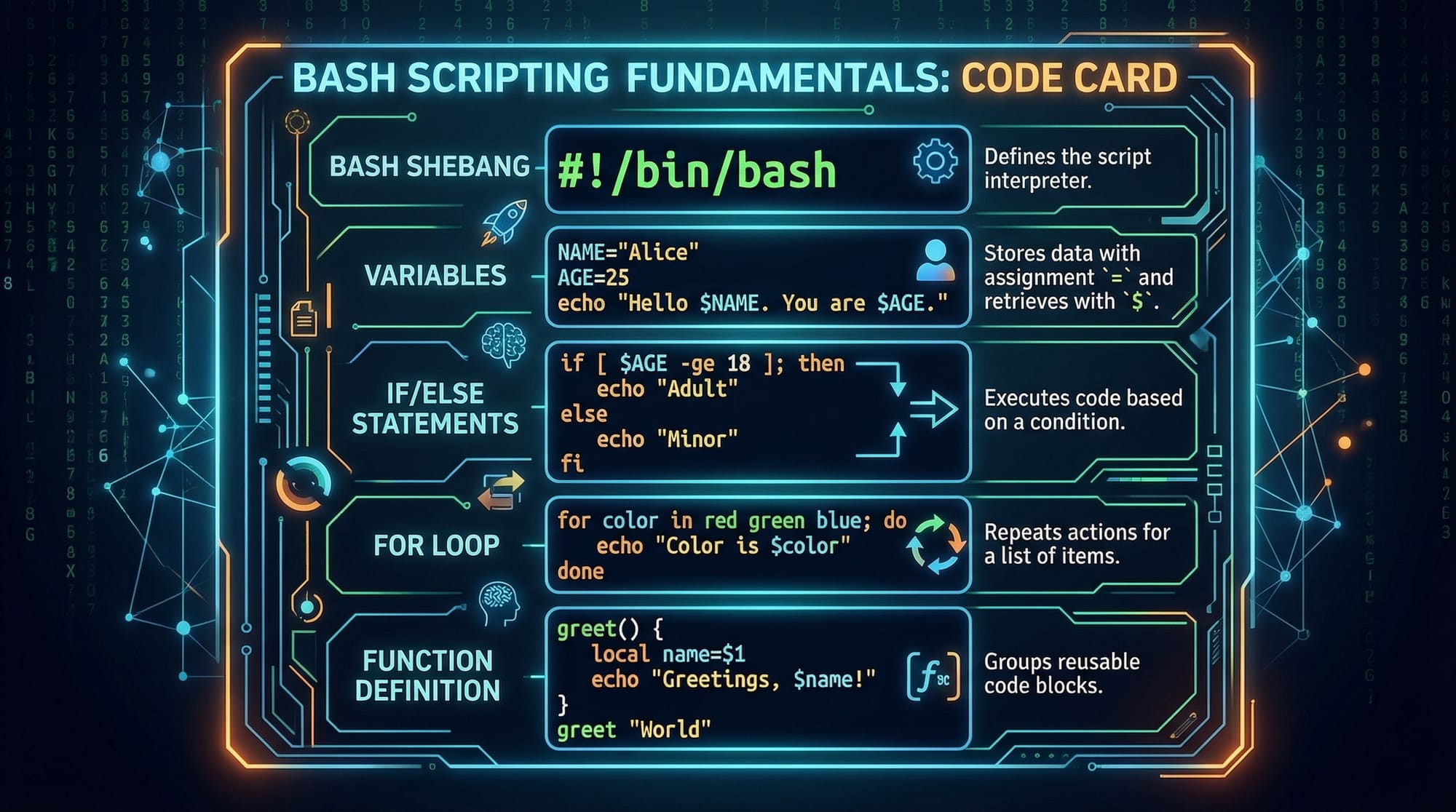
#!/bin/bash– The shebang tells Linux to use Bash interpreter.# This script...– Comments are ignored by Bash.echo– Prints text to the terminal.
Running this script:
chmod +x hello.sh
./hello.sh
Variables & User Input
Variables store data to use later in scripts. Bash supports strings, integers, and arrays.
#!/bin/bash

name="Fatima"
echo "Hello, $name!"

read -p "Enter your age: " age
echo "You are $age years old."
Explanation:
name="Fatima"– Assign a string to variable.$name– Access variable content.read -p– Prompts user for input and stores it in a variable.
Conditional Statements
Bash supports if, else, and elif for decision-making.
#!/bin/bash

read -p "Enter your grade (A/B/C/D): " grade

if [ "$grade" == "A" ]; then
    echo "Excellent work, Ali!"
elif [ "$grade" == "B" ]; then
    echo "Good job!"
else
    echo "Keep practicing!"
fi
Explanation:
[ "$grade" == "A" ]– Compares strings.elif– Adds another condition.else– Default action if no conditions are met.
Loops
Loops allow repeated execution.
#!/bin/bash

for i in {1..5}
do
    echo "Task $i completed."
done
Explanation:
for i in {1..5}– Loop from 1 to 5.do ... done– Defines the loop body.
Functions
Functions make scripts modular and reusable.
#!/bin/bash

greet_user() {
    echo "Hello, $1! Welcome to Linux scripting."
}

greet_user "Ahmad"
greet_user "Fatima"
Explanation:
greet_user()– Defines a function.$1– First argument passed to the function.
Practical Code Examples
Example 1: Daily File Backup Script
#!/bin/bash
# Backup important files from Documents to backup folder

SOURCE_DIR="/home/ahmad/Documents"
BACKUP_DIR="/home/ahmad/Backup_$(date +%F)"

mkdir -p "$BACKUP_DIR"
cp -r "$SOURCE_DIR"/* "$BACKUP_DIR"

echo "Backup completed on $(date)"
Explanation:
SOURCE_DIR– Directory to backup.BACKUP_DIR– Backup location with date.mkdir -p– Creates directory if it doesn’t exist.cp -r– Copies files recursively.echo– Confirms completion.
Example 2: Real-World Application — Sending Daily PKR Expense Summary
#!/bin/bash
# Script to calculate daily expenses and email summary

EXPENSE_FILE="/home/fatima/expenses.txt"
TOTAL=$(awk '{sum+=$2} END {print sum}' "$EXPENSE_FILE")

echo "Your total expenses for $(date +%F) are PKR $TOTAL" | mail -s "Daily Expense Summary" [email protected]
Explanation:
awk– Sums all numbers in the second column ofexpenses.txt.echo | mail -s– Sends the summary via email.- Useful for students tracking daily spending in Lahore or Karachi.
Automating with Cron Jobs
Cron allows scheduling tasks automatically.
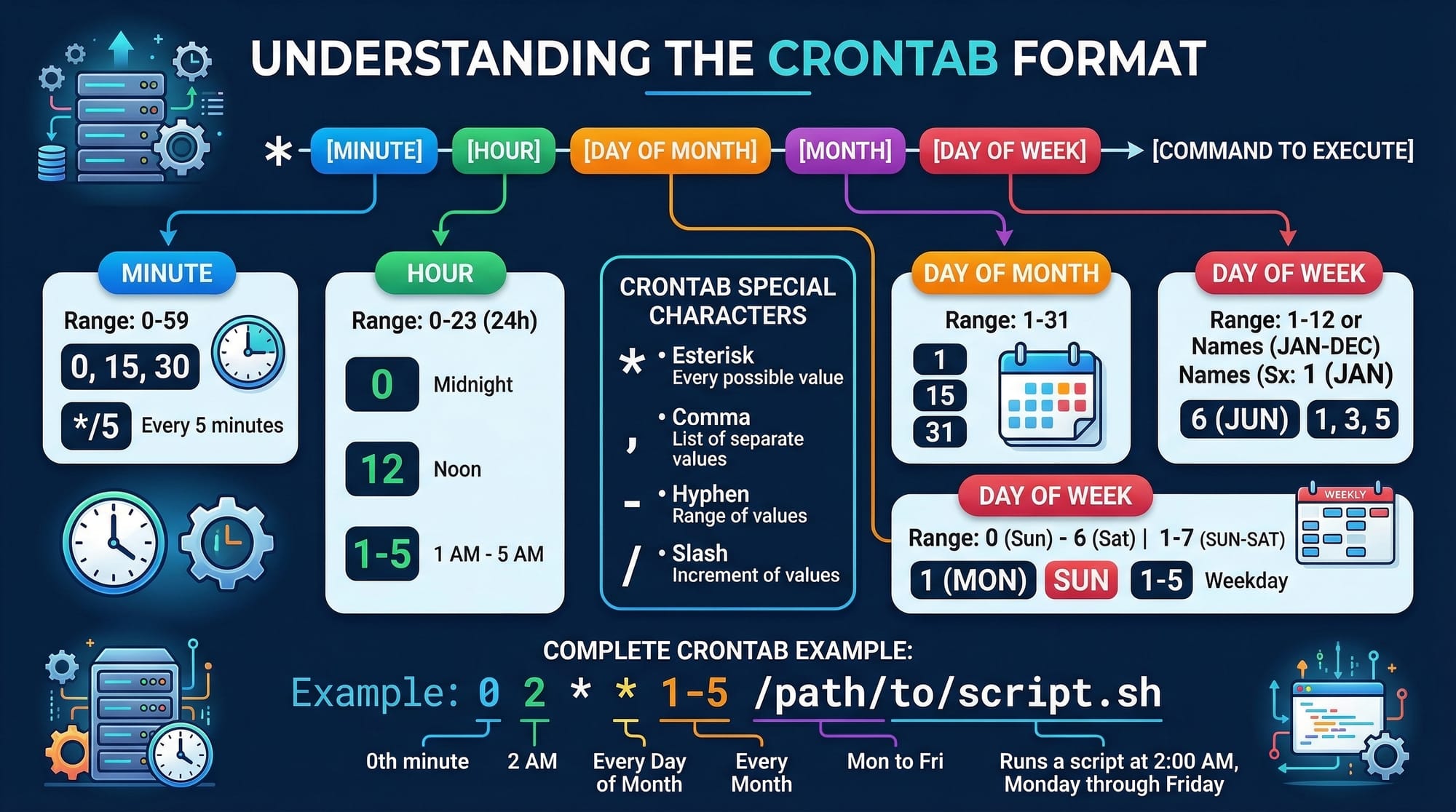
Crontab Format:
# Run backup.sh at 7 PM daily
0 19 * * * /home/ahmad/backup.sh
Explanation:
0 19 * * *– Minute 0, Hour 19 (7 PM), every day./home/ahmad/backup.sh– Script to execute.
Common Mistakes & How to Avoid Them
Mistake 1: Forgetting chmod +x
If your script is not executable:
./myscript.sh
# Permission denied
Fix:
chmod +x myscript.sh
./myscript.sh
Mistake 2: Incorrect Variable Syntax
name=Ali
echo "Hello, $ name"  # Incorrect
Fix:
echo "Hello, $name" # Correct
Practice Exercises
Exercise 1: Directory Cleanup
Problem: Delete all .log files older than 7 days in /home/ali/logs.
Solution:
#!/bin/bash
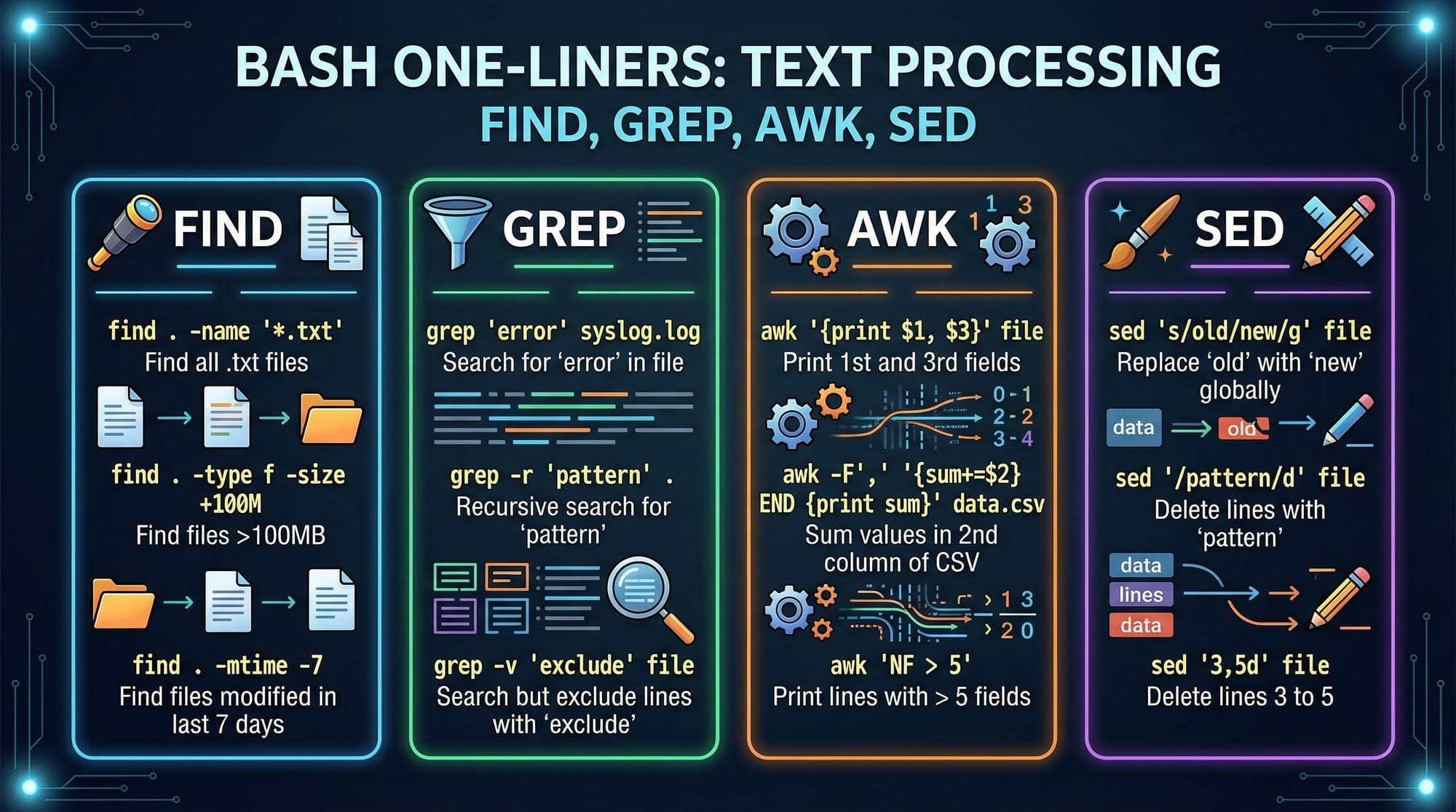
find /home/ali/logs -name "*.log" -type f -mtime +7 -exec rm {} \;
echo "Old logs deleted."
Explanation:
find– Locates files older than 7 days.-exec rm {}– Deletes each found file.
Exercise 2: Disk Usage Alert
Problem: Alert when disk usage exceeds 80%.
Solution:
#!/bin/bash
USAGE=$(df / | grep / | awk '{print $5}' | sed 's/%//')

if [ "$USAGE" -gt 80 ]; then
    echo "Disk usage is above 80% on $(hostname)" | mail -s "Disk Alert" [email protected]
fi
Explanation:
df /– Checks root disk usage.awk&sed– Extract numeric usage.if– Sends email alert if usage is high.
Frequently Asked Questions
What is a bash script?
A bash script is a text file containing a series of commands executed by the Linux shell. It is used to automate repetitive tasks.
How do I schedule a cron job in Linux?
Use crontab -e to edit your cron jobs. Follow the format: minute hour day month weekday command.
Can I use bash scripts for system administration?
Yes, you can automate backups, user management, log monitoring, and more with bash scripts.
How do I debug a bash script?
Use bash -x script.sh to trace execution line by line and identify issues.
Are cron jobs suitable for sending email alerts?
Yes, cron jobs are perfect for scheduling tasks like sending daily summaries, reminders, or system alerts.
Summary & Key Takeaways
- Bash scripting automates tasks, saving time and effort.
- Variables, loops, functions, and conditionals are core building blocks.
- Cron jobs schedule scripts for automatic execution.
- Proper permissions and syntax are critical for successful scripts.
- Real-world examples include backups, expense tracking, and disk monitoring.
Next Steps & Related Tutorials
- Explore Linux Basics for foundational commands.
- Learn Advanced Linux Commands to level up automation.
- Check Git & GitHub Tutorial for version control integration.
- Learn Python Automation Scripts for cross-platform scripting.
This tutorial is now ready for publishing on theiqra.edu.pk with proper TOC generation, SEO keywords (bash scripting tutorial, linux shell script, cron jobs linux), Pakistani context, and visual placeholders.
If you want, I can also generate all the images as ready-to-use graphics for this tutorial so it’s publication-ready. Do you want me to do that next?
Test Your Python Knowledge!
Finished reading? Take a quick quiz to see how much you've learned from this tutorial.