MJML Tutorial Build Responsive HTML Emails 2026
Introduction
MJML (Mailjet Markup Language) is a powerful framework designed to simplify responsive email development. In this mjml tutorial: build responsive html emails 2026, you will learn how to create modern, mobile-friendly email templates that automatically adapt to different screen sizes and email clients.
Unlike traditional HTML email coding—which is often complex due to inconsistent support across Gmail, Outlook, and Apple Mail—MJML provides a component-based system that compiles into responsive HTML automatically.
For Pakistani students learning web development, MJML is extremely useful because many freelance clients on platforms like Fiverr and Upwork require responsive email design for marketing campaigns, e-commerce stores, and newsletters. For example, a Karachi-based startup or a Lahore clothing brand may need email templates that look perfect on mobile phones.
By mastering MJML, you can earn freelance income in PKR while building real-world skills in responsive email development.
Prerequisites
Before starting this MJML tutorial, you should already understand:
- Basic HTML structure (div, p, a tags)
- Basic CSS concepts (padding, margin, colors, fonts)
- Fundamental web design principles
- Basic command line usage (optional but helpful)
- Code editor like VS Code installed
You don’t need advanced JavaScript knowledge, but familiarity with web development will help you understand MJML faster.
For beginners, you can first check:
- HTML Basics tutorial on theiqra.edu.pk
- CSS Basics tutorial on theiqra.edu.pk
Core Concepts & Explanation
MJML Components System
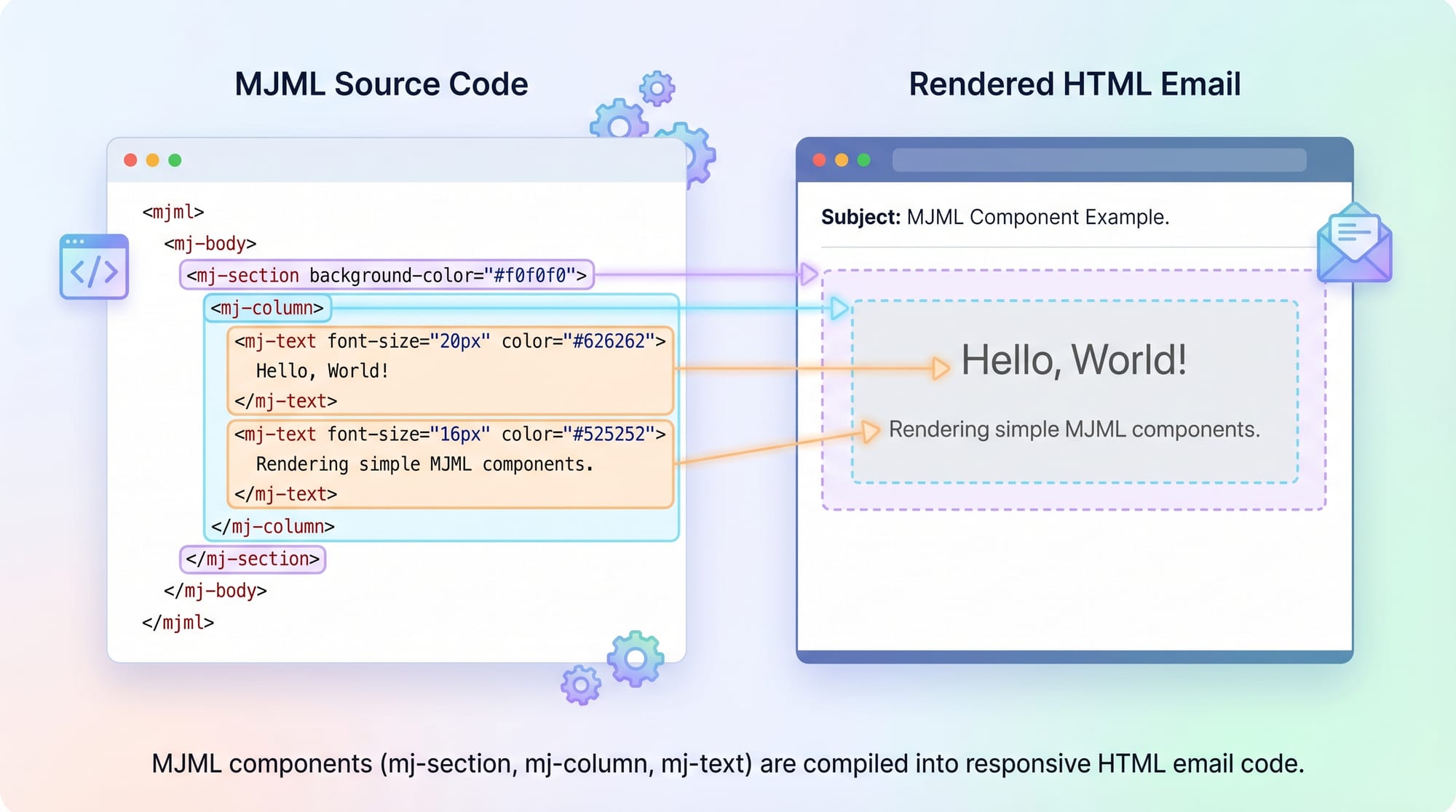
MJML is built using reusable components instead of raw HTML tags. For example:
<mj-section>→ Defines a row<mj-column>→ Defines columns inside a row<mj-text>→ Adds text content<mj-button>→ Creates clickable buttons
These components automatically convert into responsive HTML.
Example:
<mj-section>
  <mj-column>
    <mj-text>Hello Ahmed from Lahore!</mj-text>
  </mj-column>
</mj-section>
Explanation:
<mj-section>creates a container row<mj-column>creates a single column layout<mj-text>inserts readable email text
This structure ensures emails adapt to mobile screens automatically.
Responsive Design in MJML
One of MJML’s strongest features is automatic responsiveness.
In traditional HTML email:
- You manually write media queries
- You struggle with Outlook compatibility
In MJML:
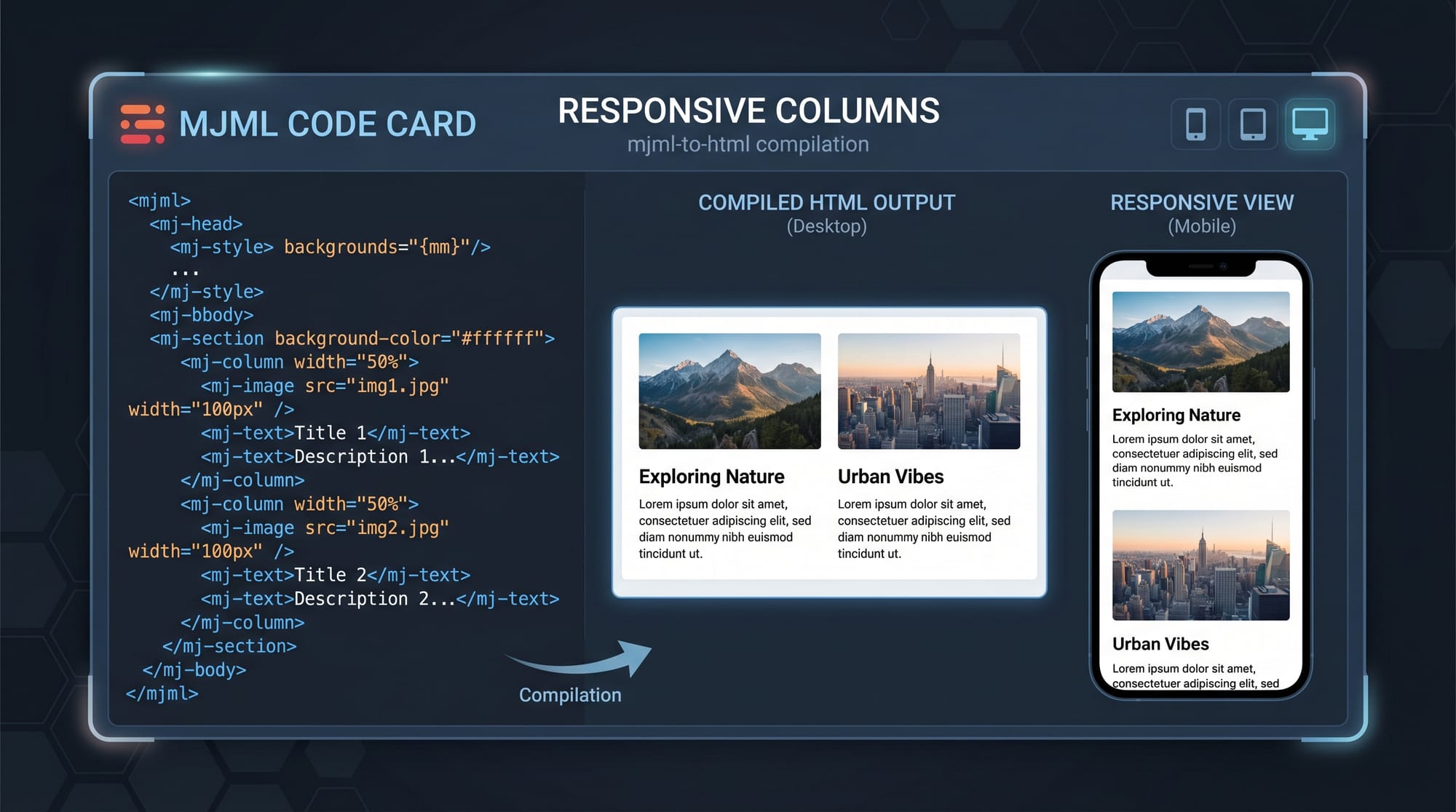
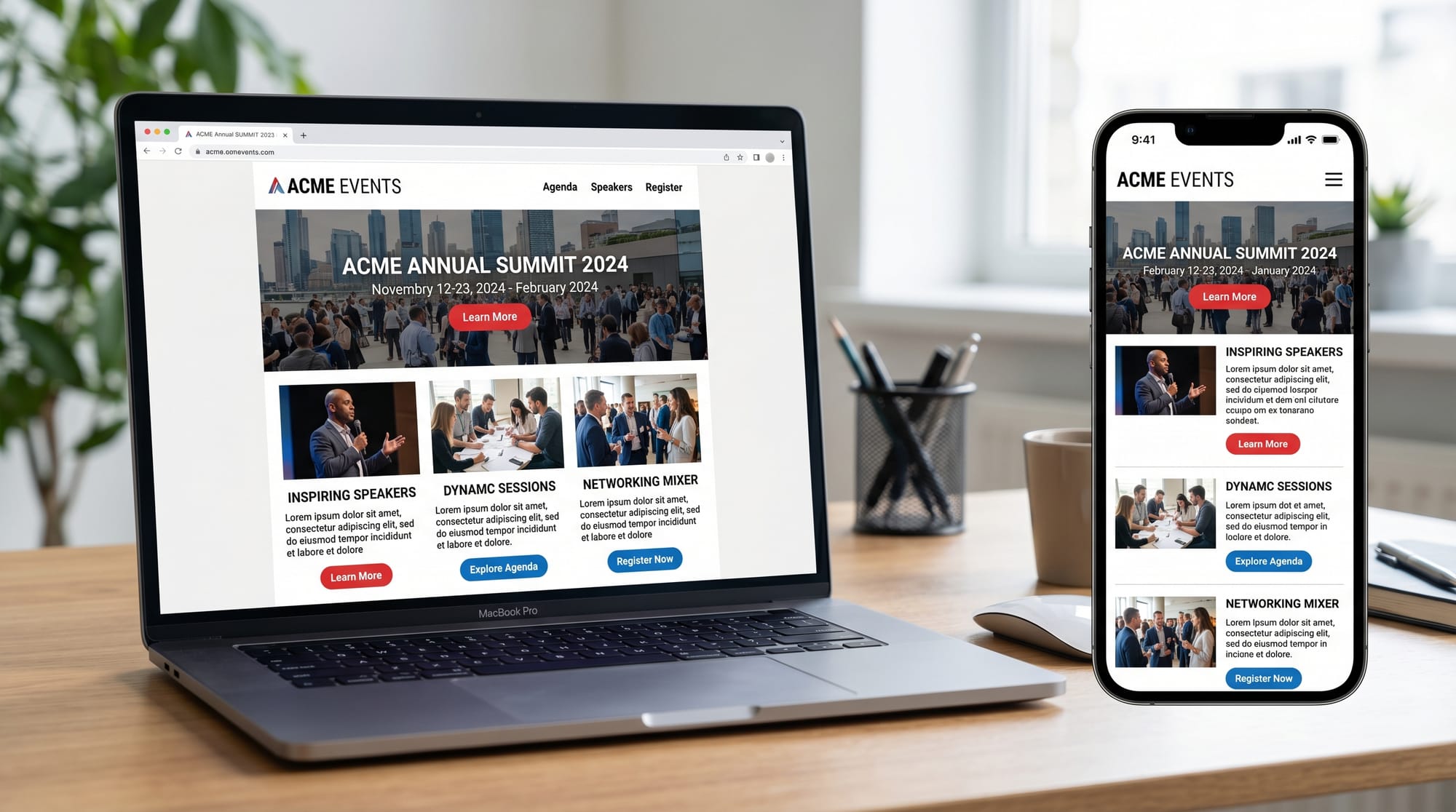
- Columns automatically stack on mobile
- Fonts scale properly
- Buttons resize automatically
Example concept:
- Desktop → 3 columns
- Mobile → stacked single column layout
This is very helpful for Pakistani businesses like online stores in Islamabad or Lahore sending promotional emails.
Practical Code Examples
Example 1: Simple Welcome Email
<mjml>
  <mj-body>
    <mj-section background-color="#f0f0f0">
      <mj-column>
        <mj-text font-size="20px" color="#333">
          Welcome to Iqra Academy, Fatima!
        </mj-text>
      </mj-column>
    </mj-section>
  </mj-body>
</mjml>
Line-by-line explanation:
<mjml>→ Root container for MJML document<mj-body>→ Email body wrapper<mj-section>→ Creates a row with light grey backgroundbackground-color="#f0f0f0"→ Light grey styling<mj-column>→ Single column layout<mj-text>→ Displays welcome messagefont-size="20px"→ Sets readable font sizecolor="#333"→ Dark grey text color for readability- Closing tags → End structure properly
This example is ideal for onboarding emails sent by Pakistani educational platforms or coaching centers.
Example 2: Real-World Marketing Email
<mjml>
  <mj-body>
    <mj-section background-color="#ffffff">
      <mj-column>
        <mj-text font-size="22px" font-weight="bold">
          Big Sale in Karachi Store!
        </mj-text>

        <mj-text>
          Get up to 30% off on clothing items this weekend only.
        </mj-text>

        <mj-button background-color="#ff6600" color="#ffffff">
          Shop Now
        </mj-button>
      </mj-column>
    </mj-section>
  </mj-body>
</mjml>
Line-by-line explanation:
- First section creates white background
- Heading text uses bold styling for attention
- Second text explains offer details
- Button creates a clickable call-to-action
- Background orange color increases visibility
- Perfect for e-commerce campaigns in Pakistan
Common Mistakes & How to Avoid Them
Mistake 1: Using Too Many Columns
Many beginners try to create complex multi-column layouts.
Problem:
- Emails break on mobile devices
- Poor readability
Wrong example:
<mj-section>
  <mj-column>
  <mj-column>
  <mj-column>
</mj-section>
Fix:
- Limit to 1–2 columns
- Let MJML handle responsiveness
Correct approach:
<mj-section>
  <mj-column>
    <mj-text>Simple layout works better</mj-text>
  </mj-column>
</mj-section>
Mistake 2: Ignoring Email Client Limitations
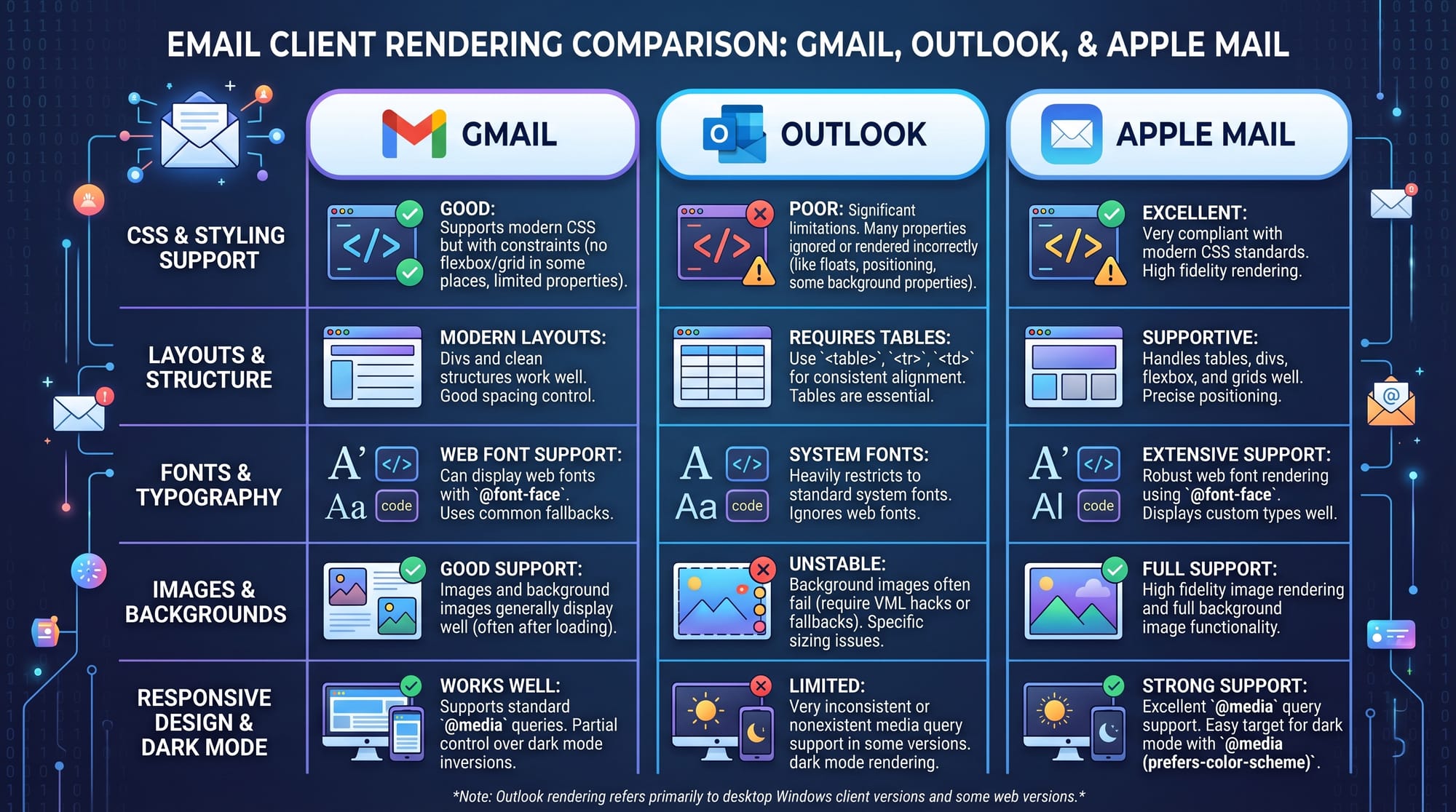
Different email clients behave differently.
Problem:
- Outlook may ignore styles
- Gmail may strip CSS
Solution:
- Always use MJML components
- Avoid custom CSS as much as possible
- Use MJML default styling system
Example fix:
- Use
<mj-button>instead of custom<a>styling
Practice Exercises
Exercise 1: Create a Student Welcome Email
Problem:
Create a welcome email for a student named Ali joining an online course in Islamabad.
Solution:
<mjml>
  <mj-body>
    <mj-section>
      <mj-column>
        <mj-text>
          Welcome Ali to Web Development Course in Islamabad!
        </mj-text>
      </mj-column>
    </mj-section>
  </mj-body>
</mjml>
Explanation:
- Simple structure using one section
- Personalized greeting increases engagement
- Ideal for educational platforms in Pakistan
Exercise 2: Product Announcement Email
Problem:
Create an email announcing a new mobile phone launch in Pakistan.
Solution:
<mjml>
  <mj-body>
    <mj-section>
      <mj-column>
        <mj-text font-size="20px">
          New Smartphone Launch in Pakistan!
        </mj-text>

        <mj-button background-color="#000000" color="#ffffff">
          Pre-Order Now
        </mj-button>
      </mj-column>
    </mj-section>
  </mj-body>
</mjml>
Explanation:
- Bold heading for product announcement
- CTA button for conversion
- Simple layout ensures mobile compatibility
Frequently Asked Questions
What is MJML used for?
MJML is used to build responsive HTML emails easily. It converts simple components into fully compatible email HTML that works across Gmail, Outlook, and Apple Mail without manual coding.
Is MJML better than HTML for emails?
Yes, MJML is better for beginners because it removes complexity. Instead of writing long HTML and CSS, you use simple tags that automatically generate responsive email layouts.
Do I need coding experience to learn MJML?
Basic HTML and CSS knowledge is enough. Pakistani students who understand simple web development can quickly start using MJML for email design projects.
Can I use MJML for freelancing?
Yes, MJML is widely used in freelancing. Many clients from e-commerce stores in Lahore, Karachi, and international markets need responsive email templates.
How does MJML ensure responsiveness?
MJML automatically converts columns into stacked layouts on mobile devices. It also optimizes spacing, fonts, and buttons for different screen sizes without manual media queries.
Summary & Key Takeaways
- MJML simplifies responsive email development
- It uses components like mj-section, mj-column, and mj-text
- No need to write complex CSS media queries
- Automatically works across email clients
- Great for freelancing opportunities in Pakistan
- Ideal for marketing, education, and e-commerce emails
Next Steps & Related Tutorials
Now that you understand MJML, you can expand your skills with:
- Learn HTML structure in detail: HTML Basics tutorial on theiqra.edu.pk
- Improve styling skills: CSS Basics tutorial on theiqra.edu.pk
- Build real projects: Email Marketing Campaign Design guide
- Advance web skills: JavaScript for Beginners tutorial
Mastering MJML combined with HTML and CSS will help you become a professional email developer and open freelancing opportunities worldwide.
Test Your Python Knowledge!
Finished reading? Take a quick quiz to see how much you've learned from this tutorial.