SendGrid & Resend Tutorial Transactional Email APIs
Introduction
Transactional emails are the backbone of modern web applications. Whenever you sign up on a website, reset your password, receive an order confirmation, or get an OTP code—those are transactional emails.
In this tutorial, we will learn how to use SendGrid and Resend APIs to send transactional emails using Node.js. This topic is highly important for modern web developers and is widely used in real-world SaaS applications, e-commerce platforms, and dashboards.
For Pakistani students learning web development in cities like Lahore, Karachi, Islamabad, and Faisalabad, mastering email APIs is a valuable skill. Freelancers on platforms like Fiverr and Upwork often earn in USD by building systems that send automated emails for clients.
By the end of this tutorial, you will understand:
- How SendGrid works
- How Resend email API works
- How to send transactional emails using Node.js
- Real-world use cases for Pakistani developers
Target Keywords Covered:
sendgrid tutorial, resend email api, transactional email nodejs
Prerequisites
Before starting this tutorial, you should have:
- Basic understanding of JavaScript
- Node.js installed on your system
- Knowledge of Express.js (recommended but not required)
- A SendGrid account (free tier available)
- A Resend account (free tier available)
- Basic understanding of REST APIs
If you are new, you can first check:
- Node.js Basics on theiqra.edu.pk
- Express.js Crash Course
Core Concepts & Explanation
What is SendGrid?
SendGrid is a cloud-based email delivery service that allows developers to send emails without managing email servers. It provides:
- Email APIs
- SMTP relay
- Email analytics
- Templates
Instead of configuring your own mail server (which is complex and unreliable), SendGrid handles everything.
Example use case:
Ahmad from Lahore runs an online store. When a customer places an order, SendGrid sends an instant confirmation email.
What is Resend Email API?
Resend is a modern email API designed for simplicity and developer experience. It is popular among startups because:
- Very simple API
- Fast setup
- Clean SDK for Node.js
- Great for transactional emails
Example use case:
Fatima from Karachi builds a SaaS app. When a user signs up, Resend sends a welcome email instantly.
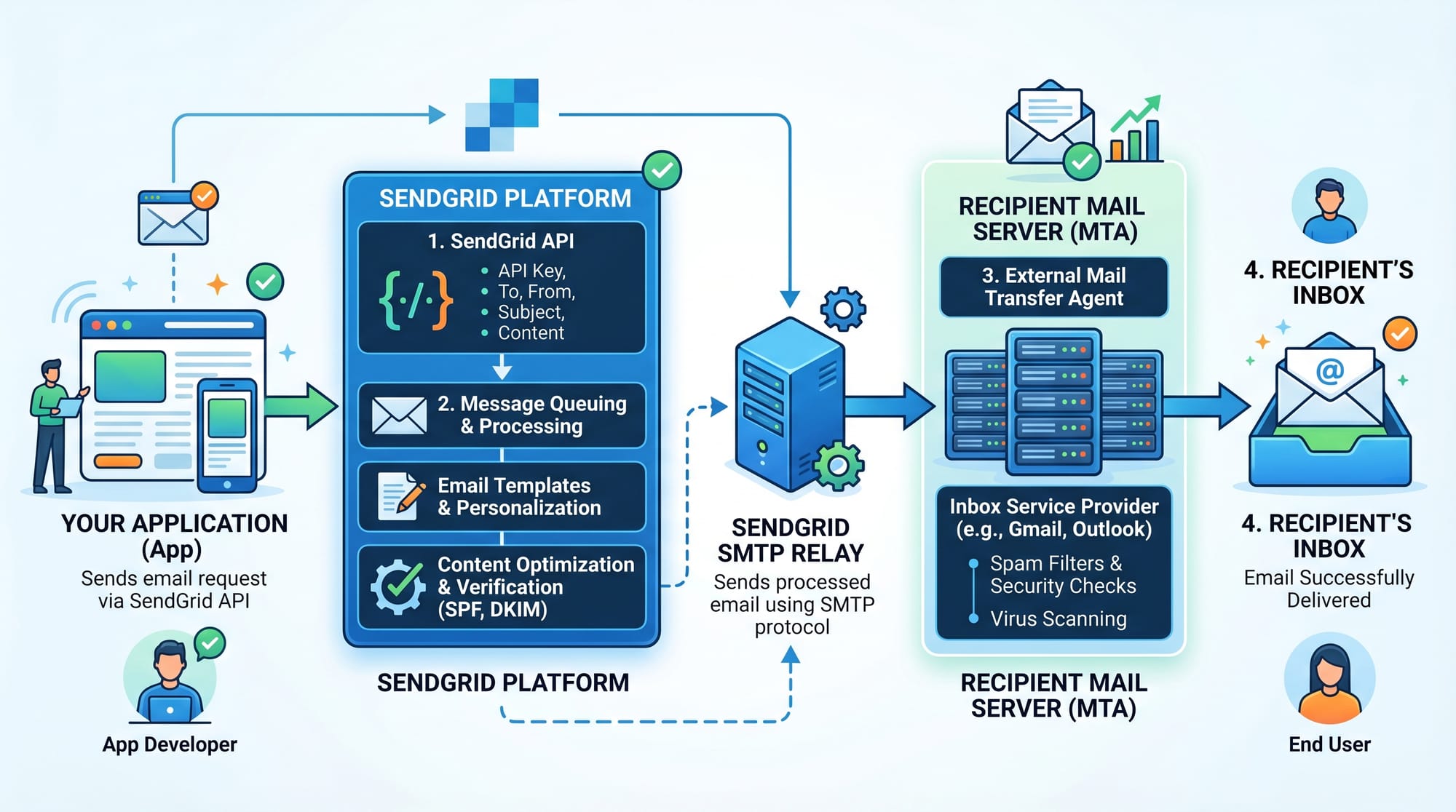
Transactional Email Flow in Node.js
When using Node.js, the flow typically looks like this:
- User performs an action (signup, purchase)
- Backend triggers email function
- Email API (SendGrid/Resend) processes request
- Email is delivered to inbox
Key idea:
Transactional emails are event-driven, not manual.
Practical Code Examples
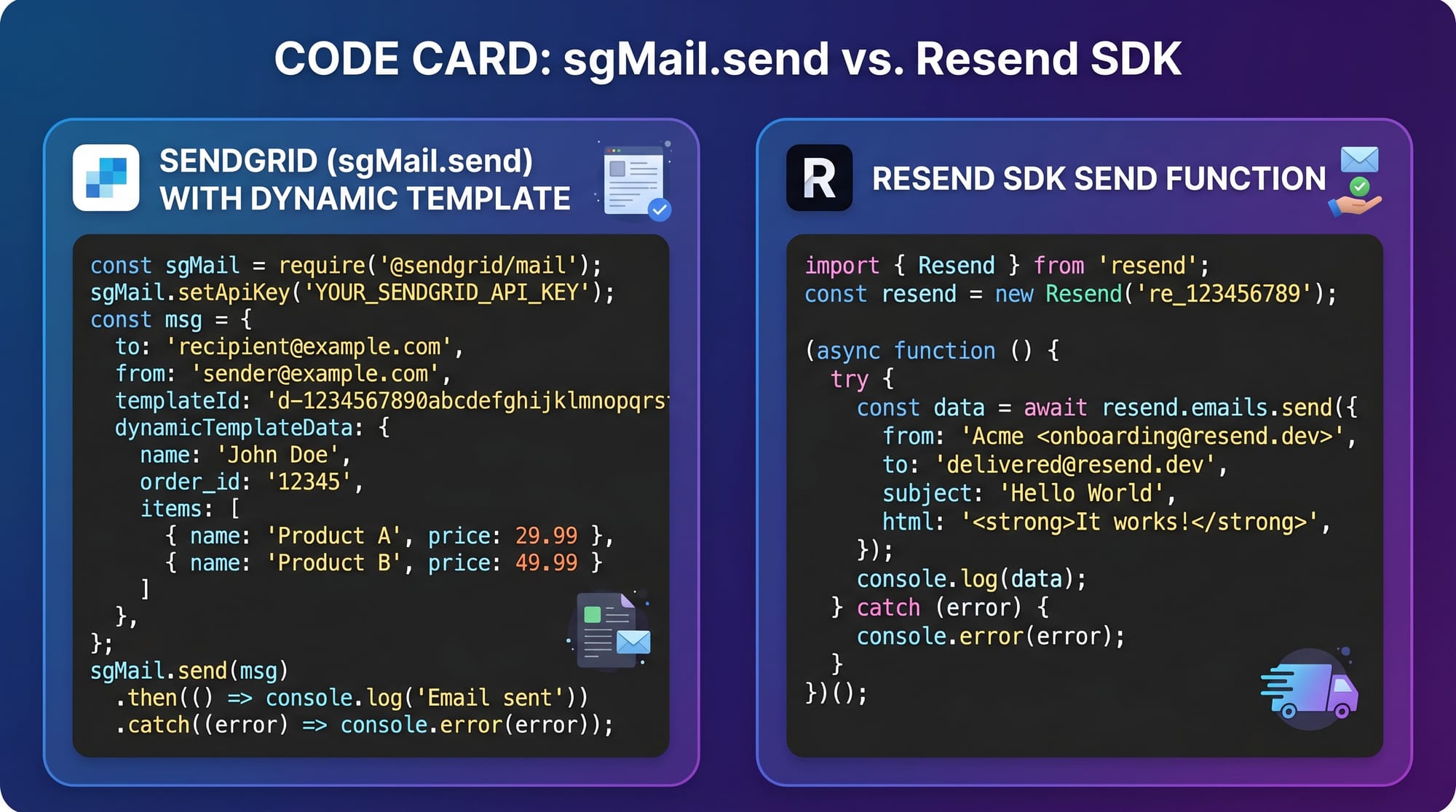
Example 1: Sending Email Using SendGrid in Node.js
First, install dependencies:
npm install @sendgrid/mail
Now write the code:
// Step 1: Import SendGrid library
const sgMail = require('@sendgrid/mail');

// Step 2: Set API key from SendGrid dashboard
sgMail.setApiKey(process.env.SENDGRID_API_KEY);

// Step 3: Create email message object
const msg = {
  to: '[email protected]',
  from: '[email protected]',
  subject: 'Welcome to Our Platform',
  text: 'Thank you for signing up!',
  html: '<strong>Welcome to our platform!</strong>'
};

// Step 4: Send email
sgMail
  .send(msg)
  .then(() => {
    console.log('Email sent successfully');
  })
  .catch((error) => {
    console.error(error);
  });
Line-by-Line Explanation
require('@sendgrid/mail'): Imports SendGrid librarysetApiKey(...): Authenticates your app with SendGridmsg object: Defines email details (to, from, subject, body).send(msg): Sends the email request.then(): Runs when email is successfully sent.catch(): Handles errors like invalid email or API issues
Example 2: Sending Email Using Resend API
Install Resend SDK:
npm install resend
Now the code:
// Step 1: Import Resend
const { Resend } = require('resend');

// Step 2: Initialize Resend with API key
const resend = new Resend(process.env.RESEND_API_KEY);

// Step 3: Send email function
async function sendWelcomeEmail() {
  const response = await resend.emails.send({
    from: '[email protected]',
    to: '[email protected]',
    subject: 'Welcome to Our App',
    html: '<h1>Hello Ali!</h1><p>Welcome to our platform.</p>'
  });

  console.log(response);
}

// Step 4: Call function
sendWelcomeEmail();
Line-by-Line Explanation
Resend: Imports email service SDKnew Resend(...): Initializes API clientemails.send(): Sends transactional emailfrom/to/subject/html: Defines email structureasync/await: Handles asynchronous API requestconsole.log(response): Shows result from API
Real-World Example: E-commerce Order Confirmation System
Imagine Ali from Islamabad builds an online clothing store.
When a customer places an order:
app.post('/order', async (req, res) => {
  const { email, name, orderId } = req.body;

  // Step 1: Save order in database (simulated)
  console.log('Order saved:', orderId);

  // Step 2: Send confirmation email using Resend
  await resend.emails.send({
    from: '[email protected]',
    to: email,
    subject: `Order Confirmation #${orderId}`,
    html: `
      <h2>Thank you, ${name}!</h2>
      <p>Your order has been placed successfully.</p>
      <p>Order ID: ${orderId}</p>
    `
  });

  res.send('Order placed and email sent!');
});
Explanation
- User submits order form
- Backend stores order
- Email API sends confirmation instantly
- Improves customer trust and experience
This is exactly how platforms like Daraz or Amazon notify customers.
Common Mistakes & How to Avoid Them
Mistake 1: Not Verifying Sender Email
Many beginners use random email addresses in from field.
❌ Wrong:
from: '[email protected]'
✔ Fix:
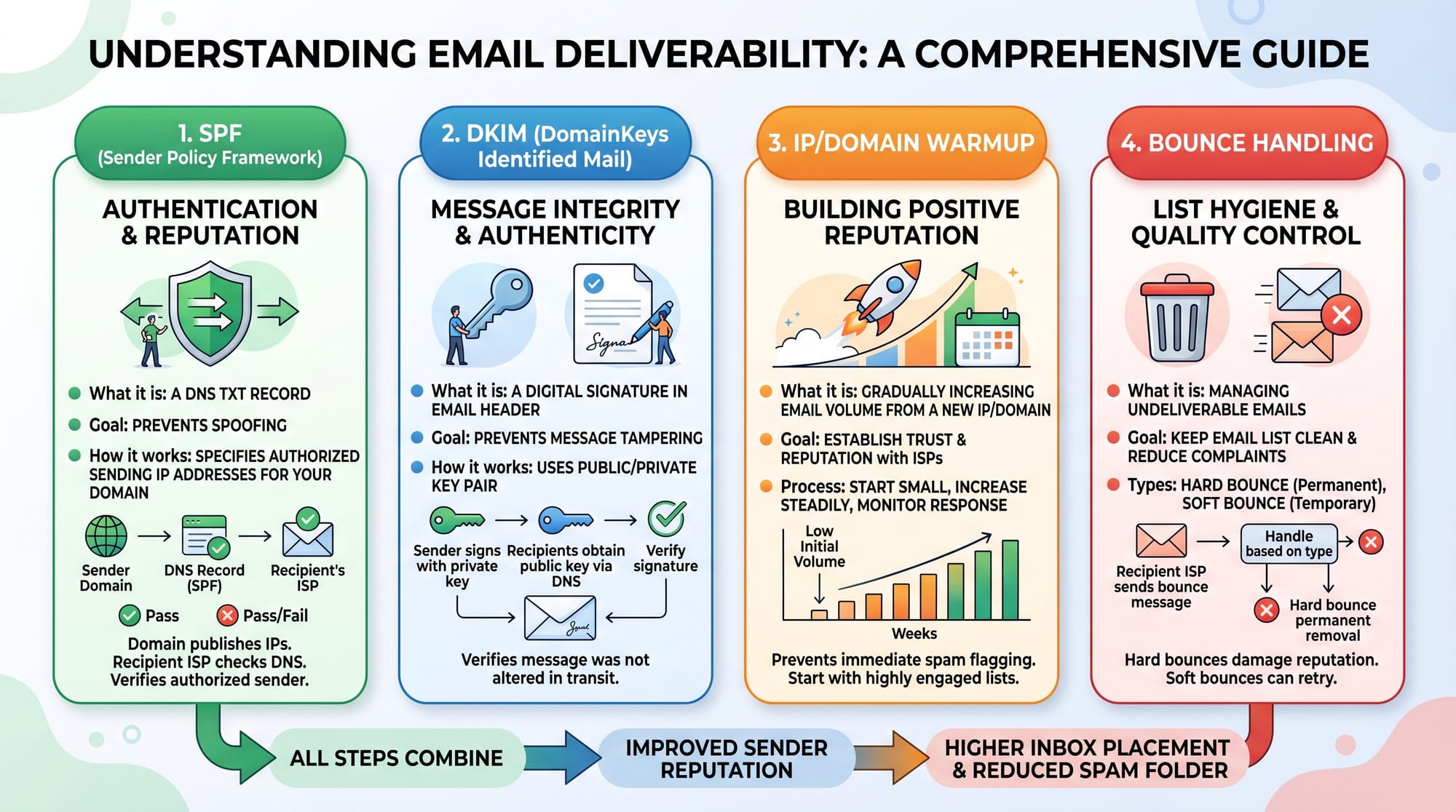
- Always verify your domain in SendGrid or Resend
- Use professional emails like
[email protected]
Mistake 2: Hardcoding API Keys
Hardcoding keys is dangerous.
❌ Wrong:
const apiKey = "SG.xxxxx";
✔ Fix:
Use environment variables:
process.env.SENDGRID_API_KEY
Store them in .env file:
SENDGRID_API_KEY=your_key_here
Mistake 3: Ignoring Email Delivery Logs
SendGrid dashboard provides:
- Open rates
- Bounce reports
- Spam reports
Many developers ignore this, causing poor deliverability.

Mistake 4: Sending Emails in Loops Without Delay
Sending bulk emails instantly can trigger spam filters.
✔ Fix:
- Add delay
- Use queues like BullMQ or RabbitMQ
Practice Exercises
Exercise 1: Send Welcome Email on Signup
Problem:
Create an API endpoint /signup that sends a welcome email when a user registers.
Solution:
app.post('/signup', async (req, res) => {
  const { email } = req.body;

  await resend.emails.send({
    from: '[email protected]',
    to: email,
    subject: 'Welcome!',
    html: '<h1>Welcome to our platform</h1>'
  });

  res.send('User registered and email sent');
});
Exercise 2: Password Reset Email System
Problem:
Send a password reset link when user clicks "Forgot Password".
Solution:
app.post('/reset-password', async (req, res) => {
  const { email } = req.body;

  const resetLink = `https://app.com/reset?token=abc123`;

  await sgMail.send({
    to: email,
    from: '[email protected]',
    subject: 'Password Reset Request',
    html: `<p>Click here to reset: ${resetLink}</p>`
  });

  res.send('Reset email sent');
});
Frequently Asked Questions
What is SendGrid used for?
SendGrid is used to send transactional and marketing emails through APIs or SMTP without managing email servers. It is widely used in web applications for automated email delivery.
What is Resend email API?
Resend is a modern email sending API designed for developers. It simplifies transactional email sending with a clean Node.js SDK and fast integration process.
Which is better: SendGrid or Resend?
SendGrid is more feature-rich and enterprise-ready, while Resend is simpler and developer-friendly. Beginners often prefer Resend, while large companies prefer SendGrid.
How do I send transactional emails in Node.js?
You can use libraries like @sendgrid/mail or resend SDK to send emails by calling their API inside your Node.js backend.
Is email API free to use?
Both SendGrid and Resend offer free tiers with limited emails per month, making them ideal for students and beginners in Pakistan to learn and practice.
Summary & Key Takeaways
- Transactional emails are essential for modern web apps
- SendGrid is powerful and widely used in enterprise systems
- Resend is simple and developer-friendly
- Node.js makes email integration easy using SDKs
- Always use verified domains and environment variables
- Email APIs improve user experience and automation
Next Steps & Related Tutorials
Now that you understand transactional emails, you should continue learning:
- Node.js Basics – learn backend fundamentals
- Express.js API Development – build real-world APIs
- MJML Tutorial – design responsive email templates
- Authentication System in Node.js – integrate login systems with emails
Explore more on theiqra.edu.pk for hands-on programming tutorials designed for Pakistani students.
Test Your Python Knowledge!
Finished reading? Take a quick quiz to see how much you've learned from this tutorial.