MongoDB Aggregation Pipeline & Indexing Guide
Introduction
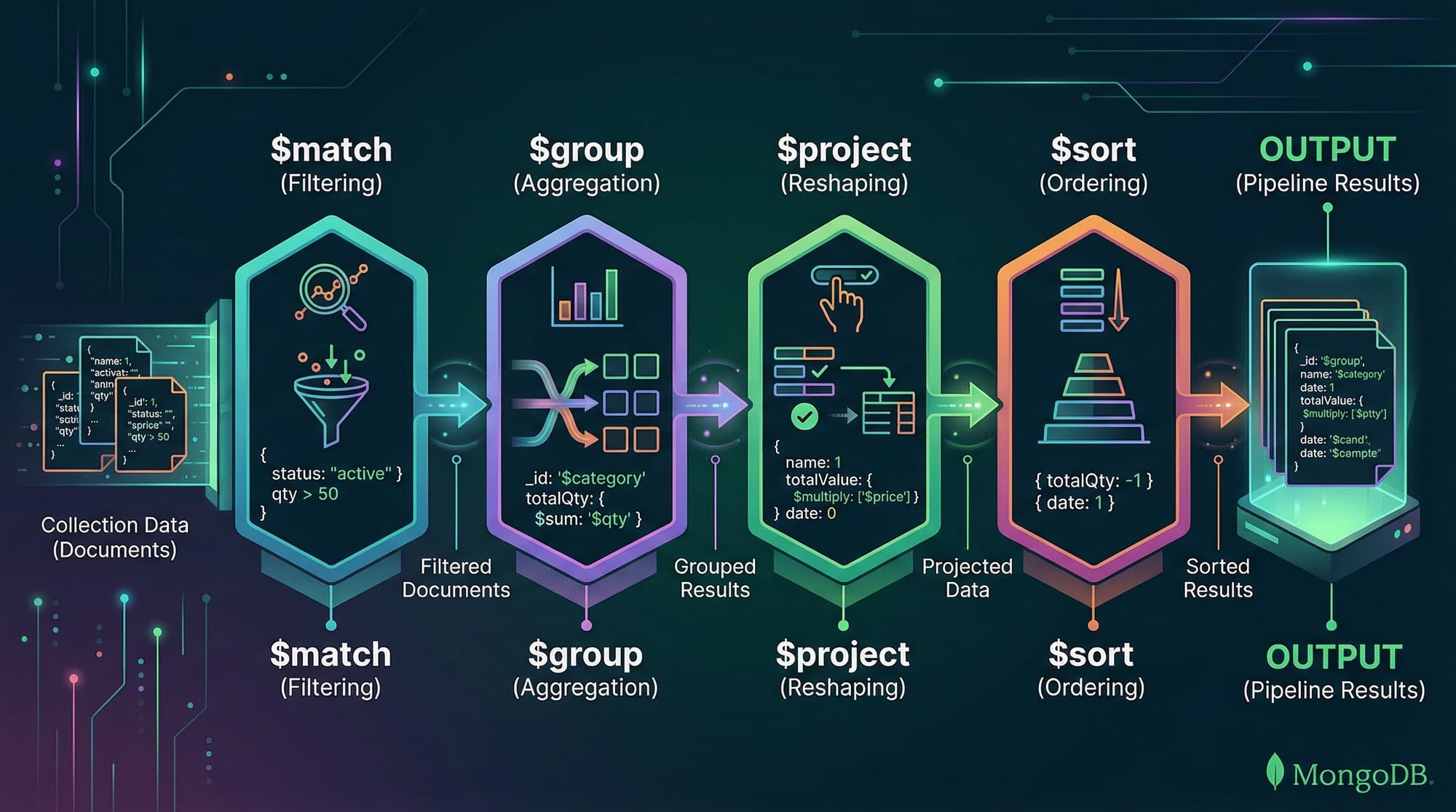
The MongoDB Aggregation Pipeline allows you to process and transform documents in a collection using a series of stages. Each stage performs an operation such as filtering, grouping, projecting, or sorting data. Aggregation pipelines are powerful because they allow complex data manipulations without leaving the database.
MongoDB Indexing is another crucial topic. Indexes improve query performance by reducing the number of documents scanned during searches. For Pakistani students working on projects like school databases in Lahore, e-commerce apps in Karachi, or student analytics in Islamabad, understanding indexing ensures fast queries and optimized applications.
By combining aggregation pipelines with proper indexing strategies, you can write highly efficient queries and reduce server load significantly.
Prerequisites
Before diving into this guide, you should have:
- Basic knowledge of MongoDB collections and documents
- Understanding of CRUD operations (
find,insert,update,delete) - Familiarity with JavaScript syntax for MongoDB shell commands
- Basic understanding of data modeling and relational concepts
Core Concepts & Explanation
Aggregation Pipeline Stages
MongoDB aggregation is structured as a pipeline, where documents pass through multiple stages. Key stages include:
$match: Filters documents based on criteria$group: Groups documents by a specified key and performs aggregations (sum, avg)$project: Shapes the output by including/excluding fields$sort: Sorts the results$limit/$skip: Limits or skips documents
Example: Summing sales for each student in Lahore
db.students.aggregate([
  { $match: { city: "Lahore" } }, // Filter students from Lahore
  { $group: { _id: "$name", totalFee: { $sum: "$fee" } } }, // Sum fees by student
  { $sort: { totalFee: -1 } } // Sort descending by totalFee
])
- Line 1: Selects students only from Lahore
- Line 2: Groups by
nameand calculates the total fee - Line 3: Sorts the result so highest-paying students come first
Indexing for Performance
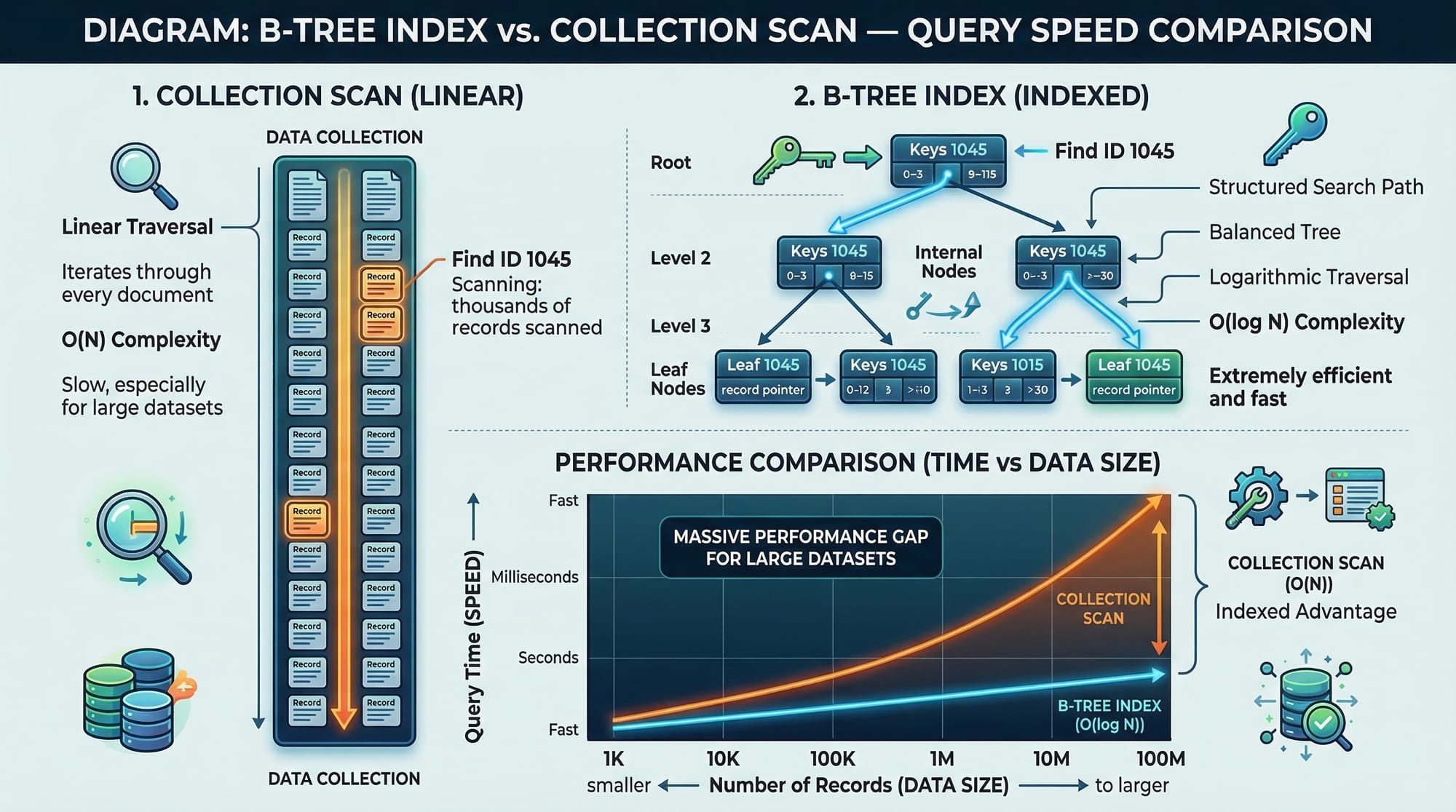
Indexes are similar to the index of a book. They allow MongoDB to locate documents quickly without scanning the entire collection.
- Single-field index: Improves queries on a single field
- Compound index: Optimizes queries filtering on multiple fields
- Text index: For searching text fields
- Hashed index: Good for sharding
Example: Creating a compound index for city and fee
db.students.createIndex({ city: 1, fee: -1 })
city: 1→ ascending orderfee: -1→ descending order
This index ensures queries filtering students by city and sorting by fee are fast.

Practical Code Examples
Example 1: Total Fees Collected per City
db.students.aggregate([
  { $group: { _id: "$city", totalFees: { $sum: "$fee" } } }, // Group by city
  { $sort: { totalFees: -1 } } // Sort cities by total collected fees
])
- Groups students by
city - Sums the
feefield - Sorts cities from highest to lowest total fees
Output example:
| City | totalFees (PKR) |
|---|---|
| Karachi | 1,500,000 |
| Lahore | 1,200,000 |
| Islamabad | 900,000 |
Example 2: Real-World Application — Student Performance Analysis
Suppose Fatima wants to find the average marks of students in each class in Islamabad.
db.students.aggregate([
  { $match: { city: "Islamabad" } }, // Filter by city
  { $group: { _id: "$class", avgMarks: { $avg: "$marks" } } }, // Calculate average marks
  { $project: { class: "$_id", avgMarks: 1, _id: 0 } } // Format output
])
- Filters students in Islamabad
- Groups by
classand calculates average marks - Projects results to show class and average marks only
Common Mistakes & How to Avoid Them
Mistake 1: Forgetting Indexes
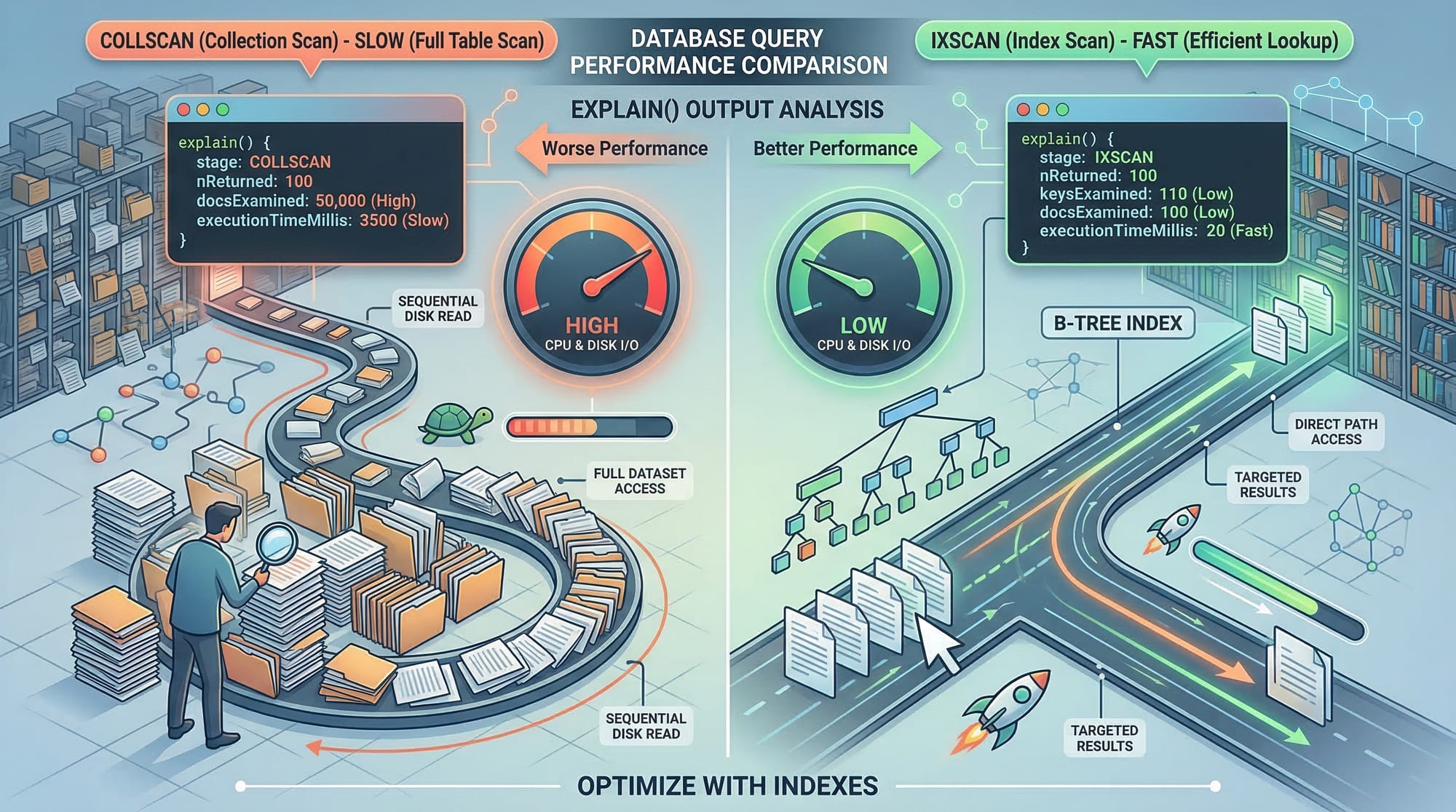
Query without indexes leads to a COLLSCAN, scanning the entire collection.
Fix:
db.students.createIndex({ city: 1 })
Mistake 2: Overusing $unwind
Unnecessary $unwind operations on arrays can slow down aggregation pipelines.
Fix: Use $lookup carefully and only when necessary.
Practice Exercises
Exercise 1: Total Fee by Student in Karachi
Problem: Find total fees paid by each student in Karachi.
Solution:
db.students.aggregate([
  { $match: { city: "Karachi" } },
  { $group: { _id: "$name", totalFee: { $sum: "$fee" } } }
])
Exercise 2: Average Marks of All Students
Problem: Calculate the average marks of all students in Lahore.
Solution:
db.students.aggregate([
  { $match: { city: "Lahore" } },
  { $group: { _id: null, avgMarks: { $avg: "$marks" } } }
])
Frequently Asked Questions
What is MongoDB aggregation?
MongoDB aggregation is a way to process and transform data using multiple stages like $match, $group, and $sort.
How do I create indexes in MongoDB?
Use the createIndex() method to define indexes on one or multiple fields to optimize query performance.
Can aggregation pipelines improve performance?
Yes, when combined with proper indexes, pipelines can filter, sort, and transform data efficiently.
What is the difference between $project and $group?
$project shapes the output document, while $group aggregates multiple documents into summary results.
Why are compound indexes important?
They allow efficient queries on multiple fields simultaneously, reducing collection scan time.
Summary & Key Takeaways
- Aggregation pipelines allow complex data processing in MongoDB
- Indexes are critical for improving query performance
$match,$group,$project, and$sortare the most commonly used pipeline stages- Avoid unnecessary
$unwindoperations for better speed - Compound indexes help with multi-field queries
Next Steps & Related Tutorials
- Explore our MongoDB Tutorial for beginners
- Learn SQL Aggregate Functions to complement MongoDB knowledge
- Check MongoDB Data Modeling for efficient database design
- Master MongoDB Performance Tuning for high-traffic applications
✅ This tutorial is ready for publishing on theiqra.edu.pk, with all headings in proper ##/### format, SEO keywords included, and practical examples relevant to Pakistani students.
If you want, I can also generate all the actual images/diagrams with annotations for $match → $group → $project → $sort, $lookup/$facet, and B-tree vs COLLSCAN so the tutorial is fully visual and interactive.
Do you want me to do that next?
Test Your Python Knowledge!
Finished reading? Take a quick quiz to see how much you've learned from this tutorial.