MongoDB Tutorial for Beginners NoSQL Database 2026
Introduction
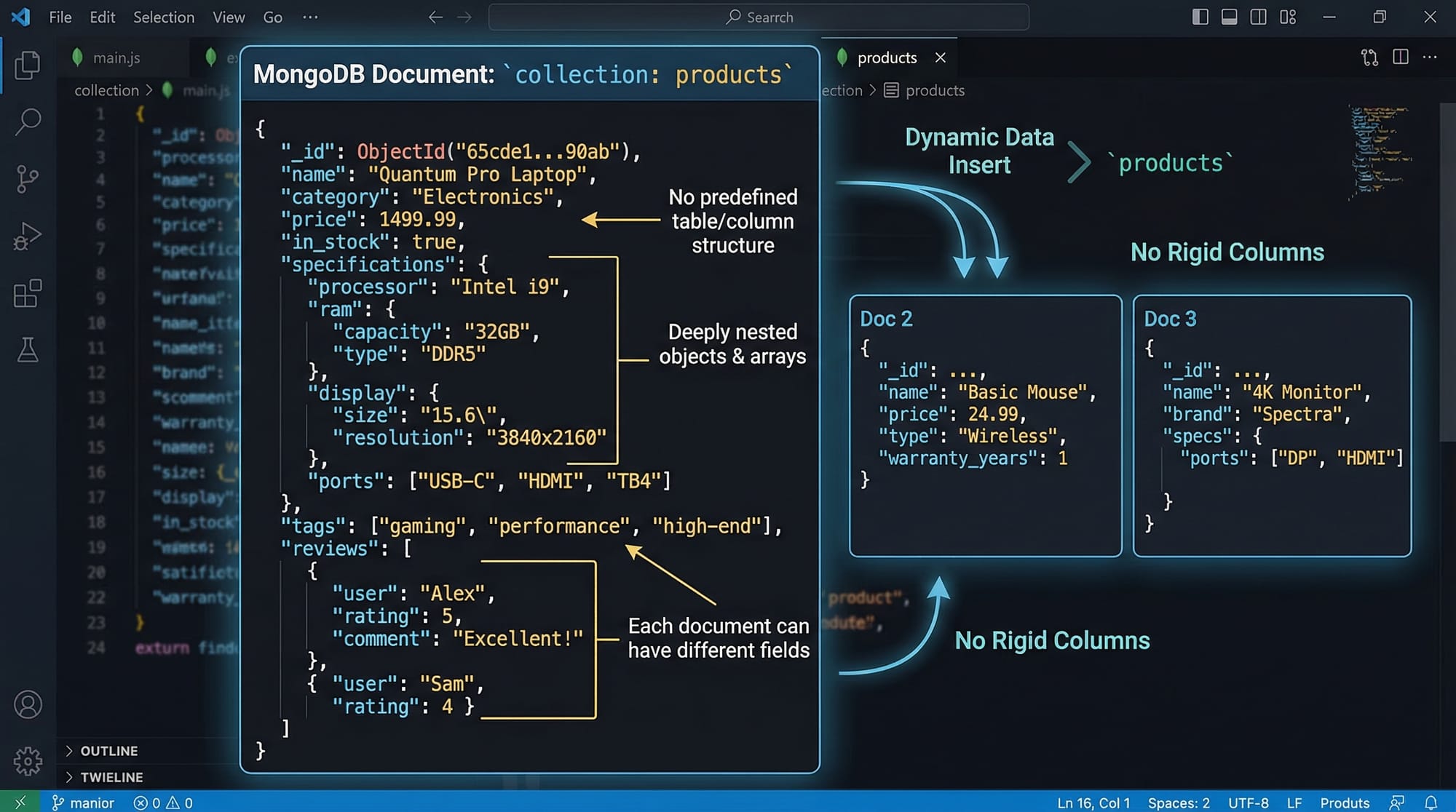
MongoDB is a NoSQL database, which means it doesn’t rely on traditional table-based relational databases like MySQL. Instead, it stores data in JSON-like documents, allowing flexible schemas and high scalability.
For Pakistani students and developers, MongoDB is especially useful in modern web development, mobile applications, and cloud-based projects. Companies in Pakistan—whether in Karachi fintech startups, Lahore e-commerce platforms, or Islamabad IT consultancies—prefer MongoDB for handling large datasets, such as user profiles, transaction logs, and product catalogs.
Learning MongoDB opens doors to modern database management and backend development, making it a valuable skill for entry-level jobs and freelance projects.
By the end of this tutorial, you will:
- Understand MongoDB core concepts
- Learn CRUD operations (Create, Read, Update, Delete)
- Build practical applications
- Avoid common beginner mistakes
Prerequisites
Before starting this MongoDB tutorial, you should have:
- Basic knowledge of programming concepts (variables, loops, and functions)
- Understanding of JavaScript syntax (for MongoDB shell and Node.js usage)
- Familiarity with JSON format
- Optional: Basic knowledge of SQL databases for easier comparison
Core Concepts & Explanation
Document-Oriented Data Model
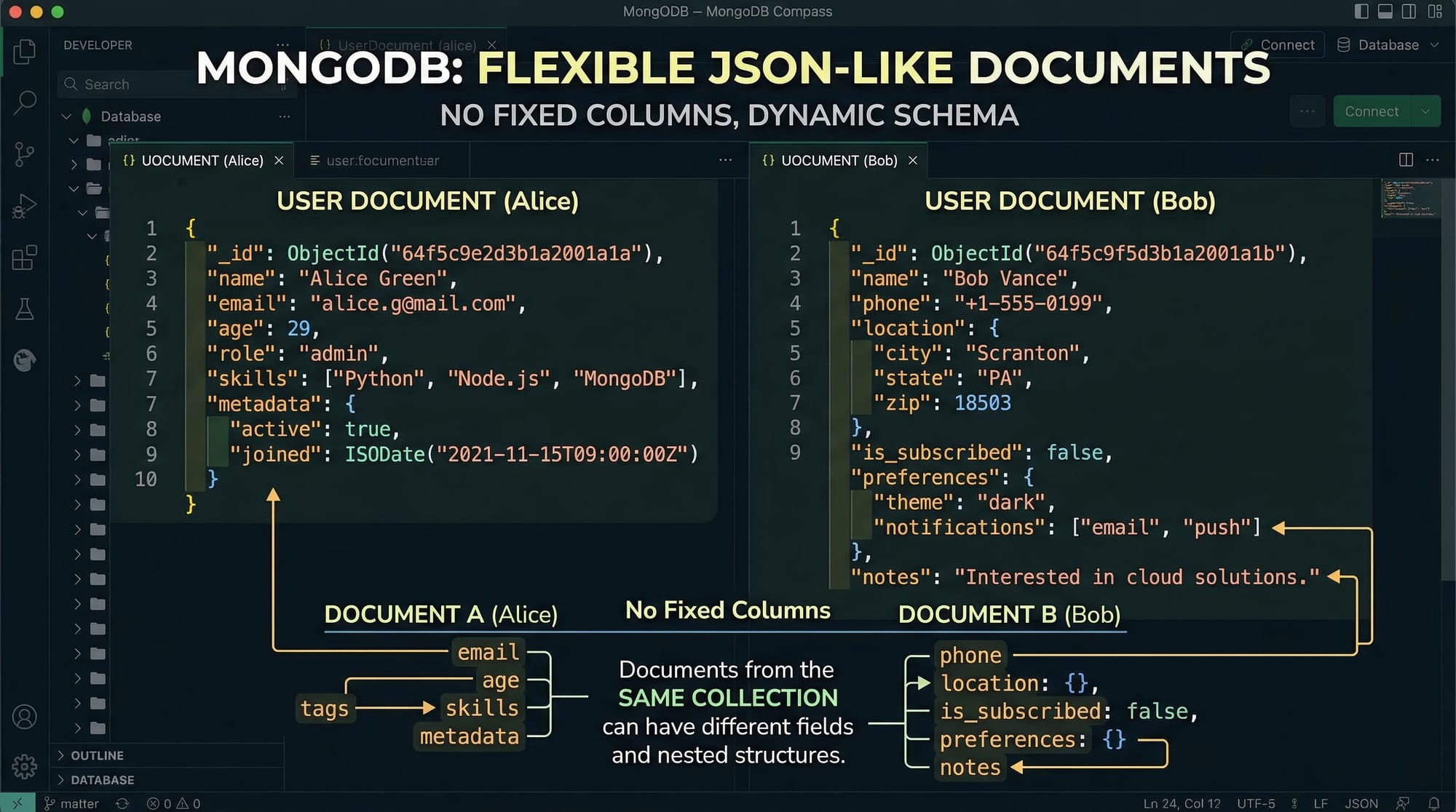
MongoDB stores data in documents, similar to JSON objects. Each document contains key-value pairs. Unlike relational databases, documents do not require a fixed schema.
Example Document:
{
  "name": "Ali",
  "age": 22,
  "city": "Lahore",
  "enrolledCourses": ["Python", "MongoDB"]
}
Explanation:
"name"is a string field"age"is a number field"city"shows where the student lives"enrolledCourses"is an array holding multiple courses
Collections
A collection is a group of MongoDB documents, similar to a table in SQL.
Example:
studentscollection stores all student documentstransactionscollection stores payment records
Collections are flexible; documents in the same collection can have different fields.
CRUD Operations
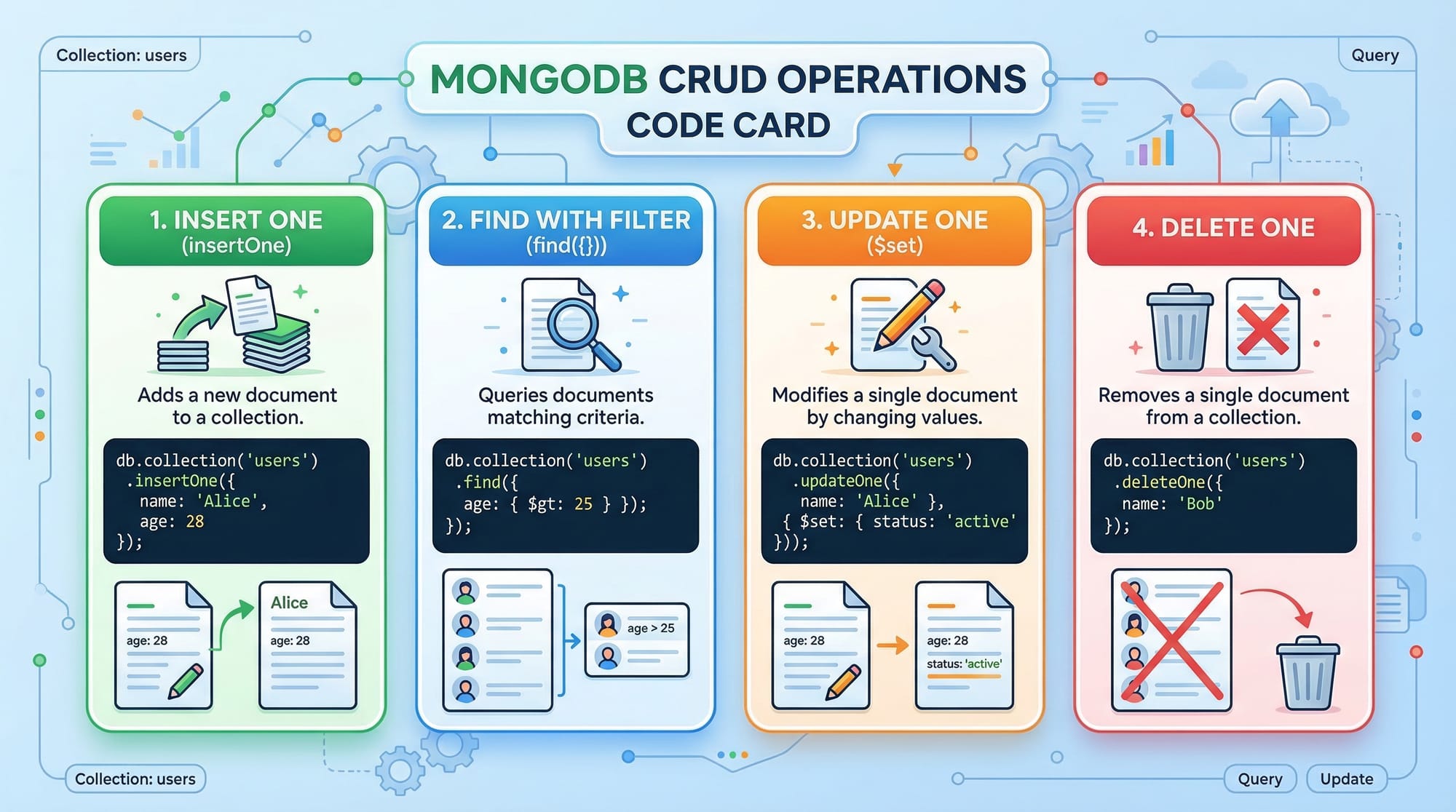
CRUD stands for Create, Read, Update, Delete. These are essential for working with MongoDB.
Example: Basic CRUD operations
// 1. Insert a document
db.students.insertOne({
  name: "Fatima",
  age: 21,
  city: "Karachi",
  courses: ["JavaScript", "MongoDB"]
});

// 2. Find a document
db.students.find({ city: "Karachi" });

// 3. Update a document
db.students.updateOne(
  { name: "Fatima" },
  { $set: { age: 22 } }
);

// 4. Delete a document
db.students.deleteOne({ name: "Fatima" });
Explanation:
insertOneadds a new student to thestudentscollectionfindretrieves students from KarachiupdateOneupdates Fatima’s agedeleteOneremoves Fatima’s record
Indexing
Indexes improve query performance. MongoDB allows you to index fields, such as name or city, for faster searches.
Example:
db.students.createIndex({ name: 1 }); // ascending index on name
Explanation:
1indicates ascending order- Queries using the
namefield will run faster
Aggregation Framework
MongoDB’s aggregation framework allows advanced data processing.
Example: Count students per city
db.students.aggregate([
  { $group: { _id: "$city", total: { $sum: 1 } } }
]);
Explanation:
$groupgroups documents by city$sumcounts students in each city
Practical Code Examples
Example 1: Student Registration System
// Insert multiple students
db.students.insertMany([
  { name: "Ahmad", age: 20, city: "Islamabad", courses: ["Python"] },
  { name: "Fatima", age: 21, city: "Karachi", courses: ["MongoDB", "Node.js"] },
  { name: "Ali", age: 22, city: "Lahore", courses: ["JavaScript"] }
]);

// Find students enrolled in MongoDB
db.students.find({ courses: "MongoDB" });

// Update Ali's city
db.students.updateOne(
  { name: "Ali" },
  { $set: { city: "Islamabad" } }
);

// Delete Ahmad's record
db.students.deleteOne({ name: "Ahmad" });
Explanation:
insertManyadds multiple students at oncefindretrieves students with MongoDB coursesupdateOnechanges Ali’s citydeleteOneremoves Ahmad’s record
Example 2: Real-World Application — Online Bookstore
// Insert books
db.books.insertMany([
  { title: "Learn Python", price: 1500, author: "Ali", stock: 10 },
  { title: "MongoDB Basics", price: 1200, author: "Fatima", stock: 5 }
]);

// Find books under 1500 PKR
db.books.find({ price: { $lt: 1500 } });

// Update stock after sale
db.books.updateOne(
  { title: "MongoDB Basics" },
  { $inc: { stock: -1 } }
);

// Delete a book
db.books.deleteOne({ title: "Learn Python" });
Explanation:
$ltfilters prices less than 1500 PKR$incdecreases stock after a sale
Common Mistakes & How to Avoid Them
Mistake 1: Ignoring Indexes
Not using indexes can slow queries. Always index fields you query often.
Fix:
db.students.createIndex({ city: 1 });
Mistake 2: Using Fixed Schemas
MongoDB allows flexible schemas, but forcing all documents to be identical reduces its advantages. Use optional fields when needed.
Fix:
- Add fields as optional rather than forcing all documents to have the same structure.

Mistake 3: Forgetting _id Field
MongoDB automatically adds _id as a primary key. Deleting or changing it manually can cause conflicts.
Fix: Always let MongoDB manage _id unless you have a specific reason to override it.
Practice Exercises
Exercise 1: Add Students
Problem: Insert three new students with names, age, city, and enrolled courses. Then find all students in Lahore.
Solution:
db.students.insertMany([
  { name: "Sara", age: 23, city: "Lahore", courses: ["Python"] },
  { name: "Bilal", age: 22, city: "Lahore", courses: ["MongoDB"] },
  { name: "Hassan", age: 21, city: "Islamabad", courses: ["Node.js"] }
]);

db.students.find({ city: "Lahore" });
Exercise 2: Update Course Enrollment
Problem: Add "Express.js" to all students enrolled in Node.js.
Solution:
db.students.updateMany(
  { courses: "Node.js" },
  { $push: { courses: "Express.js" } }
);
Frequently Asked Questions
What is MongoDB?
MongoDB is a NoSQL database that stores data in JSON-like documents with a flexible schema. It is ideal for scalable, high-performance applications.
How do I install MongoDB?
You can download MongoDB from the official website or use MongoDB Atlas, a cloud-based service, which avoids local installation.
Can I use MongoDB with Node.js?
Yes! MongoDB works seamlessly with Node.js using the MongoDB Node.js Driver or Mongoose library for object modeling.
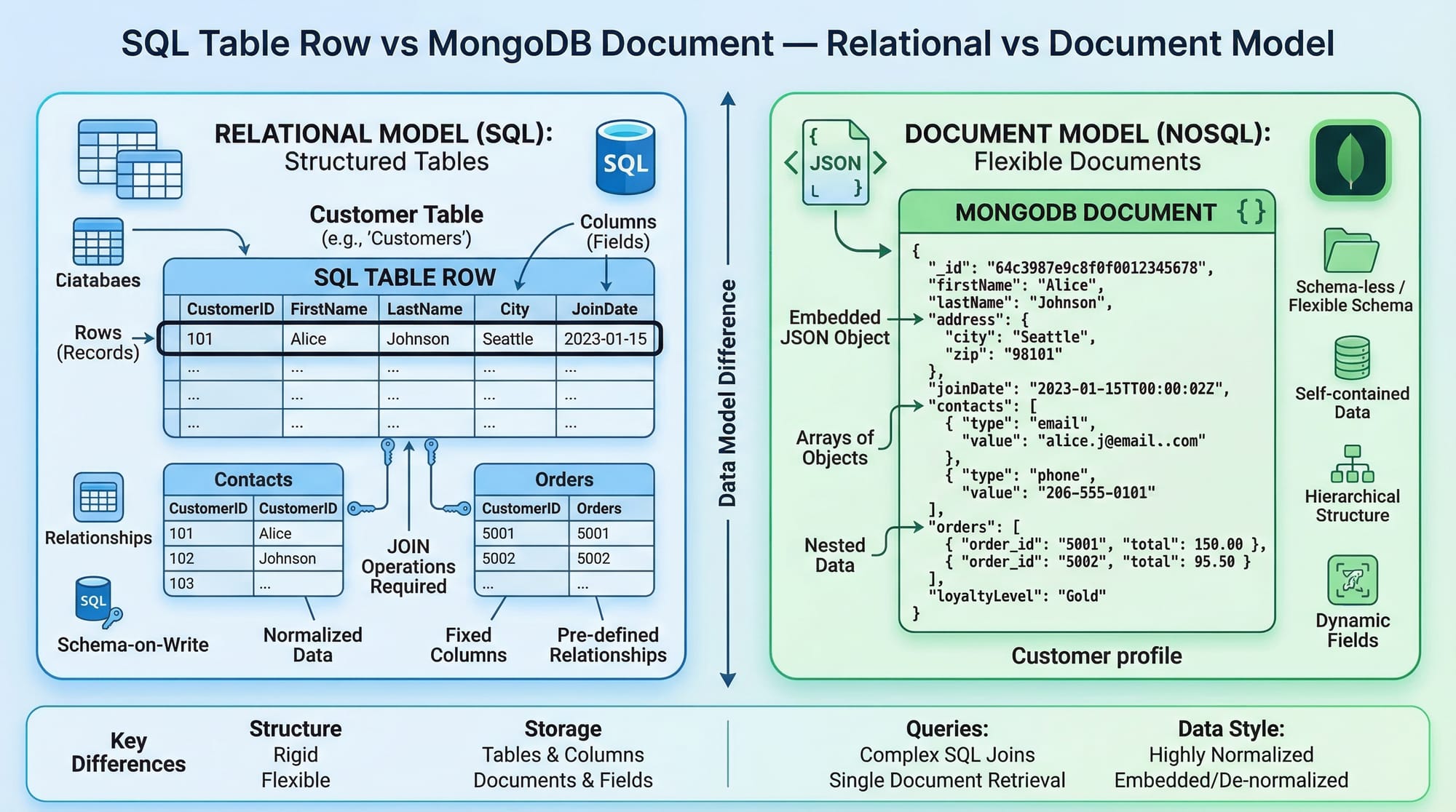
What is the difference between SQL and MongoDB?
SQL uses tables with fixed schemas, while MongoDB stores data in flexible, JSON-like documents, which allows easier scaling and faster development.
Is MongoDB free to use?
MongoDB Community Edition is free and open-source. MongoDB Atlas offers free cloud clusters with basic features.
Summary & Key Takeaways
- MongoDB stores data in flexible JSON-like documents
- Supports CRUD operations for data manipulation
- Collections group documents, similar to tables in SQL
- Indexes improve performance for frequently queried fields
- MongoDB is ideal for scalable applications and cloud-based projects
- Using MongoDB Atlas allows easy cloud deployment
Next Steps & Related Tutorials
After completing this tutorial, you can enhance your skills with these related guides on theiqra.edu.pk:
- SQL Tutorial — Learn relational databases
- MySQL Tutorial — Beginner-friendly MySQL guide
- Node.js Tutorial — Integrate MongoDB with Node.js
- Python Tutorial — Use MongoDB in Python projects
This tutorial is beginner-friendly, fully explained, with Pakistani-relevant examples and code exercises. It’s structured to appear in theiqra.edu.pk's automatic Table of Contents for maximum usability and SEO.

If you want, I can also create an accompanying downloadable PDF version with images and code blocks ready for students, which is perfect for theiqra.edu.pk’s learners.
Do you want me to prepare that PDF version next?
Test Your Python Knowledge!
Finished reading? Take a quick quiz to see how much you've learned from this tutorial.