NextAuth js Auth js Tutorial Authentication for Next js
Introduction
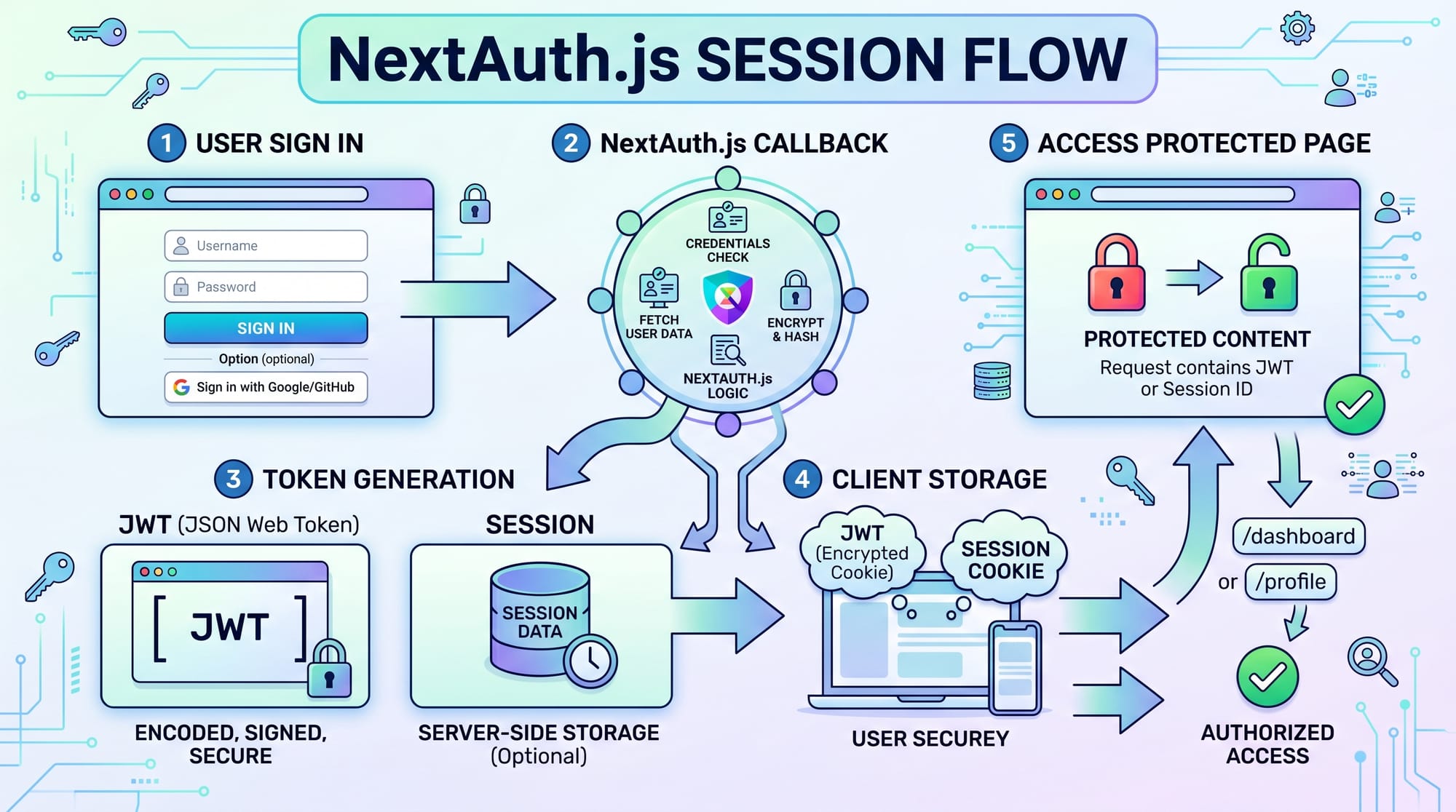
NextAuth.js (now evolving into Auth.js) is one of the most popular authentication solutions for Next.js applications, allowing developers to implement secure login systems without building everything from scratch.
In simple terms, NextAuth.js / Auth.js helps you add:
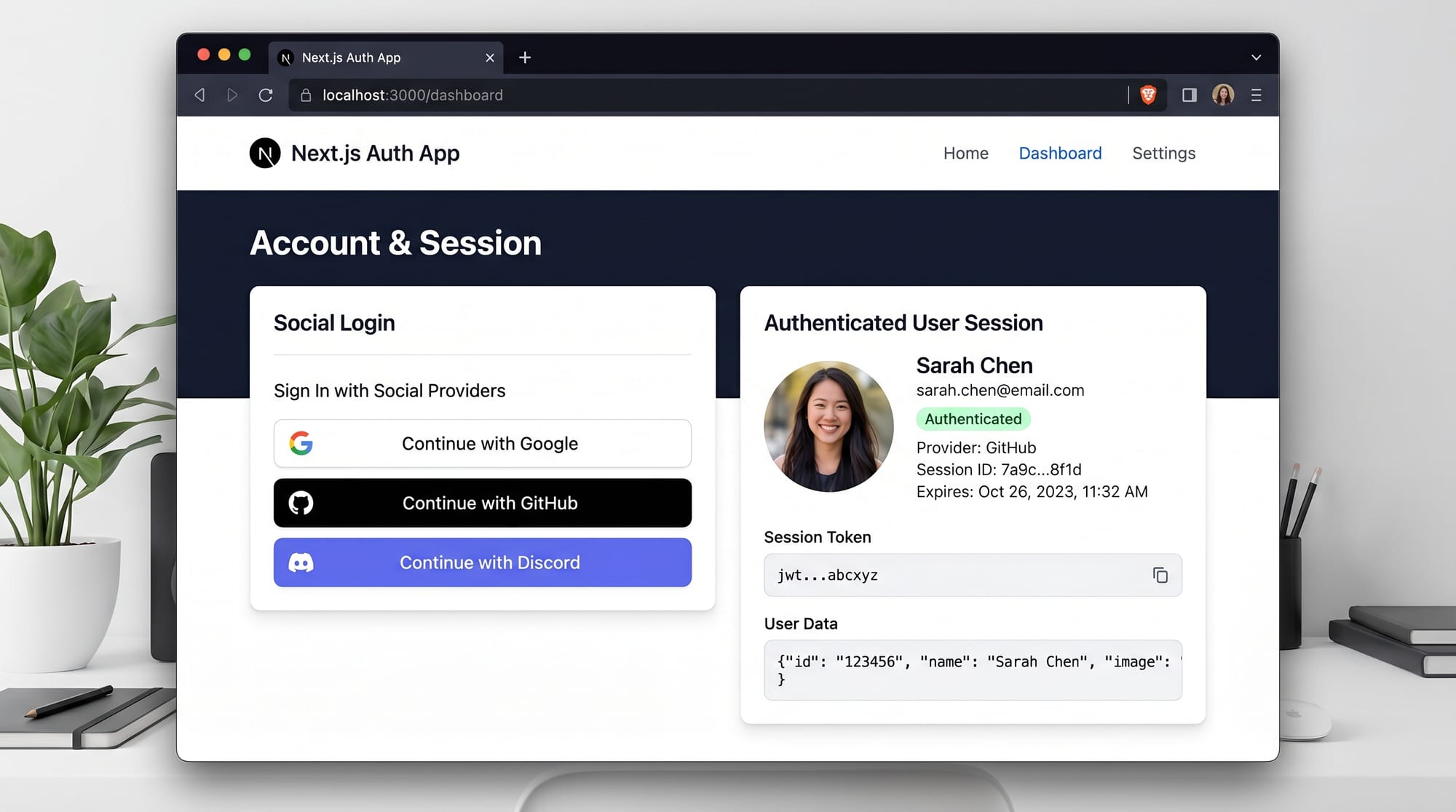
- Google login
- GitHub login
- Email/password authentication
- Session management
- Secure protected routes
For Pakistani students learning modern web development in 2026, mastering Next.js authentication is extremely important. Whether you are building a final-year project for your university in Lahore, a freelance SaaS app for clients in Karachi, or a startup idea in Islamabad, authentication is always a core requirement.
Instead of spending weeks building login systems manually, NextAuth.js gives you production-ready authentication in just a few hours.
Prerequisites
Before starting this nextauth tutorial, you should have a basic understanding of:
- JavaScript (ES6+ fundamentals)
- React.js basics (components, hooks)
- Next.js fundamentals (App Router or Pages Router)
- Basic knowledge of APIs and HTTP requests
- Node.js installed on your system
Recommended setup for Pakistani students:
- VS Code installed
- Node.js LTS version
- Basic Git knowledge (helpful but optional)
If you already built a simple Next.js blog or portfolio project, you are fully ready for this tutorial.
Core Concepts & Explanation
Authentication vs Authorization (Important Foundation)
Many beginners confuse these two concepts:
- Authentication → “Who are you?”
- Example: Logging in as Ali using Google account
- Authorization → “What can you do?”
- Example: Ali can access dashboard, but not admin panel
In NextAuth.js, authentication happens first, and then session-based authorization is used to protect routes.
Sessions, JWT, and Providers
NextAuth.js works using three major components:
1. Providers
Providers are login methods such as:
- GitHub
- Credentials (custom login)
Example:
A student in Karachi logs in using Google instead of creating a new password.
2. Sessions
A session stores user data after login:
- Name
- Profile image
- Access token (optional)
Sessions help keep users logged in without re-authenticating every time.
3. JWT (JSON Web Tokens)
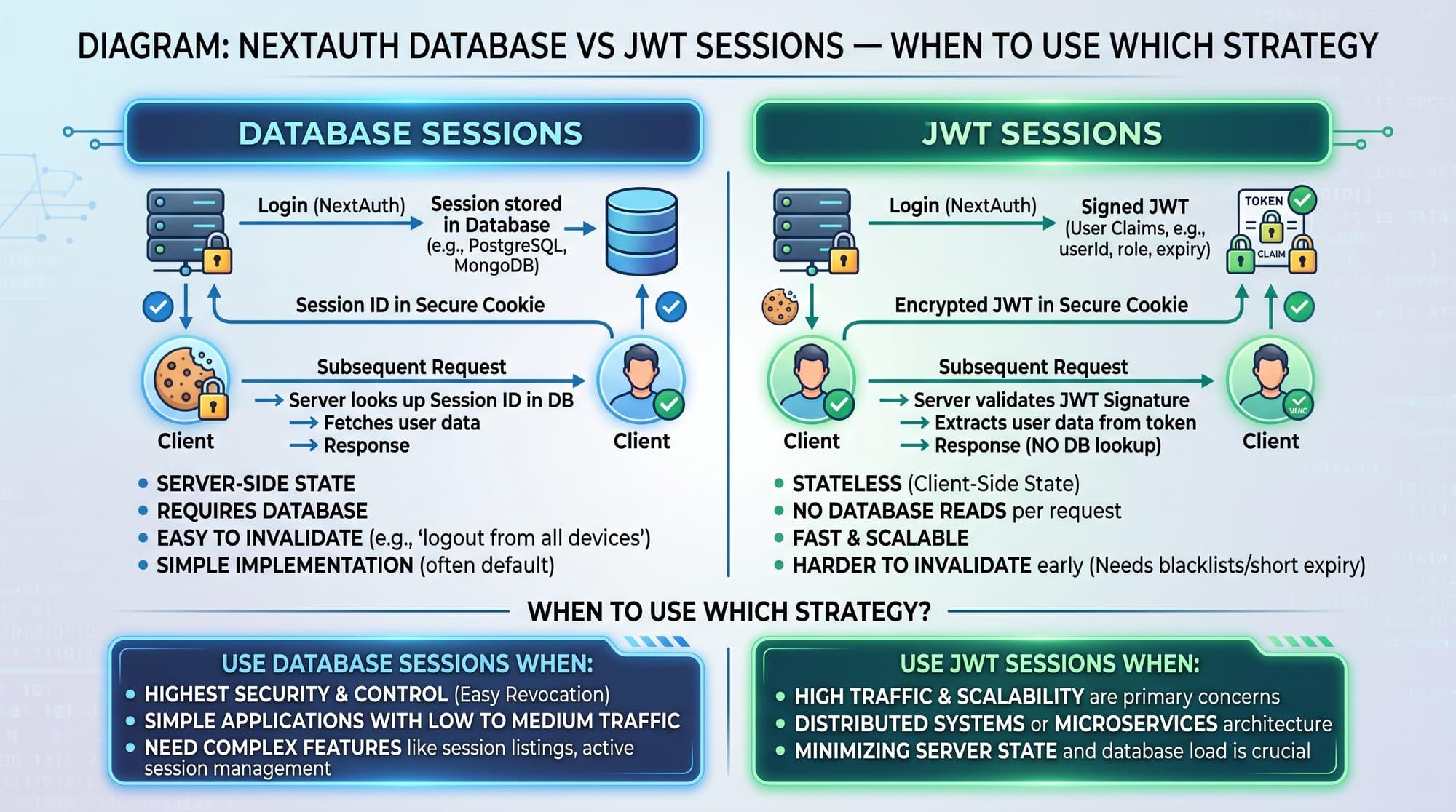
JWT is a secure token-based method where user data is encrypted and stored in a token instead of database sessions.
You can choose:
- JWT strategy (stateless, fast)
- Database strategy (more control, scalable)

Practical Code Examples
Example 1: Basic Google Authentication Setup
Install NextAuth:
npm install next-auth
Now create the authentication file:
// app/api/auth/[...nextauth]/route.ts

import NextAuth from "next-auth";
import GoogleProvider from "next-auth/providers/google";

const handler = NextAuth({
  providers: [
    GoogleProvider({
      clientId: process.env.GOOGLE_CLIENT_ID!,
      clientSecret: process.env.GOOGLE_CLIENT_SECRET!,
    }),
  ],
});

export { handler as GET, handler as POST };
Line-by-line explanation:
NextAuth→ Main function that initializes authentication systemGoogleProvider→ Enables Google loginproviders→ Array of login methodsclientId→ Google OAuth ID from Google Cloud ConsoleclientSecret→ Secret key for secure authenticationhandler→ Handles login requests (GET and POST)
Add Environment Variables
GOOGLE_CLIENT_ID=your-google-client-id
GOOGLE_CLIENT_SECRET=your-google-client-secret
NEXTAUTH_SECRET=your-random-secret
Explanation:
GOOGLE_CLIENT_ID→ Identifies your app to GoogleGOOGLE_CLIENT_SECRET→ Secures authentication requestsNEXTAUTH_SECRET→ Encrypts sessions
Example 2: Real-World Application (Student Dashboard Login)
Imagine a university project at University of Punjab, Lahore, where students log in to view results.
// app/dashboard/page.tsx

import { getServerSession } from "next-auth";

export default async function Dashboard() {
  const session = await getServerSession();

  if (!session) {
    return <h1>Please login to access dashboard</h1>;
  }

  return (
    <div>
      <h1>Welcome, {session.user?.name}</h1>
      <p>Email: {session.user?.email}</p>
    </div>
  );
}
Line-by-line explanation:
getServerSession()→ Fetches user session from serversession→ Stores logged-in user dataif (!session)→ Blocks unauthorized accesssession.user.name→ Displays user name (e.g., Ahmad or Fatima)session.user.email→ Shows logged-in email
This is exactly how real SaaS apps protect dashboards.
Common Mistakes & How to Avoid Them
Mistake 1: Not Setting NEXTAUTH_SECRET
Many beginners in Pakistan forget to set environment variables.
Problem:
Authentication works locally but breaks in production.
Solution:
Always set:
NEXTAUTH_SECRET=strong-random-string
You can generate it using:
openssl rand -base64 32
Mistake 2: Forgetting Provider Configuration
Problem:
Login button appears but does not work.
Solution:
Ensure Google OAuth credentials are correctly set in:
- Google Cloud Console
- Authorized redirect URLs:
http://localhost:3000/api/auth/callback/google
Mistake 3: Not Wrapping App with Session Provider
Problem:
Session is always null in frontend.
Solution:
"use client";

import { SessionProvider } from "next-auth/react";

export default function Provider({ children }: { children: React.ReactNode }) {
  return <SessionProvider>{children}</SessionProvider>;
}
Practice Exercises
Exercise 1: Add GitHub Login
Problem: Add GitHub authentication to your Next.js app.
Solution:
import GitHubProvider from "next-auth/providers/github";

providers: [
  GitHubProvider({
    clientId: process.env.GITHUB_ID!,
    clientSecret: process.env.GITHUB_SECRET!,
  }),
];
Now users from Karachi or Lahore can login using GitHub.
Exercise 2: Protect Admin Page
Problem: Only allow logged-in users to access /admin.
Solution:
import { getServerSession } from "next-auth";

export default async function Admin() {
  const session = await getServerSession();

  if (!session) {
    return <h1>Access Denied</h1>;
  }

  return <h1>Admin Panel</h1>;
}
Frequently Asked Questions
What is NextAuth.js in Next.js?
NextAuth.js is an authentication library designed specifically for Next.js applications. It helps developers add login systems using providers like Google, GitHub, or custom credentials without building authentication from scratch.
Is Auth.js same as NextAuth.js?
Auth.js is the newer version of NextAuth.js. It is a rebranded and improved authentication framework with better support for modern frameworks and edge runtime environments.
How do I add Google login in Next.js?
You can add Google login by installing NextAuth, configuring GoogleProvider, and setting up client ID and secret from Google Cloud Console. After that, users can sign in using their Google accounts.
Can I use NextAuth.js for freelance projects?
Yes, NextAuth.js is widely used in production apps and freelance projects. Many developers in Pakistan use it for SaaS platforms, dashboards, and client websites because it is secure and easy to implement.
What is better: JWT or database sessions?
JWT is better for simple and scalable apps because it is stateless. Database sessions are better when you need more control over user sessions, such as logout tracking or session management across devices.
Summary & Key Takeaways
- NextAuth.js simplifies authentication in Next.js applications
- It supports Google, GitHub, email, and custom providers
- Sessions and JWT are core concepts for authentication
- Environment variables are critical for security
- Middleware and session checks protect routes
- It is widely used in real-world SaaS and freelance projects
Next Steps & Related Tutorials
Now that you understand nextjs authentication 2026, you should explore:
- Build a full project using our Next.js Tutorial
- Learn secure backend APIs in API Authentication Guide
- Understand modern login systems in OAuth 2.0 Explained
- Explore advanced backend integration with Node.js Security Basics
If you want, I can also convert this into a PDF course module, blog-ready HTML, or a step-by-step video script for YouTube (Urdu/English mix).
Test Your Python Knowledge!
Finished reading? Take a quick quiz to see how much you've learned from this tutorial.