SAML Tutorial Enterprise Single Sign On Integration
Introduction
SAML Tutorial: Enterprise Single Sign-On Integration is a comprehensive guide to understanding how Security Assertion Markup Language (SAML) enables secure, centralized authentication across enterprise applications. In simple terms, SAML allows a user to log in once (Single Sign-On or SSO) and access multiple systems without re-entering credentials.
In modern software systems—especially in universities, banks, and large IT companies in Pakistan such as systems used in Lahore universities or Karachi-based fintech firms—SAML plays a critical role in identity management. For example, a student like Ahmad from Islamabad University logs into the university portal once and automatically gains access to LMS, library systems, and exam portals without repeated logins.
Learning saml tutorial concepts is essential for Pakistani students because:
- Enterprises in Pakistan are rapidly adopting SSO systems
- Cloud platforms like AWS, Google Workspace, and Microsoft Azure rely heavily on SAML
- Understanding SAML helps you build secure authentication systems in backend development roles
- It improves your job readiness for DevOps, backend, and cybersecurity roles
Prerequisites
Before diving into this saml sso tutorial, you should be comfortable with:
- Basic web development (HTML, HTTP, cookies, sessions)
- Understanding of authentication vs authorization
- Basic knowledge of APIs and REST
- Familiarity with XML structure
- Basic backend development (Node.js, Java, Python, or PHP)
Optional but helpful:
- Understanding OAuth 2.0 basics (for saml vs oauth comparison later)
- Knowledge of enterprise identity systems like Active Directory
Core Concepts & Explanation
Identity Provider (IdP) and Service Provider (SP)
In SAML architecture, two key roles exist:
Identity Provider (IdP):
This is the system that authenticates the user. Examples include:
- Microsoft Active Directory Federation Services (ADFS)
- Okta
- Google Identity Platform
Service Provider (SP):
This is the application the user wants to access (e.g., LMS, banking portal, or university dashboard).
Example:
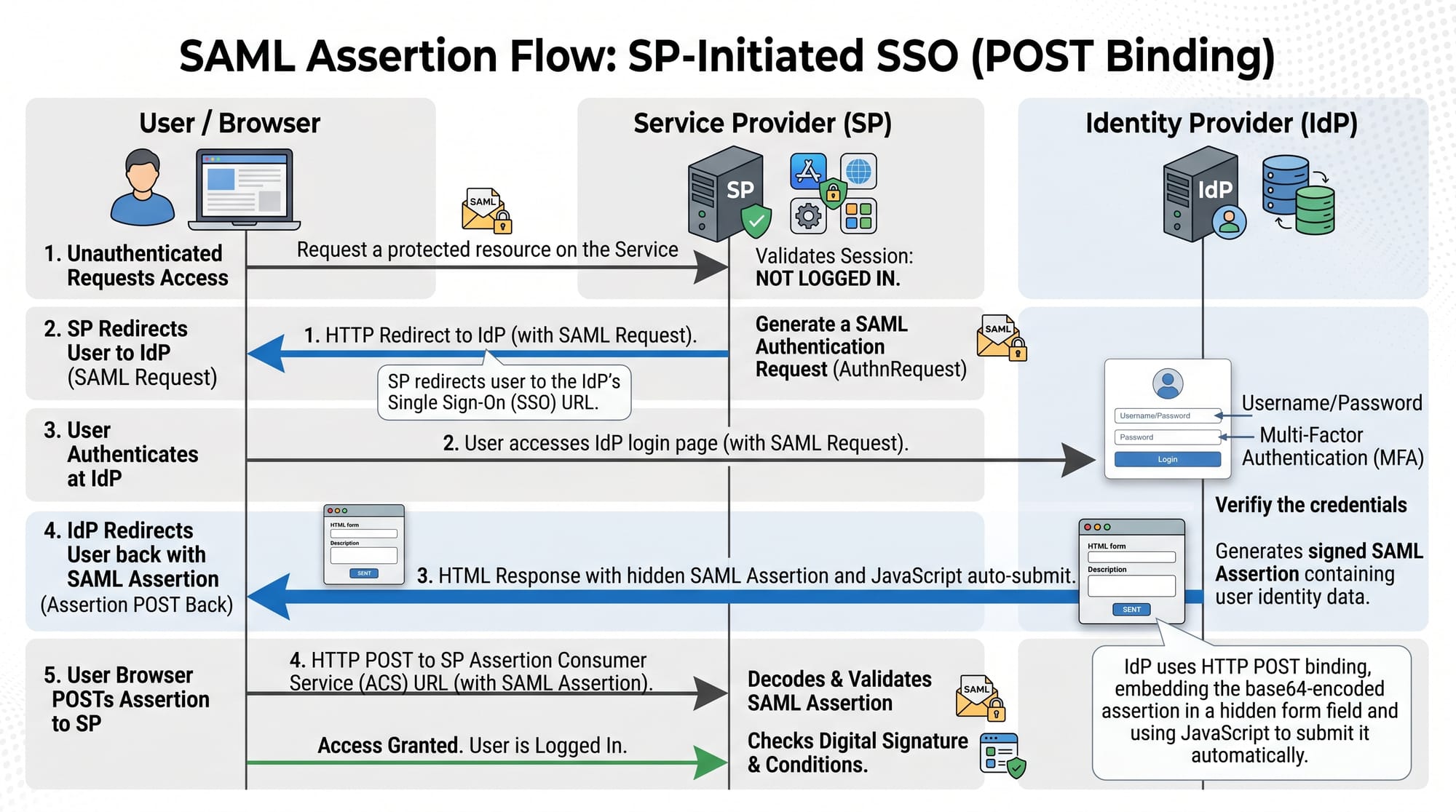
Fatima from Lahore logs into her university portal (SP). The portal redirects her to the university’s login system (IdP). Once authenticated, she is redirected back.
This separation is what makes SAML powerful for enterprise SSO.
SAML Assertion and XML-based Authentication
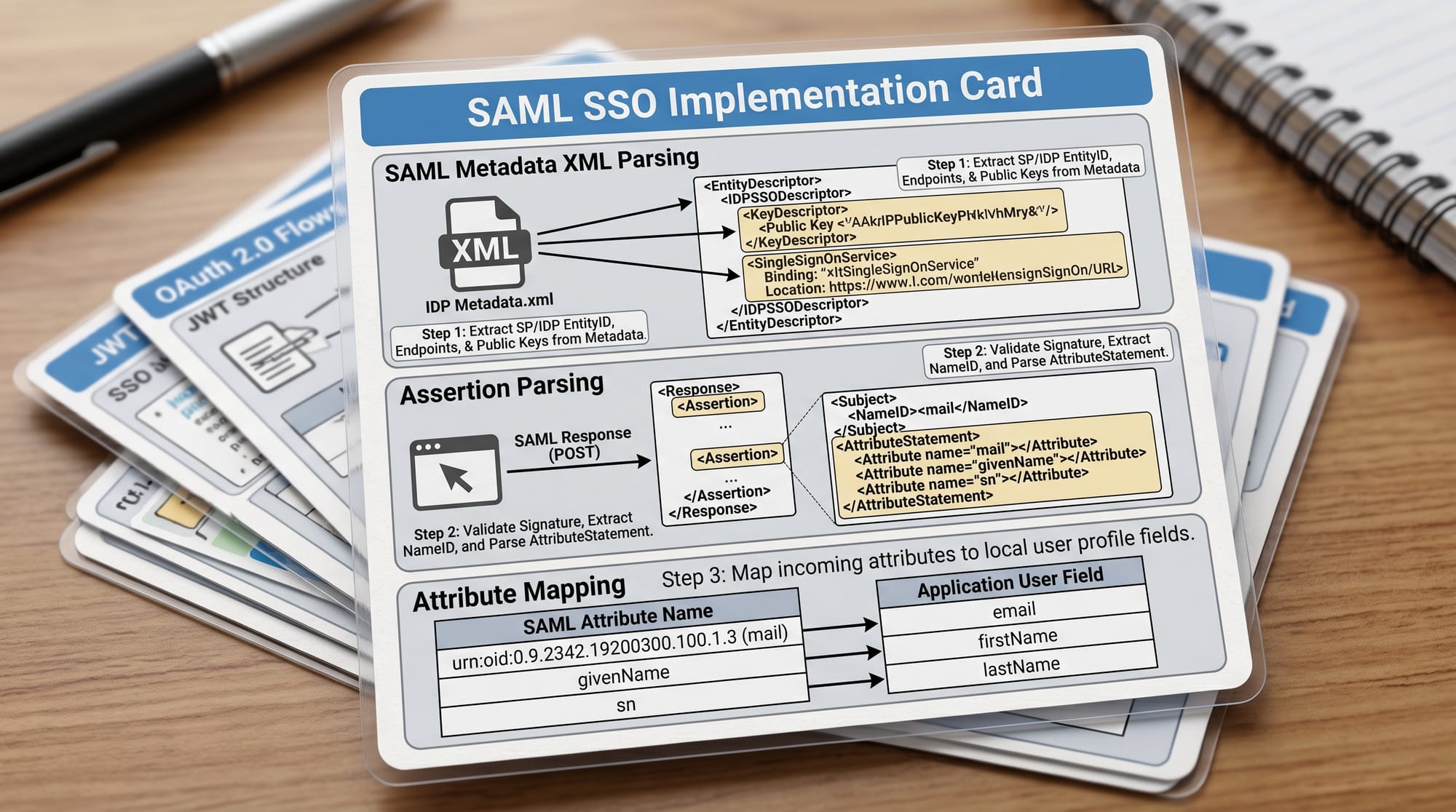
A SAML assertion is an XML document that contains authentication and authorization data.
It typically includes:
- User identity (NameID)
- Authentication timestamp
- User attributes (role, email, department)
Example attributes for a Pakistani university student:
- Name: Ali Raza
- Department: Computer Science
- University: NUST Islamabad
- Role: Student
The SP trusts this assertion because it is digitally signed by the IdP.
SAML Workflow (Step-by-Step)
The SAML authentication flow works like this:
- User tries to access SP (e.g., LMS portal)
- SP redirects user to IdP
- User logs in at IdP
- IdP generates SAML assertion
- Assertion is sent back to SP via browser POST
- SP validates the signature
- User is logged in
This is the foundation of all saml sso systems used in enterprise environments.
Practical Code Examples
Example 1: Node.js SAML Service Provider Setup
Below is a basic example using passport-saml:
const passport = require('passport');
const SamlStrategy = require('passport-saml').Strategy;

// Configure SAML strategy
passport.use(new SamlStrategy({
  path: "/login/callback",
  entryPoint: "https://idp.example.com/saml/login",
  issuer: "https://sp.example.com/metadata",
  cert: "MIIC...AB" // IdP public certificate
}, function(profile, done) {
  return done(null, profile);
}));

// Serialize user session
passport.serializeUser(function(user, done) {
  done(null, user);
});

// Deserialize user session
passport.deserializeUser(function(user, done) {
  done(null, user);
});
Line-by-line explanation:
passport.use(...)→ Registers SAML authentication strategypath→ Callback URL after authenticationentryPoint→ IdP login URLissuer→ Identifier of your Service Providercert→ Public certificate used to validate SAML responseprofile→ Contains user attributes from SAML assertionserializeUser→ Stores user session datadeserializeUser→ Retrieves session data
This setup is commonly used in SaaS apps and enterprise dashboards.
Example 2: Real-World University SSO System
Imagine a university system in Karachi:
- LMS Portal (SP)
- Exam System (SP)
- Library System (SP)
- Central Identity Server (IdP)
def validate_saml_response(response):
    decoded_xml = decode_base64(response)

    if verify_signature(decoded_xml):
        user_data = extract_attributes(decoded_xml)

        user = {
            "name": user_data["NameID"],
            "department": user_data["Department"],
            "role": user_data["Role"]
        }

        return create_session(user)
    else:
        raise Exception("Invalid SAML Assertion")
Line-by-line explanation:
decode_base64(response)→ SAML responses are base64 encodedverify_signature()→ Ensures response is from trusted IdPextract_attributes()→ Reads XML user datacreate_session(user)→ Logs user into systemraise Exception→ Blocks unauthorized access
This model is widely used in universities like LUMS or FAST NUCES.
Common Mistakes & How to Avoid Them
Mistake 1: Not Validating SAML Signatures
Many beginners assume the SAML response is safe without verification.
Problem:
Attackers can forge SAML responses if signature validation is skipped.
Fix:
Always validate the XML signature using IdP public certificate.
if (!validateSignature(samlResponse)) {
  throw new Error("Invalid SAML Response");
}
Mistake 2: Confusing SAML with OAuth
SAML is often confused with OAuth 2.0.
Problem:
Students think both are interchangeable.
Fix:
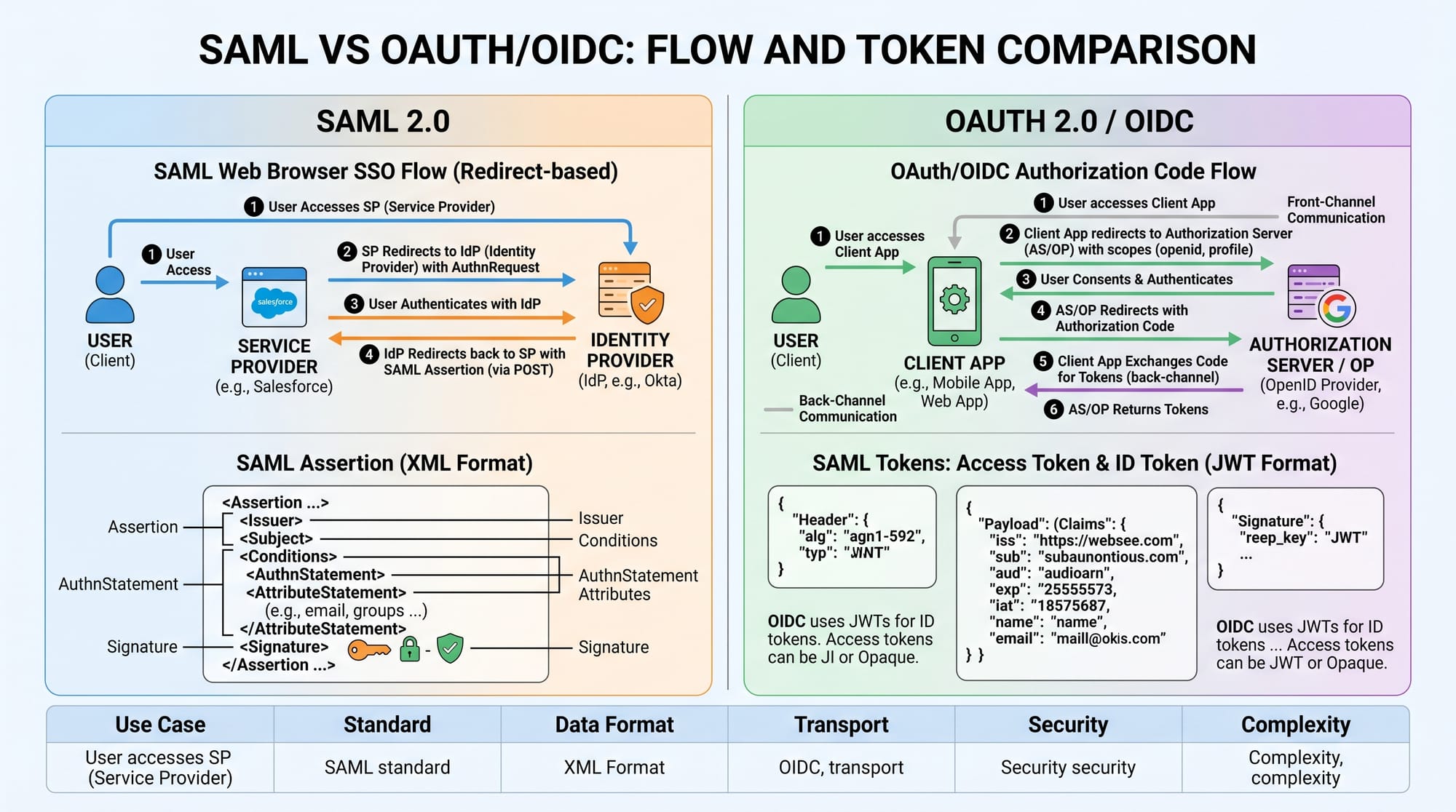
- SAML → XML-based authentication (enterprise SSO)
- OAuth → Token-based authorization (API access)
Practice Exercises
Exercise 1: Build a Simple SAML Login Flow
Problem:
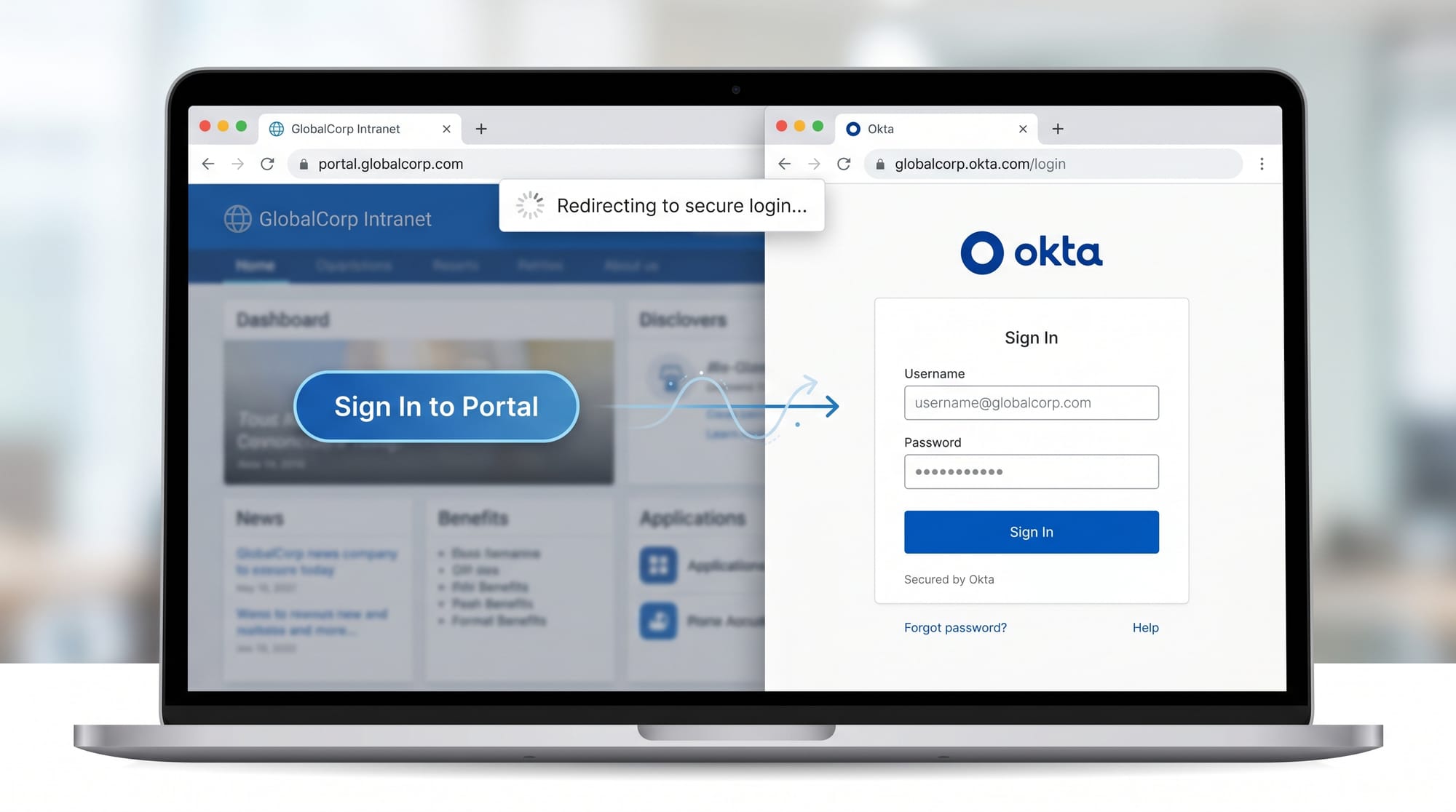
Simulate a login system where a user is redirected to an IdP and returns with a mock SAML assertion.
Solution:
- Create two routes:
/loginand/callback - Redirect user to mock IdP page
- Return encoded SAML response
Exercise 2: Parse SAML Attributes
Problem:
Extract user email and role from a SAML XML response.
Solution:
import xml.etree.ElementTree as ET

def parse_saml(xml_data):
    root = ET.fromstring(xml_data)

    email = root.find(".//Email").text
    role = root.find(".//Role").text

    return {"email": email, "role": role}
Frequently Asked Questions
What is SAML in simple terms?
SAML is a protocol that allows users to log in once and access multiple applications securely. It uses XML-based assertions to share authentication data between systems.
How does SAML SSO work?
SAML SSO works by redirecting users to an Identity Provider for login. After authentication, a signed assertion is sent back to the application to grant access.
What is the difference between SAML vs OAuth?
SAML is used for enterprise authentication and uses XML, while OAuth is used for API authorization and uses JSON-based tokens like JWT.
Is SAML still used in 2026?
Yes, SAML is still widely used in enterprises, especially in universities, banks, and large organizations using legacy identity systems.
Why should Pakistani students learn SAML?
Because many IT companies in Pakistan and abroad require knowledge of enterprise authentication systems for backend, DevOps, and security roles.
Summary & Key Takeaways
- SAML enables secure Single Sign-On (SSO) across enterprise systems
- It uses XML-based assertions to transmit identity information
- Identity Provider (IdP) authenticates users, Service Provider (SP) consumes identity
- SAML is widely used in universities, banks, and enterprises
- Security depends heavily on signature validation and trust setup
- Understanding SAML helps you become a strong backend or DevOps engineer
Next Steps & Related Tutorials
To deepen your understanding, explore these tutorials on theiqra.edu.pk:
- Learn how authentication systems work in the Keycloak Tutorial
- Understand modern API security in API Authentication Basics
- Compare modern identity systems in OAuth 2.0 vs SAML deep dive (coming soon)
- Build real-world login systems in Backend Authentication with Node.js
If you want, I can also convert this into:
- SEO blog format for WordPress
- Slides for teaching
- Or a coding project (SAML SSO demo app in Node.js or Java)
Test Your Python Knowledge!
Finished reading? Take a quick quiz to see how much you've learned from this tutorial.