Next js App Router SSR SSG ISR & API Routes
Introduction
The Next.js App Router is the modern routing system introduced in Next.js 13+ that revolutionizes how we build full-stack React applications. It enables powerful features like Server-Side Rendering (SSR), Static Site Generation (SSG), Incremental Static Regeneration (ISR), and built-in API Routes (now called Route Handlers).
For Pakistani students aiming to build scalable, production-ready web apps—whether for freelancing, startups in Lahore, or university projects in Islamabad—understanding these concepts is essential. Companies today expect developers to optimize performance, SEO, and user experience. The App Router helps you achieve all three.
In this tutorial, you will learn:
- How the Next.js App Router works
- Differences between SSR, SSG, and ISR
- How to build API routes using Route Handlers
- Real-world examples relevant to Pakistan (e.g., e-commerce in PKR, university portals)
Prerequisites
Before starting this tutorial, you should have:
- Basic knowledge of JavaScript (ES6+)
- Understanding of React (components, props, hooks)
- Familiarity with Node.js basics
- Installed:
- Node.js (v18+ recommended)
- A code editor like VS Code
- Basic understanding of:
- Fetch API
- JSON data
Core Concepts & Explanation
Server Components vs Client Components
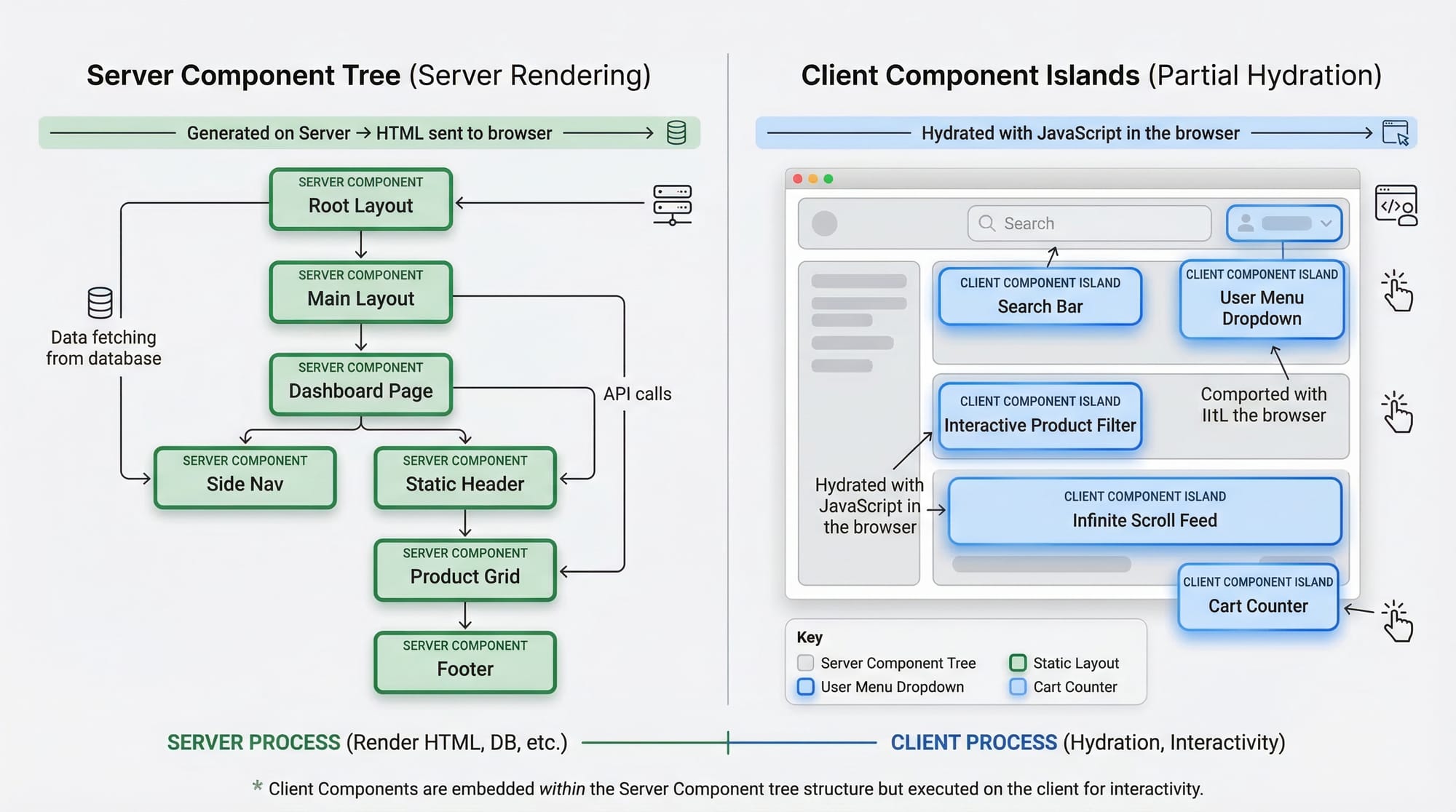
In the App Router, components are Server Components by default.
Server Components
- Run on the server
- No browser JavaScript sent
- Better performance and SEO
export default function Page() {
  return <h1>Hello from Server</h1>;
}
Explanation:
export default function Page()→ Defines a route page- No
"use client"→ Means it's a Server Component - Runs on server → Faster load for users in Pakistan with slower internet
Client Components
Use when you need interactivity:
"use client";

import { useState } from "react";

export default function Counter() {
  const [count, setCount] = useState(0);

  return (
    <button onClick={() => setCount(count + 1)}>
      {count}
    </button>
  );
}
Explanation:
"use client"→ Marks component as client-sideuseState→ React hook for state- Button updates without page reload
Data Fetching: SSR, SSG, and ISR
Next.js App Router simplifies data fetching.
SSR (Server-Side Rendering)
Data is fetched on every request.
async function getData() {
  const res = await fetch("https://api.example.com/products", {
    cache: "no-store",
  });
  return res.json();
}
Explanation:
fetch()→ Calls APIcache: "no-store"→ Disables caching → SSR behavior- Fresh data every time → Good for dashboards (e.g., stock prices in PKR)
SSG (Static Site Generation)
Data is fetched at build time.
async function getData() {
  const res = await fetch("https://api.example.com/products", {
    cache: "force-cache",
  });
  return res.json();
}
Explanation:
force-cache→ Enables static caching- Page generated once → super fast
- Ideal for blogs or course pages
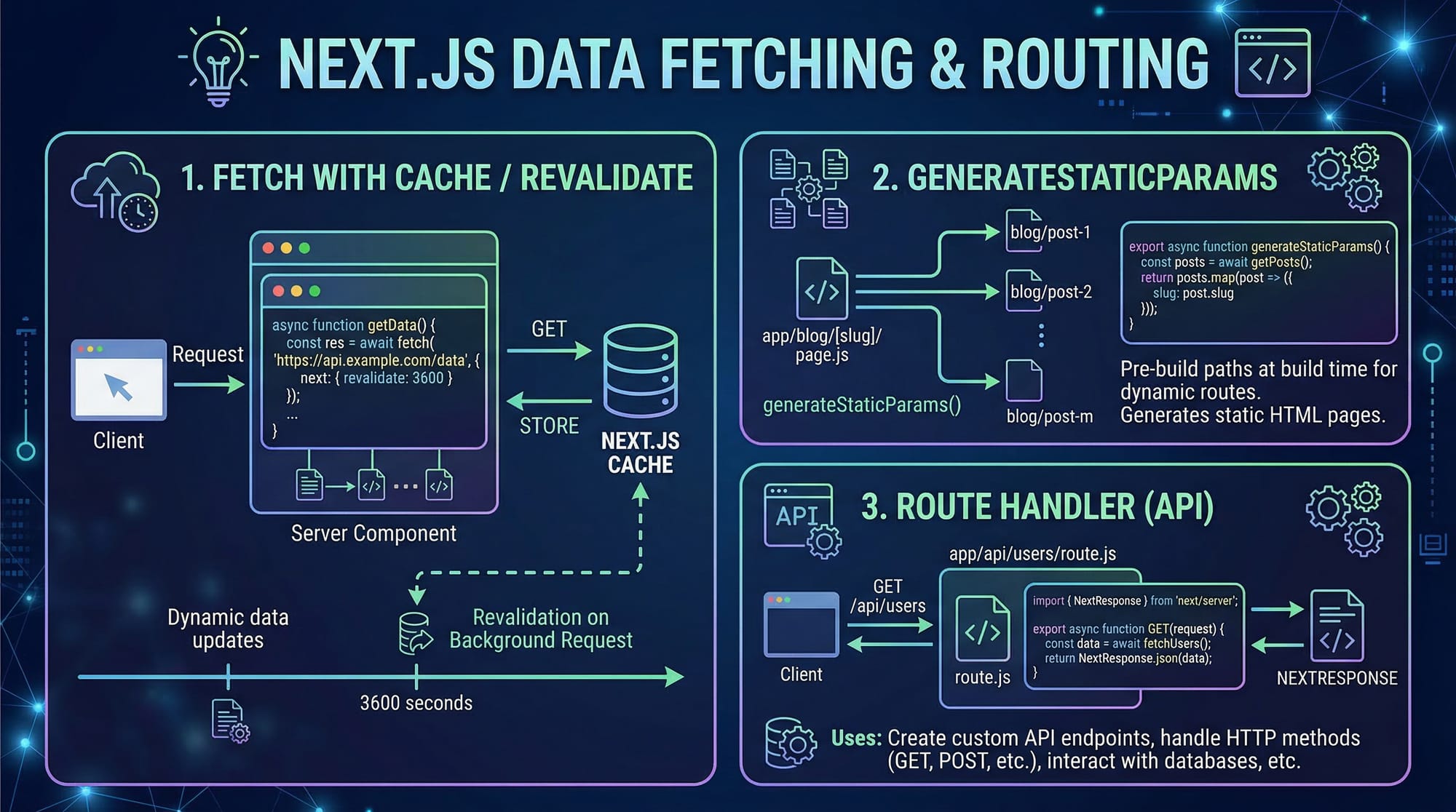
ISR (Incremental Static Regeneration)
Rebuilds page after a set time.
async function getData() {
  const res = await fetch("https://api.example.com/products", {
    next: { revalidate: 60 },
  });
  return res.json();
}
Explanation:
revalidate: 60→ Updates every 60 seconds- Combines speed + freshness
- Perfect for e-commerce (e.g., price updates in Karachi stores)
Dynamic Routes & generateStaticParams
Used for dynamic pages like /products/[id].
export async function generateStaticParams() {
  return [{ id: "1" }, { id: "2" }];
}
Explanation:
- Pre-generates pages at build time
- Improves performance for popular products
API Routes (Route Handlers)
App Router replaces old API routes with Route Handlers.
// app/api/products/route.js
export async function GET() {
  return Response.json({ message: "Hello from API" });
}
Explanation:
GET()→ Handles GET requestResponse.json()→ Sends JSON response- Located inside
app/api/
Practical Code Examples
Example 1: Product Listing Page (SSR)
Let’s build a dynamic product page for a Pakistani store.
// app/products/page.jsx
async function getProducts() {
  const res = await fetch("https://fakestoreapi.com/products", {
    cache: "no-store",
  });
  return res.json();
}

export default async function ProductsPage() {
  const products = await getProducts();

  return (
    <div>
      <h1>Products (PKR)</h1>
      {products.map((product) => (
        <div key={product.id}>
          <h2>{product.title}</h2>
          <p>PKR {product.price * 280}</p>
        </div>
      ))}
    </div>
  );
}
Line-by-line Explanation:
getProducts()→ Fetches product datacache: "no-store"→ Enables SSRProductsPage()→ Async componentproducts.map()→ Loops through productsproduct.price * 280→ Converts USD to PKR
Example 2: Real-World Application (University API)
Build an API for student data.
// app/api/students/route.js
export async function GET() {
  const students = [
    { name: "Ahmad", city: "Lahore" },
    { name: "Fatima", city: "Karachi" },
  ];

  return Response.json(students);
}
Explanation:
GET()→ Handles API requeststudents→ Static dataResponse.json()→ Returns JSON
Now fetch it:
async function getStudents() {
  const res = await fetch("http://localhost:3000/api/students");
  return res.json();
}
Explanation:
- Calls local API
- Returns student data
- Can be used in dashboard UI
Common Mistakes & How to Avoid Them
Mistake 1: Using Client Components Everywhere
Problem: Overusing "use client" slows performance.
❌ Wrong:
"use client";
export default function Page() { return <h1>Hello</h1>; }
✅ Correct:
export default function Page() { return <h1>Hello</h1>; }
Fix: Only use client components when needed (forms, buttons).
Mistake 2: Incorrect Caching Strategy
Problem: Using wrong cache type.
❌ Wrong:
fetch(url, { cache: "force-cache" });
(for dynamic data)
✅ Correct:
fetch(url, { cache: "no-store" });
Fix:
- SSR →
no-store - SSG →
force-cache - ISR →
revalidate
Practice Exercises
Exercise 1: Blog Page with SSG
Problem: Create a static blog page.
Solution:
async function getPosts() {
  const res = await fetch("https://jsonplaceholder.typicode.com/posts", {
    cache: "force-cache",
  });
  return res.json();
}
Explanation:
- Uses SSG
- Loads fast
- Ideal for blogs
Exercise 2: API Route for Orders
Problem: Create API returning orders in PKR.
Solution:
export async function GET() {
  return Response.json([
    { orderId: 1, amount: "PKR 5000" },
  ]);
}
Explanation:
- Simple API
- Returns JSON
- Can be used in admin panel
Frequently Asked Questions
What is Next.js App Router?
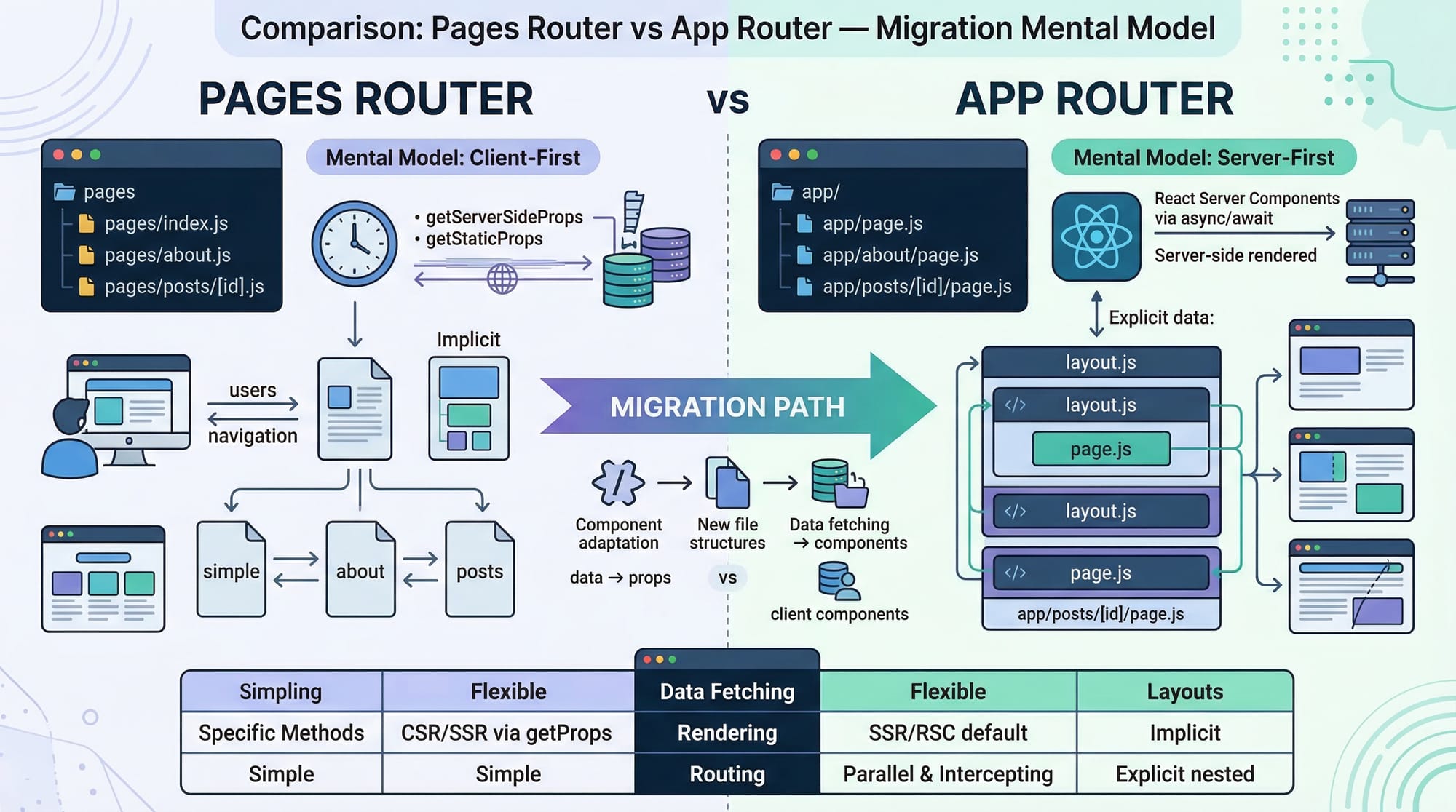
It is the new routing system in Next.js that uses the app/ directory and supports advanced features like Server Components, SSR, and API routes.
How do I use SSR in Next.js?
Use fetch() with cache: "no-store" inside a Server Component to fetch fresh data on every request.
What is ISR in Next.js?
ISR allows pages to update after a certain time using revalidate, combining speed and freshness.
How do I create API routes in Next.js App Router?
Create a route.js file inside app/api/ and export functions like GET, POST.
When should I use Client Components?
Use them only when you need interactivity like forms, state, or event handlers.
Summary & Key Takeaways
- Next.js App Router simplifies full-stack development
- Server Components improve performance and SEO
- SSR, SSG, and ISR control how data is fetched
- API Routes (Route Handlers) replace traditional backend APIs
- Choosing the right rendering strategy is critical
- Avoid overusing Client Components
Next Steps & Related Tutorials
To continue learning, explore these tutorials on theiqra.edu.pk:
- Learn the basics in our Next.js Tutorial for Beginners
- Understand UI logic with React State Management
- Build full-stack apps with Firebase Integration Guide
- Explore databases with MongoDB Tutorial for Beginners
These will help you become a complete full-stack developer ready for freelancing or software jobs in Pakistan 🚀
Test Your Python Knowledge!
Finished reading? Take a quick quiz to see how much you've learned from this tutorial.