Next js Tutorial for Beginners 2026 React Framework
Introduction
Welcome to this Next.js Tutorial for Beginners 2026: React Framework — a complete guide designed especially for Pakistani students who want to build modern, fast, and scalable web applications.
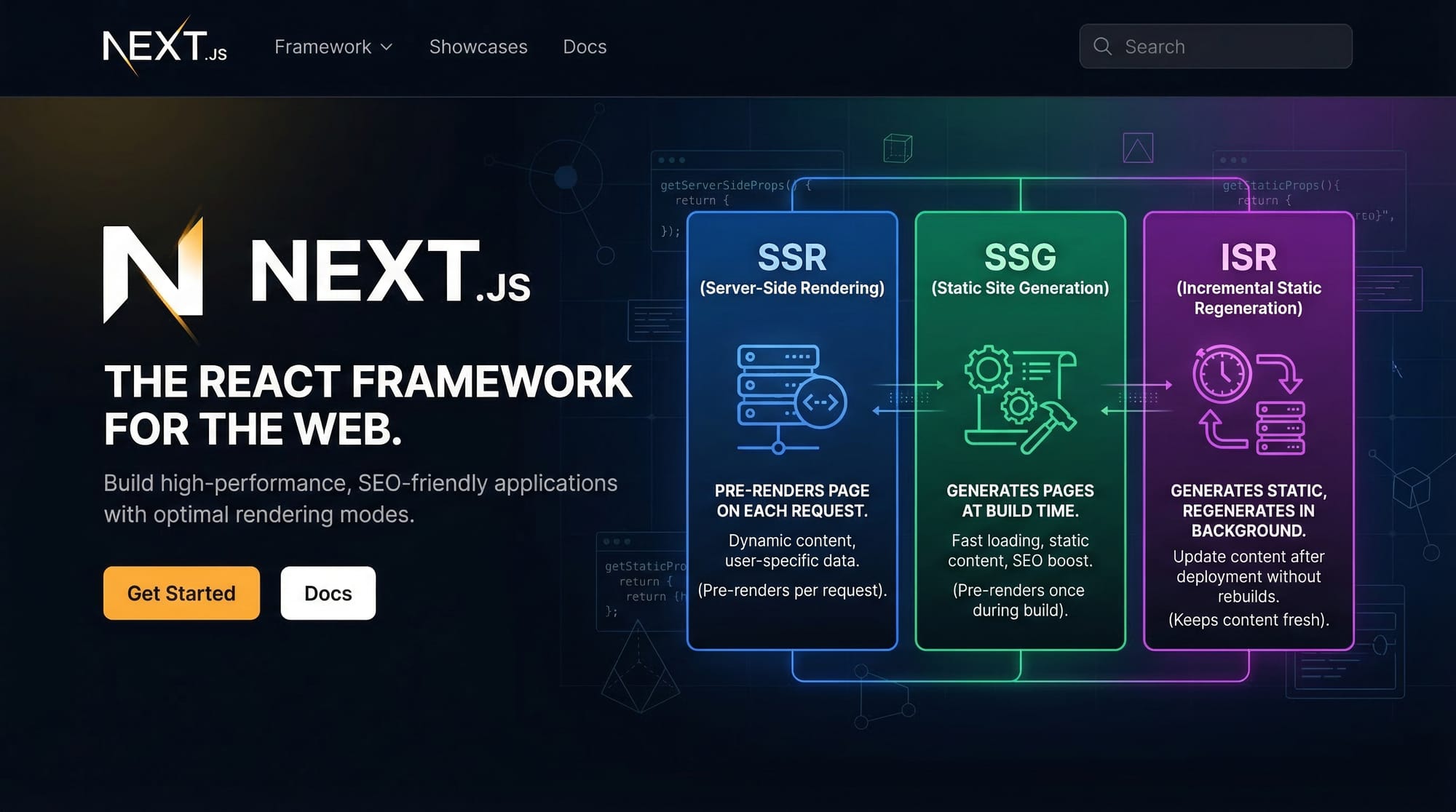
Next.js is a powerful React framework developed by Vercel that enables developers to create production-ready applications with features like server-side rendering (SSR), static site generation (SSG), and API routes — all out of the box.
If you’re already familiar with React and want to level up your skills, this tutorial will help you learn Next.js step by step using real-world examples relevant to Pakistan — from building student dashboards to small business websites in cities like Lahore, Karachi, and Islamabad.
Why should Pakistani students learn Next.js in 2026?
- High demand in freelancing platforms like Fiverr and Upwork
- Used by startups and tech companies worldwide
- Helps build SEO-friendly websites (important for local businesses)
- Supports full-stack development with built-in APIs
Prerequisites
Before starting this next js for beginners 2026 tutorial, you should have:
- Basic knowledge of HTML, CSS
- Intermediate understanding of JavaScript (ES6+)
- Familiarity with React (components, props, state, hooks)
- Node.js installed on your system
- A code editor like VS Code
Optional but helpful:
- Basic Git knowledge
- Understanding of REST APIs
Core Concepts & Explanation
App Router & File-Based Routing
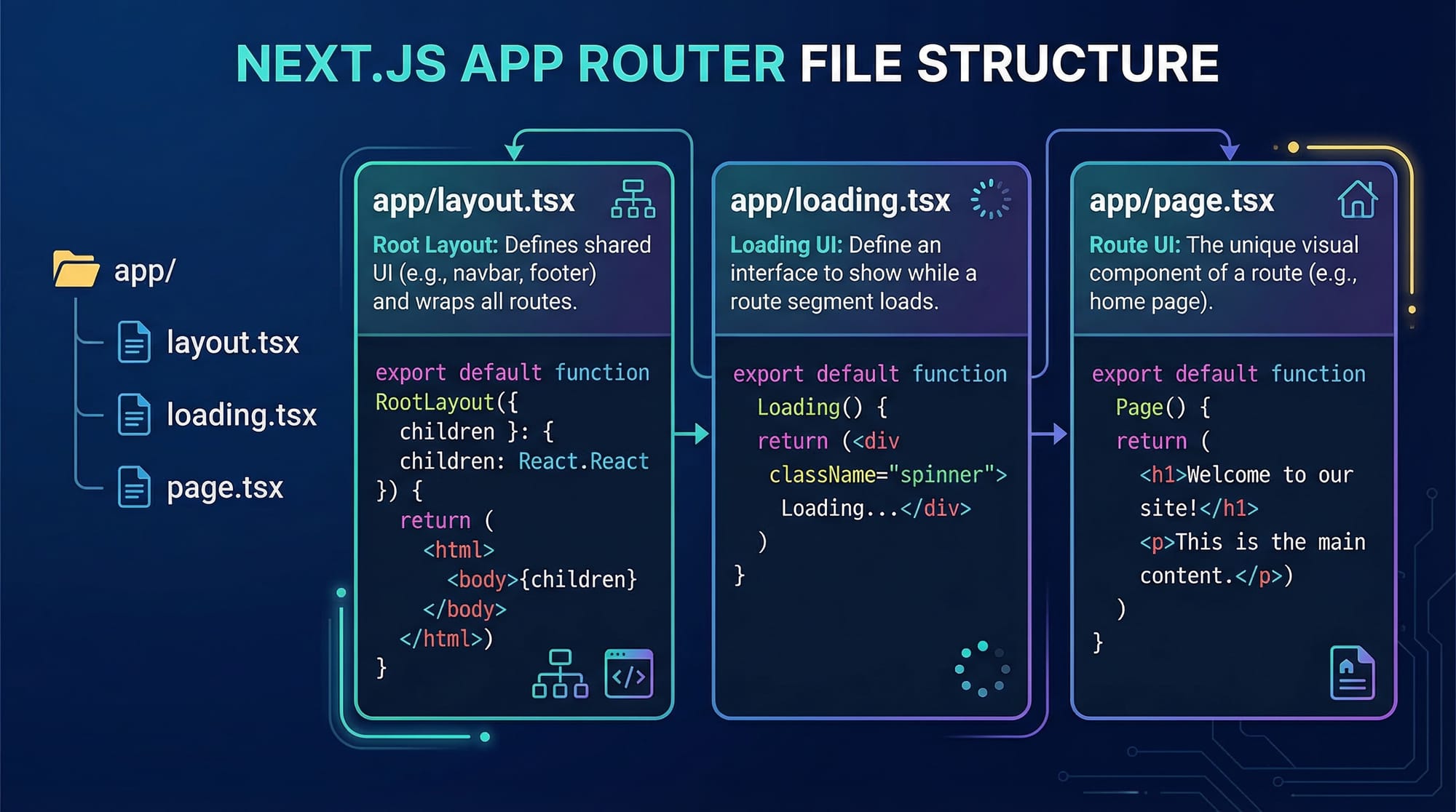
Next.js uses a file-based routing system, which means your folder structure defines your routes.
For example:
app/
  page.tsx        → "/"
  about/page.tsx  → "/about"
This makes routing simple and intuitive compared to traditional React Router.
Example:
// app/about/page.tsx
export default function About() {
  return <h1>About Page</h1>;
}
Explanation:
export default function About()→ Defines a React componentreturn <h1>→ Renders heading content- File location determines URL
/about
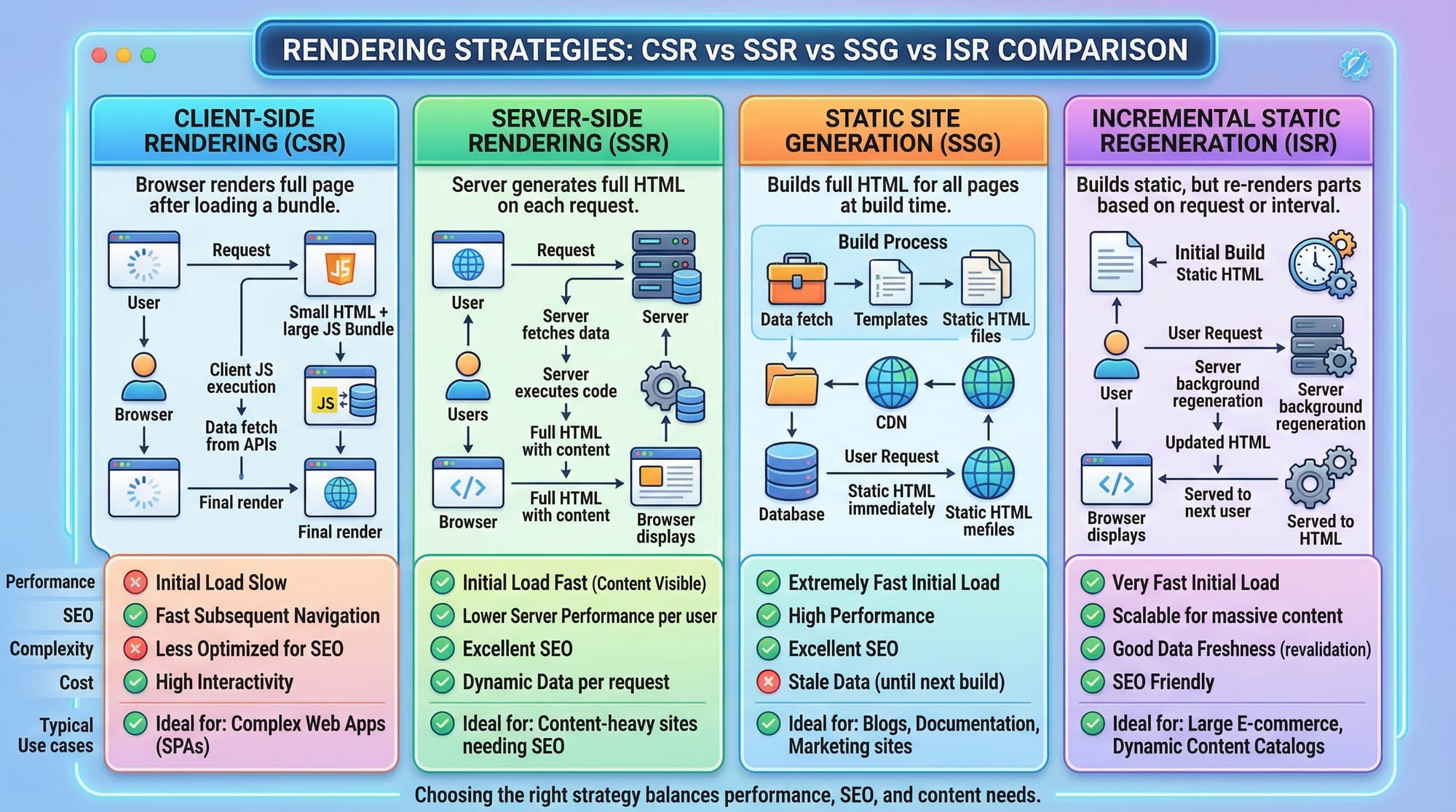
Rendering Strategies: CSR vs SSR vs SSG vs ISR
Next.js supports multiple rendering strategies:
- CSR (Client-Side Rendering) → React default
- SSR (Server-Side Rendering) → Page rendered on each request
- SSG (Static Site Generation) → Pre-built at build time
- ISR (Incremental Static Regeneration) → Updates static pages dynamically
Example of SSR:
export default async function Page() {
  const data = await fetch("https://api.example.com/products");
  const products = await data.json();

  return <div>{products.length} items</div>;
}
Explanation:
async function→ Enables server-side fetchingawait fetch()→ Fetches data before rendering- Runs on server → improves SEO and performance
Practical Code Examples
Example 1: Simple Blog Page
Let’s create a blog page for a student named Ahmad.
// app/blog/page.tsx
export default function Blog() {
  const posts = [
    { id: 1, title: "Learn Next.js in Lahore" },
    { id: 2, title: "React Jobs in Karachi" }
  ];

  return (
    <div>
      <h1>Blog Posts</h1>
      {posts.map((post) => (
        <p key={post.id}>{post.title}</p>
      ))}
    </div>
  );
}
Line-by-line explanation:
const posts = [...]→ Array of blog posts{posts.map(...)}→ Loop through postskey={post.id}→ Required for React list rendering{post.title}→ Display each post title
Example 2: Real-World Application — Student Fee Dashboard (Pakistan Context)
Let’s build a dashboard for a student named Fatima showing fees in PKR.
// app/dashboard/page.tsx
export default async function Dashboard() {
  const student = {
    name: "Fatima",
    city: "Lahore",
    fee: 25000
  };

  return (
    <div>
      <h1>Student Dashboard</h1>
      <p>Name: {student.name}</p>
      <p>City: {student.city}</p>
      <p>Monthly Fee: PKR {student.fee}</p>
    </div>
  );
}
Explanation:
student object→ Stores data{student.name}→ Dynamic renderingPKR {student.fee}→ Pakistani currency display
This type of app is useful for:
- Schools in Islamabad
- Coaching centers in Karachi
- Freelance admin dashboards
Common Mistakes & How to Avoid Them
Mistake 1: Using Client-Side Code in Server Components
By default, Next.js components are server components.
❌ Wrong:
useState(); // error
✅ Fix:
"use client";
import { useState } from "react";
Explanation:
"use client"→ Makes component run in browser- Required for hooks like
useState,useEffect
Mistake 2: Incorrect File Structure
Many beginners place files incorrectly.
❌ Wrong:
pages/about.js (old structure)
✅ Correct:
app/about/page.tsx
Explanation:
- Next.js 2026 uses App Router
page.tsxis required for route rendering
Practice Exercises
Exercise 1: Create Profile Page
Problem:
Create a profile page for Ali showing name and city.
Solution:
export default function Profile() {
  return (
    <div>
      <h1>Ali</h1>
      <p>City: Karachi</p>
    </div>
  );
}
Explanation:
- Simple component rendering static data
- Demonstrates JSX usage
Exercise 2: Product List with Prices
Problem:
Display 3 products with prices in PKR.
Solution:
export default function Products() {
  const items = [
    { name: "Laptop", price: 120000 },
    { name: "Mobile", price: 50000 },
    { name: "Headphones", price: 5000 }
  ];

  return (
    <div>
      {items.map((item, index) => (
        <p key={index}>
          {item.name} - PKR {item.price}
        </p>
      ))}
    </div>
  );
}
Explanation:
items array→ Product data.map()→ Loop renderingkey={index}→ Unique identifier
Frequently Asked Questions
What is Next.js used for?
Next.js is used to build fast, SEO-friendly web applications using React. It supports server-side rendering, static generation, and full-stack features.
How do I install Next.js?
You can install it using npx create-next-app@latest. It sets up everything automatically, including routing and configuration.
Is Next.js better than React?
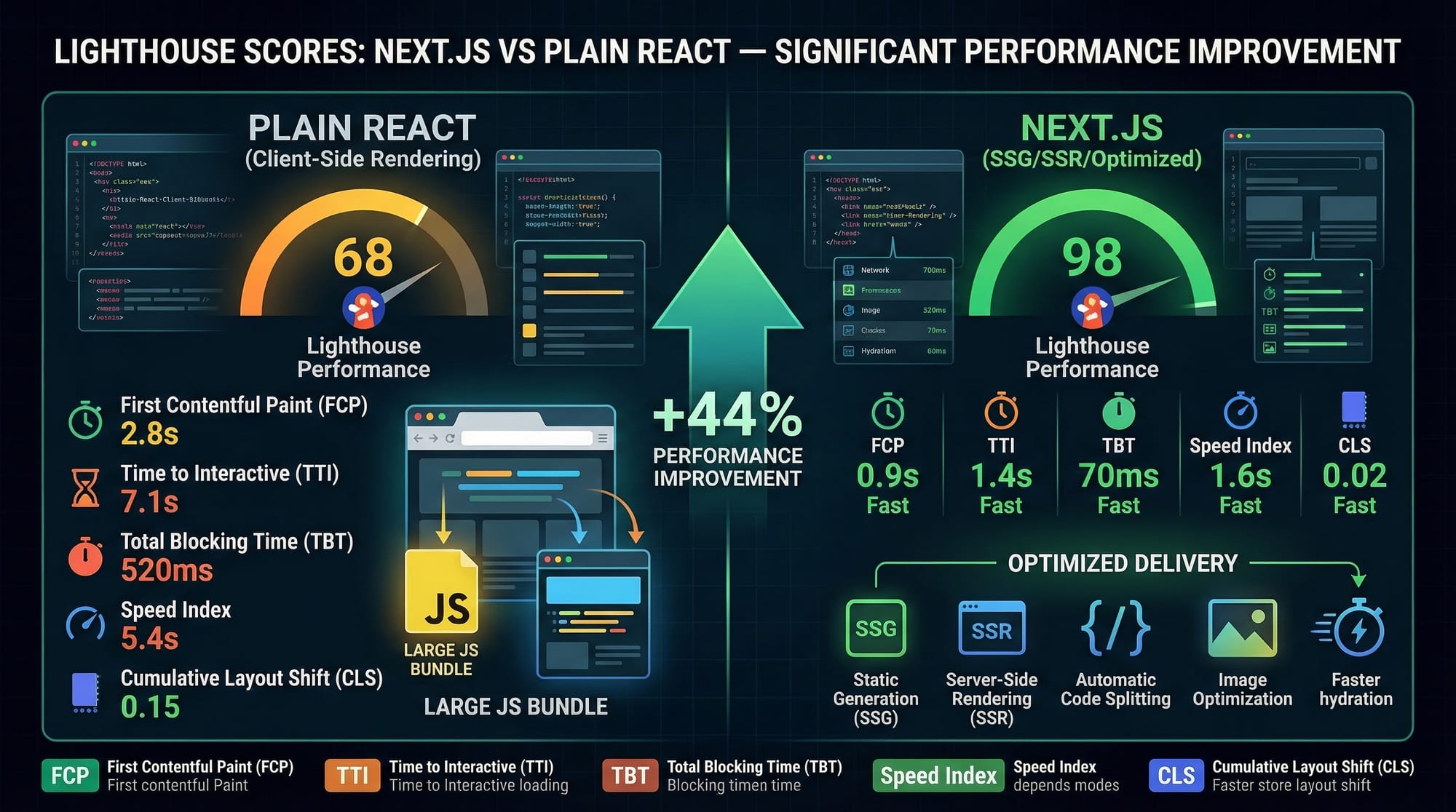
Next.js is built on top of React and adds powerful features like routing and SSR. For large applications, it is often better than plain React.
Can I use Next.js for freelancing in Pakistan?
Yes, Next.js is highly in demand on platforms like Fiverr and Upwork. Pakistani developers use it to build business websites and dashboards.
Do I need backend knowledge for Next.js?
Not necessarily. Next.js provides API routes, so you can build backend functionality without learning a separate backend framework.
Summary & Key Takeaways
- Next.js is a powerful React framework for modern web development
- It supports SSR, SSG, and ISR for better performance and SEO
- File-based routing makes development simple
- App Router is the new standard in 2026
- Ideal for Pakistani students targeting freelancing and jobs
- Enables full-stack development with built-in APIs
Next Steps & Related Tutorials
To continue your learning journey, check out these tutorials on theiqra.edu.pk:
- Learn the basics in React.js Introduction
- Master state management with React Hooks
- Build APIs with Node.js Backend Tutorial
- Explore databases with MongoDB Beginner Guide
By combining these with this nextjs tutorial, you’ll be ready to build real-world applications and start your development career in Pakistan 🚀
Test Your Python Knowledge!
Finished reading? Take a quick quiz to see how much you've learned from this tutorial.