Vue js Tutorial for Beginners 2026 Complete Guide
Introduction
Vue.js Tutorial for Beginners 2026: Complete Guide is a step-by-step learning resource designed to help students understand and build modern web applications using Vue.js. Vue.js is a progressive JavaScript framework that makes it easy to create interactive user interfaces with minimal complexity.
For Pakistani students, learning Vue.js is a valuable skill in today’s tech-driven job market. Whether you’re in Lahore, Karachi, or Islamabad, companies are increasingly looking for frontend developers who can build fast and dynamic web apps. Vue.js is beginner-friendly, lightweight, and widely used in freelancing and software houses across Pakistan.
If you want to start your journey in web development or improve your frontend skills, this guide will help you learn Vue.js from scratch in a simple and practical way.
Prerequisites
Before starting this vue.js tutorial, you should have basic knowledge of:
- HTML (tags, forms, structure)
- CSS (styling, layouts)
- JavaScript fundamentals (variables, functions, arrays, objects)
- Basic understanding of how websites work
You don’t need to be an expert. Even if you’re a beginner student in Pakistan learning web development, this guide is designed for you.
Core Concepts & Explanation
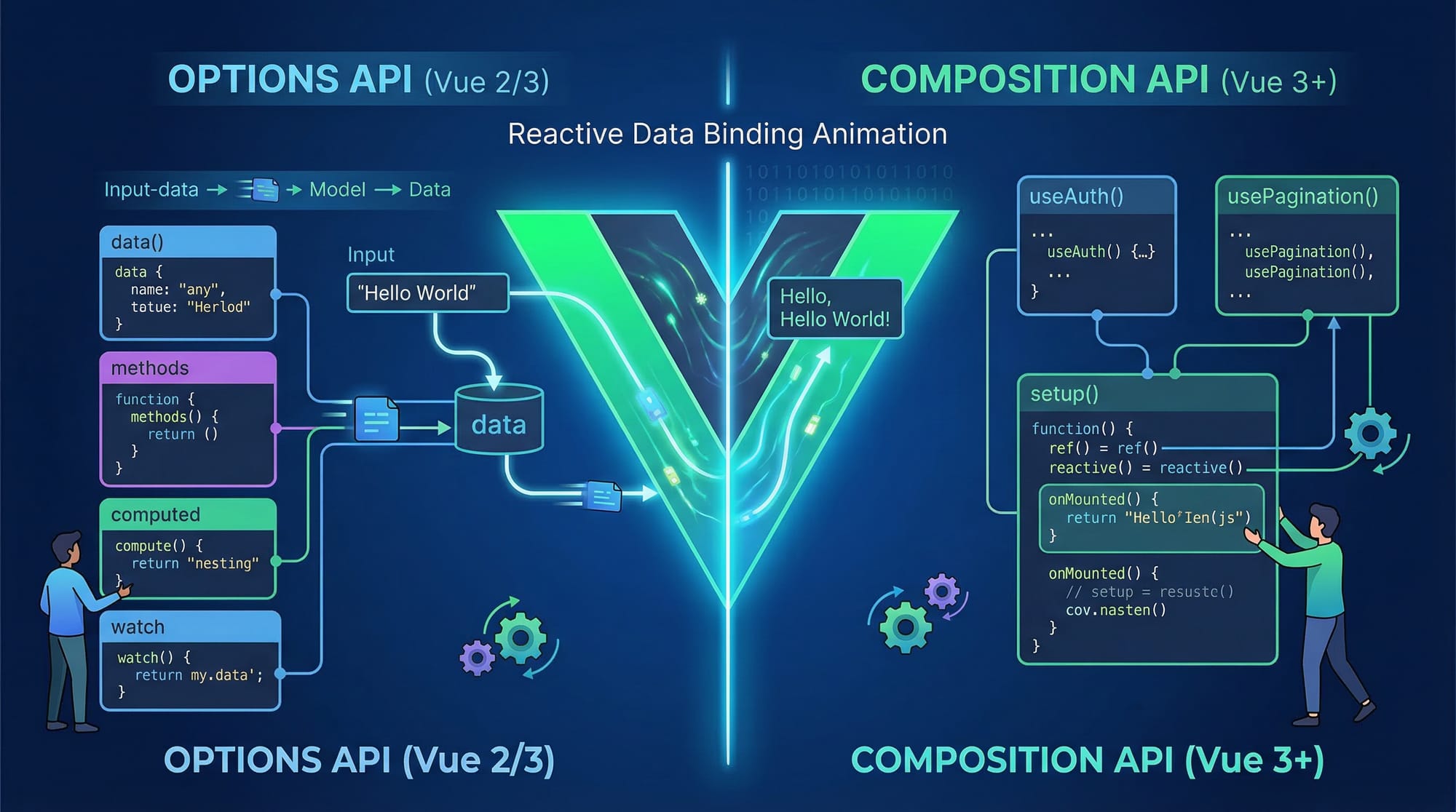
Reactive Data Binding
One of the most powerful features of Vue.js is reactive data binding. This means when your data changes, the UI updates automatically.
Example:
<div id="app">
  <p>{{ message }}</p>
</div>

<script>
const app = Vue.createApp({
  data() {
    return {
      message: "Hello Ahmad!"
    }
  }
})

app.mount("#app")
</script>
Explanation line-by-line:
<div id="app">→ Root element where Vue app will mount{{ message }}→ Vue template syntax to display dataVue.createApp({...})→ Creates a new Vue applicationdata()→ Function that returns reactive datamessage: "Hello Ahmad!"→ Data propertyapp.mount("#app")→ Attaches Vue app to HTML
If you change message, the UI updates automatically without reloading.
Components & Reusability
Vue.js allows you to break your UI into reusable components.
Example:
const app = Vue.createApp({})

app.component("user-card", {
  template: `<h3>Welcome, Fatima!</h3>`
})

app.mount("#app")
Explanation:
app.component()→ Registers a reusable component"user-card"→ Component nametemplate→ HTML structure of component
You can reuse <user-card></user-card> anywhere in your app.

Vue 3 Composition API
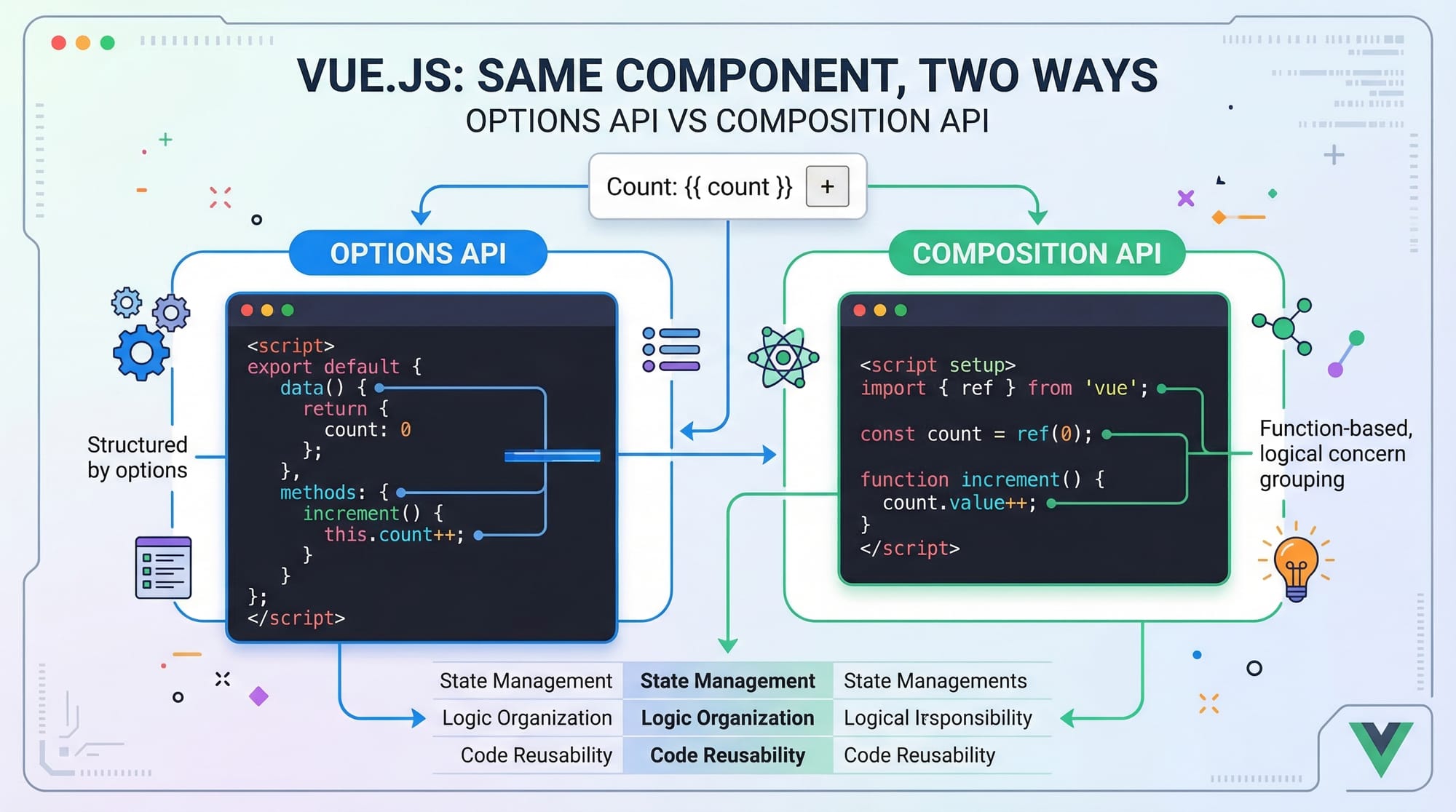
Vue 3 introduces the Composition API, which is more flexible than the old Options API.
Example:
<script setup>
import { ref } from "vue"

const count = ref(0)

function increment() {
  count.value++
}
</script>

<template>
  <button @click="increment">Clicked {{ count }} times</button>
</template>
Explanation:
ref(0)→ Creates reactive variablecount.value→ Access value of refincrement()→ Function to update state@click="increment"→ Event listener
Practical Code Examples
Example 1: Counter App
<script setup>
import { ref } from "vue"

const count = ref(0)

function increase() {
  count.value++
}
</script>

<template>
  <div>
    <h2>Counter: {{ count }}</h2>
    <button @click="increase">Increase</button>
  </div>
</template>
Explanation line-by-line:
import { ref }→ Import reactive functionconst count = ref(0)→ Initialize counterincrease()→ Function to update counter<h2>Counter: {{ count }}</h2>→ Display value@click="increase"→ Button click event
Example 2: Real-World Application (Student Fee Tracker - PKR)
<script setup>
import { ref, computed } from "vue"

const studentName = ref("Ali")
const feePaid = ref(5000)
const totalFee = ref(20000)

const remainingFee = computed(() => {
  return totalFee.value - feePaid.value
})
</script>

<template>
  <div>
    <h2>{{ studentName }}</h2>
    <p>Total Fee: PKR {{ totalFee }}</p>
    <p>Paid: PKR {{ feePaid }}</p>
    <p>Remaining: PKR {{ remainingFee }}</p>
  </div>
</template>
Explanation:
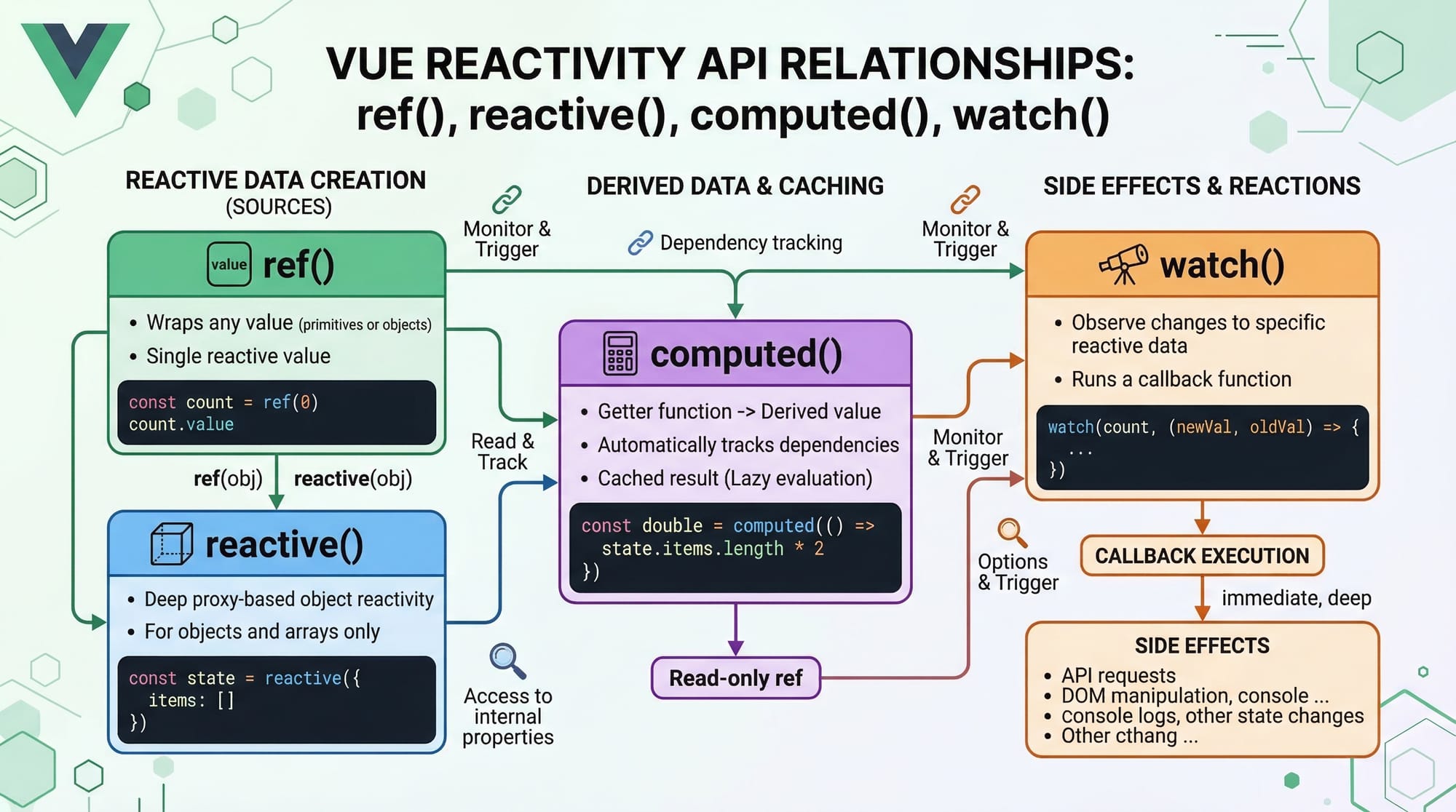
ref()→ Stores reactive datacomputed()→ Calculates derived valueremainingFee→ Automatically updates when values change- Displays fee in PKR (useful for Pakistani students)
Common Mistakes & How to Avoid Them
Mistake 1: Forgetting .value in ref
❌ Wrong:
count++
✅ Correct:
count.value++
Explanation:ref() stores value inside .value. Forgetting this causes bugs.
Mistake 2: Mixing Options API with Composition API incorrectly
❌ Wrong:
data() {
  return { count: 0 }
}
const count = ref(0)
✅ Correct: Use one approach consistently.
const count = ref(0)
Explanation:
Mixing both APIs can confuse beginners. Stick to Composition API in Vue 3.
Practice Exercises
Exercise 1: Simple Greeting App
Problem:
Create a Vue app that shows “Hello Fatima” and updates when a button is clicked.
Solution:
<script setup>
import { ref } from "vue"

const name = ref("Fatima")

function changeName() {
  name.value = "Ayesha"
}
</script>

<template>
  <div>
    <h2>Hello {{ name }}</h2>
    <button @click="changeName">Change Name</button>
  </div>
</template>
Explanation:
name→ Reactive variablechangeName()→ Updates value- UI updates automatically
Exercise 2: Marks Calculator
Problem:
Calculate total marks of a student.
Solution:
<script setup>
import { ref, computed } from "vue"

const math = ref(80)
const english = ref(75)
const science = ref(85)

const total = computed(() => {
  return math.value + english.value + science.value
})
</script>

<template>
  <div>
    <p>Total Marks: {{ total }}</p>
  </div>
</template>
Explanation:
computed()→ Calculates total- Automatically updates when marks change
Frequently Asked Questions
What is Vue.js?
Vue.js is a JavaScript framework used to build interactive web interfaces. It is lightweight, easy to learn, and perfect for beginners.
How do I install Vue 3?
You can install Vue using npm (npm create vue@latest) or use CDN for simple projects. Beginners can start with CDN for quick learning.
Is Vue.js good for beginners in 2026?
Yes, Vue.js remains one of the easiest frameworks to learn. Its simple syntax and clear structure make it ideal for students.
What is the difference between ref() and reactive()?
ref() is used for primitive values like numbers and strings, while reactive() is used for objects and arrays.
Can I get a job in Pakistan after learning Vue.js?
Yes, many software houses and freelancing platforms require Vue.js developers. Skills in Vue.js can help you earn in PKR or even dollars through freelancing.
Summary & Key Takeaways
- Vue.js is a beginner-friendly JavaScript framework
- Reactive data binding makes UI updates automatic
- Vue 3 Composition API is modern and powerful
- Components help build reusable code
- Practical projects improve understanding
- Vue.js skills are valuable in Pakistan’s job market
Next Steps & Related Tutorials
To continue your learning journey, explore these tutorials on theiqra.edu.pk:
- Learn frontend basics with React.js Introduction
- Compare frameworks with Angular Tutorial for Beginners
- Build backend skills with Node.js Complete Guide
- Understand databases with MongoDB Tutorial 2026
Keep practicing, build small projects, and stay consistent. With dedication, you can become a skilled Vue.js developer in 2026 🚀
Test Your Python Knowledge!
Finished reading? Take a quick quiz to see how much you've learned from this tutorial.