Vue js Composition API Pinia & Vue Router Guide

Introduction
The Vue.js ecosystem has evolved significantly, and modern development now revolves around three powerful tools: Vue Composition API, Pinia (state management), and Vue Router. Together, they help you build scalable, maintainable, and professional web applications.
In this guide — "Vue.js Composition API, Pinia & Vue Router Guide" — you’ll learn how to structure your Vue apps using the latest best practices.
For Pakistani students in cities like Lahore, Karachi, and Islamabad, mastering these tools can open doors to freelancing, internships, and remote jobs. Whether you're building a university project or a real-world product like a student portal or e-commerce app in PKR, these skills are essential.
Prerequisites
Before starting, you should have:
- Basic understanding of HTML, CSS, and JavaScript
- Familiarity with Vue.js basics (components, directives)
- Node.js and npm installed
- Basic knowledge of ES6 (arrow functions, destructuring)
Core Concepts & Explanation
Understanding the Vue Composition API
The Composition API allows you to organize logic by feature instead of by option (data, methods, etc.).
Instead of writing everything inside data, methods, and computed, you use functions like:
ref()→ for reactive variablesreactive()→ for objectscomputed()→ for derived statewatch()→ for side effects
Example:
import { ref } from 'vue'

export default {
  setup() {
    const count = ref(0)

    function increment() {
      count.value++
    }

    return { count, increment }
  }
}
Explanation:
import { ref }→ imports reactive functionconst count = ref(0)→ creates reactive variablecount.value→ access/update valuesetup()→ main entry point for Composition APIreturn→ exposes variables to template
Pinia State Management (Modern Vue Store)
Pinia is the official state management library for Vue (replacing Vuex).
It helps manage shared data across components — for example, a logged-in user or shopping cart.
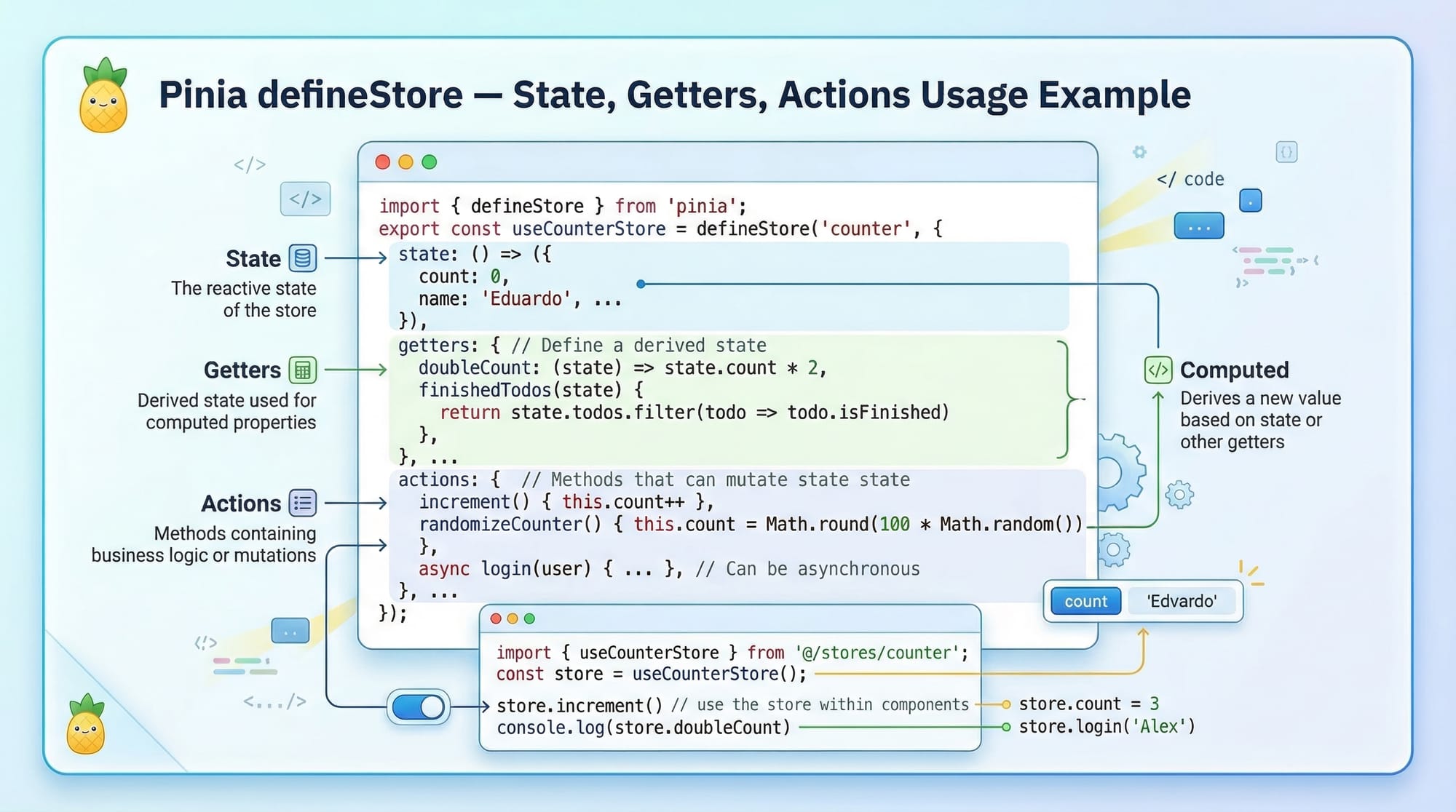
Example:
import { defineStore } from 'pinia'

export const useUserStore = defineStore('user', {
  state: () => ({
    name: 'Ahmad',
    balance: 5000
  }),
  getters: {
    formattedBalance: (state) => `PKR ${state.balance}`
  },
  actions: {
    deposit(amount) {
      this.balance += amount
    }
  }
})
Explanation:
defineStore('user')→ creates a store named "user"state→ holds data (name, balance)getters→ computed valuesactions→ methods to modify statedeposit()→ updates balance
Vue Router for Navigation
Vue Router allows navigation between pages (SPA behavior).
Example:
import { createRouter, createWebHistory } from 'vue-router'
import Home from './views/Home.vue'
import About from './views/About.vue'

const routes = [
  { path: '/', component: Home },
  { path: '/about', component: About }
]

const router = createRouter({
  history: createWebHistory(),
  routes
})

export default router
Explanation:
createRouter()→ initializes routercreateWebHistory()→ enables clean URLsroutes→ defines pages/about→ maps to About component
Practical Code Examples
Example 1: Counter App with Composition API
<script setup>
import { ref } from 'vue'

const count = ref(0)

function increment() {
  count.value++
}
</script>

<template>
  <div>
    <h2>Counter: {{ count }}</h2>
    <button @click="increment">Increase</button>
  </div>
</template>
Explanation:
<script setup>→ simplified Composition API syntaxref(0)→ creates reactive countincrement()→ updates value{{ count }}→ displays value@click→ triggers function
Example 2: Real-World Application (Student Wallet System)
Let’s build a simple wallet system for a student like Fatima in Lahore.
// stores/wallet.js
import { defineStore } from 'pinia'

export const useWalletStore = defineStore('wallet', {
  state: () => ({
    balance: 10000
  }),
  actions: {
    withdraw(amount) {
      if (amount <= this.balance) {
        this.balance -= amount
      }
    }
  }
})
<script setup>
import { useWalletStore } from '../stores/wallet'

const wallet = useWalletStore()

function withdrawMoney() {
  wallet.withdraw(500)
}
</script>

<template>
  <div>
    <h2>Balance: PKR {{ wallet.balance }}</h2>
    <button @click="withdrawMoney">Withdraw 500</button>
  </div>
</template>
Explanation:
useWalletStore()→ accesses storewallet.balance→ reactive statewithdraw()→ action method- Button triggers withdrawal

Common Mistakes & How to Avoid Them
Mistake 1: Forgetting .value in ref()
❌ Wrong:
count++
✅ Correct:
count.value++
Why?ref() wraps value inside an object. You must use .value.
Mistake 2: Using Pinia Without Initialization
❌ Wrong:
const store = useUserStore()
(without installing Pinia)
✅ Correct:
import { createPinia } from 'pinia'

const app = createApp(App)
app.use(createPinia())
Why?
Pinia must be registered globally.
Practice Exercises
Exercise 1: Build a Simple Counter
Problem:
Create a counter with increment and decrement.
Solution:
import { ref } from 'vue'

const count = ref(0)

function increment() {
  count.value++
}

function decrement() {
  count.value--
}
Explanation:
ref(0)→ initial valueincrement/decrement→ update state
Exercise 2: Create a Login Store
Problem:
Store user login status.
Solution:
import { defineStore } from 'pinia'

export const useAuthStore = defineStore('auth', {
  state: () => ({
    isLoggedIn: false
  }),
  actions: {
    login() {
      this.isLoggedIn = true
    }
  }
})
Explanation:
isLoggedIn→ statelogin()→ action updates state
Frequently Asked Questions
What is Vue Composition API?
It is a modern way to write Vue components using functions like ref() and reactive(). It improves code organization and reuse.
How do I use Pinia in Vue?
Install Pinia, register it with app.use(createPinia()), and create stores using defineStore().
What is Vue Router used for?
Vue Router handles navigation between pages in a Vue app, enabling SPA behavior.
Is Pinia better than Vuex?
Yes, Pinia is simpler, more modern, and officially recommended for Vue 3 projects.
How can I combine all three tools?
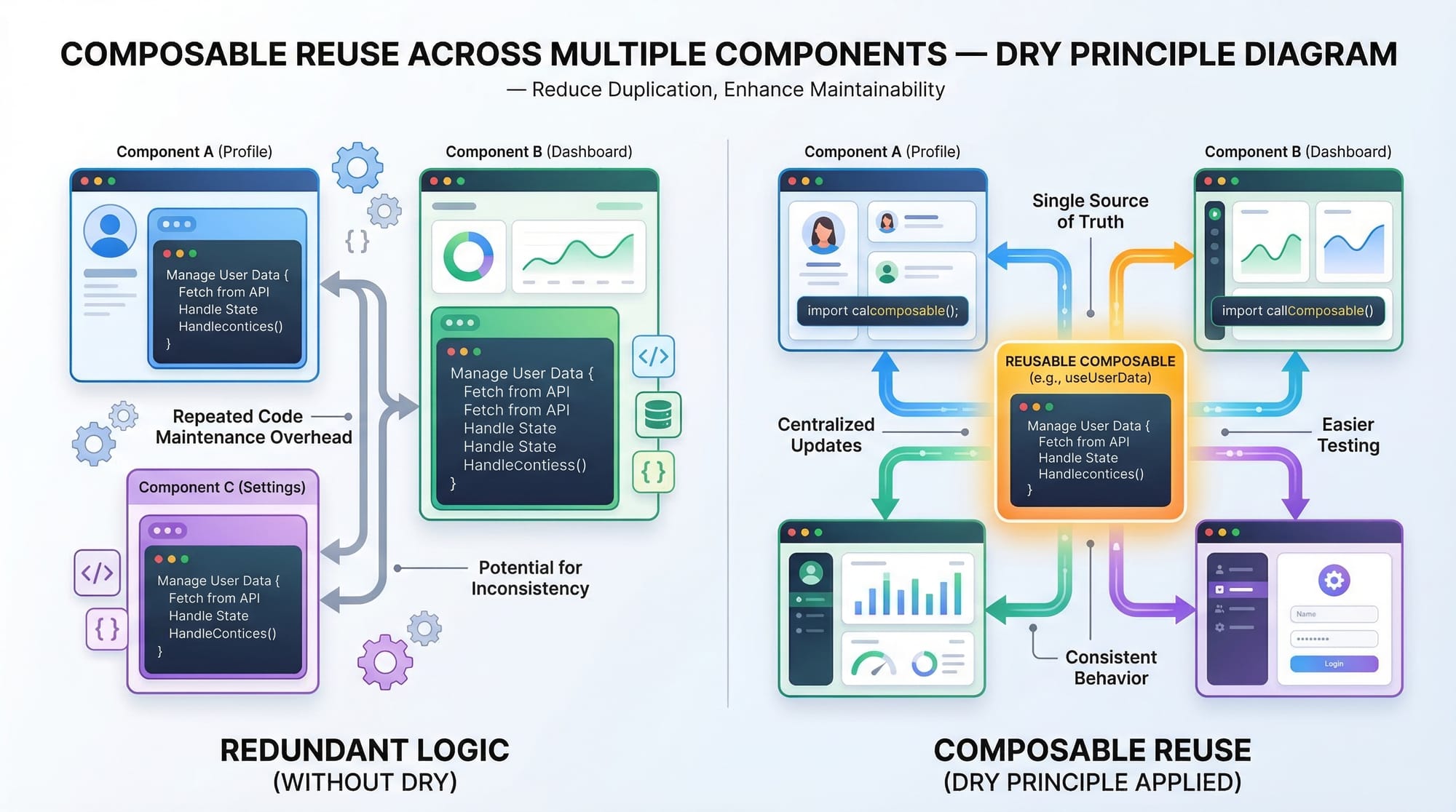
Use Composition API for logic, Pinia for shared state, and Vue Router for navigation — together they form a complete app architecture.
Summary & Key Takeaways
- Composition API makes Vue code more modular and reusable
- Pinia simplifies state management
- Vue Router handles navigation efficiently
- These tools together build scalable apps
- Practice real-world examples like wallets and dashboards
- Essential for modern frontend development careers
Next Steps & Related Tutorials
To continue your learning journey on theiqra.edu.pk:
- Learn the basics in the Vue.js Tutorial for Beginners
- Compare with React State Management to understand differences
- Explore Advanced Vue.js Patterns for large applications
- Build a full project with Vue + Firebase Integration
These will help you become a professional frontend developer ready for freelance platforms like Fiverr and Upwork 🚀
Test Your Python Knowledge!
Finished reading? Take a quick quiz to see how much you've learned from this tutorial.