NumPy Tutorial Arrays Math & Scientific Computing
Introduction
NumPy (short for Numerical Python) is a powerful open-source library used for numerical computing in Python. This numpy tutorial: arrays, math & scientific computing will help you understand how to work with arrays, perform fast mathematical operations, and build efficient data-driven applications.
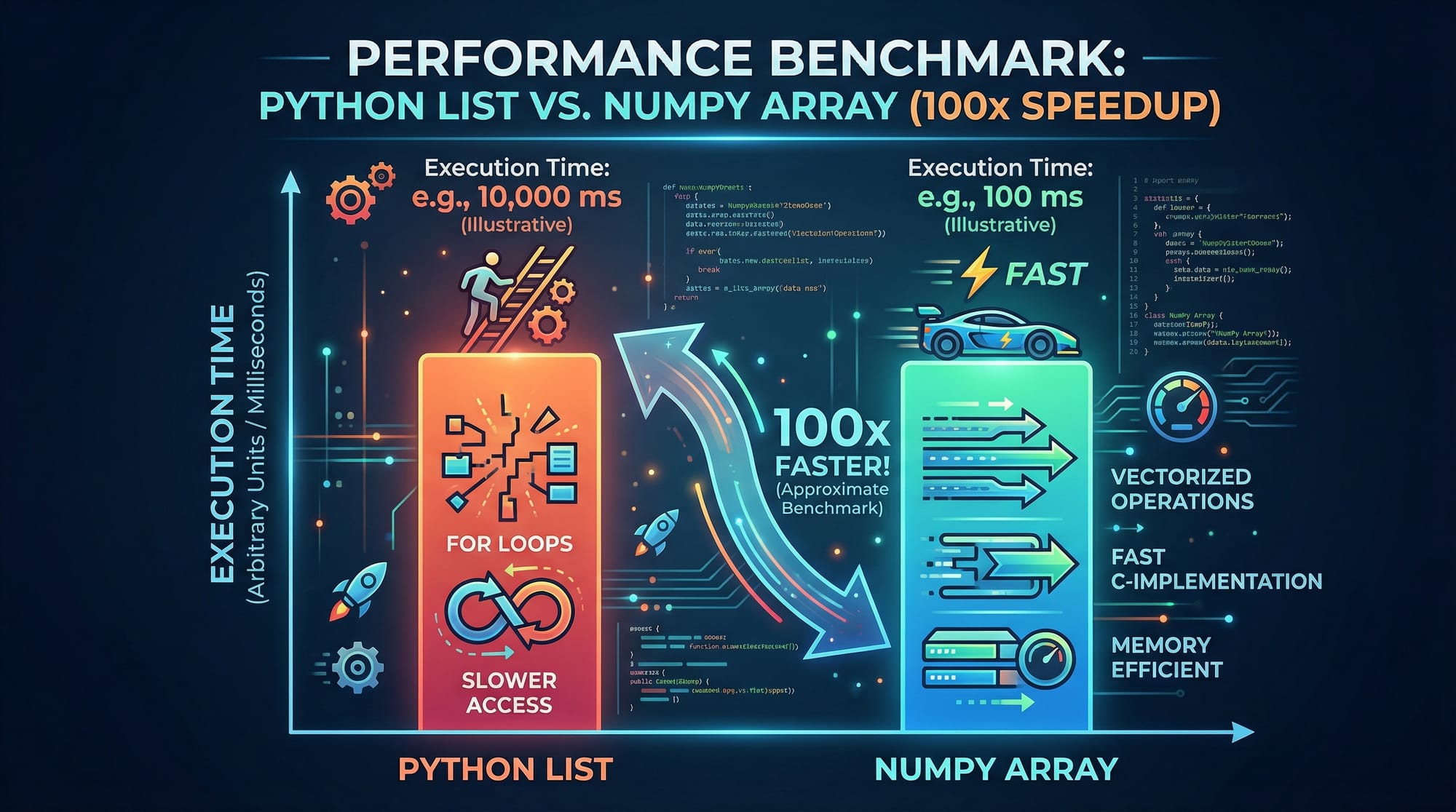
For Pakistani students—whether you're studying in Lahore, Karachi, or Islamabad—NumPy is a foundational skill for careers in Data Science, Artificial Intelligence, Machine Learning, and Engineering. Instead of slow Python loops, NumPy allows you to perform operations on large datasets instantly using optimized C-based computation.
Think of NumPy as the engine behind many popular libraries like Pandas, TensorFlow, and SciPy.
Prerequisites
Before starting this numpy arrays guide, you should have:
- Basic knowledge of Python (variables, loops, functions)
- Understanding of lists and dictionaries
- Familiarity with basic mathematics (addition, multiplication, averages)
- Python installed on your system (Anaconda or pip-based setup)
Core Concepts & Explanation
Understanding NumPy Arrays (ndarray)
The core of NumPy is the ndarray (N-dimensional array).
Unlike Python lists:
- Arrays are faster
- All elements have the same data type
- Support vectorized operations
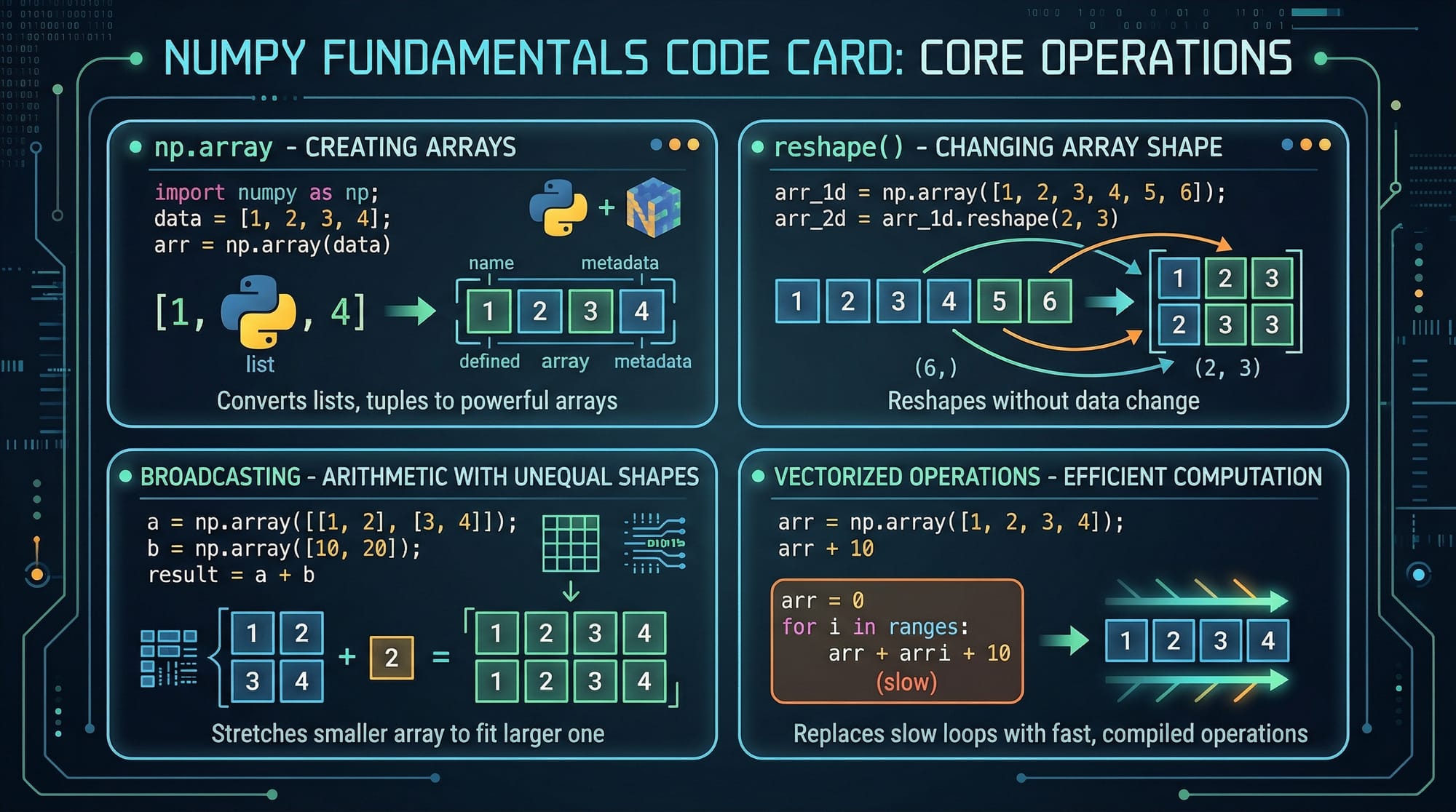
import numpy as np

arr = np.array([1, 2, 3, 4])
print(arr)
Line-by-line explanation:
import numpy as np→ Imports NumPy with aliasnp(standard practice)np.array([...])→ Converts a Python list into a NumPy arrayprint(arr)→ Displays the array
You can create:
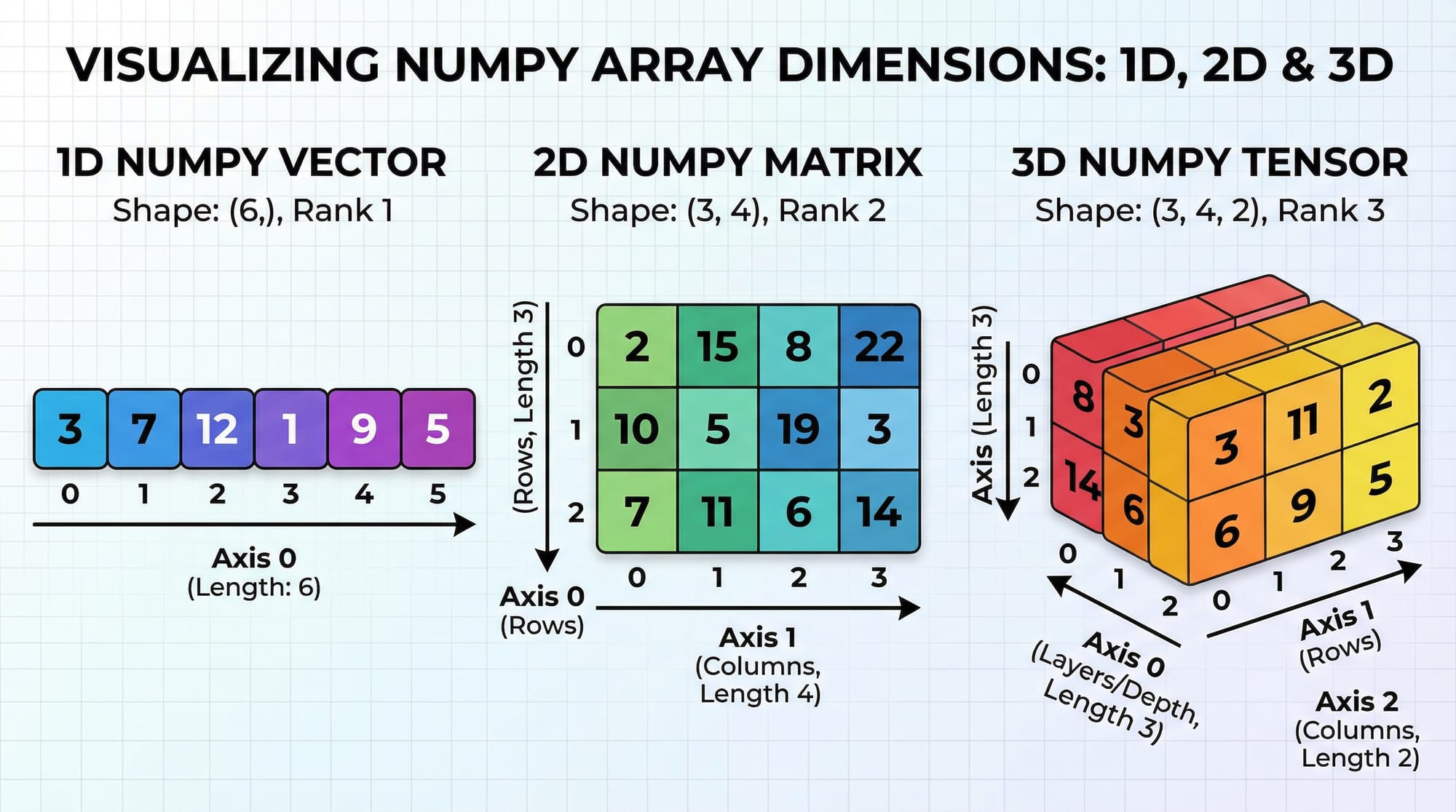
- 1D array →
[1,2,3] - 2D array →
[[1,2],[3,4]] - 3D array → tensors used in AI
Array Shape, Reshape & Dimensions
Understanding shape is crucial in scientific computing.
arr = np.array([[1, 2, 3], [4, 5, 6]])
print(arr.shape)
Explanation:
.shape→ returns(rows, columns)- Output:
(2, 3)→ 2 rows, 3 columns
Reshaping:
arr = np.array([1,2,3,4,5,6])
new_arr = arr.reshape(2,3)
print(new_arr)
Explanation:
.reshape(2,3)→ converts array into 2 rows and 3 columns- Total elements must remain the same
Vectorized Operations & Broadcasting
NumPy allows element-wise operations without loops.
arr = np.array([10, 20, 30])
result = arr + 5
print(result)
Explanation:
- Adds 5 to each element automatically
- No loop required
Broadcasting example:
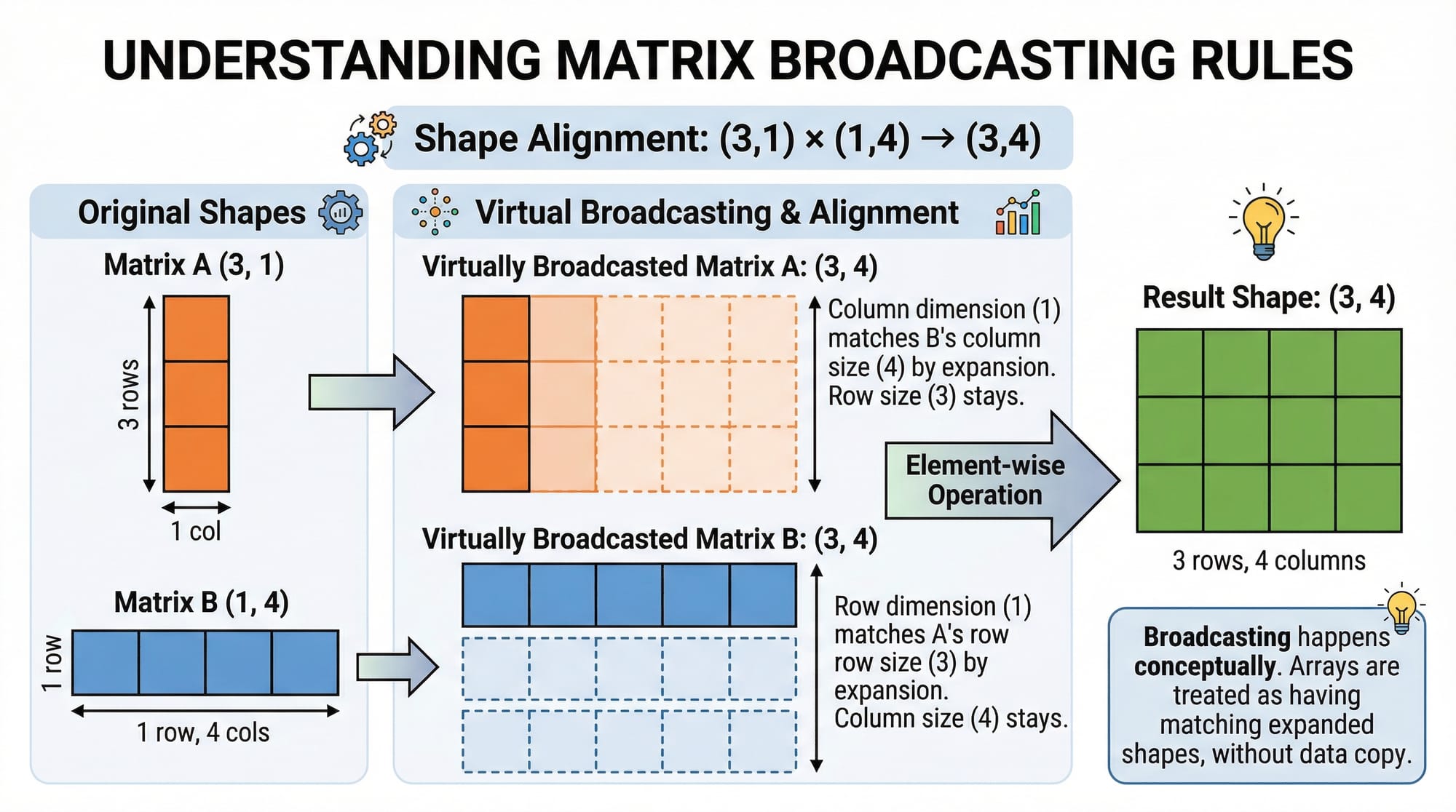
a = np.array([[1], [2], [3]])
b = np.array([10, 20, 30])
result = a + b
print(result)
Explanation:
- NumPy automatically adjusts shapes
- Result becomes a 3x3 matrix
Practical Code Examples
Example 1: Student Marks Analysis (Pakistan Context)
Ahmad is analyzing student marks in a Lahore college.
import numpy as np

marks = np.array([75, 80, 65, 90, 85])

average = np.mean(marks)
maximum = np.max(marks)
minimum = np.min(marks)

print("Average:", average)
print("Highest:", maximum)
print("Lowest:", minimum)
Line-by-line explanation:
np.array([...])→ creates array of marksnp.mean()→ calculates average marksnp.max()→ finds highest marksnp.min()→ finds lowest marksprint()→ displays results
👉 Useful for analyzing exam results in Pakistani universities.
Example 2: Real-World Application — Monthly Expenses in PKR
Fatima tracks her monthly expenses in Karachi.
import numpy as np

expenses = np.array([20000, 15000, 10000, 8000])  # Rent, Food, Transport, Misc

total = np.sum(expenses)
average = np.mean(expenses)

print("Total Expenses (PKR):", total)
print("Average Expense (PKR):", average)
Explanation:
np.sum()→ calculates total expensesnp.mean()→ average monthly spending- Helps in budgeting and financial planning
Common Mistakes & How to Avoid Them
Mistake 1: Using Python Lists Instead of NumPy Arrays
❌ Wrong:
a = [1, 2, 3]
b = [4, 5, 6]
print(a + b)
👉 Output: [1,2,3,4,5,6] (concatenation)
✅ Correct:
import numpy as np
a = np.array([1,2,3])
b = np.array([4,5,6])
print(a + b)
👉 Output: [5,7,9]
Mistake 2: Shape Mismatch Errors
❌ Wrong:
a = np.array([1,2,3])
b = np.array([[1,2],[3,4]])
print(a + b)
👉 Error due to incompatible shapes
✅ Fix:
a = np.array([[1],[2],[3]])
b = np.array([1,2])
print(a + b)
👉 Shapes now align using broadcasting
Practice Exercises
Exercise 1: Calculate Student Grades
Problem:
Ali has marks: [70, 85, 90, 60, 75]. Find:
- Average marks
- Highest marks
Solution:
import numpy as np

marks = np.array([70, 85, 90, 60, 75])

print("Average:", np.mean(marks))
print("Highest:", np.max(marks))
Explanation:
- Converts list to array
- Uses NumPy functions for quick analysis
Exercise 2: Salary Analysis in Islamabad
Problem:
Monthly salaries: [50000, 60000, 55000, 70000]
Find total and average salary.
Solution:
import numpy as np

salaries = np.array([50000, 60000, 55000, 70000])

print("Total:", np.sum(salaries))
print("Average:", np.mean(salaries))
Explanation:
np.sum()→ total salariesnp.mean()→ average salary
Frequently Asked Questions
What is NumPy in Python?
NumPy is a Python library used for numerical computing. It provides powerful array structures and mathematical functions that are much faster than standard Python operations.
How do I install NumPy in Python?
You can install NumPy using pip with the command pip install numpy. Alternatively, use Anaconda which comes pre-installed with NumPy.
Why is NumPy faster than Python lists?
NumPy uses optimized C code and supports vectorized operations, which eliminates the need for slow Python loops and improves performance significantly.
What is broadcasting in NumPy?
Broadcasting allows NumPy to perform operations on arrays of different shapes by automatically expanding them to compatible dimensions.
Can NumPy be used for real-world applications?
Yes, NumPy is widely used in data analysis, machine learning, finance, and engineering. Pakistani students can use it for projects like budget tracking, student analysis, and business forecasting.
Summary & Key Takeaways
- NumPy is essential for scientific computing and data science
- Arrays (ndarray) are faster and more efficient than Python lists
- Vectorized operations eliminate the need for loops
- Broadcasting enables operations on different-shaped arrays
- NumPy is widely used in real-world applications like finance and education
- Learning NumPy is a must for Pakistani students entering tech fields
Next Steps & Related Tutorials
Now that you've completed this numpy python tutorial, continue your learning journey with:
- Learn data analysis with our Pandas Tutorial (perfect next step after NumPy)
- Strengthen your basics with our Python Tutorial for Beginners
- Explore cloud computing with AWS for Beginners Guide
- Dive into machine learning fundamentals in upcoming tutorials
👉 These tutorials are available on theiqra.edu.pk and will help you build a complete Data Science roadmap.
Test Your Python Knowledge!
Finished reading? Take a quick quiz to see how much you've learned from this tutorial.