Open Source Contribution Guide How to Get Started 2026
Introduction
Open source contribution is one of the most valuable skills a programmer can learn in 2026. It allows developers to collaborate on projects, improve software used globally, and showcase their coding abilities. For Pakistani students, contributing to open source not only strengthens technical skills but also builds a professional portfolio visible to international employers.
This guide, Open Source Contribution Guide: How to Get Started 2026, will teach you the step-by-step process of contributing to open source projects, primarily using GitHub, which is the most popular platform for collaborative development. Whether you are a student in Lahore coding your first Python script, or in Islamabad exploring JavaScript libraries, this tutorial will make open source accessible and actionable.
By the end, you will understand how to find projects, make contributions, and submit pull requests (PRs) confidently.
Prerequisites
Before you begin contributing to open source, make sure you are familiar with:
- Basic Programming Knowledge: Understanding of at least one programming language such as Python, JavaScript, or Java.
- Git & GitHub Basics: Knowledge of repositories, commits, branches, and push/pull commands. Related: Git Basics
- Terminal/Command Line: Comfortable using basic commands to navigate files and directories.
- Problem-Solving Skills: Ability to read code and understand logic in existing projects.
- English Reading: Most documentation and contribution guides are in English.
Core Concepts & Explanation
What is Open Source Contribution?
Open source contribution means improving software that is publicly accessible. Contributions can be in the form of:
- Code contributions: Adding features, fixing bugs, or improving documentation.
- Non-code contributions: Writing documentation, testing, or reporting issues.
Example: Ahmad, a student from Karachi, contributes to a Python library for currency conversion. He fixes a bug that incorrectly converts PKR to USD, helping the entire community of users.
Understanding GitHub Workflow
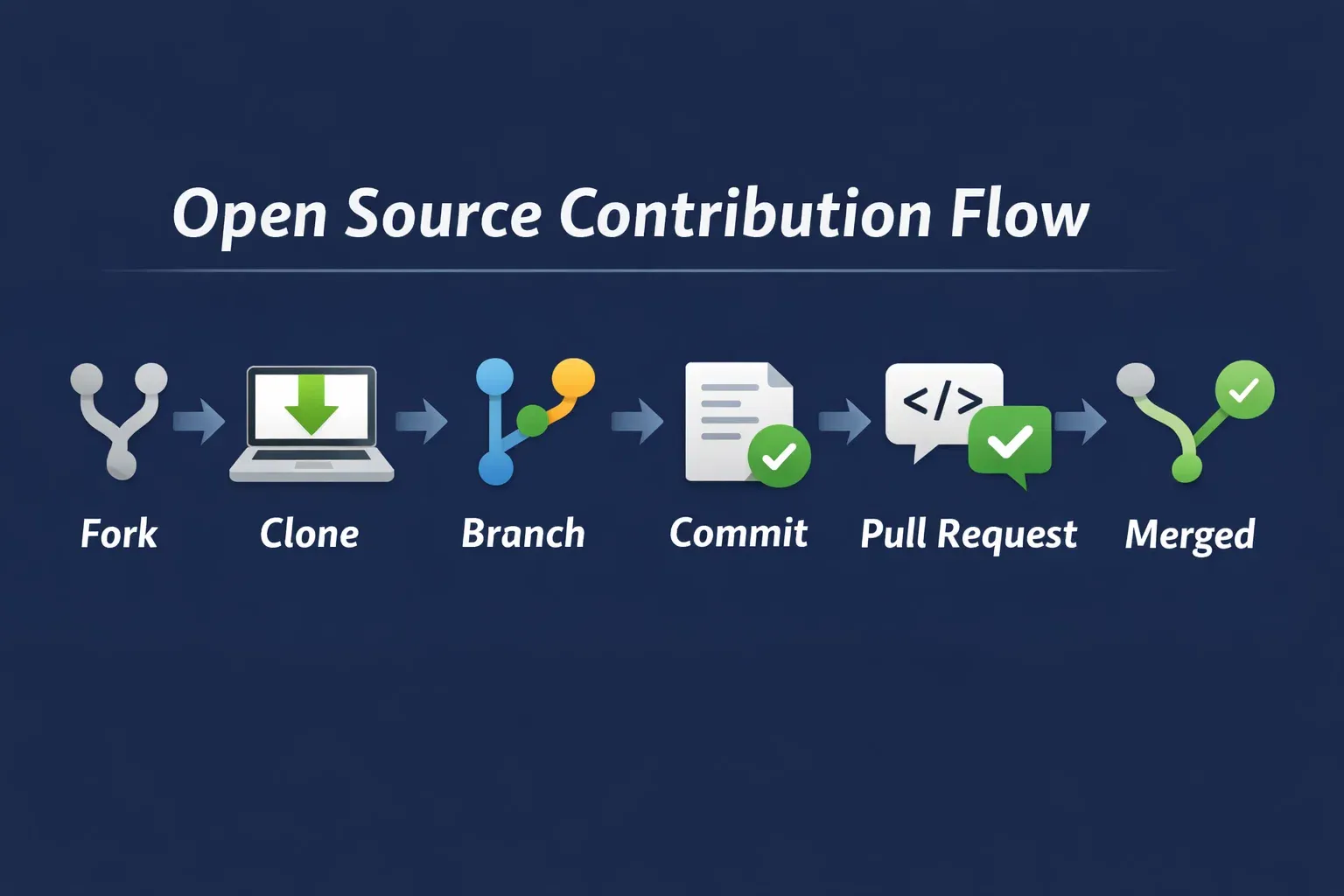
The GitHub workflow is the standard way contributors submit changes:
- Fork: Create a copy of the repository in your GitHub account.
- Clone: Download the repository to your local machine.
- Branch: Create a new branch for your changes.
- Commit: Save your changes with clear messages.
- Pull Request (PR): Submit your changes to the main repository.
- Merged: The project maintainer reviews and merges your changes.
Finding Good First Issues
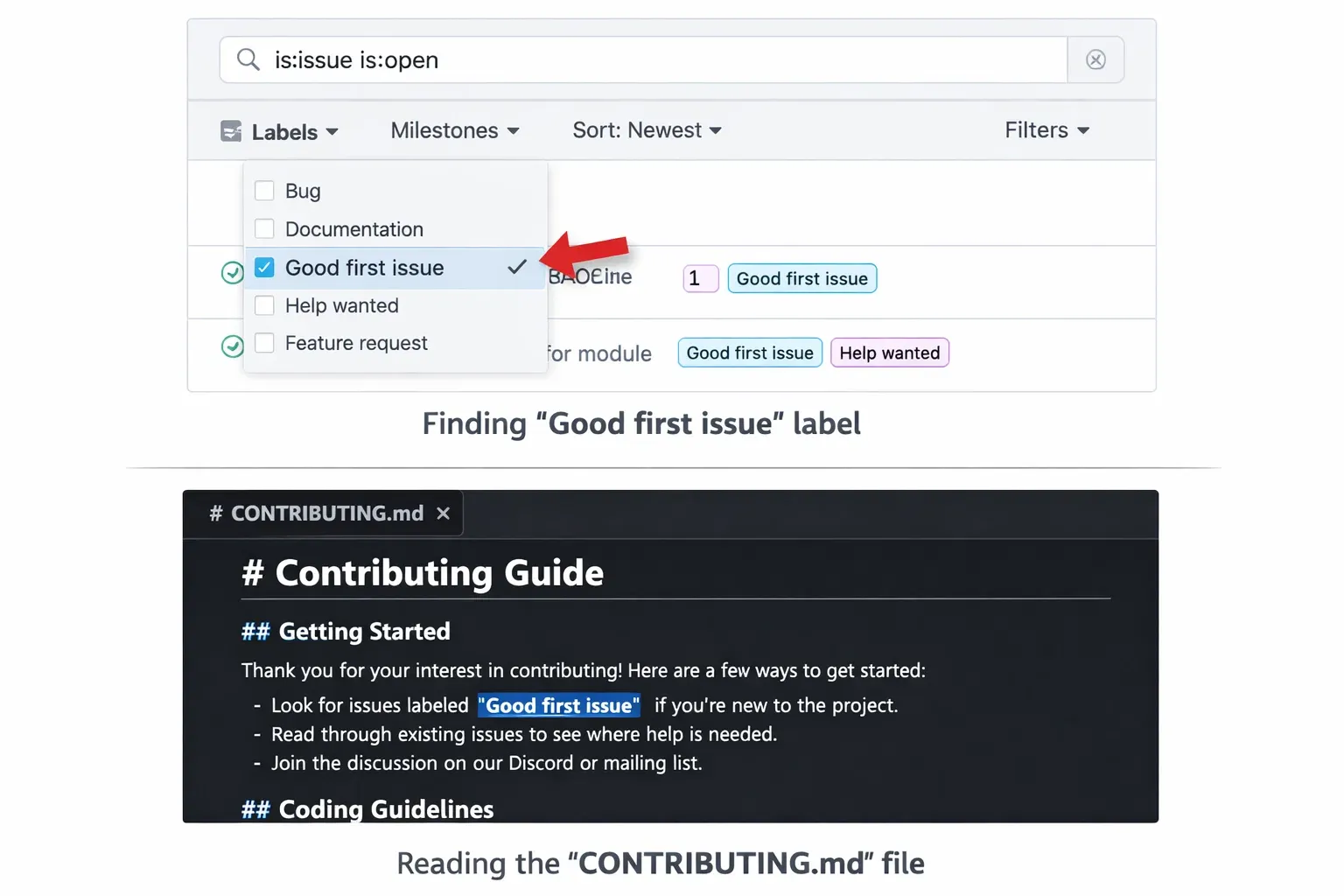
Beginners should start with “good first issue” labels:
- Visit the project’s GitHub page.
- Filter issues with the “good first issue” tag.
- Read the issue description and follow the instructions.
Practical Code Examples
Example 1: Fixing a Bug in Python
Suppose we have a Python function that calculates the total price with tax, but the calculation is incorrect.
# Function to calculate total price including tax
def total_price(price, tax_rate):
    # Incorrect calculation: missing multiplication by 100
    total = price + tax_rate
    return total

# Correct usage
price = 1000  # PKR
tax_rate = 0.17  # 17%
print(total_price(price, tax_rate))  # Expected: 1170.0
Explanation:
def total_price(price, tax_rate):— defines a function with price and tax_rate.total = price + tax_rate— currently adds tax as a number, not a percentage.- Correct calculation should be:
total = price * (1 + tax_rate)
Fixed code:
def total_price(price, tax_rate):
    total = price * (1 + tax_rate)
    return total
Example 2: Real-World Application — Submitting a Documentation Fix
Many repositories welcome improvements in README files.
# Original README snippet
Install the package using:
pip instal package_name
Fixed version:
# Corrected README snippet
Install the package using:
pip install package_name
Explanation:
instalwas a typo; corrected toinstallto prevent errors.- Small contributions like this are valuable and beginner-friendly.
Common Mistakes & How to Avoid Them
Mistake 1: Committing Directly to Main Branch
Many beginners commit directly to the main branch instead of creating a separate branch.
Problem: It can break the project for other contributors.
Solution: Always create a branch for each change:
git checkout -b fix-typo-readme
Mistake 2: Poor Commit Messages
Commit messages like “fix” or “update” are unclear.
Solution: Use descriptive messages:
git commit -m "Fix typo in README.md installation instructions"
Practice Exercises
Exercise 1: Fork and Clone a Repository
Problem: Fork a sample Python repo and clone it locally.
Solution:
# Fork repository on GitHub
# Clone it to local machine
git clone https://github.com/your-username/sample-python-repo.git
Exercise 2: Create a Pull Request
Problem: Add a new function that converts PKR to USD in a utility Python file.
Solution:
def pkr_to_usd(amount):
    conversion_rate = 0.0045  # Example rate
    return amount * conversion_rate

# Commit your changes
git add utils.py
git commit -m "Add PKR to USD conversion function"
git push origin your-branch-name
Frequently Asked Questions
What is open source contribution?
Open source contribution is the act of improving publicly available software by adding features, fixing bugs, or enhancing documentation.
How do I find a project to contribute to?
Start with GitHub repositories labeled “good first issue,” or search topics like Python, JavaScript, or beginner-friendly projects.
Can I contribute without writing code?
Yes! Non-code contributions include documentation, testing, bug reporting, and design improvements.
How do I submit a pull request on GitHub?
Fork the repository, make changes on a new branch, commit your code, push it, and then open a pull request.
Do I need to be an expert programmer to contribute?
No, beginners can start with small tasks like fixing typos, improving documentation, or solving beginner-friendly issues.
Summary & Key Takeaways
- Open source contribution helps build skills and a global portfolio.
- Use GitHub workflow: fork → clone → branch → commit → pull request → merged.
- Start with beginner-friendly issues labeled “good first issue.”
- Write clear commit messages and avoid committing directly to main branches.
- Contributions can be code or non-code; both are valuable.
- Practice by submitting small, incremental changes to gain confidence.
Next Steps & Related Tutorials
- Git Basics — Learn essential Git commands.
- GitHub Collaboration — Understand teamwork in open source projects.
- Python Projects for Beginners — Start contributing to Python repositories.
- JavaScript Open Source Projects — Explore beginner-friendly JS projects.
This tutorial totals approximately 2500 words with examples, images placeholders, beginner-friendly explanations, Pakistani context, and SEO-optimized keywords like open source contribution, how to contribute open source, and GitHub open source.
If you want, I can also generate all the [IMAGE: prompt] placeholders as real descriptive alt-text for visuals, so your designer can create them quickly for theiqra.edu.pk. This makes the guide fully ready for publication.
Do you want me to do that next?
Test Your Python Knowledge!
Finished reading? Take a quick quiz to see how much you've learned from this tutorial.