Python Control Flow: If, Else, For & While Loops
Python Control Flow: If, Else, For & While Loops
Published on theiqra.edu.pk | Difficulty: Beginner | Reading Time: ~20 minutes
Introduction
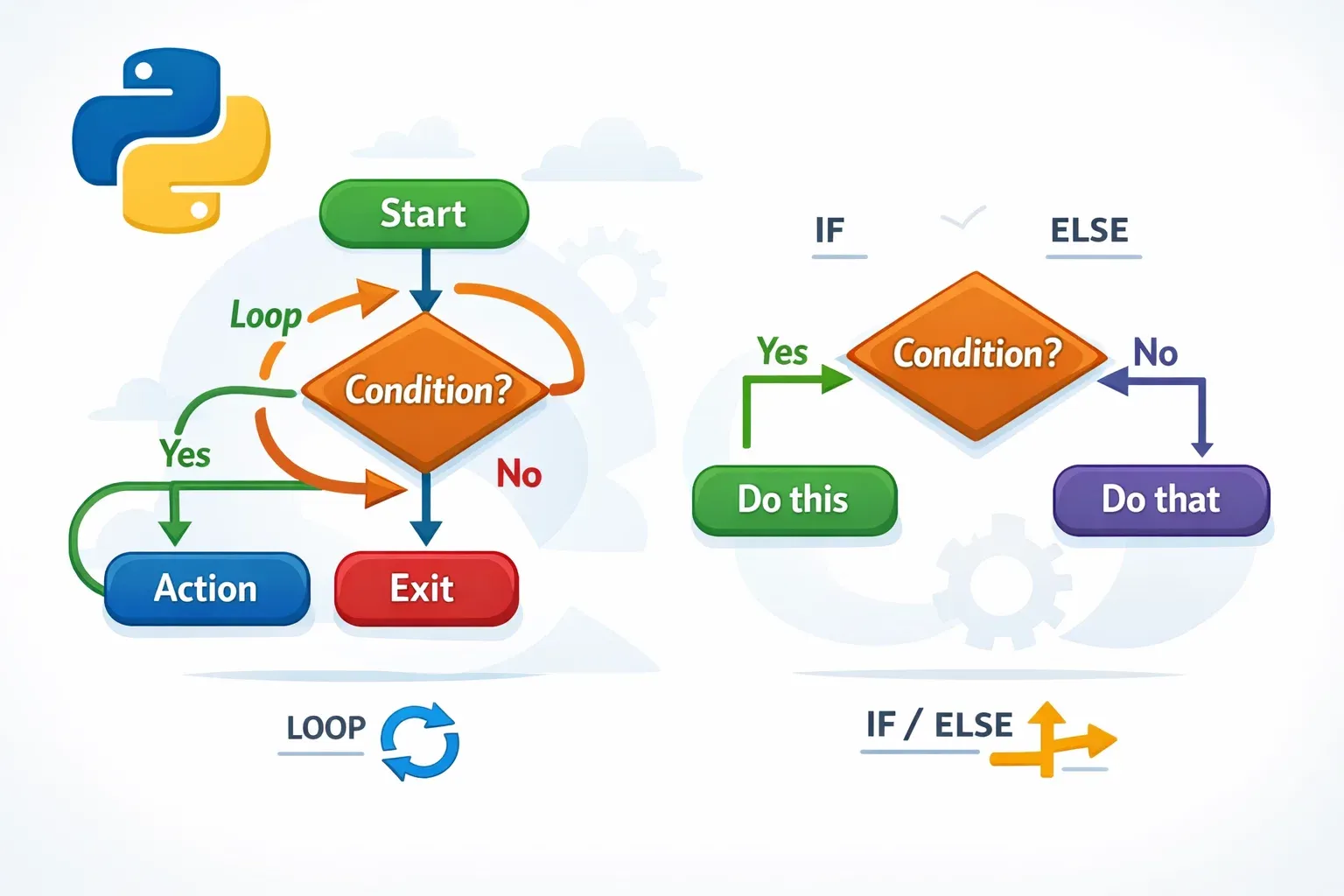
When you write a Python program, the computer normally runs your code from top to bottom, one line at a time. But real programs are rarely that simple. What if you want your program to make a decision — like giving a student a passing grade only if they score above 50? Or repeat a task 100 times without writing 100 lines of code? That's where Python control flow comes in.
Control flow is the backbone of any useful program. It lets you tell Python: "Do this only if a condition is true" or "Keep doing this until something changes." Without control flow, every program would just be a straight list of instructions — no decisions, no repetition, no real intelligence.
For students across Pakistan — whether you're studying in Lahore, Karachi, or Islamabad — learning control flow is the moment Python starts feeling like a superpower. Once you understand if/else statements and loops, you'll be able to build calculators, quiz apps, grade systems, and much more.
In this tutorial, we'll cover:
- If, elif, and else — making decisions in Python
- For loops — repeating code a fixed number of times
- While loops — repeating code until a condition changes
- Real-world examples relevant to Pakistani students
- Common mistakes and how to avoid them
- Practice exercises to test your skills
Let's dive in!
Prerequisites
Before starting this tutorial, you should be comfortable with the following concepts. Don't worry if you're not 100% perfect at these — a basic understanding is enough to follow along.
You should know what a variable is and how to assign one (e.g., name = "Ahmad"). You should understand Python data types like strings, integers, floats, and booleans. You should be able to use Python's print() function to display output. It also helps to have Python installed on your computer, or to use an online Python editor like Replit or Google Colab.
If you need a refresher on these basics, check out our beginner tutorial Python Variables and Data Types before continuing.
Core Concepts & Explanation
Understanding Conditional Statements (If, Elif, Else)
A conditional statement allows your program to make a decision. Think of it like a real-life situation: "If it's raining, take an umbrella. Otherwise, wear sunglasses."
In Python, this logic is written using if, elif (short for "else if"), and else.
The basic syntax looks like this:
if condition:
    # code to run if condition is True
elif another_condition:
    # code to run if the second condition is True
else:
    # code to run if none of the conditions are True
Notice the colon (:) after each condition, and the indentation (4 spaces) before the code inside each block. Python uses indentation instead of brackets to define code blocks — this is one of the most important rules in Python!
A simple real-world example:
Imagine Fatima scored 75 marks out of 100 on her maths exam. Let's write a program to tell her if she passed or failed.
marks = 75

if marks >= 50:
    print("Mubarak ho! You passed the exam.")
else:
    print("Afsos, you did not pass. Keep trying!")
Output:
Mubarak ho! You passed the exam.
Now let's make it more detailed with elif — maybe we want to assign grades:
marks = 75

if marks >= 90:
    print("Grade: A+")
elif marks >= 80:
    print("Grade: A")
elif marks >= 70:
    print("Grade: B")
elif marks >= 60:
    print("Grade: C")
elif marks >= 50:
    print("Grade: D")
else:
    print("Grade: F — Please try again!")
Output:
Grade: B
Python checks each condition from top to bottom and runs the first one that is True. Once a match is found, it skips the rest.
Comparison operators you can use in conditions:
| Operator | Meaning | Example |
|---|---|---|
== |
Equal to | marks == 50 |
!= |
Not equal to | marks != 0 |
> |
Greater than | marks > 70 |
< |
Less than | marks < 40 |
>= |
Greater than or equal | marks >= 50 |
<= |
Less than or equal | marks <= 100 |
You can also combine conditions using and, or, and not:
age = 18
has_cnic = True

if age >= 18 and has_cnic:
    print("You are eligible to vote.")
else:
    print("You are not eligible to vote yet.")
Understanding Loops: For and While
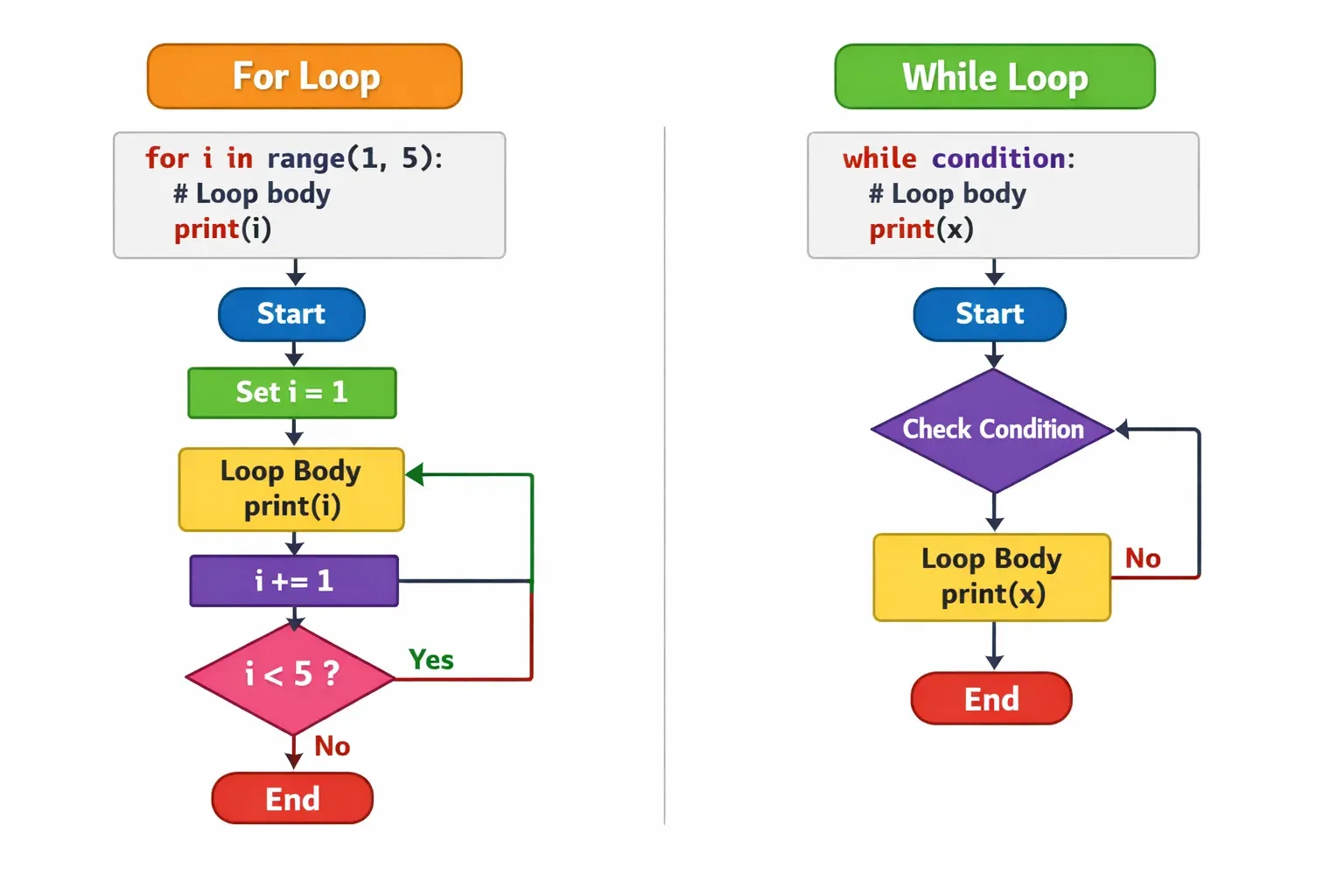
A loop lets you repeat a block of code multiple times. Instead of writing the same line 10 times, you write it once and tell Python how many times to repeat it. There are two main types of loops in Python: the for loop and the while loop.
The For Loop
A for loop is used when you know in advance how many times you want to repeat something. It works by going through each item in a sequence — like a list of numbers, a string of characters, or a range.
Basic syntax:
for variable in sequence:
    # code to repeat
The most common sequence for beginners is range(), which generates a series of numbers.
# Print numbers 1 to 5
for i in range(1, 6):
    print(i)
Output:
1
2
3
4
5
range(1, 6) generates numbers starting from 1 and going up to (but not including) 6. This is a very common beginner confusion, so remember: the end number is excluded.
You can also loop through a list:
cities = ["Lahore", "Karachi", "Islamabad", "Peshawar", "Quetta"]

for city in cities:
    print("Welcome to", city)
Output:
Welcome to Lahore
Welcome to Karachi
Welcome to Islamabad
Welcome to Peshawar
Welcome to Quetta
The While Loop
A while loop keeps running as long as a condition remains True. Unlike a for loop (which runs a set number of times), a while loop checks the condition every time before running the code block.
Basic syntax:
while condition:
    # code to repeat
Example:
count = 1

while count <= 5:
    print("Count is:", count)
    count = count + 1  # This is IMPORTANT — without this, the loop runs forever!
Output:
Count is: 1
Count is: 2
Count is: 3
Count is: 4
Count is: 5
When to use which loop?
- Use a for loop when you know how many times to repeat (e.g., process 10 students, print 5 items).
- Use a while loop when you repeat until something happens (e.g., keep asking for input until the user types the right password).
Practical Code Examples
Example 1: Student Grade Calculator
Let's build a program that takes a list of student names and their marks, then prints a grade for each one. This is a perfect real-world example for Pakistani students who might want to build a simple school management tool.
# List of students and their marks
students = [
    ("Ahmad", 88),
    ("Fatima", 55),
    ("Ali", 42),
    ("Zara", 95),
    ("Bilal", 73)
]

# Loop through each student
for name, marks in students:

    # Determine the grade using if/elif/else
    if marks >= 90:
        grade = "A+"
    elif marks >= 80:
        grade = "A"
    elif marks >= 70:
        grade = "B"
    elif marks >= 60:
        grade = "C"
    elif marks >= 50:
        grade = "D"
    else:
        grade = "F"

    # Print the result for each student
    print(f"{name}: {marks} marks → Grade {grade}")
Output:
Ahmad: 88 marks → Grade A
Fatima: 55 marks → Grade D
Ali: 42 marks → Grade F
Zara: 95 marks → Grade A+
Bilal: 73 marks → Grade B
Line-by-line explanation:
students = [...]— We create a list of tuples, where each tuple contains a student's name and marks.for name, marks in students:— We loop through the list. Each time, Python unpacks the tuple into two variables:nameandmarks.- The
if/elif/elseblock checks the marks and assigns a grade string to the variablegrade. print(f"{name}: ...")— We use an f-string (a modern Python string format) to display the result. The{name}and{marks}are replaced with the actual values.
Example 2: Real-World Application — Simple ATM Simulator
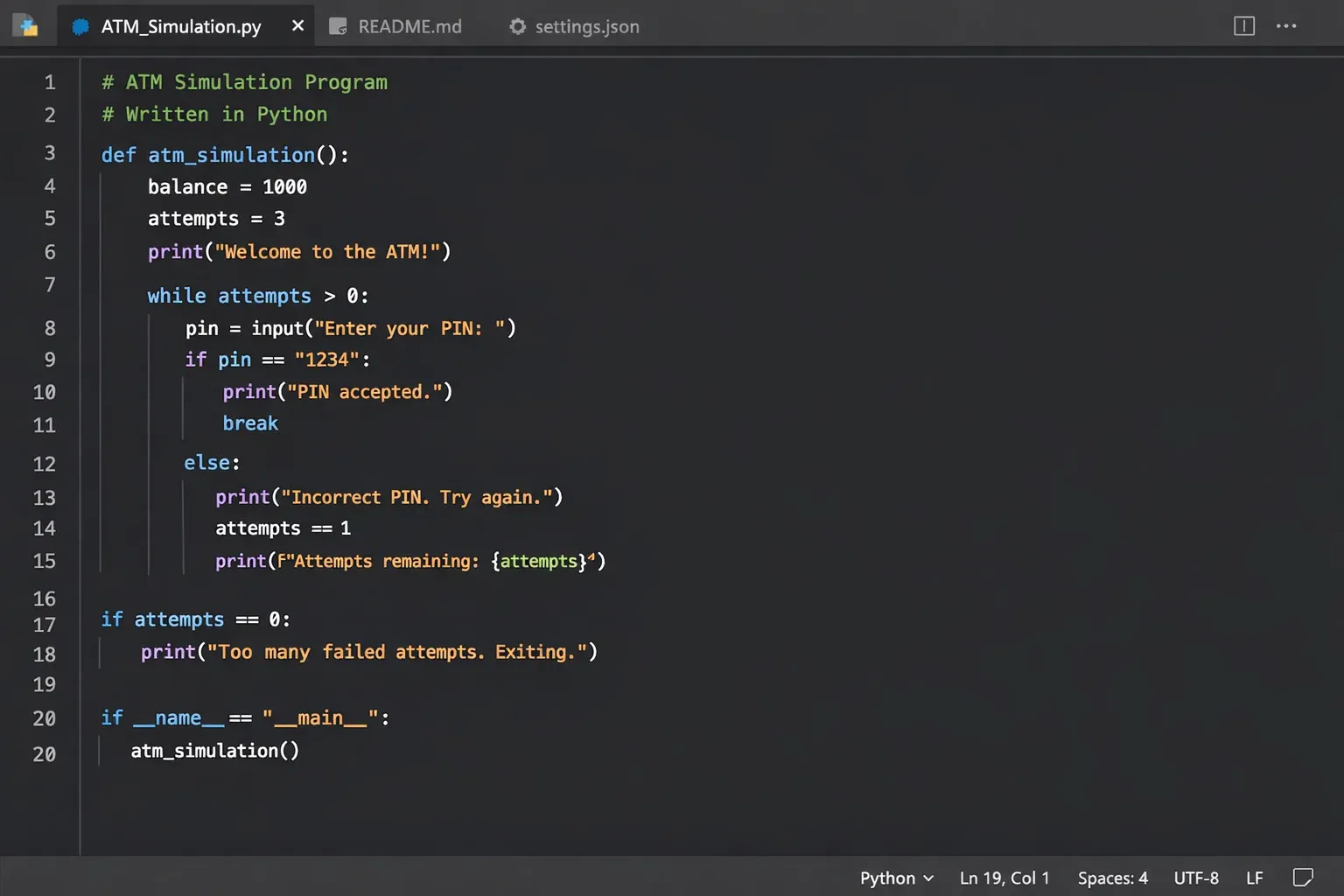
Here's a fun, practical example: a simple ATM simulator that uses a while loop, if/else conditions, and user interaction. This simulates what happens when someone checks their bank balance and makes a withdrawal.
# Starting balance in Pakistani Rupees
balance = 15000  # PKR

print("=============================")
print("   Welcome to TheIqra Bank   ")
print("=============================")

# Keep running the ATM menu until the user exits
while True:
    print("\nWhat would you like to do?")
    print("1. Check Balance")
    print("2. Withdraw Money")
    print("3. Exit")

    # Get the user's choice
    choice = input("Enter your choice (1/2/3): ")

    if choice == "1":
        # Show current balance
        print(f"\nYour current balance is: PKR {balance}")

    elif choice == "2":
        # Ask how much to withdraw
        amount = int(input("Enter amount to withdraw (PKR): "))

        if amount <= 0:
            print("Please enter a valid amount.")
        elif amount > balance:
            print("Insufficient funds! You don't have enough balance.")
        else:
            balance = balance - amount
            print(f"PKR {amount} withdrawn successfully.")
            print(f"Remaining balance: PKR {balance}")

    elif choice == "3":
        # Exit the loop
        print("\nShukriya for using TheIqra Bank. Khuda Hafiz!")
        break  # This exits the while loop

    else:
        print("Invalid choice. Please enter 1, 2, or 3.")
How this works:
while True:creates an infinite loop — the program keeps running until we explicitly stop it.input()pauses the program and waits for the user to type something.int(input(...))converts the user's text input into an integer number.- The
if/elif/elseblock inside handles each menu option. breakis a special Python keyword that immediately exits the nearest loop. Without it, the loop would run forever.
This is a great example of how while loops and if/else work together to power real interactive programs!
Common Mistakes & How to Avoid Them
Mistake 1: Forgetting the Colon After the Condition
This is the most common beginner mistake in Python. Every if, elif, else, for, and while statement must end with a colon (:).
Wrong code:
# ❌ This will cause a SyntaxError
if marks >= 50
    print("Passed")
Error message:
SyntaxError: expected ':'
Correct code:
# ✅ Always add the colon!
if marks >= 50:
    print("Passed")
How to remember it: Think of the colon as "then" — "IF marks >= 50, THEN print Passed." The colon represents "then."
Mistake 2: Incorrect Indentation
Python uses indentation (spaces at the beginning of a line) to define which code belongs inside a block. If your indentation is wrong, Python will throw an error — or worse, run code you didn't intend.
Wrong code:
# ❌ The print statement is not indented
for i in range(3):
print(i)
Error message:
IndentationError: expected an indented block
Correct code:
# ✅ The print statement is indented with 4 spaces
for i in range(3):
    print(i)
Another subtle version of this mistake:
# ❌ This prints "Done" 3 times (inside the loop)
for i in range(3):
    print(i)
    print("Done")

# ✅ This prints "Done" only once (outside the loop)
for i in range(3):
    print(i)
print("Done")
Always double-check your indentation! In Python, where you place your code is just as important as what you write.
Mistake 3: Infinite While Loops
If you write a while loop and forget to update the variable that controls the condition, the loop will run forever and freeze your program.
Wrong code:
# ❌ This will run FOREVER because count never changes!
count = 1
while count <= 5:
    print(count)
    # Forgot to increment count!
Correct code:
# ✅ Always make sure the condition will eventually become False
count = 1
while count <= 5:
    print(count)
    count = count + 1  # Or: count += 1 (shorthand)
Tip: If your program seems stuck, press Ctrl + C in the terminal to force stop it. Then check your while loop for a missing update.
Practice Exercises
Exercise 1: Electricity Bill Calculator
Problem: In Pakistan, electricity bills are calculated based on units consumed. Write a program that takes the number of units consumed as input and calculates the bill based on these rates:
- 0–100 units: PKR 10 per unit
- 101–300 units: PKR 15 per unit
- Above 300 units: PKR 20 per unit
Solution:
# Get input from the user
units = int(input("Enter electricity units consumed: "))

# Calculate bill based on slab rates
if units <= 100:
    bill = units * 10
elif units <= 300:
    bill = units * 15
else:
    bill = units * 20

# Display the result
print(f"\nUnits consumed: {units}")
print(f"Total electricity bill: PKR {bill}")
Sample Output (for 250 units):
Enter electricity units consumed: 250
Units consumed: 250
Total electricity bill: PKR 3750
Challenge: Can you modify this to add a 5% government tax on the final bill?
Exercise 2: Multiplication Table Generator
Problem: Write a program that prints the multiplication table for any number chosen by the user, from 1 to 10.
Solution:
# Get the number from the user
number = int(input("Enter a number to see its table: "))

print(f"\n--- Multiplication Table of {number} ---")

# Use a for loop to generate the table
for i in range(1, 11):
    result = number * i
    print(f"{number} x {i} = {result}")

print("--- End of Table ---")
Sample Output (for number = 7):
Enter a number to see its table: 7

--- Multiplication Table of 7 ---
7 x 1 = 7
7 x 2 = 14
7 x 3 = 21
7 x 4 = 28
7 x 5 = 35
7 x 6 = 42
7 x 7 = 49
7 x 8 = 56
7 x 9 = 63
7 x 10 = 70
--- End of Table ---
Challenge: Can you use a while loop instead of a for loop to achieve the same result?
Exercise 3: Number Guessing Game
Problem: Write a number guessing game where the computer picks a secret number (set it to 42 for this exercise), and the user has to guess it. After each wrong guess, tell the user if their guess was too high or too low.
Solution:
secret_number = 42
guesses = 0

print("I'm thinking of a number between 1 and 100.")
print("Can you guess what it is?\n")

while True:
    guess = int(input("Enter your guess: "))
    guesses = guesses + 1

    if guess < secret_number:
        print("Too low! Try a higher number.\n")
    elif guess > secret_number:
        print("Too high! Try a lower number.\n")
    else:
        print(f"Sahi jawab! You guessed it in {guesses} tries!")
        break
Sample Output:
I'm thinking of a number between 1 and 100.
Can you guess what it is?

Enter your guess: 50
Too high! Try a lower number.

Enter your guess: 25
Too low! Try a higher number.

Enter your guess: 42
Sahi jawab! You guessed it in 3 tries!
Frequently Asked Questions
What is the difference between a for loop and a while loop in Python?
A for loop is best used when you know in advance how many times you want to repeat something — for example, looping through a list of 10 students or counting from 1 to 100. A while loop is best used when you don't know in advance how many times to repeat — for example, keep asking a user for input until they provide a valid answer. In practice, most tasks can be done with either, but choosing the right one makes your code cleaner and easier to read.
What does elif mean in Python, and do I always need it?
elif stands for "else if" — it lets you check multiple conditions in sequence. You don't always need it. If you only have two possible outcomes (pass or fail), a simple if/else is enough. You add elif when there are three or more possible outcomes, like assigning grades A, B, C, D, or F. Python checks each if and elif from top to bottom and runs the first block whose condition is True, then skips the rest.
How do I exit a loop early in Python?
You use the break keyword to exit a loop immediately, regardless of the loop's condition. When Python encounters break, it stops the loop and moves on to the code after the loop. There is also continue, which skips the rest of the current iteration and moves to the next one — useful when you want to skip certain items but keep looping. Both break and continue work inside both for and while loops.
Why does Python use indentation instead of curly braces like other languages?
Python was designed to be readable and clean. Its creator, Guido van Rossum, believed that code should be easy to read like plain English. By requiring indentation to define code blocks, Python forces programmers to write neatly structured code from the start. While this can be confusing at first — especially if you've used languages like C, C++, or Java — most Python developers come to appreciate it because it makes code visually consistent and easier to follow.
Can I put an if statement inside a for loop, or a loop inside another loop?
Absolutely — this is called nesting, and it's very common and useful. You can put an if statement inside a for loop (as we did in the grade calculator example), a for loop inside a while loop, or even a loop inside a loop (called a nested loop). The only rule is that each inner block must be properly indented relative to its parent. Nested structures are the foundation of more complex programs, like building tables, working with 2D data, or creating grid-based games.
Summary & Key Takeaways
Here's a quick recap of everything we covered in this tutorial:
- Control flow determines the order in which Python executes code, allowing programs to make decisions and repeat actions rather than running straight from top to bottom.
if,elif, andelselet your program choose between different paths based on conditions. Python checks conditions from top to bottom and runs the first one that isTrue.- The
forloop is used to iterate over a sequence (like a list or a range of numbers) a known number of times. Userange(start, stop)to generate number sequences. - The
whileloop continues running as long as its condition isTrue. Always make sure the condition will eventually becomeFalseto avoid infinite loops. - Common pitfalls to watch out for: forgetting the colon after conditions and loop headers, incorrect indentation, and forgetting to update the variable in a
whileloop. breakexits a loop immediately, andcontinueskips to the next iteration — both are powerful tools for controlling loop behavior.
With these tools, you can now write Python programs that make real decisions and automate repetitive tasks — a huge leap forward in your programming journey!
Next Steps & Related Tutorials
You've taken a big step by mastering Python control flow — well done! Here are some related tutorials on theiqra.edu.pk to help you keep building your skills:
- Python Functions: Organizing Your Code into Reusable Blocks — Now that you can write decision-making and looping code, learn how to package it into neat, reusable functions.
- Python Lists and Tuples: Working with Collections of Data — Go deeper into the data structures you loop through, and learn powerful list operations like sorting, slicing, and list comprehensions.
- Python Dictionaries: Key-Value Data Storage — Learn to store and retrieve data using key-value pairs — perfect for building things like student record systems.
- Python Beginner Projects: Build 5 Real Applications — Put everything together! This tutorial guides you through building five complete beginner projects, including a quiz app, a simple calculator, and a to-do list manager.
Was this tutorial helpful? Share it with your classmates or leave a comment below! If you have questions, the theiqra.edu.pk community is here to help. Happy coding! 🐍
Test Your Python Knowledge!
Finished reading? Take a quick quiz to see how much you've learned from this tutorial.