SQL for Data Analysis Window Functions CTEs & Analytics
Introduction
SQL for Data Analysis is one of the most powerful skill sets for modern developers, analysts, and data scientists. In this advanced tutorial, we focus on window functions, Common Table Expressions (CTEs), and analytics techniques—three essential pillars of professional-level SQL.
If you’ve ever needed to rank students in a class, calculate running totals of sales in Karachi, or compare monthly revenue trends in Lahore, then sql window functions, sql cte, and sql analytics are exactly what you need.
For Pakistani students, learning these skills opens doors to careers in data analytics, freelancing, fintech startups, and global tech companies. These concepts are heavily used in tools like Power BI, Tableau, and backend systems.
Prerequisites
Before diving into this advanced tutorial, you should already know:
- Basic SQL queries (SELECT, WHERE, ORDER BY)
- Aggregate functions (SUM, COUNT, AVG)
- GROUP BY and HAVING clauses
- Basic joins (INNER JOIN, LEFT JOIN)
- Understanding of relational databases (tables, rows, columns)
If you’re not confident in these, consider reviewing beginner SQL tutorials first.
Core Concepts & Explanation
Understanding SQL Window Functions
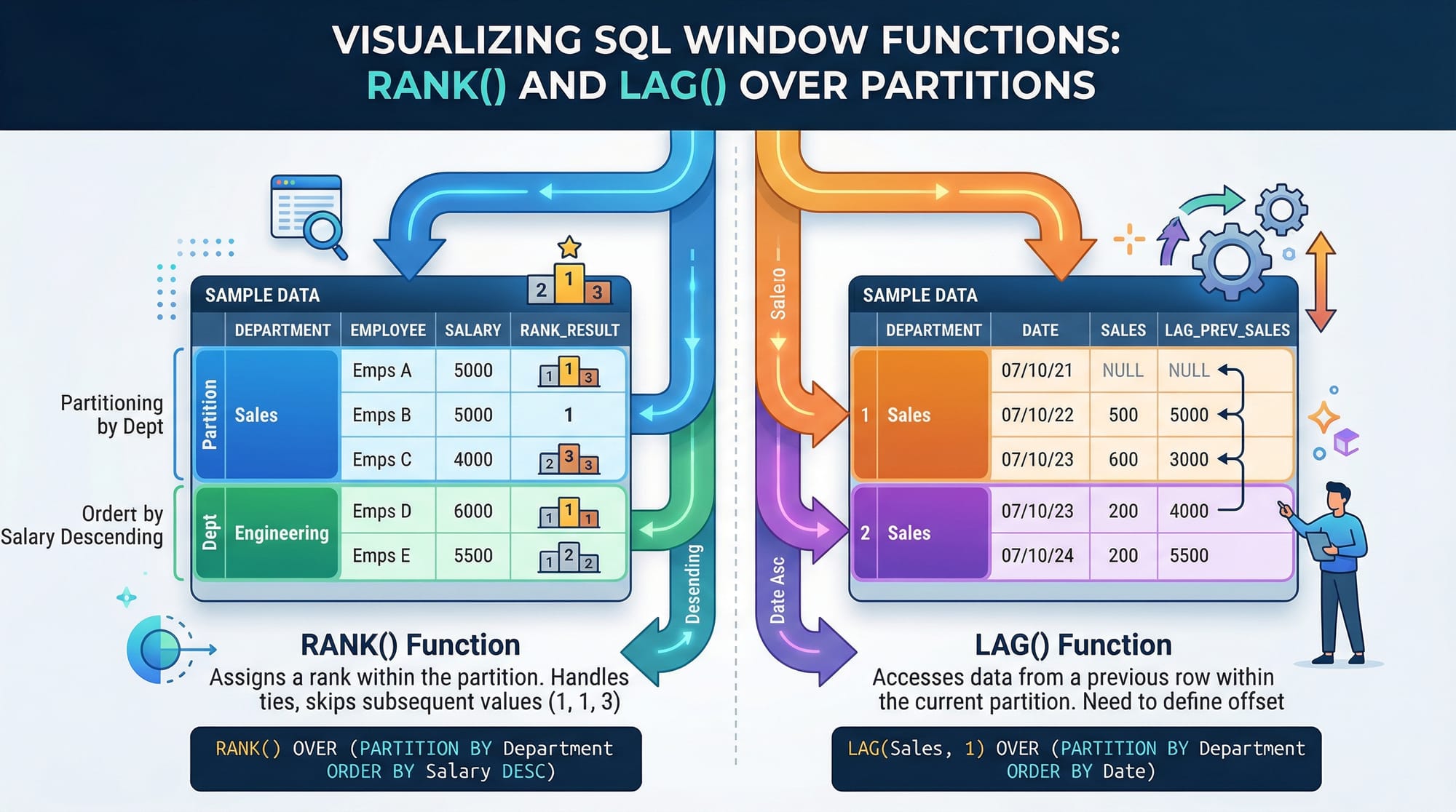
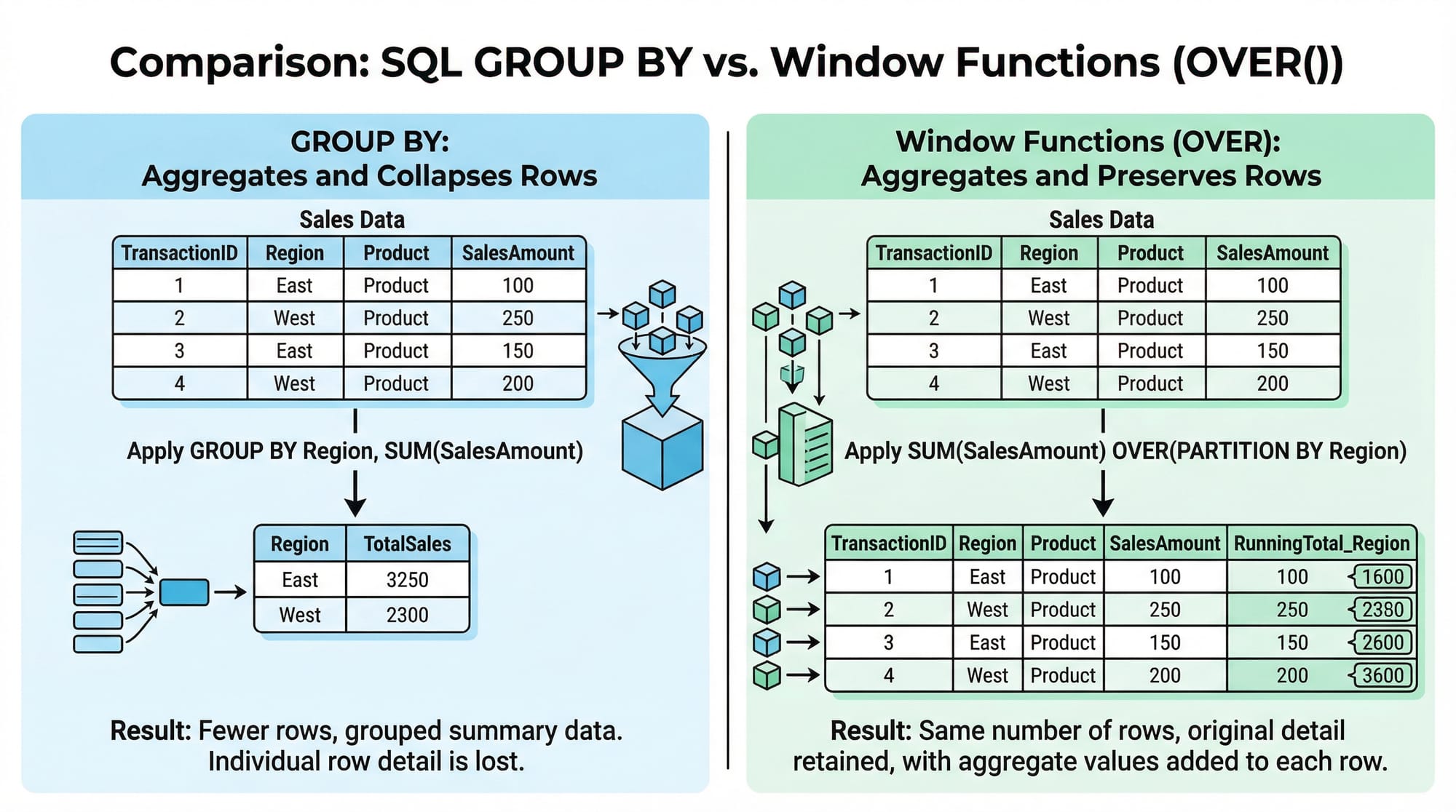
Window functions allow you to perform calculations across a set of rows related to the current row, without collapsing the result like GROUP BY does.
Syntax:
FUNCTION_NAME() OVER (
    PARTITION BY column
    ORDER BY column
)
Example:
SELECT
    name,
    city,
    salary,
    RANK() OVER (PARTITION BY city ORDER BY salary DESC) AS rank_in_city
FROM employees;
Explanation:
SELECT name, city, salary→ selecting basic columnsRANK()→ assigns rank to each rowOVER (...)→ defines the windowPARTITION BY city→ groups rows by city (Lahore, Karachi, etc.)ORDER BY salary DESC→ highest salary gets rank 1
👉 This keeps all rows intact while adding analytical insight.
Common Table Expressions (CTEs)
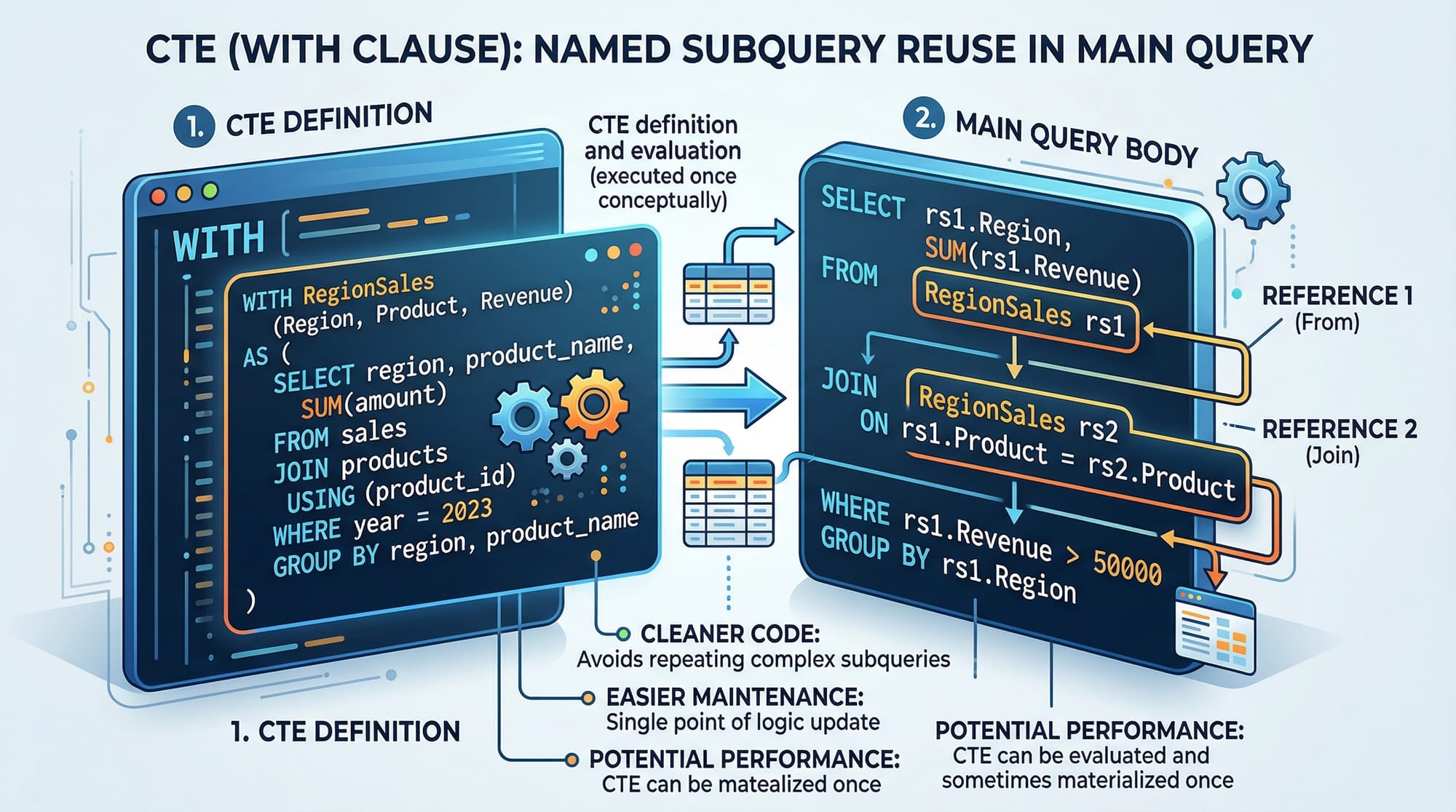
A CTE is a temporary named result set used within a query. It improves readability and reusability.
Syntax:
WITH cte_name AS (
    SELECT ...
)
SELECT * FROM cte_name;
Example:
WITH high_salary AS (
    SELECT name, salary
    FROM employees
    WHERE salary > 100000
)
SELECT * FROM high_salary;
Explanation:
WITH high_salary AS (...)→ defines a temporary table- Inner query filters employees earning > PKR 100,000
- Outer query selects from the CTE
👉 Think of CTE as a clean, reusable subquery.
Advanced SQL Analytics Functions
Analytics functions help you analyze trends over time.
Common ones include:
LAG()→ access previous rowLEAD()→ access next rowSUM() OVER()→ running totalsAVG() OVER()→ moving averages
Example:
SELECT
    name,
    salary,
    LAG(salary) OVER (ORDER BY salary) AS previous_salary
FROM employees;
Explanation:
LAG(salary)→ gets previous row’s salaryORDER BY salary→ defines sequence
👉 Useful for trend comparisons.
Ranking Functions Explained
These functions help rank data:
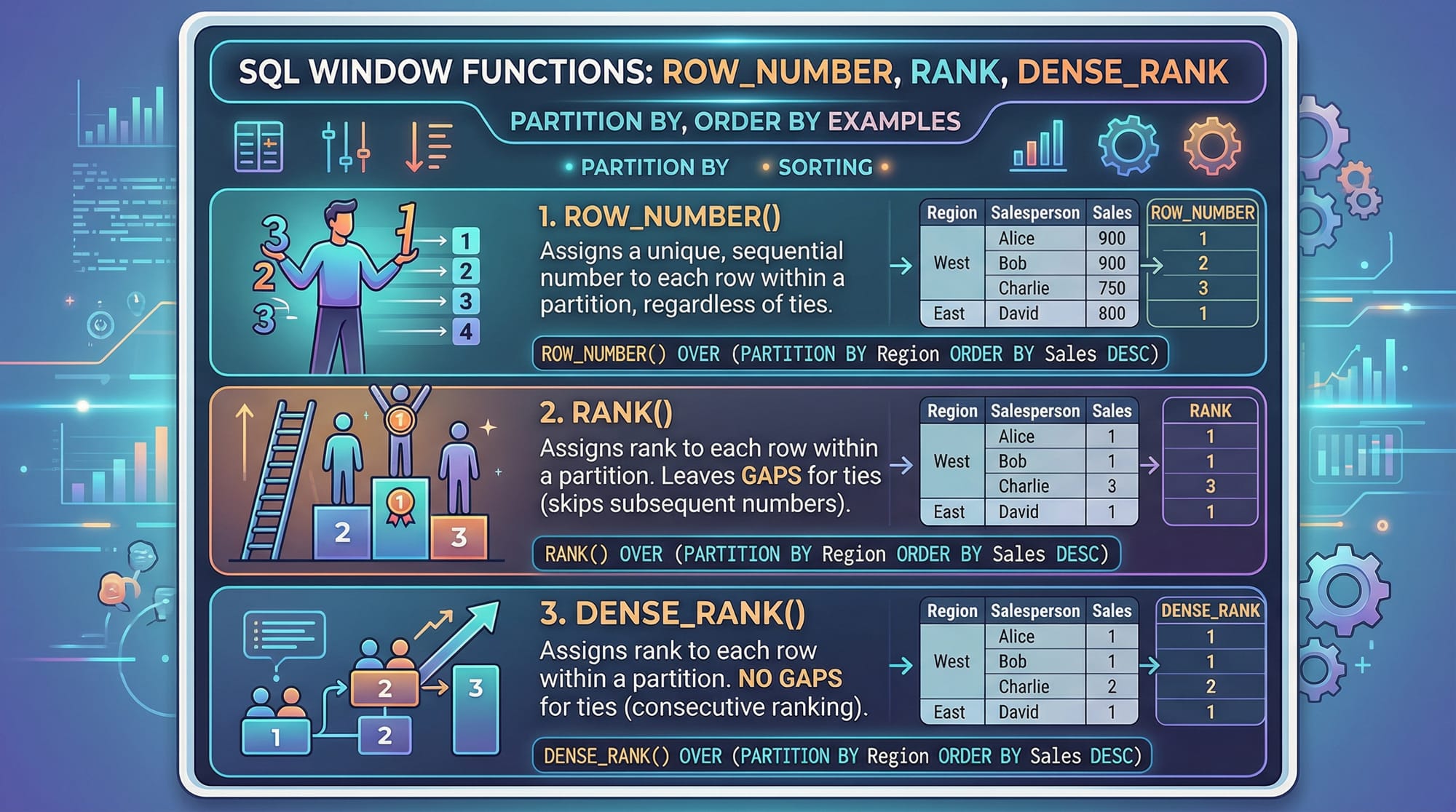
ROW_NUMBER()→ unique sequenceRANK()→ allows gapsDENSE_RANK()→ no gaps
Example:
SELECT
    name,
    salary,
    ROW_NUMBER() OVER (ORDER BY salary DESC) AS row_num,
    RANK() OVER (ORDER BY salary DESC) AS rank,
    DENSE_RANK() OVER (ORDER BY salary DESC) AS dense_rank
FROM employees;
Explanation:
ROW_NUMBER()→ unique numberingRANK()→ skips numbers on tiesDENSE_RANK()→ no skipped numbers
Practical Code Examples
Example 1: Ranking Students by Marks in Lahore
SELECT
    name,
    city,
    marks,
    RANK() OVER (PARTITION BY city ORDER BY marks DESC) AS city_rank
FROM students;
Line-by-line Explanation:
SELECT name, city, marks→ select student dataRANK()→ ranking functionOVER (...)→ defines windowPARTITION BY city→ separates Lahore, Karachi, IslamabadORDER BY marks DESC→ highest marks ranked first
👉 Result: Ahmad in Lahore might be rank 1, Fatima rank 2.
Example 2: Real-World Application — Monthly Sales Analysis in Karachi
WITH monthly_sales AS (
    SELECT
        month,
        SUM(amount) AS total_sales
    FROM sales
    WHERE city = 'Karachi'
    GROUP BY month
)
SELECT
    month,
    total_sales,
    LAG(total_sales) OVER (ORDER BY month) AS previous_month_sales,
    total_sales - LAG(total_sales) OVER (ORDER BY month) AS growth
FROM monthly_sales;
Line-by-line Explanation:
WITH monthly_sales AS (...)→ define CTESUM(amount)→ total sales per monthWHERE city = 'Karachi'→ filter cityGROUP BY month→ monthly aggregationLAG(total_sales)→ previous month’s salesgrowth→ difference between months
👉 This helps businesses track sales growth trends in PKR.
Common Mistakes & How to Avoid Them
Mistake 1: Confusing GROUP BY with Window Functions
❌ Wrong:
SELECT city, SUM(salary)
FROM employees;
✔️ Fix:
SELECT
    name,
    city,
    salary,
    SUM(salary) OVER (PARTITION BY city) AS total_city_salary
FROM employees;
Explanation:
- GROUP BY removes row-level detail
- Window functions keep all rows
Mistake 2: Missing ORDER BY in Window Functions
❌ Wrong:
SELECT LAG(salary) OVER () FROM employees;
✔️ Fix:
SELECT LAG(salary) OVER (ORDER BY salary) FROM employees;
Explanation:
- Without ORDER BY, SQL doesn’t know row sequence
Practice Exercises
Exercise 1: Rank Employees by Salary
Problem: Rank employees in Islamabad by salary.
SELECT
    name,
    city,
    salary,
    RANK() OVER (PARTITION BY city ORDER BY salary DESC) AS rank
FROM employees
WHERE city = 'Islamabad';
Explanation:
- Filters Islamabad employees
- Ranks them based on salary
Exercise 2: Calculate Running Total of Sales
Problem: Compute cumulative sales.
SELECT
    date,
    amount,
    SUM(amount) OVER (ORDER BY date) AS running_total
FROM sales;
Explanation:
SUM() OVER→ running totalORDER BY date→ chronological accumulation
Frequently Asked Questions
What is a window function in SQL?
A window function performs calculations across a set of rows related to the current row without collapsing the results. It is widely used in sql data analysis for ranking, running totals, and comparisons.
How do I use a CTE in SQL?
You use a CTE with the WITH keyword to define a temporary result set. It improves query readability and allows reuse within the same query.
What is the difference between RANK() and ROW_NUMBER()?
ROW_NUMBER() assigns a unique number to each row, while RANK() assigns the same rank for ties and skips numbers afterward.
When should I use LAG() and LEAD()?
Use LAG() to access previous row data and LEAD() for next row data. These are helpful in time-based sql analytics like sales trends.
Are window functions supported in all databases?
Most modern databases like MySQL, PostgreSQL, SQL Server, and Oracle support window functions, but syntax may slightly vary.
Summary & Key Takeaways
- Window functions allow row-level analysis without grouping
- CTEs make complex queries cleaner and reusable
- Functions like LAG() and RANK() are essential for sql analytics
- ORDER BY is critical in window functions
- These concepts are widely used in real-world data analysis jobs
- Mastering them gives you a strong advantage in the job market
Next Steps & Related Tutorials
To continue your journey in SQL and data analysis, explore:
- Learn SQL Aggregate Functions to strengthen your basics
- Dive into a Pandas Tutorial for Python-based data analysis
- Explore advanced joins and subqueries for deeper insights
- Practice real datasets from Pakistani industries like banking and e-commerce
These topics will help you transition from beginner to professional-level data analyst.
💡 Keep practicing with real datasets (like student results, sales in PKR, or city populations in Pakistan). The more you apply these concepts, the more confident you’ll become in SQL for data analysis.
Test Your Python Knowledge!
Finished reading? Take a quick quiz to see how much you've learned from this tutorial.