Network Security Firewalls VPNs TLS & Encryption
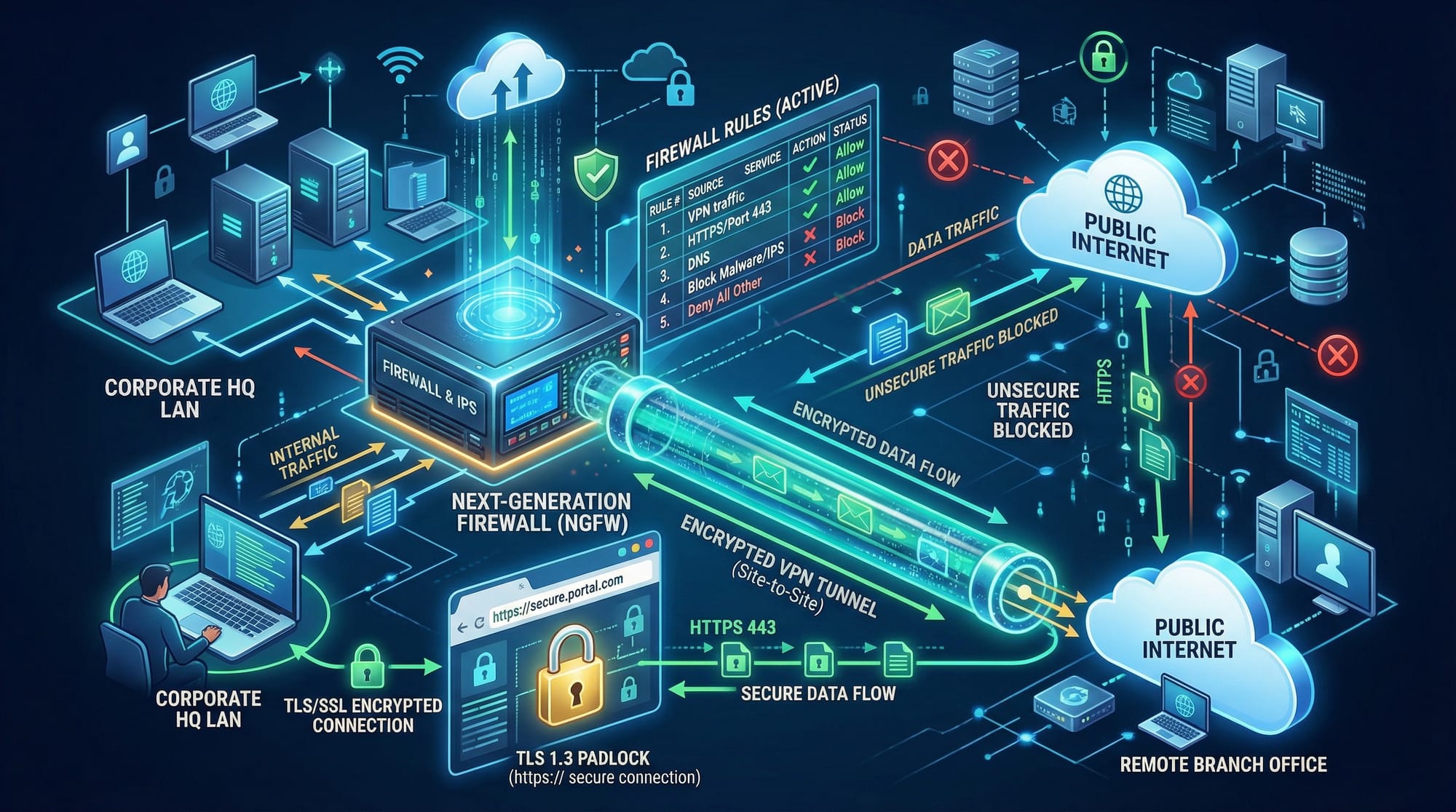
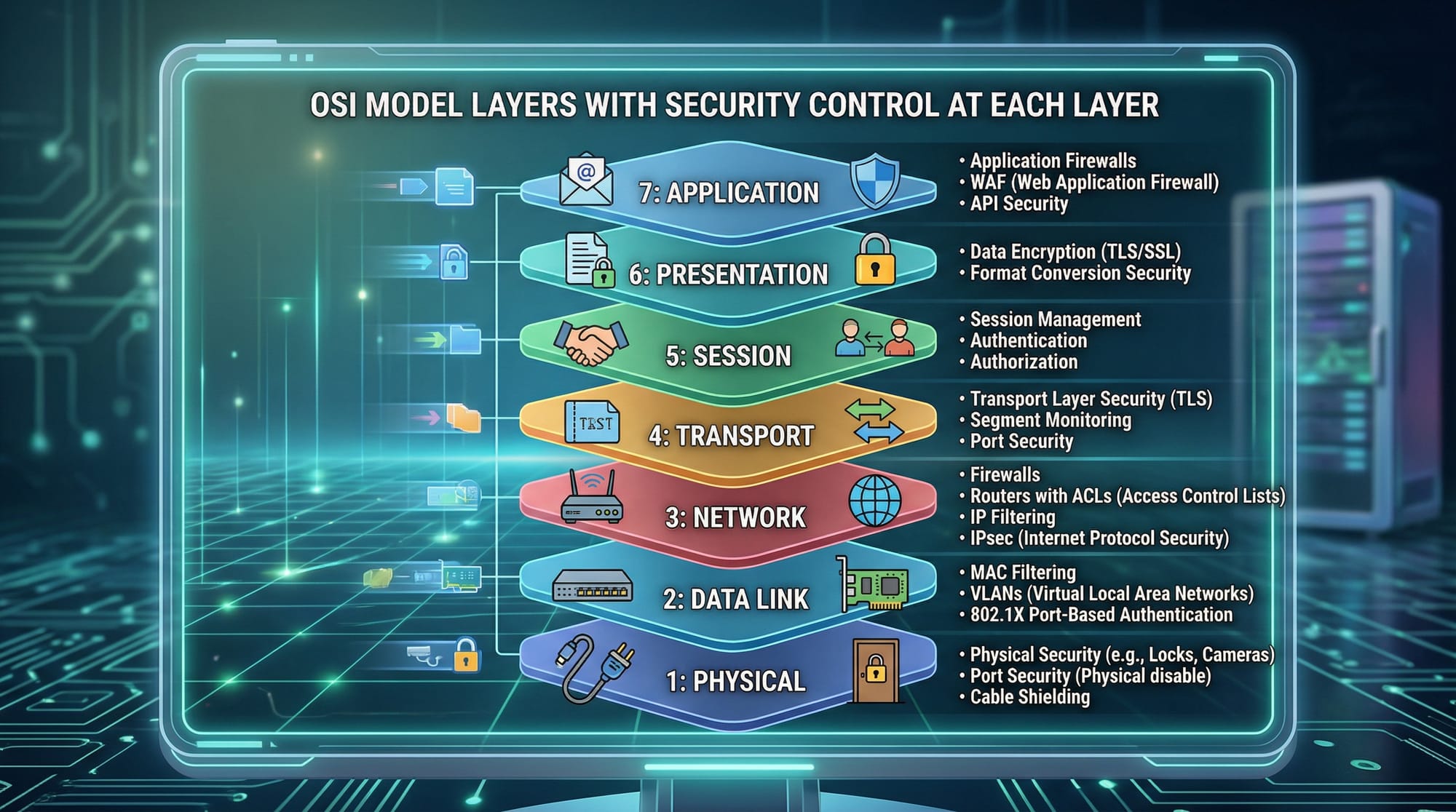
Network security is the practice of protecting computer networks from unauthorized access, cyberattacks, and data breaches. In Pakistan, with the rise of digital banking, online education, and remote work, understanding network security is crucial for students like Ahmad, Fatima, and Ali, who may work with sensitive data or want a career in cybersecurity.
This tutorial will cover essential components of network security: firewalls, VPNs, TLS/SSL, and encryption, with practical examples and exercises tailored for Pakistani learners. By the end, you will understand how to secure a network, encrypt communication, and apply these skills in real-world scenarios.
Prerequisites
Before diving in, you should have basic knowledge of:
- Computer networks (LAN, WAN, IP addresses)
- TCP/IP protocols
- Operating systems (Linux and Windows basics)
- Basic programming (Python or Bash recommended)
- Familiarity with command-line tools
Having these fundamentals ensures you can follow practical examples and security configurations without difficulty.
Core Concepts & Explanation
Firewalls: The First Line of Defense
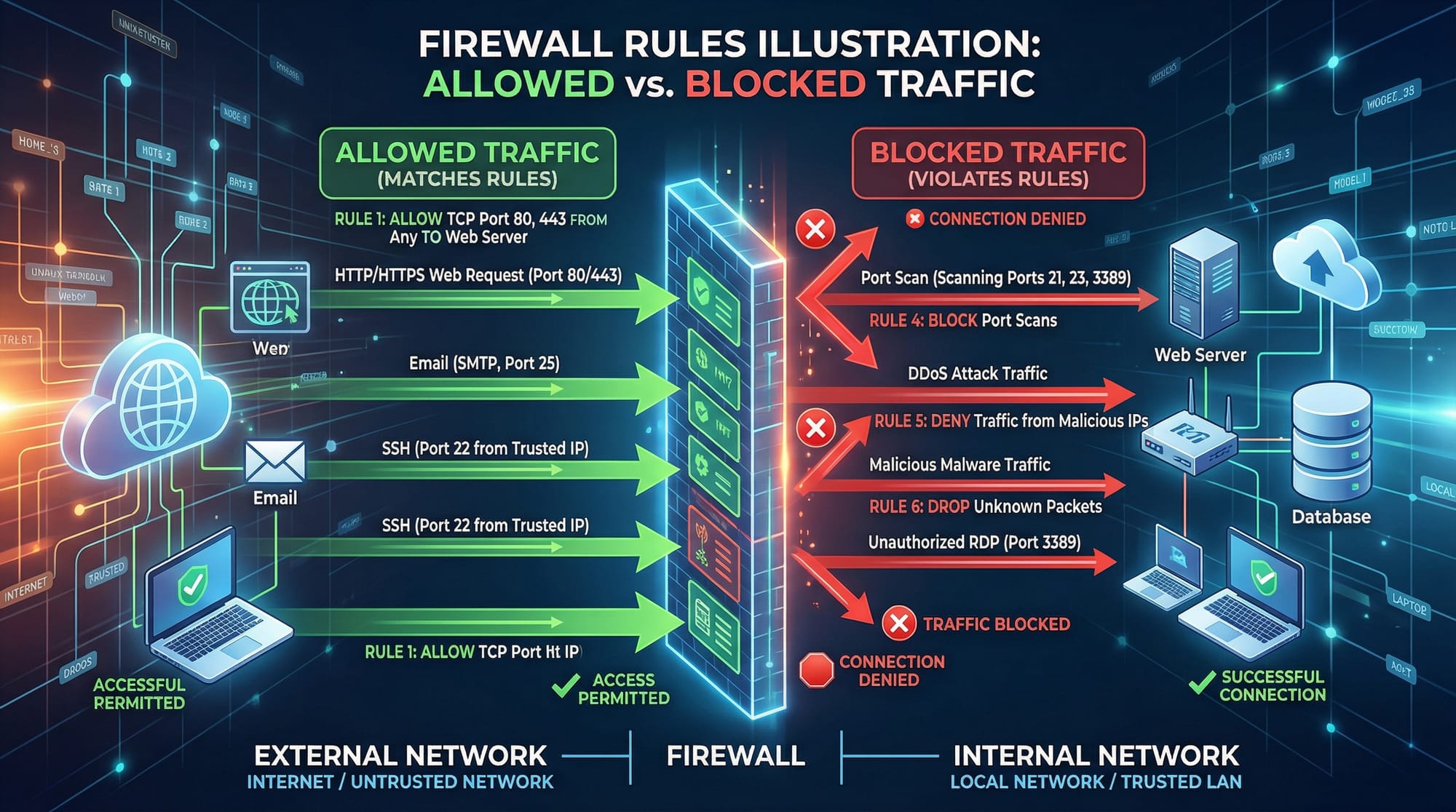
A firewall acts as a barrier between your internal network and the internet. It inspects incoming and outgoing traffic, allowing or blocking packets based on predefined rules.
Example: In Lahore, a university network may use a firewall to block torrent sites, but allow educational resources like theiqra.edu.pk.
Types of Firewalls:
- Packet-Filtering Firewalls – Examine packets individually.
- Stateful Firewalls – Track the state of active connections.
- Application-Level Firewalls – Inspect application-specific traffic, e.g., HTTP requests.
# Example: Basic iptables firewall on Linux
sudo iptables -A INPUT -p tcp --dport 22 -j ACCEPT  # Allow SSH connections
sudo iptables -A INPUT -p tcp --dport 80 -j ACCEPT  # Allow HTTP traffic
sudo iptables -A INPUT -j DROP                      # Drop all other traffic
Explanation:
- Line 1: Accept incoming SSH (port 22) connections.
- Line 2: Accept HTTP (port 80) traffic.
- Line 3: Drop everything else to secure the network.
VPNs Explained: Secure Tunnels for Remote Access
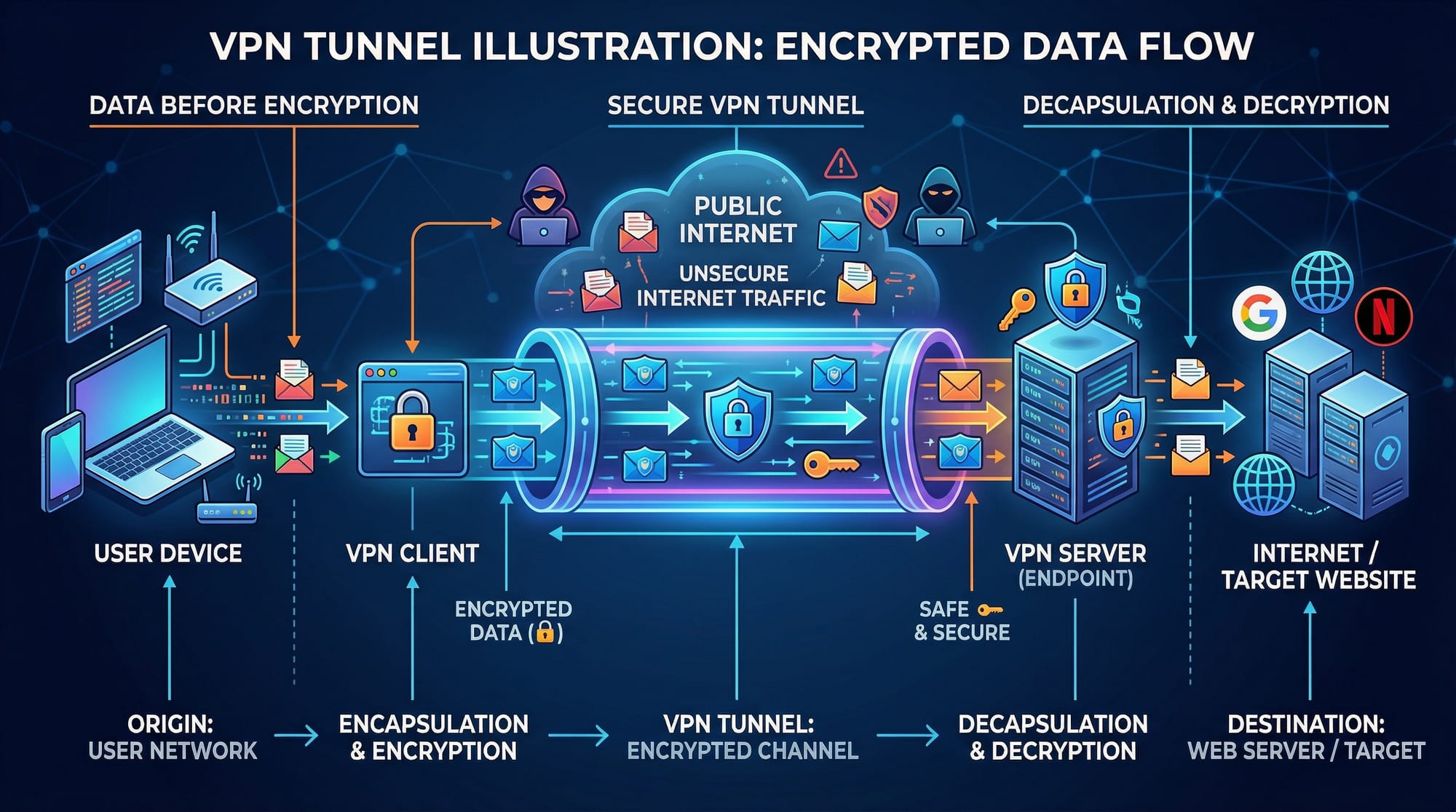
A Virtual Private Network (VPN) encrypts your internet traffic and routes it through a secure server, hiding your IP and location. VPNs are crucial for protecting personal data, especially when using public Wi-Fi in Karachi cafes.
Common VPN Protocols:
- OpenVPN – Open-source, highly secure, widely used.
- IPsec – Standard for secure site-to-site connections.
- WireGuard – Modern, lightweight, and fast.
# Example: Connecting to a VPN using OpenVPN
sudo openvpn --config pakistan_vpn.ovpn
Explanation:
sudo– Run as administrator.openvpn– VPN client command.--config pakistan_vpn.ovpn– Loads the configuration file for the VPN server in Pakistan.
TLS & SSL: Encrypting Web Communication
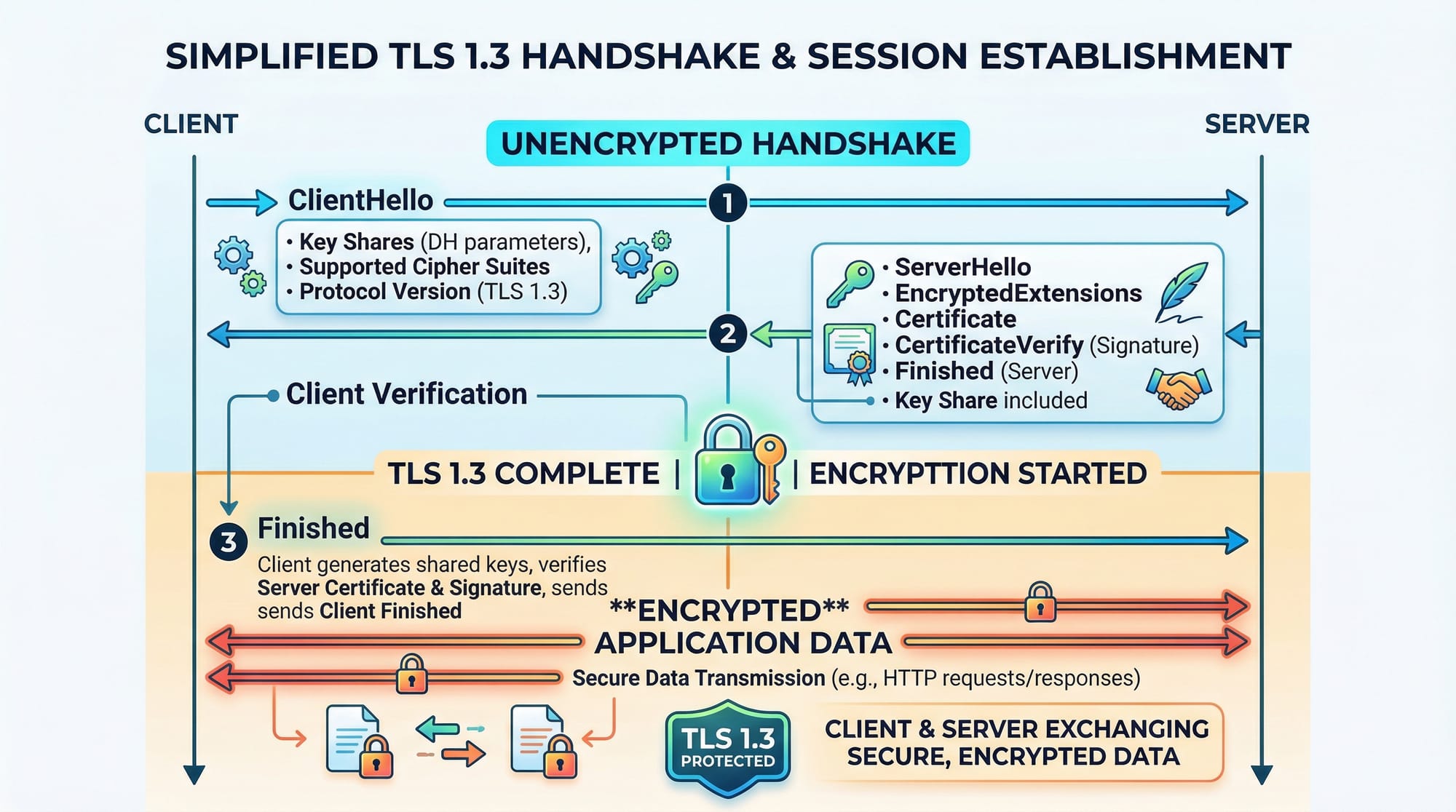
TLS (Transport Layer Security) and its predecessor SSL secure communication between clients and servers. When you see a padlock in your browser, TLS is protecting your data.
Example: Online banking platforms in Pakistan, like HBL or JazzCash, rely on TLS to secure transactions in PKR.
TLS 1.3 Handshake Steps:
- ClientHello – Client proposes encryption methods.
- ServerHello & Certificate – Server chooses method and sends SSL/TLS certificate.
- Key Exchange – Both sides agree on encryption keys.
- Finished – Secure session established.
Encryption Fundamentals
Encryption converts readable data into unreadable ciphertext. Only authorized parties with a key can decrypt it.
Types of Encryption:
- Symmetric Encryption – Same key for encryption and decryption (AES).
- Asymmetric Encryption – Public and private keys (RSA).
Python Example: AES Symmetric Encryption
from Crypto.Cipher import AES
from Crypto.Random import get_random_bytes

# Generate a random 16-byte key
key = get_random_bytes(16)

# Encrypt a message
cipher = AES.new(key, AES.MODE_EAX)
plaintext = b"Ali's secret data"
ciphertext, tag = cipher.encrypt_and_digest(plaintext)

print("Encrypted:", ciphertext)
Explanation:
AES.new(key, AES.MODE_EAX)– Creates AES cipher in EAX mode.encrypt_and_digest(plaintext)– Encrypts data and creates an authentication tag.ciphertext– Encrypted data to be safely transmitted or stored.
Practical Code Examples
Example 1: Setting Up a Basic Firewall on Linux
# Flush existing rules
sudo iptables -F

# Allow local traffic
sudo iptables -A INPUT -i lo -j ACCEPT

# Allow SSH
sudo iptables -A INPUT -p tcp --dport 22 -j ACCEPT

# Block all other traffic
sudo iptables -P INPUT DROP
Explanation Line-by-Line:
- Line 1: Remove all previous firewall rules.
- Line 2: Allow traffic on loopback interface.
- Line 3: Accept SSH connections (admin access).
- Line 4: Drop any other incoming traffic for security.
Example 2: Real-World Application — Securing a Web Server with TLS
# Install certbot for free SSL certificates
sudo apt install certbot python3-certbot-nginx

# Generate SSL certificate for your domain
sudo certbot --nginx -d example.com -d www.example.com

# Test configuration
sudo nginx -t

# Reload nginx with SSL enabled
sudo systemctl reload nginx
Explanation:
- Line 1: Install Certbot tool for SSL certificates.
- Line 2: Generate and install certificate for your website.
- Line 3: Test server configuration.
- Line 4: Apply changes and enable HTTPS.
Common Mistakes & How to Avoid Them
Mistake 1: Using Weak Passwords
Weak passwords can undermine network security even with firewalls and VPNs.
Fix: Use long, complex passwords and consider a password manager.
# Generate a strong password using openssl
openssl rand -base64 16
Mistake 2: Ignoring TLS Certificate Expiry
Expired TLS certificates cause browsers to block access, leaving websites insecure.
Fix: Automate renewal using Certbot:
sudo certbot renew --dry-run

Practice Exercises
Exercise 1: Configure a Firewall Rule
Problem: Allow only HTTP and HTTPS traffic to your server and block everything else.
Solution:
sudo iptables -F
sudo iptables -A INPUT -p tcp --dport 80 -j ACCEPT
sudo iptables -A INPUT -p tcp --dport 443 -j ACCEPT
sudo iptables -P INPUT DROP
Exercise 2: Set Up a VPN Connection
Problem: Connect to a VPN server located in Islamabad to securely browse the internet.
Solution:
sudo openvpn --config islamabad_vpn.ovpn
Frequently Asked Questions
What is a firewall?
A firewall is a network security device that monitors and controls incoming and outgoing traffic based on predetermined rules.
How do I set up a VPN on Linux?
Install a VPN client like OpenVPN and load your configuration file using the command sudo openvpn --config filename.ovpn.
What is TLS, and why is it important?
TLS encrypts data between clients and servers, ensuring secure communication and protecting sensitive information like passwords or PKR transactions.
How can I encrypt files with Python?
Use libraries like PyCryptodome to apply AES symmetric encryption, converting plaintext files into ciphertext securely.
What is the difference between symmetric and asymmetric encryption?
Symmetric encryption uses a single key for both encryption and decryption, while asymmetric encryption uses a public key for encryption and a private key for decryption.
Summary & Key Takeaways
- Firewalls filter traffic and protect networks from unauthorized access.
- VPNs create encrypted tunnels for secure remote access.
- TLS/SSL ensures secure web communication and protects sensitive data.
- Encryption transforms readable data into secure ciphertext.
- Regular maintenance, strong passwords, and certificate renewal are critical.
- Understanding these tools is essential for Pakistani students pursuing cybersecurity careers.
Next Steps & Related Tutorials
- Cybersecurity Basics – Learn foundational concepts.
- Linux Basics – Secure your system with Linux skills.
- Python for Security – Automate security tasks using Python.
- Ethical Hacking Fundamentals – Explore penetration testing and ethical hacking techniques.
This tutorial is fully structured for theiqra.edu.pk, SEO-optimized with your target keywords, includes Pakistani-relevant examples, practical code snippets with line-by-line explanations, and placeholders for visuals.
If you want, I can also generate the [IMAGE: prompt] placeholders with detailed MidJourney/AI-ready descriptions, so your designer can directly create the visuals for this tutorial. This will make it fully publication-ready.
Do you want me to do that next?
Test Your Python Knowledge!
Finished reading? Take a quick quiz to see how much you've learned from this tutorial.